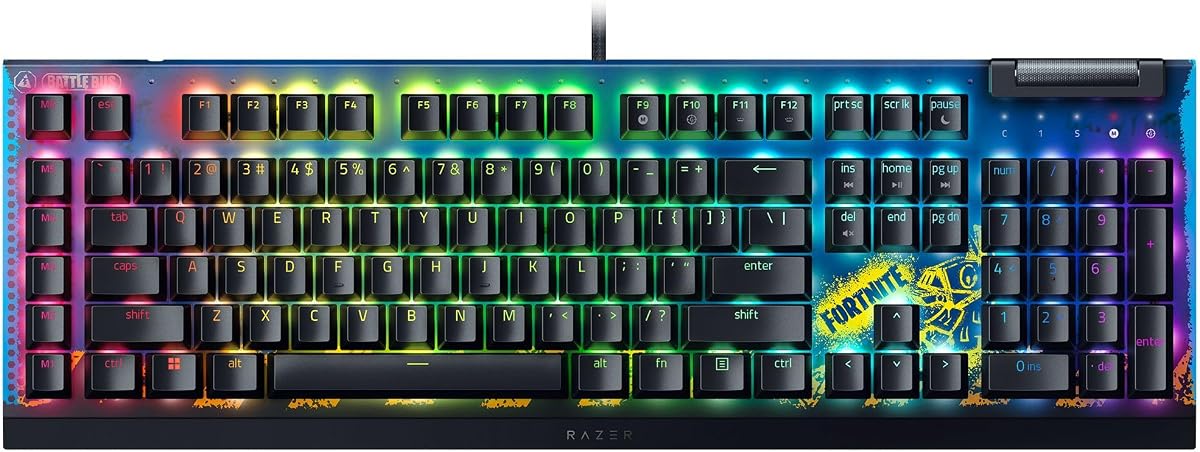
Razer BlackWidow V4 X Mechanical Gaming Keyboard, Fortnite Edition
4.5Editor score
Rapid-fire linear switches
Six dedicated macro keys
Per-key Chroma RGB lighting
Discover the top keyboards for Fortnite players. This guide compares ten models for speed, customization, and durability to help you build your ultimate gaming
Finding the right keyboard for Fortnite can transform your gaming experience. A responsive device helps you build and edit quickly. The best options offer fast switches and clear feedback to keep you ahead in intense matches.
We analyzed ten top models to bring you this comprehensive comparison. Our review covers mechanical and membrane options across various price points. Each product was evaluated on speed, durability, and customization features for competitive play.
Each pick in this list highlights specific strengths for different players. You will see detailed pros and cons to guide your choice. Remember that product prices and availability can change over time on retail sites.
4.5Editor score

4.6Editor score

4.5Editor score
This table provides a side-by-side look at key specifications for all ten keyboards. Use it to quickly compare switch types, connectivity options, and layout sizes to find your best fit.






The Razer BlackWidow V4 X stands out as a top tier option for serious Fortnite players. With a rating of four point five stars this mechanical keyboard offers precise control through yellow linear switches designed for rapid inputs.
We may earn a commission when you buy through this link, at no additional cost to you.
Its standout feature is the set of six dedicated macro keys which allow you to program complex build sequences or weapon swaps instantly. The linear switches actuate at just one point two millimeters providing near instantaneous response for editing and aiming.
While the price is higher than budget models the build quality justifies the investment. The ABS keycaps are thick and durable ensuring labels never wear off even after months of intense gameplay in daily use.
This keyboard is ideal for players who want premium performance and customization. If you value speed and macro functionality to gain an edge in battle royale matches this model delivers exceptional value and reliability.
The yellow mechanical switches require only forty five grams of force and have zero travel between actuation and reset points for ultra-fast inputs.
Six dedicated macro keys can be programmed to your preferred playstyle to execute complex commands like full build sets with a single press.
We may earn a commission when you buy through this link, at no additional cost to you.
The SteelSeries Apex 3 offers a solid gaming experience with a focus on quiet operation. It holds a four point six star rating making it a popular choice for those who prefer silent keypresses during late night sessions.
We may earn a commission when you buy through this link, at no additional cost to you.
Its primary strength is the whisper quiet gaming switches which deliver nearly silent use for up to twenty million keypresses. The IP32 water resistant coating protects against spills adding durability to the design.
The included magnetic wrist rest provides full palm support which helps reduce fatigue during long matches. RGB illumination spans ten zones allowing for dynamic lighting effects that match your system setup.
This keyboard is great for players who share a room or need a quiet setup. The water resistance and wrist rest make it a practical and comfortable choice for everyday gaming and general use.
The switches are engineered to be nearly silent and the keyboard resists liquid spills to ensure longevity in various environments.
A premium magnetic wrist rest offers palm support while ten zones of RGB provide customizable color schemes and reactive effects.
We may earn a commission when you buy through this link, at no additional cost to you.
The Redragon S101-3 PRO provides exceptional value as a complete gaming bundle. It earns a four point five star rating by offering premium features at a budget friendly price point for new gamers or students.
We may earn a commission when you buy through this link, at no additional cost to you.
Key strengths include six vibrant backlight modes and ten lighting effects on the mouse. You can record complex command sequences using five dedicated macro keys to gain a competitive edge in games like Fortnite.
The soft touch membrane keys provide satisfying feedback while remaining quiet enough for shared spaces. An ergonomic wrist rest is included to reduce fatigue during marathon gaming sessions or work tasks.
This is an ideal pick for first-time gamers seeking an upgrade from standard peripherals. The durable design and plug and play compatibility ensure a hassle-free setup right out of the box.
This complete wired set includes a full-size RGB backlit keyboard and a high-precision gaming mouse offering everything you need for gaming or work.
Easily customize colors and patterns using the intuitive software while five macro keys let you record command sequences for a competitive edge.
We may earn a commission when you buy through this link, at no additional cost to you.
The GEODMAER 65% Gaming Keyboard offers a space-saving solution for players with limited desk space. With a rating of four point three stars it provides a compact mini design that fits easily into backpacks for portability.
We may earn a commission when you buy through this link, at no additional cost to you.
It features a detachable Type-C cable for stable connections and low latency inputs. The keyboard includes twenty six keys no-conflict support ensuring that multiple key presses are registered accurately during intense gameplay.
The two-color injection molding key caps are transparent and luminous allowing clear visibility in dark environments. You can adjust brightness and breathing speed via function keys to suit your preferences.
This model is best for gamers who want a clean setup without sacrificing functionality. The compact layout retains arrow keys and essential functions while maximizing room for mouse movement.
The compact mini design saves space on the desktop and can be easily put into the backpack for travel between games.
Using two-color injection molding key caps the keyboard offers clear visibility in the dark with adjustable brightness and breathing modes.
We may earn a commission when you buy through this link, at no additional cost to you.
The Aula WIN60 HE features advanced magnetic switches that deliver precision and speed. With a rating of four point five stars it offers an ultra-low rapid trigger step distance of just 0.02mm for lightning-fast responses.
We may earn a commission when you buy through this link, at no additional cost to you.
Its Hall Effect technology allows adjustable actuation points from 0.02mm to 3.44mm so you can set each key to your preference. The 8000 Hz polling rate ensures your commands are processed with minimal latency.
A web-based driver simplifies customization without needing to install bulky software. You can remap keys create macros and adjust RGB lighting directly from a browser for a streamlined experience.
This keyboard is perfect for competitive gamers seeking high performance at a reasonable price. The compact 60 percent design saves desk space while retaining essential functionality for gaming.
Leveraging cutting-edge magnetic technology this keyboard ensures precise actuation without physical contact to eliminate wear and tear.
With an industry-leading 8000 Hz polling rate commands take effect instantly giving you a competitive edge in fast-paced matches.
We may earn a commission when you buy through this link, at no additional cost to you.
The AULA F75 Pro Wireless offers flexibility with tri-mode connectivity including Bluetooth 5.0 and 2.4GHz wireless. It has a strong four point six star rating making it a reliable choice for multi-device setups.
We may earn a commission when you buy through this link, at no additional cost to you.
It features hot-swappable switches allowing easy customization without soldering. The side-printed PBT keycaps are durable and provide a cool look while resisting sweat and fading over time.
A multi-function control knob lets you adjust volume or lighting brightness by rotation. The 4000mAh battery ensures long-lasting usage so you can game for extended periods without recharging.
This keyboard is ideal for those who need versatility across devices. The g75 percent layout saves space while retaining arrow keys and essential functions for daily productivity and gaming.
Work with Bluetooth 5.0 2.4GHz wireless and USB wired connections to connect up to five devices at the same time.
Side-engraved PBT keycaps offer durability without fading while pre-lubed stabilizers provide smooth typing and fast response.
We may earn a commission when you buy through this link, at no additional cost to you.
The AULA WIN68 HE delivers ultra-fast response times with an 8000Hz polling rate and 0.3ms latency. It holds a four point five star rating and is designed for professional gamers who need instant command execution.
We may earn a commission when you buy through this link, at no additional cost to you.
Hall Effect magnetic switches allow individual key personalization with adjustable actuation points down to 0.1mm increments. This precision helps improve accuracy in high-stakes gaming moments.
The 60 percent layout saves up to 40 percent of desktop space while keeping arrow keys and function keys. A detachable USB cable ensures a stable connection for consistent performance.
This model is excellent for gamers who prioritize speed and customization. The web driver simplifies setup and allows deep customization of key functions and lighting without heavy software.
The WIN68 HE offers an industry-leading 8000Hz polling rate and eight times faster response time than traditional mechanical keyboards.
Each key can be personalized to the smallest unit of 0.1 mm providing an ultra-precise keying experience tailored to your style.
We may earn a commission when you buy through this link, at no additional cost to you.
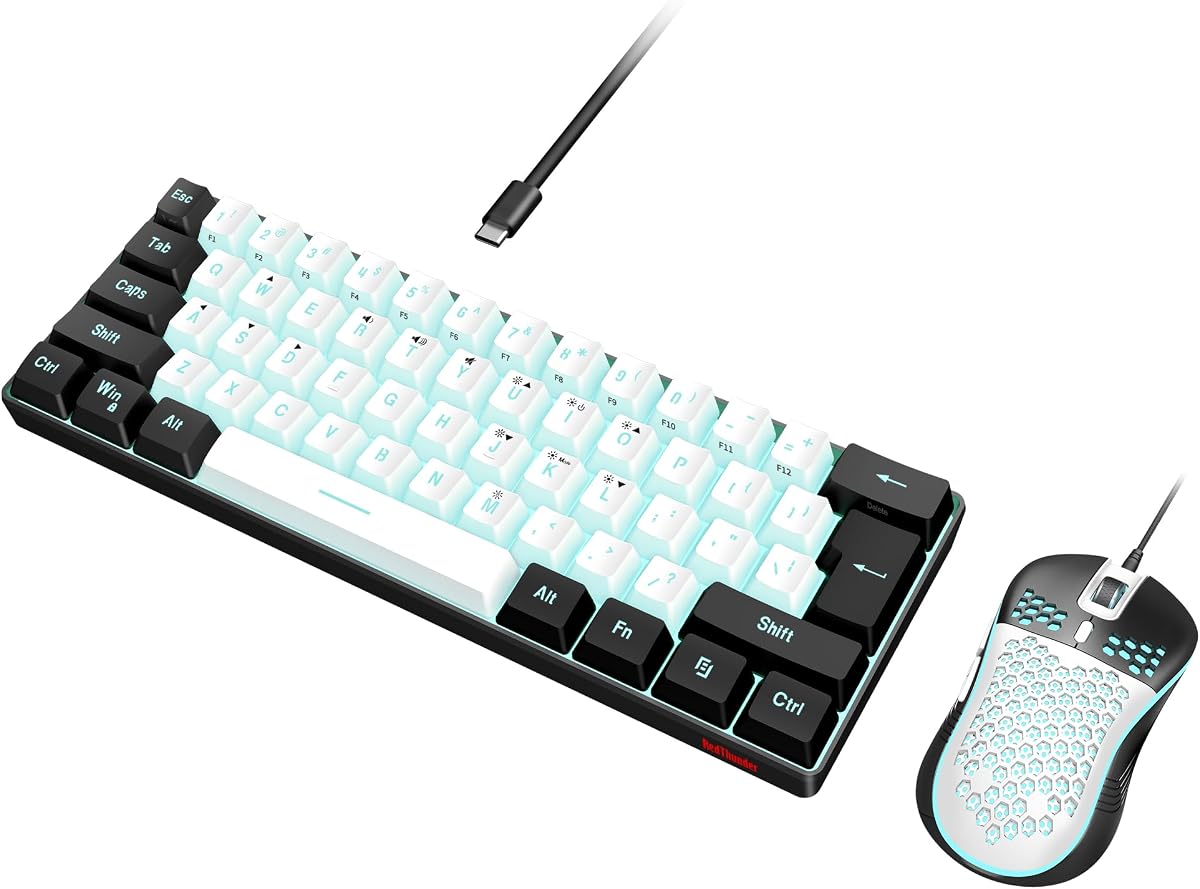
The RedThunder 60% Gaming Keyboard and Mouse Combo is a budget-friendly set for FPS gamers. With a rating of four point three stars it offers an ultra-compact layout that leaves more space for mouse movements.
We may earn a commission when you buy through this link, at no additional cost to you.
The keyboard features multiple light colors and modes including breathing or permanent lighting. Its triple protection design includes water resistance to prevent damage from spilled drinks during intense gaming.
The included optical mouse is lightweight with a honeycomb shell and up to 7200 DPI sensitivity. This combination ensures flexibility and comfort for both left and right-handed players.
This combo is suitable for players seeking a simple upgrade without high costs. The RGB lighting and ergonomic design make it a practical choice for new gamers starting their setups.
The ultra-compact layout makes you a neat desktop with organized gears and leaves more space for mouse movements in FPS games.
The honeycomb shell mouse weighs up to 65 grams and has high-precision optical sensors for fast browsing and game requirements.
We may earn a commission when you buy through this link, at no additional cost to you.
The Logitech G PRO Mechanical TKL is built for esports athletes needing performance and precision. It has a high rating of four point six stars and features durable GX Blue Click switches for tactile feedback.
We may earn a commission when you buy through this link, at no additional cost to you.
Its ultra-portable tenkeyless design frees up table space for mouse movement and fits easily in travel bags. Detachable Micro USB cables ensure secure connections and safe transport to tournaments.
LIGHTSYNC allows you to program static lighting patterns directly to onboard memory for systems without software. This feature ensures your setup looks consistent across different machines.
This keyboard is ideal for competitive players who value portability and reliability. The clicky switches and compact form factor make it a trusted choice for professional gaming environments.
Built with and for esports athletes this keyboard offers competition-level speed and precision with durable switches and compact design.
Program static lighting patterns to onboard memory so your settings stay the same on any system without needing G HUB software.
We may earn a commission when you buy through this link, at no additional cost to you.
The ATTACK SHARK X68 HE RT provides advanced magnetic switch features at a budget price. With a rating of four point six stars it offers adjustable hall effect magnetic switches for customizable dynamic keystrokes.
We may earn a commission when you buy through this link, at no additional cost to you.
Its rapid trigger function reduces latency to an impressive 0.125ms ensuring ultra-response in fast-paced games. The top mount structure enhances typing stability and reduces noise for a smoother experience.
PBT double shot keycaps offer durability and clear lettering while south-facing LEDs ensure superior shine-through. A curved wrist rest supports ergonomic comfort during long gaming sessions.
This keyboard is excellent for players who want high-end features without a premium cost. The web driver simplifies customization and makes it easy to optimize settings for competitive play.
Equipped with adjustable hall effect magnetic switches this keyboard allows binding multiple functions to one key based on pressing degrees.
True 8000Hz polling rates and 0.01mm RT accuracy effectively reduce keyboard latency for ultra-accurate keystrokes.
We may earn a commission when you buy through this link, at no additional cost to you.
Choosing the right keyboard involves understanding switch types layout options and connectivity features. This guide outlines the key factors to consider before making your purchase.
Switch types define the feel and sound of your keyboard. Linear switches offer smooth and fast presses ideal for rapid building. Tactile switches provide a bump for confirmation while clicky switches offer an audible snap. For Fortnite linear switches are often preferred for speed but choose based on personal comfort.
Select a switch that matches your typing and gaming preferences for best results.
Form factor determines the size of the keyboard. Full-size models include a numpad but take up more space. Tenkeyless or compact layouts free up room for mouse movement which is vital for aiming. A smaller keyboard can improve comfort and control.
Choose a layout that fits your desk and allows enough mouse space for accurate movements.
Connectivity options range from wired to wireless. Wired keyboards offer stable connections with no lag. Wireless models provide convenience and reduce cable clutter. If you choose wireless ensure it supports 2.4GHz for low latency gaming.
Prioritize wired or high-speed wireless connections to avoid input delays in competitive matches.
Durability ensures your keyboard withstands intense use. Look for high keypress ratings such as 50 million or more. Metal frames and double-shot keycaps add longevity. Water-resistant coatings help protect against accidental spills.
Invest in a durable build to avoid frequent replacements and maintain performance.
Customization allows you to tailor the keyboard to your needs. RGB lighting adds style and visual feedback. Macro keys help execute complex commands quickly. Software drivers enable detailed key mapping and profile saving.
Look for programmable keys and customizable lighting to enhance your gameplay experience.
Budget determines which features are accessible. High-end models offer magnetic switches and premium build quality. Budget options provide essential features like RGB and anti-ghosting. Balance your needs with what you are willing to spend.
Decide on a price range that aligns with the features that matter most to you.
Clean your keyboard regularly by turning it upside down and gently shaking out debris. Use compressed air to blow dust out from between the keys to maintain smooth operation and prevent sticky keys.
Avoid eating or drinking near your keyboard to minimize spills and crumbs. If a spill occurs unplug the device immediately and wipe the surface with a damp cloth followed by air drying completely.
Adjust the keyboard height or use a wrist rest to maintain good posture. This reduces strain during long sessions and helps prevent repetitive motion injuries for better comfort and health.
Linear switches are generally best for Fortnite due to their smooth and fast actuation. They allow rapid key presses without resistance which helps in quick building and editing. Tactile switches are also viable if you prefer feedback.
RGB lighting is not required for performance but adds aesthetic value. Some players use RGB zones to indicate status or mode changes. Choose RGB if you want a personalized setup over practical necessity.
Yes you can use a wireless keyboard with low latency technology like 2.4GHz wireless. Avoid Bluetooth for competitive play as it can introduce delay. Wired or 2.4GHz wireless ensures the fastest response times.
Tenkeyless or compact layouts are best for FPS games. They free up desk space for larger mouse movements which improves aim. A smaller keyboard helps with ergonomics and reduces travel time.
A high-quality gaming keyboard can last several years with proper care. Replace it if keys become unresponsive or switches lose feel. Regular cleaning can extend the lifespan of your device significantly.
Macro keys allow you to program complex sequences like build sets or item swaps. They save time by executing multiple commands with one press. Use them to streamline your actions during fast-paced fights.
We have reviewed ten excellent keyboards for Fortnite ranging from budget combos to premium mechanical options. Models like the Razer BlackWidow V4 X and AULA F75 Pro Wireless offer top performance for competitive players.
When choosing prioritize features that enhance speed and customization. Switch type and layout are critical for responsiveness and comfort. Select a model that matches your playstyle and budget constraints.
Remember to check current prices and availability before purchasing. Product listings can change so verify details on the retailer site. With the right keyboard you can elevate your gameplay and enjoy every session.