
AULA S99 Gaming
4.2Editor score
Multi-device Bluetooth connectivity
Full key programmable macros
96% layout with numpad
This guide compares the top ten creamy keyboards for 2026, evaluating sound profiles, build quality, and features to help you choose the perfect mechanical
Finding the right typing experience can transform your daily workflow. Creamy keyboards offer a smooth, satisfying sound and feel that many enthusiasts crave. These boards often feature gasket mounts, pre-lubed switches, and specific keycap materials to deliver that desired thocky or buttery response.
We have carefully analyzed ten standout models currently available on the market. Our comparison focuses on connectivity options, switch types, layout sizes, and the overall acoustic profile. Each product was selected based on user feedback, technical specifications, and their ability to deliver a consistent creamy sound.
Each pick below highlights key strengths and potential considerations for different user needs. Whether you prioritize wireless freedom, hot-swap flexibility, or specific layout preferences, this list covers diverse options. Please note that product availability and pricing can change frequently, so check the latest details before purchasing.
4.2Editor score

4.8Editor score

4.5Editor score
The following table provides a side-by-side overview of all ten models included in this guide. It highlights the most critical specifications such as layout percentage, connectivity modes, and key structural features that define the creamy typing experience.


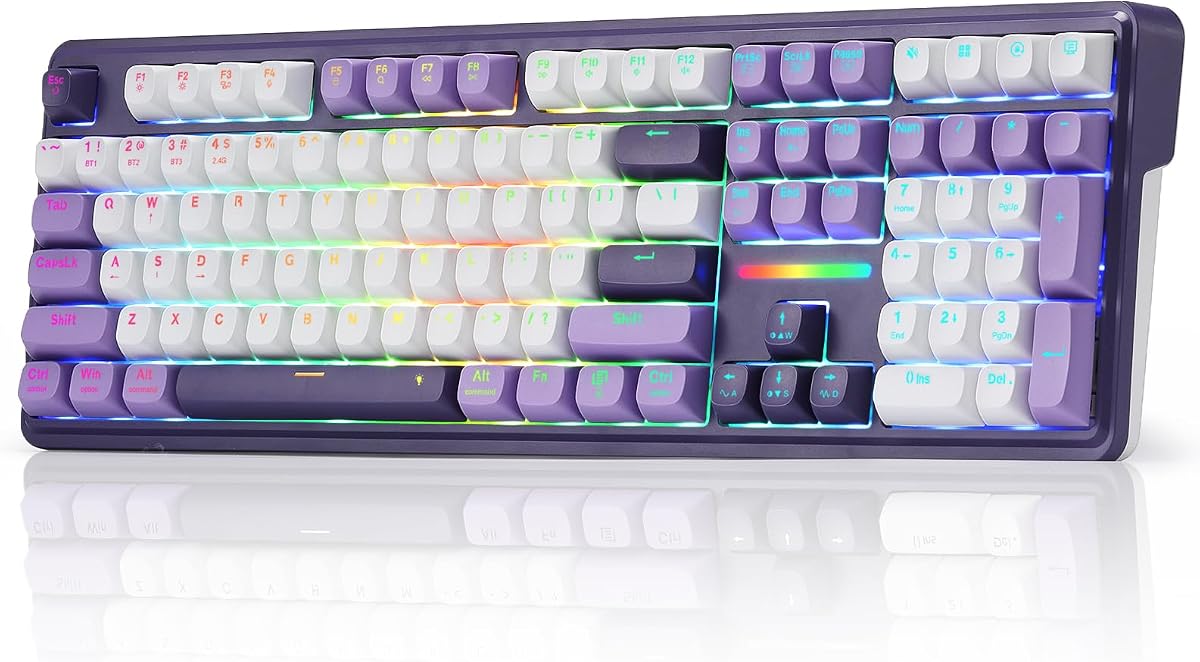


The YUNZII B98 PRO stands out as a top contender in the creamy keyboard category. With a high rating from users, it delivers a premium typing experience that balances functionality and aesthetics. The gasket mount structure combined with pre-lubed switches ensures a consistently smooth and satisfying sound profile.
We may earn a commission when you buy through this link, at no additional cost to you.
Its standout features include an impressive 8000mAh battery and deep customization via QMK/VIA firmware. Users can remap keys, record macros, and design intricate RGB lighting. The dual-style knob option allows for personalized volume control, enhancing the overall usability for both gaming and productivity tasks.
While the board offers significant value, the higher price point may be a consideration for budget-conscious buyers. Additionally, fully utilizing the QMK/VIA features requires some time to learn, though the payoff in customization is substantial for power users seeking a tailored setup.
This keyboard is ideal for enthusiasts who value long battery life and advanced customization capabilities. It is particularly well-suited for those who want a compact yet full-featured layout. The B98 PRO remains a highly recommended choice for anyone prioritizing quality and flexibility.
The massive 8000mAh battery ensures uninterrupted usage for days without needing a recharge, making it perfect for travel or long work sessions.
Support for QMK/VIA firmware allows users to create complex macros and key layers, offering unparalleled flexibility for specific workflow needs.
We may earn a commission when you buy through this link, at no additional cost to you.
The AULA S99 Gaming Keyboard offers an accessible entry point into the world of creamy sounding keyboards. Despite being a membrane keyboard, it is designed to deliver a satisfying typing experience with multi-device connectivity. Its 96% layout provides a compact footprint while retaining essential keys like the numeric keypad.
We may earn a commission when you buy through this link, at no additional cost to you.
Key strengths include versatile connectivity options and a dual-mode rotary knob for easy volume and lighting adjustments. The full key programmable feature allows users to create macros, which can enhance efficiency in gaming and daily tasks. The foldable stand adds an ergonomic touch to the design.
However, because it uses membrane technology, it does not offer the distinct tactile feedback of mechanical switches. Users seeking hot-swap capabilities will not find them here. Yet for those prioritizing budget and multi-device flexibility over mechanical customization, this remains a strong option.
This keyboard is best suited for users who need a reliable wireless solution without breaking the bank. It works well for office environments or casual gaming where cost is a primary factor. The AULA S99 delivers solid performance for its price category.
Support for Bluetooth, 2.4GHz wireless, and USB-C wired modes allows seamless switching between different devices like phones and laptops.
All keys support macro recording, enabling complex actions to be triggered with a single press for streamlined workflows.
We may earn a commission when you buy through this link, at no additional cost to you.
The SOLAKAKA A99 Pro brings a unique visual element to the creamy keyboard scene with its integrated LCD screen. This feature provides real-time information such as battery level and connection mode. The keyboard combines a gasket mount structure with full hot-swap support, ensuring a smooth and customizable typing experience.
We may earn a commission when you buy through this link, at no additional cost to you.
Its strengths lie in the advanced hardware features like the metal knob for intuitive volume control and the five-layer cushioning system. The web driver eliminates the need for heavy software downloads, allowing users to customize lighting and macros directly through a browser. The PBT keycaps add to the durability.
Users might find the web driver setup slightly complex if not connected via wired mode initially. Additionally, the price reflects the premium features which may not be necessary for everyone. However, for those who want a distinct look and flexible hardware, it is a compelling choice.
This board is perfect for enthusiasts who want both visual flair and acoustic customization. It is well-suited for users who prioritize having a detailed status display on their keyboard. The A99 Pro delivers a high-end experience with reliable performance across various systems.
The LCD screen offers immediate visual cues for system status, reducing the need to check other devices for battery or connection info.
Accessing driver settings through a web browser simplifies the setup process and keeps your computer free from installing extra software.
We may earn a commission when you buy through this link, at no additional cost to you.
The AULA F75 Wireless Mechanical Keyboard offers a compact solution for those who value desk space. With a 75% layout, it retains essential arrow keys while saving room for movement. The keyboard is designed to deliver a creamy mechanical sound with pre-lubed linear switches and a hot-swappable base.
We may earn a commission when you buy through this link, at no additional cost to you.
Strengths include a reliable battery life and extensive connectivity options that support up to five devices simultaneously. The multi-function knob enhances control over media and lighting, adding convenience to the setup. The advanced structure with PCB single key slotting ensures stability during intense use.
Trade-offs involve the lack of a dedicated numeric keypad which some users might miss. The RGB implementation is standard and may not stand out as much as others. However, for gamers and workers needing efficiency, the balance of features and size is very practical.
This keyboard is ideal for users with limited desk space or those who prefer a minimalist layout. It is a strong choice for gamers who need quick key access without sacrificing sound quality. The AULA F75 provides a versatile and efficient typing tool.
The 75% layout saves significant desk space while keeping arrow keys and function rows for a complete typing experience without the numpad.
Quickly toggle between connected devices using shortcut keys, making it perfect for managing a computer and tablet setup simultaneously.
We may earn a commission when you buy through this link, at no additional cost to you.
The HUO JI E-Yooso Creamy Mechanical Keyboard delivers a solid performance for users who prefer a wired connection. It features a 99-key layout that balances space efficiency with functionality. The keyboard uses a gasket structure with sound-absorbing foams to reduce noise and enhance the typing feel.
We may earn a commission when you buy through this link, at no additional cost to you.
Its strengths include a hot-swap PCB that allows easy replacement of switches without soldering. The 100% anti-ghosting technology ensures accurate keystroke registration even during intense gaming sessions. The RGB backlighting offers multiple effects to personalize the visual experience.
The primary trade-off is the lack of wireless connectivity which might limit mobility for some setups. Users relying on a fixed desk will find this less of an issue. The wired connection provides stable performance and eliminates battery concerns associated with wireless models.
This keyboard is well-suited for competitive gamers who prioritize response time and reliability. It is also great for users who enjoy modifying switches but want a budget-friendly wired option. The E-Yooso offers a balanced experience for wired enthusiasts.
Using a USB-C to USB-A cable ensures a consistent and lag-free connection, perfect for competitive gaming or critical work tasks.
The inclusion of sound-absorbing foams allows for a tailored acoustic experience that minimizes hollow echoes during typing.
We may earn a commission when you buy through this link, at no additional cost to you.
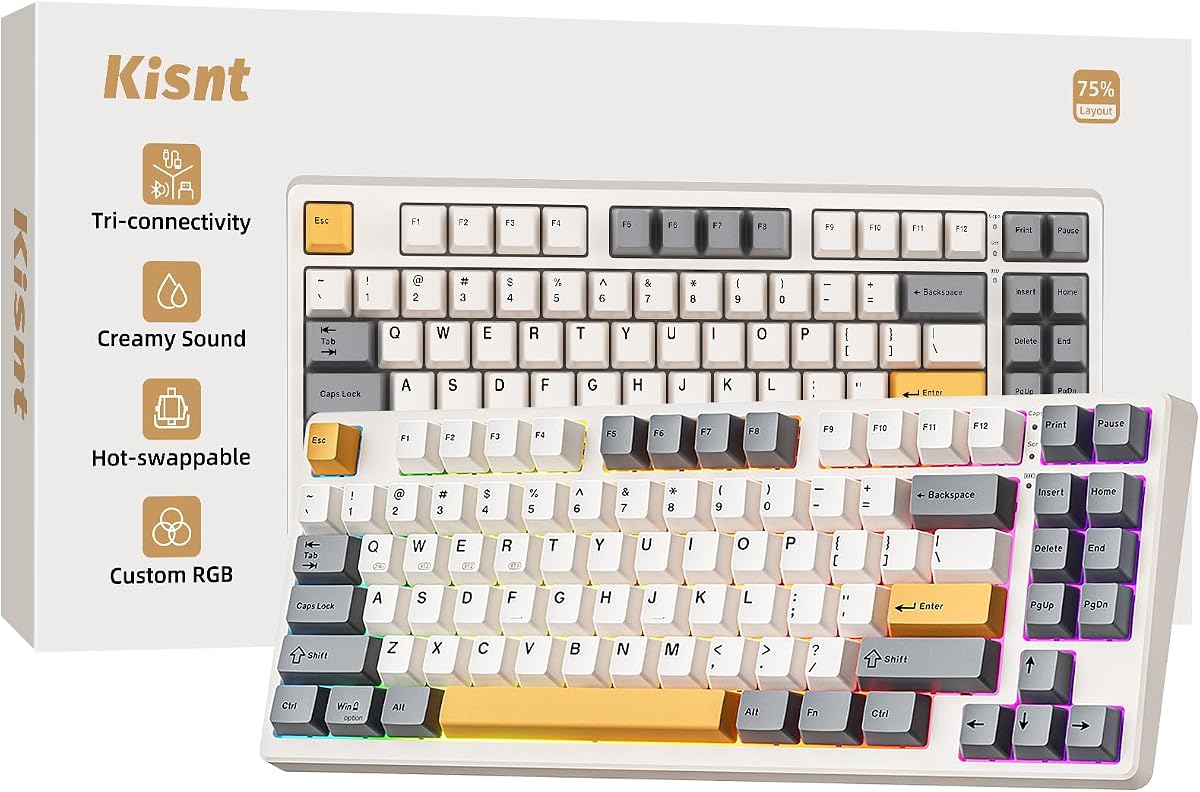
The Kisnt KN85 Wireless Mechanical Keyboard combines a vintage aesthetic with modern mechanical features. The 75% layout frees up valuable desktop space while keeping essential keys. It focuses on delivering a creamy sound through gasket mounting and pre-lubed linear switches.
We may earn a commission when you buy through this link, at no additional cost to you.
Key strengths include tri-mode connectivity for seamless switching between devices and a reliable 4000mAh battery. The retro beige colorway offers a unique look that complements various desk setups. Hot-swap support allows users to tailor the tactile feel easily.
Drivers are currently limited to Windows which might restrict customization for Mac users. The RGB software is straightforward but lacks advanced features. Despite this, the core typing experience remains high quality for the price point.
This keyboard is ideal for users seeking a stylish yet functional mechanical option. It is particularly suited for those who value a warm, muted color scheme. The KN85 provides a comfortable and satisfying typing experience for daily use.
The retro beige color and warm ambient glow create a calm, inviting desk vibe suitable for creative or focused work environments.
Connect via Bluetooth, 2.4GHz wireless or USB-C to match your specific device setup and reduce cable clutter on your desk.
We may earn a commission when you buy through this link, at no additional cost to you.
The Redragon K745 PRO Wireless offers a full-size solution with added convenience keys. With 108 keys, it ensures all standard functions are accessible. The keyboard features a gasket construction for a soft, cushioned feel that contributes to its creamy typing profile.
We may earn a commission when you buy through this link, at no additional cost to you.
Its strengths include four dedicated hotkeys for quick access to common actions like mute or calculator. The translucent PBT keycaps resist wear and allow RGB light to shine through cleanly. Connectivity is versatile with zero-lag switching between modes.
The larger size may require more desk space compared to compact layouts. While battery life is adequate, it is not exceptional. However, for those needing a full-size board with extra productivity features, the value is strong.
This keyboard is best for users who prefer a traditional layout but want modern wireless features. It is suitable for office work where extra shortcuts enhance productivity. The K745 PRO delivers reliability and convenience in a complete package.
The four extra buttons allow quick access to frequently used functions, saving time and streamlining daily computer tasks.
PBT keycaps provide a durable texture that does not become shiny or greasy over time ensuring a pleasant feel for years.
We may earn a commission when you buy through this link, at no additional cost to you.
The AULA 99 Key Keyboard brings a distinct color choice to the market with its pink finish. Designed as a membrane keyboard, it offers a smooth and quiet typing experience. The 99-key layout includes a numeric pad and function keys for a complete setup.
We may earn a commission when you buy through this link, at no additional cost to you.
Key strengths include the dual-mode rotary knob for intuitive control of volume and lighting. It supports full key programmable macros which can be useful for gaming and efficiency. The multi-device connectivity ensures flexibility across different platforms.
Users looking for mechanical customization will find the membrane switches limiting. However for those who prioritize style and ease of use the board is quite capable. The ergonomic kickstand helps maintain a comfortable typing posture.
This keyboard is ideal for users seeking a colorful and compact wireless solution. It works well for casual gaming or general productivity tasks where style is a factor. The AULA 99 Key provides a reliable and attractive option.
The pink aesthetic combined with RGB lighting allows users to create a personalized and vibrant desktop environment.
The rotary knob simplifies adjusting volume and light settings without needing to memorize complex keyboard shortcuts.
We may earn a commission when you buy through this link, at no additional cost to you.
The AULA F75 Reaper Switches Mechanical Keyboard is designed with gaming and productivity in mind. It features a 75% layout to save space while keeping essential keys. The pre-lubed LEOBOG reaper switches ensure a smooth and fast response for intense gaming sessions.
We may earn a commission when you buy through this link, at no additional cost to you.
Strengths include a multi-function knob that adjusts lighting and media, and full-key macro programmability. The battery life supports extended wireless use without frequent recharging. Hot-swap capability allows for future customization of the feel.
Users might miss the numeric keypad for specific data entry tasks. RGB effects are standard and may not appeal to those wanting unique visuals. However for general gaming performance it offers a solid balance of speed and comfort.
This keyboard is perfect for gamers who want a reliable wireless setup. It is well-suited for users who value a responsive keyboard without a bulky footprint. The AULA F75 Reaper delivers a crisp and engaging experience.
Pre-lubed linear switches provide a smooth travel with minimal resistance allowing for rapid key presses during competitive games.
Full-key macro support enables complex in-game actions to be mapped to single keys improving performance and reaction times.
We may earn a commission when you buy through this link, at no additional cost to you.
The Redragon K768 PRO Wireless offers a robust wireless experience with an exceptional battery capacity. Its 100-key layout balances compactness with full functionality. The gasket mount design provides a creamy and cushioned feel that appeals to tactile enthusiasts.
We may earn a commission when you buy through this link, at no additional cost to you.
Key strengths include a one-knob system for easy control of lighting and volume, and a massive 8000mAh battery for extended runtime. The PBT keycaps maintain their texture and color over time, resisting the wear common with other materials.
While the price is higher than budget options, the battery life and build quality justify the cost for many. The software is straightforward and may not offer deep customization. Overall it provides a premium wireless mechanical experience.
This keyboard is ideal for users who prioritize long battery life and a simplified control setup. It is suitable for both home and office environments where reliability is key. The K768 PRO delivers a smooth and enduring typing tool.
The huge battery ensures the keyboard can run for days without recharging, perfect for those who hate frequent interruptions.
A single control knob adjusts brightness and media, removing the need to memorize complex function combinations.
We may earn a commission when you buy through this link, at no additional cost to you.
Selecting the right creamy keyboard requires understanding several key factors that influence sound and feel. This section breaks down the most important elements to consider before making your final decision.
The type of switch largely determines the sound profile of the keyboard. For a creamy sound, look for pre-lubed linear switches which offer a smooth travel and a deep thock. Lubing reduces friction and friction between the switch housing and stem which creates a more consistent and pleasant sound.
Always check if the product description mentions pre-lubed switches or stabilizers. If not, you may need to lubricate them yourself to achieve the desired sound quality.
Mounting style refers to how the PCB and switches are attached to the case. Gasket mounts use silicone gaskets to suspend the PCB allowing the plate to flex. This isolation absorbs harsh vibrations and results in a softer, more muted sound.
Top mounts or plate mounts are generally stiffer and louder. If a creamy sound is your priority, a gasket mount is typically the best choice to prioritize in your buying process.
The layout determines how many keys are included on the board. Full-size keyboards include a numeric keypad while compact models like 75% or 65% exclude it to save desk space. Consider your daily tasks to decide if you need the numbers or arrow keys.
Compact layouts are popular for gamers who need more mouse room. Ensure the layout you choose matches your workflow needs without sacrificing essential keys.
Connectivity types include wired, Bluetooth, and 2.4GHz wireless. Wired offers the lowest latency and reliability, while wireless provides freedom from cables. Many modern keyboards offer tri-mode connectivity allowing you to switch between devices easily.
If you use multiple devices like a laptop and a desktop, wireless connectivity is highly recommended. Always check the battery life specs to ensure the wireless mode supports your usage duration.
Hot-swappable sockets allow you to replace switches without soldering. This feature is crucial if you plan to customize the keyboard sound or feel in the future. It adds flexibility to your setup as you experiment with different switch types.
Check if the PCB supports 3-pin or 5-pin switches. Most modern keyboards support both, but verifying this before buying ensures you can modify the keyboard if you change your preferences later.
Keycap material affects durability and feel. PBT keycaps are more durable and textured than ABS keycaps which can become shiny over time. PBT also transmits sound differently contributing to a deeper and more solid sound profile.
Look for double-shot PBT keycaps which ensure legends do not fade over time. This material choice is a strong indicator of quality and long-term satisfaction with your keyboard.
Modern keyboards often include extra features like rotary knobs, programmable macros, or LCD screens. A rotary knob is useful for volume control and lighting adjustments. Programmable keys can enhance workflow efficiency by assigning complex commands to single presses.
Consider whether these extra features align with your needs. While useful, they should not come at the expense of core typing quality if sound is your main priority.
A well-built keyboard should feel solid and stable during typing. Look for products that mention multiple layers of sound dampening foam or stabilizers. These details contribute to a consistent and pleasant experience over time.
Check the warranty terms provided by the manufacturer. A reliable warranty offers peace of mind and protection against potential manufacturing defects during normal use.
Connect your keyboard to the desired device using the provided cable or wireless receiver. For Bluetooth devices, enter pairing mode by holding the specific function key combination as noted in the manual. Once connected, test all keys to ensure they register correctly.
Regular cleaning is essential to maintain the creamy feel. Use a keycap puller to remove caps and gently vacuum the switches to remove dust. For gasket mounts, avoid applying excessive pressure on the sides which might dislodge internal dampening materials.
For hot-swap keyboards, only insert switches when the board is powered off. Apply steady vertical pressure when installing switches to avoid bending pins. If you modify the layout, keep a note of your changes so you can restore the original configuration if needed.
A creamy sound is achieved through a combination of lubricated linear switches, a gasket mount structure, and internal foam dampening. These elements reduce harsh vibrations and create a deep, solid thock on every keystroke.
Many modern keyboards come with pre-lubed switches which save time and effort. However if you buy a model without lubing you may need to do it manually to achieve the smooth, creamy profile you desire.
Absolutely. Creamy keyboards often feature linear switches with fast actuation points which are ideal for rapid inputs. Ensure the model supports anti-ghosting and has low latency wireless if you plan to use it for competitive gaming.
Modern wireless keyboards use 2.4GHz or Bluetooth 5.0 which offer very low latency comparable to wired connections. For most gaming and typing tasks, the difference is negligible and the freedom of wireless is worth it.
Battery life varies by model and usage but many offer anywhere from 200 to 8000mAh capacity. Expect several weeks of use on a single charge if you keep the RGB lighting off or dimmed during idle times.
Hot-swapping is not strictly necessary but highly recommended. It allows you to change switches if you want a different feel later. Most creamy boards support hot-swap to accommodate future customization easily.
The ten keyboards reviewed here offer a wide range of options for anyone seeking a satisfying typing experience. From the customizable YUNZII B98 PRO to the budget-friendly AULA S99, there is a model to suit almost every preference.
Prioritize the mounting style and switch quality if you value sound. These factors have the greatest impact on the creamy profile. Wireless convenience and layout size should then guide your final decision based on your specific workflow.
Remember to check the latest availability and details before purchasing as inventory can change quickly. We hope this guide helps you find the perfect keyboard to elevate your daily computing routine.