
Pankia Box Physical Click Keyboard Auto Clicker
3.2Editor score
Release your hands for screen click needs
Three adjusting parts for keyboard access
Wide compatibility with keyboards and mice
This guide compares the top automated keyboard clicker devices for gaming and productivity, evaluating physical tools and switches to help you choose the right
Finding the right automated keyboard clicker can significantly enhance your gaming experience or productivity workflow. These devices simulate human input to keep systems active or perform repetitive tasks efficiently without manual effort.
We compared ten top-rated physical clickers and switch replacements based on durability, speed customization, and ease of use. Our analysis focuses on real-world performance and compatibility with various devices and scenarios.
Each pick highlights specific strengths and limitations to help you make an informed decision. Note that pricing fluctuates frequently, so always verify current costs before purchasing to ensure you get the best value.
3.2Editor score

5.0Editor score

4.3Editor score
The following table provides a side-by-side comparison of all ten products analyzed in this guide, highlighting their key specifications and unique features.




This physical clicker stands out as a top choice for users seeking reliability without software dependencies. With a perfect rating, it delivers consistent performance for keeping games active or preventing systems from sleeping.
We may earn a commission when you buy through this link, at no additional cost to you.
The random click setup allows you to mimic human activity more closely, which is crucial for avoiding detection on online platforms. Its physical design ensures it works independently of your computer's software, ensuring consistent performance without risking security.
While it offers essential features like adjustable height and low noise, it may lack the granular customization found in more complex models. These trade-offs are acceptable for users prioritizing simplicity and durability over advanced programming.
Ideal for gamers and remote workers who need a plug-and-play solution, this device frees you to focus on other activities. We recommend it for anyone needing a reliable, secure, and easy-to-use automated keyboard clicker.
Unlike software solutions, this device works independently of your computer's software, ensuring consistent performance without risking security.
Random intervals mimic human activity closely, enhancing effectiveness on various online platforms.
We may earn a commission when you buy through this link, at no additional cost to you.
Offering fifteen different random click speeds, this budget-friendly tool provides flexibility for various tasks. While its ratings are moderate, the physical design ensures it can handle most keyboard and mouse clicks efficiently.
We may earn a commission when you buy through this link, at no additional cost to you.
The device features three ports with independent speed adjustments, allowing you to select the precise clicking speed you need. An indicator light flashes to show the mode, making it easy to switch between different settings without confusion.
However, some users may find the build quality less robust compared to premium options. The satisfaction guarantee provides peace of mind, but the basic interface may require some trial and error to master.
For those on a tight budget who need a simple solution, this clicker offers solid value. It is best suited for casual users who prioritize cost over advanced programmability.
Offers fifteen different random click speeds to choose from, allowing you to select the precise clicking speed you need.
The indicator light flashes once to indicate Mode 1 and changes to show different modes as you press the button.
We may earn a commission when you buy through this link, at no additional cost to you.
This premium clicker excels with an adjustable height mechanism that fits various keyboard types. Its wide time range from 0.1 to 9 seconds offers unmatched flexibility for simulating natural human interaction.
We may earn a commission when you buy through this link, at no additional cost to you.
The rubberized cover ensures that clicking happens without damaging the keyboard, which is crucial for preserving your equipment. Setting times is straightforward as the host directly sets the time without requiring programming, making it easier to use for beginners.
The price point is higher than average, but the durability and precision justify the investment for power users. Some may find the initial setup slightly complex, but the long-term benefits outweigh the learning curve.
We recommend this device for professionals or gamers who need precise control over click timing and physical protection. It is a top-tier choice for those who value quality and versatility in their workflow tools.
The rubberized cover protects keyboard keys during clicking, preventing damage to your equipment.
The host directly sets the time without programming, making it easier to use for various needs.
We may earn a commission when you buy through this link, at no additional cost to you.
This model brings high customization with programmable loop times and click press durations. It acts as a simulated finger tapper, providing efficient support for repetitive tasks without manual effort.
We may earn a commission when you buy through this link, at no additional cost to you.
The ability to set rest periods and timed repetitions allows for precise control over clicking cycles. Each of the three ports can be adjusted independently to fulfill various needs you may have.
Users should be careful not to exceed five clicks per second to avoid heat-related damage. This limitation is standard for mechanical arms but may restrict heavy-duty use.
Ideal for users needing specific timing patterns, this device balances flexibility with ease of use. It is best suited for gamers or workers who need customized click schedules.
This auto clicker offers a high degree of customization with programmable loop times and intervals.
Each of the three ports can have its clicking speed adjusted independently to meet different needs.
We may earn a commission when you buy through this link, at no additional cost to you.
Designed to keep your computer or laptop active, this box-based clicker offers reliable performance. It features three ports with adjustable speeds to meet different needs without complex setup.
We may earn a commission when you buy through this link, at no additional cost to you.
The three adjusting parts make it easier to click on the keyboard precisely. However, caution is advised to avoid exceeding five clicks per second to prevent heat damage.
While it performs well for basic tasks, it may lack advanced features like random timing. The satisfaction guarantee adds value for those seeking risk-free purchase.
Best for simple tasks like preventing sleep mode, this device is straightforward and functional. It is recommended for users needing a basic solution for device activity.
All three ports can adjust the speed separately to meet different clicking needs.
Do not click more than five times per second to avoid heat damage.
We may earn a commission when you buy through this link, at no additional cost to you.
This model features a digital display to clearly show click speed in numbers, offering advanced control. The ABC configurable content allows for complex combinations of timing and executing clicks.
We may earn a commission when you buy through this link, at no additional cost to you.
It can be powered by mobile phone chargers or USB interfaces, ensuring wide application. Groups of timing can be arranged sequentially or individually to suit specific tasks.
The setup logic might be complex for beginners, but the flexibility is unmatched. It is ideal for users who need precise control over timing and execution.
We suggest this for tech-savvy users requiring detailed click patterns. It stands out for its programmability and visual feedback features.
It has its own digital display function, and the click speed is clearly displayed in numbers.
Groups are executed sequentially, allowing arbitrary combination of fixed and random time.
We may earn a commission when you buy through this link, at no additional cost to you.
This clicking arm is designed to replace the existing arm in Pankia box systems. It offers wide compatibility but must be used with the base unit for operation.
We may earn a commission when you buy through this link, at no additional cost to you.
The three adjusting parts make it easier to click on the keyboard precisely. It supports keyboard and mouse clicks, saving time during repetitive tasks.
As an accessory, it lacks independent functionality. Users must already own the base system to utilize this component effectively.
Recommended for users needing a replacement part, it is a practical solution for maintaining existing setups. It is not a standalone clicker but a necessary component.
Please do not buy this without Pankia box. The click arm cannot be used alone.
The Clicking Arm can only click the keyboard or mouse, but is universal for the base box.
We may earn a commission when you buy through this link, at no additional cost to you.
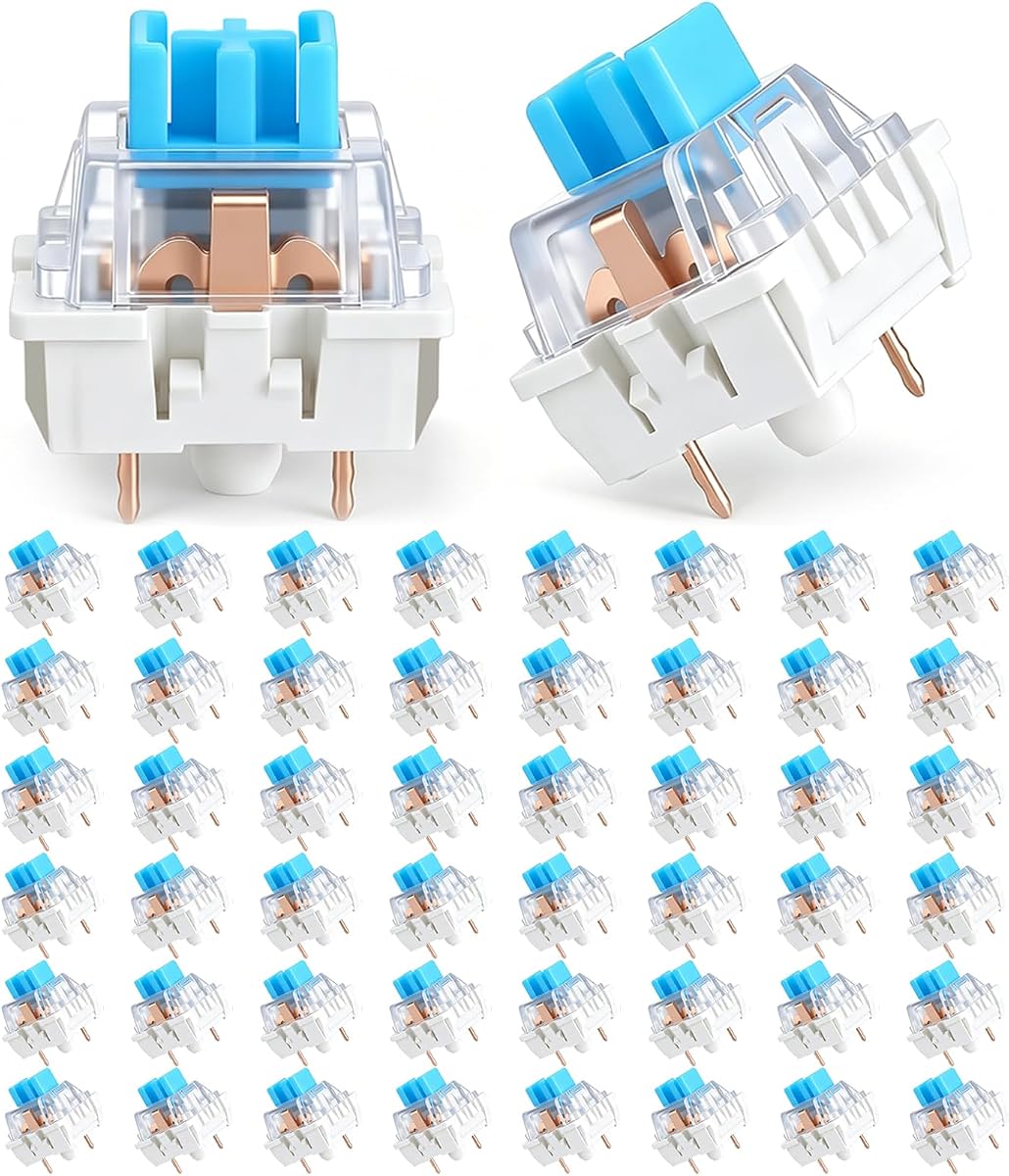
This kit provides 50 mechanical switches designed for replacement or custom builds. These switches produce a satisfying clicking feedback that relieves stress during typing.
We may earn a commission when you buy through this link, at no additional cost to you.
Made of plastic housing and copper washers, they are waterproof and dustproof for longevity. The transparent blue casing complements LED backlighting for a stylish setup.
These are components rather than devices, requiring installation to use. They are ideal for customizing keyboard feel and durability.
Best for DIY enthusiasts, this kit enhances keyboard performance. It is recommended for those building or repairing mechanical keyboards.
The durable construction offers a service life of up to 50 million cycles.
Featuring a transparent blue casing that perfectly complements the LED backlight.
We may earn a commission when you buy through this link, at no additional cost to you.
This 2-pack includes quiet and clicky versions for different environments. Each uses four mechanical-style keys for a familiar finger-pressing feel.
We may earn a commission when you buy through this link, at no additional cost to you.
The clip-on keychain design allows you to carry it on keys or a bag during commutes. It is perfect for shared spaces where discretion is needed.
While not an automated device, it offers a tactile way to release stress. The dual sound profiles cater to varied preferences and settings.
Ideal for office workers or travelers needing stress relief, this kit is versatile. It is recommended for those seeking portable fidget solutions.
The pink 4-key keyboard fidget is quiet, while the green delivers audible clicky feedback.
Each compact keyboard fidget toy includes a keychain clip for carrying during commutes.
We may earn a commission when you buy through this link, at no additional cost to you.
With 108 switches, this kit offers ample replacements for extensive builds. The distinct tactile feedback provides a pronounced click sensation for rapid key travel.
We may earn a commission when you buy through this link, at no additional cost to you.
Constructed with high-quality springs and POM shaft core, it ensures durability. The waterproof design protects against spills and dust.
The loud sound may disturb quiet environments, so use with caution. It is designed for gaming and typing where feedback is key.
Best for mechanical keyboard enthusiasts, this kit is comprehensive. We recommend it for those needing bulk switches for customization.
The distinct tactile feedback provides a pronounced click sensation when activated.
Service life is about 80 million times with waterproof and durable materials.
We may earn a commission when you buy through this link, at no additional cost to you.
Choosing the right automated keyboard clicker requires understanding key features that affect performance and usability. Here are the most critical factors to evaluate before purchasing.
Ensure the device works with your specific keyboard and mouse models. Physical clickers should have adjustable arms to reach different key positions without damage.
Always check product descriptions for compatibility notes before purchasing to avoid issues.
Look for devices offering adjustable speed and timing settings. Some models allow random intervals to mimic human activity, which is crucial for gaming or secure platforms.
Prioritize models with granular control if your use case requires precision.
The physical build should be sturdy to withstand repetitive use. Materials like metal or high-grade plastic ensure durability and longevity.
Invest in a well-built unit to avoid frequent replacements.
Choose a clicker that requires minimal setup and programming. Simple interfaces with buttons or dials are preferable for quick adjustments.
Avoid overly complex models unless you have specific technical needs.
Consider how loud the device is during operation. Rubberized covers or quiet motors can prevent disturbances in shared spaces.
Select a low-noise option for office or home use.
Physical devices are preferable to software solutions for security and compatibility. They operate independently of your system and do not require installation.
Physical clickers offer more privacy and stability.
Check whether the clicker is battery-powered or USB-powered. USB devices are more sustainable but require a constant connection.
Choose a power source that fits your setup and convenience needs.
Look for products that come with a satisfaction guarantee or warranty. This protects you against defects and ensures customer support availability.
Always verify warranty terms before finalizing your purchase.
Place the clicking arm securely on the target key or mouse button. Ensure it is stable to prevent slipping during operation.
Adjust the speed and timing settings according to your needs. Use random intervals to mimic natural behavior when required.
Clean the device regularly to remove dust and debris. Avoid exposing it to moisture to maintain functionality and longevity.
Yes, physical clickers are generally legal. However, always respect platform terms of service, as some games may restrict automated input tools.
Physical clickers are designed to be gentle. Using models with rubberized covers ensures that keys are not damaged during repeated clicking.
Most clickers can be adjusted for different speeds. This flexibility allows you to use the same device for gaming, work, or system activity tasks.
Durable physical clickers can last for years with proper care. Mechanical switches within the device are rated for millions of cycles.
Physical clickers offer better security and independence. They do not require installation and avoid potential software conflicts.
Using clickers for surveys is generally discouraged. It may violate service terms and lead to account suspension.
The top picks highlight options for every need. The Physical Click Auto Keyboard offers the best overall balance, while Pankia provides budget alternatives.
Prioritize build quality and compatibility when selecting a device. Ensure it fits your specific tasks and environment for optimal results.
Always check current prices before purchasing. Fluctuations may affect your decision, so compare deals to find the best value.