
Creality Ender 3 V3 SE
3.8Editor score
CR Touch auto leveling
Sprite direct extruder
Easy assembly process
This guide compares the top auto bed leveling 3D printers for beginners, evaluating speed, ease of use, build quality, and features to help you choose the
Starting your 3D printing journey can feel overwhelming, especially when dealing with bed leveling issues that ruin prints. Auto bed leveling technology simplifies this process, making it easier for newcomers to achieve successful results without constant manual adjustments or frustration.
We evaluated ten real products based on user feedback, technical specifications, and ease of setup. Our list includes fully integrated auto-leveling printers and compatible sensor kits, ensuring you find a solution that fits your skill level and budget while delivering reliable performance.
Each pick highlights key features like print speed, nozzle temperature, and build volume to guide your decision. Note that prices and availability change frequently, so verify current details before purchasing to ensure you get the best value for your specific project needs.
3.8Editor score

4.3Editor score

4.3Editor score
This side-by-side comparison highlights the core specifications and unique selling points of each printer. From high-speed CoreXY models to budget-friendly options, see how they stack up on leveling accuracy, build volume, and overall reliability for new users.


The FLASHFORGE Adventurer 5M stands out as a top choice for beginners seeking speed and simplicity. With its one-click auto leveling system, it eliminates the guesswork often associated with initial setup, ensuring a perfect first layer every time. Users report high satisfaction with its robust build quality and smooth operation.
We may earn a commission when you buy through this link, at no additional cost to you.
Its CoreXY motion system enables speeds up to 600mm/s, significantly reducing print times compared to traditional printers. The upgraded direct extruder handles various filaments well, while the 280C nozzle supports materials like PETG. Vibration compensation technology minimizes ghosting, resulting in cleaner surfaces.
While the build volume is modest at 220mm, it is sufficient for most hobbyist projects. The open design means it works best in ventilated areas, which might be a consideration for enclosed spaces. However, the trade-off for speed and ease of use is well worth it for many users.
This printer is ideal for those who want reliable results without diving into complex calibration. Whether you are printing functional parts or creative models, the Adventurer 5M delivers consistent performance. It balances advanced features with beginner-friendly design perfectly.
Achieve professional results in less time with acceleration up to 20,000mm/s² that maintains detail quality at high velocities.
The auto-leveling system calibrates the bed in seconds, removing the need for manual adjustments or trial-and-error prints.
We may earn a commission when you buy through this link, at no additional cost to you.
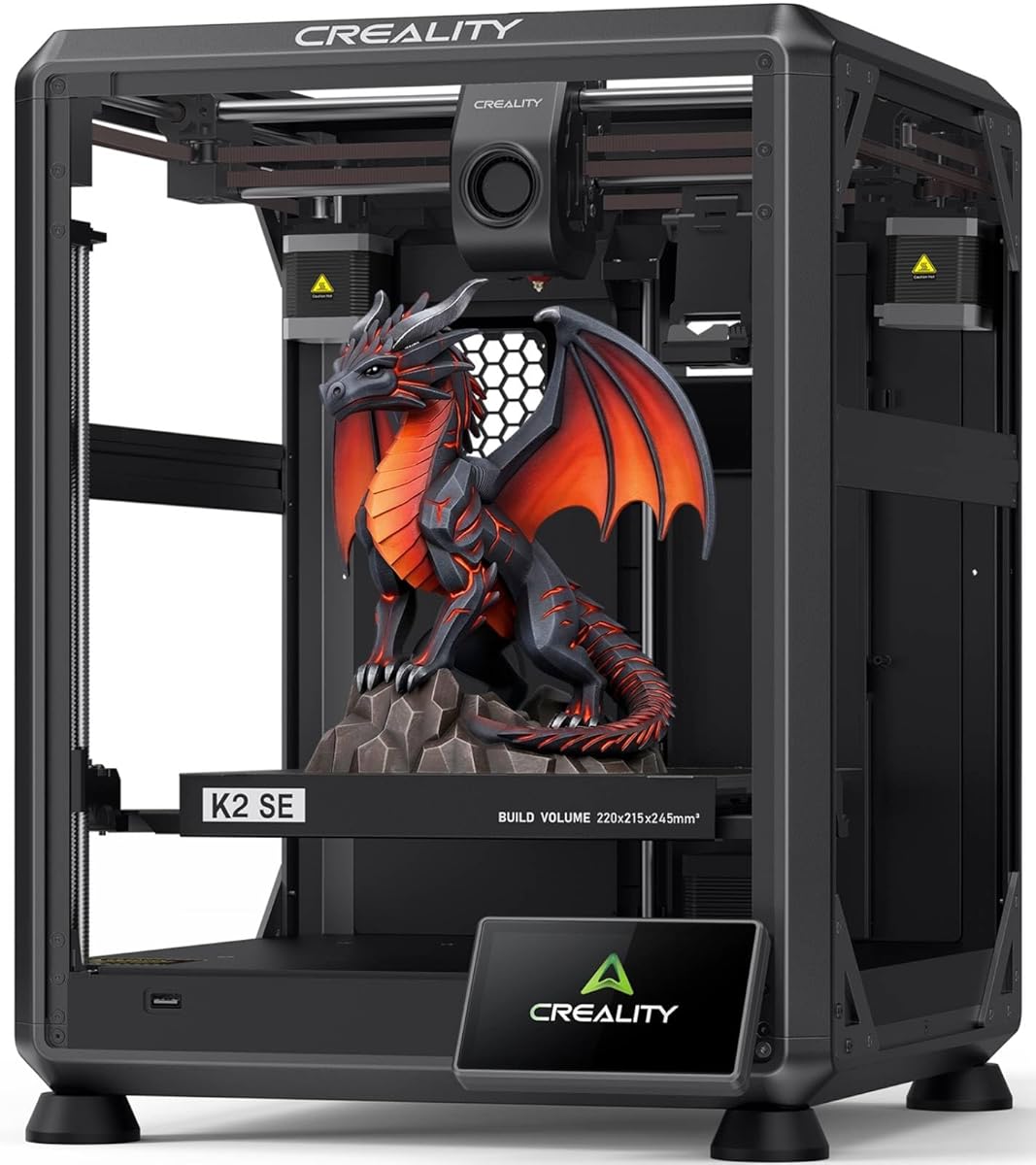
The Creality K2 SE offers a solid metal build designed for high precision and stability. Its CoreXY system delivers speeds up to 500mm/s while using input shaping to reduce ringing. This makes it suitable for detailed prints that require sharp edges and smooth surfaces.
We may earn a commission when you buy through this link, at no additional cost to you.
A key feature is its compatibility with the Creality CFS multicolor system, allowing users to expand into multi-material printing later. The direct drive extruder supports a wide range of filaments, ensuring consistent feeding even at high speeds. Quick-swap nozzles minimize downtime during maintenance.
However, the K2 SE has mixed user reviews regarding setup complexity. Some find the touchscreen guide helpful, while others report calibration quirks. The build volume is generous, but ensuring the frame is perfectly square is crucial for optimal performance.
For users looking to grow into multi-color printing, the K2 SE provides a scalable platform. It balances speed with build quality, though it may require more patience during the initial setup phase compared to simpler models.
Die-cast aluminum and corner gussets ensure dimensional accuracy during rapid movements for professional-grade finishes.
Prepare for advanced projects with native support for the CFS system, unlocking automatic filament switching capabilities.
We may earn a commission when you buy through this link, at no additional cost to you.
The E-Leveler 2 is a specialized tool designed to simplify manual bed leveling for printers without auto features. It provides visual LED feedback, helping users adjust the bed to perfect levels quickly. This is an excellent accessory for those with older machines seeking upgrade options.
We may earn a commission when you buy through this link, at no additional cost to you.
Its improved design includes a stronger battery holder and simplified nozzle target. The balancing end caps ensure the device sits flat during use, providing accurate readings. It works with most manually adjustable print beds, making it versatile across various printer models.
Note that it is not an automatic system; you still need to turn screws yourself. However, the precision it offers reduces trial and error significantly. For users on a tight budget who cannot replace their printer, this tool is a smart investment.
Whether you own a standard Cartesian printer or a customized setup, the E-Leveler 2 streamlines the process. It removes the frustration of guessing bed height, ensuring better first layers and fewer failed prints. This tool is essential for manual leveling enthusiasts.
Clear lights indicate when the bed is perfectly level, reducing guesswork during manual adjustments for consistent results.
Designed for most printers with adjustable beds, making it a universal solution for older or customized 3D machines.
We may earn a commission when you buy through this link, at no additional cost to you.
The AD5M combines durability with speed, featuring an all-metal CoreXY structure for precise movement. Its one-click auto leveling system ensures accurate offsets without manual intervention. This printer is designed for both beginners and experts who value reliability and consistency.
We may earn a commission when you buy through this link, at no additional cost to you.
Maintenance is simplified with a quick-release nozzle that can be swapped in seconds. This allows users to switch between different nozzle diameters for varied project needs easily. The power loss recovery feature ensures that unexpected outages do not ruin long print jobs.
While the build volume is standard, the speed and quality are impressive. The open design allows for good ventilation, which is important for certain materials. However, the need to purchase nozzles separately might be a drawback for some users.
Ideal for creative projects requiring precision, the AD5M handles PLA and PETG effortlessly. Its robust design minimizes vibrations, leading to smooth prints. It is a strong choice for those seeking a no-fuss experience with professional results.
CoreXY structure ensures low-noise, high-speed movement that maintains accuracy even under rapid acceleration conditions.
Quick-swap nozzle design minimizes downtime, allowing users to change tools in seconds without extra tools.
We may earn a commission when you buy through this link, at no additional cost to you.
The QIDI Q2 redefines what a beginner-friendly printer can achieve by supporting advanced materials. Its 370C nozzle and 65C heated chamber unlock high-performance filaments like PPS-CF and nylon. The auto-leveling system uses the nozzle itself for unparalleled first-layer accuracy.
We may earn a commission when you buy through this link, at no additional cost to you.
Beyond printing capabilities, it offers a triple filtration system for safer indoor use. AI camera monitoring allows users to watch prints remotely, ensuring early detection of issues. This level of safety and connectivity is rare in this price range.
While the price is higher than entry-level options, the reliability and material versatility justify the cost. The direct drive extruder and synchronous belt reduce vibration, resulting in ultra-smooth surfaces. It is a professional tool that remains accessible to hobbyists.
For those willing to invest in long-term quality, the Q2 is a top choice. It supports functional prototypes and detailed models alike. If you plan to print with tough materials, this machine delivers unmatched precision and stability.
Unlock high-temp materials like PPS-CF with a 370C nozzle that handles engineering plastics with ease.
Triple filtration and flame-retardant chamber ensure a clean and safe environment for home or office use.
We may earn a commission when you buy through this link, at no additional cost to you.
The AD5M Pro is designed with safety and noise reduction in mind, making it ideal for homes or classrooms. Its fully enclosed design and dual filtration system filter out particles and VOCs. With a low-speed silent mode, it operates quietly during operation.
We may earn a commission when you buy through this link, at no additional cost to you.
It comes bundled with both 0.4mm and 0.6mm nozzles, offering immediate versatility. The auto-leveling system calculates offsets precisely, ensuring consistent first layers. Remote monitoring via app adds convenience for checking print status from anywhere.
The quiet operation is a major benefit for shared spaces. The build volume remains standard, but the speed and safety features make up for it. This printer prioritizes user experience and environmental health without sacrificing performance.
For users concerned about noise or air quality, this model is excellent. It balances high-speed printing with a safe environment. Whether for educational use or personal hobbies, it delivers reliable, clean, and quiet results.
Achieve noise levels under 50dB with dual filtration that ensures safe indoor use for families or classrooms.
Included 0.4mm and 0.6mm nozzles allow you to switch between detail and speed without extra purchases.
We may earn a commission when you buy through this link, at no additional cost to you.
The Ender 3 V3 SE offers an excellent entry point with CR Touch auto leveling included. Its Sprite direct extruder improves filament feeding consistency, reducing failures. Assembly is straightforward, making it accessible for those who have never printed before.
We may earn a commission when you buy through this link, at no additional cost to you.
While speeds are lower at 250mm/s, this ensures better stability for budget hardware. The dual Z-axis leadscrews reduce wobbling, maintaining accuracy over time. It supports auto filament loading, making swaps easier without manual intervention.
This printer is perfect for beginners prioritizing budget and reliability. The proven extruder is market-tested, ensuring durability. Although it lacks high-speed capabilities, it handles standard materials well. It is a practical choice for learning the basics of 3D printing.
For those looking to start printing without a large investment, the V3 SE is ideal. It simplifies setup and reduces manual tweaks. If you need reliable parts or hobby prints, this printer delivers consistent performance at a low cost.
The upgraded Sprite extruder ensures smooth feeding and reduces clogging, making it ideal for new users.
Get started quickly with CR Touch leveling and a design that minimizes manual adjustments before printing.
We may earn a commission when you buy through this link, at no additional cost to you.
The CR Touch kit allows you to add auto leveling to older printers. It uses multi-point detection to build a virtual plane, compensating for bed tilt. This is a cost-effective way to upgrade existing machines without buying a new printer.
We may earn a commission when you buy through this link, at no additional cost to you.
It is compatible with common Ender models and certain mainboards. Installation involves mounting the sensor and updating firmware via SD card. While this technical step can be intimidating, guides are available to help users through the process.
Once installed, the system improves first-layer success significantly. It works with various bed surfaces like PEI or glass. For users comfortable with basic electronics, this kit offers a great balance of performance and price.
This is the best option for those with older hardware looking to modernize. It extends the life of your printer while adding critical features. With stable performance and wide compatibility, it is a trusted solution for leveling upgrades.
Records height data from multiple points to calculate bed tilt and compensate automatically during printing.
Affordable sensor kit that transforms older printers into auto-leveling machines without needing a full replacement.
We may earn a commission when you buy through this link, at no additional cost to you.
The AD5X stands out with its Intelligent Filament System (IFS) supporting four colors. This enables seamless multicolor printing without manual swaps during jobs. It simplifies complex designs, making vibrant models accessible to beginners.
We may earn a commission when you buy through this link, at no additional cost to you.
With a max speed of 600mm/s, projects finish quickly. The auto-leveling system ensures the first layer is perfect, crucial for maintaining print integrity over time. The 300C nozzle handles a variety of materials, including flexible filaments.
Multicolor printing requires managing multiple spools, which can be space-intensive. However, the system minimizes downtime by automating refills. This allows users to focus on design rather than logistics. It is a powerful tool for artistic applications.
Ideal for artists and designers, this printer brings professional capabilities to hobbyists. It balances speed with creative potential. If you want to experiment with colors effortlessly, the AD5X offers a robust and user-friendly solution.
Innovative IFS allows up to four colors to be managed automatically, enhancing creative possibilities.
Rapid printing speeds ensure that even complex multicolor projects are completed quickly and efficiently.
We may earn a commission when you buy through this link, at no additional cost to you.
The Ender 3 V3 SE is optimized for beginners with a focus on ease of use. Auto leveling and automatic Z-offset calibration reduce the need for manual tuning. Its silent mainboard ensures a quiet experience, perfect for shared spaces.
We may earn a commission when you buy through this link, at no additional cost to you.
The Sprite extruder delivers consistent feeding, while the flexible PC plate allows easy print removal. Dual synchronized Z-axis screws minimize vibration, ensuring accurate layers. This model prioritizes a smooth user experience over raw speed.
Assembly is quick, and the design minimizes potential failure points. While it lacks advanced features like heated chambers, it excels in reliability. For first-time users, this provides a confidence-building experience that reduces frustration.
If you are new to 3D printing and need a straightforward machine, this is it. It delivers quality prints without demanding technical expertise. With reliable hardware and simple operations, it is a top recommendation for starting out.
Auto leveling and guided steps allow new users to start printing within minutes of unboxing.
Quiet operation and simple controls ensure a comfortable environment for learning and creating.
We may earn a commission when you buy through this link, at no additional cost to you.
Choosing the right printer involves considering several technical aspects that affect ease of use and output quality.
Auto leveling systems vary between capacitive sensors and strain probes. Ensure the method is reliable and supported by firmware to avoid calibration headaches. Some models use the nozzle as a probe, which can be more accurate.
Look for one-click leveling to simplify the workflow. This reduces setup time significantly and ensures consistent first layers without manual intervention. This feature is critical for beginners who want immediate success.
Speed is measured in mm/s, with many modern printers offering 500mm/s or more. However, high speeds require stable frames to maintain quality. Look for CoreXY systems that reduce vibration at high velocities.
Balance speed with your project needs. If you prioritize detail over rapid prototyping, moderate speeds with high stability may be better. Fast acceleration means shorter wait times for completed models.
Build volume determines the size of objects you can print. Standard sizes like 220x220mm suit most hobbyist needs. Ensure the printer offers enough height for tall objects if that is important for your plans.
Consider future projects when choosing volume. A larger build area provides flexibility for functional parts or larger props. Keep in mind that larger builds may require more frequent calibration and time.
Higher nozzle temperatures allow printing with advanced materials like ABS or PETG. Ensure the printer reaches at least 280C for versatility. This temperature range handles most filaments used in home settings effectively.
Check if the extruder is direct drive for flexible materials. High heat capacity ensures melting even difficult filaments. This capability expands the types of projects you can undertake without buying a new machine.
A sturdy frame prevents vibrations that degrade print quality. Aluminum alloy or metal frames are preferred over plastic ones. Stability is crucial when running printers at high speeds to maintain dimensional accuracy.
Look for dual Z-axis leadscrews for better stability. This design reduces wobbling and ensures smooth vertical movement. A rigid frame extends the lifespan of your printer and improves long-term consistency.
Enclosed printers often include filtration to filter particles and odors. Look for HEPA filters if you plan to use in living spaces. Safety is paramount when printing materials like ABS that emit fumes.
Ensure the printer has thermal protection features. This prevents overheating and ensures safe operation. A clean environment makes printing more pleasant and healthier for everyone in the room.
Different printers support specific filaments. Some work best with PLA, while others handle engineering plastics. Check compatibility to ensure you can print what you want without clogs or issues.
Auto feeders or run-out sensors add convenience. These features prevent wasted prints when spools run out. Consider if you need multi-color or multi-material support for your specific creative goals.
Good slicer software and app control improve usability. Look for models with dedicated apps for monitoring. Cloud connectivity allows remote management and downloading models directly to the printer.
Ensure firmware is easy to update for new features. Regular updates improve stability and add functionality. A user-friendly interface reduces the learning curve for new users entering the hobby.
Always ensure the build plate is clean before starting any print. Dust or oils can affect adhesion, even with auto-leveling systems. Use isopropyl alcohol to wipe the surface regularly for the best results.
Calibrate your Z-offset periodically even with auto features. Over time, mechanical parts shift slightly, affecting the first layer. A simple test print can help verify that the nozzle height is optimal.
Perform routine maintenance on your printer. Lubricate rods and clean filters to keep performance high. Check belts for tension to ensure smooth motion and accurate prints over the long term.
Auto leveling handles most of the bed adjustment, but Z-offset may still need fine-tuning. It reduces manual steps significantly but is not always perfect. Regular checks ensure consistent results for every print job.
PLA is the easiest filament to use for beginners. It does not require a heated chamber and prints well at moderate temperatures. This material is forgiving and available in many colors for various projects.
Clean the nozzle after every few prints to prevent clogs. Residue from previous filaments can affect flow and quality. Use a brush or cold pull technique to clear blockages effectively.
Auto leveling sets the bed, but the Z-offset might need adjustment. A bed that is too clean or dirty also causes adhesion issues. Verify the nozzle distance manually if auto settings fail.
Some models support ABS, but enclosed chambers help with warping. Check if your printer reaches high enough temperatures. Proper ventilation is key when working with ABS fumes at home.
CoreXY systems separate the motors from the print head, reducing weight. This allows for faster speeds with better stability. You get higher quality results even when printing at rapid velocities.
Most kits include basic tools like wrenches for assembly. However, additional items like brushes or spare parts may need to be bought. Always check the package contents before starting your setup.
Download firmware from the official manufacturer website. Copy it to a clean SD card and follow instructions. Ensure the printer has power during updates to avoid corruption issues.
Selecting the right printer depends on your budget and project goals. Models like the AD5M and Ender 3 V3 SE offer great entry points. Each provides unique features to simplify the learning curve for new users.
Prioritize ease of setup and reliability over raw speed. A machine that works consistently encourages experimentation and growth. Features like auto leveling and filament sensors make the process enjoyable.
Always check current prices and availability before purchasing. The market changes quickly, and new models appear regularly. This ensures you get the best value and latest features available today.