
SANSUI 24 Inch Curved 160Hz Gaming Monitor
4.4Editor score
1500R Curved Panel
160Hz Refresh Rate
1ms MPRT Response Time
Gaming has evolved beyond simple flat screens to immersive curved displays that wrap around your vision. A curved 160Hz gaming monitor delivers smooth motion and reduced distortion for competitive play.
We evaluated ten leading models based on refresh rate, curvature, color accuracy, and connectivity options. Each product offers unique features suited for different gaming styles and budgets.
Each pick highlights key strengths and trade-offs to help you find the right screen. Prices and availability change frequently so check current listings before purchasing your new monitor.
4.4Editor score
4.5Editor score

4.6Editor score
As an Amazon Associate we earn from qualifying purchases.
The following table compares all ten monitors side by side to highlight key specifications and performance characteristics for informed decision making.






The SANSUI 24 Inch Curved Gaming Monitor offers an accessible entry into high refresh rate curved displays. It carries a strong rating and focuses on core gaming needs without extra frills.
We may earn a commission when you buy through this link, at no additional cost to you.
This model delivers a smooth 160Hz refresh rate with a 1500R curve that wraps visuals around your peripheral vision. It supports FreeSync for tear-free gaming and includes useful game modes for FPS and RTS titles.
While it lacks speakers and advanced ergonomic adjustments, its performance per dollar is hard to beat. The contrast ratio and color gamut support decent visuals for the price.
Budget-conscious gamers seeking a reliable 24 inch curved screen for fast-paced titles will find this an excellent choice. It balances cost and performance effectively.
The 1500R curvature brings edges closer to your eyes reducing eye strain during long sessions.
With a 160Hz refresh rate and 1ms MPRT response time motion blur is minimized for clearer action.
We may earn a commission when you buy through this link, at no additional cost to you.
The SANSUI 27 Inch Curved Gaming Monitor expands the screen real estate while keeping the same performance features as the 24 inch model. It is ideal for those wanting a bigger view.
We may earn a commission when you buy through this link, at no additional cost to you.
It features a 1500R curve and 160Hz refresh rate for immersive and smooth visuals. HDR mode is available via HDMI and the monitor includes helpful gaming tools like crosshairs and timers.
Like its smaller sibling it omits speakers and advanced stand adjustments to stay affordable. However the extra inches provide more space for multitasking and gaming.
Gamers wanting a slightly larger field of view without spending extra will appreciate this option. It maintains high refresh rates at a competitive price point.
The 27 inch panel offers more space for game maps and HUD elements without increasing cost.
HDR mode enhances contrast and color when enabled through the HDMI port for supported content.
We may earn a commission when you buy through this link, at no additional cost to you.
This SANSUI 24 Inch Curved Gaming Monitor stands out with its wide color gamut and flicker-free technology. It is optimized for both gaming and general computing tasks.
We may earn a commission when you buy through this link, at no additional cost to you.
With 97% DCI-P3 coverage and 160Hz refresh rate it delivers vivid colors and fluid motion. The 1500R curve enhances immersion while the 1ms MPRT reduces motion blur effectively.
It lacks audio and ergonomic height adjustments but provides solid performance for its category. The wide viewing angle ensures consistent color even from off-center positions.
Users seeking accurate colors alongside high refresh rates in a compact form factor should consider this model. It offers reliable performance for everyday gaming and work.
The 97% DCI-P3 coverage ensures richer colors for games and media compared to standard sRGB panels.
Flicker-free technology and blue light reduction help reduce strain during extended usage periods.
We may earn a commission when you buy through this link, at no additional cost to you.
The CRUA 32 4K Curved Gaming Monitor combines high resolution with a fast refresh rate in a large format. It is designed for users prioritizing clarity and size.
We may earn a commission when you buy through this link, at no additional cost to you.
Its 4K UHD panel delivers sharp visuals while the 160Hz refresh rate ensures smooth motion. The built-in speakers reduce cable clutter and the 1500R curve provides strong immersion.
While color accuracy may not match professional displays the overall experience is engaging for gamers. The connectivity options support next-gen PCs and consoles.
Those wanting 4K resolution with high refresh rates and speakers will find this unit appealing. It balances resolution and performance for a premium feel.
The 4K UHD resolution renders fine details sharply ideal for open-world games and media.
Integrated speakers eliminate the need for external audio devices in minimalist setups.
We may earn a commission when you buy through this link, at no additional cost to you.
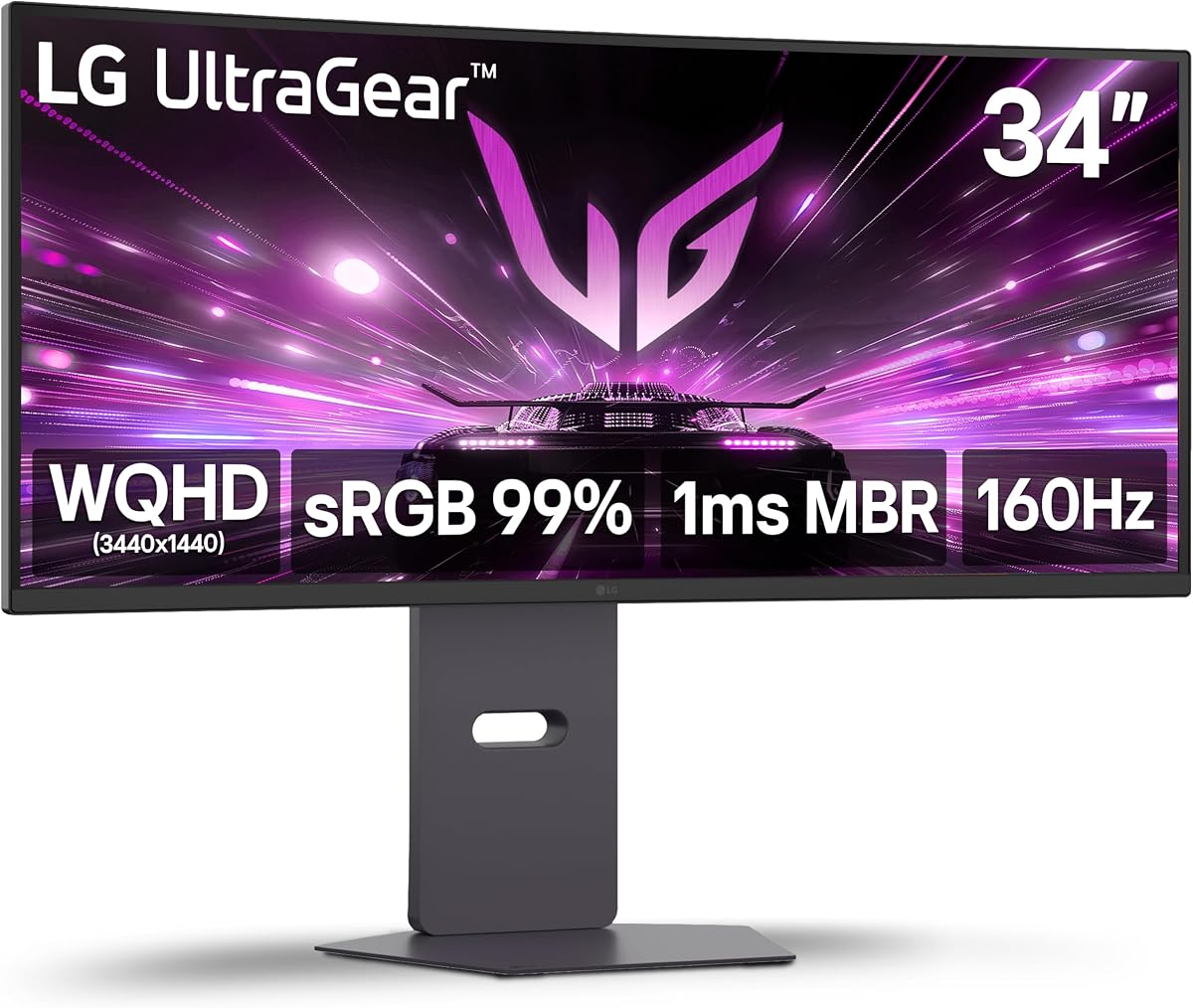
The LG 34G600A-B UltraGear delivers a complete package with ultrawide immersion and competitive performance. It earns top marks for its feature set and build quality.
We may earn a commission when you buy through this link, at no additional cost to you.
Its 34 inch WQHD curved display expands your field of view with HDR10 color and AMD FreeSync Premium for tear-free gaming. The stand offers height and swivel adjustments for comfort.
The inclusion of stereo speakers and reader mode adds versatility beyond gaming. While it commands a higher price the overall experience is top tier.
Gamers seeking an ultrawide monitor with premium features and ergonomics will love this model. It sets a strong standard for curved gaming displays.
The 21:9 WQHD display provides more horizontal space for multitasking and wide aspect ratio games.
Full height and swivel adjustments ensure comfortable viewing angles during long sessions.
We may earn a commission when you buy through this link, at no additional cost to you.
This renewed LG 34G600A-B offers the same exceptional performance as the new model at a reduced price. It maintains the core strengths of the original design.
We may earn a commission when you buy through this link, at no additional cost to you.
Features like WQHD resolution and AMD FreeSync Premium remain intact for smooth ultrawide gaming. The renewed status ensures testing for quality while saving money.
Users should verify stock availability as renewed items may vary in quantity. However the savings make it an attractive option for budget minded buyers.
Smart shoppers looking for high-end specs without the full retail price should consider this choice. It offers a great balance of value and performance.
Renewed products undergo rigorous inspection to ensure they meet functional and cosmetic standards.
Buying renewed allows access to premium features typically reserved for higher price tiers.
We may earn a commission when you buy through this link, at no additional cost to you.
The Samsung 32 Odyssey G55C offers a unique 1000R curve that wraps more tightly around your vision for maximum immersion. It is built for intense gaming sessions.
We may earn a commission when you buy through this link, at no additional cost to you.
With a 165Hz refresh rate and QHD resolution it delivers fast and detailed visuals. HDR10 support enhances contrast and the Eye Saver Mode helps reduce strain during extended use.
The extreme curvature may not suit non-gaming tasks but excels in immersive play. FreeSync ensures smooth motion without tearing.
Gamers who prioritize immersion and high refresh rates will love the unique design. It brings a distinctive look to gaming setups.
The 1000R curve matches the human eye for a more natural and enveloping viewing experience.
Eye Saver Mode minimizes blue light to keep eyes relaxed during marathon gaming nights.
We may earn a commission when you buy through this link, at no additional cost to you.
The Sceptre 34 Inch Curved Ultrawide Monitor brings high refresh rates and wide resolution to a competitive price. It stands out for its speed and color coverage.
We may earn a commission when you buy through this link, at no additional cost to you.
With an 180Hz refresh rate and 99% sRGB coverage it delivers smooth motion and vibrant visuals. Built-in speakers and LED lighting add modern touches.
While the stand lacks height adjustment the performance metrics are impressive for the cost. It supports multiple DisplayPort connections for flexible setups.
Gamers seeking ultrawide gaming at a fast refresh rate without premium costs should consider this. It offers strong value for its specs.
The 180Hz refresh rate ensures smooth action while 99% sRGB delivers vibrant game colors.
Back cover LED lights give the monitor a sleek look that enhances the gaming vibe.
We may earn a commission when you buy through this link, at no additional cost to you.
The Alienware 34 Curved Gaming Monitor delivers top tier performance with a focus on comfort and detail. It is designed for serious gamers wanting the best.
We may earn a commission when you buy through this link, at no additional cost to you.
Its 180Hz refresh rate and WQHD resolution ensure smooth and sharp visuals. Hardware-based low blue light and console mode help optimize the experience for different users.
The build quality and design justify the premium price for enthusiasts. It offers a polished finish and reliable performance.
Gamers looking for high-end features and durable design will find this model rewarding. It sets a benchmark for premium curved monitors.
Dedicated console mode optimizes settings for console gaming making setup easy.
WQHD resolution with high refresh rate provides crisp and smooth gameplay.
We may earn a commission when you buy through this link, at no additional cost to you.
The AOC 34 Inch Curved Gaming Monitor pushes speed with a 200Hz refresh rate and fast response time. It targets competitive gamers needing quick reaction.
We may earn a commission when you buy through this link, at no additional cost to you.
Its 0.3ms MPRT response time minimizes ghosting while the WQHD resolution delivers sharp details. The ergonomic stand and multiple connectivity options add flexibility.
While HDR support is limited the core performance shines in fast-paced games. It is ideal for those prioritizing speed.
Competitive gamers seeking the fastest refresh rates in an ultrawide curved format should consider this. It delivers speed-focused performance.
A 200Hz refresh rate and 0.3ms response time reduce lag for competitive edges.
Multiple HDMI and DisplayPort connections support various gaming PCs and consoles.
We may earn a commission when you buy through this link, at no additional cost to you.
Selecting the right curved monitor involves balancing size resolution refresh rate and ergonomics to match your gaming style and setup.
Curvature measured in millimeters like 1500R or 1000R indicates how much the screen wraps around you. Lower numbers mean deeper curves that increase immersion but may feel too tight for some users.
Choose a 1500R or 1800R curve for a balanced immersive experience or deeper options if you prioritize total wraparound visuals.
Refresh rate determines how many frames per second the monitor can display. A 160Hz refresh rate provides smooth motion ideal for competitive gaming and fast-paced action.
Look for at least 160Hz if you want fluid gameplay. Higher rates like 200Hz offer even smoother motion but require powerful hardware.
VA panels are common in curved monitors due to their high contrast and deep blacks. They offer good color coverage often reaching 99% sRGB or higher.
Ensure the panel supports wide color gamuts for vibrant visuals. VA is preferred for its contrast performance in gaming environments.
Resolution impacts clarity with options like FHD WQHD and 4K. Larger screens like 27 or 34 inches benefit from higher resolutions to avoid pixelation.
Match resolution to screen size. WQHD on 34 inches gives sharp clarity while FHD works well on 24 or 27 inches.
FreeSync and G-Sync technologies synchronize the monitor with your GPU to reduce screen tearing. FreeSync Premium offers enhanced features for HDR and low frame rates.
Choose a monitor with compatible sync technology to ensure tear-free gameplay. AMD FreeSync is widely supported and effective.
An ergonomic stand with height tilt and swivel adjustments helps maintain a healthy posture. Tilt is common but height adjustment is vital for long sessions.
Prioritize stands offering full adjustability to reduce neck strain. A fixed stand may suffice if desk height is already optimal.
Ports like HDMI 2.0 or 2.1 and DisplayPort 1.4 enable high refresh rates. Additional audio jacks or built-in speakers simplify setup.
Verify your GPU supports the required bandwidth for your chosen refresh rate and resolution. Multiple ports add flexibility for multi-device setups.
A solid warranty and responsive technical support protect your investment. Look for companies offering money-back guarantees and long-term support.
Check warranty terms carefully. Quality brands often provide lifetime technical support and easy replacements for peace of mind.
Start by connecting the monitor using the DisplayPort cable for the highest refresh rates if supported. Adjust the OSD settings to enable FreeSync or adaptive sync for smoother motion.
Position the monitor at arm's length with the center at eye level to avoid strain. Use the stand's tilt adjustments to reduce glare and improve visibility during gameplay.
Keep the screen clean using a microfiber cloth and avoid harsh chemicals. Dust and smudges can reduce image clarity so gentle cleaning extends the life of the panel.
Yes to fully utilize 160Hz you need a GPU that can output frames at that rate in modern games. Lower-end cards may struggle to reach 160fps but you can lower graphics settings to improve performance.
Curved monitors provide an immersive view that can help track action across the screen. While flat panels are preferred by some pros curved screens offer comfort and reduced distortion over time.
Refresh rate is how many times per second the image updates measured in Hz. Response time is how quickly pixels change color measured in milliseconds. Both affect smoothness and clarity.
Yes curved monitors reduce eye strain and expand workspace for productivity. However deep curves may distort text or straight lines so balance gaming needs with work requirements.
Many models include HDR10 or HDR Ready support which enhances contrast and brightness. True HDR performance depends on brightness and color depth so check specific ratings before buying.
24 to 27 inch models suit desktop setups well while 34 inch ultrawides offer immersive gaming. Choose based on your desk depth and viewing distance preferences.
Use the built-in color presets or calibration tools in the display settings. For accuracy consider software calibration tools or professional services depending on your needs.
FreeSync is widely compatible and cost effective while G-Sync offers certified performance. Most curved gaming monitors support FreeSync which works well with both AMD and NVIDIA cards.
This guide highlights top curved monitors ranging from budget-friendly 24 inch screens to premium 34 inch ultrawides. Each model offers unique features tailored to different gaming and viewing needs.
Prioritize refresh rate resolution and ergonomics to match your priorities. A 160Hz refresh rate ensures smooth visuals while curvature and size impact immersion and comfort.
Always check current availability and settings before purchasing. Prices fluctuate and newer models may arrive so verify specs match your expectations for the best experience.