
Cooler Master Q300L V1
4.5Editor score
Transparent edge-to-edge panel
Perforated thermal design
Modular I/O placement
Discover the top Compact E ATX Case options for powerful builds in a small footprint. We compare airflow, compatibility, and design features.
Finding the right Compact E ATX Case can transform your desktop experience. These cases balance size with performance to support high-end hardware without taking up too much space.
We compared ten top models based on cooling potential, motherboard support, and build quality. Each selection offers unique advantages for builders seeking efficiency and style.
Every pick highlights key specs and real-world performance notes. Please note that availability and pricing may vary by region and retailer at any time.
4.5Editor score

4.4Editor score

3.9Editor score
This table breaks down the core specifications of each selected model to help you decide which fits your needs best.



The Cooler Master QUBE 540 stands out as a top contender for those seeking a versatile and spacious case that still respects a compact footprint. Its design prioritizes both airflow and accessibility, making it an excellent choice for builders who value flexibility in their setup.
We may earn a commission when you buy through this link, at no additional cost to you.
Key strengths include its ability to support large E-ATX motherboards and massive GPUs without compromising on ventilation. The full front mesh panel ensures that heat does not get trapped, while the movable handles and reversible I/O panel allow for unique horizontal or vertical positioning.
Trade-offs are minimal but worth noting. While the case does not come with many fans, this keeps the price down and allows users to choose their preferred cooling solution. Additionally, the lack of a top dust filter means you may need to clean internal components more often.
Anyone looking to build a high-performance PC in a flexible form factor should consider this model. It balances premium features with practical design, offering a solid platform for long-term upgrades and custom configurations.
The reversible I/O panel and adjustable handles let you place the case exactly where you need it.
Full mesh panels and dedicated fan mounts create a high-airflow environment for sensitive components.
We may earn a commission when you buy through this link, at no additional cost to you.
The Lian Li O11D Mini V2 is a stunning example of modern PC case design, featuring pillar-less tempered glass that showcases your build without obstruction. It is ideal for builders who want their components to be the centerpiece of their workspace.
We may earn a commission when you buy through this link, at no additional cost to you.
This case improves on the original with a slanted bottom design that directs cold air straight to the GPU, enhancing cooling efficiency. The inclusion of anti-sag brackets and specialized cable management clips ensures that heavy components stay secure and cables remain hidden.
While it excels in style and structure, it does not include fans which means you will need to purchase them separately to achieve optimal airflow. This adds to the total cost but allows for greater customization of your cooling setup.
If visual impact is your priority and you are willing to invest in additional parts, this case delivers a premium feel. It is a fantastic choice for display-oriented builds that demand both beauty and reliability.
Pillar-less glass panels on both sides provide a clear view of your custom liquid cooling or RGB setup.
The 10-degree slanted bottom creates a direct channel for air to reach the graphics card.
We may earn a commission when you buy through this link, at no additional cost to you.
The Mechanic Master C34Pro offers a unique blend of premium materials and portability that is hard to find in other cases. Its aluminum shell and steel frame provide durability while keeping the unit lightweight enough to move regularly.
We may earn a commission when you buy through this link, at no additional cost to you.
It supports large components like 420mm GPUs and 360mm radiators, making it suitable for high-end gaming or rendering rigs that need to travel. The integrated carry handle makes transporting your rig to LAN parties or work much easier than standard cases.
Although it is priced higher than many competitors, the build quality and versatility justify the cost. However, some users may find it slightly heavier than expected due to the robust materials used in its construction.
If you need a case that can withstand travel and still fit top-tier hardware, this is an outstanding choice. It combines ruggedness with advanced cooling options to support demanding workflows.
The reinforced aluminum shell and integrated handle protect your investment during transport.
Spacious internal layout accommodates massive GPUs and high-end CPU coolers without modification.
We may earn a commission when you buy through this link, at no additional cost to you.
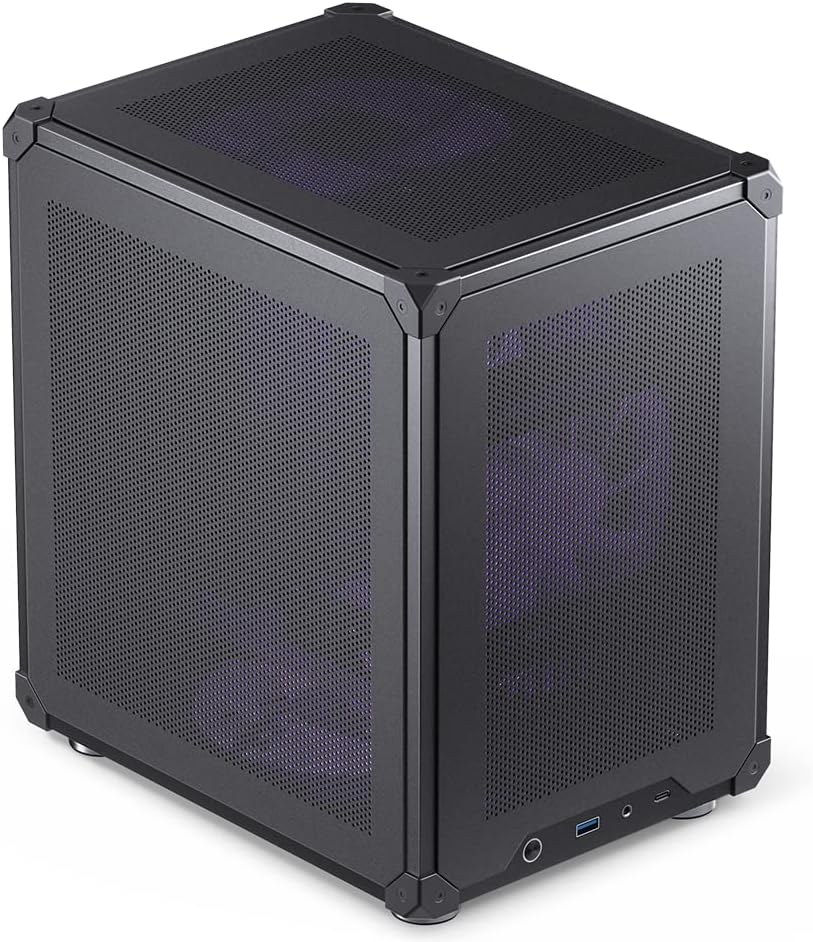
The Cooler Master Q300L V1 is an affordable choice that proves you do not need to spend a fortune for a good airflow case. It is designed for Micro-ATX and Mini-ITX builds, offering plenty of room for standard components.
We may earn a commission when you buy through this link, at no additional cost to you.
Its perforated design on all sides promotes excellent heat dissipation, and the magnetic dust filters help keep your system clean. The edge-to-edge transparent panel allows you to show off your build without needing extra lighting.
While it may not have the premium build quality of more expensive models, it is durable enough for daily use. The main limitation is the shorter maximum GPU length which might restrict high-end card upgrades in the future.
For budget-conscious builders who want style and cooling performance, this case is a solid starting point. It offers great value and flexibility for small form factor projects.
Perforated panels on all sides ensure air moves freely to cool hot components efficiently.
The modular I/O panel can be moved to suit your cable management preferences.
We may earn a commission when you buy through this link, at no additional cost to you.
The Mechanic Master C34 Ultra brings the convenience of a portable case while still supporting full-size ATX motherboards. It is perfect for users who need to move their PC regularly but do not want to compromise on power.
We may earn a commission when you buy through this link, at no additional cost to you.
With support for GPUs up to 335mm and standard ATX power supplies, it maintains versatility in a small frame. The built-in handle and modern I/O ports make it both functional and easy to use in various environments.
The only real limitation is the shorter GPU length compared to larger cases, which might be a constraint for future upgrades. However, for most users, it provides enough space for current generations of hardware.
If you need a portable powerhouse that is easy to carry and fits standard parts, this case is a great option. It balances compact design with practical usability for work or gaming.
Supports standard ATX boards without sacrificing too much desk space.
Reinforced handle and lightweight design make moving the PC effortless.
We may earn a commission when you buy through this link, at no additional cost to you.
The ASUS Prime AP201 stands out for its extensive mesh design which allows for maximum airflow. With over 57,000 precision holes, it keeps temperatures low without sacrificing a clean look.
We may earn a commission when you buy through this link, at no additional cost to you.
Despite its small 33L footprint, it supports large ATX PSUs and substantial radiators for liquid cooling. The tool-free side panels make maintenance and upgrades incredibly easy for any skill level.
While it lacks modern USB-C ports on the front, the cooling efficiency and cable management features more than make up for it. It is a smart choice for performance builders on a budget.
If you need a case that prioritizes temperature control and ease of use, this model is a top pick. It offers great value for anyone looking for reliable airflow in a small box.
Quasi-filter mesh panels increase intake while providing a clear view of internal hardware.
Tool-free clips allow you to remove panels quickly without needing any screwdrivers.
We may earn a commission when you buy through this link, at no additional cost to you.
The Cooler Master Q300L V3 improves on the original V1 with better GPU support and refined airflow options. It is built for Micro-ATX systems that need to handle modern high-end graphics cards.
We may earn a commission when you buy through this link, at no additional cost to you.
Its high-airflow design supports up to six fans and large radiators which ensures stability during long gaming sessions. The movable I/O panel and magnetic dust filters add convenience for daily use and maintenance.
While the build quality is mostly plastic, it remains durable and offers excellent utility. The lack of a top dust filter is a minor downside but does not impact overall performance significantly.
This case is a smart upgrade for those needing more GPU clearance and better airflow than entry-level options. It delivers strong performance and style for moderate budgets.
Accommodates graphics cards up to 366mm ensuring compatibility with current models.
Adjustable I/O panel helps you place ports exactly where you need them.
We may earn a commission when you buy through this link, at no additional cost to you.
The Zalman CUBIX is one of the most compact options available while still supporting standard ATX power supplies. It is ideal for basic office or entry-level gaming builds where space is tight.
We may earn a commission when you buy through this link, at no additional cost to you.
Its perforated front panel and pre-installed fan provide decent airflow for low-heat components. The sturdy steel construction ensures it can handle daily use without bending or denting.
The small fan may struggle with high-performance GPUs but works well for standard systems. It also restricts GPU length which limits future upgrade paths significantly.
For those needing a tiny desktop case that is affordable and durable, this is a practical choice. It offers reliable protection for basic hardware in a minimal footprint.
At 17.1 liters, this case fits easily on top of a desk or in a closet.
Steel construction provides durability without adding unnecessary cost to your project.
We may earn a commission when you buy through this link, at no additional cost to you.
The JONSBO C6 Black is a highly efficient mini case that uses a full mesh design to maximize cooling. It is designed for M-ATX and ITX builds where every millimeter counts.
We may earn a commission when you buy through this link, at no additional cost to you.
Its tool-free design makes building and cleaning much easier since you can access parts without using any tools. The support for ATX power supplies is impressive for such a compact unit.
However, the GPU length is limited which restricts its use to low-profile cards. This makes it less suitable for high-end gaming but perfect for media or office work.
If you want a small mesh case that is easy to assemble and supports standard PSUs, this is a great option. It balances simplicity and airflow well for basic builds.
The side panels and upper cover open easily without needing any screwdrivers.
Front and lower mesh zones keep heat flowing out of the chassis efficiently.
We may earn a commission when you buy through this link, at no additional cost to you.
The NZXT H5 Flow is designed for simplicity and solid cooling performance without extra complexity. It uses ultra-fine mesh on the top front and side to ensure air moves efficiently.
We may earn a commission when you buy through this link, at no additional cost to you.
It comes with two pre-installed fans to save you the hassle of buying them separately. The perforated PSU shroud improves GPU cooling by allowing more air intake from below.
While it does not include RGB lighting, the clean lines and straightforward design are perfect for minimalists. It is easy to build in with wide channels for cable management.
If you want a reliable case that is easy to use and keeps your system cool, this is a great pick. It offers a balanced experience for standard ATX builds.
The perforated PSU shroud and mesh panels help cool the GPU directly.
Pre-installed fans let you start using your PC right out of the box.
We may earn a commission when you buy through this link, at no additional cost to you.
Selecting the right case involves understanding your hardware needs and space constraints. Below are key factors to consider.
Always check the supported motherboard sizes such as ATX E-ATX or Micro-ATX to ensure your board fits properly.
This ensures you do not buy a case that is too small for your main component.
Verify the maximum GPU length and power supply size to match your current or planned components.
Proper clearance prevents installation issues and ensures efficient cooling for your parts.
Look for mesh panels and fan mounts to ensure your PC stays cool during high-performance tasks.
Good airflow is critical for longevity and consistent performance in compact spaces.
Steel and aluminum are common materials that offer durability and better sound dampening than plastic.
Higher quality materials often mean a more rigid structure that resists bending over time.
Adequate cable routing space and cutouts help keep your build tidy and improve airflow.
Proper cable management also makes future upgrades easier to access.
Check the front I/O panel for modern ports like USB Type-C to ensure compatibility with new devices.
Having fast ports on the front saves time when transferring data or charging devices.
If you move your PC often, look for cases with handles or lightweight designs for easier transport.
Portable cases help you avoid damage during travel or LAN events.
Set a clear budget that accounts for the case and any additional fans or accessories you may need.
A balanced investment ensures you get quality without overspending on features you do not use.
Place your case in a well-ventilated area with at least a few inches of space on all sides for optimal airflow.
Regularly clean dust filters and fans to prevent heat buildup that can affect performance over time.
Use cable ties to route wires neatly and avoid blocking critical air paths inside the chassis.
Yes many models support GPUs up to 360mm or more. Always check the clearance specs before buying to confirm your specific card fits.
Most of these cases are designed to support standard ATX power supplies. However some smaller units may require SFX or SFX-L models.
Yes most feature tool-free panels and ample space for easy assembly. Some designs even include cable management features to simplify the process.
Some models come with pre-installed fans while others do not. Check the product details to see if additional cooling is required for your build.
E-ATX cases are slightly larger to support wider motherboards. ATX cases are more common and often more compact while still supporting standard boards.
Use fans with lower RPM settings and ensure proper cable routing to avoid vibration. A quality power supply also helps reduce operational noise.
We have reviewed ten excellent options that offer power and portability in a compact frame. Each case has unique strengths to suit different needs.
Consider your GPU size motherboard type and cooling needs before making a decision. Choosing the right case ensures your system runs smoothly for years.
Prices and availability change frequently so check the current links for the latest details. This guide helps you find the best value for your setup.