
2 in 2 Out USB 3.0 Switch
4.6Editor score
One-button LED switching
USB 3.0 5Gbps speed
Includes 2 USB 3.0 cables
Compare the top 10 Keyboard and Mouse Switch for 2 Computers to find the best USB switcher or KVM for sharing peripherals between dual PCs in 2026.
Finding the right Keyboard and Mouse Switch for 2 Computers can transform your dual PC workspace into a streamlined hub of productivity. These devices allow you to share essential peripherals like keyboards, mice, and printers between machines without constantly swapping cables.
We evaluated ten top-rated USB switchers and KVM solutions based on speed, compatibility, build quality, and user feedback. Our list covers everything from budget-friendly USB 2.0 models to high-speed USB 3.2 and HDMI KVM options for advanced setups.
Each pick highlights key features, pros, and cons to help you choose the perfect match for your needs. Remember that prices and availability can change, so check the latest details before making your final purchase decision.
4.6Editor score

4.1Editor score

4.0Editor score
This side-by-side comparison highlights the key specifications and capabilities of each top-rated switcher to help you quickly identify the best fit for your specific dual-computer setup needs.


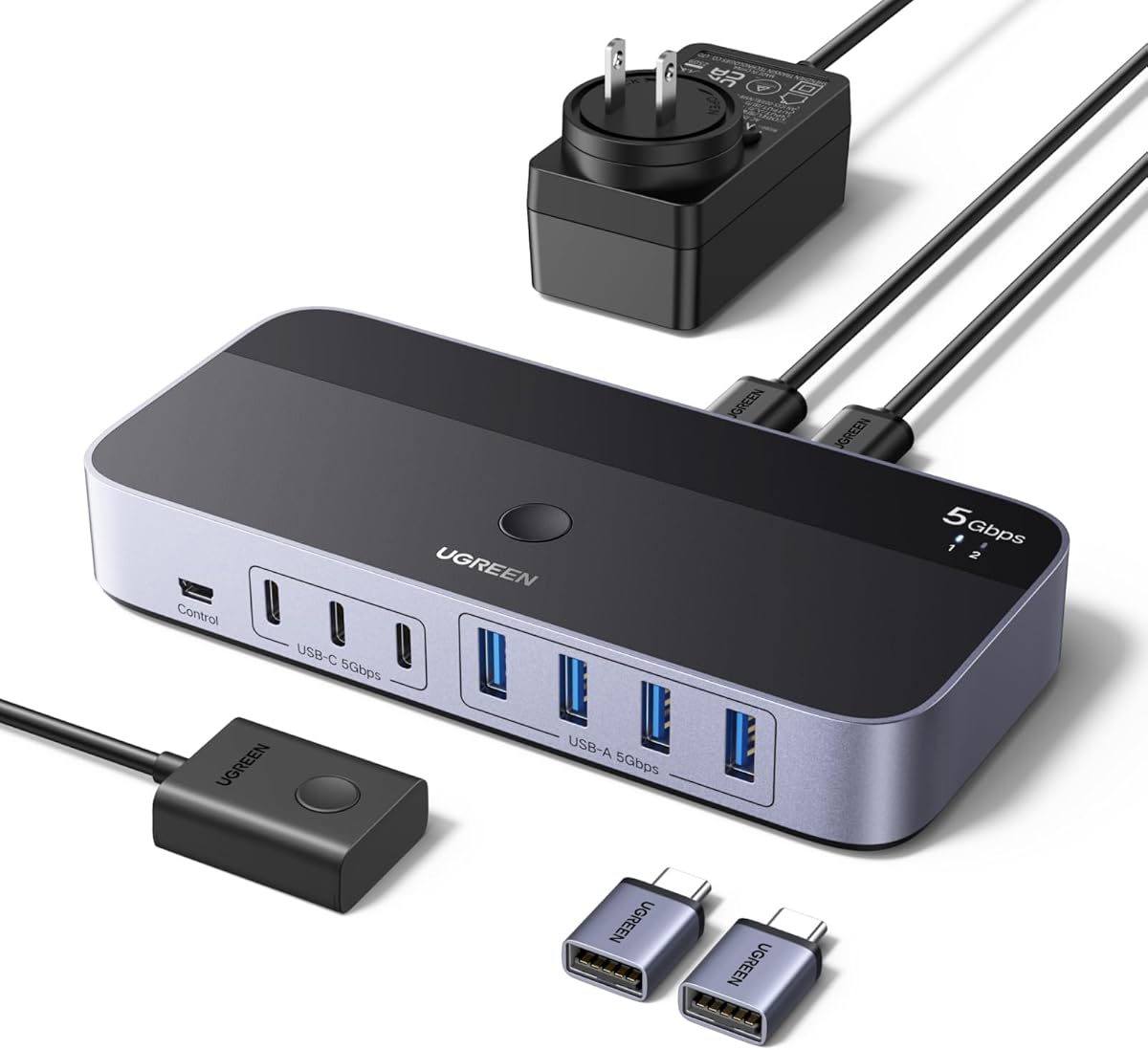


The UGREEN USB 3.0 Switch is a top-rated device for sharing peripherals between two computers. With a 4.0 rating, it excels at allowing two PCs to share up to four USB devices seamlessly. It supports both USB-C and USB-A ports for maximum flexibility.
We may earn a commission when you buy through this link, at no additional cost to you.
This switch offers high-speed 5Gbps data transfer and is compatible with Windows, macOS, Linux, and Chrome OS. You get two USB 3.0 cables and a controller for convenient switching between work and personal setups without swapping cables.
While it does not support video transmission like a KVM switch, it is specifically designed for sharing keyboards, mice, printers, and scanners. The optional power supply ensures stability for high-power devices like external drives.
Ideal for home offices or dual-PC workstations, this switch boosts efficiency by keeping peripherals connected to one hub. It is an excellent choice if you need reliable USB sharing without video routing capabilities.
This switch supports both USB-C and USB-A devices, allowing you to connect a wide range of modern and legacy peripherals without extra adapters.
You can switch using the built-in button or the included remote controller, giving you options to keep your desk tidy or access switching easily.
We may earn a commission when you buy through this link, at no additional cost to you.
The BENFEI USB 3.0 Switch is highly rated for its ability to share up to four USB devices between two computers. With a 4.1 rating, it delivers reliable performance for keyboards, mice, and printers without requiring drivers.
We may earn a commission when you buy through this link, at no additional cost to you.
It features four USB 3.0 ports for fast 5Gbps data transfer and an LED indicator to show which computer is active. An extra power slot helps stabilize high-power devices like hard drives or webcams during use.
While it is not a true KVM switch, it is perfect for sharing peripherals without video. It works with Windows, Mac, and Linux systems, and the included power cable supports extra power needs for stability.
This switch is ideal for budget-conscious users needing multi-device sharing. The included warranty and customer service add value, making it a dependable choice for dual-PC home offices.
The LED indicator clearly shows which computer is active, making switching intuitive and preventing confusion when managing dual PCs.
An extra power supply slot ensures high-power devices like external drives or webcams run stably without disconnection issues.
We may earn a commission when you buy through this link, at no additional cost to you.
The 2 in 2 Out USB 3.0 Switch holds a standout 4.6 rating for simplicity and reliability. It allows two computers to share two USB devices like a keyboard and mouse without needing to unplug cables.
We may earn a commission when you buy through this link, at no additional cost to you.
This switch supports high-speed 5Gbps data transfer and features a one-button LED switch for easy toggling between PCs. Its aluminum alloy shell ensures good heat dissipation and durability for long-term use.
While it is limited to sharing only two devices, this is often sufficient for basic setups. It works with Windows, Mac, and Linux, and includes two USB 3.0 cables to get you started immediately.
For users wanting a simple, affordable way to share essential peripherals, this switch is the top budget choice. It removes cable clutter and boosts productivity efficiently.
With a 4.6 rating, this switch is praised by users for its reliability and ease of setup in dual-PC environments.
The aluminum alloy shell offers robust protection and better heat dissipation compared to plastic alternatives for lasting performance.
We may earn a commission when you buy through this link, at no additional cost to you.
The UGREEN 2 in 2 Out Switch is a simple yet effective tool for sharing essential peripherals between two computers. With a 4.1 rating, it provides reliable connectivity for keyboards, mice, and printers without complex setup.
We may earn a commission when you buy through this link, at no additional cost to you.
It supports fast 5Gbps data transfer and features a one-button switch with an LED indicator to show which PC is active. Two USB 3.0 cables are included for immediate use.
This model is ideal for users who only need to share a few devices. It works with Windows, Mac, and Linux, and eliminates the need to unplug cables when switching machines.
If you want a clutter-free dual-PC workspace with minimal ports, this switch is a great choice. It is straightforward, fast, and budget-friendly.
USB 3.0 support ensures files and data move quickly between computers, enhancing productivity when sharing peripherals.
Plug-and-play compatibility with major operating systems means no drivers or software are needed for quick installation.
We may earn a commission when you buy through this link, at no additional cost to you.
The Hearvo HDMI KVM Switch stands out as the best premium option for users needing both video and peripheral sharing. It supports 4K resolution at 60Hz and allows two computers to control one monitor plus four USB devices.
We may earn a commission when you buy through this link, at no additional cost to you.
It features USB 3.0 ports for fast data transfer and a wired remote for convenient switching. The adaptive EDID ensures stable image transmission, and it works with most operating systems without drivers.
While it is more expensive than basic USB switchers, the ability to share a monitor adds significant value for users with limited desk space. It also supports various input devices like laptops and game consoles.
Ideal for advanced setups needing visual sharing, this switch simplifies dual-PC management. It is a top choice for productivity and entertainment combined.
With 4K 60Hz support, you get crystal-clear visuals, making it perfect for creative work or multimedia consumption.
The included wired remote lets you switch computers easily without reaching behind devices, keeping your desk tidy.
We may earn a commission when you buy through this link, at no additional cost to you.
The UGREEN USB Switch Selector is a reliable USB 2.0 option for sharing up to four devices between two computers. With a 4.4 rating, it is praised for its one-button swapping and plug-and-play functionality.
We may earn a commission when you buy through this link, at no additional cost to you.
It works with Windows, Mac, and Linux, and an LED indicator shows the active PC. While it offers slower USB 2.0 speeds, it is sufficient for keyboards, mice, printers, and scanners.
An optional micro USB power port helps stabilize high-power devices like hard drives. Two USB A to A cables are included to get started immediately without extra purchases.
For users who do not need high-speed data transfer, this is a cost-effective and durable solution. It is excellent for basic office or home use.
The one-button design makes switching between computers incredibly fast and simple, reducing downtime during work.
An optional micro USB port ensures stable operation for power-hungry devices like external drives or digital cameras.
We may earn a commission when you buy through this link, at no additional cost to you.
The UGREEN USB 3.0 Switch Selector provides fast data speeds and multiple ports for sharing peripherals between two computers. With a 4.3 rating, it is ideal for users needing to connect several devices like keyboards, scanners, and external drives.
We may earn a commission when you buy through this link, at no additional cost to you.
It features four USB 3.0 ports with 5Gbps transfer speeds and a one-button switch for easy toggling. An extra USB C power port helps stabilize high-power devices during use.
Two USB 3.0 cables are included, and it works with Windows, Mac, and Linux without drivers. It is a great choice for users who need faster speeds than USB 2.0 offers.
This switch balances performance and affordability well. It is perfect for home offices requiring reliable multi-device sharing with high-speed data transfer.
USB 3.0 ports enable quick file transfers between computers, improving workflow when sharing devices regularly.
The extra USB C power port ensures high-power devices like external drives remain stable during use.
We may earn a commission when you buy through this link, at no additional cost to you.
The UGREEN 2-in 7-Out USB 3.0 Switch is a powerhouse for extensive device sharing between two computers. With a 4.3 rating, it supports four USB-A and three USB-C ports, perfect for modern and legacy peripherals.
We may earn a commission when you buy through this link, at no additional cost to you.
It includes a power adapter and USB-C adapter to ensure stability and compatibility. A controller is included for easy switching, and data transfer speeds reach up to 5Gbps for fast file sharing.
While pricier than other options, the capacity to share seven devices makes it unique. It works with Windows, Mac, and Linux, and simplifies complex setups with multiple devices.
Ideal for power users needing maximum connectivity, this switch is a top choice for clutter-free dual-PC management.
With seven ports total, you can connect keyboards, mice, drives, and more without needing extra hubs.
A power adapter ensures stable operation for all connected devices, reducing disconnects.
We may earn a commission when you buy through this link, at no additional cost to you.
The USB Switch 2 in 2 Out is a straightforward solution for sharing two peripherals between two computers. With a 4.2 rating, it is easy to set up and works well for basic dual-PC needs.
We may earn a commission when you buy through this link, at no additional cost to you.
It features a one-button LED switch and includes an external controller to keep your desk tidy. Two USB cables are included for immediate use, and it works with major operating systems.
While limited to two devices, this switch is perfect for users who only need keyboard and mouse sharing. It is affordable and reliable for everyday home use.
For minimalists wanting clean workspace management, this switch offers great value without unnecessary complexity.
An external desktop switch controller helps keep your workspace clean by placing the control button within easy reach.
Included USB cables mean you can start using the switch right out of the box without extra purchases.
We may earn a commission when you buy through this link, at no additional cost to you.
The UGREEN USB 3.2 Switch offers the fastest transfer speeds on this list, reaching up to 10Gbps. With a 4.3 rating, it supports seven USB ports and is perfect for users needing to move large files quickly between computers.
We may earn a commission when you buy through this link, at no additional cost to you.
It includes a power adapter and USB-C adapter for stable, versatile connectivity. Four USB-A and three USB-C ports allow extensive device sharing, and a controller is included for easy switching.
While more expensive, the performance makes it ideal for demanding workflows involving external drives or large data sets. It works with Windows, Mac, and Linux seamlessly.
For power users prioritizing speed, this switch is the top premium choice. It simplifies dual-PC management with high-speed data capabilities.
With 10Gbps speeds, you can transfer large files in seconds, significantly improving productivity.
Seven ports total allow you to connect multiple devices without needing extra hubs or docks.
We may earn a commission when you buy through this link, at no additional cost to you.
Choosing the right switch depends on your needs for speed, port count, and whether you need video sharing. This guide breaks down the key factors to consider.
USB 3.0 and higher offer speeds up to 5Gbps or more, which is ideal for external drives or frequent file transfers. USB 2.0 is sufficient for keyboards, mice, and printers but slower for data-heavy tasks.
Choose USB 3.0 or higher if you need fast data transfer; otherwise, USB 2.0 can save cost for basic use.
Switches range from 2 ports to 7 or more. Count your devices to ensure you have enough ports for all peripherals without needing hubs.
More ports offer flexibility but may cost more. Choose based on how many devices you need to share.
KVM switches include video output allowing you to share a monitor. USB-only switches do not support video, focusing only on data devices like keyboards, mice, and printers.
If you need to share a screen, choose a KVM switch; otherwise, a USB switch is simpler and often cheaper.
Most modern switches work with Windows, macOS, Linux, and Chrome OS without drivers. Always verify compatibility with your specific systems before purchasing.
Look for plug-and-play models to avoid installation issues across your devices.
High-power devices like external hard drives may need extra power for stability. Some switches include power adapters or slots for external power.
Check if the switch includes a power adapter if you plan to share high-power peripherals.
Switches come with buttons on the unit or external controllers. External controllers keep your desk tidy but may add bulk.
Choose a button or controller based on your desk space and switching convenience.
Some models include USB cables, while others require separate purchases. This affects the total cost and setup time.
Verify which cables are included to avoid unexpected costs when buying.
Aluminum builds offer better durability and heat dissipation. Longer warranties indicate manufacturer confidence in product quality.
Invest in sturdy builds with good warranties for long-term reliability.
Connect the switch to your two computers using the included USB cables. Ensure each computer is linked to a USB port on the switch before plugging in your peripherals.
Plug your keyboard, mouse, or other devices into the switch's USB ports. Use the button or controller to toggle between computers and confirm which system is active via LED indicators.
To maintain performance, keep the switch in a cool, dry place. Avoid overloading ports with high-power devices without an extra power supply to ensure stable operation.
No, standard USB switches are designed for data devices like keyboards and mice. To share a monitor, you need a KVM switch that includes HDMI or DisplayPort connections.
Most switches are plug-and-play and do not require drivers on modern operating systems like Windows or macOS. Just connect the cables and start using them.
Yes, some switches support sharing multiple USB devices like two keyboards or mice. Check the port count to ensure it meets your specific setup needs.
Many newer switches support USB-C directly. Others may require a USB-C to USB-A adapter. Check the product description for USB-C compatibility details.
USB 3.0 offers faster data transfer speeds up to 5Gbps compared to 480 Mbps on 2.0. Choose 3.0 for external drives or faster file transfers.
Yes, sharing printers is a common use case for USB switches. Just ensure your printer supports USB connections and has compatible drivers.
Not always. Basic switches work via USB power, but high-power devices like external drives may need an external power adapter for stability.
Yes, USB switches are designed to stay connected. Just switch between PCs as needed without unplugging cables for convenience and efficiency.
The UGREEN USB 3.0 Switch and 2 in 2 Out USB 3.0 Switch are top budget choices for simple setups. For advanced needs, the Hearvo HDMI KVM Switch offers video sharing capabilities.
When choosing, prioritize data speed, port count, and whether you need video support. Make sure the switch is compatible with your operating systems and device types.
Prices and availability can change, so check the current listings before buying. With the right switch, you can streamline your dual-PC workspace and boost efficiency.