
Hard Drive Reader USB 3.0 & Type C
4.1Editor score
USB 3.0 and Type-C
Universal drive support
No driver installation needed
This guide compares the top laptop hard drive adapter kits for data recovery and backup, evaluating compatibility, speed, power requirements, and build quality.
Finding the right adapter kit is crucial for accessing old data stored on legacy drives. A reliable solution ensures you can connect IDE and SATA drives to modern USB ports without hassle or data loss risks during transfer.
We evaluated ten top-rated kits based on connection speed, power stability, and universal drive support. Our analysis focuses on real-world performance for backups, recovery, and cloning across various operating systems and drive capacities.
Each pick highlights specific strengths like dual-drive support or Type-C compatibility. While prices fluctuate daily, these models offer consistent value. Always verify your drive type and power needs before purchasing to ensure seamless integration with your system.
4.1Editor score

4.4Editor score
4.6Editor score
This side-by-side comparison highlights key differences across the top ten adapter kits. We examine interface types, power requirements, drive compatibility, and transfer speeds to help you select the most suitable tool for your specific data recovery needs.


The Unitek USB 3.0 IDE/SATA Adapter stands out as a top choice for users needing to connect both IDE and SATA drives. With a 4.4 rating, it offers robust dual-drive functionality and high-speed transfers. Its design ensures stability during data recovery and backup tasks.
We may earn a commission when you buy through this link, at no additional cost to you.
Key strengths include simultaneous connection of one IDE and one SATA drive. The adapter supports USB 3.0 for rates up to 6Gbps, backward compatible with older ports. It includes a dedicated 12V power adapter essential for stable operation of 3.5 inch drives.
Trade-offs involve the lack of USB-C support, which may limit modern laptop compatibility. Also, the external power requirement adds bulk. However, these are acceptable for the reliability and flexibility provided in professional and home data recovery scenarios.
This adapter is ideal for IT enthusiasts and office workers handling legacy drives. We recommend it for anyone needing a versatile tool that supports multiple drive types and ensures data integrity during transfer.
Users can connect two drives at once to facilitate quick data copying or verification.
USB 3.0 interface enables fast migration of large files with minimal downtime.
We may earn a commission when you buy through this link, at no additional cost to you.
The Hard Drive Reader USB 3.0 & Type C offers a cost-effective solution for connecting legacy drives. With a 4.1 rating, it supports both USB-A and USB-C ports for broad laptop compatibility. It is a strong choice for budget-conscious users needing quick data access.
We may earn a commission when you buy through this link, at no additional cost to you.
Strengths include universal support for 2.5 and 3.5 inch drives and a plug-and-play design that requires no drivers. The included Type-C adapter ensures it works with modern devices without extra dongles. Technical support is available for troubleshooting complex issues.
On the downside, IDE transfer speeds are lower compared to SATA options. The build quality is functional but not rugged. These trade-offs are acceptable given the low price point and versatility for occasional data recovery tasks.
We recommend this kit for casual users or those on tight budgets needing occasional access to old drives. It is especially suitable for those owning modern laptops with USB-C ports.
The included adapter ensures seamless connection to newer laptops lacking USB-A ports.
No driver installation is required, allowing immediate use across Windows and Mac systems.
We may earn a commission when you buy through this link, at no additional cost to you.
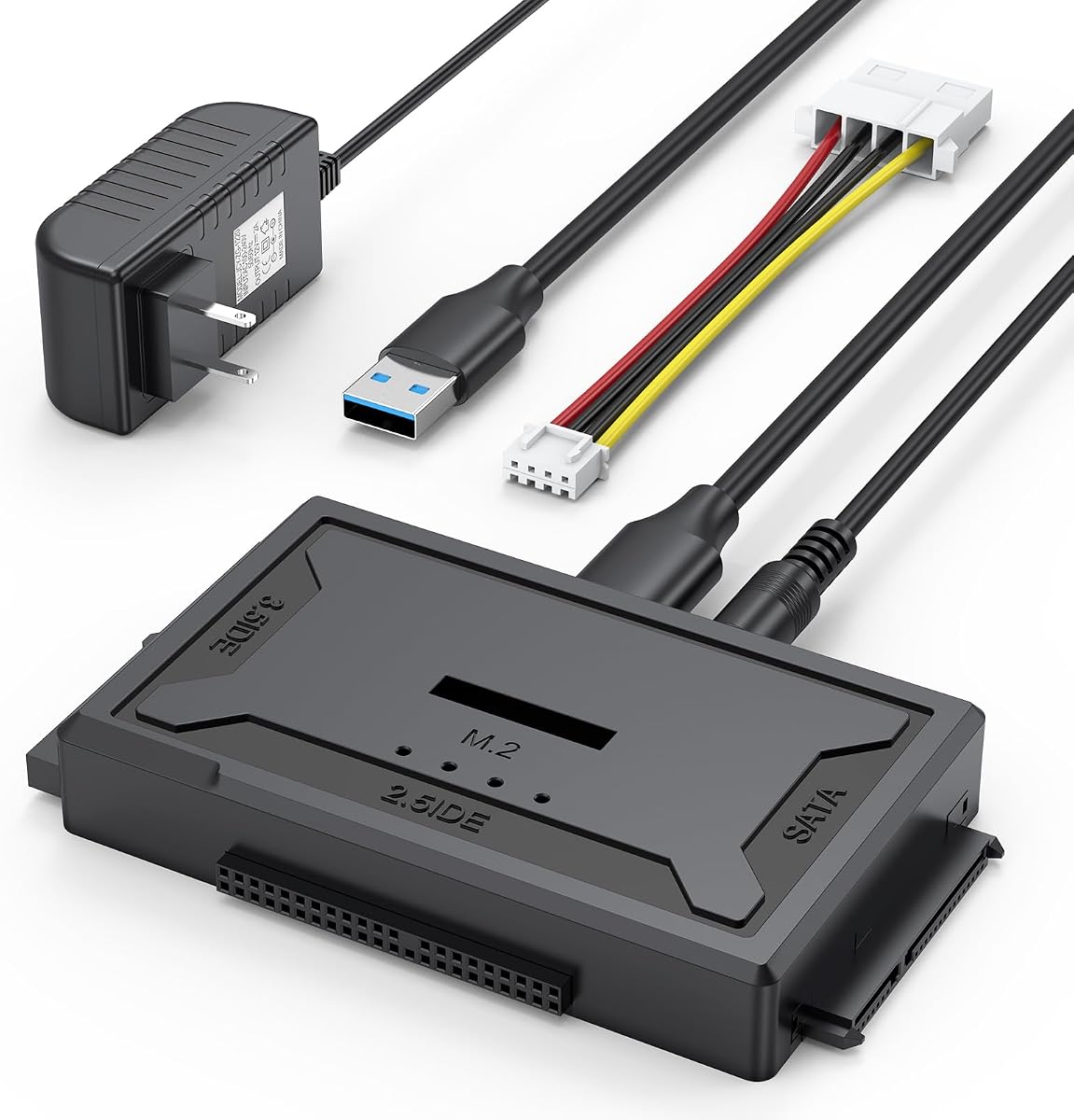
The Hard Drive Reader 4-in-1 offers comprehensive support for M.2, SATA, and IDE drives in one kit. With a 4.6 rating, it delivers fast 10Gbps speeds for M.2 SSDs. It is the top pick for users needing advanced capabilities and future-proofing.
We may earn a commission when you buy through this link, at no additional cost to you.
Key strengths include the ability to read NVMe protocols and a flexible power cable designed for easier connection. The upgraded design improves connection distance for IDE drives. It supports multiple operating systems with strong technical support for complex recovery needs.
Trade-offs include a higher price compared to basic kits and potential complexity for casual users. However, for professionals or those with mixed drive types, the versatility and speed justify the investment. It is built for reliability.
We recommend this kit for IT professionals or enthusiasts managing diverse drive types. It is ideal for users requiring the fastest possible transfer speeds and support for modern M.2 hardware.
Users can access ultra-fast SSDs without needing separate adapters for different formats.
The flexible 4-pin cable makes connecting older IDE drives much easier and safer.
We may earn a commission when you buy through this link, at no additional cost to you.
The YINNCEEN External Hard Drive Ultra Recovery Converter provides robust support for both IDE and SATA drives. With a 4.3 rating, it features a 12V power supply for stability and supports up to 6TB capacity. It is a solid option for data recovery.
We may earn a commission when you buy through this link, at no additional cost to you.
Key strengths include support for 40 and 44 pin IDE drives and a 5Gbps USB 3.0 transfer rate. The included power supply ensures 3.5 inch drives function reliably. It works seamlessly with Windows and Mac systems without extra drivers.
Trade-offs include the need to set jumpers on older IDE drives, which can be tricky for beginners. The power adapter adds weight to the kit. These minor inconveniences are worth it for the broad drive compatibility offered.
We recommend this kit for users needing to access older IDE drives alongside modern SATA SSDs. It is particularly useful for data recovery scenarios where drive types vary widely.
Supports both 40 and 44 pin IDE connectors to maximize compatibility with older hardware.
The included 12V adapter ensures stable operation for all drive types during transfer.
We may earn a commission when you buy through this link, at no additional cost to you.
This FEMORO SATA IDE to USB adapter is designed for home users and professionals alike. With a 4.6 rating, it features an extended body for easier IDE port access. It includes professional tech support and a stable 12V power supply.
We may earn a commission when you buy through this link, at no additional cost to you.
Key strengths include the softer 4-pin cable and flexible USB 3.0 cable for reliable connections. The on/off power switch protects drives from electrical damage. The LED indicator helps monitor power and activity status effectively.
Trade-offs involve a slightly higher price point than entry-level kits. Cable management may require attention in tight spaces. However, the added safety features and support make it a valuable choice for serious users.
We recommend this kit for those prioritizing safety and support during data recovery. It is suitable for office workers and IT enthusiasts needing reliable performance with backup options.
The extended body design improves access to IDE ports on older hard drives.
On/off switches and stable power supplies reduce risks of electrical damage to drives.
We may earn a commission when you buy through this link, at no additional cost to you.
The SABRENT USB 3.0 to SATA Hard Drive Docking Station offers a simple, tool-free solution for SATA drives. With a 4.4 rating, it supports 2.5 and 3.5 inch drives with UASP for improved speeds. It is ideal for quick swapping of drives.
We may earn a commission when you buy through this link, at no additional cost to you.
Key strengths include the lay-flat bay that accepts bare drives without screws. The 12V power adapter ensures stability for 3.5 inch drives. Hot-swap capabilities allow quick access without rebooting your computer.
Trade-offs include lack of IDE support, limiting it to SATA users. The external power requirement adds dependency on a wall outlet. These are acceptable for users needing a straightforward docking solution for modern storage.
We recommend this station for users working exclusively with SATA SSDs or HDDs. It is a strong choice for data backups and frequent drive access.
Insert drives into the bay without tools, allowing quick access without system reboot.
Supports UASP protocol for faster data transfer on compatible computers and systems.
We may earn a commission when you buy through this link, at no additional cost to you.
The SABRENT USB 3.0 to 2.5in SATA Adapter Cable offers a compact, bus-powered solution for laptop drives. With a 4.7 rating, it delivers fast UASP speeds without needing external power. It is perfect for travelers needing quick access to data.
We may earn a commission when you buy through this link, at no additional cost to you.
Key strengths include its tiny size and plug-and-play functionality. It works directly with USB 3.0 ports for 5Gbps transfer rates. The design supports hot-swapping, allowing quick connection of 2.5 inch SATA drives without extra cables.
Trade-offs include lack of support for 3.5 inch drives requiring external power. It is limited to 2.5 inch form factors only. However, for laptop drives, the portability and speed make it a top choice.
We recommend this cable for users traveling with 2.5 inch SSDs or HDDs. It is ideal for quick file transfers without needing bulky adapters.
The small cable design fits easily in any bag for data access on the go.
No external power adapter is needed, relying solely on the USB port for energy.
We may earn a commission when you buy through this link, at no additional cost to you.
The BENFEI 2.5 Inch SATA to USB Enclosure provides a protective housing for internal drives. With a 4.6 rating, it features tool-free installation and supports up to 6TB capacity. It is ideal for turning internal drives into external backups.
We may earn a commission when you buy through this link, at no additional cost to you.
Key strengths include support for both USB-C and Type-A connectors with UASP for faster speeds. The push-in design makes installation easy without tools. It is optimized specifically for SSD performance and offers an 18-month warranty.
Trade-offs include support limited to 2.5 inch drives only. IDE support is not included. These are minor for users needing a durable solution to protect and access laptop drives reliably.
We recommend this enclosure for those needing a portable external drive solution. It is perfect for upgrading old laptop drives to portable external storage.
Simply push out the cover to install drives without needing any screwdrivers or tools.
Supports UASP protocol to ensure SSDs reach their maximum potential transfer speeds.
We may earn a commission when you buy through this link, at no additional cost to you.
This adapter supports 2.5 and 3.5 inch SATA HDD/SSD and IDE drives with a dual interface design. With a 4.3 rating, it allows connecting two drives simultaneously. It is a versatile choice for data recovery with broad compatibility.
We may earn a commission when you buy through this link, at no additional cost to you.
Key strengths include USB and Type-C ports for modern laptop support. The 12V power adapter ensures 3.5 inch IDE drives function reliably. It supports up to 6TB capacity with fast 5Gbps transfer speeds.
Trade-offs include complexity with jumper settings for new drives. The cables require management during use. However, the versatility for multiple drive types makes it a powerful tool for diverse storage needs.
We recommend this kit for users managing mixed drive types. It is ideal for home users needing to connect both SATA and IDE drives simultaneously.
Both USB and Type-C ports ensure compatibility with a wide range of modern laptops.
Supports one IDE and one SATA drive connected at once for easy data migration.
We may earn a commission when you buy through this link, at no additional cost to you.
This adapter supports 2.5 and 3.5 inch HDD/SSD and IDE drives with dual-head IDE connectors. With a 4.5 rating, it includes a USB 3.0 and USB-C design for modern compatibility. It offers broad drive support and fast transfers.
We may earn a commission when you buy through this link, at no additional cost to you.
Key strengths include 5Gbps transfer rates and support for optical drives like CD-ROMs. The on/off switch protects HDDs from electrical damage. It includes a 12V power adapter for stable operation of larger drives.
Trade-offs include jumper settings needed for new drives which can be tricky. The power adapter adds bulk. However, for universal support across various drive formats, it offers excellent value for recovery tasks.
We recommend this kit for users needing a broad compatibility solution. It is suitable for those dealing with older IDE drives and modern SATA SSDs.
Supports IDE, SATA, and optical drives ensuring access to virtually any legacy hardware.
The USB and USB-C cables ensure compatibility with both old and new computers.
We may earn a commission when you buy through this link, at no additional cost to you.
Choosing the right adapter kit requires balancing interface compatibility, power needs, and speed.
Consider if your laptop has USB-A, USB-C, or both. Adapters supporting both offer the most flexibility.
Select a kit with Type-C support if you have modern devices to avoid needing extra dongles.
3.5 inch drives require external 12V power for stability. Ensure the kit includes a compatible power adapter.
For 2.5 inch drives, bus power is often sufficient, but external power adds reliability.
Check if you need support for IDE, SATA, or M.2 drives. Most kits cover SATA and IDE but not all include M.2.
Choose a universal kit if you deal with mixed drive types to avoid buying multiple adapters.
USB 3.0 offers up to 5Gbps which is suitable for most data recovery tasks.
Opt for adapters with UASP support to maximize SSD transfer speeds.
Hot-swap support allows changing drives without rebooting the system.
Look for an on/off switch to safely disconnect drives during use.
Robust cables and stable connectors prevent intermittent disconnections during long transfers.
Choose kits with durable designs if you plan to travel or use them frequently.
Ensure the adapter works with your specific OS including Windows, Mac, and Linux.
Plug-and-play functionality is preferred to avoid complex driver installations.
Basic kits are affordable for occasional use while professional kits cost more for added features.
Invest in higher quality if data recovery is critical to avoid potential data loss.
Connect the adapter to your computer using the USB port, ensuring it is secure before powering up. Always use the included external power adapter for 3.5 inch drives.
To swap drives, use the on/off switch to safely disconnect power before removing the drive. Avoid removing drives while they are spinning.
Store the adapter and cables in a protective case to prevent damage. Regularly check connectors for debris to ensure stable connections.
Most adapters are plug-and-play and do not require manual driver installation on modern systems. However, some older operating systems may need drivers provided by the manufacturer.
Many modern adapters support both USB-C and USB-A. Check the product specifications to confirm if a Type-C adapter is included with the kit.
3.5 inch drives require an external 12V power supply to spin up. The included adapter is essential for stable operation and data safety.
Some kits support both IDE and SATA, but others only support SATA. Always verify the connectors included match your drive type before purchasing.
Most adapters work with Mac OS if the file system is compatible. You may need to format the drive using Disk Utility for read/write access.
Many adapters support drives up to 6TB or even 20TB. Check the product specifications to ensure it fits your drive's capacity requirements.
The Unitek and Hard Drive Reader 4-in-1 kits offer top-tier performance for diverse needs. Budget options like the Hard Drive Reader USB 3.0 & Type C are great for occasional use.
Prioritize power stability and interface compatibility to ensure smooth data recovery. Selecting a kit with both USB-A and USB-C support is highly recommended for modern laptops.
Always verify your drive type and check current prices on Amazon. This ensures you get the best value and avoid compatibility issues.