
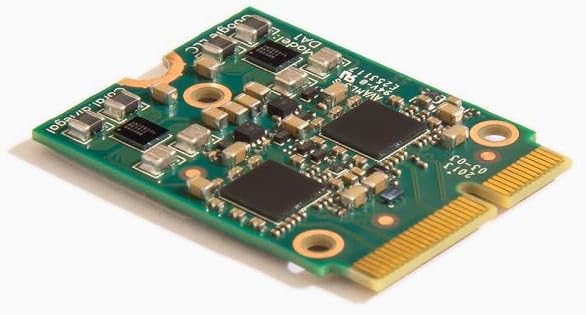
G650-04686-01 Coral M.2 Accelerator
5.0Editor score
4 TOPS peak performance
Works with Debian Linux
Supports TensorFlow Lite
This comprehensive guide compares the top M2 Accelerator Cards for AI inference and edge computing to help you choose the right hardware for your specific
M2 Accelerator Cards are essential components for modern edge computing and AI inference tasks. They provide specialized processing power that general purpose CPUs cannot match efficiently. Choosing the right card depends on your specific workload requirements and system compatibility needs.
We evaluated ten leading M2 Accelerator Cards based on performance specifications and software support. Our analysis focuses on throughput capabilities and power efficiency as well as integration ease. This list covers options ranging from budget friendly modules to high performance enterprise solutions.
Each pick highlights key features and ideal use cases for different user scenarios. Prices and availability change frequently so always verify current listings before purchasing. We aim to provide clear guidance for developers and hardware enthusiasts seeking reliable acceleration.
5.0Editor score

4.3Editor score

4.6Editor score
The following table provides a side by side comparison of all ten M2 Accelerator Cards reviewed in this guide. It highlights key specifications and compatibility details to help you quickly identify the best fit for your project needs.


The MX3 M.2 AI Accelerator stands out as a top choice for developers needing robust computer vision capabilities. It delivers exceptional performance while maintaining high efficiency for edge deployment scenarios.
We may earn a commission when you buy through this link, at no additional cost to you.
Its flexible integration allows seamless adoption into existing systems via the standard M.2 M-key form factor. The comprehensive SDK simplifies the deployment process significantly for software engineers.
While it is optimized for Linux environments which may limit some use cases the power efficiency makes it ideal for battery operated devices. The hardware compatibility with Pi 5 expands its reach to hobbyists.
Buyers seeking a balance of performance and ease of use will find this card compelling. It is a strong recommendation for professional and semi professional AI edge projects.
The MX3 delivers high throughput for AI tasks while keeping power draw low for sustainable operation.
Access to a comprehensive SDK ensures that building and deploying models remains straightforward for teams.
We may earn a commission when you buy through this link, at no additional cost to you.
This dual TPU card offers a compelling entry point for those needing more compute power without a high cost. It combines two Google Edge TPUs to boost inference speeds for complex models.
We may earn a commission when you buy through this link, at no additional cost to you.
The efficiency rating of 2 TOPS per watt ensures it runs cool and fits well into constrained power budgets. This makes it suitable for small form factor devices requiring reliable AI processing.
The limitation to PCIe Gen2 means raw bandwidth is lower than newer standards but often sufficient for inference tasks. The compact 2230 size may require careful planning in dense system layouts.
For budget conscious buyers needing dual core TPU performance this adapter is a solid pick. It maximizes value by leveraging established Edge TPU technology effectively.
Two integrated Edge TPUs provide double the compute resources for parallel task execution and faster inference.
With low wattage requirements this card is ideal for portable or battery dependent edge computing setups.
We may earn a commission when you buy through this link, at no additional cost to you.
The Coral M.2 Accelerator B+M Key is a highly rated solution for deploying ML models on edge devices efficiently. It leverages the Edge TPU to deliver consistent performance with minimal power usage.
We may earn a commission when you buy through this link, at no additional cost to you.
Users appreciate the seamless integration with Debian based Linux systems which simplifies development workflows significantly. TensorFlow Lite models compile directly to run on the hardware without extensive rework.
While it supports only a single TPU it provides robust capabilities for many standard vision tasks at a low cost. The high user rating reflects its reliability and ease of deployment in real world settings.
Buyers looking for a proven and efficient accelerator will find this card excellent for its price. It is a top recommendation for developers focused on practical deployment speed.
Designed for Debian systems this card reduces setup time and friction for Linux based developers.
Delivering 4 TOPS at 0.5 watts per TOPS ensures high performance without excessive heat or power draw.
We may earn a commission when you buy through this link, at no additional cost to you.
This QNAP expansion card enhances NAS performance by adding NVMe storage and fast networking options simultaneously. It serves hardware critical infrastructure roles rather than dedicated AI inference tasks.
We may earn a commission when you buy through this link, at no additional cost to you.
The included 10GbE port allows for rapid data transfers which is essential for large datasets or high bandwidth streaming. The Marvell Ethernet controller ensures reliable connectivity across different network environments.
Although it does not offer AI acceleration its value lies in system expansion and throughput improvements for servers. The bracket included ensures compatibility with standard chassis without extra purchases or modifications needed.
Buyers needing storage and network upgrades for QNAP systems will find this card highly useful. It addresses specific infrastructure bottlenecks effectively.
Combining NVMe slots with a 10GbE port provides comprehensive upgrades for high performance storage networks.
Support for QTS QuTS hero and Linux Windows makes this versatile for mixed OS server environments.
We may earn a commission when you buy through this link, at no additional cost to you.
The Rocket 1604L delivers cutting edge storage expansion with PCIe 5.0 speeds for maximum throughput capabilities. It supports up to four M.2 devices ensuring scalability for demanding storage needs.
We may earn a commission when you buy through this link, at no additional cost to you.
Natively supported by mainstream operating systems it requires minimal driver work for deployment. The wide range of supported form factors like 2242 and 2280 makes it versatile for different use cases.
While it does not perform AI acceleration it is a premium option for systems requiring high speed data pipelines. The PCIe 5.0 interface ensures future proofing for emerging storage technologies.
Buyers prioritizing bandwidth and scalability will appreciate this card robust architecture. It is a top choice for high end storage solutions.
PCIe 5.0 x16 connectivity offers the fastest available data transfer speeds for intensive storage workloads.
With four dedicated ports this card allows systems to grow storage capacity without replacing the whole card.
We may earn a commission when you buy through this link, at no additional cost to you.
This adapter transforms a standard PCIe slot into a dual TPU workstation for advanced AI edge computing tasks. It supports two Coral M.2 Accelerator Cards simultaneously for parallel inference execution.
We may earn a commission when you buy through this link, at no additional cost to you.
The included heatsink ensures that thermal management remains adequate even when running two high performance modules together. This physical design prevents throttling and maintains consistent performance during long runtime.
While it requires separate TPU purchases it offers a cost effective path to multi core TPU setups. Developers can scale their hardware investment without buying entirely new dedicated systems.
Buyers looking to maximize existing TPU hardware will find this adapter invaluable for expansion. It is a smart choice for scaling AI workloads.
Support for two TPU cards allows for simultaneous model execution and higher aggregate throughput.
Integrated heatsink keeps the cards cool ensuring stable performance during continuous operation without throttling.
We may earn a commission when you buy through this link, at no additional cost to you.
The ASUS Hyper M.2 x16 Gen5 Card brings server grade performance to consumer platforms with four NVMe drive slots. It supports RAID functions to create bootable arrays for increased reliability and speed.
We may earn a commission when you buy through this link, at no additional cost to you.
Thermal management is handled by a large heatsink and active fan which reduces SSD temperatures for unthrottled speeds. This active cooling ensures that sustained data transfers do not degrade performance over time.
While it is a storage focused product rather than an AI accelerator it offers immense bandwidth potential for data intensive apps. Users should be aware of the extra power connection needed for full operation.
Buyers needing high capacity and speed storage arrays will find this card robust and reliable. It delivers professional features at a competitive price point.
Designed with server grade PCBs this card maintains stability even under heavy sustained data transfer loads.
A built-in fan and large heatsink ensure drives stay cool preventing thermal throttling during intensive work.
We may earn a commission when you buy through this link, at no additional cost to you.
This module offers an incredible 26 TOPS of performance for those requiring high capacity AI inference on the edge. It is compatible with Raspberry Pi 5 and supports both Linux and Windows systems seamlessly.
We may earn a commission when you buy through this link, at no additional cost to you.
The typical power consumption of 2.5W ensures it remains efficient even when processing complex models continuously. It supports major frameworks like Pytorch and TensorFlow making adoption straightforward for developers.
The main trade-off is that it is a module only which means additional mounting or carrier boards may be required. However the performance density is unmatched by most other options in this category.
Buyers seeking high end performance for sophisticated AI tasks will find this module exceptional. It is a powerful tool for advanced edge computing needs.
26 TOPS allows for running complex models in real time without latency issues even under heavy loads.
Whether you run Linux or Windows this module integrates smoothly ensuring flexibility for diverse environments.
We may earn a commission when you buy through this link, at no additional cost to you.
The Coral M.2 Accelerator A+E Key is built for industrial environments where reliability and temperature tolerance are critical. It delivers 4 TOPS performance in a compact package that fits easily into many systems.
We may earn a commission when you buy through this link, at no additional cost to you.
Operating across a wide temperature range from -20C to +85C ensures it remains functional even in harsh conditions. Its support for Windows and Linux broadens its utility for various project requirements.
While the performance is lower than premium options it remains highly efficient for standard inference tasks. The A+E key interface makes integration simple for embedded developers.
Buyers needing an industrial grade solution will find this card reliable and robust for deployment. It is an excellent choice for rugged edge applications.
Designed to withstand extreme temperatures this card is ideal for outdoor or factory floor deployments.
Compatibility with both Linux and Windows allows for flexible software choices without hardware limitations.
We may earn a commission when you buy through this link, at no additional cost to you.
This adapter is designed exclusively for Coral M.2 Accelerator with Dual Edge TPU modules to maximize their performance. It fits standard 2280 slots ensuring it works with common hardware configurations.
We may earn a commission when you buy through this link, at no additional cost to you.
The inclusion of a stainless steel mounting screw provides vibration-resistant fixation which is useful for industrial use cases. The bidirectional bandwidth supports data flow between the host and the TPU modules efficiently.
While it is limited to PCIe Gen2 speeds it is perfectly adequate for the bandwidth needs of Edge TPUs. The 5.0 rating reflects strong user satisfaction with its functionality and reliability.
Buyers needing a dedicated solution for dual TPU setups will find this adapter ideal. It completes the hardware setup effectively for edge AI tasks.
The included mounting screw ensures the adapter remains secure even in high vibration environments for stability.
Exclusively designed for Dual Edge TPU it ensures best compatibility and performance for specific modules.
We may earn a commission when you buy through this link, at no additional cost to you.
Selecting the right M2 Accelerator Card involves understanding your specific workloads and hardware constraints. This guide outlines key factors to help you make an informed decision for your project.
Performance is measured in TOPS or Tera Operations Per Second which indicates the card's computational capacity. Higher TOPS allow for more complex models and faster processing times but may consume more power. Evaluate the complexity of your AI models and the required inference latency to choose appropriately.
For simple tasks like object detection lower TOPS cards suffice while deep learning requires higher performance modules. Always match the performance level to your application needs to avoid overpaying or underperforming.
Power efficiency is critical for edge devices that rely on batteries or have limited cooling. Look for specifications like TOPS per watt to compare how much computation you get for each watt consumed. Low power cards help extend battery life and reduce heat dissipation requirements in compact enclosures.
Choose a card that aligns with your thermal and power budget to ensure stable long-term operation. Efficient modules are often preferred for portable or outdoor deployments where power is limited.
Ensure the card supports the frameworks you use such as TensorFlow Lite Pytorch or ONNX. Some accelerators require compiling models to specific formats which can impact development time and flexibility. Check the provided SDKs and documentation to see if they fit your development workflow.
Strong software support reduces friction during deployment and ensures tools and community help are available. Prioritize cards with robust ecosystem support for smoother integration and ongoing maintenance.
M2 cards come in various lengths like 2230 2260 and 2280 which dictate physical fit in your system. Verify your motherboard or enclosure supports the specific size and key (M E or B) you are buying. Improper sizing can prevent installation or require adapters that add cost.
Select a form factor that matches your available slot space to ensure a clean build without modifications. Proper physical compatibility is the first step to successful integration.
Most accelerators work with Linux distributions like Debian or Ubuntu but some may have Windows support. Check the product data for explicit OS compatibility to avoid driver or software issues later. If you need cross platform flexibility choose a card that lists both options.
Align OS support with your deployment environment to prevent unexpected barriers during setup. Linux support is common for edge but Windows may be needed for specific industrial applications.
Interface speed such as PCIe Gen2 or Gen3 determines the bandwidth available for data transfer between the host and accelerator. Faster interfaces help reduce bottlenecks when feeding large data to the accelerator. Ensure the interface matches the rest of your system to avoid limiting performance.
Consider the bandwidth requirements of your specific application when selecting the interface generation. While Gen2 may suffice for many inference tasks Gen3 provides better headroom for high throughput data.
Active or passive cooling is necessary to prevent throttling under load. Some cards include heatsinks or fans while others rely on the system chassis. Check if additional cooling is provided or required for the specific model you are buying.
Proper thermal design ensures sustained performance without temperature-related drops. Adequate cooling is essential for reliability especially in enclosed spaces.
Price varies significantly based on performance and features so define your budget early. Consider total cost including any required adapters or enclosures when calculating value. Sometimes a slightly more expensive card offers better long term value due to efficiency.
Balance performance needs with financial constraints to find the most cost effective solution. Value is not just about price but about the capabilities delivered for that cost.
Install the card into the correct M.2 slot on your motherboard ensuring the key aligns properly. Secure it with the mounting screw if provided to prevent movement or loose connections. Verify that the BIOS recognizes the device before installing software drivers.
Ensure your power supply can meet the card's requirements if it draws power through PCIe. Use proper cooling solutions like heatsinks or fans to maintain optimal operating temperatures. Regularly check for thermal throttling signs to prevent performance drops.
Keep the card free from dust and debris to avoid overheating issues. Monitor system temperatures and update firmware regularly for optimal compatibility and performance. Proper care extends the lifespan and reliability of your hardware investment.
Not all motherboards support M.2 AI accelerators or have the correct key slot. Check your motherboard manual for M.2 slot specifications including key type (M B E) and PCIe support. Some may require adapters for proper fit or functionality in your system.
These cards are designed for AI inference and machine learning tasks rather than gaming graphics. They do not replace GPUs for rendering games but enhance specific compute workloads. You will still need a dedicated GPU for gaming performance.
Edge TPU is optimized for TensorFlow Lite and specific model types while Hailo supports broader frameworks. Each has different performance characteristics power usage and software ecosystems. Choose based on your model framework and target deployment environment.
Many AI accelerators generate heat during operation so passive or active cooling is recommended. Some cards include heatsinks but others may rely on system airflow. Always verify thermal needs to prevent throttling under sustained loads.
Yes if your motherboard has multiple compatible M.2 slots or you use a PCIe adapter with support. Each card must have its own slot and power resources. Multi-card setups can increase total throughput for parallel tasks.
Most popular accelerators prioritize Linux support but some like Hailo or Coral also support Windows. Always check the product documentation for OS compatibility before purchasing. Requirements vary by vendor and specific model capabilities.
We reviewed ten leading M2 Accelerator Cards covering various performance levels and use cases. The MX3 offers a balanced high performance option while the Coral M.2 delivers excellent value. Hailo leads in raw throughput for those needing maximum capacity.
Prioritize your workload requirements budget and system compatibility when selecting your card. Ensure thermal and OS support matches your setup for smooth integration and reliable performance. The right choice depends on balancing power efficiency and capability.
Always check current prices and availability before buying as details may change over time. We hope this guide helps you find the perfect accelerator for your projects.