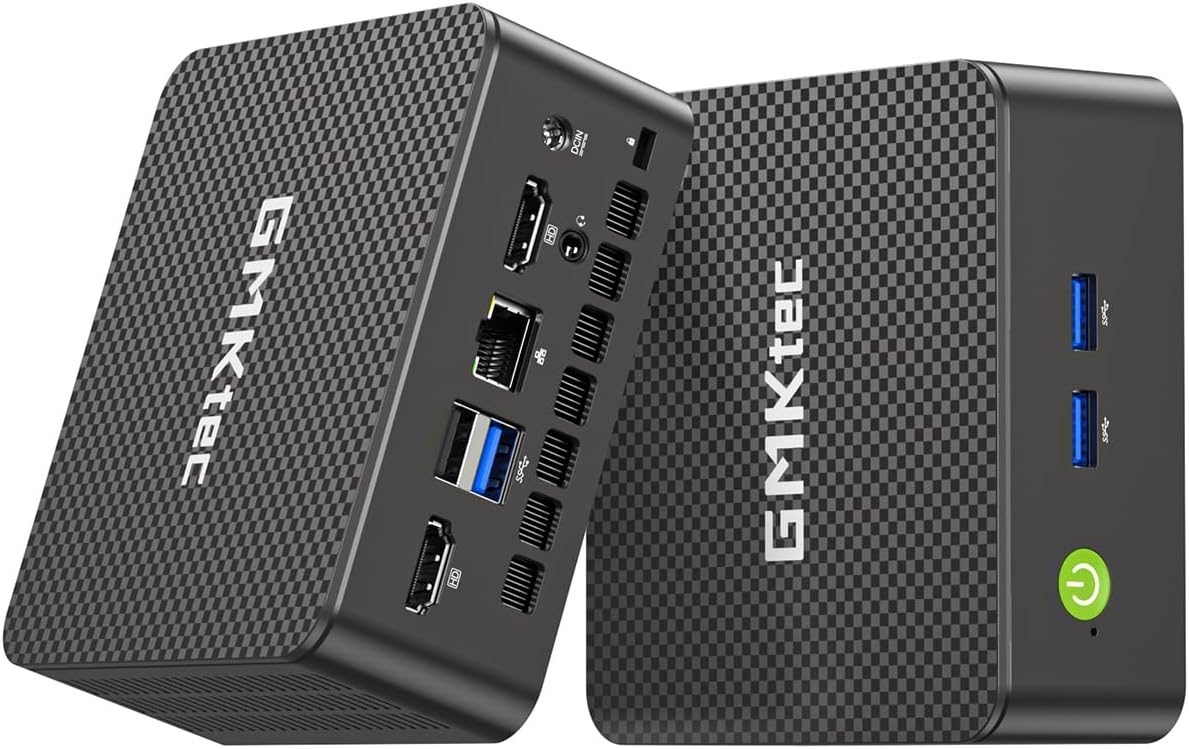
GMKtec G3S Mini PC
4.4Editor score
Intel N95 Processor
Dual 4K Display Support
Affordable Entry Price
Discover the top Linux Mini Pcs for 2026. This guide compares performance, features, and value to help you choose the ideal compact Linux system.
Linux Mini Pcs offer powerful computing in a tiny footprint. They are perfect for developers, home labs, and efficient office setups. Choosing the right one means balancing processor power, memory, and connectivity options for your specific needs.
We evaluated ten top models based on performance, expandability, and Linux compatibility. Our analysis covers everything from entry-level office units to high-end workstation replacements. Each product was selected for its ability to run modern distributions smoothly.
Each pick below highlights key strengths, potential limitations, and ideal use cases. Note that pricing and availability can shift quickly. Always verify current specs and stock before making your final purchase decision today.
4.4Editor score

4.5Editor score

4.7Editor score
This side-by-side comparison outlines the core specifications of all ten selected models. It helps you quickly identify which device fits your performance requirements and budget constraints for running Linux efficiently.


The TK Node Mini PC stands out as the Editor's Choice for users seeking a reliable, Linux-native solution. It ships with Zorin OS Core pre-installed, offering a familiar desktop experience that eases the transition from Windows. Its build quality and US-based support make it a trustworthy long-term investment.
We may earn a commission when you buy through this link, at no additional cost to you.
Performance is robust thanks to the AMD Ryzen R2314 processor, which handles daily productivity and light virtualization with ease. The system supports up to 64GB RAM and 4TB storage, ensuring it grows with your needs. Connectivity options include triple 4K display support and Gigabit Ethernet.
While the base model starts with 8GB RAM, the dual SO-DIMM slots allow for easy upgrades. The price point is higher than entry-level options but reflects the premium support and expandability. This trade-off is acceptable for professionals who need dependability.
Buy this if you need a compact, powerful Linux workstation with official support. It is ideal for developers, home servers, and office environments. The pre-installed OS and warranty make it a hassle-free choice for immediate deployment.
Zorin OS Core provides a polished, user-friendly interface optimized for productivity and development tasks right out of the box.
Dual slots for RAM and NVMe SSDs allow you to scale performance and capacity up to 64GB and 4TB respectively.
We may earn a commission when you buy through this link, at no additional cost to you.
The Beelink SER3 Mini PC offers excellent value for users needing a capable machine for everyday Linux tasks. It comes with 16GB RAM and a 500GB SSD, providing smooth multitasking and fast boot times. The Ryzen 3 3200U processor handles web browsing and office applications well.
We may earn a commission when you buy through this link, at no additional cost to you.
Graphics performance is decent for light media playback with Radeon Vega 3 graphics. Dual HDMI ports allow for a dual-monitor setup, boosting productivity. The system includes WiFi 5 and Bluetooth for versatile connectivity. Beelink offers a three-year warranty and lifetime technical support.
The main limitation is the older CPU, which may struggle with heavy computational tasks or modern gaming. Storage expansion might be limited compared to newer models. However, for general productivity, the price-to-performance ratio remains competitive.
This unit is perfect for home offices or students on a budget who need a reliable Linux box. It is also suitable for media centers where high-end processing is not required. The included warranty adds peace of mind for long-term use.
With 16GB RAM and a fast SSD, this PC handles multiple browser tabs and applications without lag.
Multiple USB ports and dual HDMI outputs ensure you can connect all your essential peripherals easily.
We may earn a commission when you buy through this link, at no additional cost to you.
The ASUS NUC 14 Pro is a powerhouse designed for developers and power users requiring top-tier performance. It features the latest Intel Ultra 7 155H processor and 64GB of DDR5 RAM. Linux Mint is pre-installed, providing a stable environment for coding and AI tasks.
We may earn a commission when you buy through this link, at no additional cost to you.
This mini PC excels in heavy workloads thanks to its scalable memory and fast PCIe SSD. The advanced cooling system ensures silent operation even under sustained loads. Connectivity includes Thunderbolt 4, enabling fast data transfer and docking station support for multiple displays.
The premium price is justified for professionals who need workstation power in a small form factor. For casual users, the specs may be excessive. The investment is best suited for those running virtual machines, complex builds, or data-intensive applications.
Choose this if you need maximum Linux performance and portability. It fits perfectly in enterprise environments or serious home labs. The included wireless keyboard and mouse bundle add extra value for immediate setup without extra purchases.
The Intel Ultra 7 processor delivers cutting-edge AI acceleration and multi-core power for demanding development tasks.
Thunderbolt 4 and WiFi 6E provide lightning-fast data speeds and future-proof wireless connectivity options.
We may earn a commission when you buy through this link, at no additional cost to you.
The Beelink Mini S12 Pro is an ideal choice for energy-efficient computing. Powered by the Intel N100 processor, it consumes minimal power while delivering reliable performance for office work and media streaming. 16GB RAM ensures smooth multitasking for most daily applications.
We may earn a commission when you buy through this link, at no additional cost to you.
This mini PC supports dual 4K displays and includes WiFi 6 for faster wireless connections. Its compact design and silent fan make it suitable for living rooms or quiet offices. It also functions well as a NAS or soft router due to low thermal output.
The single RAM slot limits future expansion to 16GB total. Graphics are sufficient for video playback but not for gaming. However, the trade-off for efficiency and low heat makes it a great secondary device or home server.
Buy this for lightweight Linux desktops, media centers, or home servers. It is perfect for users prioritizing low electricity costs and quiet operation. The robust port selection allows easy integration into existing setups without hassle.
With a 6W TDP, this unit runs cool and quiet, ideal for 24/7 operation without noise.
Dual HDMI 2.0 ports enable a dual-monitor workspace capable of driving 4K resolutions comfortably.
We may earn a commission when you buy through this link, at no additional cost to you.
The KAMRUI Pinova P2 excels in visual multitasking with its triple 4K display capability. The AMD Ryzen 7 3300U processor delivers strong single and multi-core performance. It is perfect for users managing multiple windows or digital signage applications.
We may earn a commission when you buy through this link, at no additional cost to you.
Integrated Radeon Graphics handle visual tasks efficiently. The chassis is compact and designed to be nearly silent under load. Two storage slots allow you to expand storage up to 4TB total. This flexibility is rare in this price range.
The memory is soldered, so you must choose the right amount at purchase. The base storage is modest, requiring an upgrade for large media libraries. Despite this, the performance and display options make it a versatile choice for professionals.
This is a great option for home offices needing multiple screens. It is also ideal for digital signs or control rooms. The VESA mount allows for clean mounting behind monitors to save desk space effectively.
Support for three 4K displays allows you to spread out your work across multiple screens without lag.
Zen 3 7nm process ensures high performance per watt, keeping power usage and heat manageable.
We may earn a commission when you buy through this link, at no additional cost to you.
The GMKtec G11 Mini PC is designed for users who need serious networking capabilities. Dual 2.5GbE Ethernet ports allow it to serve as a high-speed router or firewall using software like pfSense. This makes it a top choice for home lab enthusiasts.
We may earn a commission when you buy through this link, at no additional cost to you.
Powered by the Ryzen Embedded R2514, it offers strong graphics and CPU performance for its class. Dual-channel memory improves bandwidth for demanding tasks. The cooling system is robust enough for continuous 24/7 operation without overheating issues.
Unlike some competitors, it does not come with Linux pre-installed. You will need to install your preferred distro yourself. However, the hardware reliability and unique networking features outweigh this setup step for advanced users.
Buy this if you are building a home server or network lab. It is also useful for digital signage requiring high reliability. The dual Ethernet ports provide flexibility that most standard consumer mini PCs lack entirely.
Two 2.5GbE ports enable advanced routing and traffic separation for secure and fast home networks.
Radeon GPU outperforms many Intel alternatives, handling visual tasks and playback smoothly.
We may earn a commission when you buy through this link, at no additional cost to you.
The CyberGeek Mini PC brings high-end laptop performance into a small chassis. Its Intel i9-11900H processor ensures rapid processing for compilation, virtualization, and heavy multitasking. Ubuntu Linux options make it accessible for developers seeking power.
We may earn a commission when you buy through this link, at no additional cost to you.
It features extensive connectivity with six USB ports and dual LAN for network segregation. The advanced cooling system maintains performance during long sessions. Triple 4K support makes it suitable for visual workflows and streaming tasks on multiple screens.
Power comes with heat, so expect the fan to work under load. The price is higher than mainstream units due to the top-tier CPU. For users needing desktop-level compute in a portable package, it offers a unique advantage.
Select this for demanding workloads like coding or media rendering. It is ideal for power users who refuse to compromise on speed. The included Linux options simplify setup for those committed to open-source environments.
The i9 processor delivers speeds comparable to full desktop towers in a compact form factor.
Multiple ports ensure you can connect numerous peripherals without needing extra hubs or adapters.
We may earn a commission when you buy through this link, at no additional cost to you.
The BOSGAME E5 Mini PC strikes a balance between performance and cost. It includes 16GB RAM and a fast 512GB NVMe SSD out of the box. This configuration is sufficient for most home users and small office environments running Linux daily.
We may earn a commission when you buy through this link, at no additional cost to you.
Dual 2.5G LAN ports offer advanced networking capabilities for NAS or firewall setups. Triple 4K support allows for an immersive multi-monitor experience. The cooling design keeps noise low even when the system is under heavy load.
Memory is soldered, limiting upgrades later. However, the 16GB provided is a good standard amount. The value proposition is strong given the networking specs and RAM included. It is a reliable machine for daily use.
Buy this for a reliable Linux desktop with networking flair. It suits remote workers or gamers needing multiple screens. The front USB-C port adds modern convenience for quick data transfer and device charging.
Dual 2.5G LAN ports enable high-speed home network setups for servers and NAS devices easily.
Triple 4K output lets you maximize your workspace with sharp, crisp visuals across screens.
We may earn a commission when you buy through this link, at no additional cost to you.
The BOSGAME E4 Air is a budget-friendly option that still delivers functional performance. With a Ryzen 5 3500U, it handles web browsing and basic office tasks well. The price point makes it accessible for those new to Linux environments.
We may earn a commission when you buy through this link, at no additional cost to you.
It supports triple 4K displays which is rare at this price. Dual LAN ports allow it to function as a lightweight router or firewall. The system is designed to be quiet and energy-efficient for 24/7 operation.
Storage is limited to a SATA SSD which is slower than NVMe alternatives. RAM is modest but adequate for single-tasking or light multitasking. It is best suited for users who need a simple, low-cost Linux machine.
This unit is perfect for students or home servers on a tight budget. It offers great connectivity for the price. The three-year warranty ensures long-term reliability without added expenses for support.
Priced lower than competitors, it offers solid hardware for those with strict spending limits.
Dual LAN ports enable this compact PC to run router software or network monitoring tools.
We may earn a commission when you buy through this link, at no additional cost to you.
The GMKtec G3S Mini PC is the top pick for those seeking the lowest price. It features an Intel N95 processor that provides reliable performance for light Linux tasks. Dual HDMI outputs allow for a dual-monitor setup without extra cost.
We may earn a commission when you buy through this link, at no additional cost to you.
It is ideal for media centers or basic office use. The system is compact and easy to mount. For users needing only basic web browsing and streaming, this offers excellent value. The N95 chip is efficient and quiet.
The 8GB RAM and 256GB SSD are fixed, limiting future upgrades. It is not suitable for heavy workloads or large file storage. However, for casual users, it covers all essential needs without unnecessary cost.
Buy this if you want an affordable Linux mini PC. It is great for kids' PCs or digital signage. The simple design and reliable warranty make it a safe choice for first-time buyers.
With a focus on essential features, this unit keeps costs low while maintaining quality standards.
Support for 4K video and dual screens makes it perfect for home entertainment setups.
We may earn a commission when you buy through this link, at no additional cost to you.
Selecting a Linux Mini PC requires understanding your workload needs. This guide outlines the critical factors to consider before making a purchase decision.
The processor determines how fast your system runs. For general use, Intel N-series or AMD Ryzen 3/5 is sufficient. For heavy development or virtualization, aim for Ryzen 7 or Intel Core i5/i7.
Memory is crucial for multitasking. 8GB is the minimum for light tasks. 16GB is recommended for modern web browsing and office work. 32GB+ is needed for professional engineering or virtualization.
SSDs are faster than HDDs. NVMe SSDs offer the best speed for boot and app loading. Ensure the device has enough space for your OS and files. Expandability via extra slots is a plus.
Check the number and type of video ports. Dual HDMI is common for multi-monitor setups. USB-C with DisplayPort support adds flexibility. Ensure it supports 4K resolutions if needed.
Look for WiFi 6, Bluetooth 5.0+, and multiple USB ports. Gigabit Ethernet is standard, but 2.5GbE is better for NAS. Ensure there are enough USB slots for peripherals.
Verify if Linux is pre-installed or if you need to install it yourself. Pre-installed options like Ubuntu or Zorin save time. Check community support for Linux drivers on specific models.
Mini PCs vary in upgrade potential. Some allow RAM or SSD upgrades while others do not. Choose a model with user-accessible slots if you plan to increase capacity later.
A solid warranty protects your investment. Look for at least one year of coverage. US-based support or reliable online service channels are important for troubleshooting hardware issues.
Ensure proper ventilation to prevent overheating. Place the unit in an open area and avoid blocking intake or exhaust vents. Dust accumulation over time can reduce cooling efficiency.
Most modern mini PCs support Linux distributions, but compatibility varies by hardware. Check for driver support for WiFi and graphics cards. Some models ship with Linux pre-installed to guarantee seamless operation.
Ubuntu and Linux Mint are excellent choices due to their user-friendly interfaces and broad hardware support. Zorin OS is also great for transitioning from Windows. Lightweight options like Xubuntu help on lower-end hardware.
For basic browsing and office work, 8GB is sufficient. For heavy multitasking or development, aim for 16GB or more. More RAM allows for more browser tabs and background processes.
Most mini PCs are designed for productivity rather than gaming. While they handle light or indie games well, they lack the dedicated graphics required for AAA titles. Use them for retro gaming or cloud gaming services instead.
Many mini PCs allow upgrades via accessible panels. However, some models solder RAM or limit storage slots. Always check the manufacturer specs for upgradeability before purchasing if you need future expansion.
Yes, they generally consume significantly less power. Mini PCs are designed for efficiency and often run under 15 watts during idle. This makes them ideal for 24/7 use without high electricity costs.
Many models have dual LAN ports and reliable thermal designs, making them perfect for home servers. They can run Docker, media streaming apps, or network services effectively without noise and heat.
Most reputable brands offer a one-year limited warranty covering defects. Some manufacturers like TK Node provide longer or US-based support. Check return policies and support availability before finalizing your purchase.
The best Linux Mini PC depends on your specific needs and budget. From the premium ASUS NUC 14 Pro to the budget-friendly GMKtec G3S, there is an option for every use case. Prioritize performance, connectivity, and expandability based on your goals.