
Mouse Jiggler Mover Wiggler
4.7Editor score
Plug and Play
Compact Design
Undetectable Operation
This guide compares the top laptop jiggler devices to keep your PC awake without software, ensuring seamless remote work and productivity across all major
In today's remote work landscape, keeping your computer active during long tasks is essential. A laptop jiggler simulates mouse movement to prevent sleep mode and maintain your online status across various communication tools.
We evaluated ten top-rated devices based on undetectability, ease of use, and build quality. Our comparison covers mechanical movers, USB devices, and cordless options designed for diverse workflows and operating systems.
Each pick highlights specific strengths like silent operation or custom modes. Note that availability and pricing may change frequently, so verify details on the product pages before making your final purchasing decision.
4.7Editor score

4.7Editor score

4.5Editor score
The following table provides a side-by-side comparison of all ten selected devices, highlighting their unique features, connectivity options, and key specifications to help you find the perfect match.



The TECH8 USA Undetectable Mouse Mover stands out as a premium solution for remote workers needing to keep their systems active without installing software. With a rating of 4.7 stars, users appreciate its innovative 3D hologram disc design that simulates natural movement while adding a stylish touch to your desk setup.
We may earn a commission when you buy through this link, at no additional cost to you.
This device features an ambient glow ring that can be customized or turned off, blending function with aesthetics. It offers three motion levels and a built-in auto shut-off timer, providing flexibility for different work durations. The large disc supports various mouse sizes, ensuring compatibility with most standard peripherals.
While it is more expensive than basic USB dongles, the build quality and lack of IT detection make it a worthy investment. The Austin-based customer support ensures you get real help if issues arise, adding peace of mind to your purchase.
Ideal for professionals who value design and reliability, this mover keeps your status green on Teams and Zoom effortlessly. If you want a hardware solution that looks great and performs flawlessly without compromising security, this is the top choice for 2026.
No downloads or IT permissions are needed, making it safe for corporate environments. The device runs independently, ensuring your workflow remains uninterrupted by software updates or conflicts.
Adjust motion levels and timer settings to match your specific needs. The ambient lighting allows you to personalize your workspace while maintaining a professional look during video calls.
We may earn a commission when you buy through this link, at no additional cost to you.
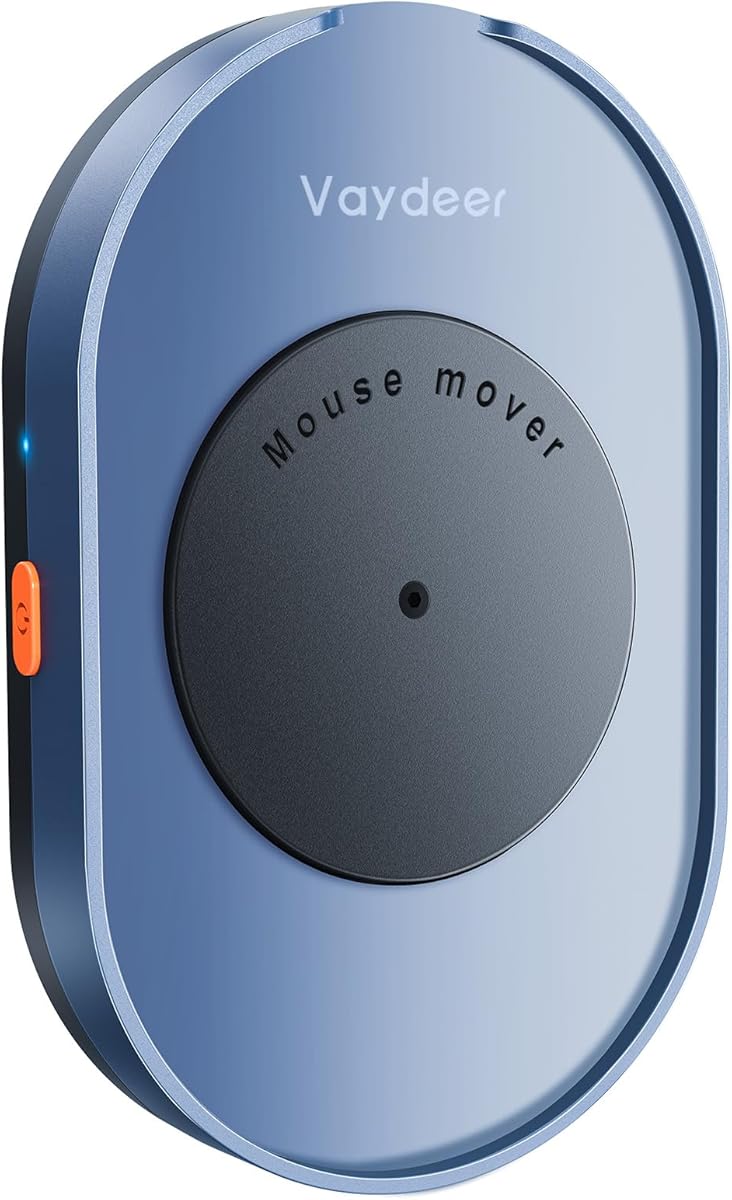
The Vaydeer Undetectable Mouse Jiggler is renowned for its ultra-silent motor, operating below 45dB to ensure a quiet workspace. It holds ISO/IEC27001 security certification, making it a trustworthy choice for corporate users concerned about hardware security scans.
We may earn a commission when you buy through this link, at no additional cost to you.
Designed for convenience, this device can be powered by an external adapter or USB port, offering flexibility in placement. The ON/OFF switch eliminates the need to constantly plug and unplug, streamlining your daily routine. It simulates physical movement without requiring any driver installation.
Despite its quiet operation, the device is robust enough for long-term use. The manufacturer highlights their 6-year R&D commitment, suggesting a focus on durability and continuous improvement based on user feedback.
If noise is a primary concern for your environment, this mover is an excellent choice. It is particularly suitable for shared offices or late-night work sessions where minimizing disturbance is crucial.
Certified to international security standards, ensuring the device meets rigorous safety protocols. This certification builds trust for users working in regulated or sensitive environments.
Supports both external adapter and USB power for versatile placement. This flexibility allows you to position the device wherever it works best without cable constraints.
We may earn a commission when you buy through this link, at no additional cost to you.
Offering a 2-pack for a budget-friendly price, the WFB Mouse Jiggler provides excellent value for multiple users or backup needs. It is recognized by computers as a standard 2.4G mouse, ensuring it remains undetectable by IT departments while keeping your system awake.
We may earn a commission when you buy through this link, at no additional cost to you.
The device moves the cursor only 1-2 pixels, making the movement invisible during work or presentations. This slight shaking ensures your status stays active without interrupting your focus on screens. It runs directly after being plugged in, requiring no additional software installation.
It works across Windows, Mac OS, and even Android systems, providing broad compatibility for diverse tech stacks. The compact design fits easily into any workspace, and the included 2-pack ensures you always have a spare ready to use.
This option is ideal for users who need a straightforward, cost-effective solution without frills. If you need to maintain presence on multiple devices or want a reliable backup, this pack delivers consistent performance at an affordable price point.
Simulates minimal cursor movement that goes unnoticed during normal use. This ensures your online status remains active without distracting from your current tasks.
Supports Windows, Mac, and Android systems for versatile use. This broad compatibility makes it suitable for mixed environments or personal and professional devices.
We may earn a commission when you buy through this link, at no additional cost to you.
The AUEDROT Mouse Jiggler is designed with a modern USB-C connector, making it perfect for newer laptops and devices. It is recognized as a trusted USB composite device, avoiding suspicion from security scans. Users can easily switch between two jiggle modes with a single button press.
We may earn a commission when you buy through this link, at no additional cost to you.
One mode moves the pointer slightly without affecting work, while the other moves it irregularly for more natural simulation. The compact black design fits discreetly into a laptop bag or pocket. No software installation is needed, and the device turns on automatically upon connection.
This tool is ideal for those who prefer the latest connectivity standards without needing adapters. It keeps Teams, Skype, and other platforms green while you focus on your tasks. The switch button adds convenience, allowing quick toggling of modes without unplugging.
For modern setups prioritizing USB-C compatibility, this is a strong contender. Its small form factor and ease of use make it a practical travel companion for remote workers on the go.
Uses USB-C for seamless integration with newer devices. Eliminates the need for extra dongles or adapters on modern laptops and tablets.
Switch between slight or random movement with a simple button. Allows customization based on your current task and visibility needs.
We may earn a commission when you buy through this link, at no additional cost to you.
Yonktoo's mouse mover stands out with its ultra-slim profile and low-noise motor, designed to fit neatly into any workspace. The included 1.5m USB-A to C cable offers flexibility in positioning, allowing you to route it cleanly around monitors and equipment.
We may earn a commission when you buy through this link, at no additional cost to you.
It operates as a mechanical device, requiring no software installation. The automatic start feature means it begins working as soon as it is connected, and the built-in button allows you to pause movement with a single press. This independence ensures no interference with system settings.
Ideal for users with limited desk space, the slim design does not bulk up the workspace. It works well for long tasks where consistent activity is needed without manual intervention. The silent motor ensures it won't disturb your workflow or colleagues nearby.
If you prefer a sleek, unobtrusive solution that is easy to manage, this mover is a reliable choice. It balances simplicity with effective performance for keeping your computer active during extended work sessions.
The slim profile blends seamlessly with modern desk setups. Keeps the workspace clean and organized without adding visual clutter.
The included 1.5m cable allows versatile positioning options. Routes easily around equipment to maintain a tidy workspace environment.
We may earn a commission when you buy through this link, at no additional cost to you.
The Meatanty Mouse Mover features a large turntable with adjustable interval timers, allowing precise control over movement frequency. The LED display visualizes settings, providing clear feedback without guessing. It uses a silent motor that emits less than 20dB, ensuring a peaceful workspace.
We may earn a commission when you buy through this link, at no additional cost to you.
Unlike many devices, it simulates true random movement patterns, making it highly undetectable. The edge protection design prevents the mouse from slipping off the platform, ensuring stability during operation. It works with any mouse size and does not require calibration before use.
While it occupies more desk space than USB dongles, the mechanical reliability and customization options are superior. The device is compatible with multiple operating systems, including Windows, Mac, and Linux, making it a versatile tool for diverse environments.
For professionals who need maximum control and reliability, this premium device delivers. It is particularly useful for users who prefer hardware control over software settings and want a solution that adapts to their specific workflow needs.
LED display provides clear feedback on movement frequency. Allows easy adjustment of settings without relying on indicator lights.
Simulates natural random trajectories for realistic movement. Ensures detection avoidance by mimicking human behavior patterns accurately.
We may earn a commission when you buy through this link, at no additional cost to you.
This mouse mover is constructed from aluminum alloy, providing a sturdy and upscale feel compared to plastic alternatives. It includes a USB-C adapter for modern connectivity while maintaining a mini size. The switch button allows quick toggling between two jiggle modes with ease.
We may earn a commission when you buy through this link, at no additional cost to you.
One mode moves the pointer slightly to avoid detection, while the other moves it irregularly. The device is recognized as a trusted USB composite device, ensuring it is accepted without flags. It works seamlessly with Teams, Skype, and other apps to keep your status green.
The metal build ensures durability for long-term use in office settings. No software is required, and it runs instantly upon connection. This combination of robust design and simple functionality makes it a reliable option for daily use.
If you value build quality and want a device that feels premium, this is a top contender. Its simple operation and sturdy construction make it suitable for users who want a long-lasting solution without complex configuration steps.
Aluminum alloy construction offers durability and a premium feel. Resists wear and tear better than standard plastic devices.
One button toggles between movement modes effortlessly. Reduces need for unplugging and provides instant control over activity.
We may earn a commission when you buy through this link, at no additional cost to you.
TECKNET's mouse jiggler offers three smart modes with a discreet color LED indicator that shows which mode is active. Mode 1 moves 1 pixel every 3 seconds, Mode 2 moves in a fixed area, and Mode 3 performs variable-speed random movement. This feedback eliminates guesswork about your current settings.
We may earn a commission when you buy through this link, at no additional cost to you.
The device is recognized as a standard USB mouse, ensuring it remains undetectable by IT software. It is plug-and-play, working instantly on Windows and Mac without drivers. The compact design makes it ideal for discreet use at home or on the go.
Users appreciate the one-button control for switching modes, avoiding frequent plugging and unplugging. The device is backed by an 18-month warranty, reflecting confidence in its reliability. It keeps your screen active without requiring any complex setup.
This mover is excellent for those who want clear visual feedback and multiple modes in a tiny package. It is particularly suitable for travelers who need a reliable, portable solution that adapts to different work environments seamlessly.
Color LED indicates active mode discreetly. Allows quick confirmation of settings without looking at device.
Mini size fits easily in a laptop bag. Ideal for travel and remote work scenarios requiring quick setup.
We may earn a commission when you buy through this link, at no additional cost to you.
The Phiginoo mouse mover is a simple, tiny device that plugs directly into a USB port to keep your computer awake. It is recognized as a regular mouse by the system, ensuring seamless operation without triggering security scans. The plug-and-play nature means no drivers or software are required.
We may earn a commission when you buy through this link, at no additional cost to you.
It simulates mouse movement to prevent the computer from entering sleep mode, allowing you to step away without losing your place. The compact size makes it easy to carry and use anywhere, whether at work or during online classes. It supports Windows, Mac, and Linux systems effectively.
Users appreciate its reliability for maintaining presence during long meetings or downloads. The straightforward design eliminates complexity, making it accessible for anyone who needs a quick solution. The included 12-month warranty adds confidence to this budget-friendly option.
If you need a no-frills, effective tool that just works, this mover is the best pick. It balances functionality with simplicity, providing a reliable way to keep your system active without any technical setup or complications.
Connects instantly without software. Drivers or complicated configuration steps are needed for immediate use.
Simulates movement to prevent sleep mode. Ensures consistent online presence during extended work periods.
We may earn a commission when you buy through this link, at no additional cost to you.
The Magic Pet Touchpad Jiggler is a unique cordless device that simulates fingertip movement directly on your laptop touchpad. It requires no USB or Bluetooth connection, making it invisible to IT scans. The low RPM DC motor ensures silent operation, keeping your workspace quiet while maintaining activity.
We may earn a commission when you buy through this link, at no additional cost to you.
Powered by an AA battery that lasts up to 6 months, this device is highly convenient for remote work. It keeps your screen awake during remote work or WFH without interruption. The device is easy to set up but requires tweaking touchpad sensitivity settings for reliable performance.
Ideal for laptops without a mouse or for users who prefer not to plug in devices. The cordless nature makes it perfect for desks with limited ports. While it requires specific settings adjustments, the convenience of a battery-powered solution makes it stand out in the market.
This option is best for users seeking a truly wireless solution that eliminates cable clutter. If you want to keep your touchpad active without external hardware, this device offers a unique and practical approach to staying active.
Eliminates cables entirely for a clutter-free workspace. Ideal for desks with limited port access.
Long-lasting AA battery reduces need for frequent power changes. Provides months of consistent operation for remote workers.
We may earn a commission when you buy through this link, at no additional cost to you.
Choosing the right laptop jiggler depends on your specific workspace needs, device compatibility, and security requirements.
The most critical factor is whether the device can be detected by IT departments or security software. Physical devices that mimic mouse movements are generally safer than software solutions, which might be flagged as security risks in corporate environments.
Look for products labeled as 'undetectable' or recognized as standard peripherals by the system to ensure safe usage.
Devices come in USB plug-and-play or battery-powered options. USB devices offer convenience but occupy a port, while battery-powered ones provide flexibility at the cost of battery maintenance.
Ensure the connector matches your laptop, with USB-C becoming more common for newer devices.
In quiet offices or shared spaces, a silent motor is essential to avoid disturbing others. Mechanical movers often have rotating parts that can produce sound, whereas electronic simulators are usually quieter.
Choose a model with a decibel rating if noise is a concern in your work environment.
Some models allow you to adjust movement frequency or switch between slight and random modes. This flexibility can help make movements more realistic and less likely to be flagged.
Consider if you need specific control over how often the cursor moves to fit your workflow.
Materials matter; metal or high-grade plastic housings tend to last longer than cheap plastic versions. Check reviews regarding motor life and physical durability for long-term value.
Investing in a durable device prevents the need for frequent replacements.
Ensure the device works with your specific OS, whether Windows, Mac, or Linux. Some devices have drivers that may conflict with certain systems.
Verify system requirements before purchasing to avoid technical issues.
Reputable brands offer customer support and warranties. This is crucial if the device fails or needs troubleshooting during critical work sessions.
Look for brands with responsive support teams to resolve issues quickly.
For travelers or those with small desks, a compact design is vital. Larger mechanical movers may take up too much space.
Choose a small, lightweight device if you need to transport it frequently.
To use a laptop jiggler, plug it into your USB port and place your mouse on top if it requires physical contact. Ensure the device is recognized by your computer before starting your work session.
For software-based devices, simply install the tool and configure settings. Avoid installing on managed systems without permission to maintain security compliance.
Regularly check the device for dust or debris that might interfere with mechanical parts. Keep it clean and store it safely when not in use to extend its lifespan.
Most hardware jigglers mimic physical mouse movements and are generally not detected by IT scans. However, software versions may trigger security flags depending on your corporate policies.
No, these devices simulate minimal cursor movement and have no impact on system performance or speed. They operate independently without consuming significant resources.
Yes, most hardware jigglers are compatible with Mac systems as they are recognized as standard USB mice. Always verify specific compatibility before purchasing.
Hardware jigglers are plug-and-play and require no installation. Software versions may need setup, but physical devices work immediately upon connection.
Yes, they are designed to maintain activity without disrupting workflows. They are safe for remote work when used according to company guidelines and policies.
Adjust your system power settings to ensure the screen and system do not sleep quickly. Some jigglers may not override aggressive power-saving policies.
From the TECH8 USA Undetectable Mouse Mover to the compact Mouse Jiggler Mover Wiggler, there are options for every budget and workspace setup. Each device offers unique features to keep your computer active seamlessly.
Prioritize undetectability and ease of use to ensure you maintain productivity without interruptions. Consider your specific workspace needs when choosing the right model for your situation.
Remember to check current prices and availability on Amazon as they can change frequently. Make sure to select a product that aligns with your professional requirements and comfort.