
Logitech K120 Full Size Wired Keyboard USB Plug-and-Play Windows
4.6Editor score
Spill-resistant design
Full-size standard layout
Plug-and-play setup
Discover the top keyboards with integrated USB ports for expanded connectivity. This guide compares features, compatibility, and build quality to find your
Finding a keyboard with a built-in USB port can streamline your workspace significantly. These devices allow you to connect peripherals like mice or drives directly without cluttering your computer. It is an essential feature for those seeking efficiency and a clean desk setup.
We evaluated ten leading models based on port count, compatibility, and build quality. Our analysis focuses on how well each keyboard integrates hubs into the design while maintaining typing comfort. This list covers various price points to suit different user needs effectively.
Each selection highlights specific strengths such as multimedia controls or mechanical switches. You will see detailed breakdowns of pros and cons to guide your decision. Please note that product availability and pricing may change over time.
4.6Editor score
4.4Editor score
4.3Editor score
This table provides a side-by-side comparison of all ten selected keyboards to help you quickly identify key differences in features and compatibility.






The Adesso AKB-132HB offers a practical solution for users needing quick access to USB peripherals. It holds a solid rating for its reliability in home and office settings. The standout quality is its integration of three USB hubs directly into the keyboard chassis.
We may earn a commission when you buy through this link, at no additional cost to you.
Its multimedia controls allow you to manage music and video without leaving your work. Windows One-Touch controls let you launch apps like Calculator or Mail instantly. These features streamline your workflow by reducing the need to switch applications manually.
While the membrane switches are quiet and comfortable, they lack the tactile feedback of mechanical keys. The design is functional but does not offer backlighting for low-light environments. These trade-offs are acceptable for users prioritizing connectivity over gaming performance.
This keyboard is ideal for general office tasks where hub access is valuable. It suits those who need extra ports without buying a separate hub. We recommend it for users seeking a straightforward and cost-effective input device.
The three built-in USB hubs allow you to plug in flash drives or mice directly. This reduces cable clutter and keeps your desk organized efficiently.
Media and Windows shortcuts provide quick access to frequently used functions. This helps improve productivity by minimizing navigation time.
We may earn a commission when you buy through this link, at no additional cost to you.
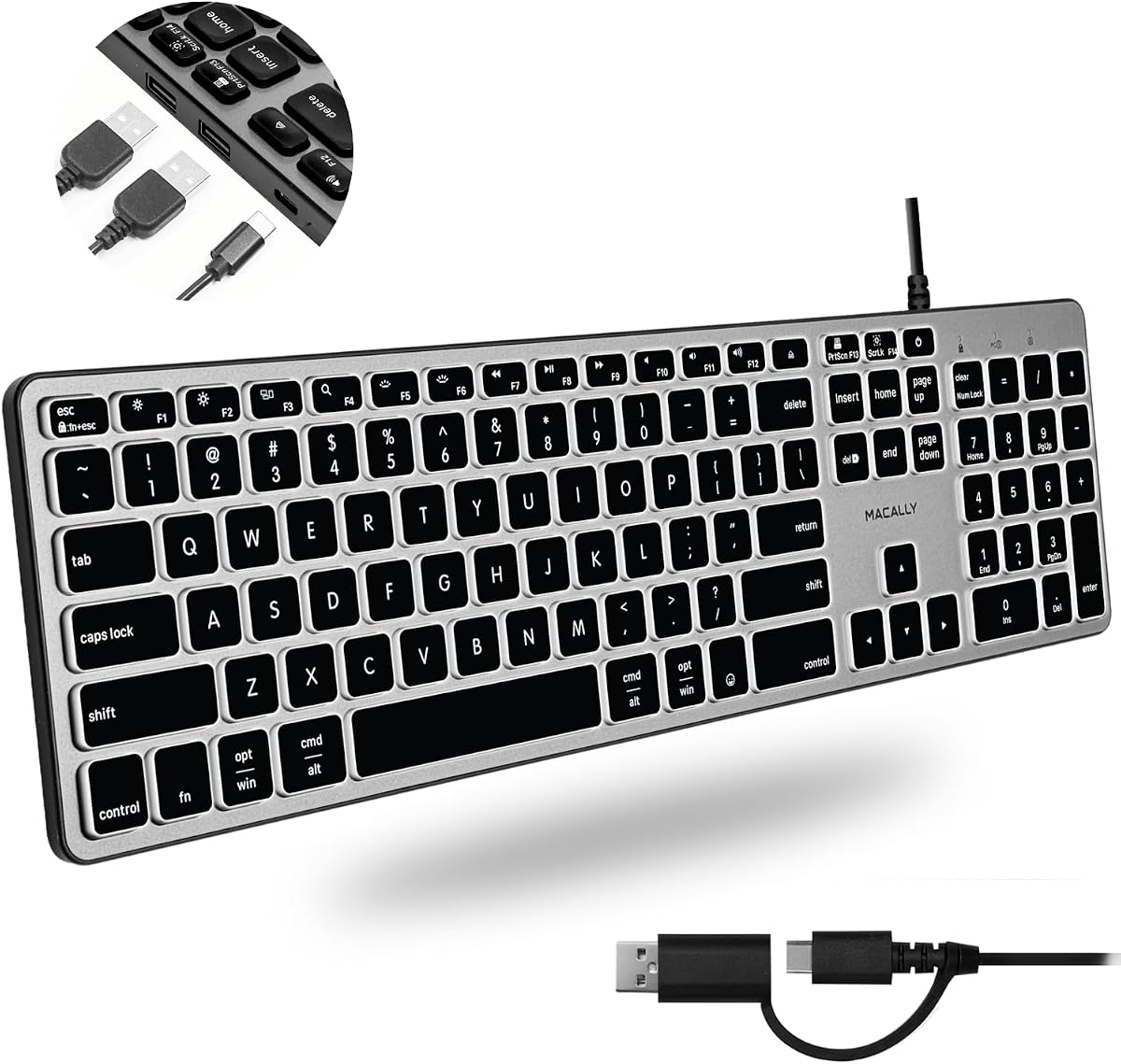
The Macally Wired Keyboard stands out for Mac users needing modern connectivity options. It supports both USB-A and USB-C ports on the hub for flexible device use. Its rating reflects strong performance across different operating systems.
We may earn a commission when you buy through this link, at no additional cost to you.
The illuminated keys offer three adjustable brightness levels for optimal visibility in any light. Auto OS detection ensures shortcuts adapt instantly whether you use Mac or Windows. The 2-in-1 plug accommodates a wide range of devices seamlessly.
While the price is higher than standard models, the build quality and features justify the cost. Wired connection limits mobility compared to wireless alternatives. These factors are minor for users prioritizing stability and hub convenience.
This keyboard is perfect for MacBook Pro or Air users with limited ports. It suits professionals needing reliable input with extra connectivity. We recommend it for its versatility and clean aesthetic design.
The hub includes two USB-A and one USB-C port for various peripherals. This mix ensures compatibility with older and newer devices alike.
LED backlighting with adjustable levels helps you type comfortably in dim rooms. This feature enhances usability during late-night work sessions.
We may earn a commission when you buy through this link, at no additional cost to you.
The Macally Premium Wired USB C Keyboard offers excellent value for those needing a dedicated Type-C solution. It connects up to three devices including mice or webcams easily. Its rating highlights durability and ease of use.
We may earn a commission when you buy through this link, at no additional cost to you.
The scissor switches provide a quiet typing experience with low profile keys. A space gray finish adds a touch of elegance to any setup. All 107 keys function fully on Mac PC and Chrome systems.
While it lacks backlighting, the design focuses on practicality and port connectivity. The integrated typing angle improves comfort during long sessions. These trade-offs work well for users prioritizing aesthetics and utility.
This keyboard is ideal for Mac Mini or MacBook users with USB-C ports. It suits students or office workers needing reliable extra ports. We recommend it for its clean look and functional hub integration.
Space gray finish and low profile design enhance your workspace look. It blends well with modern Apple devices effectively.
Scissor switches reduce noise for a pleasant typing environment. This helps maintain focus during important tasks.
We may earn a commission when you buy through this link, at no additional cost to you.
The Logitech K120 is a reliable standard keyboard with a focus on durability. It features a spill-resistant design to protect against accidental liquid spills. Its high rating indicates long-term user satisfaction.
We may earn a commission when you buy through this link, at no additional cost to you.
Deep-profile keys and a standard layout provide comfortable typing all day. Setup is effortless as it works plug-and-play without software installation. It fits well for home or office workstations.
While it lacks advanced features like backlighting or media keys, it is highly functional. The plastic parts use recycled materials for an eco-friendly touch. These trade-offs are acceptable for users wanting a straightforward keyboard.
This keyboard is ideal for basic computing tasks in shared environments. It suits users who need reliability without extra frills. We recommend it for its robustness and simplicity.
Spill-resistant design and anti-fade keys ensure long-term performance. This makes it suitable for high-use office settings.
Full-size layout with F-keys and number pad offers versatile typing. Adjustable tilt legs help find the right angle.
We may earn a commission when you buy through this link, at no additional cost to you.
The Perixx PERIBOARD-409H saves desk space with its mini keyboard design. It includes two built-in USB hubs for connecting mice or flash drives. Its rating reflects strong utility for compact workspaces.
We may earn a commission when you buy through this link, at no additional cost to you.
Responsive membrane keys offer a high lifecycle of ten million keystrokes. The solid ABS material with UV coating ensures print durability. Setup requires no drivers for immediate use.
The lack of a number pad limits data entry efficiency. Some users may find the cable length insufficient for deep desk setups. These trade-offs are acceptable for those prioritizing desk real estate.
This keyboard is ideal for users with limited desk space needing hub access. It suits professionals using multiple input devices. We recommend it for its compact efficiency and sturdy build.
Mini design without number pad saves significant desk space. It helps maintain an organized workspace environment.
Two USB hubs allow flexible connection of extra devices. This reduces the need for external hubs.
We may earn a commission when you buy through this link, at no additional cost to you.
The KOPJIPPOM Large Print Keyboard features fonts four times larger than standard. This design aids those with vision challenges. Its rating highlights strong satisfaction among elderly and visually impaired users.
We may earn a commission when you buy through this link, at no additional cost to you.
White LED backlighting provides bright and evenly distributed illumination for dark rooms. Full size ergonomic design reduces hand fatigue during extended typing sessions. It works with Windows 2000 up to 10 easily.
Mac OS compatibility is limited as multimedia keys may not function fully. The keyboard is slightly heavier than standard models. These trade-offs are minor for users prioritizing visibility.
This keyboard is ideal for schools libraries and senior users. It suits anyone needing clear key labels. We recommend it for its accessibility features and comfort.
Large print keys help users with low vision type confidently. This makes typing easier without strain.
White LED backlight adjusts brightness for lower light environments. This helps maintain focus during night work.
We may earn a commission when you buy through this link, at no additional cost to you.
The Dell Wired Keyboard KB216 provides a convenient solution for everyday computing. It features chiclet keys for a modern and comfortable typing experience. Its high rating reflects reliability in office settings.
We may earn a commission when you buy through this link, at no additional cost to you.
Multimedia controls allow quick access to play or pause functions. The design fits various Dell systems and standard PCs well. Dimensions make it easy to fit on most desks.
While it lacks a hub, its simplicity appeals to users needing just typing. No backlighting limits use in dark environments. These trade-offs are acceptable for general business tasks.
This keyboard is ideal for home office use with standard setups. It suits users needing reliable media access. We recommend it for its balanced design and comfort.
Chiclet keys offer a clean and easy-to-use surface. This helps reduce typing errors.
Built-in keys let you control media without switching windows. This improves workflow efficiency.
We may earn a commission when you buy through this link, at no additional cost to you.
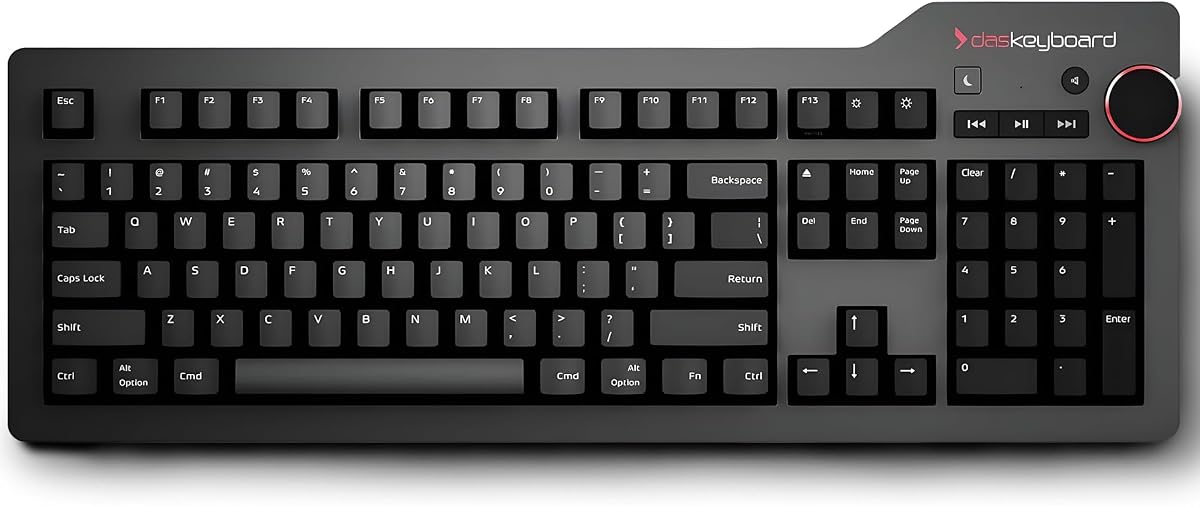
The Das Keyboard 4 Professional for Mac offers a premium mechanical typing experience. It uses Cherry MX Blue switches for tactile and audio feedback. Its rating indicates strong approval from professionals.
We may earn a commission when you buy through this link, at no additional cost to you.
The 2-Port USB 3.0 hub transfers files at up to 5Gb per second. A dedicated volume knob allows instant audio control. The aluminum top adds a robust aesthetic.
The switches are loud which may disturb others in quiet offices. The price point is high compared to membrane options. These trade-offs are acceptable for users prioritizing build quality.
This keyboard is ideal for Mac users needing superior typing feel. It suits professionals needing fast data transfer. We recommend it for its unmatched craftsmanship and utility.
Cherry MX Blue switches provide precise and responsive typing. This boosts productivity for fast typists.
USB 3.0 hub ensures rapid data transfer speeds. This supports efficient workflow for large files.
We may earn a commission when you buy through this link, at no additional cost to you.
The Das Keyboard 4 Professional offers a premium mechanical typing experience for professionals. It uses Cherry MX Blue switches for precise feedback. Its rating reflects strong approval from power users.
We may earn a commission when you buy through this link, at no additional cost to you.
A 2-Port USB 3.0 hub supports rapid file transfers. The volume knob allows instant media control without software. Aluminum top construction ensures long-lasting durability.
The switches are loud and may not suit quiet environments. The price point is high compared to standard keyboards. These trade-offs are acceptable for users prioritizing performance.
This keyboard is ideal for users needing superior build and feel. It suits professionals needing fast USB transfers. We recommend it for its craftsmanship and typing utility.
Gold-plated switches and aluminum top ensure longevity. This supports extended daily use.
USB 3.0 hub offers speeds ten times faster than USB 2.0. This helps in efficient data management.
We may earn a commission when you buy through this link, at no additional cost to you.
The Genuine Dell Multimedia Keyboard serves as a reliable replacement for business setups. It includes two USB hub ports for extra device connectivity. Its rating indicates strong compatibility with Dell systems.
We may earn a commission when you buy through this link, at no additional cost to you.
Fourteen hot keys provide quick access to functions like sleep or calculator. The spill-resistant design protects the device against liquids. A removable palm rest adds comfort.
The design is functional but lacks backlighting for dark areas. It is optimized for business rather than gaming. These trade-offs work well for office users.
This keyboard is ideal for Dell business PC replacements needing hub access. It suits users needing standard multimedia controls. We recommend it for its compatibility and utility.
Designed as a genuine replacement for various Dell systems. This ensures reliable performance on work devices.
Two USB ports let you connect peripherals directly. This reduces need for external hubs.
We may earn a commission when you buy through this link, at no additional cost to you.
Selecting the right keyboard with a USB port involves considering several key factors to ensure it meets your needs.
Determine whether you need USB-A USB-C or both ports on the keyboard. Some models offer three ports while others provide just two. More ports allow greater flexibility for connecting devices like mice or drives.
Look for models that support the specific interfaces your peripherals use.
Ensure the keyboard works with your primary OS like Windows Mac or Linux. Some keyboards feature auto-detection to switch shortcuts automatically. This is vital for users who switch between different systems often.
Check product descriptions for specific OS support lists before buying.
Choose between membrane mechanical or scissor switches based on typing preference. Mechanical switches offer tactile feedback while membrane ones are quieter. This affects comfort during long typing sessions.
Select a switch type that aligns with your work environment.
USB 3.0 hubs provide faster data transfer than USB 2.0. If you move large files regularly this speed matters. Check the specs to ensure you get the desired bandwidth.
Opt for USB 3.0 hubs if transfer speed is a priority.
Aluminum tops and spill-resistant designs enhance durability. High-quality materials extend the lifespan of the keyboard. A sturdy build withstands daily wear and tear.
Prioritize durable materials for long-term reliability.
Backlit keys help in low-light conditions for better visibility. Ergonomic designs reduce wrist strain during extended use. These features improve overall typing experience.
Consider backlight and ergonomics if you work late or often.
Built-in media keys let you control playback without opening apps. This adds convenience for users managing audio or video. Check which shortcuts are included on the model.
Select keyboards with relevant multimedia hotkeys for your tasks.
A longer cable offers flexibility for desktop placement. Some models provide five-foot or longer cables. This ensures you can reach your computer easily.
Check cable length to match your desk setup.
Plug the keyboard into a USB port on your computer directly. If using a hub, plug devices into the keyboard ports first.
Clean keys regularly with a soft cloth to prevent dust buildup. Avoid using liquids directly on the keyboard surface.
Restart your system if keys are not recognized to refresh connections. Check drivers if needed for specific multimedia functions.
Most keyboards are plug-and-play and require no drivers. However specific multimedia keys may need software on some systems. Check the product page for compatibility details.
A hub adds extra ports for peripherals without using computer ports. It reduces cable clutter on your desk significantly. This is ideal for devices needing constant connection.
Many keyboards support Mac with auto OS detection features. Some models have specific key layouts for macOS. Verify compatibility lists before purchasing.
Yes the keyboard functions fully even if USB ports are unused. The ports are optional additions for extra connectivity. They do not interfere with typing performance.
Membrane or scissor switches are quieter for offices. Mechanical switches offer feedback but can be loud. Choose based on noise tolerance in your workspace.
Unplug the keyboard and turn it upside down to drain liquid. Use a soft cloth to wipe off remaining moisture. Let it dry completely before reconnecting.
USB 3.0 provides faster data transfer speeds than 2.0. It allows rapid file movement between devices. This is beneficial for large media files.
Yes they offer durability and better tactile feedback. They last longer and improve typing comfort. Consider them if you type extensively daily.
We have explored ten top keyboards with integrated USB ports for diverse needs. From budget models to premium mechanical options there is something for everyone. Consider your specific requirements before making a choice.
Prioritize port types and compatibility with your current devices. Durability and ergonomics also play key roles in long-term satisfaction. Match features to your work environment for best results.
Remember to check current prices and availability as they may vary. Our selection offers solid choices across different categories. We hope this guide helps you find the perfect keyboard.