
AULA WIN68 HE Mechanical Gaming Keyboard 60%
4.5Editor score
Web-Based Driver Customization
Adjustable Actuation Points
Compact 68-Key Layout
Explore our expert guide comparing the top keyboards for Valorant featuring rapid trigger technology and high polling rates for competitive tactical shooter
Finding the right keyboard for Valorant can significantly impact your performance in tactical shooter matches. Players need precise actuation and rapid response times to execute counter-strafing and peeking mechanics effectively during intense competitive play.
We evaluated ten top-rated keyboards based on their switch technology, polling rates, and layout designs specifically suited for fast-paced gaming scenarios. Our analysis focuses on models that offer rapid trigger capabilities and adjustable actuation points to minimize input latency and maximize control.
Each selection in this guide highlights unique features that cater to different playstyles and budget considerations. Please note that product availability and specifications may vary over time, so always verify the latest details before making your final purchase decision.
4.5Editor score

4.1Editor score

4.6Editor score
This side-by-side comparison highlights the key specifications and unique features of each selected keyboard to help you find the perfect match for your Valorant setup and gaming preferences.

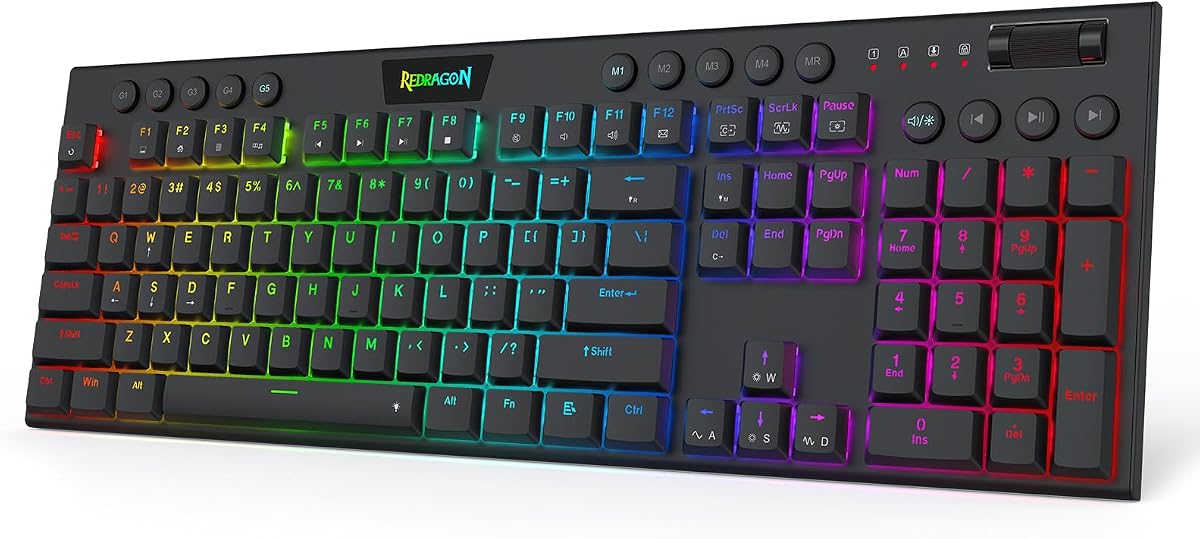





This keyboard delivers exceptional performance for Valorant players seeking rapid trigger capabilities at an accessible price point. With an impressive 8000Hz polling rate, it ensures that every input is registered with minimal latency during high-stakes competitive matches.
We may earn a commission when you buy through this link, at no additional cost to you.
The magnetic switch technology allows for dynamic key activation that cuts redundant keystrokes when changing direction quickly. This feature is particularly valuable for counter-strafing mechanics that require precise timing to stop and shoot effectively.
Users may find the reliance on software for customization limits immediate adjustability without a desktop connection. However, the ability to save multiple actuation profiles between 0.1mm and 3.4mm provides extensive tuning options for different playstyles.
The Redragon K673 HE is an excellent choice for gamers who prioritize speed and precision without breaking the bank. Its combination of rapid trigger and high polling makes it a top contender for tactical shooter enthusiasts.
The rapid trigger function allows keys to reset instantly upon release enabling faster repetition of actions without physical contact interference.
Players can calibrate magnetic switches to save different actuation points ensuring consistent performance across various games and scenarios.
We may earn a commission when you buy through this link, at no additional cost to you.
The Redragon K686 HE builds upon the success of its siblings with enhanced noise dampening layers that create a softer acoustic experience. This design choice helps maintain focus during long gaming sessions by reducing the harsh clack associated with traditional mechanical switches.
We may earn a commission when you buy through this link, at no additional cost to you.
Performance remains a priority with the inclusion of next-gen UltraMag POM magnetic switches that sense keypresses without physical contact. This technology ensures your peek-and-fire timing lands exactly when you intend it to during critical moments in matches.
Some users might prefer a wireless option for cleaner cable management on their desks. Despite this limitation, the wired connection ensures a stable data transmission that supports the high polling rate required for competitive play.
This keyboard offers a balanced blend of comfort and speed making it suitable for players who value a quieter setup without sacrificing responsiveness. It is a strong candidate for those seeking a refined mechanical feel with magnetic technology.
Independent switch-plate design paired with dampening layers gives a soft bounce instead of a harsh rigid clack sound.
Calibrate magnetic switches through web-based drivers so your setup stays consistent across different games you play regularly.
We may earn a commission when you buy through this link, at no additional cost to you.
Designed specifically for counter-strafing, this keyboard features the shortest travel low-profile magnetic switches available in the market. These switches sense keypresses faster than standard switches ensuring your timing is perfect for rapid peek-and-fire maneuvers in tactical shooters.
We may earn a commission when you buy through this link, at no additional cost to you.
The slim form factor reduces wrist strain during extended play sessions by shortening the distance your fingers need to travel. This 30% slimmer design contributes to a lighter typing feel that many users find less fatiguing over time.
Players may need to adjust to the compact layout if they frequently use function keys or numpads. However, the inclusion of twenty on-the-fly macro keys allows for significant customization without needing to install any additional software first.
Ideal for gamers who prefer a sleek and modern aesthetic, this keyboard delivers speed and precision in a minimalist package. It stands out for its ability to register keystrokes quickly while maintaining a comfortable typing experience.
Shortened travel distance ensures keystrokes register quicker and typing feels lighter on your wrists during intense sessions.
A dedicated macro zone plus media controls let you record combos or adjust volume and tracks instantly without software.
We may earn a commission when you buy through this link, at no additional cost to you.
The Corsair Clipper PRO MINI brings advanced hall effect control to a compact 60% form factor ideal for maximizing mouse space. Its rapid trigger feature enables an instant 0.1mm reset for rapid taps and faster reactions essential for competitive gameplay.
We may earn a commission when you buy through this link, at no additional cost to you.
Durability is a key focus with an IP57 rating that allows the keyboard to handle intense gameplay sessions with water and dust resistance. This resilience ensures longevity even in environments where spills or dust accumulation might occur over time.
The lack of dedicated arrow keys in a 60% layout may require users to rely on function layers for navigation tasks. While manageable for gaming, this constraint can be a drawback for users who need frequent access to arrow keys for work.
This keyboard is a top choice for those seeking a premium compact solution with robust features. The combination of high polling rates and rapid trigger technology makes it a formidable tool for serious Valorant players.
FlashTap SOCD enables cleaner directional inputs and sharper counter-strafing ensuring every movement lands exactly when needed.
PBT double-shot keycaps resist wear through extended FPS sessions while water resistance allows for handling spills.
We may earn a commission when you buy through this link, at no additional cost to you.
Featuring Razer Linear Optical switch technology, this keyboard registers key presses at the speed of light with significantly shorter actuation distances. This optical beam-based actuation ensures that inputs are recognized faster than traditional mechanical switches for improved response times.
We may earn a commission when you buy through this link, at no additional cost to you.
The inclusion of Razer Snap Tap allows for responsive in-game movement by prioritizing the latest input between assigned keys. This feature streamlines directional changes and can be toggled on or off depending on your preference via Razer Synapse.
Gamers who require rapid trigger capabilities might find the optical switches less flexible for specific tuning needs. However, the high-quality aluminum construction and extensive RGB customization options provide a premium feel that appeals to many users.
This keyboard is well-suited for players who value the Razer ecosystem and optical switch performance. It offers a reliable and fast typing experience that supports intense gaming sessions with consistent performance.
Optical switch technology uses light to register key presses at the speed of light with shorter actuation distance.
Snap Tap functionality lets you prioritize inputs between assigned keys for faster directional changes during gameplay.
We may earn a commission when you buy through this link, at no additional cost to you.
The Aula WIN60 HE stands out with its hot-swappable magnetic switches that allow for customization without soldering or complex tools. This feature enables users to experiment with different switch characteristics to find the perfect balance for their specific gaming style.
We may earn a commission when you buy through this link, at no additional cost to you.
With an 8000Hz polling rate and rapid trigger mode, this keyboard ensures lightning-fast response times perfect for complex combos and quick stops. The magnetic technology provides precise actuation without physical contact which helps in reducing latency during fast-paced action.
Some users might find the web-based driver interface limiting if they prefer desktop applications for deeper customization. Despite this, the ease of access allows for effortless key mapping and macro creation directly from a browser without system compatibility concerns.
This keyboard is an excellent choice for enthusiasts who want to tinker with their hardware while maintaining high performance. Its compact design saves desk space without sacrificing the functionality needed for competitive play.
Web-based driver allows effortless remapping and macros without needing bulky software downloads or worrying about compatibility.
Magnetic switches enable faster peeking and quick-stop shooting enhancing accuracy and positioning in high-stakes moments.
We may earn a commission when you buy through this link, at no additional cost to you.
This keyboard offers an industry-leading 8000Hz polling rate and 8x faster response time than traditional mechanical keyboards. Combined with ultra-low latency, it ensures your commands take effect instantly giving you an edge in the game.
We may earn a commission when you buy through this link, at no additional cost to you.
The hall effect magnetic switches allow for adjustable actuation points from 0.02mm to 3.44mm enabling precise control over sensitivity. Press reset sensitivity can be individually set via software to match the keystroke habits of different people in different types of games.
Compatibility is limited to Windows systems which may exclude Mac users from accessing the full driver features. However, for Windows users the web-based driver provides one-stop management for key mapping and RGB lighting without extra downloads.
Ideal for budget-conscious gamers who refuse to compromise on speed this keyboard delivers professional-level performance at an affordable price. Its compact design retains essential keys while saving valuable desktop space for a cleaner setup.
Ultra-low latency of 0.3ms ensures your commands take effect instantly giving you an edge in the game.
Press reset sensitivity can be individually set via software to match keystroke habits of different people in different games.
We may earn a commission when you buy through this link, at no additional cost to you.
The AULA F75 Pro brings versatility to the table with tri-mode connectivity supporting Bluetooth 5.0 2.4GHz wireless and USB wired connections. This flexibility allows you to connect up to five devices at the same time and switch between them easily using shortcut keys.
We may earn a commission when you buy through this link, at no additional cost to you.
Built for long sessions the keyboard features a 4000mAh large-capacity battery that provides exceptional battery life. The hot-swappable base supports 3-pin or 5-pin switch replacement enabling you to DIY your own keyboards without soldering issues or technical hurdles.
While wireless connectivity offers convenience users seeking the absolute lowest latency may prefer a wired solution. The 2.4GHz mode minimizes this delay effectively making it suitable for most gaming scenarios without sacrificing performance quality.
This keyboard is perfect for multi-tasking users who need a single input device for gaming and work. The premium build quality and unique side-printed keycaps add a stylish touch that enhances the overall look of your setup.
Can connect up to five devices at the same time and easily switch by shortcut keys or side button.
Equipped with a 4000mAh large-capacity battery which has long-lasting battery life for uninterrupted use.
We may earn a commission when you buy through this link, at no additional cost to you.
Equipped with adjustable hall effect magnetic switches this keyboard features customizable dynamic keystroke and rapid trigger function allowing you to bind four functions according to four different pressing degrees to one key. This level of control provides unparalleled flexibility for advanced users.
We may earn a commission when you buy through this link, at no additional cost to you.
The theoretical latency is reduced to an impressive 0.125ms thanks to true 8000Hz polling rates and 0.01mm RT accuracy. This ensures ultra-response capabilities that are perfect for FPS and rhythm games like Valorant where every millisecond counts.
Setup may require familiarity with web drivers to unlock the full potential of the customization options. Once configured the top-mount structure and aluminum alloy positioning plate deliver a quiet stable and smooth typing operation that enhances gaming efficiency.
This keyboard is recommended for players who demand precise control over their inputs and are willing to invest time in configuration. The curved wrist rest and wide compatibility support make it a practical choice for various gaming environments.
Bind four functions according to four different pressing degrees to one key for highly customizable input methods.
True 8000Hz polling rates and 0.01mm RT accuracy effectively reduce keyboard latency to an impressive value.
We may earn a commission when you buy through this link, at no additional cost to you.
This keyboard delivers a compact space-saving design that is only 1cm wider than a standard keyboard while retaining the keys and number pad of a full-size layout. The tri-mode connectivity allows you to connect via Bluetooth 2.4GHz wireless or USB ensuring seamless compatibility with both PC and Mac.
We may earn a commission when you buy through this link, at no additional cost to you.
Enhanced acoustics are achieved through integrated sound-dampening foam and switch-dampening pads that absorb pinging noises and echoes. This results in improved keystroke acoustics that keep the gaming environment distraction-free and pleasant for extended periods.
The hot-swappable pre-lubed switches offer customization options for those who want to adjust the tactile feel of their inputs. However the extensive features may overwhelm casual users who prefer a simpler setup without extensive configuration requirements.
Ideal for enthusiasts seeking a premium wireless experience with full-size functionality this keyboard balances performance and convenience perfectly. Its long battery life and ergonomic wrist rest ensure comfort even during the most intense gaming marathons.
Experience a compact space-saving design only 1cm wider than a standard 80 percent keyboard with full functionality.
Integrated sound-dampening foam effectively absorb pinging noises and echoes resulting in improved keystroke acoustics.
We may earn a commission when you buy through this link, at no additional cost to you.
Selecting the right keyboard requires understanding key technical features that directly impact your gameplay performance and comfort levels.
Rapid trigger allows keys to reset instantly upon release rather than waiting for a full physical reset. This feature is crucial for rapid counter-strafing and fast repetitive inputs in tactical shooters.
Prioritize keyboards with rapid trigger capabilities to minimize input delays and maximize your reaction speed during competitive matches.
A higher polling rate ensures that your keystrokes are communicated to your computer more frequently. For Valorant a rate of 1000Hz is standard but 4000Hz or 8000Hz options offer even faster input registration.
Look for models with at least 1000Hz polling but consider 8000Hz for the fastest possible response times available on the market.
Magnetic switches offer adjustable actuation points and no physical contact for reduced wear and higher precision. Optical switches use light beams for similar speed but may lack the same level of actuation customization.
Magnetic switches are generally preferred for Valorant due to their ability to adjust actuation depth and rapid reset features.
Layouts range from full-size to 60% and 75% options. A smaller layout frees up desk space for mouse movement which is essential for low-sensitivity aiming styles.
Choose a compact layout like 60% or 68% if you need more room for large mouse movements during intense gameplay.
Wired connections traditionally offer the lowest latency and most stable signal. Modern wireless technology has improved significantly but may still introduce minor lag in extreme competitive scenarios.
Opt for wired connections if absolute minimal latency is your priority or ensure the wireless model has a low-latency mode for gaming.
Customizing actuation points and macros often requires dedicated software or drivers. Ensure the software is user-friendly and compatible with your operating system to avoid setup issues.
Select a keyboard with a robust software or web driver that supports your system and allows deep customization of settings.
High-quality PBT keycaps resist wear and shine over time better than ABS materials. Durability ratings such as IP57 water resistance can also extend the lifespan of the device.
Prioritize keyboards with PBT keycaps and solid build quality to ensure long-term reliability and consistent typing feel.
Price ranges vary significantly between entry-level and premium models. While higher-end options often include advanced features like wireless connectivity ensure the base model meets your core performance needs.
Determine which features are essential for your playstyle to find the best value without overspending on unnecessary add-ons.
Begin by installing the necessary software drivers to configure your actuation points and rapid trigger settings according to your playstyle. Proper calibration ensures that the keyboard responds exactly as you intend during fast-paced movements.
Keep the keyboard clean by using compressed air to remove dust from the switches and keycaps. Regular cleaning prevents debris from interfering with the magnetic or optical actuation mechanisms inside the device.
Store the keyboard in a dry environment to avoid moisture damage especially if it lacks waterproof ratings. For wireless models ensure the battery is charged fully before extended gaming sessions to maintain consistent performance.
Rapid trigger allows a key to reset instantly when released without waiting for a full physical reset. This feature helps players perform quick counter-strafes and rapid directional changes essential for tactical shooting accuracy.
Magnetic switches offer adjustable actuation points which allow for greater customization and faster response times. This flexibility makes them particularly suitable for the precise timing requirements of Valorant gameplay.
Not necessarily but a 60% layout frees up significant mouse space for low-sensitivity aiming. If you frequently use arrow keys or function keys a 68% or 75% layout might be more practical for your workflow.
While 1000Hz is standard for most gaming 4000Hz or 8000Hz rates offer significantly faster input registration. Higher polling rates can help reduce input lag for faster reactions during critical moments.
Many keyboards support Mac compatibility but some software drivers are Windows-only. Always check the product specifications to confirm Mac support before purchasing if you use a Mac for gaming.
Use keyboards with ergonomic designs and consider adding a wrist rest. Ensure your keyboard height allows your wrists to stay neutral rather than bent upward to reduce fatigue over time.
Yes most models include programmable keys and macro support that integrate with streaming software. You can assign specific keys to trigger actions like muting or changing scenes without leaving the game.
High-quality wireless keyboards with low-latency modes are now viable for competitive play. However wired models still offer the absolute lowest latency and reliability for extreme competitive scenarios.
Choosing the right keyboard for Valorant is about balancing speed precision and personal preference. The Redragon K673 HE stands out as an all-around excellent option while the AULA WIN68 HE offers incredible value for budget-conscious players.
Prioritize features like rapid trigger and high polling rates to gain a competitive edge during intense matches. Remember that ergonomic comfort and durability are equally important for ensuring you can play comfortably over long sessions.
Always check current product availability and specifications before purchasing as models may evolve over time. Investing in a keyboard tailored to your specific needs will enhance your performance and enjoyment of the game.