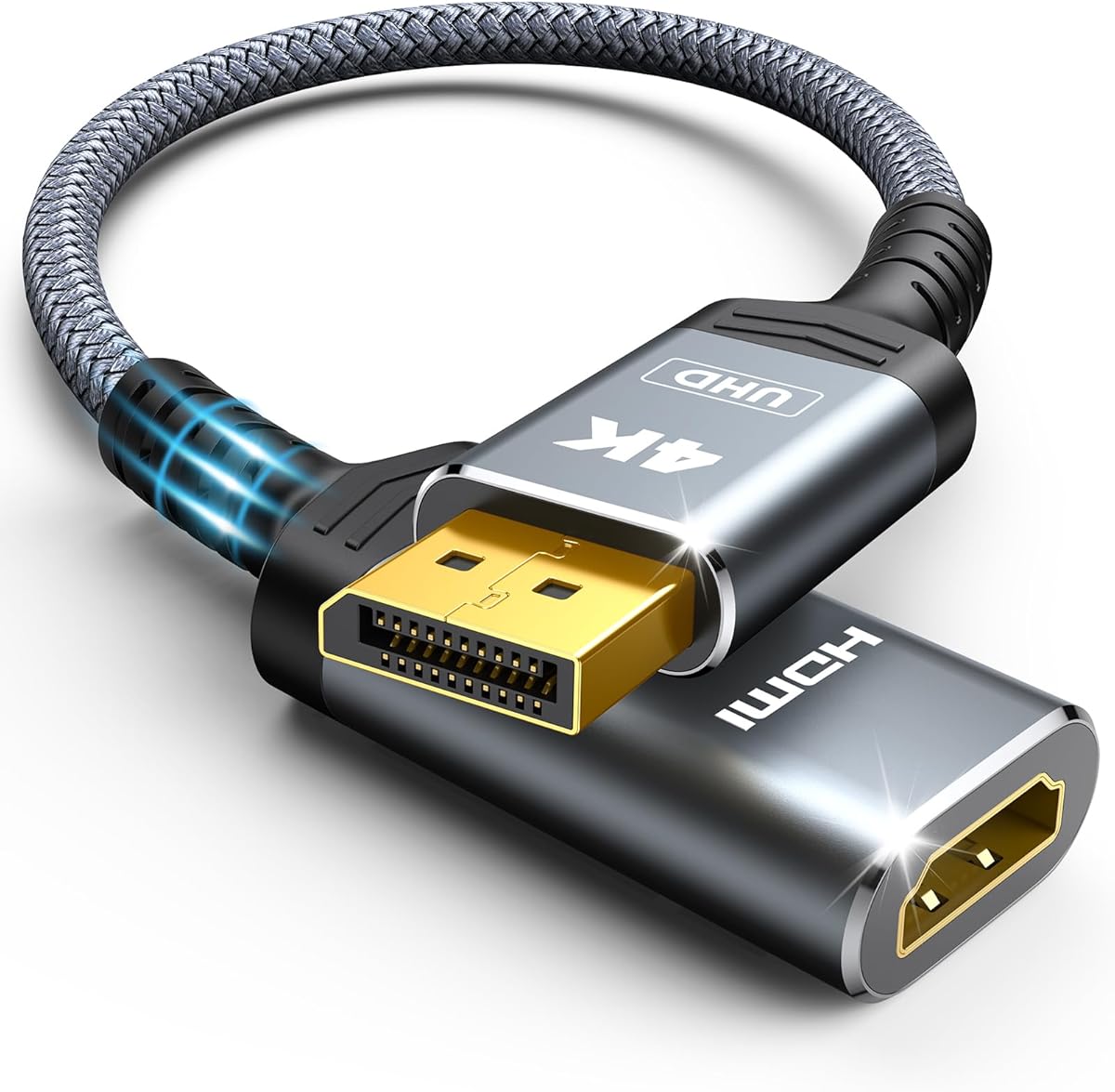
Highwings 4K DisplayPort to HDMI Adapter
4.6Editor score
Passive DP to HDMI adapter
Supports 4K at 30Hz
Durable military-grade nylon
This expert guide compares the top 10 HDMI to Displayport Converter adapters for video and audio output from HDMI sources to Displayport monitors.
Finding the right converter to connect your HDMI source to a Displayport monitor can be challenging. You need reliable signal transmission, high resolution support, and durable build quality to ensure your setup runs smoothly without flickering or dropouts.
We evaluated ten top-rated adapters based on performance, compatibility, build quality, and user feedback. Our analysis focuses on active versus passive designs, resolution capabilities, and how well each unit handles high refresh rates and audio synchronization.
Each pick highlights key strengths and limitations to help you choose the best fit for your specific hardware. Note that availability and pricing may change over time, so always verify current stock and compatibility before making your final purchase decision.
4.6Editor score

4.4Editor score

5.0Editor score
This side-by-side comparison highlights the core specifications and capabilities of each adapter to help you quickly identify the model that matches your specific connection requirements and performance expectations.



The Cable Matters HDMI to DisplayPort Adapter is an active converter designed to bridge HDMI sources to DisplayPort monitors. It holds a solid rating and provides consistent performance for users needing to connect laptops or gaming devices to DP displays.
We may earn a commission when you buy through this link, at no additional cost to you.
This adapter converts HDMI signals into DisplayPort inputs using an internal chip. It supports resolutions up to 4K at 30Hz and includes a USB power cable to ensure stable transmission. The gold plated connectors help maintain signal integrity.
While it performs well, users should note it is not designed for KVM switches or high refresh rate gaming beyond 60Hz at lower resolutions. The USB power requirement adds a slight complexity but ensures reliability with low power HDMI sources.
Ideal for office setups or home theater conversions, this adapter offers a dependable solution for extending displays. It is recommended for those who need to connect HDMI equipped devices to DisplayPort monitors reliably.
The internal IC chip ensures stable signal transmission from HDMI sources to DisplayPort displays.
The included USB power cable guarantees consistent performance even with low power HDMI output devices.
We may earn a commission when you buy through this link, at no additional cost to you.
Highwings offers a reliable passive adapter for converting DisplayPort signals to HDMI displays. With strong ratings for build quality and signal stability, it serves users with DP capable computers connecting to HDMI monitors.
We may earn a commission when you buy through this link, at no additional cost to you.
This adapter supports 4K at 30Hz and syncs audio and video seamlessly. The military-grade nylon and gold plated connectors ensure durability and resistance to corrosion. It works well with desktops and laptops featuring DP ports.
Users should be aware it is strictly unidirectional and does not support docking stations. High resolutions may cause heat which is normal but should be monitored during extended use to maintain performance.
Best for home or office use where budget matters, this adapter delivers solid performance for its price. It is a practical choice for extending desktops to larger screens without needing extra power.
Designed for one way conversion from DisplayPort source to HDMI display ensuring straightforward setup.
Military-grade nylon and gold plated ports extend the product life significantly under daily use.
We may earn a commission when you buy through this link, at no additional cost to you.
BENFEI delivers a sturdy passive adapter for converting DisplayPort sources to HDMI displays. It is popular for its stability and compact design making it suitable for both stationary setups and portable presentations.
We may earn a commission when you buy through this link, at no additional cost to you.
This adapter supports 4K at 30Hz and 1080p at 60Hz ensuring smooth video and audio. The latch design provides a secure connection while the gold plated connector resists wear. It includes an 18 month warranty for peace of mind.
While it is reliable, it does not support bidirectional conversion. Users must ensure their source device is a DisplayPort computer. The compact size is great for travel but may get warm during high resolution streaming.
A solid choice for users needing a reliable DP to HDMI connection, this adapter offers good value. It is recommended for those prioritizing stability and build quality over bidirectional functionality.
The latch design ensures the adapter stays firmly connected during use without accidental disconnections.
Lightweight and compact design allows easy storage in bags for on the go presentations.
We may earn a commission when you buy through this link, at no additional cost to you.
Answin offers a high performance active adapter for connecting HDMI sources to DisplayPort monitors. Its top rating reflects strong satisfaction with its ability to handle 4K at 60Hz and high refresh rates for gaming.
We may earn a commission when you buy through this link, at no additional cost to you.
This adapter supports 4K at 60Hz and 2K at 144Hz making it ideal for gamers and power users. It comes with a USB power cable for stable signal transmission and works with consoles like Xbox and PS5 without extra setup.
Users should note it is unidirectional and requires external power. While the price is higher than passive options, the ability to drive high refresh rates makes it a premium choice for demanding applications.
Ideal for gaming setups or high resolution workstations, this adapter delivers lag-free performance. It is highly recommended for users who need reliable high refresh rate output from HDMI devices.
Supports 2K at 144Hz enabling smooth gaming experiences on high refresh monitors.
Designed to work with Xbox and PS5 ensuring console users can connect to DP displays.
We may earn a commission when you buy through this link, at no additional cost to you.
Moread provides a durable passive adapter for converting DisplayPort outputs to HDMI inputs. With a strong reputation for build quality it is a popular choice for users needing a reliable connection for presentations or media.
We may earn a commission when you buy through this link, at no additional cost to you.
This adapter supports 4K at 30Hz and includes a locking latch to prevent disconnections. The reinforced ABS housing and gold plated connectors protect against wear. It is compatible with most DP equipped computers.
While effective, it requires a DP source and does not support docking stations. The 5 year warranty adds value but users must ensure their device supports DP alternate mode for optimal performance.
Best for daily office use or home entertainment, this adapter offers long term reliability. It is recommended for users who prioritize build quality and warranty protection.
The latch connector prevents accidental disconnects during active use or travel.
A 5 year unconditional warranty ensures long term satisfaction and support.
We may earn a commission when you buy through this link, at no additional cost to you.
This active adapter enables HDMI sources to connect to DisplayPort monitors with high resolution support. It is designed for users needing 4K at 60Hz performance across PCs and gaming consoles.
We may earn a commission when you buy through this link, at no additional cost to you.
The adapter supports 4K at 60Hz and features aluminum housing for heat dissipation. It complies with HDCP 2.2 ensuring content protection is maintained. It works with a wide range of HDMI source devices.
Users should note it requires a power source for stable performance at high resolutions. While effective for content creation and gaming it is slightly more expensive than basic passive options.
A versatile choice for those needing HDMI to DP connectivity with high refresh support. It is recommended for users prioritizing resolution and compatibility with modern devices.
HDCP 2.2 compliance ensures protected content streams securely to your display.
Aluminum housing helps dissipate heat effectively during high resolution streaming.
We may earn a commission when you buy through this link, at no additional cost to you.
UGREEN provides a two-pack of passive adapters for converting DisplayPort signals to HDMI. This value pack is ideal for offices or homes with multiple setups needing reliable connections without extra power.
We may earn a commission when you buy through this link, at no additional cost to you.
Each adapter supports 4K at 30Hz and features a compact aluminum build for durability. The plug and play design makes setup simple. It connects DP sources to HDMI displays efficiently.
While great for standard setups, it does not support HDMI to DP conversion. Users should verify their devices are DP sources. The two-pack offers flexibility for multiple workstations at a single price.
Best for teams or multi-monitor setups, this pack offers reliable performance. It is recommended for users needing cost effective and reliable DP to HDMI solutions.
The two-pack allows simultaneous setup of multiple stations without buying individual units.
Aluminum construction ensures durability and heat resistance during regular use.
We may earn a commission when you buy through this link, at no additional cost to you.
UGREEN offers a compact passive adapter with a braided sheath for durability. It is highly rated for its reliable performance in converting DP signals to HDMI displays for personal use.
We may earn a commission when you buy through this link, at no additional cost to you.
This adapter supports 4K at 30Hz and features a slim aluminum housing. The braided sheath prevents wear and tear. It includes strain relief for both ports to enhance longevity.
Its compact size is great for travel but the short length may limit flexibility. Users should ensure their source is a DP device. The high rating reflects satisfaction with signal quality.
Ideal for laptop users needing a portable solution, this adapter is reliable. It is recommended for those prioritizing portability and build quality in a passive unit.
Slim design fits easily in bags making it perfect for mobile professionals.
Both ends feature strain relief to prevent cable damage during plugging.
We may earn a commission when you buy through this link, at no additional cost to you.
BENFEI provides an active adapter for connecting HDMI sources to DisplayPort monitors with high refresh rates. It is popular among gamers needing 144Hz support on DP screens using HDMI consoles.
We may earn a commission when you buy through this link, at no additional cost to you.
This adapter supports up to 4K at 60Hz and 2K at 144Hz ensuring smooth motion. The braided nylon cable and aluminum casing ensure durability. It comes with an 18 month warranty for peace of mind.
Users must provide external power for stable performance at high resolutions. It does not work with VR headsets. The price reflects the active capabilities and high performance support.
Best for gaming setups or high refresh workstations, this adapter delivers solid performance. It is recommended for users needing reliable HDMI to DP conversion for demanding tasks.
Supports 144Hz at 2K enabling fluid visuals for gaming and animation.
Braided cable and aluminum casing resist wear and heat effectively.
We may earn a commission when you buy through this link, at no additional cost to you.
This BENFEI adapter converts HDMI signals to DisplayPort inputs supporting high refresh rates. It serves users who need to connect gaming consoles or laptops to high refresh DP monitors effectively.
We may earn a commission when you buy through this link, at no additional cost to you.
It supports 4K at 60Hz and 1080p at 165Hz offering smooth visuals. The compact design fits well on desks. It includes strong audio support and an 18 month warranty.
Users should note it is active and requires external power. High resolutions may cause heat buildup but this is normal for active chips. It is not for bidirectional use.
Best for home theater or gaming setups, this adapter offers high performance. It is recommended for users needing reliable high refresh rates from HDMI sources.
Supports 1080p at 165Hz for ultra smooth gaming and animation.
Supports 8 channels digital audio with high sampling rates.
We may earn a commission when you buy through this link, at no additional cost to you.
Selecting the right converter requires understanding your source and display capabilities to ensure smooth video and audio transmission without compatibility issues.
Check if you need to connect HDMI to DisplayPort or vice versa. HDMI to DisplayPort adapters are active and require power while DisplayPort to HDMI adapters are often passive.
Always verify directionality before buying to avoid purchasing a converter that works in the wrong direction for your setup.
Ensure the adapter supports your monitor's native resolution and refresh rate. Higher resolutions like 4K require specific chips and bandwidth to function correctly.
Match the adapter specs to your display capabilities to avoid flickering or dropped frames during use.
Active adapters use chips to convert signals and require external power. Passive adapters rely on direct protocol conversion and need no power source.
Use active converters for HDMI to DisplayPort connections and passive for DisplayPort to HDMI when supported by your hardware.
Look for gold plated connectors and durable housing materials like aluminum or braided nylon. These features protect against corrosion and physical wear over time.
Higher quality materials extend the lifespan of your adapter and maintain signal integrity.
Active converters typically need a USB power connection to ensure stable performance. Ensure you have a spare USB port available for power delivery.
Verify power needs to prevent signal drops or intermittent connectivity issues during use.
Check device compatibility to ensure the adapter works with your PC console or laptop. Some adapters do not support specific brands or docking stations.
Read device lists carefully to confirm support for your exact model before purchasing.
Ensure the adapter supports digital audio formats you need like surround sound. High quality audio pass-through is essential for home theater setups.
Verify audio specs to ensure your speakers or headset work correctly with the adapter.
Choose adapters with solid warranty terms to protect your investment. Reputable brands often offer one to five year warranties for peace of mind.
Check warranty details to understand coverage for defects or compatibility issues.
Connect the adapter to your source device first then attach the HDMI or DisplayPort cable to the adapter. Ensure the power cable is plugged in for active converters.
Set your display to the correct input and resolution settings on your device. This ensures the adapter transmits the signal correctly without errors.
Keep the adapter clean and avoid bending the cable sharply. Store in a cool dry place when not in use to prevent heat damage.
Yes active HDMI to DisplayPort adapters require external power usually via USB to convert the signal properly. Without power the connection may fail or flicker. Ensure your source device has a spare USB port.
No passive adapters work for DisplayPort to HDMI but not the other way around. HDMI to DisplayPort requires active signal conversion due to protocol differences. Always choose an active converter for HDMI sources.
Some adapters have limited console compatibility. Ensure the adapter explicitly supports your model like PS5 or Xbox. Also check if your display resolution settings are compatible with the adapter output.
Check if your DisplayPort is DP++ capable. If not an active adapter is required. Most modern laptops support DP++ but desktops may need an active solution. Verify specs with the device manufacturer.
Most adapters are not compatible with VR headsets due to high refresh rate requirements. Check product details for VR support before purchasing. Use dedicated cables for VR if possible.
Refresh rates vary by model and resolution. Some support 144Hz at 2K while others are limited to 60Hz at 4K. Review product specs to confirm the refresh rate you need for your monitor.
The top picks cover a range of needs from passive simplicity to active high refresh performance. Choose based on your source type and resolution requirements for optimal results.
Prioritize build quality and power needs when deciding on a model. Active converters require power but offer more flexibility for HDMI sources.
Always check current availability and compatibility before buying to ensure the adapter matches your device setup. Prices and stock may vary over time.