
HDMI Splitter 1 in 3 Out
4.6Editor score
Compact aluminum build
USB C power included
Independent LED indicators
This guide compares the top HDMI splitter for 3 monitors models to help you choose the best device for extending or mirroring displays seamlessly.
Finding the right HDMI splitter for 3 monitors can transform your workspace or entertainment setup. A quality device ensures stable signal distribution without lag or flickering, supporting high resolutions like 4K for smooth multitasking or media viewing across multiple screens.
We evaluated ten leading models based on resolution support, build quality, and compatibility. Our comparison covers essential features such as power requirements, signal bandwidth, and whether the splitter supports extended desktop modes or only mirroring for accurate selection.
Each pick highlights specific strengths like audio extraction, 8K support, or budget-friendly designs. Keep in mind that availability and pricing may shift over time, so verify current details before purchasing to ensure you get the best value for your setup needs.
4.6Editor score

4.4Editor score

4.2Editor score
This side-by-side comparison lists ten top models with their core specifications. Use this table to quickly identify which splitter matches your resolution needs, connection type, and budget constraints for optimal performance.



The UANTIN DisplayPort to HDMI Splitter stands out as a top choice for users needing to expand one DP signal across three HDMI monitors. With a strong 4.4 rating, it delivers 4K@60Hz performance ideal for designers and multitaskers who demand sharp visuals and smooth refresh rates.
We may earn a commission when you buy through this link, at no additional cost to you.
This device uses an all-aluminum casing to ensure efficient heat dissipation during long sessions, preventing overheating that could cause signal drops. Its gold-plated interfaces and high-density braided nylon cables reduce interference, maintaining stable transmission even at higher resolutions.
While it supports extended screens, users must ensure their graphics card has at least 18Gbps bandwidth. Some older integrated GPUs may only allow mirroring, limiting its utility for those seeking distinct desktops on each screen without powerful hardware upgrades.
For professionals using PCs with dedicated GPUs, this splitter offers a reliable way to create multi-screen environments without complex configurations. It is the best pick for those who need true extension rather than simple mirroring across three monitors.
The splitter enables triple-screen synchronization or split-screen displays, perfect for trading or data analysis workflows requiring multiple active windows.
The anti-interference design and wear-resistant cable ensure long service life, making it suitable for commercial or heavy daily office use.
We may earn a commission when you buy through this link, at no additional cost to you.
The NEWCARE 4K@60Hz HDMI Splitter is designed for users who want to duplicate one HDMI input to three screens simultaneously. With a 4.2 rating, it offers a reliable way to broadcast the same content across multiple monitors or TVs in retail or home setups.
We may earn a commission when you buy through this link, at no additional cost to you.
This unit supports advanced formats like HDR10 and Dolby Vision, enhancing color depth and contrast on compatible displays. Its auto downscaler allows mixing 4K and 1080P screens under the same refresh rate, ensuring smooth playback without signal conflicts.
Note that it does not support extended modes, meaning all screens show identical content. It also cannot connect external audio devices directly, which might limit setups requiring separate speaker connections for synchronized sound distribution.
Ideal for home entertainment or retail displays, this splitter simplifies setup with included cables. Users should check power adapter placement to avoid signal flickering, making it a solid choice for straightforward mirroring tasks.
Synchronizes audio and video across all displays with zero lag, perfect for presentations or watching movies on multiple screens simultaneously.
Works with PS5, Fire Stick, and other HDMI 2.0 devices, allowing gamers to extend their setup without extra hardware costs.
We may earn a commission when you buy through this link, at no additional cost to you.
The MT-ViKI 4K HDMI Splitter offers a robust solution for distributing one HDMI source across four displays with excellent signal stability. Its 4.4 rating reflects reliable performance in large setups like conference rooms where consistent output is critical.
We may earn a commission when you buy through this link, at no additional cost to you.
A built-in amplifier supports up to 100 feet of total cable length, reducing signal loss over distance. The rugged metal housing protects against heat and interference, ensuring 24/7 reliability for commercial or educational broadcasting needs.
While it only mirrors content, the cascading feature allows connecting even more screens by daisy-chaining units. This flexibility makes it suitable for expanding coverage beyond the standard four outputs without needing additional source devices.
For setups requiring long cable runs, this splitter prevents flickering better than USB alternatives. Users should note it supports 3D video and deep color, making it a strong option for home theaters or digital signage projects.
Supports cascading to connect more screens, making it perfect for large-scale broadcasting or security monitoring environments.
The powered performance ensures consistent signal transmission even with long-distance cable setups.
We may earn a commission when you buy through this link, at no additional cost to you.
The THANDBLE DisplayPort to HDMI Splitter serves as an MST hub enabling three monitors from a single DP port on compatible PCs. With a 4.1 rating, it delivers 4K@60Hz resolution, making it a viable choice for multitasking environments needing high refresh rates.
We may earn a commission when you buy through this link, at no additional cost to you.
This adapter uses high-quality chips to ensure compatibility with DP and DP++ ports from various graphics cards. The nylon braided cables and aluminum alloy shell offer durability and efficient heat management, preventing performance loss during heavy usage.
Mac users should note that only SST mirroring works, limiting its versatility for Mac setups requiring extended desktops. Additionally, it cannot work with hubs or docking stations, requiring a direct connection to the graphics card for optimal results.
For Windows users seeking an affordable MST solution, this splitter expands workspace efficiently. Ensuring GPU support for at least 18Gbps bandwidth is crucial to avoid compatibility issues when running three screens simultaneously.
Supports mirroring and extended modes for PCs with multi-screen output functions, enhancing productivity.
Integrated aluminum alloy shell provides superior heat dissipation and lossless signal transmission.
We may earn a commission when you buy through this link, at no additional cost to you.
This HDMI Splitter 1 in 3 Out stands out as the best budget option with a 4.6 rating for its reliable performance and compact form. It duplicates a single HDMI input to three displays perfectly for home entertainment or small commercial setups.
We may earn a commission when you buy through this link, at no additional cost to you.
The full aluminum casing ensures excellent heat dissipation, allowing 24/7 operation without signal distortion. Independent LED indicators make troubleshooting easy by showing which ports are active at a glance for better maintenance.
While it uses USB-C power, users must ensure the adapter meets requirements. The HDMI 1.4b standard limits refresh to 30Hz at 4K, but it supports 3D and deep color for rich visuals suitable for movie nights and presentations.
For those seeking affordability without compromising stability, this splitter offers a durable solution. Its small footprint saves desk space, making it ideal for setups where efficiency and cost-effectiveness are top priorities.
With a size of 3.26×2.16×0.78 inches, it fits anywhere without cluttering your workspace.
Independent LED indicators allow you to check the working status of each channel at a glance.
We may earn a commission when you buy through this link, at no additional cost to you.
This HDMI Splitter 1 in 3 Out delivers zero latency synchronization, making it perfect for gamers who need multiple screens to show identical feeds. Its 4.3 rating highlights consistent performance for PS5 and PS4 setups without dropped frames.
We may earn a commission when you buy through this link, at no additional cost to you.
The aluminum alloy build blocks interference and keeps the device cool, ensuring reliable streaming even during long gaming sessions. With 12-month warranty and US-based support, users get peace of mind if issues arise during use.
Note that 4K is limited to 30Hz, which might not suit high-refresh gaming on all monitors. However, the 3D support and deep color options still offer vibrant visuals that enhance immersion for casual players and home theaters.
For setups prioritizing stability over ultra-high refresh rates, this splitter is an excellent choice. Its plug-and-play simplicity ensures quick setup, saving time for those who want to dive straight into multiplayer experiences.
Every monitor shows the exact same image in real time with no delays or dropped frames for competitive gaming.
24/7 US-based customer support ensures you get timely help if you have any questions.
We may earn a commission when you buy through this link, at no additional cost to you.
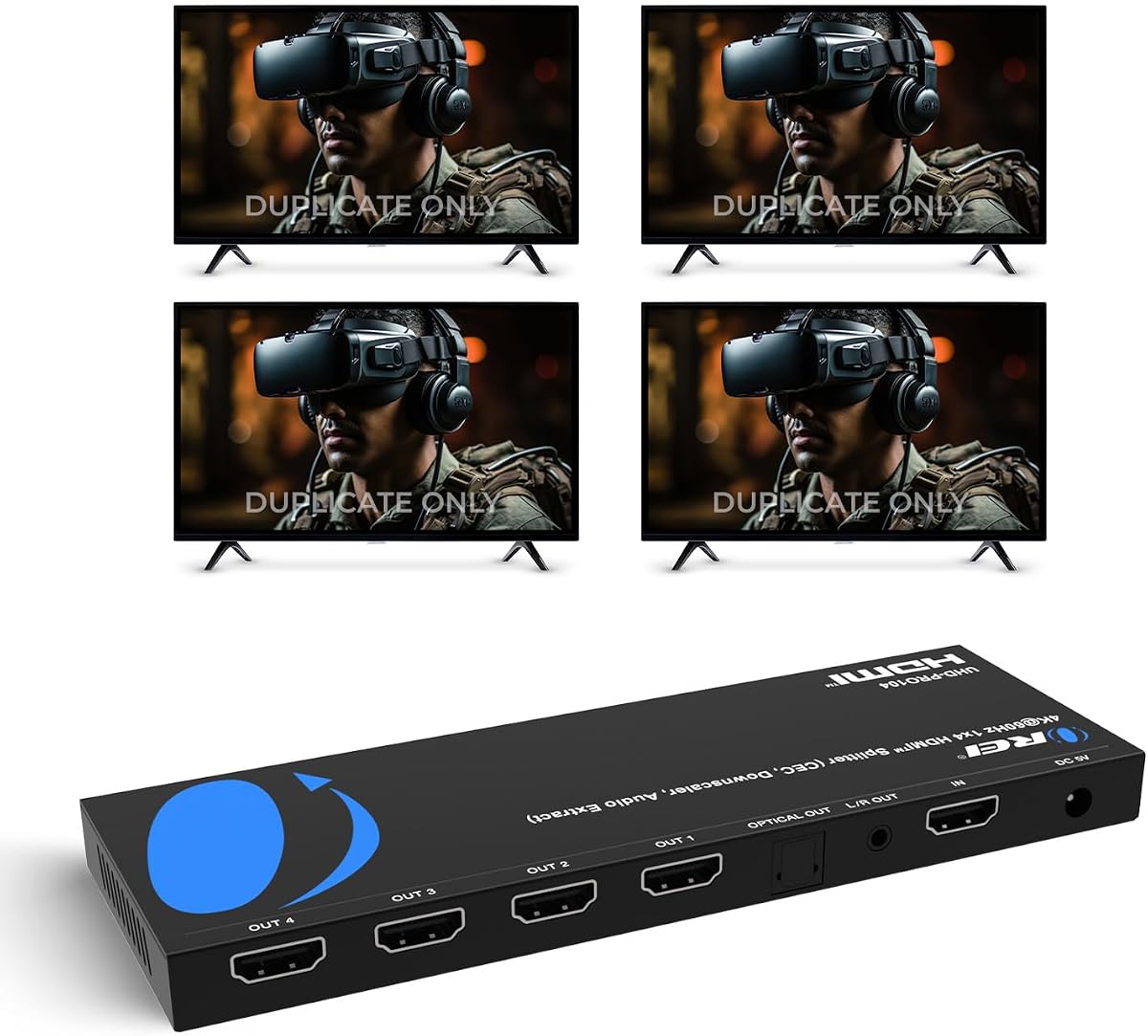
The OREI UltraHD 1×4 HDMI Splitter is designed for professional environments requiring high-quality video distribution across multiple displays. With a 4.5 rating, it supports 4K@60Hz resolution, ensuring crystal-clear performance for presentations and retail signage.
We may earn a commission when you buy through this link, at no additional cost to you.
Its heavy-duty metal enclosure ensures long-term durability and better heat dissipation, making it suitable for 24/7 commercial use. Advanced EDID management helps avoid black screens and flickering, improving compatibility with various source devices.
While it mirrors content only, the support for multiple audio formats like Dolby TrueHD enhances sound quality. This feature is essential for businesses needing synchronized audio and video across multiple zones in stores or classrooms.
For commercial users seeking reliable, high-bandwidth performance, this splitter delivers consistent results. Its simple setup reduces downtime during installation, allowing teams to focus on content delivery rather than technical troubleshooting.
Delivering crystal-clear video performance across all connected displays for a better viewing experience.
Supports multiple advanced audio formats including LPCM, ensuring immersive sound quality.
We may earn a commission when you buy through this link, at no additional cost to you.
The OREI 1×4 HDMI Splitter adds unique value with an integrated audio extractor, ideal for home theaters needing separate sound output. Its 4.3 rating reflects strong support for 4K@60Hz video with HDR10+ pass-through for vivid colors.
We may earn a commission when you buy through this link, at no additional cost to you.
Users can connect speakers via optical or analog ports, solving audio limitations found in standard splitters. Advanced EDID and CEC management ensure stable signal communication, making it easier to integrate with gaming consoles and media systems.
Downscaling support allows mixing 4K and 1080p displays without signal conflicts. While the higher cost might deter budget buyers, the audio flexibility justifies the price for serious AV enthusiasts seeking immersive setups.
This splitter is the top choice for those needing more than just video mirroring. Its ability to manage complex audio and video routing makes it a versatile tool for high-end entertainment centers.
Features audio de-embedding via Optical S/PDIF and 3.5mm analog L/R outputs for flexible audio integration.
Supports HDR10+, Dolby Vision, and HLG pass-through for enhanced contrast and brightness.
We may earn a commission when you buy through this link, at no additional cost to you.
The 8K@60Hz HDMI Splitter is a premium choice for users wanting to future-proof their setup with HDMI 2.1 support. With a 4.2 rating, it handles 8K@60Hz and 4K@120Hz, delivering unmatched resolution and refresh rates for gaming and professional graphics.
We may earn a commission when you buy through this link, at no additional cost to you.
Smart EDID management allows selecting different output resolutions for each screen, though it remains a mirroring device. Variable refresh rate and HDR support ensure smooth, flicker-free visuals, making it ideal for high-end gaming rigs and media setups.
Though pricey, its ability to handle 48Gbps bandwidth means it supports next-gen consoles without compromise. The only limitation is the lack of extended modes, restricting its use to identical content display across all three monitors.
For enthusiasts and professionals needing maximum resolution fidelity, this splitter offers top-tier performance. Its robust feature set justifies the investment, ensuring compatibility with future displays and advanced video standards.
Supports 8K@60Hz, 4K@120Hz, and 1080P@240Hz for immersive visual experiences.
Provides 4 switching modes including Auto and Copy modes to meet different resolution needs.
We may earn a commission when you buy through this link, at no additional cost to you.
The UGREEN HDMI Splitter 1 in 4 Out is a reliable universal distributor supporting 4K@60Hz with consistent bandwidth. Its 4.4 rating confirms stable performance across various HDMI source devices like consoles, PCs, and streaming boxes.
We may earn a commission when you buy through this link, at no additional cost to you.
EDID settings help users avoid black screens by matching display capabilities to the source output. The USB-powered design ensures ease of use without needing bulky external adapters, keeping setups clean and organized.
While it requires continuous power connection, the device supports CEC for enhanced control. Its wide compatibility makes it a safe choice for homes needing to mirror content across multiple TVs or monitors without technical expertise.
For general use where stability and ease of setup matter most, this splitter delivers. It balances performance and affordability, making it a solid option for users looking to expand their entertainment setup efficiently.
Offers high bandwidth 18Gbps data transmission ensuring consistent video output.
Plug and play setup is easy to hook up with universal compatibility.
We may earn a commission when you buy through this link, at no additional cost to you.
Selecting the right splitter involves understanding resolution, bandwidth, and connection types. This section breaks down critical factors to ensure your setup works smoothly without signal loss or compatibility issues.
Most splitters support up to 4K@60Hz, which is ideal for multitasking and high-definition content. For gaming or professional graphics work, look for models supporting 4K@120Hz or even 8K to ensure smooth visuals.
Higher refresh rates provide smoother motion, essential for gaming or video editing. Ensure your monitors and graphics card support the same resolution to avoid downscaling or flickering issues.
HDMI 2.0 or newer is required for 4K@60Hz. Older HDMI 1.4 models are limited to 30Hz at 4K, which may feel sluggish. Check your device's HDMI port version to confirm compatibility before purchasing.
HDMI 2.1 offers better bandwidth for 8K and 120Hz support. If you plan to upgrade to new consoles or monitors, choosing an HDMI 2.1 splitter ensures future-proofing for long-term use.
Most HDMI splitters only mirror content across all screens. For true multitasking where each monitor shows different content, you need a DisplayPort MST hub. Confirm whether you need duplication or extension.
MST hubs use DisplayPort to extend screens while HDMI splitters typically mirror. If your source device supports MST, look for models explicitly stating extended mode support to avoid buying a mirror-only device.
High resolution requires high bandwidth. 4K@60Hz needs at least 18Gbps, while 8K@60Hz demands 48Gbps. Ensure your splitter and cables meet these standards to prevent signal degradation or blackouts.
Using low-quality cables can bottleneck bandwidth. Always check if the product includes high-speed HDMI cables to guarantee stable transmission across all connected displays.
Splitters often need external power to handle high-resolution signals. USB-powered models may fail with long cables or 4K content. Always plug in the included adapter for consistent performance.
USB-C powered units are common but require adapters for older ports. Ensure the adapter meets voltage specs to prevent flickering or intermittent signal dropouts during operation.
Metal casings are essential for preventing overheating. Continuous use generates heat that can damage plastic units, leading to signal instability. Look for all-aluminum or rugged metal enclosures.
Aluminum housings not only improve durability but also act as heatsinks. This is especially critical in commercial or 24/7 setups where reliability cannot be compromised by hardware failure.
Standard HDMI splitters pass audio through video cables. If you need separate audio output, check for optical or analog audio extraction ports. This is vital for home theater setups with external speakers.
Some models extract audio via S/PDIF or 3.5mm jacks. This flexibility allows connecting soundbars or receivers without running audio cables from each monitor, keeping your setup tidy.
Reliable customer support is important for troubleshooting. Look for products offering at least a 12-month warranty and responsive technical assistance. This ensures help if compatibility issues arise post-purchase.
Brands with US-based support can resolve issues faster than international sellers. Verify warranty terms to ensure coverage for hardware defects or signal transmission problems.
Begin by connecting the splitter to a power source before attaching HDMI cables. This ensures the device initializes correctly and prevents signal flickering. Use high-speed cables rated for your resolution to maintain stability.
Connect your source device to the input port and monitors to the output ports. Turn on the source device last to allow the splitter to recognize the displays properly. Avoid moving cables during operation to prevent connection drops.
Keep the splitter in a well-ventilated area to prevent overheating. Dust buildup can hinder heat dissipation, so clean vents regularly. If the unit becomes too hot to touch, check connections or power supply immediately.
Most HDMI splitters duplicate or mirror content across all screens. To extend your desktop, you need a DisplayPort MST hub that supports Multi-Stream Transport. Check the product description to ensure it explicitly supports extended modes rather than just mirroring.
This often happens due to resolution mismatches or HDCP issues. Ensure all monitors support the same resolution and that the splitter handles the source's bandwidth. Adjusting EDID settings or reducing resolution might resolve the problem.
Yes, external power is usually required for 4K@60Hz operation to maintain stable signal transmission. USB-powered models may work but often struggle with high resolutions. Always plug in the included adapter to prevent flickering or signal loss.
Standard HDMI splitters do not have separate audio ports; they pass audio through HDMI cables. If you need external audio, choose a model with an audio extractor. Otherwise, connect speakers to your monitors or source device instead.
Yes, but ensure the splitter supports HDMI 2.1 and high bandwidth for 4K@120Hz. Some splitters limit refresh rates to 60Hz which may affect gaming performance. Check product specifications for console compatibility before purchasing.
Most splitters support up to 4 outputs. For more than four, you may need to cascade multiple units or use a specialized matrix. Ensure your source device can drive the total number of displays without overloading the GPU.
EDID helps the source recognize connected displays for optimal resolution. Without it, screens may show black or wrong resolutions. Splitters with EDID control ensure stable detection and prevent issues with mixed-resolution setups.
Most HDMI splitters mirror only. For Mac users needing extended modes, DisplayPort MST hubs often work via adapters. Check if the splitter supports MST on Mac OS to avoid buying a device limited to mirroring only.
Choosing the right HDMI splitter for 3 monitors depends on whether you need mirroring or extended displays. Our top picks range from budget-friendly options to premium 8K-ready models, ensuring there is a solution for every setup.
Prioritize bandwidth, resolution support, and build quality to ensure reliable performance. A well-chosen splitter enhances productivity and entertainment by delivering stable video across all your displays without signal degradation.
Always check current product listings for updated compatibility and pricing. Verify your graphics card and monitor specifications before buying to ensure the splitter meets your needs for high-quality multi-screen setups.