
OREI 8K@60Hz 48Gbps HDMI Audio Extractor, SPDIF & 3.5mm, ARC, HDCP 2.3, CEC
4.2Editor score
Supports 8K@60Hz video
HDMI 2.1 protocol support
ARC functionality included
This guide compares the top HDMI Audio Extractor models for 2026, evaluating audio quality, resolution support, and compatibility to help you find the perfect
Finding the right HDMI Audio Extractor is essential for modern home theater setups. These devices separate audio from video signals, allowing you to connect external speakers or soundbars easily.
We compared ten leading models based on resolution support, audio formats, and ease of use. Each product was evaluated for compatibility with popular gaming consoles and streaming devices.
Each pick shows key specs and real-world performance insights. Prices and availability change often, so check the current listings before making your final decision.
4.2Editor score

4.2Editor score

4.1Editor score
This table provides a side-by-side view of the top ten HDMI Audio Extractor models available in November 2026, highlighting their key specifications and unique features.






The VPFET HDMI Audio Extractor 4K is a budget-friendly solution for separating audio from HDMI signals. With a rating of 4.1 stars, it offers basic functionality for those needing optical or 3.5mm outputs without breaking the bank.
We may earn a commission when you buy through this link, at no additional cost to you.
It supports up to 4K@30Hz video and includes DTS 5.1 audio support via optical output. The device allows selection between 2.0CH, 5.1CH, and pass modes, giving users flexibility depending on their connected equipment and audio needs.
While affordable, it lacks ARC support and cannot accept TV as an input source, which limits its use in some modern setups. Additionally, it requires USB power, which may mean finding an available port on your TV or using an adapter.
This extractor is best suited for basic setups involving gaming consoles or media players where budget is a priority. If you need a simple way to route audio to external speakers without advanced features, this is a solid choice.
The ability to switch between stereo and surround sound modes ensures compatibility with different speaker systems without requiring complex configuration steps.
Low energy consumption makes this extractor ideal for setups where power usage is a concern, drawing minimal power from the USB source to operate effectively.
We may earn a commission when you buy through this link, at no additional cost to you.
The OREI HDMI Audio Extractor ARC 4K@60Hz is a robust choice for users needing higher resolution support. With a 4.4 rating, it delivers reliable performance for 4K content and modern audio formats without compromising video quality.
We may earn a commission when you buy through this link, at no additional cost to you.
It features HDMI 2.0b compliance and supports 18Gbps bandwidth, ensuring full 4K@60Hz video with HDR pass-through. The device can extract audio to both optical and analog outputs simultaneously, making it versatile for different speaker configurations.
Although it supports ARC for TV connectivity, volume control via the TV remote is not possible on the audio outputs. This can be a minor inconvenience for users who prefer centralized control over their entire home theater system.
Ideal for home theater enthusiasts who want to maintain 4K quality while upgrading audio, this extractor offers strong performance. It is particularly useful for those needing ARC compatibility without sacrificing video resolution.
Support for HDR10 and Dolby Vision ensures that your visual experience remains vibrant and true to source, even when audio is being extracted separately.
ARC support allows for easy audio routing from your TV to external systems, while CEC pass-through helps maintain device communication across your entertainment setup.
We may earn a commission when you buy through this link, at no additional cost to you.
The OREI 4K@60Hz HDMI Audio Converter Extractor stands out as a versatile and reliable option for modern setups. With a 4.2 rating, it handles a wide range of audio formats including Dolby Atmos, making it suitable for immersive sound experiences.
We may earn a commission when you buy through this link, at no additional cost to you.
It supports up to 4K@60Hz video with HDR pass-through and is compatible with HDMI 2.0b. The metal housing provides durability, and the device works seamlessly with popular gaming consoles and streaming devices without requiring additional drivers.
However, it lacks ARC support, which means it cannot extract audio directly from a TV's return channel. Additionally, some users may find the lack of 4K@30Hz compatibility in certain scenarios restrictive for older devices.
This extractor is a top choice for gamers and movie enthusiasts who prioritize audio quality and video fidelity. If your setup involves dedicated source devices rather than TV audio return, this model delivers consistent performance.
Support for TrueHD, DTS:X, and Dolby Atmos ensures that high-fidelity audio tracks are preserved when extracting sound for external amplification systems.
The durable metal housing not only protects internal components but also helps with heat dissipation during extended use, ensuring stable operation over time.
We may earn a commission when you buy through this link, at no additional cost to you.
The eSynic Professional eARC & ARC Audio Extractor is designed for users who want to upgrade their TV audio output. With a 4.5 rating, it excels at high-resolution audio extraction using the eARC and ARC ports found on modern HDTVs.
We may earn a commission when you buy through this link, at no additional cost to you.
It supports high sampling rates up to 192kHz, ensuring that audio details are preserved when connecting to external speakers or headphones. The device provides 3.5mm and L/R stereo outputs, making it easy to connect to various analog systems.
A key limitation is that it only works with TV ARC/eARC ports and does not support other HDMI sources. Additionally, the lack of optical output restricts its use to analog audio systems, which may not fit all setups.
This extractor is perfect for users wanting to bypass TV speakers for better sound quality. If your TV has ARC/eARC and you prefer analog connections, this device offers a seamless upgrade for listening to content through external speakers.
The 192kHz sampling rate ensures that even subtle audio nuances are captured, providing a more immersive experience than standard stereo outputs.
Designed specifically for TV ARC ports, this extractor simplifies the process of connecting external audio systems directly to your television's built-in streaming apps.
We may earn a commission when you buy through this link, at no additional cost to you.
The J-Tech Digital HDMI Audio Extractor is well-suited for gaming setups that require high refresh rates. With a 4.1 rating, it supports 1080p@144Hz, making it an excellent choice for PC gaming and next-gen consoles.
We may earn a commission when you buy through this link, at no additional cost to you.
It offers HDMI 2.0 compatibility and HDR10 support, ensuring high-quality video output. The CEC function allows for basic device control integration, which can streamline your setup. Digital audio is passed through to optical output efficiently.
One trade-off is that it does not decode digital audio formats like Dolby Digital for analog outputs, meaning users must set their source to PCM for 3.5mm output. Additionally, it is not compatible with certain Apple TV models or older HDMI sources.
This extractor is best for gamers who prioritize performance and high refresh rates. If you need to extract audio while maintaining high frame rates and compatibility with modern HDMI 2.0 devices, this unit provides a solid balance.
Support for up to 144Hz at 1080p ensures that gamers can enjoy smooth visuals without sacrificing audio extraction capabilities.
HDR10 pass-through allows for vibrant colors and contrast levels to remain intact, enhancing the overall visual experience during gaming or media playback.
We may earn a commission when you buy through this link, at no additional cost to you.
The VPFET HDMI eARC Audio Extractor focuses on delivering digital audio from modern TVs via Toslink and Coaxial outputs. With a 4.1 rating, it is a specialized tool for users needing dual digital outputs for their soundbars or amplifiers.
We may earn a commission when you buy through this link, at no additional cost to you.
It supports high sampling rates up to 192kHz, ensuring high-quality sound reproduction. The device is backward compatible with ARC, making it versatile for both newer eARC TVs and older ARC-enabled models. This expands its utility across different setups.
However, it does not support CEC, meaning you won't have device communication control through the extractor. Additionally, like similar models, it only works with TV ARC/eARC ports and not with other HDMI source devices.
This extractor is ideal for users with digital audio systems like soundbars or home theater receivers. If your TV lacks coaxial or optical outputs, this device bridges the gap effectively for high-resolution audio playback.
Having both Toslink and Coaxial options provides flexibility for connecting to different audio equipment without needing additional adapters or converters.
The eARC interface offers higher bandwidth compared to standard ARC, allowing lossless transmission of multi-channel digital audio for a better surround sound experience.
We may earn a commission when you buy through this link, at no additional cost to you.
The OREI 8K@60Hz HDMI Audio Extractor is built for users planning for future display technologies. With a 4.2 rating, it supports 8K video pass-through, making it a future-proof option for high-end home theater systems.
We may earn a commission when you buy through this link, at no additional cost to you.
It features HDMI 2.1 support with 48Gbps bandwidth, ensuring compatibility with allM and QFT features. The device supports a wide range of audio formats including Dolby Atmos and DTS:X, delivering a comprehensive sound experience alongside video.
While it supports ARC, it does not support eARC, which might be a limitation for some users. Additionally, the premium price point may be higher than others, though the metal enclosure ensures durability and heat dissipation.
This is the top choice for early adopters and users who need HDMI 2.1 features. If you want a premium extractor that keeps up with the latest video standards and high-quality audio, this model is worth the investment.
Support for 8K@60Hz ensures that your audio setup remains relevant even as display technology advances, protecting your investment against obsolescence.
Comprehensive support for Dolby TrueHD, DTS-HD Master Audio, and Dolby Atmos allows for lossless audio extraction to high-fidelity external systems.
We may earn a commission when you buy through this link, at no additional cost to you.
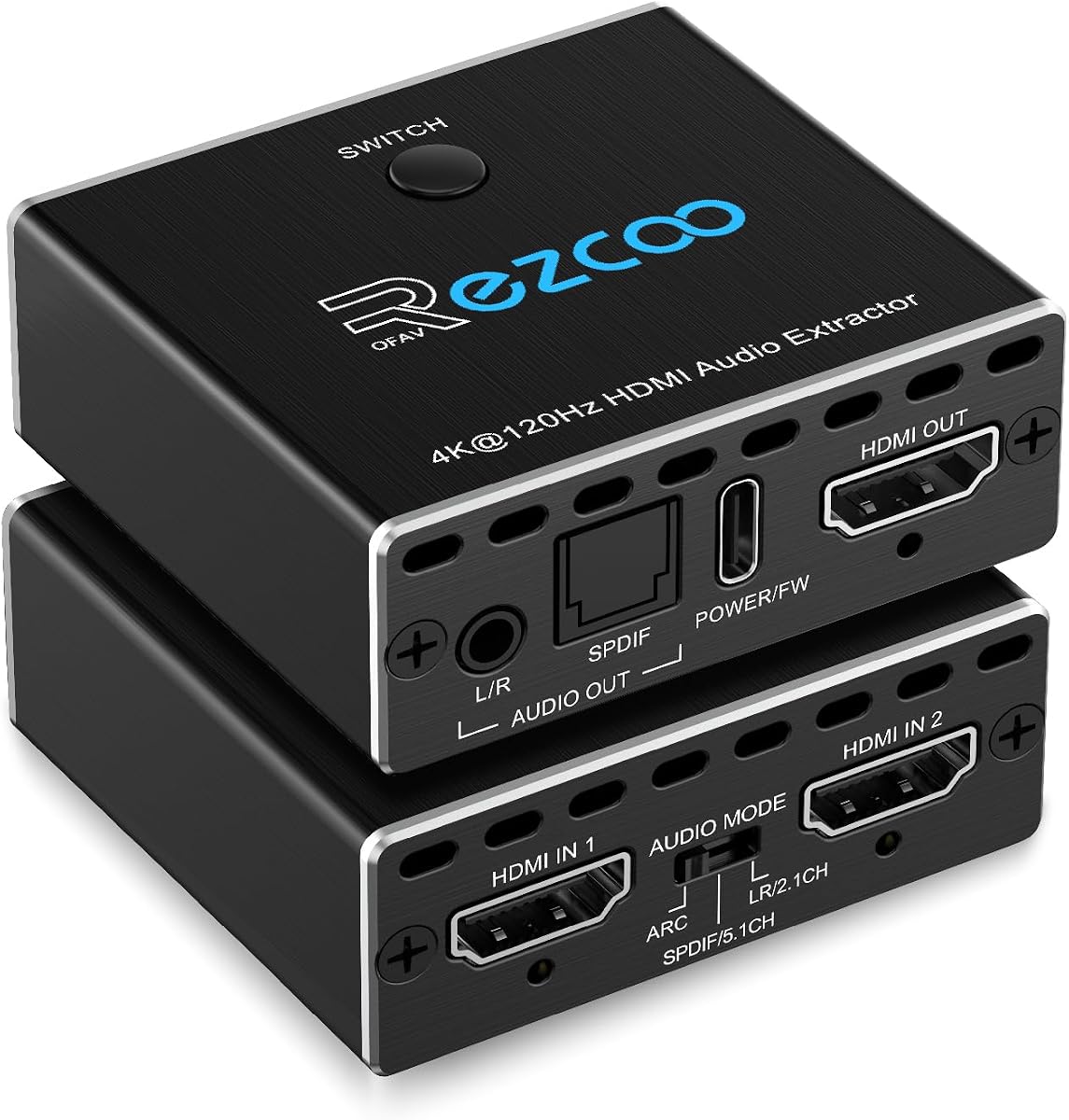
The 4K 120Hz HDMI 2.1 Audio Extractor Switch is unique because it allows switching between two HDMI sources. With a perfect 5.0 rating, it combines an audio extractor with a switch, simplifying setups with multiple consoles or devices.
We may earn a commission when you buy through this link, at no additional cost to you.
It supports up to 8K@60Hz and 4K@120Hz, ensuring high performance for gaming and media. The device extracts audio via HDMI, SPDIF, or 3.5mm, offering flexibility for different types of sound systems without additional hardware.
Users must use HDMI 2.1 cables to achieve top performance, and the switch function is automatic based on input presence. While it doesn't support 1 in 2 out, its focus on 2 in 1 out makes it ideal for consolidating inputs.
This extractor is best for gamers managing multiple consoles or PCs. If you need to switch between devices while maintaining high resolution and quality audio extraction, this combination device streamlines your setup effectively.
The ability to switch between two sources without needing a separate switch simplifies cable management and reduces clutter in your entertainment center.
Support for 120Hz ensures that fast-paced games remain smooth while audio is extracted for external surround sound systems for an immersive experience.
We may earn a commission when you buy through this link, at no additional cost to you.
This HDMI Audio Extractor stands out for its triple operating modes, which offer significant flexibility. With a 4.2 rating, it supports 8K@60Hz video and both ARC and eARC for modern TV integration and audio separation.
We may earn a commission when you buy through this link, at no additional cost to you.
The device can be configured to pass-through audio, downmix to stereo, or output multi-channel surround sound. This makes it adaptable for different audio preferences and equipment types, ensuring you get the right sound format for your speakers.
Users must ensure their TV is set to eARC or ARC output mode for proper function, and it does not work with TVs as an input source for video extraction. Additionally, the multiple modes may require some initial setup to get right.
This extractor is ideal for advanced users who need specific audio output formats. If you want control over how audio is processed and support for high-resolution video, this model offers a versatile solution for home theater setups.
The ability to switch between pass, stereo, and multi-channel modes allows users to optimize audio output for different scenarios without additional processing hardware.
Support for up to 8K@60Hz ensures compatibility with future display technologies, keeping your setup relevant as video standards advance over time.
We may earn a commission when you buy through this link, at no additional cost to you.
The HDMI Audio Extractor Splitter is a compact and simple solution for basic audio needs. With a 4.2 rating, it separates audio into a 3.5mm jack, making it ideal for connecting headphones or basic speakers directly to gaming consoles or PCs.
We may earn a commission when you buy through this link, at no additional cost to you.
It supports 4K@30Hz and 3D video, providing decent resolution for most media and gaming scenarios. The device does not require an external power adapter for most setups, though some devices may benefit from a USB power connection for stability.
It lacks ARC support and only supports 30Hz refresh rates, which may limit use for high-performance gaming. Additionally, like others, it does not support TV as an input source for audio extraction.
This extractor is best for users needing a simple, portable solution. If you want to connect headphones to a console without a complex setup, this lightweight adapter provides a convenient and affordable option for daily use.
The compact and lightweight design makes it easy to carry in a bag, ensuring you can connect audio to any HDMI device while traveling or moving setups.
Plug-and-play functionality means no drivers or complex configuration is needed, allowing you to get audio working within minutes of unboxing the device.
We may earn a commission when you buy through this link, at no additional cost to you.
Choosing the right HDMI Audio Extractor requires understanding your specific audio and video needs. This guide helps you focus on the key factors that impact performance and compatibility.
Check that the extractor supports the resolution your source and display require. Models vary from 4K@30Hz to 8K@60Hz, so pick one that matches your setup to avoid video degradation.
Prioritize extractors with HDMI 2.0 or 2.1 support if you need higher refresh rates or HDR for modern displays.
Determine if you need optical (SPDIF), 3.5mm, or coaxial outputs. Some models only provide one type, while others offer multiple for flexibility.
For surround sound, ensure the model supports formats like Dolby Digital or DTS 5.1 for your specific audio system.
If you want to extract audio from a TV, look for ARC or eARC support. eARC offers higher bandwidth for lossless audio but requires a compatible TV.
Note that not all models support ARC, so verify this feature if you intend to use it with television outputs.
Ensure the extractor supports the required HDCP version for your devices, such as HDCP 2.2 for 4K content. Without this, you may face playback issues.
HDCP 2.3 support is better for future-proofing as newer content may require stricter copyright protection.
Some extractors need an external power adapter while others use a USB port. Verify power requirements to ensure you have a convenient power source available.
USB-powered models are more portable but may struggle with devices that don't provide enough power through HDMI.
Check which audio formats the extractor can handle, especially if you have high-fidelity systems. Some models support Dolby Atmos or DTS:X while others do not.
If you use analog outputs, ensure the model can downmix digital formats to PCM to avoid audio issues.
Metal housings generally offer better durability and heat dissipation compared to plastic models. Consider this if you plan to use the device for long hours.
A compact design is beneficial if you have limited space behind your entertainment center.
Look for brands that offer reliable tech support and warranty coverage. Some companies provide lifetime support which can be valuable if issues arise.
Reading reviews from other buyers can also give insight into how responsive a brand is to customer needs.
To use the extractor, connect your HDMI source device to the input port and your display to the HDMI output port. Then connect your audio system to the optical or analog outputs as needed.
Ensure your device is powered on using the provided USB cable or adapter. Check that your audio system is set to the correct input source to receive the signal from the extractor.
Keep the extractor in a well-ventilated area to prevent overheating during extended use. Regularly check cables for wear and ensure all connections remain secure to maintain stable performance.
Some HDMI Audio Extractors support ARC or eARC, but not all models include this feature. If you want to extract audio from a TV, look specifically for models that list ARC support. Without ARC, you will need to connect the extractor to a dedicated HDMI source.
Yes, most HDMI Audio Extractors are compatible with PS5 as long as they support HDMI 2.1 or the required resolution and refresh rate. Ensure the model supports HDCP 2.2 or higher for full functionality. Check the specifications before purchasing to confirm compatibility.
This can happen if the audio format is not supported by your speakers. Try changing the audio settings on your source device to PCM if using analog outputs. Ensure all cables are securely connected and the extractor is powered on properly.
Not always. Some models can run via USB power from the source device, but others require an external adapter for stable performance. High-resolution models often need external power to handle the bandwidth requirements effectively.
Some extractors support Dolby Atmos and pass it through via optical output. However, for analog outputs, the model must be able to downmix the signal to PCM. Check the product specifications to confirm Dolby Atmos compatibility before buying.
You can only connect the extractor to a TV if it supports ARC or eARC. Standard HDMI inputs on TVs are not compatible as inputs. Use the extractor for TVs only if it explicitly states ARC support in its features.
Our top picks offer reliable solutions for various budgets and needs. The OREI 4K@60Hz model stands out as the best overall, while the OREI 8K@60Hz offers premium features for advanced setups.
When choosing, prioritize the audio formats and resolution you need most. If you play games, look for high refresh rate support. For home theater, focus on surround sound compatibility.
Remember that prices and availability can change quickly. Always verify the latest specifications and current listings before making your final decision to ensure you get the right model.