
MAIWO Hard Drive Docking Station Cloner for 2.5 3.5 Inch SATA HDD SSD
4.5Editor score
Independent 12V 3A power supply included
3X USB 3.0 hub extension ports
Supports up to 48TB total capacity
Finding the right hard drive duplicator cloner docking station is essential for anyone needing to manage, backup, or clone storage drives efficiently. These devices offer a convenient way to copy data without relying on complex software or direct computer connections. Whether you are an IT professional or a home user, choosing the correct model ensures speed, compatibility, and reliability for your specific storage needs.
To create this comprehensive list, we evaluated ten top-rated products based on user feedback, technical specifications, and real-world performance metrics. We focused on features like offline cloning capabilities, transfer speeds, drive compatibility, and overall build quality. Our analysis ensures that every recommendation provides genuine value and meets the diverse requirements of modern storage management tasks.
Each product pick highlights key strengths, potential trade-offs, and ideal use cases to help you make an informed decision. Note that product availability and pricing can change frequently, so always verify current details before purchasing. This guide aims to simplify your search and connect you with the most suitable hardware for your data handling requirements.
4.5Editor score

4.5Editor score

4.5Editor score
As an Amazon Associate we earn from qualifying purchases.
The following comparison table outlines the key specifications and features of each selected hard drive duplicator cloner docking station to help you quickly identify the model that best fits your technical requirements and budget constraints.





The SABRENT USB 3.0 Dual Bay Hard Drive Docking Station stands out as a top contender with a strong user rating. It delivers consistent performance for cloning and docking tasks without needing a computer connection. This makes it highly accessible for users who need quick data migration solutions.
We may earn a commission when you buy through this link, at no additional cost to you.
Its support for both 2.5 and 3.5 inch SATA drives ensures broad compatibility across different hardware types. The offline cloning feature allows you to duplicate drives directly via a button press, which simplifies workflows significantly. Additionally, the USB 3.0 interface provides fast data transfer speeds up to 5Gbps when connected to a PC.
While it lacks USB-C connectivity, the standard USB 3.0 port is sufficient for most desktop setups. Users should note that an external power adapter is required for stable operation with larger drives. These trade-offs are generally acceptable given the reliable performance and ease of use.
This docking station is ideal for home users and small business owners who need reliable drive cloning and docking capabilities. Its combination of speed, compatibility, and straightforward operation makes it a highly recommended choice for daily storage management tasks.
With a simple button press, you can duplicate source drives to target drives without needing any PC connection or software setup.
It accommodates standard desktop 2.5 and 3.5 inch SATA hard drives and SSDs, ensuring flexibility for various storage upgrades.
We may earn a commission when you buy through this link, at no additional cost to you.
This model brings modern connectivity to your setup with its USB-C interface, making it perfect for newer laptops and devices. It maintains the strong cloning capabilities found in the classic model while updating the connection type. Users appreciate the ability to use both bays simultaneously when connected to a computer.
We may earn a commission when you buy through this link, at no additional cost to you.
The offline cloning function allows you to copy data directly between drives using a physical button, removing the need for system resources. Both bays can mount as separate drives when plugged into a PC, enabling flexible file management. The hot-swappable design means you can change drives without tools.
Potential buyers should check their computer ports to ensure compatibility, as older systems may need a USB-C to USB-A adapter. It only supports SATA drives, so IDE or M.2 drives are not compatible. These limitations are minor for most modern users but important to note.
If you need a docking station that aligns with current tech standards without sacrificing cloning features, this is a great choice. It suits professionals and enthusiasts who value flexibility and modern connection options in their storage tools.
The included USB-C cable ensures compatibility with newer devices that lack traditional USB-A ports, future-proofing your setup.
You can move files between drives or work off both simultaneously when connected to a computer for efficient workflow.
We may earn a commission when you buy through this link, at no additional cost to you.
This triple-bay docking station expands flexibility by supporting both M.2 NVMe and SATA drives, which is rare in standard models. It offers faster data transfer speeds thanks to USB 3.2 Gen 2 technology, making it suitable for high-performance SSDs. The offline cloning feature remains robust and easy to use with a simple touch.
We may earn a commission when you buy through this link, at no additional cost to you.
The triple-bay design allows you to manage multiple drives at once, ideal for users with extensive storage needs. You can clone between different drive types, offering maximum versatility for various setups. The tool-free design ensures quick and convenient swapping of drives without extra hardware.
Users should ensure their devices support USB-C for optimal speed, as older ports may limit performance. The price is higher than basic models, reflecting its advanced feature set and broader drive compatibility. These factors make it a premium option for those with specific needs.
For users managing diverse data sources or working with modern NVMe drives, this docking station is an excellent investment. It bridges the gap between traditional SATA solutions and newer high-speed storage technologies seamlessly.
Supports cloning between various drive types including M.2 PCIe NVMe SSDs and 2.5 or 3.5 inch SATA SSDs and HDDs.
Features USB 3.2 Gen 2 technology for blazing-fast data transfer speeds up to 10 Gbps for efficient operations.
We may earn a commission when you buy through this link, at no additional cost to you.
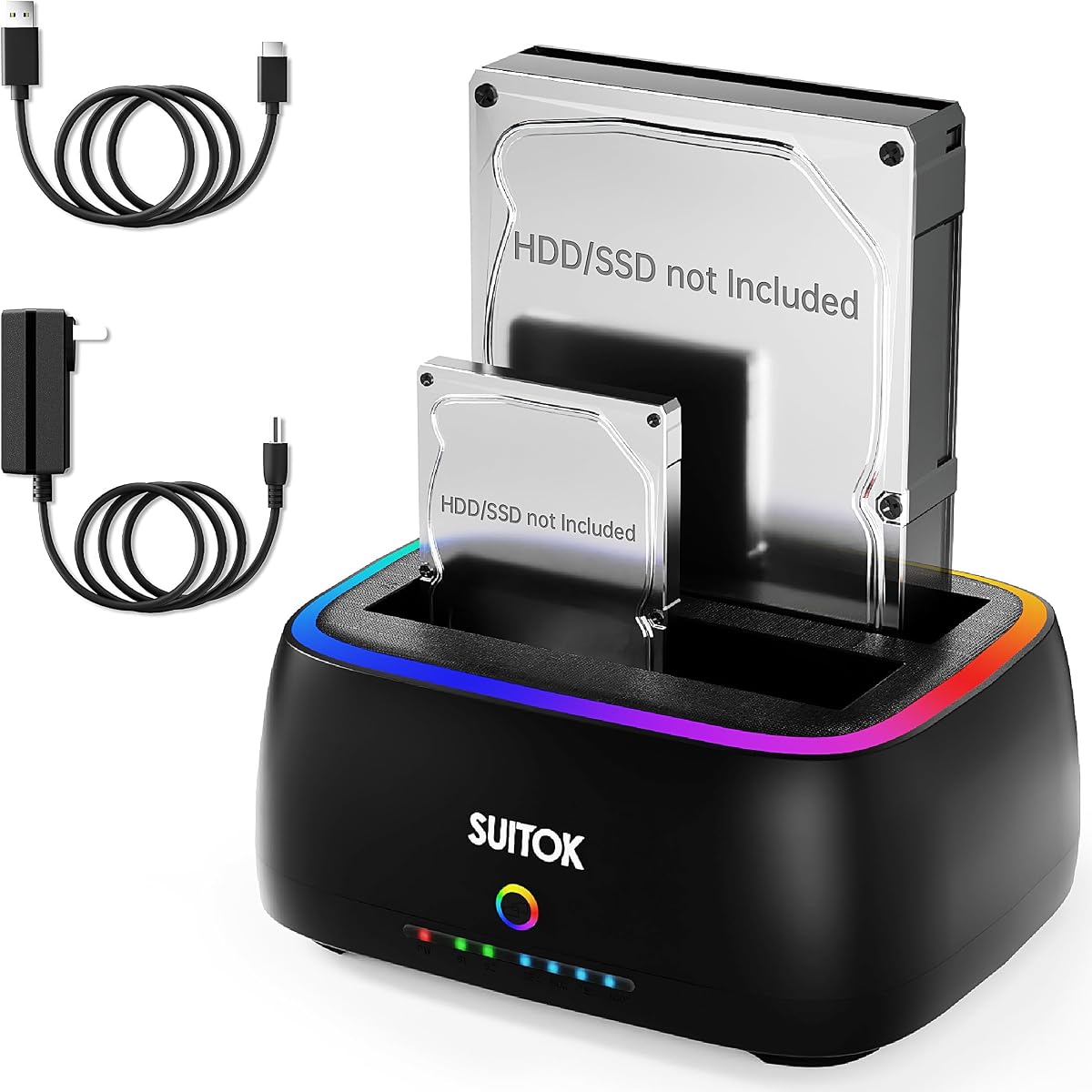
The MAIWO Hard Drive Docking Station offers impressive value with its comprehensive feature set at a budget-friendly price. It provides offline cloning capabilities and high total capacity support for managing large data volumes efficiently. The inclusion of USB 3.0 hub extensions adds extra utility to your desktop setup.
We may earn a commission when you buy through this link, at no additional cost to you.
This model supports offline cloning without needing a computer connection, making it convenient for quick data backups. Each bay supports large drives allowing a total capacity of up to 48TB for extensive storage expansion. The highly efficient power supply ensures stable performance for both bays simultaneously.
The USB hub extension is useful for connecting additional devices but may require caution regarding power draw. While it lacks advanced features like USB-C or NVMe support, it covers standard SATA needs exceptionally well. These aspects make it a solid entry-level option for general users.
If you need a reliable docking station for cloning and docking SATA drives without breaking the budget, this model fits perfectly. It is ideal for home users or IT technicians who value practicality and cost-effectiveness in their tools.
Supports offline cloning data without connecting to computer automatically backing up source HDD to target HDD without drivers needed.
Equips with 3X USB 3.0 Type-A interfaces supporting USB Flash Drives for extended connectivity options.
We may earn a commission when you buy through this link, at no additional cost to you.
This docking station combines compact functionality with essential cloning features in a sleek package. It offers a one-key offline clone function that makes duplicating drives simple and direct. The vertical open-air design enhances heat dissipation which helps maintain drive health over time.
We may earn a commission when you buy through this link, at no additional cost to you.
The tool-free vertical insertion design allows you to swap drives quickly without any tools. It supports high-speed 5Gbps data transmission ensuring efficient file access and transfers. The integrated LED progress bar provides clear monitoring of cloning tasks.
Some users may find the customizable RGB lighting unnecessary for professional settings but it adds modern desktop aesthetics. Ensure you have compatible USB-C ports for full performance benefits. These small trade-offs do not detract from its core reliability and ease of use.
This model is suitable for home office enthusiasts who need a functional and visually appealing docking solution. It works well for occasional cloning tasks and daily docking requirements without taking up much space.
Experience instant plug-and-play functionality with vertical open-air design that enhances heat dissipation for cooler operations.
LED progress bar provides real-time monitoring of your disk imaging tasks with clear indicators of completion percentage.
We may earn a commission when you buy through this link, at no additional cost to you.
StarTech is known for building reliable tools for IT professionals and this duplicator reflects that quality. It delivers high duplication speeds of up to 28GB/min making it efficient for batch operations. The build quality and warranty support offer peace of mind for business users.
We may earn a commission when you buy through this link, at no additional cost to you.
It works with 2.5 and 3.5 inch SATA drives of any capacity and supports 4Kn formats for enterprise drives. TRIM support helps maintain SSD performance over time which is essential for longevity. The product includes universal power adapters and USB-C/A cables for immediate use.
The toaster-style top-loading design is effective but may be less intuitive than vertical slot systems for some users. Its higher price reflects the professional grade build and support structure. These factors are generally worth the investment for mission critical tasks.
If you are an IT technician or work in a business environment this docking station provides the durability and speed needed. It is a trustworthy solution for professional data migration and storage management workflows.
Designed and built for IT Professionals with a 2-year warranty and lifetime technical assistance for business continuity.
Standalone sector-by-sector copier works at speeds up to 28GB/min ensuring efficient processing of large drive volumes.
We may earn a commission when you buy through this link, at no additional cost to you.
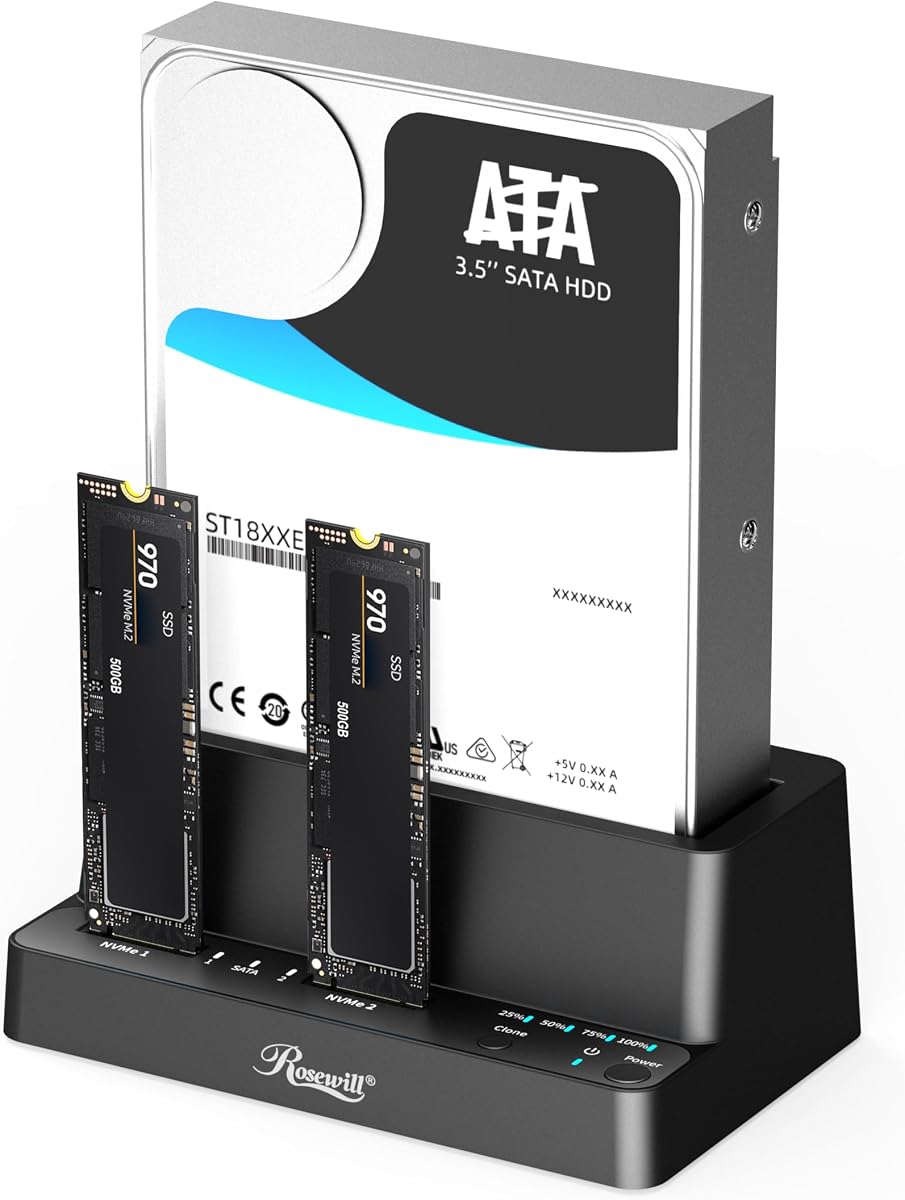
Rosewill provides a triple bay option that supports both M.2 NVMe and SATA drives at fast speeds. This makes it versatile for users who need to handle different drive types without separate docks. The compact design ensures it is easy to transport for field work.
We may earn a commission when you buy through this link, at no additional cost to you.
It achieves lightning-fast data transfer speeds up to 10Gbps with USB 3.2 Gen 2×1 technology. The offline cloning function allows you to perform HDD and SSD clones without a host computer for added convenience. Tool-free operation makes it easy to install and remove drives without tools.
Users should ensure they have USB-C ports to take advantage of the higher transfer speeds. While not as widely recognized as some brands it offers solid performance for the price. These points make it a competitive choice for portable storage solutions.
For users on the go or with mixed drive types this docking station offers practical versatility. It balances speed and portability effectively for those who need reliable cloning outside the office.
Achieve lightning-fast data transfer speeds up to 10Gbps with USB 3.2 Gen 2×1 technology for efficient work.
The lightweight and compact design makes it easy to carry and use on the go for field technicians.
We may earn a commission when you buy through this link, at no additional cost to you.
The ORICO 5-bay station is designed for users needing to manage massive storage volumes at once. It supports a total capacity of up to 100TB making it ideal for photographers or professionals with large archives. The aluminum-alloy construction helps keep drives cool during extended use.
We may earn a commission when you buy through this link, at no additional cost to you.
It enables simultaneous duplication of four copies through a single button without needing a computer connection. This 1:4 offline duplicator feature saves significant time for bulk backups. The design includes anti-vibration pads to reduce noise and improve stability.
User reviews indicate a slightly lower rating compared to dual bay models which may suggest some complexity. However, for those who need 5 bays this is one of the few affordable options available. It supports S.M.A.R.T and TRIM functionalities for drive health monitoring.
This dock is best suited for power users who prioritize capacity and simultaneous drive access. It is a practical tool for creating backup hubs for large volume storage management.
Max of 5x20TB capacity making it ideal for users requiring ample storage space for large volumes of files.
Constructed from durable aluminum alloy material with vertical design providing excellent performance and cooling.
We may earn a commission when you buy through this link, at no additional cost to you.
This WAVLINK model uses UASP transfer protocol which allows for faster speeds up to 6Gbps. It supports both USB 3.0 and USB C interfaces for broad device compatibility. The offline cloning function works directly between drives without needing a host computer.
We may earn a commission when you buy through this link, at no additional cost to you.
It supports transfer speeds up to 6Gbps by UASP which is up to 20% faster than standard USB 3.0. The built-in power control switch allows you to manage energy usage efficiently. Automatic sleep mode helps save energy when the device is inactive.
Note that it is not compatible with M1 or M2 based Macs which limits some users. You will need an external power adapter which is included. These specifics are minor compared to the performance gains offered by UASP.
Ideal for Linux or Windows users who want faster data transfers in a docking station this model stands out. It is a solid choice for performance conscious users on a standard budget.
Support transfer speeds up to 6Gbps by UASP transfer protocol which is up to 20% faster than standard USB 3.0.
Highly efficient 12V 3A power supply with automatic sleep mode after 30 minutes of inactivity saves energy.
We may earn a commission when you buy through this link, at no additional cost to you.
This 4-bay duplicator is a robust solution designed for professionals who need secure data management features. It supports standalone cloning and erasing which makes it a complete tool for data lifecycle management. The LCD menu display allows you to select modes without needing a PC.
We may earn a commission when you buy through this link, at no additional cost to you.
It supports Quick Erase and Secure Erase options that meet industry standards for wiping data. This is essential for organizations that need to ensure data cannot be recovered after disposal. The hardware supports both USB and eSATA connections for versatility.
The price is higher than standard models reflecting the added erasing capabilities and support features. It also includes IDE adapters which expand compatibility significantly compared to SATA only options. These capabilities make it worth the investment for security focused users.
If you need to manage disposal or secure wiping of drives this model is unmatched. It is a premium choice for those who value comprehensive control and security in their hardware tools.
Supports Quick Erase and Secure Erase following NIST SP 800-88 Rev 1 Purge for secure data removal.
Use push button menu navigation to select duplication and erase modes and check drive info without a computer.
We may earn a commission when you buy through this link, at no additional cost to you.
Selecting the right docking station requires understanding key factors that impact performance and compatibility with your specific drives.
Ensure the station supports both the size and interface of your drives. Most stations support 2.5 and 3.5 inch SATA drives but some include M.2 NVMe or IDE support for legacy drives.
Always check the product specs to confirm compatibility with your specific SSD or HDD models.
Look for offline cloning options if you need to duplicate drives without a computer connection. Standalone cloning saves time and system resources by using physical buttons on the dock.
Confirm the cloning speed meets your needs as some models are faster than others during sector-by-sector copying.
Choose a dock with the right port for your computer. USB 3.0 is standard but USB-C provides better compatibility with modern laptops and faster data transfer speeds.
Consider the cables included to ensure you do not need to buy extra adapters for your setup.
Higher USB standards like USB 3.2 Gen 2 offer faster speeds which is crucial for large drives. UASP support can further improve data transfer rates compared to standard USB protocols.
Real-world speeds depend on your drives but selecting a dock with higher max throughput prevents bottlenecks.
Adequate power is essential for running multiple drives simultaneously. Most units come with external power adapters to ensure stable performance especially with larger capacity drives.
Check the voltage and amperage to confirm the unit can handle the total power needs of your bays.
Features like USB hubs, LED indicators, and cooling design add convenience and protect your drives. Some models include secure erase modes for data wiping which is vital for professionals.
Evaluate which extras are useful for your workflow before paying for advanced features.
Durable materials like aluminum improve heat dissipation which keeps your drives cool during long operations. Tool-free designs allow you to swap drives quickly without damaging them or the dock.
Read reviews about the physical build to ensure the dock remains stable on your desk during use.
Professional grade units often come with extended warranties and technical support. This is beneficial if you rely on the device for daily business tasks.
Check the warranty terms and availability of customer service to ensure you are protected after purchase.
To use the docking station effectively insert the source drive into the designated bay and ensure it is securely seated. Connect the unit to a power outlet and then to your computer via USB if online access is needed.
For offline cloning press the clone button once both drives are inserted to start the duplication process. Use the LED indicators to monitor progress and wait until the process completes fully before removing any drives.
To maintain longevity keep the dock in a well-ventilated area to prevent overheating. Regularly check connection ports for dust and ensure firmware or drivers remain updated if software management is used.
Most docking stations support internal SATA drives but some models offer USB-C connectivity that can work with external SSD enclosures. Check specific compatibility notes to confirm if external enclosures are supported with the dock's interface.
No most modern docking stations are plug and play and do not require driver installation. They utilize standard USB storage protocols that are recognized automatically by Windows and macOS systems.
Offline cloning copies data directly between drives using a button on the dock without a computer. Online cloning requires a connected PC and software to manage the transfer process between the source and target drives.
Generally the target drive must be the same size or larger than the source drive to prevent data loss. Most docks check capacity before allowing the cloning process to proceed safely.
Check the product specs for supported interface types and sizes. Look for details on SATA or NVMe compatibility and ensure the bay dimensions match your drives physical form factor.
It is safe for storage but ensure the dock has proper cooling to prevent overheating. Use sleep modes or disconnect power if the dock will not be in use for extended periods.
The SABRENT USB 3.0 Dual Bay and MAIWO Station are excellent choices for general users needing reliability and speed. For professional needs the StarTech 4-Bay and Rosewill NVMe models offer advanced features and security options.
Prioritize the connection type and cloning speed that matches your workflow to ensure smooth data management. Selecting a dock with the correct power supply and build quality will extend the device's useful life.
Always verify current pricing and availability before purchasing as models may vary over time. With the right choice you can simplify your data backup and migration tasks efficiently.