
Keychron Q6 Pro Full Aluminum Wireless
4.1Editor score
QMK VIA programmable
Hot swappable switches
Full size layout
This guide compares the top full metal keyboards for durability and performance, featuring models with aluminum frames, steel plates, and robust construction
Finding a full metal keyboard means you want a typing experience that feels solid and professional. These devices use aluminum or steel frames to reduce flex and improve longevity. Whether you game or type all day, a metal build offers stability and a premium aesthetic that plastic cannot match.
We evaluated ten leading models based on build quality, switch types, and overall features. Our analysis covers everything from budget-friendly options with aluminum tops to high-end custom boards with full chassis. We looked at how each keyboard handles heavy use and what makes its design unique.
Each pick below highlights specific strengths like magnetic switches, OLED screens, or wireless connectivity. You will see why these models stand out in a crowded market. Keep in mind that prices fluctuate often, so check current listings before making your final purchase decision today.
4.1Editor score

4.8Editor score

4.6Editor score
Below is a side-by-side look at every model we reviewed. This table helps you quickly compare key specifications like connectivity, switch type, and build materials to find the perfect fit for your workspace needs.



The SteelSeries USB Apex 5 stands out with its hybrid switches and aircraft grade aluminum frame. It offers a unique mix of tactile feedback and membrane smoothness. With a 4.6 rating, users appreciate the sturdy build and the OLED display for game stats.
We may earn a commission when you buy through this link, at no additional cost to you.
Its aluminum frame ensures the keyboard does not flex during intense gaming sessions. The OLED display lets you see Discord messages or system info instantly. The magnetic wrist rest adds significant comfort for long typing or gaming marathons.
Some users find the hybrid switches less crisp than pure mechanical options. The software is powerful but might require time to learn. These trade-offs are acceptable for the price and the unique features it offers.
This keyboard is ideal for gamers who want a durable metal board with smart features. If you value customization and a solid typing surface, this is a strong choice for your desk setup.
The OLED screen allows real-time updates without alt-tabbing out of your game or app.
Aircraft grade aluminum alloy provides a rigid foundation that resists bending over time.
We may earn a commission when you buy through this link, at no additional cost to you.
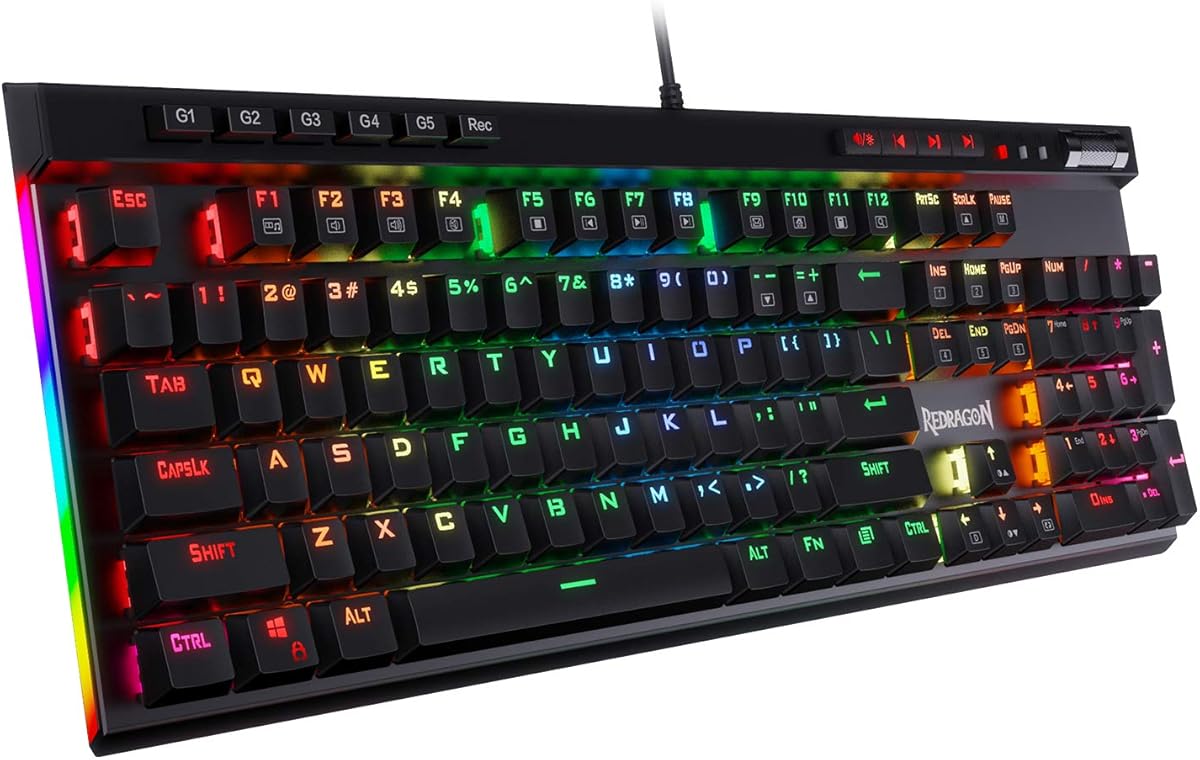
The Redragon K556 delivers a robust aluminum build at a very accessible price point. It features a 104 key layout with hot swap capability. This makes it easy to upgrade switches later without needing soldering skills or tools.
We may earn a commission when you buy through this link, at no additional cost to you.
The brushed aluminum board keeps every keystroke steady. RGB lighting offers vibrant presets for a true eSports vibe. Anti-ghosting ensures accuracy during rapid combos, making it suitable for both work and play.
It lacks wireless connectivity which limits mobility for some users. The software is functional but not as deep as premium brands. These limitations are minor given the excellent value and construction quality.
Budget conscious buyers should consider this keyboard for its durability and customization options. It is a great starting point for anyone entering the mechanical keyboard hobby.
Swap almost any 3 pin or 5 pin switch without soldering for easy experimentation.
20 preset modes with adjustable brightness let you match your desk aesthetic perfectly.
We may earn a commission when you buy through this link, at no additional cost to you.
The Cherry KC 200 MX is designed specifically for office environments with a focus on reliability. It uses anodized metal plates and MX2A Brown switches for a smooth typing experience. The build quality is high with laser etched keycaps that resist wear.
We may earn a commission when you buy through this link, at no additional cost to you.
Typing feel is precise with tactile switching characteristics. N key rollover ensures all keys register correctly. Status LEDs are tasteful and white, fitting well in professional settings without distraction.
It is strictly wired which might not suit mobile workers. Features are basic compared to gaming boards. These are acceptable trade-offs for an office focused tool meant for consistent daily use.
Professionals seeking a reliable metal keyboard for typing should look here. The durable construction ensures it lasts through years of heavy office use.
MX2A switches rated for over 100 million actuations provide long term reliability.
Clean white LEDs and metal plate create a subtle look for office desks.
We may earn a commission when you buy through this link, at no additional cost to you.
The Keychron K10 HE combines a classic mechanical feel with advanced magnetic switch technology. It features Hall Effect switches for ultra responsive performance and rapid trigger. The full size layout fits well on larger desks with plenty of media keys.
We may earn a commission when you buy through this link, at no additional cost to you.
Tri-mode connectivity allows switching between Bluetooth 5.2, 2.4 GHz, and Type-C wired modes. This makes it versatile for multi-device workflows. The wood sidings add a refined aesthetic touch to the setup.
The price is higher than many other options on this list. Setting up the web configurator requires clearing browser data. These hurdles are worth it for the performance gains magnetic switches offer.
Tech enthusiasts and gamers who need speed should choose this model. The wireless flexibility and magnetic switches provide a modern upgrade to traditional boards.
Sensors detect keypresses instead of physical contact reducing wear and tear.
Pair up to three devices via Bluetooth or use wireless for lag free gaming.
We may earn a commission when you buy through this link, at no additional cost to you.
The Corsair Vanguard 96 fits full keyboard functionality into a compact 96 percent frame. It includes arrow keys, a tenkey pad, and a vibrant LCD screen. This layout is ideal for saving desk space without sacrificing functionality.
We may earn a commission when you buy through this link, at no additional cost to you.
The LCD screen displays animations or system specs making it highly customizable. 8000Hz polling eliminates input lag for fast response times in games. Virtual Stream Deck integration adds productivity features for streamers.
The software suite is complex and may take time to master. The price is high compared to standard TKL boards. These issues are acceptable for the advanced features and compact design.
Streamers and gamers with limited desk space will love this option. The combination of layout efficiency and smart features makes it a standout choice.
Personalize the integrated 1.9 inch LCD to show custom animations and system info.
8000Hz polling ensures ultra responsive input for competitive gaming actions.
We may earn a commission when you buy through this link, at no additional cost to you.
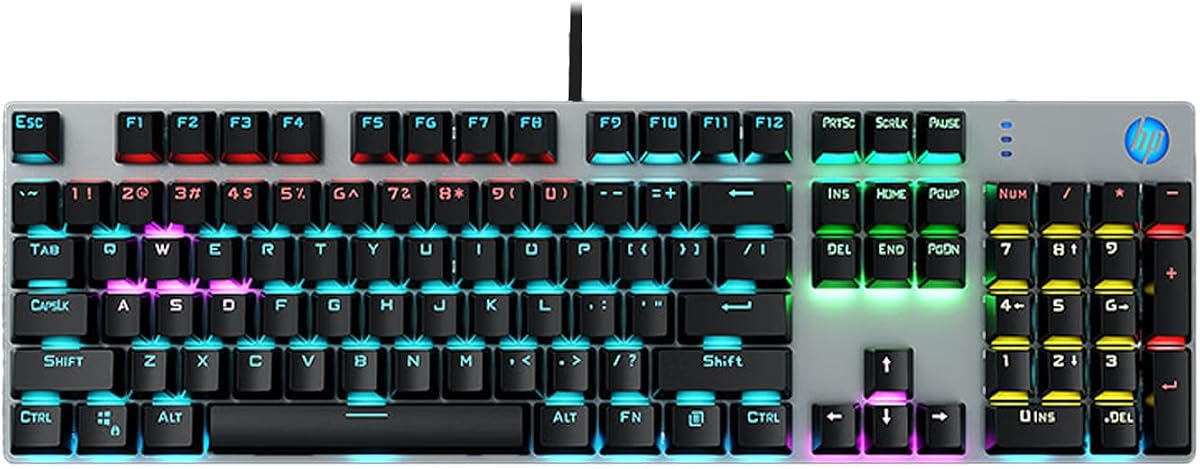
The HP GK400F uses a sturdy metal panel for stable structure. It comes with Brown switches for tactile feedback without loud clicks. The ice blue backlight provides clear visibility in low light environments.
We may earn a commission when you buy through this link, at no additional cost to you.
It supports full N key rollover ensuring accurate input during fast typing. The design fits both office and gaming needs with a plug and play USB connection. Compatibility is wide across desktop and laptop devices.
ABS keycaps may shine over time compared to PBT options. There is no companion software for customization. These are minor drawbacks for a keyboard priced for practical use.
Business users need a reliable metal keyboard should consider this model. It offers a solid balance of durability and function at a reasonable price.
Front engraved keycaps ensure backlight shines through clearly for low light typing.
Two stage adjustable feet help reduce wrist fatigue during long typing sessions.
We may earn a commission when you buy through this link, at no additional cost to you.
The Keychron Q6 Pro is a premium custom keyboard built with full metal. It features 6063 aluminum construction and a double gasket design for sound dampening. This provides a unique and comfortable typing experience for enthusiasts.
We may earn a commission when you buy through this link, at no additional cost to you.
QMK VIA software support allows deep customization of macros and remaps. The hot swap feature lets you change switches easily. PBT keycaps are durable and resist shine over time.
The price point is high compared to standard options. The weight is significant due to the full metal build. These factors are acceptable for those who value customizability and build quality.
Custom keyboard enthusiasts should choose this for its full metal chassis and programming. It delivers an outstanding typing experience that few other boards match.
Silicone pads reduce acoustic resonance for a softer and quieter typing feel.
Customize the knob to control volume or other specific functions easily.
We may earn a commission when you buy through this link, at no additional cost to you.
The Logitech G413 SE offers a sleek design with a brushed aluminum magnesium alloy top case. It features PBT keycaps that are heat and wear resistant. White LED lighting provides clear visibility for gaming at night.
We may earn a commission when you buy through this link, at no additional cost to you.
The tactile mechanical switches deliver uncompromising performance. 6 key rollover ensures reliable input during complex combos. The body design minimizes flex for a stable typing surface.
It lacks full RGB which limits aesthetic customization. Switch options are limited compared to hot swap models. These are acceptable trade-offs for a solid and dependable gaming keyboard.
Gamers seeking a durable and reliable board should check this model. The build quality and keycaps ensure longevity for years of use.
PBT keycaps are the most durable material used in keycap design.
The aluminum magnesium alloy top case serves as the keyboard backbone.
We may earn a commission when you buy through this link, at no additional cost to you.
The OOCTPK Chilkey SF60 is a high performance 60 percent keyboard with a full aluminum case. It features magnetic switches with rapid trigger precision for competitive gaming. The metal keycaps create a unique sound profile that feels premium.
We may earn a commission when you buy through this link, at no additional cost to you.
AI driven features allow the keyboard to adapt to your typing style. The 5 layer acoustic structure ensures a deep thock sound. Rapid trigger precision gives a decisive edge in fast paced games.
The price is high compared to standard mechanical boards. The software setup requires some time to configure properly. These costs are worth it for the advanced features and build quality.
Competitive gamers and enthusiasts will love this magnetic marvel. It delivers unmatched performance and a truly unique typing feel.
0.001mm Rapid Trigger precision gives you the highest accuracy available.
5 layer acoustic filling absorbs unwanted resonance for a rich sound.
We may earn a commission when you buy through this link, at no additional cost to you.
The Redragon K580 includes dedicated macro keys and a media wheel for easy control. It supports hot swap switches for easy customization. The double shot keycaps resist fading and ensure longevity.
We may earn a commission when you buy through this link, at no additional cost to you.
It offers full anti-ghosting for fast-paced gaming. Software allows advanced RGB effects and macro profiles. This makes it versatile for both work and play.
The layout may be slightly different for some users. Software is optional which means default functions are basic. These issues are minor compared to the value offered.
Users who need quick macro access should consider this board. It delivers solid performance and unique controls at a great price.
Save complex combos directly on the keyboard without software.
Quick access to play pause skip and other media controls.
We may earn a commission when you buy through this link, at no additional cost to you.
Selecting the right full metal keyboard involves understanding specific features that impact performance and comfort. We break down the most important factors to help you make an informed decision.
Full metal keyboards often use aluminum or steel frames to reduce flex. Look for aircraft grade aluminum for a balance of weight and durability. A solid frame ensures stability during intense typing or gaming sessions.
Prioritize keyboards with reinforced frames if you type heavily every day.
Mechanical switches come in various styles like linear, tactile, or clicky. Magnetic switches offer rapid trigger for gaming. Choose based on whether you prefer quiet or audible feedback.
Select switches that match your preference for sound and tactile feel.
Wired connections offer zero lag which is crucial for competitive gaming. Wireless options provide flexibility for clean desk setups. Check for Bluetooth or 2.4 GHz wireless modes if you need mobility.
Decide between wired stability and wireless freedom based on your usage.
ABS keycaps are common but may shine over time. PBT keycaps are more durable and resist oil. Look for double shot keycaps for long lasting lettering.
Choose PBT keycaps for better longevity and texture.
Full size keyboards include a number pad which is useful for data entry. Tenkeyless or 60 percent models save desk space. Consider your screen real estate and typing needs.
Pick a layout that fits your workspace and workflow.
RGB lighting enhances the visual appeal of your setup. Some models have single color or OLED displays. Choose based on whether you want full customization or a cleaner look.
Select lighting that complements your desk aesthetic.
Hot swap boards allow you to change switches without soldering. This is great for experimenting with different feels. If you plan to upgrade switches, ensure this feature is included.
Look for hot swap sockets if you want future customization.
Software allows deep customization of keys and RGB effects. Some models support on board macro recording. Check if the software is user friendly for your needs.
Ensure the keyboard supports macros if you use productivity tools.
To maintain your metal keyboard, keep it free of dust and debris. Use a soft brush or compressed air to clean between keys regularly. Wipe down the metal surface with a dry microfiber cloth to avoid water damage.
Adjust the feet to find a comfortable typing angle that reduces wrist strain. If your board has hot swap switches, you can change them whenever you want a different feel. Avoid using harsh chemicals on the metal finish.
Store your keyboard in a cool dry place when not in use. If you use it daily, take short breaks to rest your hands and wrists. Proper care ensures the metal frame and switches last for many years.
Yes, full metal keyboards provide greater durability and stability than plastic ones. They reduce flex during intense typing or gaming sessions. This makes them ideal for users who want a long lasting premium device.
Metal can feel cooler than plastic initially but it quickly warms to room temperature. If you are sensitive to cold, look for models with thicker keycaps or wrist rests. The metal body helps dissipate heat during heavy use.
Many modern metal keyboards are hot swappable allowing switch changes without soldering. Check product specs for hot swap sockets before buying. This feature gives you flexibility to experiment with different switch types.
Metal frames can produce a sharper sound but often come with gasket mounts for dampening. Look for keyboards with acoustic chambers or silicone pads to soften the noise. This creates a richer and deeper typing sound.
Most metal keyboards are universal and work with both Windows and Mac. Some brands like Keychron offer dedicated Mac layouts. Check product descriptions for Mac compatibility if you use Apple devices.
Use a dry microfiber cloth to wipe the metal surface regularly. For stubborn dirt, use a lightly dampened cloth but avoid excess moisture. Never use harsh chemicals that might damage the finish.
We have reviewed ten excellent full metal keyboards ranging from budget to premium. Each model offers unique features like rapid trigger, OLED screens, or wireless support to fit different needs.
Prioritize build quality and switch type based on whether you game or work. A full metal frame ensures your keyboard lasts longer and feels solid under your fingers.
Remember to check current prices as they often fluctuate online. Choose the model that best fits your budget and workspace requirements today.