
Thrustmaster T-Flight Hotas One
4.4Editor score
Plug and play USB connection
Detachable throttle for flexibility
Ergonomic joystick design
Compare the top flight sticks for Xbox Series X including HOTAS and yoke systems to find the best controller for your flight simulation gaming setup.
Flight simulation gaming has evolved significantly, requiring precise controllers that mimic real cockpits. A quality flight stick enhances immersion by providing tactile feedback and dedicated controls for complex maneuvers during intense gameplay sessions on modern consoles.
We evaluated ten top-rated flight sticks designed specifically for Xbox Series X and PC users. Our comparison considers build quality, axis precision, button mapping, and ecosystem compatibility to help you choose the right hardware for your specific simulation needs.
Each pick below highlights unique strengths like detachable throttles or Hall Effect sensors. While we focus on features and performance, note that prices can fluctuate frequently due to market demand and seasonal sales events across major online retailers.
4.4Editor score
4.5Editor score

4.2Editor score
The following table provides a side by side comparison of all ten flight sticks to help you quickly identify key specifications and features for each model.


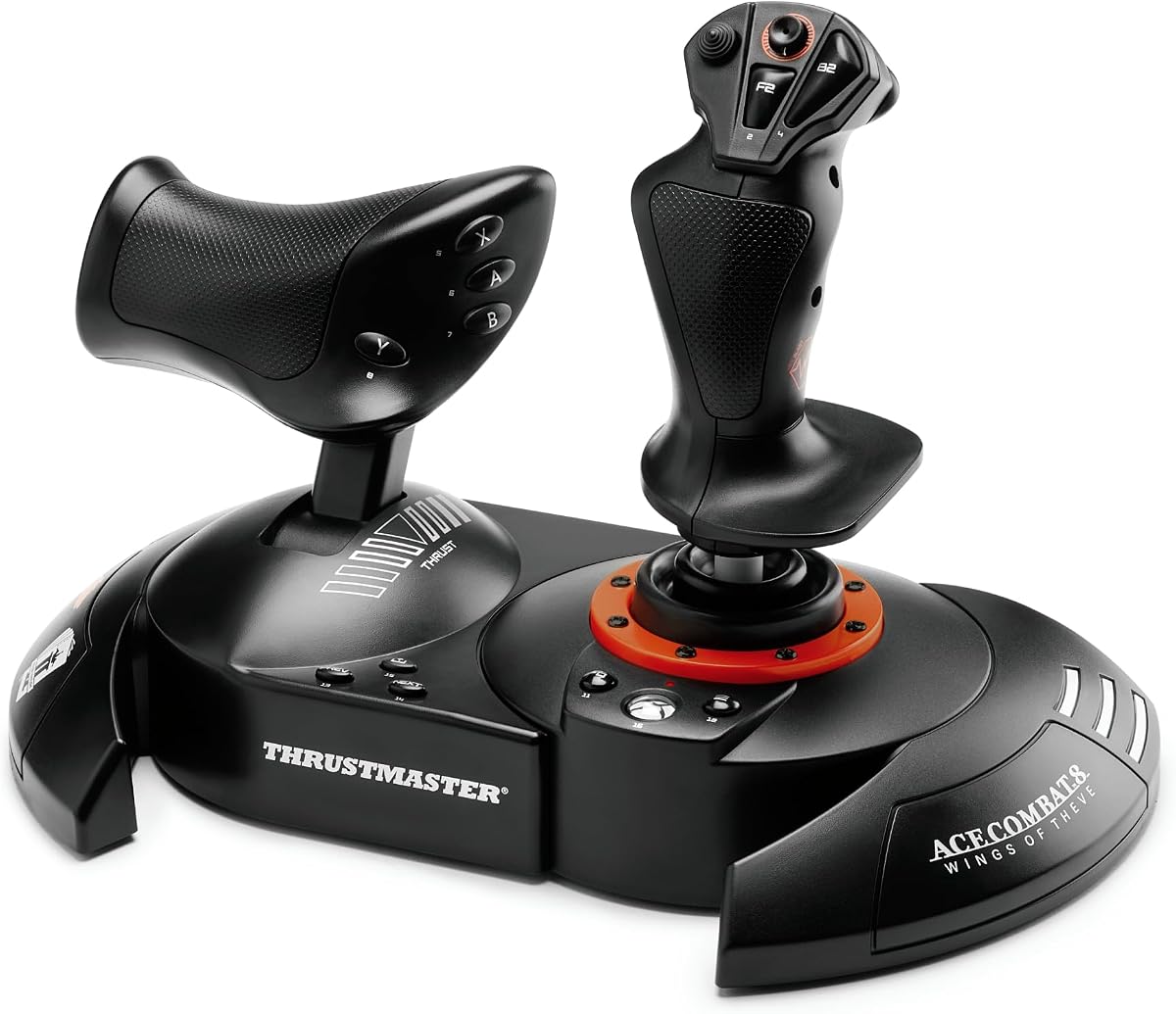
This Thrustmaster controller offers an accessible way to enter flight simulation on Xbox Series X. It holds a solid rating due to its reliable performance and modular design that fits various gaming spaces.
We may earn a commission when you buy through this link, at no additional cost to you.
The standout quality is its detachable throttle which allows you to configure the stick for lap play or desk setups. Precision controls include a responsive trigger and hat switch that manage aircraft systems effectively during combat or cruising.
While it lacks advanced features like vibration feedback it compensates with adjustability. The resistance can be tuned to match your preference for lighter commercial flights or heavier combat maneuvers without breaking the bank.
This stick is ideal for beginners who want realism without complexity. It serves as a great foundation for a cockpit that can grow as you add pedals and other Thrustmaster accessories over time.
The ability to separate the throttle gives you freedom to use the stick on your lap while keeping the throttle on a table.
You can connect TFRP rudder pedals to this system to gain full control over yaw movements for a complete cockpit experience.
We may earn a commission when you buy through this link, at no additional cost to you.
This limited edition controller stands out for its official Ace Combat 8 license. It delivers high precision control using Hall Effect technology which ensures longevity and accuracy over thousands of flights without degradation.
We may earn a commission when you buy through this link, at no additional cost to you.
The vibration feedback motor adds a tactile layer to gameplay by simulating missile impacts and turbulence. This feature makes dogfights feel more intense and helps pilots sense their aircraft status through physical cues in their hands.
A dual rudder system offers flexibility by allowing control via the Z axis or the throttle lever. This choice lets players customize how they manage rotation based on their personal flying style or game requirements.
Pilots looking for a combat focused stick should consider this model. It bridges the gap between entry level and mid range by offering premium sensor tech at a competitive price point for enthusiasts.
Proprietary H.E.A.R.T. technology guarantees surgical precision that remains consistent even after hours of intense dogfighting sessions.
Feel every missile impact and cannon burst directly in your palm thanks to the vibration motor built into the grip design.
We may earn a commission when you buy through this link, at no additional cost to you.
The Turtle Beach VelocityOne brings a unique mix of features to the Xbox Series X flight stick market. It combines high precision axes with an integrated OLED display that shows real flight management data directly on the controller.
We may earn a commission when you buy through this link, at no additional cost to you.
One of its key strengths is the touchpad navigation sensor which offers full cursor control for menus without taking your eyes off the sky. With 27 programmable buttons and eight axes you have extensive control over aircraft systems and settings.
Ambidextrous design ensures that both left and right handed pilots find it comfortable. The adjustable RGB lighting adds a personal touch to your setup allowing you to match the aesthetic of your cockpit or room lighting.
This stick is perfect for users who value visual feedback and customization. While it comes at a higher price the OLED display and touchpad provide utility that simplifies complex flight management tasks during long sessions.
The integrated OLED flight management display provides essential telemetry so you can monitor status without switching windows.
Customizable multi-function throttle and flap levers allow for intricate aircraft control during takeoff and landing procedures.
We may earn a commission when you buy through this link, at no additional cost to you.
This Turtle Beach H.O.T.A.S system is designed for serious enthusiasts who want maximum control inputs. It features high resolution Hall Effect sensors that deliver precision feedback for the stick control without mechanical wear.
We may earn a commission when you buy through this link, at no additional cost to you.
The full color display provides real-time flight data and quick performance tuning options on the controller itself. Swappable dual throttle detents deliver tactile thrust reference points that help you identify thrust levels intuitively during flight.
With 73 programmable inputs and 15 axes this unit supports a wide range of complex flight scenarios. The adjustable resistance and tension settings ensure that the controls match your physical preferences for long duration flying sessions.
It suits advanced pilots building a dedicated cockpit. While the high price and complexity may deter casual players it offers the depth needed for professional grade simulation training or competitive gaming environments.
The full color display provides real-time flight data and quick performance tuning to keep you informed without looking away.
The VelocityOne Flight Hangar app enables full customization and personalized settings to tailor the experience to your needs.
We may earn a commission when you buy through this link, at no additional cost to you.
This kit brings together a joystick, throttle, and rudder pedals into one cohesive package for Xbox and PC. It simplifies the setup process with plug-and-play installation that allows for immediate takeoff without complex configuration steps.
We may earn a commission when you buy through this link, at no additional cost to you.
The T.Flight Hotas One features included offer a compact design that can be detached for customized positioning. The joystick resistance is easily adjustable so it fits your preferences whether you are flying commercial jets or fighters.
The rudder pedals come with slide rails that enhance steering precision and fluid control surfaces. This addition makes the set versatile for various flight simulation types including commercial aviation and combat scenarios.
It is an excellent choice for those wanting a full cockpit solution quickly. The combination of stick, throttle, and pedals ensures you have all essential flight controls in one reliable and affordable bundle for your console.
This kit includes a joystick, detachable throttle, plus rudder pedals with slide rails for a complete flight setup experience.
The T.Flight Hotas One features a compact design and can be detached allowing for customized positioning of the joystick and throttle.
We may earn a commission when you buy through this link, at no additional cost to you.
This sidestick is an ergonomic replica inspired by the iconic A320 airliner controls. It is officially licensed by Airbus and Xbox ensuring that it integrates smoothly with simulation games designed for commercial flight experiences.
We may earn a commission when you buy through this link, at no additional cost to you.
It features 21 action buttons with tact switch technology that provides crisp and precise inputs. The Xbox configuration includes necessary keys like Guide and Share which makes navigating menus on your console seamless and intuitive.
Four swappable joystick head button modules allow for a multitude of possibilities both in flight and on the ground. The New Ecosystem Hub simplifies connectivity to make your existing Thrustmaster Airbus setup work seamlessly with Xbox.
Commercial pilots or fans of airliner simulations will find this authentic design compelling. While it focuses on Airbus systems its button density and layout offer the professional feel needed for realistic cargo or passenger flight training.
Ergonomic replica of the Airbus sidestick inspired by the flight controls found on iconic Airbus airliners A320 type.
Make your existing Thrustmaster Airbus ecosystem compatible with Xbox via simplified connectivity thanks to the New Ecosystem Hub.
We may earn a commission when you buy through this link, at no additional cost to you.
This enhanced edition builds on the Airbus experience with additional flight features. It remains officially licensed by Airbus and Xbox Series X while offering upgraded components like an enhanced throttle with a built-in thrust reverser mechanism.
We may earn a commission when you buy through this link, at no additional cost to you.
Contactless magnetic sensor technology replaces traditional potentiometers to ensure an unlimited lifespan and optimal precision. The rudder control is managed by rotating the sidestick handle which is lockable or unlockable depending on your flight mode needs.
It automatically integrates into Microsoft Flight Simulator 2020 on console allowing for immediate recognition of controls upon connection. This feature saves time on manual mapping so you can focus on flying instead of setup.
For those who prefer commercial airliner realism this stick is a top tier choice. The added thrust reverser and durable sensors make it a robust investment for long-term simulation enthusiasts who value precision and authenticity.
Enhanced Throttle with built-in thrust reverser mechanism provides more realistic control for landing and ground operations.
Contactless magnetic sensor technology with no potentiometers ensures an unlimited lifespan and optimal precision over time.
We may earn a commission when you buy through this link, at no additional cost to you.
This special edition is tailored for players who focus on Microsoft Flight Simulator titles on Xbox and PC. It carries the official license to ensure compatibility and optimized button mapping for that specific simulation environment out of the box.
We may earn a commission when you buy through this link, at no additional cost to you.
It offers complete flight equipment with 10-bit accuracy and 5 axes including the Z-axis which adds depth to your control. The 14 buttons and multi-directional Chinese hat switch provide ample options for managing aircraft systems effectively.
You can operate the device sideways using the Z axis or the throttle lever giving you dual options for managing rotation. This versatility supports various aircraft types and helps maintain control even in complex flight conditions.
Pilots who prioritize official licensing will appreciate this edition. It serves as a solid general controller that also caters to the nuances of Microsoft Flight Simulator making it a versatile choice for any flight fan.
Official Microsoft Flight Simulator license for Xbox Series X|S and PC ensures optimized performance for that title.
Operate the device sideways with the Z axis of the joystick or with the rocker lever on the detachable throttle.
We may earn a commission when you buy through this link, at no additional cost to you.
This pack transforms your setup into a true simulator cockpit inspired by the Boeing 787 airliner at one to one scale. The PENDULUM mechanism replicates the real pendular movement delivering smooth responsive control across an 8.3 inch range.
We may earn a commission when you buy through this link, at no additional cost to you.
A fully adjustable spring tension and suspended mechanism give you fluid precise flight stick handling for every takeoff and landing. The yoke is crafted with a 100 percent metal internal structure ensuring balanced weight and a premium professional feel.
The bundle features a throttle quadrant with iconic Boeing autopilot functions to control altitude airspeed and heading. With 35 action buttons and two additional axes you unlock a full range of maneuvers for complex flight sim controls.
Enthusiasts who want the most authentic commercial flight experience should consider this yoke. It requires space but offers a level of realism and tactile feedback that standard sticks cannot match for serious pilots.
The PENDULUM mechanism replicates the pendular movement of a Dreamliner delivering smooth responsive control with an 8.3 inch range.
Yoke crafted with a 100% metal internal structure ensures durability balanced weight and a premium professional feel.
We may earn a commission when you buy through this link, at no additional cost to you.
This controller is designed primarily for fighting games but offers a unique open chassis design for maintenance and customization. It is officially licensed by Microsoft ensuring seamless integration with Xbox Series X and Xbox One systems.
We may earn a commission when you buy through this link, at no additional cost to you.
The top housing artwork is swappable so you can personalize the look of your controller easily. With assignable buttons and a key lock mode you can set up specific configurations for different games or flight modes if supported.
A profile button allows you to switch between saved setups quickly without needing external software. The Share button gives you easy access to capturing game clips while you fly which helps document your best moments.
While it is a fighting stick its design flexibility makes it an interesting alternative for specific simulation games. It appeals to gamers who want to modify their hardware and prefer a compact control layout.
Chassis opens for easy maintenance and customization while you can switch out top housing artwork with your own design.
Assignable buttons Share Button Profile Button Key Lock Mode and more provide versatile control options for your console.
We may earn a commission when you buy through this link, at no additional cost to you.
Selecting the right flight stick involves evaluating several technical and practical factors. This guide breaks down the key elements you should consider to ensure your controller matches your simulation needs.
Modern flight sticks use either potentiometers or Hall Effect sensors. Hall Effect sensors use magnetic fields to track movement which means there is no physical contact to wear down. This results in higher durability and consistent precision over years of use without drift.
Look for controllers that explicitly mention Hall Effect technology if you plan to fly frequently. This ensures your stick remains accurate for long term simulation without requiring regular replacement or calibration.
Axes define the degrees of freedom your controller offers. A basic stick might have two axes for pitch and roll while advanced ones add Z-axis for rotation or throttle movement. More axes allow for complex flight maneuvers without extra pedals.
Choose a stick with at least three axes for full control. If you want to manage rudder independently check if the stick offers a dual rudder system or a twist grip for added depth.
The number and placement of buttons determine how easily you can access systems like landing gear or weapons. Look for programmable buttons that map to your game's critical functions to keep your hands on the controls.
Select a model with enough buttons for your aircraft type. Combat simulators need more triggers while commercial flights rely on toggle switches. Ensure the layout fits your hand comfortably.
Modular designs allow you to separate the stick from the throttle for flexible setups. This is useful if you have limited desk space or want to use the stick on your lap for comfort.
Opt for a detachable throttle unit if you want to switch between desk and lap configurations. This versatility extends the life of the controller as your setup changes.
Many flight sticks are part of a larger ecosystem that includes rudder pedals or yokes. Check if the brand offers accessories that work seamlessly with your chosen stick for a complete cockpit experience.
Choose a stick that supports expansion with pedals or a rudder. This allows you to upgrade your setup over time without replacing the entire system.
The materials used in construction affect durability and realism. Metal internal structures provide a professional feel and stability while plastic may feel lighter and more flexible.
Consider metal components if you want a controller that stays stable during intense maneuvers. This ensures a consistent flight experience over time.
Some premium sticks include OLED or full-color displays that show real-time flight data. These displays help you monitor status without switching to a game menu on your TV or monitor.
Prioritize a controller with a display if you want to see data like airspeed or altitude on the stick. This adds convenience and realism to your cockpit setup.
Ensure the controller supports Xbox Series X|S and PC to avoid compatibility issues. Most modern sticks use USB connections but some may require specific drivers or ecosystem hubs for full functionality.
Choose a plug-and-play model for simplicity. This ensures you can start flying immediately without complex software installations or troubleshooting.
Start by connecting your flight stick to a USB port on your Xbox Series X. Allow the console to automatically recognize the device and install any necessary drivers. Test the controls in a game menu to ensure all axes and buttons are responsive.
Calibrate the stick if your game provides a calibration option. Adjust the sensitivity settings to match your flying style so that small movements do not cause oversteering during cruise.
Store the controller in a dry area away from direct sunlight to preserve internal electronics. Regularly clean the surface with a soft dry cloth to prevent dust buildup from entering the button gaps or sensor areas.
Flight sticks work best with flight simulation titles designed for Xbox such as Microsoft Flight Simulator and Ace Combat. They may not function in non-sim games that do not recognize specialized controllers.
Most modern flight sticks are plug-and-play on Xbox Series X and do not require manual driver installation. Just connect them via USB and the console will configure them automatically for immediate use.
Yes you can use a keyboard for menu navigation while using a flight stick for aircraft control. Most consoles support multiple controllers and input devices simultaneously for a flexible setup.
A Hall Effect sensor uses magnetism to detect movement rather than physical contact. This reduces wear and tear and ensures high precision over long periods of use without drift or calibration issues.
Pedals provide independent rudder control which enhances realism especially during takeoff and landing. While not strictly necessary they offer a significant advantage for full flight dynamics in advanced simulators.
You can map buttons in the game settings menu by selecting the control option and pressing the desired button. Some brands also offer companion apps for PC that allow deeper customization before connecting to console.
Drift usually happens when sensors wear out or accumulate dust. Using a stick with Hall Effect sensors minimizes this risk. Cleaning the sensors or recalibrating may fix it but sometimes replacement is needed.
You cannot connect a laptop directly to an Xbox controller but you can use a flight stick with Xbox via USB. If you fly on PC you can use the same stick across both platforms if supported.
The Thrustmaster T-Flight Hotas One and NEO models offer excellent entry and mid-range options with reliable sensor technology. For those seeking maximum features the Turtle Beach VelocityOne provides a premium display and extensive input options.
Prioritize Hall Effect technology for long-term precision and consider expandability if you plan to add rudder pedals later. A modular design offers flexibility for different play environments whether on a desk or lap.
Check current prices and availability as they can fluctuate frequently due to market conditions. Ensure your chosen controller matches your specific simulation preferences to get the best value for your flight gaming setup.