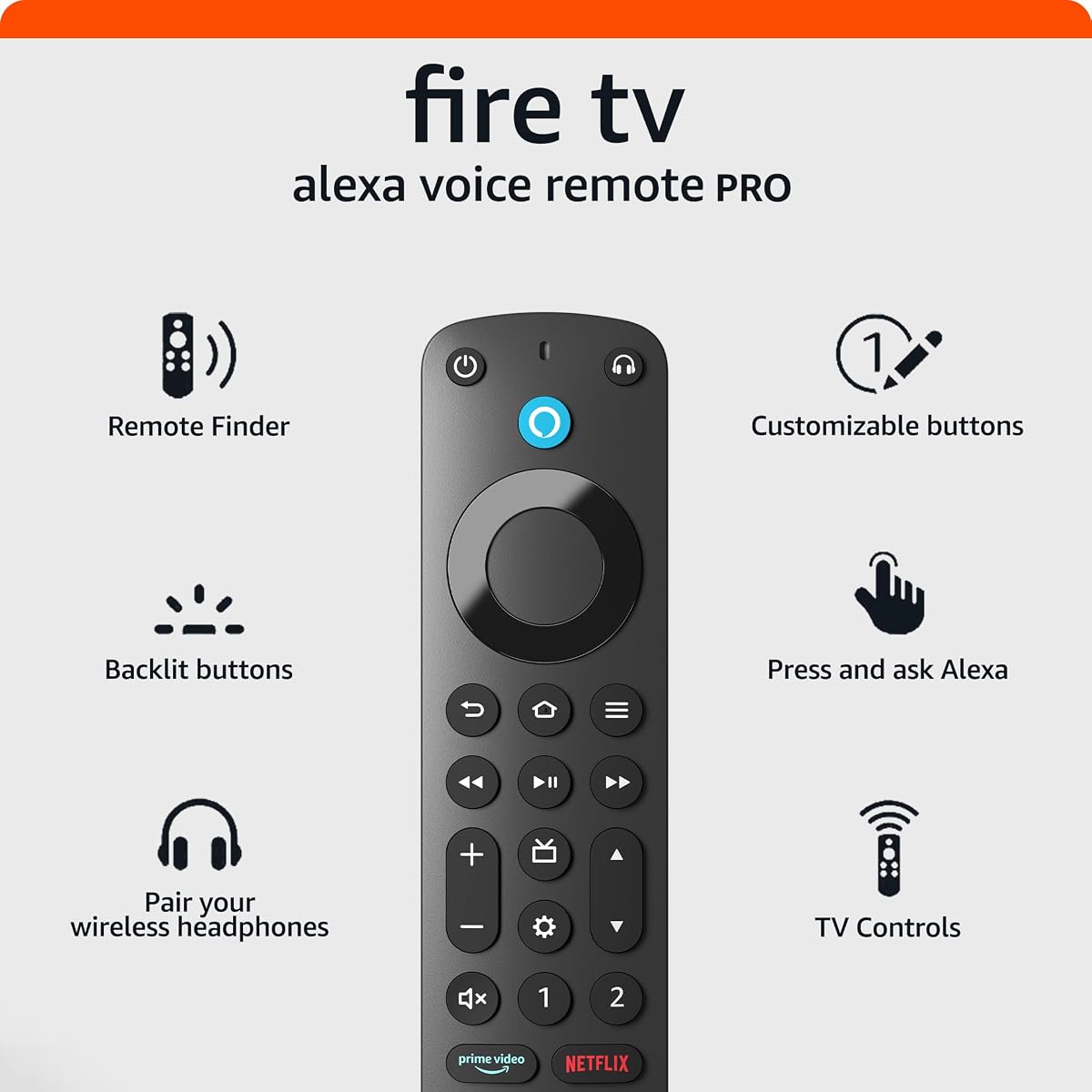
Amazon Fire TV Alexa Voice Remote Pro
4.5Editor score
Remote finder feature included
Backlit buttons for night use
Two customizable shortcut buttons
Discover the top 10 Fire Stick Replacement Remote options for 2026. We compare compatibility, voice features, and build quality to help you choose the right
Finding a reliable Fire Stick Replacement Remote can be challenging with so many options on the market today. You need a device that offers seamless connectivity, responsive buttons, and durable construction to enhance your viewing experience effectively. Many users struggle with pairing issues or limited functionality when selecting third-party alternatives for their streaming setups.
This guide compares ten top-rated Fire Stick Replacement Remote models based on compatibility, voice control features, and user feedback. We analyzed product specifications, pairing methods, and additional features like shortcut buttons or backlighting. Our goal is to help you identify the perfect remote that fits your specific Fire TV ecosystem and budget requirements accurately.
Each pick highlights unique strengths such as voice activation, customizable shortcuts, or broad device support. Note that prices and availability change frequently, so verify current details before purchasing. We provide direct links to official product pages to ensure you access the most accurate and up-to-date information for your decision-making process today.
4.5Editor score

4.5Editor score

4.3Editor score
The following table provides a side-by-side comparison of all ten Fire Stick Replacement Remote models reviewed in this guide. Each entry highlights key specifications to help you quickly assess compatibility and features before making your final selection.
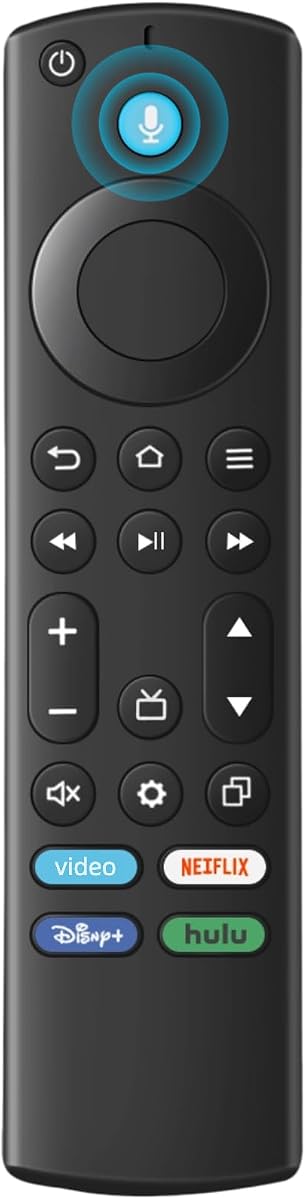


This Replacement Voice Remote offers solid performance for users needing a dependable Fire Stick Replacement Remote. With a rating of 4.2 stars, it balances cost and functionality well. The remote supports multiple Fire TV models and smart TV brands, making it versatile for various setups.
We may earn a commission when you buy through this link, at no additional cost to you.
Its voice command feature allows quick content search without typing. The remote works with Fire Stick 4K Max, Fire Cube, and compatible smart TVs like Insignia and Toshiba. This broad compatibility ensures it fits most modern streaming environments effectively.
Users should note that batteries are not included in the package. The remote requires two AAA batteries for operation. While not a major drawback, it adds a small initial cost to the total purchase price.
This remote is ideal for budget-conscious buyers needing a standard replacement. If you value simplicity and wide compatibility, this model is a strong contender for your Fire TV ecosystem.
This remote supports Fire Stick 4K Max and Fire Cube models up to the 3rd Generation.
Use voice commands to find content quickly without navigating complex menus manually.
We may earn a commission when you buy through this link, at no additional cost to you.
The Amazon Fire TV Alexa Voice Remote Pro stands out as the top Fire Stick Replacement Remote for users seeking advanced features. Its 4.5-star rating reflects high user satisfaction. The remote includes unique tools like a remote finder and motion-activated backlight for better usability.
We may earn a commission when you buy through this link, at no additional cost to you.
Backlit buttons illuminate when in motion, making navigation easier in dark rooms. The remote finder feature lets you locate the device using Alexa voice commands. These premium features justify the higher cost for many users.
Customizable buttons allow you to create shortcuts for favorite apps. The dedicated headphone button simplifies Bluetooth pairing for wireless audio. Integrated TV controls manage power and volume from one device.
Choose this remote if you value convenience and premium design. It is the best option for upgrading your Fire TV experience with extra functionality and style.
Use Alexa to make the remote emit a ring, helping you locate it quickly.
Buttons light up automatically when you move the remote in dimly lit rooms.
We may earn a commission when you buy through this link, at no additional cost to you.
This Replacement Remote for Fire TV offers robust support for various Fire TV devices and smart TVs. With a 4.5-star rating, it delivers reliable performance. It is specifically designed for Fire Series smart TVs and compatible Fire Stick models.
We may earn a commission when you buy through this link, at no additional cost to you.
The remote includes two customizable buttons for quick access to preferred apps. Voice function activation is straightforward with included instructions. It works well with Fire Cube models up to the 3rd Generation.
Users should note it does not support Roku devices or certain non-Fire TV brands like Hisense. Battery packs are excluded from the package. This limitation helps ensure focus on Fire ecosystem compatibility.
Ideal for users needing specific compatibility with Fire Series TVs. The customization options enhance navigation efficiency. Consider this if you prioritize brand-specific functionality over universal support.
Designed specifically to work with Insignia Fire TVs and Fire Series smart TVs.
Program two buttons to launch your favorite streaming apps instantly with one press.
We may earn a commission when you buy through this link, at no additional cost to you.
This replacement remote emphasizes durability and reliable connectivity. With a 4.3-star rating, it offers solid performance for Fire Stick users. The remote is designed to withstand heavy use with tested button lifespan.
We may earn a commission when you buy through this link, at no additional cost to you.
It supports Fire Stick 4K Max and Select/Plus models. The remote includes four shortcut buttons for quick app access. Voice control is enabled via a built-in microphone for easy commands.
Users get a 60-day satisfaction guarantee for peace of mind. Battery packs are not included. The design focuses on longevity and basic functionality without extra premium features.
Choose this remote for long-term use and reliable connectivity. It is a practical choice for those needing a durable Fire Stick Replacement Remote without complex features.
Buttons are tested for over 20,000 clicks to ensure long-term reliability.
A 60-day satisfaction guarantee is backed by responsive customer support.
We may earn a commission when you buy through this link, at no additional cost to you.
This remote focuses on ease of use and quick setup. It has a 4.2-star rating and supports auto-sync for convenient pairing. The remote works seamlessly with Fire Stick and Insignia Fire TV models.
We may earn a commission when you buy through this link, at no additional cost to you.
Four pre-programmed buttons provide instant access to popular streaming apps. Voice search functionality allows quick content discovery. The setup process is straightforward for most users.
Battery packs are not included in the package. Customization options are limited compared to premium models. The design prioritizes simplicity and basic functionality.
Ideal for users who want a hassle-free replacement remote. If ease of setup and app access are priorities, this model is a strong contender for your needs.
The remote automatically syncs with your device without complex configuration steps.
Access popular streaming services instantly with four dedicated shortcut buttons.
We may earn a commission when you buy through this link, at no additional cost to you.
This remote offers broad compatibility across Fire TV generations. It has a 4.3-star rating and supports Fire Cube 1st Gen models. Voice control extends to compatible smart home devices.
We may earn a commission when you buy through this link, at no additional cost to you.
Pairing is simple using the Home button for ten to fifteen seconds. The package includes a user manual with detailed instructions. It works with Fire Stick Lite, HD, and 4K models.
Battery packs are not provided with the remote. Customization options are basic. The focus is on universal compatibility within the Fire ecosystem.
Choose this remote if you need support for older Fire Cube models. Its broad compatibility makes it a versatile option for multiple device setups.
Unlike many newer remotes, this model supports the Fire Cube 1st Generation.
Use voice commands to control compatible smart home devices from one remote.
We may earn a commission when you buy through this link, at no additional cost to you.
This official Amazon remote ensures consistent performance and design quality. With a 4.5-star rating, it meets high user expectations. It includes two AAA batteries, offering immediate use upon unboxing.
We may earn a commission when you buy through this link, at no additional cost to you.
The remote features dedicated TV power and volume buttons. It supports Fire TV Stick Lite and 4K models. The guide button provides easy access to channel listings.
Battery packs are included, adding value to the purchase. Customization is limited compared to the Pro version. The design prioritizes reliability and essential functionality.
Ideal for users seeking an official replacement with essential features. If you value quality assurance and battery inclusion, this model is a top contender for your Fire TV setup.
The package includes two AAA batteries, so you can start using the remote immediately.
Press the guide button to view channel and program listings in one place.
We may earn a commission when you buy through this link, at no additional cost to you.
This remote provides strong voice control capabilities at a budget price. It has a 4.4-star rating. The remote supports Fire Stick Lite and Fire Cube 2nd and 3rd Generation models.
We may earn a commission when you buy through this link, at no additional cost to you.
Pairing is indicated by an LED flash on the remote. Voice commands allow volume adjustment and content search. It is compatible with Smart TVs 3rd Gen for integrated control.
Battery packs are not included. Manual pairing steps are required for initial setup. The design emphasizes essential voice functionality over extra features.
Choose this remote for cost-effective voice control. It is a practical option for users needing a replacement without premium features.
The LED light flashes rapidly to confirm the remote is in pairing mode.
Works with Smart TVs 3rd Gen for unified TV and streaming control.
We may earn a commission when you buy through this link, at no additional cost to you.
This model offers a very affordable Fire Stick Replacement Remote. It has a 4.3-star rating. The remote supports Hisense and Insignia smart TVs alongside Fire Stick models.
We may earn a commission when you buy through this link, at no additional cost to you.
Four preset app shortcuts provide quick access to content. Voice commands enable content discovery and playback control. The LED flashes rapidly to confirm successful pairing.
Battery packs are excluded from the package. Customization options are limited. The design prioritizes essential functionality and broad compatibility.
Ideal for budget-conscious buyers needing basic voice features. If you prioritize cost and compatibility over customization, this model is a strong choice.
This remote is designed to work with Hisense smart TVs as well as Fire devices.
Access four popular streaming apps instantly with dedicated shortcut buttons.
We may earn a commission when you buy through this link, at no additional cost to you.
This remote supports multiple Fire TV brands like Toshiba and Pioneer. It has a 4.4-star rating. The remote includes four dedicated shortcut buttons for app access.
We may earn a commission when you buy through this link, at no additional cost to you.
Voice function is enabled with a built-in microphone. It supports Fire Cube 1st to 3rd Generation models. Customer support is available for pairing assistance.
Battery packs are not included. Customization options are limited to shortcut buttons. The focus is on multi-brand compatibility and reliable voice control.
Ideal for users with multi-brand smart TV setups. If you need broad brand support and voice functionality, this model is a strong contender.
Works with Fire TV devices and compatible smart TVs from Toshiba and Insignia.
Dedicated support is available to assist with setup and pairing issues.
We may earn a commission when you buy through this link, at no additional cost to you.
Choosing the right Fire Stick Replacement Remote involves evaluating several key factors to ensure optimal performance and compatibility. This guide outlines essential considerations to help you make an informed decision.
Verify that the remote supports your specific Fire TV device model. Check the product description for supported generations like 1st, 2nd, or 3rd Gen Fire Sticks and Cubes.
Ensure the remote is compatible with your smart TV brand if you plan to control TV functions from the same device.
Look for built-in voice functionality if you want hands-free content search and smart home control. This feature significantly enhances navigation speed and ease of use.
Some remotes require specific pairing steps to activate voice functions, so check the setup instructions.
Consider whether you need shortcut buttons for your favorite apps. Customizable buttons allow you to program quick access to specific services.
Dedicated power and volume buttons are essential if you want to control your TV directly from the remote.
Premium remotes may offer features like motion-activated backlighting or remote finder tools. These features improve usability in low-light environments or reduce lost remote incidents.
Check if the package includes batteries. Some models require separate battery purchases which can add to the total cost.
Look for remotes with tested button lifespans to ensure longevity. Quality materials contribute to a more satisfying user experience and fewer replacements.
Read user reviews to gauge real-world durability and build quality over time.
Simple pairing methods like holding the Home button are preferred for ease of setup. Complex pairing procedures can be frustrating for less tech-savvy users.
Ensure the remote pairs automatically or has clear instructions for manual pairing.
Determine your budget range before selecting a remote. Basic models are affordable but may lack advanced features like backlighting or customization.
Investing in a slightly higher-priced remote might save money long-term if it offers better durability and features.
Check the seller's return policy in case the remote is incompatible. A satisfaction guarantee or warranty provides peace of mind for your purchase.
Access to responsive customer support can help resolve pairing or compatibility issues quickly.
Install two AAA batteries into the battery compartment. Ensure the positive and negative terminals align with the markings inside the compartment to prevent connection issues.
If automatic pairing fails, disconnect your Fire TV device from power for 15 seconds. Reconnect the power and hold the Home button for 10 to 15 seconds until the LED indicator flashes rapidly to enter pairing mode.
Avoid exposing the remote to extreme temperatures or moisture. Store it in a dry place when not in use to protect the electronic components and battery contacts from damage.
No, compatibility varies by generation. Check the product specifications to ensure the remote supports your specific Fire Stick or Cube model. Most remotes support 2nd and 3rd Gen devices but may exclude older versions.
Check the product description for listed smart TV brands like Toshiba or Insignia. If your TV supports voice commands through Fire TV OS, it is likely compatible with these remotes.
Most third-party remotes do not include batteries. You will need to purchase two AAA batteries separately. Always verify package contents before purchasing to avoid unexpected costs.
Yes, many replacement remotes include dedicated TV control buttons. Ensure the remote supports HDMI-CEC or IR pairing with your TV to control power and volume effectively.
First, ensure batteries are correctly installed. Try restarting the Fire TV device by unplugging it for 15 seconds. Then hold the Home button on the remote for 10 to 15 seconds to initiate pairing.
Third-party remotes use standard infrared or Bluetooth protocols. There are no known security risks if purchased from reputable sellers. Always ensure the remote is from a trusted brand.
Most high-quality remotes last several years with regular use. Button lifespan varies by model, but many are tested for over 20,000 clicks. Proper care can extend their functional life.
Yes, Fire TV devices can support multiple remotes. Simply pair each remote individually following the standard instructions. This is useful for households with multiple viewers.
We reviewed ten top-rated Fire Stick Replacement Remote options ranging from budget models to premium versions with advanced features. Each product offers unique strengths depending on your specific compatibility and feature needs.
Prioritize compatibility with your specific Fire TV generation and smart TV brand. Voice features and button customization enhance convenience significantly, so choose a model that aligns with your usage patterns.
Verify current prices and availability before purchasing as they fluctuate frequently. Use the provided links to access official product pages for the most accurate and up-to-date information.