
8Bitdo M30 Wired Controller
4.2Editor score
6-Button Layout
USB-C Wired Connection
Officially Licensed
Find the best fightpads for PC with this expert guide comparing top tournament-grade controllers for precision, durability, and competitive gaming performance.
Choosing the right fightpad for PC can transform your competitive gaming experience. A good controller offers precise inputs, durability, and ergonomic comfort for extended play sessions.
We compared ten top-rated controllers based on build quality, button response, compatibility, and user feedback to help you find the perfect match for your setup.
Each pick highlights key features and pros and cons so you can decide quickly. Prices may vary over time, so check current listings before purchasing.
4.2Editor score

4.1Editor score

4.2Editor score
Explore the detailed side-by-side comparison of ten top fightpads designed for PC and console platforms to find the ideal controller for your fighting games.
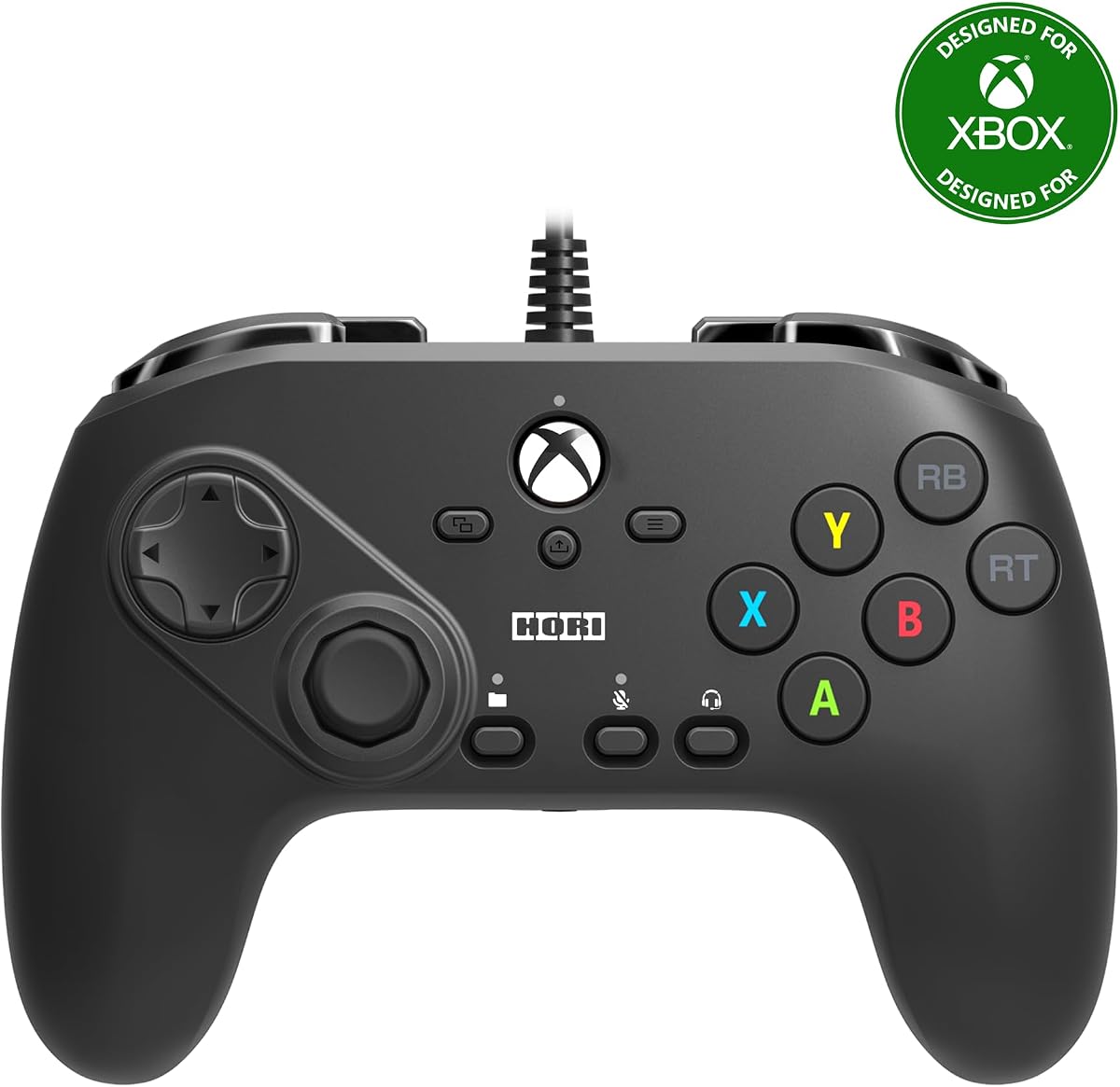


The HORI Fighting Commander OCTA is a tournament-grade fightpad rated 4.1 stars by users. It stands out for its precision and durable components designed for competitive play.
We may earn a commission when you buy through this link, at no additional cost to you.
It features Micro Switch buttons and a Short Throw Analog Stick with an 8-way gate for fast execution. Adjustable D-Pad sensitivity enhances control tailored to your needs.
While it lacks wireless options, the wired connection ensures lag-free performance. The companion app allows for easy customization of settings and profiles.
Competitive players seeking reliable performance on PC will find this controller excellent. It balances build quality and features effectively for serious fighting games.
The short throw analog stick and micro switches enable rapid inputs critical for competitive fighting titles.
Adjustable D-Pad sensitivity and companion app settings let you tailor the controller to your playstyle.
We may earn a commission when you buy through this link, at no additional cost to you.
This HORI controller is optimized for Xbox Series X|S and compatible with Windows 10. It includes key features like micro switches and adjustable D-pads.
We may earn a commission when you buy through this link, at no additional cost to you.
The six-button layout and short throw analog stick support accuracy and fast execution in fighting games. Profile switching is simplified with a dedicated button.
While rated lower than some alternatives, it still offers solid performance for Xbox-focused setups. Users may need to adjust settings via the companion app.
For PC players using Xbox-compatible titles, this controller provides a familiar layout. It is a practical option if you prefer Xbox ecosystem integration.
The profile button allows quick switching between up to four customized settings for different games.
We may earn a commission when you buy through this link, at no additional cost to you.
The 8Bitdo M30 Wired Controller offers a budget-friendly option with a 6-button layout and USB-C connectivity. It is officially licensed for Xbox and Windows.
We may earn a commission when you buy through this link, at no additional cost to you.
Featuring 2 bumpers, 2 triggers, and 2 button layout switches, it supports classic and fighting games well. Three profiles can be switched instantly using the custom button.
While it lacks advanced features like analog sticks, the layout suits retro and fighting games. Audio control via 3.5mm jack adds convenience for headsets.
Players seeking an affordable, reliable controller for PC will appreciate its simplicity. It delivers solid performance without breaking the bank.
The 6-button design echoes classic controllers, ideal for retro fighting titles and simple setups.
We may earn a commission when you buy through this link, at no additional cost to you.
The DOYOKY Leverless Controller rates 4.4 stars and features a robust 16-button layout. It includes an OLED display for real-time input and SOCD settings.
We may earn a commission when you buy through this link, at no additional cost to you.
Hot-swappable switches let you tailor the tactile feel without soldering. Compatibility spans PC, PS4, PS3, Switch, and Steam Deck with five input modes.
While hitbox controllers require adjustment, this model offers tournament-level control depth. The web-based customization simplifies tweaks without installing software.
Competitors seeking customization and durability will find this controller valuable. Its reinforced USB-C and anti-slip design support intense gameplay sessions.
Hot-swappable switches and OLED feedback allow immediate feel adjustments during gameplay.
We may earn a commission when you buy through this link, at no additional cost to you.
The Akko FUNBOX controller earns a 4.2 rating and leads with next-gen Hall Effect switches offering zero wear. Its rapid trigger and 8000Hz polling support competitive precision.
We may earn a commission when you buy through this link, at no additional cost to you.
A full-color LCD and intuitive aluminum dial simplify deep customization. It supports PC, PS4, Xbox, Switch, Android with a tournament lock for compliance.
Premium materials and advanced features justify the cost for serious players. Hot-swappable design allows easy switch upgrades from Hall Effect to mechanical if desired.
Players prioritizing durability and tournament-grade performance will love this controller. Its smart SOCD management ensures fairness without sacrificing versatility.
Magnetic switches eliminate friction and debris buildup, ensuring long-term reliability and consistency.
We may earn a commission when you buy through this link, at no additional cost to you.
This Tekken 8 Edition HORI fightpad is designed specifically for Windows PC. It carries a 3.8 rating and includes standard HORI features like micro switches.
We may earn a commission when you buy through this link, at no additional cost to you.
The six-button layout and short throw analog stick support fast execution. The analog slide pad aids in-game navigation within Tekken and similar titles.
While branded for Tekken, its functionality mirrors the standard OCTA model. Fans of the series may appreciate the themed design for desktop setups.
Competitive players looking for Tekken-specific aesthetics will find it compelling. Performance remains consistent with other HORI tournament-grade controllers.
The Tekken 8 Edition branding adds visual appeal for fans without compromising controller functionality.
We may earn a commission when you buy through this link, at no additional cost to you.
The HORI Wireless Fighting Commander OCTA Pro offers tournament-grade play without cables on PS5 and Windows. It features swappable D-pads and programmable rear buttons.
We may earn a commission when you buy through this link, at no additional cost to you.
Its wireless design includes a lockable USB-C charging cable for secure use. Three D-pad options provide flexibility for different game styles.
While rated slightly lower, wireless convenience is valuable for long sessions. Users should install latest firmware for optimal performance and connectivity.
Players valuing cable-free setups will appreciate this controller. It combines premium HORI build quality with wireless freedom effectively.
Wireless functionality enhances comfort during extended play by removing cable drag and tangles.
We may earn a commission when you buy through this link, at no additional cost to you.
This renewed HORI OCTA controller offers tournament-grade performance at a lower cost. It includes programmable macros and a touchpad for console navigation.
We may earn a commission when you buy through this link, at no additional cost to you.
Renewed items often come tested but may vary in cosmetic condition. The eight-button layout and Sony licensing ensure core performance reliability.
While ratings are unavailable, the original model's reputation supports this choice. Eco-conscious buyers may prefer renewed options for sustainability.
Players seeking value without sacrificing key features will find this appealing. Check seller ratings when purchasing renewed items for confidence.
Renewed controllers reduce electronic waste while offering access to premium tournament-grade hardware.
We may earn a commission when you buy through this link, at no additional cost to you.
The Logitech G F310 is a classic gamepad with a 4.4 rating. It supports broad titles and includes a floating D-pad for responsive direction changes.
We may earn a commission when you buy through this link, at no additional cost to you.
Ten programmable buttons and profiler software allow customization. The six-foot cord supports comfortable seating distance from your monitor.
While not fightpad-specific, it offers reliable inputs for casual fighting. Its familiar layout reduces learning curve for Xbox users.
Budget players wanting general gaming versatility will find this suitable. It lacks specialized fightpad features but performs well for casual play.
Broad compatibility and easy setup make it a versatile option beyond fighting games.
We may earn a commission when you buy through this link, at no additional cost to you.
This HORI Fighting Stick Mini offers a compact arcade stick experience for PS5, PS4, and PC. It rates 4.2 and features an 8-button layout.
We may earn a commission when you buy through this link, at no additional cost to you.
Its small form factor and V-cut joystick housing support accurate inputs. The 8ft cable allows flexible positioning on desks or laps.
While not a fightpad, it appeals to stick users wanting portability. Lightweight design makes it ideal for travel and small setups.
Fans preferring joystick controls will find this mini version effective. It balances compact size with licensed performance reliably.
Compact size and lightweight build make this stick easy to transport for tournaments or LANs.
We may earn a commission when you buy through this link, at no additional cost to you.
Selecting the ideal fightpad involves understanding key factors that impact performance, comfort, and compatibility with your games and system.
Choose between traditional six-button layouts, hitbox leverless, or stick controllers based on your preference. Some players prefer D-pads while others favor buttons for accuracy.
Wired controllers offer lower latency but limit movement. Wireless options provide freedom but require charging and may introduce slight delays in competitive play.
Microswitches and Hall Effect switches affect tactile feedback and durability. Mechanical switches may wear over time whereas magnetic switches offer longer life and consistent feel.
Ensure the controller supports PC and any consoles you use. Official licensing ensures driver support and avoids additional software requirements for proper function.
Look for features like programmable macros, remappable buttons, or hot-swappable switches. Customization helps tailor the controller to your specific game strategies.
Durability matters for long sessions. Reinforced cables, anti-slip bases, and quality materials prevent damage and maintain stability during intense gameplay.
Consider size, weight, and button placement to avoid hand strain. A comfortable controller enhances focus and performance during extended gaming marathons.
Set a budget reflecting your needs. Entry-level options work for casual play, while premium controllers offer advanced features suited for tournament competition.
Always connect the controller before launching games to ensure proper recognition. Use the provided software if available to configure mappings and macros.
Fightpads offer more precise inputs with layouts optimized for fighting titles. They typically feature faster buttons and D-pads than standard gamepads.
Many Xbox or PlayStation licensed fightpads work on PC. Verify system requirements to ensure full compatibility and driver support.
Some models offer wireless connectivity. wired options provide more reliable performance. Choose based on your priority between convenience and latency.
Leverless controllers replace joysticks with directional buttons for faster inputs. They are popular in competitive play but require adaptation.
Use companion software or browser-based customization tools included with the controller. These allow button remapping and macro creation easily.
Tournament-grade fightpads feature reinforced materials and quality switches designed for heavy usage. Proper care extends their lifespan significantly.
We reviewed ten fightpads offering diverse features from budget-friendly options to premium tournament-grade controllers. Each provides unique strengths for different player needs.