
MINISFORUM MS-S1 MAX
4.5Editor score
128GB Unified Memory
AMD Ryzen AI Max+
Dual M.2 Expansion
Cluster Capable Design
This guide compares ten dual GPU AI setups ranging from compact minis to enterprise racks, helping you choose the right configuration for your specific machine
Dual GPU AI setups represent the forefront of local machine learning infrastructure, enabling researchers and developers to run massive models without relying on cloud services. These systems combine powerful graphics processors to deliver unprecedented compute power for training and inference tasks.
We evaluated ten distinct configurations based on their architecture, memory capacity, cooling solutions, and software compatibility. Our analysis focuses on how well each system handles large language models, generative AI tasks, and high-performance computing demands in a localized environment.
Each pick in this guide highlights specific strengths such as VRAM capacity, power efficiency, or expandability. Please note that hardware availability and pricing fluctuate frequently, so verify current stock and costs before making your final purchase decision.
4.5Editor score

4.9Editor score

4.8Editor score
The following table provides a side-by-side comparison of all ten systems, highlighting their core specifications, GPU configurations, and primary use cases to help you quickly identify the best fit for your needs.


The WEELIAO MAXSUN card offers a unique approach to dual GPU AI setups by combining two Arc Pro B60 GPUs into a single package. With 48GB of GDDR6 memory, it allows users to run large models like DeepSeek-R1 entirely on one card. This eliminates the complexity of multi-card setups and reduces total system costs significantly.
We may earn a commission when you buy through this link, at no additional cost to you.
Its dual compute power delivers 394 TOPS, which is impressive for this price point. The card is recognized separately by the system for flexible task assignment, and it supports standard open-source models including Qwen3 and DeepSeek series. The turbo edition features robust cooling for sustained loads during long inference tasks.
While the card performs well for inference, software support is still maturing compared to NVIDIA options. You may need to configure PCIe bifurcation on your motherboard to achieve full bandwidth. However, for those prioritizing VRAM capacity over raw ecosystem support, this is a compelling choice.
Buyers looking for an affordable way to host large local models without cloud dependencies should consider this setup. It is ideal for hobbyists or small teams needing high concurrency inference on a budget.
The 48GB shared memory pool ensures large models fit without offloading, improving latency and throughput during inference.
Using x8 lanes per GPU balances bandwidth and compatibility, allowing full performance on consumer platforms.
We may earn a commission when you buy through this link, at no additional cost to you.
The APC MES2X is a high-end workstation designed for professionals who need maximum local AI performance. It pairs two RTX PRO 6000 Blackwell GPUs with a Ryzen 9 9950X processor. This combination provides immense VRAM and compute power for enterprise-grade generative AI pipelines and data science work.
We may earn a commission when you buy through this link, at no additional cost to you.
With 8TB NVMe storage and 256GB DDR5 RAM, the system eliminates bottlenecks in data pipelines. The liquid cooling ensures stability during heavy loads, and it arrives with professional cable management. It is ready to use immediately after unboxing, saving time on configuration and setup.
The primary drawback is the significant investment required for this level of hardware. Additionally, the configuration is fixed, so there is little room for customization. However, for mission-critical tasks where reliability and support matter, this pre-built solution offers peace of mind.
This workstation is best suited for research labs or enterprise teams requiring immediate deployment. It balances power, cooling, and software readiness effectively for professional environments.
The RTX PRO 6000 GPUs leverage Blackwell for enhanced AI performance and efficiency compared to previous generations.
Fully tested and preloaded with drivers ensures minimal downtime for business-critical AI operations.
We may earn a commission when you buy through this link, at no additional cost to you.
The APC ES620 is a powerhouse for local LLM training and inference. It features two RTX 5090 GPUs with 64GB of GDDR7 memory each. This configuration provides the speed and capacity needed to handle massive datasets and complex neural networks without cloud latency.
We may earn a commission when you buy through this link, at no additional cost to you.
The Ryzen 9 9950X processor complements the GPUs with strong multi-threaded performance. The system includes a 360mm liquid cooler for the CPU and a 1600W power supply to ensure stable operation under load. Windows 11 Pro for Workstations is pre-installed and activated.
Cost and power consumption are significant factors to consider with this build. It requires a robust power infrastructure and generates more heat than standard desktops. However, for those demanding top-tier performance, the trade-offs are justified by the speed gains.
Researchers and developers focused on training models locally will find this workstation invaluable. It combines consumer-grade power with enterprise-level stability for high-performance computing.
The latest GDDR7 memory standard offers faster bandwidth, crucial for accelerating data transfer during training.
A dedicated liquid cooler maintains low CPU temperatures, preventing thermal throttling during extended compute sessions.
We may earn a commission when you buy through this link, at no additional cost to you.
The NVIDIA DGX Spark brings supercomputer performance to your desktop in a compact design. It uses the GB10 Grace Blackwell chip to deliver up to 1 petaFLOP of AI performance. This system is designed from the ground up to build and run AI efficiently without external dependencies.
We may earn a commission when you buy through this link, at no additional cost to you.
With 128GB of unified memory per unit, you can experiment with large models directly on the desktop. The NVIDIA AI software stack integrates seamlessly, allowing for rapid iteration and deployment. It is ideal for prototyping, testing, and validating ideas locally.
While the performance is unmatched for a personal device, the ecosystem is proprietary. You are tied to NVIDIA software and hardware standards, which may limit flexibility. Additionally, the price point is high for individual hobbyists.
This device is perfect for developers and startups needing enterprise-scale AI on a smaller footprint. It offers exceptional ROI for increased productivity through faster development cycles.
128GB of shared memory between CPU and GPU eliminates data transfer bottlenecks common in traditional systems.
Pre-integrated tools streamline workflows, allowing you to focus on model development rather than infrastructure.
We may earn a commission when you buy through this link, at no additional cost to you.
The ASUS Dual EPYC is an industrial-grade server capable of housing eight NVIDIA RTX PRO 6000 GPUs. It is designed for HPC clusters requiring massive density and performance. With two AMD EPYC 9005 processors, it offers 192 cores for handling simultaneous large-scale AI workloads.
We may earn a commission when you buy through this link, at no additional cost to you.
Storage and memory are equally impressive, with up to 2.3TB DDR5 ECC RAM and hot-swap drive bays. This ensures data integrity and allows for easy maintenance without shutting down the system. The toolless design simplifies physical operations for IT administrators.
This system is not suitable for home use due to its size and power requirements. It requires a controlled data center environment with proper cooling and power infrastructure. However, for organizations, it provides unmatched scalability and performance.
Enterprises building private AI clouds should prioritize this server. It supports advanced networking and security features essential for protecting sensitive data and ensuring uptime.
A 4U chassis packs massive GPU power, maximizing floor space efficiency in data centers.
ECC RDIMM memory prevents data corruption, crucial for long training jobs and financial modeling.
We may earn a commission when you buy through this link, at no additional cost to you.
The Cloud Ninjas Iron Bull is designed for demanding workflows like PIX4Dsurvey and heavy CAD rendering. It features a Ryzen Threadripper 9970X CPU and a single RTX 5090 GPU. While focused on single GPU power, its memory and processing power make it a strong contender for AI and visualization tasks.
We may earn a commission when you buy through this link, at no additional cost to you.
With 128GB of ECC RAM and 4TB NVMe storage, data handling is seamless. The system includes high-speed networking and Wi-Fi 7 for connectivity. The 360mm liquid cooler ensures the CPU remains stable during intensive rendering sessions.
Power consumption is high, requiring a dedicated 1600W supply. This limits portability and adds to operating costs. However, for stationary professional studios, this reliability ensures consistent output quality.
Designers and 3D modelers looking for a workstation that can handle both creative and AI workloads will appreciate this build. It balances raw compute with professional stability.
Error-correcting RAM protects large datasets and complex models from corruption during long rendering tasks.
10GbE LAN allows rapid file transfers, essential for collaborating on large 3D assets remotely.
We may earn a commission when you buy through this link, at no additional cost to you.
The Empowered PC workstation packs three RTX PRO 6000 GPUs into a desktop chassis. With 192 cores and 768GB of RAM, it supports massive multi-tasking and parallel processing. This system is ideal for teams needing local infrastructure for generative AI and deep learning.
We may earn a commission when you buy through this link, at no additional cost to you.
The chassis is spacious with toolless design features for easy maintenance. Storage is handled by Gen5 NVMe SSDs, ensuring rapid data ingestion. Windows 11 Pro is pre-installed, and the system comes with a 3-year warranty and lifetime technical support.
Managing power and heat for three high-end GPUs requires attention. It may need specialized cooling solutions in a standard room. However, the performance gains justify the complexity for serious practitioners.
This workstation is best for studios and small enterprises needing server-level power on a desk. It offers a balanced approach between flexibility and raw performance.
Three GPUs allow parallel training jobs, significantly reducing turnaround time for research projects.
Lifetime technical support ensures long-term reliability and quick resolution of any hardware issues.
We may earn a commission when you buy through this link, at no additional cost to you.
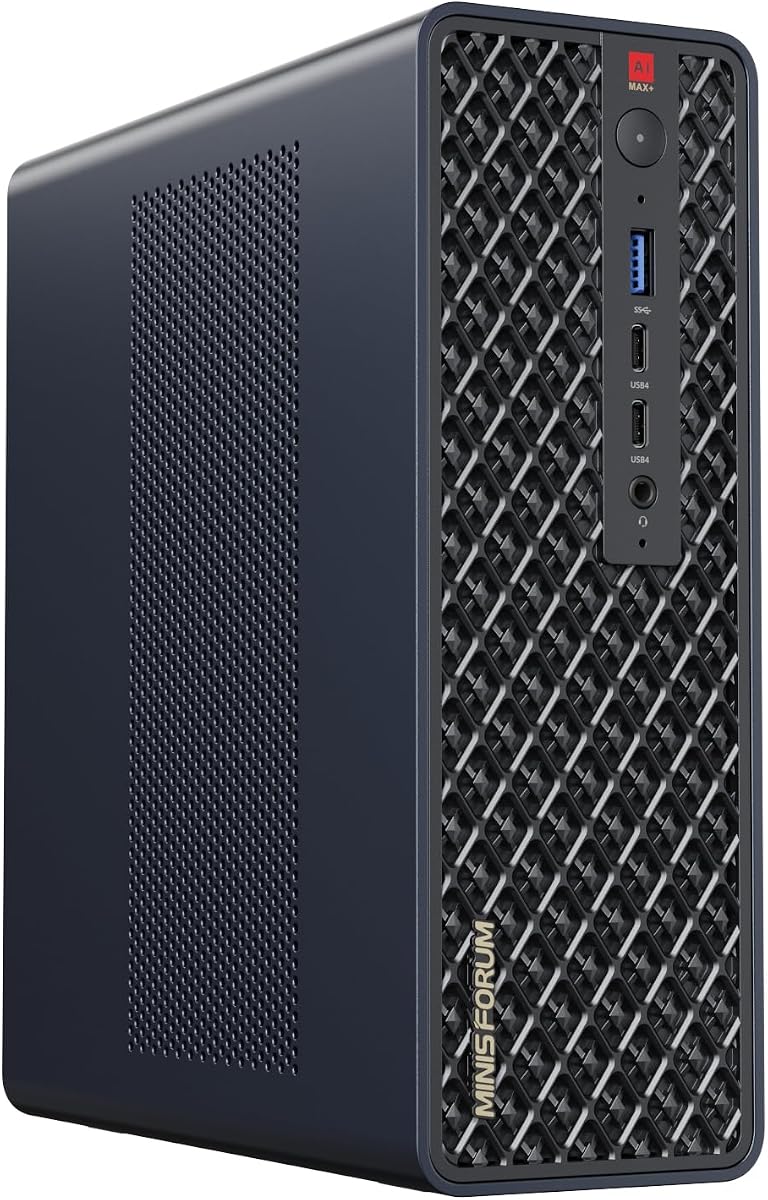
The MINISFORUM MS-S1 MAX redefines what a mini PC can do for AI tasks. It integrates a powerful APU with 128GB of LPDDR5x memory. This unified memory allows CPU and GPU to access a shared pool, reducing latency and enabling efficient data processing.
We may earn a commission when you buy through this link, at no additional cost to you.
Its unique cluster design allows multiple units to work together. You can cascade units to run large models like DeepSeek-R1 671B. It supports PCIe x16 expansion and M.2 slots for additional storage, making it versatile for various workflows.
While not a replacement for discrete GPU systems, its efficiency is remarkable. It is best suited for inference rather than heavy training. The silent operation makes it suitable for office environments.
Developers needing a portable yet powerful AI workstation will find this device useful. It bridges the gap between mobile and desktop computing effectively.
Access to 128GB of shared memory eliminates bottlenecks in data transfer between compute units.
Multiple units can be chained to increase total memory and throughput for larger models.
We may earn a commission when you buy through this link, at no additional cost to you.
The NVIDIA RTX PRO 6000 Max-Q is a specialized card for workstations. It packs 96GB of GDDR7 ECC memory into a dual-slot form factor. This capacity allows hosting heavy open-source LLMs locally without needing multi-GPU configurations.
We may earn a commission when you buy through this link, at no additional cost to you.
It offers up to 3,511 TOPS of AI performance while capping power at 300W. This efficiency makes multi-GPU desktop scaling viable without excessive heat. It supports standard desktop interfaces, enabling teams to scale intelligence rapidly.
Since it ships in OEM packaging, you must ensure your chassis and PSU can handle it. The card is designed for enterprise use, so retail features may be limited. However, for stability and performance, it is unmatched.
Professionals building high-end desktops should consider this card. It balances capacity and efficiency for complex data science tasks effectively.
Optimized for workstation chassis, it delivers server-grade performance in a consumer-friendly form factor.
Error-correcting memory ensures data integrity during long inference runs and critical analytics.
We may earn a commission when you buy through this link, at no additional cost to you.
The MINISFORUM MS-S1 Max is a versatile mini workstation that supports multi-monitor setups. It comes with 128GB LPDDR5 RAM and five video outputs for wide field views. The inclusion of dual 10GbE LAN ports ensures high-speed wired connectivity for data-heavy tasks.
We may earn a commission when you buy through this link, at no additional cost to you.
Thermal management is handled by a large copper substrate and turbine fans. It maintains stable performance even at 130W continuous power. The chassis includes an internal PCIe slot for future expansion and RAID support for storage.
While it lacks a discrete GPU, the integrated graphics are efficient for general workflows. It is best used for light inference or as a companion device to larger servers. Its compact size saves desk space while delivering robust connectivity.
This workstation is ideal for traders, engineers, or digital signage users needing multiple screens. It offers a unique balance of size, memory, and connectivity.
Five video outputs allow seamless multi-tasking across multiple screens for productivity and monitoring.
Dual 10GbE ports enable dedicated high-speed channels for data transfer and cloud syncing.
We may earn a commission when you buy through this link, at no additional cost to you.
Selecting the right dual GPU AI setup requires understanding your specific workload needs, physical constraints, and budget.
VRAM capacity is the most critical factor for running large language models locally. Larger models require more memory to fit entirely on the GPU. Ensure the combined VRAM of your setup meets the size of your intended models.
Prioritize systems with at least 48GB of total VRAM for serious AI work to avoid offloading to RAM.
Dual GPU systems demand significant power. Check the wattage of your power supply and ensure your electrical infrastructure can handle the load. High-end setups may need specialized outlets or cooling solutions.
Always verify your PSU capacity before purchasing to prevent system instability or hardware damage.
Continuous AI workloads generate substantial heat. Effective cooling ensures stable performance without throttling. Look for liquid cooling or advanced air cooling designs in your chosen system.
Invest in systems with robust thermal designs to maintain peak efficiency during long sessions.
Not all GPUs support every AI framework equally. NVIDIA systems typically have broader support for PyTorch and TensorFlow. Verify that your hardware works with the specific tools you use.
Choose hardware that aligns with your software stack to avoid compatibility headaches later.
Future needs may require more storage or RAM. Check if your chassis allows for easy upgrades. Systems with multiple slots for memory and drives offer better longevity.
Opt for configurations that can grow with your project to save money in the long run.
Server-grade systems often require rack space or large towers. Desktop-friendly workstations save room but may compromise on power. Consider where the system will be located before buying.
Ensure your workspace can accommodate the size and airflow requirements of the hardware.
Cost varies widely from compact units to enterprise servers. Calculate the potential savings against cloud services to justify the investment. High-performance setups should pay for themselves over time.
Balance upfront costs with operational efficiency to find the best value.
Keep your system in a well-ventilated area to prevent dust buildup. Clean air filters regularly to maintain optimal airflow and prevent overheating.
Update drivers and firmware frequently to ensure compatibility with new AI frameworks. Check manufacturer websites for patches and optimizations.
Monitor temperatures and performance metrics during use. Use built-in tools to detect thermal throttling early and adjust fan speeds accordingly.
Not all setups support CUDA. NVIDIA GPUs use CUDA, but Intel or AMD cards use different frameworks. Always check specific software compatibility before buying.
VRAM is usually soldered onto the GPU. Upgrading requires replacing the GPU itself. Choose your VRAM carefully during the initial purchase.
Dual GPU setups often need 1000W or more. Ensure your PSU has enough wattage and PCIe connectors for all cards.
Server-grade systems can be loud due to high-speed fans. Desktop workstations are quieter but may still generate noise under load.
Most systems use standard PCIe slots. Ensure your motherboard supports multiple GPU connections and necessary bandwidth.
Many models support gaming, but enterprise GPUs may have limitations. Workstations focus on compute over gaming performance.
High-performance systems benefit from liquid or dedicated cooling. Ensure your case fits your cooling solution and airflow needs.
Local systems are fast but cloud backups ensure data safety. Consider hybrid solutions for critical data and model storage.
We have explored ten diverse systems ranging from compact mini PCs to enterprise servers. Each option offers unique strengths depending on your memory needs and budget constraints.
Prioritize VRAM capacity and software support when making your decision. Systems with balanced power consumption and efficient cooling will serve you best in the long term.
Remember to check current pricing and availability before ordering. Technology evolves quickly, so verify specifications to ensure the setup meets your current requirements.