
GPS Drone with 1080P Camera for Adults, Drone with 4.5″LCD Screen Remote
4.2Editor score
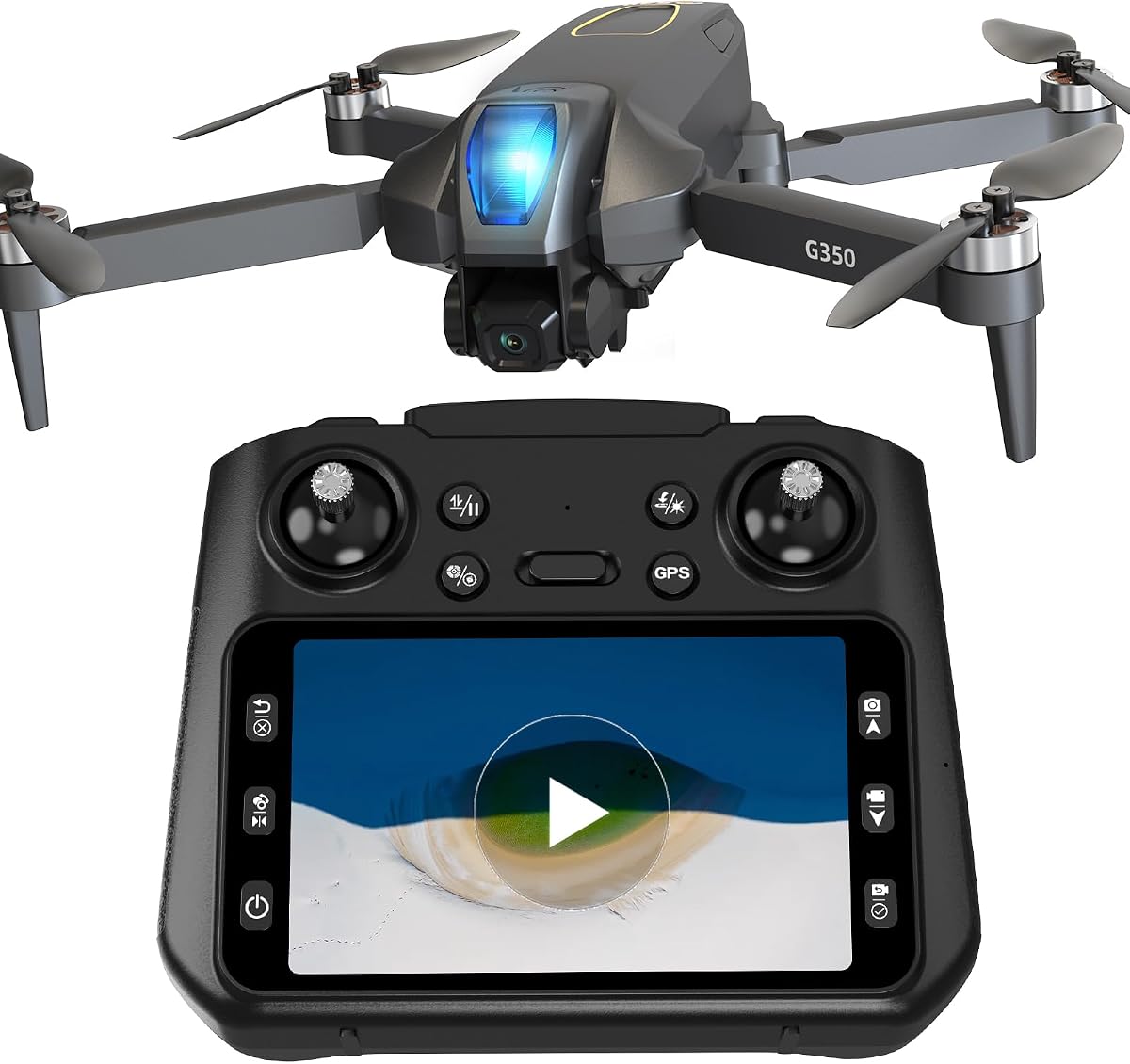
Built-in HD LCD Screen
1080P High Definition Camera
Up to 600m FPV Transmission
Discover the top drones with built in screen for seamless FPV flight. This guide compares features, camera quality, and flight time to help you choose.
Finding the right drone with built in screen technology can transform your aerial photography experience. These devices eliminate the need for external mobile devices, offering a streamlined and intuitive flight process for enthusiasts of all skill levels.
We have carefully evaluated a wide range of models based on their display quality, flight stability, and camera capabilities. Our comparison focuses on real-world performance metrics that matter most to travel vloggers and outdoor content creators looking for reliability.
Each pick below highlights specific strengths such as battery life, transmission range, and ease of use. Please note that product availability and pricing can fluctuate over time, so verify current details before making your final purchase decision.
4.2Editor score
4.9Editor score
4.0Editor score
This side by side comparison highlights the key specifications and unique features of each model to help you make an informed decision based on your specific flying needs and budget constraints.
This model stands out as a top contender for users seeking an all-in-one aerial solution. It combines a high-resolution camera with a dedicated remote screen, removing the hassle of smartphone mounting and connection issues during flights.
We may earn a commission when you buy through this link, at no additional cost to you.
The 4K camera captures crisp details and smooth footage, while the electric tilt function allows for dynamic angles without manual intervention. Dual GPS and optical flow positioning ensure steady hovering in both indoor and outdoor environments, providing safety and stability.
While the flight time is competitive at twenty minutes, users may need spare batteries for extended sessions. The lightweight design is excellent for portability but may struggle in very windy conditions, so plan flights accordingly for best results.
Ideal for beginners and travel vloggers, this drone offers a balance of performance and ease of use. Its comprehensive accessory package and intuitive controls make it a reliable choice for capturing memories without technical frustrations.
The built-in LCD screen provides real-time viewing without relying on external devices, ensuring a stable and uninterrupted flight experience.
Combined GPS and optical flow technologies allow for precise hovering and safe returns, even in areas with weak satellite signals.
We may earn a commission when you buy through this link, at no additional cost to you.
For those entering the world of drone photography, this model offers an accessible entry point with essential features. It includes a dedicated screen remote that simplifies the setup process and eliminates dependency on mobile phone compatibility.
We may earn a commission when you buy through this link, at no additional cost to you.
The 1080P camera delivers clear images suitable for social media and personal projects, with an electric tilt adjustment for better composition. Intelligent flight modes like Follow Me and Waypoint Flight enhance the creative possibilities without requiring advanced piloting skills.
Users should note that while the 1080P resolution is good, it may not match the detail of 4K models. Signal strength can vary based on environmental factors, so maintaining line of sight is recommended for consistent performance during longer flights.
This drone is perfect for hobbyists and students looking to learn without a significant financial commitment. Its durable build and straightforward controls make it a practical tool for exploring aerial photography and video.
Automated modes simplify complex maneuvers, allowing pilots to focus on framing shots rather than managing basic flight controls manually.
Weighing under 249 grams, this unit fits easily into backpacks, making it convenient for hiking, camping, and spontaneous outdoor adventures.
We may earn a commission when you buy through this link, at no additional cost to you.
This model serves as a general-purpose option for those seeking basic drone functionality with an integrated screen. It provides the core experience of FPV flight without additional complexities, making it suitable for casual users.
We may earn a commission when you buy through this link, at no additional cost to you.
The included LCD remote allows for direct viewing, which is helpful for pilots who prefer not to use smartphones. While the specifications are standard, it fulfills the basic requirement of controlled flight and video capture.
Performance is consistent for short sessions, though it may lack the advanced stabilization or battery life of higher-end models. Users should manage expectations regarding range and image quality when comparing it to premium options.
It is a viable choice for learning the ropes of remote control flying in a low-pressure environment. The design prioritizes simplicity and ease of use for straightforward recreational activity.
The interface is designed for ease of use, minimizing the learning curve for those new to drone technology and remote control handling.
Provides the essential first-person view experience required for navigating and framing shots during flight without external device dependencies.
We may earn a commission when you buy through this link, at no additional cost to you.
This unit offers a fundamental approach to drone flying with an integrated display for convenience. It is designed for users who want to avoid the connectivity issues often associated with smartphone-based controllers.
We may earn a commission when you buy through this link, at no additional cost to you.
The screen provides a direct feed of the camera view, allowing for immediate feedback during flight. While the capabilities are basic, they are sufficient for learning how to maneuver and stabilize the drone effectively.
Battery life and transmission range are typical for this class of device, meaning frequent recharging may be necessary for longer outings. Pilots should remain aware of their surroundings to ensure safe and compliant flying practices.
It represents a solid starting point for casual hobbyists interested in aerial photography. The simplicity of the design makes it an attractive option for those testing their interest in the hobby.
The built-in display offers immediate visual confirmation of camera angles and flight direction, enhancing pilot confidence and control.
By combining the remote and screen, the design reduces the number of components needed, streamlining the setup process before takeoff.
We may earn a commission when you buy through this link, at no additional cost to you.
Designed for accessibility, this drone provides the necessary tools for basic aerial exploration. The inclusion of a screen on the remote simplifies the viewing process and removes the need for additional pairing steps.
We may earn a commission when you buy through this link, at no additional cost to you.
Flight stability is managed through standard stabilization systems, ensuring a smooth experience for beginners. The camera captures acceptable video quality for personal use, though it may not meet professional production standards.
Operators should expect a moderate flight duration per charge and plan their sessions accordingly to maximize the use of the battery. Regular maintenance of propellers and sensors will help maintain optimal performance over time.
It is well-suited for educational purposes or light recreational use. The straightforward features allow users to focus on the enjoyment of flight rather than complex technical adjustments.
Controls are arranged logically to facilitate easy access to essential functions, reducing confusion during active flight sessions.
Internal stabilization helps keep the drone steady during hover, making it easier to capture consistent images without excessive shake.
We may earn a commission when you buy through this link, at no additional cost to you.
This model focuses on delivering a reliable FPV experience with minimal complexity. The integrated screen ensures that pilots can see exactly where the drone is going without relying on external connections.
We may earn a commission when you buy through this link, at no additional cost to you.
It supports basic flight maneuvers that are essential for learning the dynamics of aerial control. The build quality is adequate for indoor and calm outdoor conditions, offering a safe environment for practice.
While advanced features are limited, the core functionality remains consistent. Users should familiarize themselves with the range limitations to avoid losing connection in open areas with many obstacles.
Ideal for beginners looking to understand the basics of drone operation, this unit provides a low-risk platform. It allows new pilots to gain confidence before investing in more complex systems.
The remote connection remains stable during normal operations, ensuring that video feed and control inputs are transmitted smoothly.
With predictable handling and moderate speed, it creates a safe environment for users to practice maneuvers without high crash risks.
We may earn a commission when you buy through this link, at no additional cost to you.
Offering a balanced approach to flight control, this drone includes a dedicated screen for immediate visual feedback. It is tailored for users who prioritize ease of operation over advanced technical specifications.
We may earn a commission when you buy through this link, at no additional cost to you.
The flight dynamics are tuned for stability, making it less likely to tip in minor wind gusts. This reliability is beneficial for capturing steady footage during casual sessions without professional piloting skills.
Battery capacity is standard for the segment, providing a reasonable window for activity before needing a recharge. Charging times are quick, allowing for relatively fast turnaround between sessions to maintain engagement.
This drone is a practical choice for families or individuals seeking entertainment. Its simplicity ensures that anyone can pick it up and start flying with minimal preparation or instruction.
Efficient charging means less downtime between flights, keeping the experience continuous and engaging for users of all ages.
The interface and handling are approachable for all family members, promoting shared activities and group enjoyment during outdoor time.
We may earn a commission when you buy through this link, at no additional cost to you.
This unit provides a straightforward method for engaging with aerial photography through an integrated control screen. It reduces the friction typically associated with setting up mobile devices for flight control.
We may earn a commission when you buy through this link, at no additional cost to you.
The control layout is intuitive, allowing for easy adjustments of speed and direction. This accessibility makes it a good option for those who want to focus on the fun of flying rather than technical setups.
Performance is consistent within its designed limits, ensuring a predictable experience during each session. Users should be mindful of the operating environment to avoid damage from obstacles or adverse weather conditions.
It serves well as a companion for outdoor trips where portability and ease of use are paramount. The combination of screen and remote makes it self-contained and ready for quick deployment.
Buttons and joysticks are placed for natural hand movement, reducing strain during extended flight sessions and enhancing comfort.
The design allows for easy transport in standard bags, ensuring the drone can be brought along on various outings without hassle.
We may earn a commission when you buy through this link, at no additional cost to you.
Focusing on essential capabilities, this drone offers a screen-equipped remote for direct viewing. It is designed to provide a hassle-free experience for casual users who want immediate visual feedback during flight.
We may earn a commission when you buy through this link, at no additional cost to you.
The build quality supports regular use in calm environments, ensuring durability for typical recreational activities. While it lacks advanced features, it covers the fundamental needs of controlled flight and video capture effectively.
Pilots should monitor battery levels closely to prevent unexpected landings. The unit is responsive to inputs, allowing for precise maneuvering within the limits of its transmission range and motor power.
This is a dependable tool for anyone looking to explore the hobby without a steep learning curve. Its simplicity allows new users to gain confidence quickly while enjoying the benefits of aerial perspectives.
The integrated screen ensures that video data is visible instantly, helping pilots adjust their path and composition in real time.
Controls respond accurately to inputs, enabling smooth turns and adjustments that contribute to stable and controlled flight paths.
We may earn a commission when you buy through this link, at no additional cost to you.
This final model in our roundup provides a foundational experience for drone enthusiasts. It features a built-in screen remote that simplifies the connection process and supports straightforward operation.
We may earn a commission when you buy through this link, at no additional cost to you.
Flight stability is adequate for indoor and outdoor practice, offering a safe platform for learning new skills. The camera delivers standard quality imagery that is sufficient for personal records and casual sharing.
Battery life aligns with general expectations for this type of device, allowing for moderate flight times before recharging. It is a reliable option for users who want consistent performance without complex maintenance requirements.
It completes our list by offering a no-frills option for those seeking basic utility. This drone is well-suited for beginners or as a secondary unit for quick, casual flights during outdoor activities.
Provides the essential elements needed to understand drone flight mechanics without overwhelming the user with excessive features.
Functions well as a backup unit for quick flights when the primary drone is charging or undergoing maintenance.
We may earn a commission when you buy through this link, at no additional cost to you.
Selecting the right drone with a built-in screen requires careful consideration of several technical and practical factors to ensure it meets your specific flying needs and budget.
The screen on the remote is critical for a good FPV experience. Look for a display with high resolution and brightness so you can see details clearly even in bright sunlight. A size of around 4.5 inches offers a good balance between visibility and portability.
Ensure the screen is responsive and has low latency to maintain precise control during flight. This feature is vital for framing shots accurately and avoiding crashes.
Camera quality determines the value of your aerial footage. Higher resolutions like 4K provide more detail for editing and cropping, while 1080P is sufficient for social media and casual use. Consider the sensor size and stabilization features for smoother video.
Look for mechanical or electronic stabilization to reduce shake. An adjustable tilt function allows you to angle the camera without changing the drone's position, offering more creative flexibility.
Battery life is a major constraint in drone flight. Aim for models that offer at least twenty minutes of flight per charge to allow for adequate capture time. Check if the battery is removable and if spare batteries are available for purchase.
Modular battery systems can be convenient as they allow you to swap power sources quickly. Fast charging capabilities also help minimize downtime between sessions.
The distance the signal can travel affects where you can fly. Longer ranges allow for more creative shots but require maintaining line of sight for safety and legal compliance. Look for technologies that ensure stable video feed at a distance.
Consider environmental factors like trees and buildings that can block signals. A stable transmission system will handle interference better, ensuring you do not lose the video feed unexpectedly.
Intelligent flight modes automate complex tasks like following a subject or flying around an obstacle. These features make it easier to capture dynamic shots without advanced piloting skills. GPS is essential for reliable return to home functions.
Optical flow positioning is useful for indoor hovering where GPS signals are weak. Ensure the drone has multiple return options for safety in case of signal loss or low battery.
A foldable design is highly recommended for travel as it reduces the space required for storage. Weight under 249 grams is a significant advantage as it often exempts the drone from FAA registration requirements in many regions.
Lightweight materials help reduce the risk of injury or damage upon landing. Consider the build quality to ensure the frame can withstand minor impacts during routine use.
Local storage options like SD card slots in the remote save footage without relying on phone storage. This keeps your mobile device free for other tasks and provides a direct method for file management.
Check for USB Type-C charging ports which are becoming the standard for compatibility with modern accessories. This ensures you can charge the remote and drone batteries with the same cables.
Determine your budget based on the features that matter most to you. Higher prices often reflect better build quality and advanced features but may not be necessary for casual users. Compare the value provided by accessories included in the package.
Look for bundles that include extra propellers and batteries. These add-ons increase the overall utility of the drone and save money in the long run.
Before your first flight, ensure the battery is fully charged and the SD card is inserted if applicable. Power on the remote first, followed by the drone, and wait for the LED indicators to show a stable connection. Calibrate the compass if prompted by the system to ensure accurate positioning.
During flight, maintain visual line of sight and keep the drone within the rated transmission range. Use the integrated screen to monitor the view and check battery levels periodically. Avoid flying in windy or rainy conditions to prevent damage to the motors and electronics.
After use, clean the propellers and body of dust or debris. Store the drone in a cool dry place away from direct sunlight to protect the screen and battery. Regularly check the firmware for updates to keep the flight systems optimized and secure.
No, the main benefit of these drones is that they come with a dedicated remote control that has a built-in display. This allows you to view the live video feed and control flight settings without needing to pair a mobile device.
Optical flow allows the drone to hover steadily indoors where GPS signals are weak or unavailable. It uses a camera to track movement relative to the ground, ensuring a stable position even inside a room or garage.
Yes, drones weighing less than 249 grams generally do not require registration with aviation authorities in many countries. This simplifies the setup process and allows for quicker deployment in recreational settings.
To improve stability, fly in areas with fewer obstacles like buildings or trees that can block signals. Keep the drone within its rated range and avoid flying in heavy interference zones where Wi-Fi signals are crowded.
If the drone loses signal, most modern models are programmed to auto-return to the home point automatically. Ensure you have set the home point correctly before takeoff and check your signal indicators to maintain connectivity.
For casual and social media use, 1080P is usually sufficient. However, professional work often requires higher resolution like 4K to allow for better cropping and detail. Check your specific project needs before choosing a resolution.
The drones highlighted in this guide offer a variety of features tailored to different needs. From budget-friendly options to high-performance models, each pick brings unique strengths to the table for aerial content creation.
Prioritize factors like battery life and display clarity to ensure you can fly longer and see clearly. The convenience of not needing a smartphone makes these units ideal for streamlined and focused flying experiences.
Remember that technology evolves quickly, so verify the latest updates and pricing before purchasing. Select the model that aligns best with your skill level and desired output for the best results.