
THUSTAR 8MP
4.4Editor score
3-Level LED lighting
A3 size coverage area
Dual microphones included
Document cameras have become essential tools for modern education and remote presentations. A good model offers high resolution, flexible zoom capabilities, and reliable connectivity. Teachers and professionals need devices that capture fine details clearly without lag or distortion during live sessions.
We evaluated ten top-rated document cameras based on zoom performance, image quality, and ease of use. Our analysis covers optical and digital zoom ranges, sensor types, and compatibility with popular conferencing platforms. Each product was assessed for its ability to handle diverse materials under varying lighting conditions.
Each pick in this list highlights specific strengths like budget value, premium features, or specialized connectivity. We included detailed reviews and comparison data to help you choose wisely. Please note that product availability and pricing can change frequently, so verify details before purchasing.
4.4Editor score
4.5Editor score

4.5Editor score
As an Amazon Associate we earn from qualifying purchases.
The following table provides a side-by-side comparison of all ten document cameras. It highlights key specifications such as resolution, zoom capabilities, and connectivity options to help you identify the right fit for your specific teaching or presentation needs.


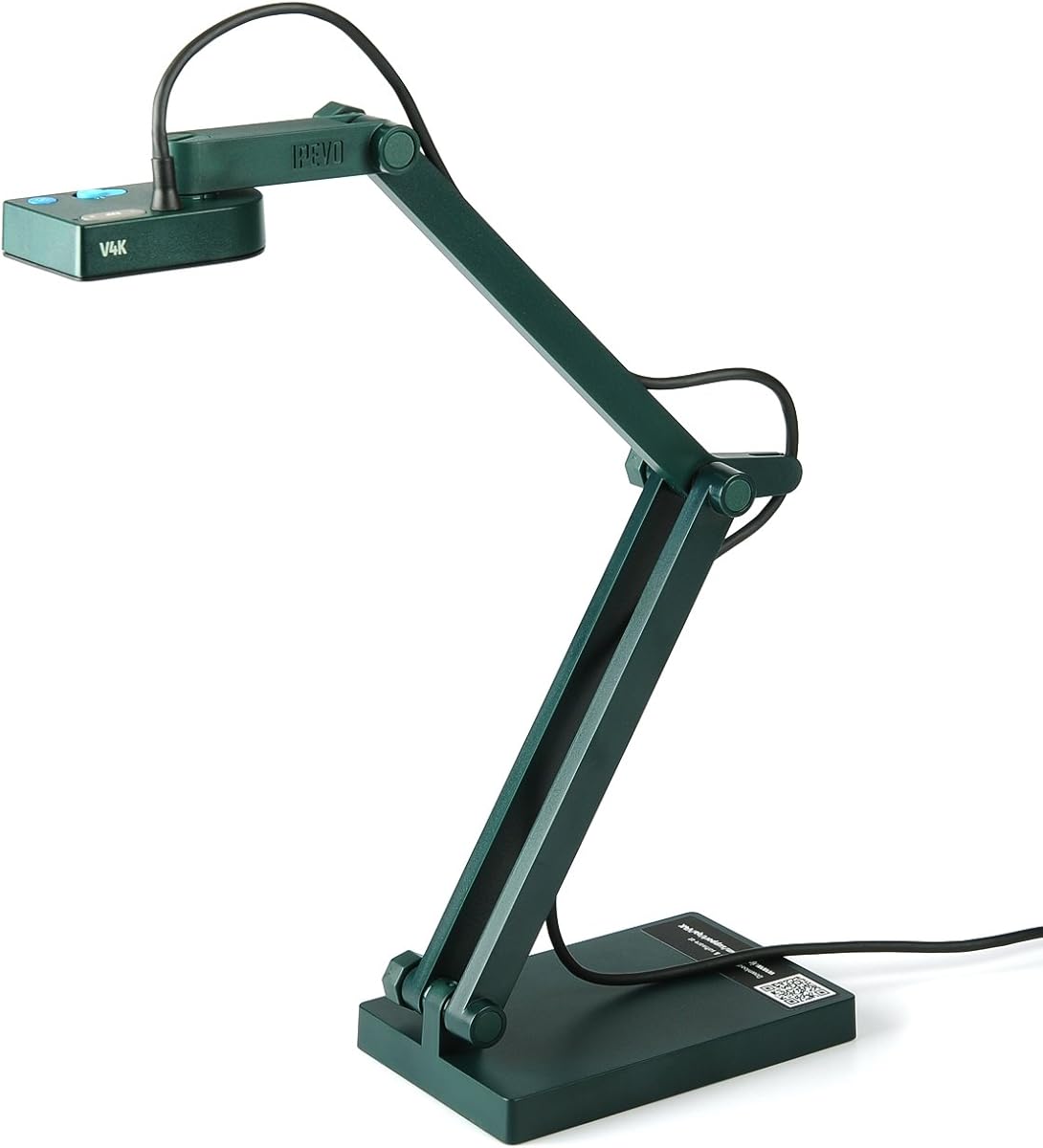
The IPEVO V4K stands out as a top choice for educators and presenters needing reliable zoom capabilities. With its 8 Megapixel camera and Sony CMOS sensor, it delivers ultra high definition images that capture fine details effectively. Users appreciate its fast focusing speed which minimizes interruptions during live demonstrations or remote teaching sessions.
We may earn a commission when you buy through this link, at no additional cost to you.
Its multi-jointed stand offers flexibility for positioning at various angles, making it easy to switch between documents and 3D objects. The camera supports high frame rates up to 30 fps at full HD, ensuring smooth streaming without lag. Compatibility across Mac, Windows, and Chromebook systems adds significant value for diverse classroom environments.
While it requires a dedicated USB port and adequate disk space for optimal performance, these are minor trade-offs given the image quality. The stand may loosen over heavy daily use but includes a fix for tightening joints. Overall, it balances performance and durability well for regular use.
This model is ideal for teachers and professionals who prioritize image clarity and ease of use. Its robust construction and wide software support make it a dependable tool for distance learning. We recommend it for those seeking a versatile document camera with strong zoom and streaming features.
The 8 Megapixel resolution and Sony CMOS sensor ensure exceptional noise reduction and color reproduction for clear visuals.
The multi-jointed stand allows for easy adjustment to capture different materials and angles without complex setup.
We may earn a commission when you buy through this link, at no additional cost to you.
The INSWAN INS-1 offers a compelling mix of features for users needing a compact yet powerful document camera. Its 8 Megapixel SONY camera captures live images at high resolutions with smooth streaming capabilities. The built-in LED light and anti-glare sheet help manage exposure challenges in varying lighting conditions effectively.
We may earn a commission when you buy through this link, at no additional cost to you.
Its multi-joint design is durable and space-saving, fitting well on desktop setups. The bundled Documate software adds functionality like digital zoom and image annotation. This makes it suitable for webinars and distance learning where interactive elements are valuable during presentations.
Users should note that downloading the latest software version is necessary for full feature access. While the camera is plug-and-play, relying solely on USB may limit connectivity options compared to HDMI models. However, its ease of setup is a strong advantage.
Ideal for classrooms or home offices needing a versatile tool without excessive bulk. The combination of hardware and software features provides a complete solution for digital presentations. We recommend it for those who value convenience and interactive capabilities.
Built-in LED and anti-glare sheet ensure consistent visibility even in challenging lighting environments.
Documate software enables digital zoom and annotations to enhance engagement during live sessions.
We may earn a commission when you buy through this link, at no additional cost to you.
The Epson DC-13 is designed for users prioritizing HD video output and direct HDMI connectivity. Its 1080p resolution ensures astounding clarity for presentations and lessons. The inclusion of a microscope adapter makes it suitable for scientific demonstrations requiring magnification beyond standard document viewing.
We may earn a commission when you buy through this link, at no additional cost to you.
Its HDMI digital connectivity allows for high-definition video streaming without relying on a computer for processing. The built-in microphone supports recording and sharing audio video lessons easily. This feature simplifies content creation for educators needing to distribute materials later.
While the digital zoom is limited to 16x compared to other models, it provides sufficient magnification for most classroom needs. The price point is higher but justified by the specialized features and connectivity options. Users may find it less versatile for digital-only setups.
Best suited for settings where direct projection and scientific tools are essential. Its ability to share magnified images and record lessons makes it a unique tool. We recommend it for schools with specific hardware requirements.
Included microscope adapter supports many standard microscopes for advanced educational demonstrations.
One-touch audio video recording simplifies the process of creating lesson content for students.
We may earn a commission when you buy through this link, at no additional cost to you.
The Elmo TT-12W is a premium visual presenter offering an impressive 192x zoom range. Its 12x optical zoom combined with 16x digital zoom provides exceptional magnification for detailed viewing. The HDMI in and out connectivity ensures it integrates seamlessly into complex AV setups.
We may earn a commission when you buy through this link, at no additional cost to you.
Powered by Android, it supports a wide range of educational apps without additional equipment. The Ethernet and Wi-Fi capabilities offer flexible network connectivity. A built-in remote control dock ensures you never misplace your remote during presentations.
The complexity of setup and high cost may be barriers for casual users. However, for professional environments requiring robust features and connectivity, it is unmatched. Users should have technical support available for initial configuration.
This model is best for advanced educational institutions needing high-end tools. Its ability to connect via multiple channels and run apps makes it a standalone solution. We recommend it for users needing maximum flexibility.
192x zoom allows for detailed viewing of small objects or large documents with ease.
Android powered system opens up a world of learning apps without needing a separate computer.
We may earn a commission when you buy through this link, at no additional cost to you.
The THUSTAR 8MP offers an affordable entry point for educators needing a reliable document camera. It features 8 Megapixel output and 30fps transmission for clear live images. The adjustable image brightness buttons ensure you can adapt to different lighting conditions manually.
We may earn a commission when you buy through this link, at no additional cost to you.
Its foldable design makes it easy to carry and store, while the multi-joint support allows flexible positioning. Dual microphones improve sound quality for video chats. The ability to cover A3 paper size supports larger documents effectively.
While it lacks HDMI output and advanced software, its hardware performance is strong for the price. Users should manage expectations regarding digital features. However, its core imaging functions are solid for basic teaching needs.
Ideal for budget-conscious schools or individual teachers. The balance of features and cost makes it a top pick for value. We recommend it for those needing a simple yet effective visual tool.
Manual brightness buttons allow adjustment in 10-degree increments for optimal image clarity.
Embedded design allows easy storage and transport for use across multiple classrooms.
We may earn a commission when you buy through this link, at no additional cost to you.
The PAKOTOO document camera is a versatile tool designed for teachers needing flexible webcam and document functionality. It supports A3 format capture and features a 3-level LED fill light to eliminate shooting problems in difficult lighting conditions.
We may earn a commission when you buy through this link, at no additional cost to you.
Its left and right mirroring function helps adjust images during video chat for better clarity. The 5-Level IOS exposure button ensures sharp images even in imperfect environments. Built-in dual silicon microphones reduce noise for clearer audio.
Users need to select 'USB Camera' in the system settings for it to work correctly. This lack of true plug-and-play can be a hurdle for some. However, the connectivity options are broad once configured.
Best for hybrid classrooms needing a device that can double as a webcam. Its compatibility with Zoom and OBS makes it useful for streaming. We recommend it for tech-savvy educators willing to configure settings.
Manual adjustment buttons provide control over brightness to ensure perfectly sharp images.
Dual silicon microphones improve sound quality and reduce noise for professional audio.
We may earn a commission when you buy through this link, at no additional cost to you.
The IPEVO VZ-R stands out for its dual mode capability allowing direct HDMI connection without a computer. This makes it ideal for real-time projection in classrooms lacking reliable USB ports. Its 8 Megapixel sensor ensures high image clarity for detailed visuals.
We may earn a commission when you buy through this link, at no additional cost to you.
Tactile built-in buttons enable instant adjustments to images during presentations. The glass fiber reinforced stand offers durability for daily use. Compatible with Mac, Windows, and Chromebook, it doubles as a webcam for video calls seamlessly.
Users should note that the package does not include an HDMI cable or wall power adapter. This can add to the overall cost and setup time. However, its portability and flexibility are strong advantages.
Best for environments requiring both direct projection and computer connectivity. Its ability to operate independently provides significant versatility. We recommend it for users needing a standalone visual tool.
Direct HDMI connection to a TV or projector allows operation without a computer.
Glass fiber reinforced stand ensures durability and portability for daily use.
We may earn a commission when you buy through this link, at no additional cost to you.
The OKIOCAM S2-4K is designed to excel in low light environments with its Exmor R CMOS sensor. It eliminates glare and uneven brightness common with LED lights by doubling light sensitivity. This makes it ideal for dark or projector-lit environments.
We may earn a commission when you buy through this link, at no additional cost to you.
Its OKIOPoint AI tracking on software zooms in and follows your pointer in real-time. This simplifies teaching focus and enhances student engagement. The device captures near-Ledger size documents on a compact durable frame.
Users rely on the software for the AI features which may require downloading. While the cost is higher, the low light capabilities are unmatched. Hardware alone performs well without external lighting.
Best for classrooms with variable or dim lighting conditions. The combination of sensor technology and software provides a unique learning experience. We recommend it for those prioritizing image quality in difficult lighting.
Back-illuminated design doubles light sensitivity to reduce noise and improve color.
OKIOPoint AI tracking allows real-time pointer following for engaging presentations.
We may earn a commission when you buy through this link, at no additional cost to you.
The IPEVO V4K PRO features a 120-degree wide-angle lens perfect for capturing expansive visuals. Its 4K resolution and Sony CMOS sensor deliver unparalleled quality. The built-in LED light and swift autofocus enhance usability in various conditions.
We may earn a commission when you buy through this link, at no additional cost to you.
AI noise reduction effectively eliminates background ambient noises during video calls. This elevates the quality of presentations and conferences. The compact portable design makes it easy to transport between classrooms or offices.
While it lacks hardware controls, software integration is seamless. The wide angle may not be ideal for detailed small document zoom. However, for broader views, it excels.
Ideal for users needing a versatile webcam and document camera. Its wide field of view supports diverse presentation needs. We recommend it for those prioritizing coverage over extreme magnification.
120-degree lens allows capturing tabloid size documents and larger objects effortlessly.
AI noise reduction technology cleans up audio for clearer video calls.
We may earn a commission when you buy through this link, at no additional cost to you.
The Elmo TT-12iD represents the next generation of document cameras with its powerful 96x zoom. Its 3.4 Megapixel CMOS sensor supports smooth moving images at 30 fps. The built-in switcher allows easy switching between video sources.
We may earn a commission when you buy through this link, at no additional cost to you.
HDMI input capability enables connection to external devices easily. The included sleek remote control adds convenience. Users appreciate its ability to enhance learning and interaction in the classroom.
Its high price reflects its professional grade features. Setup requires technical knowledge but rewards with performance. It is a premium tool for dynamic lessons.
Best for advanced educational settings needing robust interaction. Its ability to incorporate 21st century tech makes it a strong choice. We recommend it for institutions prioritizing technology.
Built-in switcher simplifies managing multiple video inputs during lessons.
Designed to incorporate modern classroom technology for enhanced academic performance.
We may earn a commission when you buy through this link, at no additional cost to you.
Selecting the right document camera depends on your specific needs. This guide outlines key factors to consider before purchasing.
Zoom is crucial for document cameras to display fine details clearly. Look for both optical and digital zoom ranges to ensure versatility. Optical zoom provides clearer magnification without quality loss. Digital zoom can be useful but may reduce image resolution.
Prioritize models with sufficient optical zoom for your specific needs. Check maximum magnification levels in product specs.
Higher resolution ensures sharper images and better detail capture. Most models offer 8 Megapixel or 4K output. Sony CMOS sensors are often preferred for low light performance. Resolution affects how clear text and images appear on screen.
Opt for at least 1080p or 4K resolution for professional results. Check sensor type if working in dim environments.
Connectivity determines how you link the camera to displays or computers. USB is common for plug-and-play use. HDMI allows direct projection without a computer. Wi-Fi or Ethernet enables networked setups in large classrooms.
Choose a model matching your available ports and AV needs. Consider dual mode cameras for flexibility.
Lighting affects image quality significantly. Built-in LEDs help in low light conditions. Adjustable exposure settings ensure images stay sharp. Some models use sensors to handle low light without extra lights.
Look for brightness control or adaptive lighting features. Avoid models without any light adjustment options.
Software adds functionality like annotation and recording. Some brands bundle full-featured tools. Others rely on third-party apps. Check compatibility with your preferred conferencing software.
Ensure the software supports your workflow needs. Verify if updates are free and accessible.
Portability matters if you move between classrooms. Foldable designs save desk space. Multi-jointed stands offer angle flexibility. Durable builds withstand daily handling in busy schools.
Select a design that fits your physical space and usage pattern. Consider weight and base stability.
Good audio is essential for remote teaching. Built-in microphones reduce external noise. Some models include dual mics for better pickup. Clear sound enhances the overall presentation experience.
Check microphone specs if audio is important. External mics may be needed for large rooms.
Prices vary widely from budget to premium options. Consider total cost including cables and power. High-end models offer advanced connectivity. Budget models often cover core needs well.
Balance features with your available budget. Ensure the model meets minimum requirements first.
Connect the document camera to your computer or projector using the appropriate cable. Ensure the software is installed or the device is recognized as a video source. Position the object under the lens and adjust the height using the stand.
Use the brightness and focus buttons to optimize image clarity. If your camera supports digital zoom, use it sparingly to avoid pixelation. Adjust the angle to capture the document fully without glare from overhead lights.
Clean the lens gently with a soft cloth to maintain image quality. Store the camera in a dry place to prevent dust accumulation. Regularly check for software updates to ensure compatibility and performance.
Optical zoom uses the lens to magnify the image without losing quality. Digital zoom enlarges pixels and may reduce clarity. For best results, prioritize optical zoom when comparing models for detailed work.
Most modern document cameras are compatible with both Mac and Windows. Check system requirements in the product description. Some may require specific drivers or software for full functionality.
Yes, some models support direct HDMI connection to a projector or monitor. This allows standalone operation for live demos. Others require a computer to process video signals.
Use the built-in LED controls to change brightness levels. Adjust exposure settings if available. Position lights to avoid shadows on your document surface.
Most models support up to A3 or letter size documents. Some offer larger capture areas for bigger materials. Check the maximum shooting area in the specs.
Most manufacturers provide free software updates for their bundled tools. Check their support site for download links. Ensure you have the latest version for best compatibility.
With proper care, document cameras can last several years. Durability depends on build quality and usage frequency. Stand components may loosen over time but can be fixed.
We have reviewed ten top document cameras ranging from budget to premium options. Each model offers unique strengths in zoom, connectivity, and design. The IPEVO V4K remains a top choice for overall reliability and value.
When choosing, consider your specific needs for optical zoom depth and connectivity options. Prioritize features that match your teaching environment or presentation setup. Compatibility with your existing hardware is also essential.
Prices and availability can change quickly so verify details before buying. Check current reviews and warranty options for the best protection. Selecting the right tool will enhance your visual communication capabilities.