
VEVOR Portable Digital Magnifier
3.4Editor score
2X to 48X magnification
13MP dual lens system
AV and HDMI output
Finding the right digital magnifier for low vision can transform daily tasks like reading and cooking into enjoyable activities. These devices offer powerful zoom capabilities and highcontrast color modes to help users with visual impairments navigate text and objects more easily.
We evaluated ten leading products based on magnification range, screen size, portability, and ease of use. Our comparison considers battery life, connectivity options, and specific features designed for conditions like macular degeneration or color blindness.
Each pick below highlights unique strengths and potential trade-offs to help you match a device to your specific needs. Please note that prices and availability may change over time so checking the current listings is recommended before purchasing.
3.4Editor score

4.6Editor score

4.4Editor score
As an Amazon Associate we earn from qualifying purchases.
Below is a side-by-side comparison of all ten products to help you quickly identify which digital magnifier for low vision fits your budget and requirements based on core specifications.




This Eyoyo model is highly rated for its balance of portability and functionality. Users appreciate the range of color modes that help make text stand out against backgrounds effectively.
We may earn a commission when you buy through this link, at no additional cost to you.
The zoom range of 2X to 25X is suitable for most reading tasks such as books and menus. The AV output allows you to connect to a larger TV screen if needed for better visibility.
While the screen is smaller than some competitors, it remains easy to carry around. The snapshot function lets you save images to a TF card for later review which adds practical value.
This device is ideal for users seeking a straightforward digital magnifier for low vision without overwhelming features. It works well for daily reading and small visual aid needs at home or on the go.
The eight adjustable color modes include options like white on black and blue on yellow which are vital for users with specific contrast sensitivities.
Its compact form factor makes it easy to slip into a bag or pocket ensuring you have visual aid available whenever you leave the house.
We may earn a commission when you buy through this link, at no additional cost to you.
This unit offers a generous 5-inch screen which is beneficial for reading larger blocks of text. The high magnification range helps those with significant vision loss access text details more clearly.
We may earn a commission when you buy through this link, at no additional cost to you.
The simplified button layout is designed to reduce confusion for elderly users or children. It stores your preferred settings so you do not need to readjust every time you turn it on.
While some users report mixed experiences with durability the features are strong for the price. The ability to connect to a TV extends its utility beyond just handheld use at a desk.
It serves as a robust option for individuals needing a larger display and customizable color settings. The memory function adds convenience for daily routines like reading newspapers or medication labels.
With no redundant buttons the design focuses on essential functions making it easier to operate without extensive training or technical knowledge.
The HD LCD screen restores colors and details through professional image processing ensuring text does not deform when magnified to high levels.
We may earn a commission when you buy through this link, at no additional cost to you.
This magnifier focuses on comfort with an integrated handle and bracket that lets you position it at a comfortable angle. This design reduces the need to hunch over while reading text for extended periods.
We may earn a commission when you buy through this link, at no additional cost to you.
The device features 26 color modes to customize contrast levels based on your specific vision needs. It remembers your settings so switching between tasks does not require resetting preferences each time.
Although it is a bit more expensive than some competitors the build quality and ergonomics justify the cost. The high resolution screen ensures clarity even when zooming in on fine print or images.
It is an excellent choice for users who prioritize physical comfort and ease of use. Whether at home or in an office setting this device offers a reliable solution for reading and visual tasks.
The foldable bracket allows you to lay the device on a page at an angle reducing strain on your neck and shoulders during long reading sessions.
Beyond the built-in screen the AV output capability provides an additional way to view content on a larger display for better overall visibility.
We may earn a commission when you buy through this link, at no additional cost to you.
This product emphasizes simplicity with its reduced button layout which is great for users who find complex electronics challenging. The screen size helps make text larger and more readable for those with moderate vision loss.
We may earn a commission when you buy through this link, at no additional cost to you.
It features a high-resolution screen that ensures details remain sharp even when magnifying fonts to high levels. The memory function stores your preferences so you can pick up right where you left off.
While some users have noted issues with long-term durability the core functions are effective for daily reading tasks. It connects to TVs to offer a bigger view which is helpful for group settings or shared reading.
This magnifier is best suited for those who value straightforward operation over advanced features. It covers essential needs like grocery shopping or reading menus with its range of zoom and color options.
By removing unnecessary buttons the device focuses on core functions which makes it accessible for elderly users or those with limited dexterity.
The professional image processing ensures colors are restored accurately so text remains crisp and easy to read without blurring.
We may earn a commission when you buy through this link, at no additional cost to you.
The VEVOR model stands out with its incredibly high magnification range reaching up to 48X which is rare at this price point. It also offers dual lenses for both close-up reading and viewing distant objects.
We may earn a commission when you buy through this link, at no additional cost to you.
It supports both AV and HDMI outputs allowing you to connect to modern TVs easily. The large screen and brightness controls provide a comfortable viewing experience for extended periods of use.
While user ratings are mixed likely due to the complex feature set it remains an affordable choice for many. The battery life is decent but you may need to recharge it for very long sessions.
This device is perfect for users who want maximum magnification without spending a fortune. It is especially useful for those who need to read very small text or view signs from a distance.
The combination of a near lens for documents and a far lens for signs or boards makes this a versatile tool for both indoor and outdoor tasks.
With both AV and HDMI outputs you can choose the connection type that works best with your available television or monitor setup.
We may earn a commission when you buy through this link, at no additional cost to you.
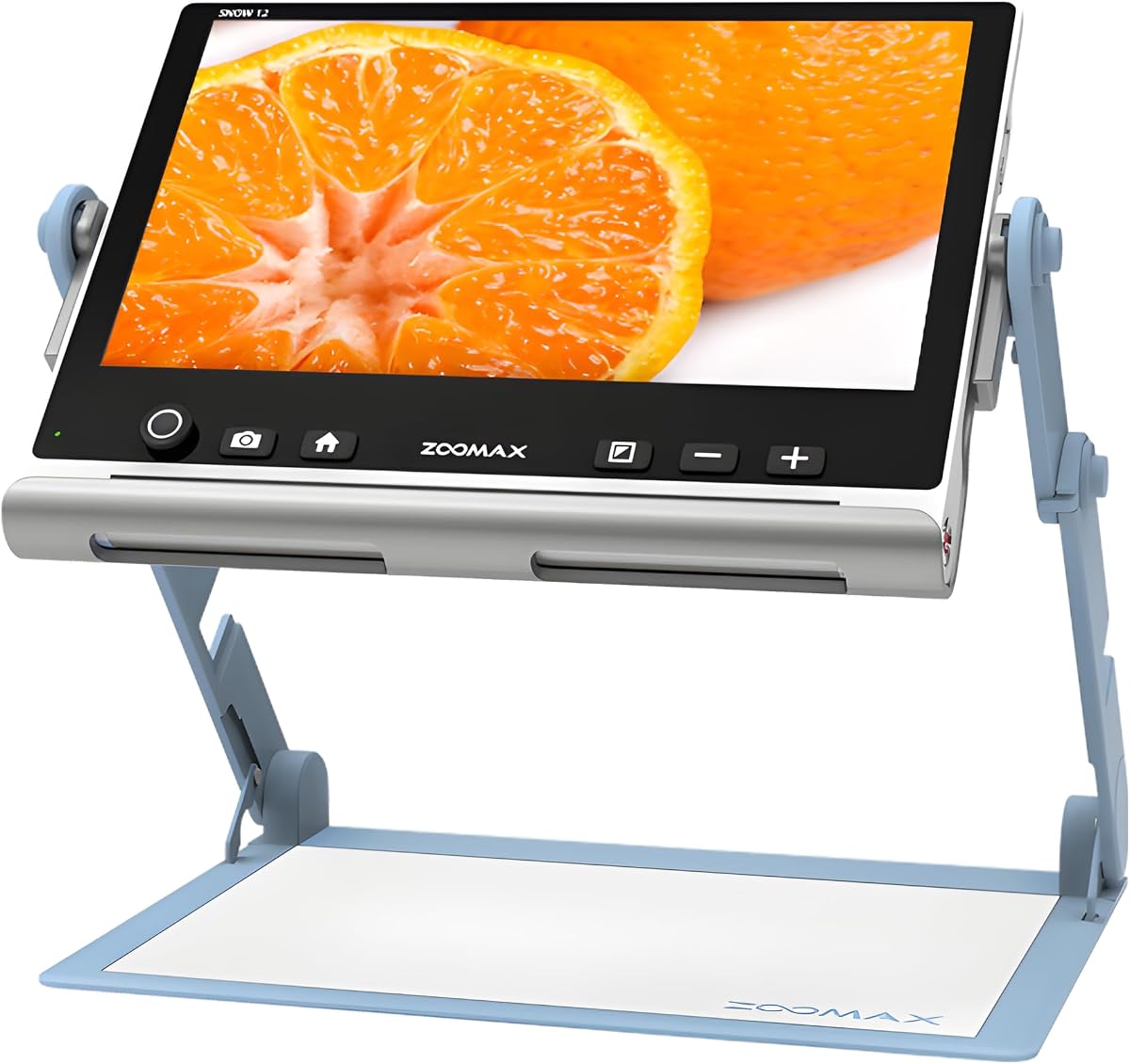
This device offers a massive 12-inch screen that provides a wide field of view for reading books or documents. The OCR feature converts text to speech which adds a layer of accessibility beyond just visual magnification.
We may earn a commission when you buy through this link, at no additional cost to you.
It supports text to speech in over 20 languages making it a powerful tool for multilingual users or students. The foldable stand ensures stability while still allowing the device to be carried easily.
While the magnification is lower than some competitors the screen size compensates by providing a clear large image. The camera quality is high ensuring that text is captured clearly for conversion to speech.
It is ideal for users who benefit from auditory feedback alongside visual aids. This makes it a comprehensive solution for people with low vision who need both reading assistance and independent navigation.
Optical character recognition converts printed text into spoken words helping users consume written content without relying solely on their remaining vision.
The 12-inch screen reduces the need to scan text line by line allowing you to see larger sections of content at once.
We may earn a commission when you buy through this link, at no additional cost to you.
This Eyoyo model boasts a large 4500mAh battery which provides over four hours of continuous operation. This is beneficial for users who need to read for extended periods without worrying about running out of power.
We may earn a commission when you buy through this link, at no additional cost to you.
It offers a wide range of color modes and brightness levels to customize the viewing experience. The handle allows for comfortable handheld use or you can place it on a table using the bracket.
The snapshot function lets you capture images and save them to a TF card which is great for saving receipts or labels. Connecting to a TV via AV output gives you the option for a larger display.
For those who need reliability and long usage sessions this device is a strong contender. It balances performance and battery life well making it a practical choice for everyday tasks.
With a large 4500mAh capacity you can use the device for hours of reading without needing to recharge it frequently during the day.
The foldable handle and bracket system lets you switch between handheld and tabletop use comfortably depending on your current activity.
We may earn a commission when you buy through this link, at no additional cost to you.
This model stands out with 26 color modes which provide extensive options for customizing contrast. The high-resolution screen ensures that details are sharp and text does not deform when magnified.
We may earn a commission when you buy through this link, at no additional cost to you.
It remembers your settings before shutdown so you do not need to adjust preferences every time. The handle design allows for ergonomic use whether you are right or left-handed.
While some users find the initial setup slightly complex once configured it works smoothly for daily reading. The TV output adds versatility for those who prefer a larger screen at home.
It is a solid choice for users who need specific color contrasts to make text visible. The combination of features supports a wide range of visual impairments effectively.
With 26 options you can choose the exact contrast needed such as white on black or blue on yellow to suit your eyes sensitivity.
The integrated handle and bracket let you position the device at an angle that reduces neck strain during long reading sessions.
We may earn a commission when you buy through this link, at no additional cost to you.
Eschenbach is known for quality and this model reflects that with its sturdy build and reliable performance. The HD video magnifier offers clear images that are essential for detailed viewing tasks.
We may earn a commission when you buy through this link, at no additional cost to you.
It includes image capture features which allow you to save important visual information. The five viewing modes provide options for different lighting and contrast needs ensuring comfortable use.
While the zoom range is lower than some models the clarity and build quality make it worth the premium price. It is designed to be lightweight so carrying it does not feel burdensome.
This device is ideal for users who prioritize reliability and build over maximum magnification. It serves as a high-end option for those who want a durable and effective visual aid.
The HD video display ensures that text and images are sharp and clear providing a superior visual experience for low vision users.
Its lightweight design makes it easy to take anywhere so you have reliable visual aid with you whether at home or traveling.
We may earn a commission when you buy through this link, at no additional cost to you.
This device offers an impressive battery life of over four hours which is great for travel or all day use. The zoom range of 3X to 48X covers most reading needs including very small text on labels.
We may earn a commission when you buy through this link, at no additional cost to you.
It uses simplified buttons to make operation easy for elderly users. The high-resolution screen ensures that text does not become blurry when zoomed in to high levels.
While it is not recommended for reading full novels due to screen size it is perfect for quick tasks like shopping or recipes. The TV connection allows for a bigger view when at home.
This is a practical option for those needing a portable solution with strong battery life. It balances zoom power and usability to help users manage daily visual tasks effectively.
With an external battery that lasts over four hours you can rely on this device for long trips without needing to plug it in frequently.
The simplified button layout removes complexity so you can focus on reading without fumbling with unnecessary controls.
We may earn a commission when you buy through this link, at no additional cost to you.
Choosing the right digital magnifier for low vision involves considering several key factors such as screen size magnification range and additional features that match your lifestyle.
Screen size determines how much text you can see at once. Larger screens like 12 inches offer a wider field of view but are less portable. Resolution impacts how sharp the text looks so look for HD screens like 800×480 to ensure clarity.
Choose a screen size that balances portability with readability for your daily activities.
Magnification range tells you how much text can be zoomed in. Some devices offer 2X to 32X while others go up to 48X. If you need to read very small labels or signs high magnification is essential.
Select a zoom range that covers your most common tasks without distorting the image.
Different users need different color contrasts. Devices with multiple color modes allow you to switch between options like white on black or yellow on blue. This helps reduce eye strain and improves text visibility significantly.
Look for at least eight to twenty six color modes to ensure you can find a comfortable setting.
If you plan to use the device outside the home battery life is crucial. Aim for devices that offer at least four hours of use. Weight and handle design also affect how comfortable it is to hold for long periods.
Prioritize lightweight devices with long battery life if you travel frequently.
Some magnifiers allow you to connect to a TV or monitor via AV or HDMI cables. This is helpful if you want a larger display at home for group reading or extended viewing sessions.
Check for TV output options if you plan to use the device primarily indoors.
Simplified buttons and memory functions make devices easier to operate for elderly users. Features that remember your settings save you time and frustration. Avoid complex controls if you need something straightforward.
Choose models with intuitive interfaces and memory settings for daily convenience.
Advanced features like OCR text to speech or image capture can add value. These tools help with navigation and saving important information for later review. Consider what extra functions might aid your specific needs.
Evaluate extra features like OCR or snapshot capabilities based on your lifestyle requirements.
Prices vary widely from budget models to premium devices. Higher prices often come with better build quality and more features but affordable options can still meet basic needs. Balance cost with the features you truly require.
Set a budget that allows for essential features without overspending on unnecessary extras.
Start by charging the device fully before first use to ensure maximum battery performance. Then turn it on and adjust the brightness and contrast settings to match your vision needs. Use the color modes to find the most comfortable viewing experience.
Place the magnifier on top of the text you want to read or hold it steady over the surface. Slide it slowly across the page to read continuously. Use the snapshot button to save any images or labels you want to review later.
Keep the lens and screen clean with a soft lint free cloth to avoid smudges that reduce clarity. Store the device in a protective case when not in use to prevent scratches or damage. Regularly check the battery and charge it as needed.
Yes many digital magnifiers are designed to assist users with macular degeneration by enlarging text and improving contrast. These devices allow users to read more comfortably by making details clearer.
A range of 2X to 32X is typically sufficient for most reading tasks like books and menus. Higher magnifications such as 48X are useful for very small text or labels.
Use the AV or HDMI cable provided with the magnifier to connect it to your television. Ensure the TV input source is set to the corresponding port for the best display results.
Many digital magnifiers offer multiple color modes that can help users with color blindness distinguish text better. Adjusting contrast and color schemes can enhance visibility significantly.
Most portable digital magnifiers provide between three to four hours of continuous use on a full charge. Some models have larger batteries that extend this time for longer sessions.
Yes many models feature simplified buttons and memory settings that make them easy to use. Look for devices with intuitive interfaces to avoid confusion for older adults.
We have explored ten top digital magnifiers for low vision including picks for budget quality and overall value. Each device offers unique features like color modes zoom ranges and battery life to suit different needs.
Prioritize factors such as screen size and ease of use when selecting a device. Consider whether you need additional features like TV output or OCR text to speech for your daily tasks.
Always check the current pricing and availability before making a purchase as these details can change quickly. We hope this guide helps you find the perfect digital magnifier for low vision today.