
Memory Card Reader BENFEI 4in1
4.5Editor score
Simultaneous four card reading
USB-C and USB 3.0 ports
Universal compatibility with devices
Compare the top 10 best Compact Flash Card Reader options for photographers and videographers to find the fastest, most reliable multi-card solution for your
Choosing the right memory card accessory is essential for professionals who need to offload footage quickly. A quality reader supports multiple formats like CF, SD, and Micro SD while delivering high-speed data transfer rates for efficient editing.
We evaluated ten top-rated models based on compatibility, transfer speeds, build quality, and ease of use. Each entry was selected to offer versatile solutions for cameras, laptops, and mobile devices across various operating systems.
Each pick highlights specific strengths and trade-offs to help you decide based on your needs. Note that availability and pricing fluctuate regularly, so verify current details before purchasing to ensure the best value today.
4.5Editor score

4.7Editor score

4.6Editor score
This table provides a quick overview of key specifications across all ten models to help you compare transfer speeds, card types supported, and connector options side by side.



The Lexar Multi-Card 3-in-1 Reader stands out as a top performer for those prioritizing raw speed and reliability. With a stellar rating of 4.7 stars, it delivers transfer rates up to 312MB/s for SD cards and 160MB/s for CompactFlash, making it ideal for high-resolution photo and video workflows.
We may earn a commission when you buy through this link, at no additional cost to you.
Its USB 3.1 interface ensures rapid data movement while remaining backwards compatible with older USB 2.0 ports. The reader supports SD, microSD, and CompactFlash cards, covering the most common formats used by professionals today. The compact form factor fits easily into camera bags without adding bulk.
One trade-off is the lack of simultaneous multi-card reading, which might slow down users juggling multiple cards at once. However, the speed per card compensates for this limitation significantly. The two-year warranty provides peace of mind for long-term use.
This reader is perfect for photographers who value speed and compactness over multi-card convenience. If you need quick access to footage without swapping ports often, this model offers a balanced and robust solution for your editing setup.
Transfer speeds reach up to 312MB/s for SD cards, drastically reducing wait times when offloading large RAW files or 4K video clips.
Supports SD, microSD, and CompactFlash cards including UHS-I, ensuring compatibility with both modern and legacy camera equipment.
We may earn a commission when you buy through this link, at no additional cost to you.
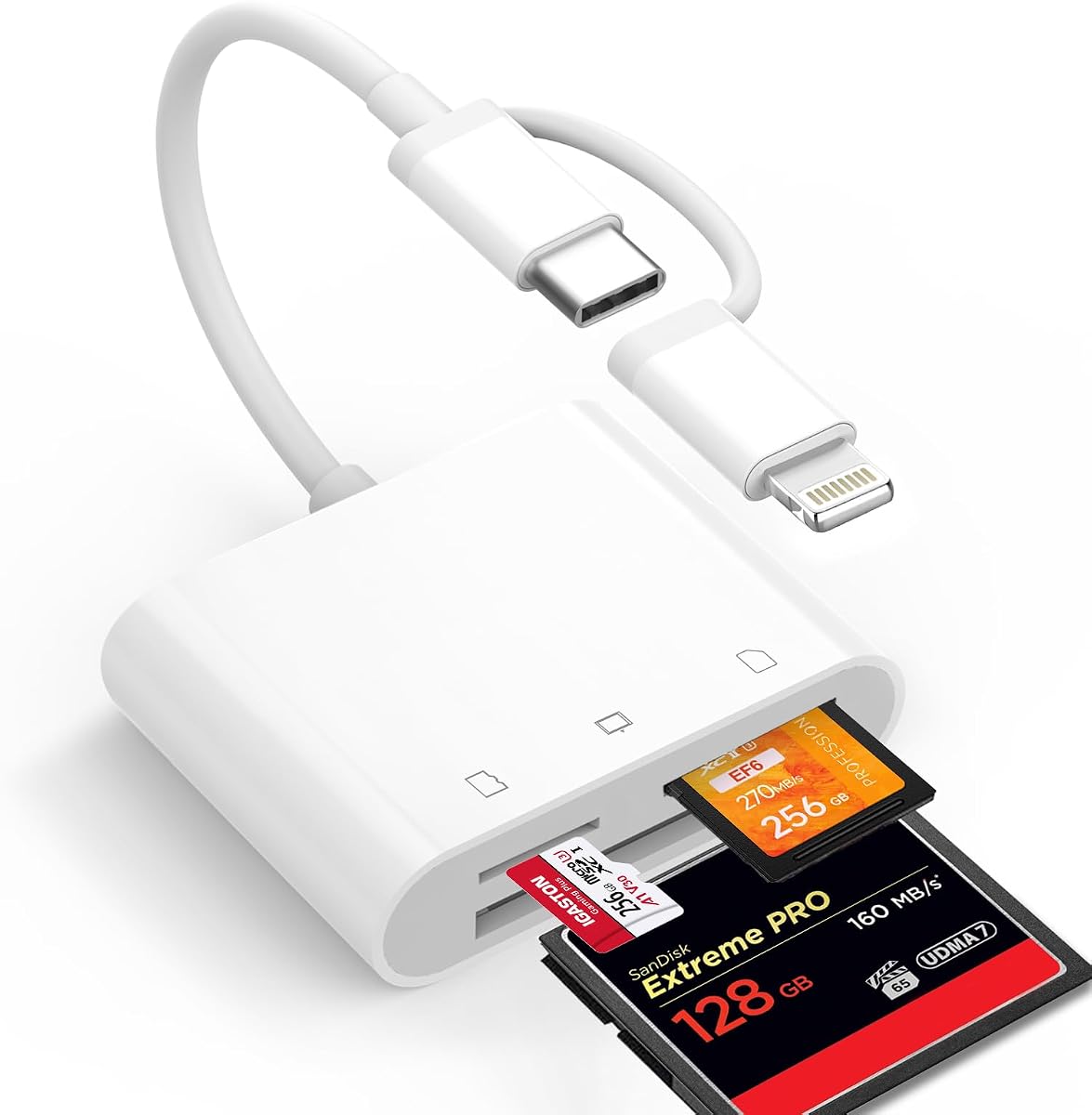
The BENFEI 4in1 Reader delivers exceptional value by supporting four card types simultaneously at a budget-friendly price. Rated 4.5 stars, it features a dual USB-C and USB 3.0 design that works seamlessly with modern laptops and devices. This flexibility makes it a standout choice for users needing versatile connectivity.
We may earn a commission when you buy through this link, at no additional cost to you.
Its integrated design allows reading SD, Micro SD, MS, and CF cards at once, eliminating constant plugging and unplugging. The advanced IC chip ensures stable data transfer for HD movies and large files. Compatibility extends to iPhone 15 series and recent MacBooks, covering most consumer needs.
Limitations include incompatibility with certain Memory Stick formats and dependence on card speed for actual transfer rates. Despite this, the speed and versatility offer great return on investment. The 18-month warranty adds security against defects or failures.
This reader is ideal for casual users or students who need a cost-effective multi-card solution without sacrificing essential features. It balances affordability with strong performance for everyday file management tasks.
Features both USB-C and USB 3.0 connectors, allowing seamless use with newer USB-C devices and traditional USB-A ports.
Reads four card types simultaneously, saving time and effort when transferring files from multiple camera memory cards at once.
We may earn a commission when you buy through this link, at no additional cost to you.
The UGREEN SD Card Reader USB 3.0 offers premium performance with 5Gbps speeds and support for up to 2TB memory cards. With a 4.6 rating, it excels in simultaneous multi-card reading and broad format support including SD, CF, and MS. Its compact build makes it easy to carry alongside professional gear.
We may earn a commission when you buy through this link, at no additional cost to you.
Designed for efficiency, it reads four cards at once without requiring constant swapping. The plug-and-play functionality works across Windows, Mac, and Linux systems effortlessly. The 1.7ft cable provides enough reach to position the device conveniently near your computer or laptop.
While the cable length is fixed, it remains manageable for most setups. The lack of native USB-C means adapters may be needed for newer devices. However, the speed and reliability justify the investment for power users managing large media libraries.
This reader is best suited for professionals needing high throughput and large storage support. It combines speed, capacity, and convenience to streamline data offloading workflows effectively.
Supports cards up to 2TB capacity, allowing future-proof storage management for high-resolution video and large photo archives.
Reads four memory cards simultaneously, eliminating downtime and enhancing workflow speed for content creators handling multiple sources.
We may earn a commission when you buy through this link, at no additional cost to you.
This 6-in-1 Reader is designed for maximum versatility, supporting CFast, CompactFlash, SD, MicroSD, MS, and XD cards simultaneously. Rated 4.3 stars, it features a premium aluminum chassis that dissipates heat efficiently. The dual USB-C and USB-A connectors ensure it works with almost any device.
We may earn a commission when you buy through this link, at no additional cost to you.
Read speeds reach up to 5Gbps, making it suitable for high-resolution video offloading. The aluminum alloy build offers superior durability compared to plastic alternatives. Its comprehensive slot coverage makes it a one-stop solution for photographers using various legacy and modern equipment.
The device may feel bulkier than minimalist options, and the price reflects its premium build and feature set. However, the convenience of supporting six card types without needing multiple adapters makes it worth the trade-off for multi-camera setups.
This reader is perfect for professionals who use diverse camera formats and need reliable, fast transfers. It combines durability with extensive compatibility to meet demanding workflow requirements.
Supports six card types including CFast 2.0 and XD, ensuring access to both new high-speed and older camera formats.
Built from durable aluminum alloy that resists heat and physical wear, extending the device's lifespan during intensive use.
We may earn a commission when you buy through this link, at no additional cost to you.
The ZIYUETEK CF Card Reader combines speed and protection in a slim aluminum package. Rated 4.5 stars, it reads five cards at once using USB 3.0 for speeds up to 5Gbps. Intelligent features protect against over-current and short circuits, ensuring data and device safety.
We may earn a commission when you buy through this link, at no additional cost to you.
Hot swapping and plug-and-play compatibility with Windows and Mac make setup effortless. The compact size fits easily in pockets or camera bags. The aluminum cover not only looks premium but also helps dissipate heat during long transfers.
Lack of USB-C support limits use with newer devices without adapters. The grey finish might show scratches over time. These are minor issues given the solid build and versatile card support.
Ideal for users needing a protective and compact multi-card reader, this model balances durability and functionality well. It ensures reliable data transfers while safeguarding connected hardware from electrical faults.
Features over-current and short circuit protection to safeguard both the reader and your connected computer during data transfers.
Compact dimensions with a slim aluminum profile make it easy to carry and store in any travel bag or laptop case.
We may earn a commission when you buy through this link, at no additional cost to you.
The UGREEN USB C SD Card Reader provides native connectivity for modern devices. With a 4.5 rating, it supports SD, CF, MS, and TF cards at 5Gbps speeds. It works seamlessly with USB-C devices like iPhone 15, MacBooks, and Android phones, simplifying cable management.
We may earn a commission when you buy through this link, at no additional cost to you.
Simultaneous access to four cards improves workflow efficiency without extra adapters. Plug-and-play functionality requires no drivers on Windows or Mac systems. Its compact design fits easily in phone cases or laptop bags for on-the-go transfers.
The reliance on USB-C means it may not work with older laptops without a hub. However, the performance and port compatibility make it a future-proof option. The streamlined design focuses on essential functions without clutter.
This reader is excellent for users fully invested in USB-C ecosystems who need reliable multi-card support. It ensures fast and simple data offloading across phones, tablets, and laptops.
Designed specifically for USB-C devices, eliminating the need for dongles and ensuring seamless integration with modern MacBooks and phones.
Reads four cards at once, reducing the need to swap cards during offloading sessions and speeding up your editing workflow.
We may earn a commission when you buy through this link, at no additional cost to you.
The SmartQ C368 Reader delivers reliable performance with a clear LED status indicator for visual feedback. Rated 4.6 stars, it supports SD, Micro SD, MS, and CF cards with speeds up to 5Gbps. The blue LED lights up when powered, confirming connection status instantly.
We may earn a commission when you buy through this link, at no additional cost to you.
It reads cards independently, preventing conflicts when accessing multiple formats. The plug-and-play setup works across Windows, Mac, and Linux systems. The included cable organizer helps keep your workspace tidy during use.
It does not support simultaneous multi-card reading, which might slow users juggling multiple cards. The external power dependency is standard for USB readers but requires an available port. These constraints are balanced by its stability and speed.
This reader is ideal for users who prioritize visual confirmation and reliable single-card access. It offers a straightforward and efficient solution for regular file transfers.
Blue LED indicator lights up when powered, providing immediate visual confirmation of successful connection and data transfer status.
Reads cards independently to prevent system conflicts, ensuring stable performance when switching between different card formats.
We may earn a commission when you buy through this link, at no additional cost to you.
This CFast 2.0 Reader is built for professional workflows needing support for high-speed CFast cards. Rated 4.4 stars, it reads five cards simultaneously including SD, XD, and CF. The aluminum housing dissipates heat, ensuring stable performance during large data transfers.
We may earn a commission when you buy through this link, at no additional cost to you.
The dedicated CFast slot provides blazing-fast 5Gbps speeds tailored for professional video and photography work. Compatibility with San Disk, Lexar, and Sony cards ensures wide utility. The dual USB cable connects easily to MacBooks and PCs alike.
Its specialized feature set makes it more expensive than standard readers. The size is larger due to the CFast slot but manageable. For users needing CFast support, the convenience outweighs the added cost.
This reader is perfect for videographers and professionals using CFast cameras. It combines speed, heat management, and multi-card efficiency to streamline demanding workflows.
Includes a dedicated CFast 2.0 slot, delivering specialized high-speed transfers for professional-grade camera cards.
Aluminum chassis effectively dissipates heat during continuous transfers, maintaining speed and device safety during long sessions.
We may earn a commission when you buy through this link, at no additional cost to you.
The Denlane Dual Connector Reader solves mobile access issues with both Lightning and USB-C connectors. Rated 4.3 stars, it supports CF, SD, and MicroSD cards. Apple MiFi certification ensures stable transmission without needing extra apps or network connections.
We may earn a commission when you buy through this link, at no additional cost to you.
It allows bi-directional transfer, letting users move photos from iPhone to card to free up space. The fixed connectors eliminate the risk of losing separate cables. It works with iPhone, iPad, and Android devices seamlessly.
Using both connectors simultaneously isn't possible, requiring users to choose based on device. The short cable limits placement but keeps the design compact. These trade-offs are acceptable for users prioritizing mobile workflow.
This reader is perfect for iPhone and iPad users needing quick access to camera footage. It offers flexible connectivity and reliable performance for mobile creators on the go.
Features both Lightning and USB-C connectors to support older iPhones and newer USB-C devices without needing adapters.
Allows copying photos from phone to memory card, freeing up storage space while keeping backups safely stored.
We may earn a commission when you buy through this link, at no additional cost to you.
The ChiaoPio USB C SD Reader features a built-in USB-C cable that cannot be lost or detached. Rated 4.5 stars, it reads CF, SD, and MicroSD cards. The design avoids blocking other ports, making it ideal for slim laptops and iPads.
We may earn a commission when you buy through this link, at no additional cost to you.
Its plug-and-play functionality requires no drivers on Mac or Windows. The compact form factor fits easily into small spaces. Compatibility extends to iPhone 15 and recent iPad models, covering most Apple users.
Fixed cable length limits positioning flexibility, but this trade-off prevents cable clutter. The device only works with USB-C ports, excluding older Macs. For modern devices, its simplicity is a significant advantage.
This reader is perfect for Apple users needing reliable card access without worrying about lost adapters. It ensures a streamlined and hassle-free transfer experience for daily use.
Built-in USB-C cable ensures you never lose the connector, offering a streamlined experience without loose cables or adapters.
Compact design prevents blocking adjacent ports, ensuring easy access to other USB-C connections while using the reader.
We may earn a commission when you buy through this link, at no additional cost to you.
Selecting the right reader depends on your specific needs regarding speed, compatibility, and workflow requirements.
Look for USB 3.0 or USB 3.1 interfaces to ensure speeds of at least 5Gbps. Faster transfer rates reduce downtime when moving large 4K video files or RAW photo batches.
Prioritize readers with high bandwidth specs like 312MB/s for SD cards to match your camera output and editing demands efficiently.
Verify the reader supports your current card formats such as CF, SD, MicroSD, and legacy options like XD or Memory Stick. Ensure it handles UHS-I or UHS-II if you use high-performance cards.
Check for multi-card support slots if you own multiple camera types. Compatibility ensures you won't need separate adapters for different cards or devices.
Choose between USB-A, USB-C, or dual connectors based on your laptop and phone ports. USB-C is essential for newer Macs and iPhones, while USB-A remains common on desktop PCs.
Dual connector options add versatility but may cost more. Match the connector to your primary devices to avoid needing extra adapters during transfers.
Readers that support simultaneous multi-card access improve workflow speed by allowing bulk transfers. This feature is valuable for users juggling several cards from multiple shoots.
Ensure the device can read multiple cards without conflicts. Simultaneous access saves time and avoids constant unplugging when managing diverse media collections.
Aluminum alloy housings dissipate heat better than plastic, which is critical for prolonged use. Durable materials protect against physical damage during travel or daily handling.
Look for robust construction and certifications that promise long-term reliability. Heat management ensures stable transfer speeds even under heavy workloads.
Most readers work with Windows, Mac, and Linux, but verify drivers or firmware requirements. Plug-and-play compatibility ensures immediate use without complex installations.
Check for OS-specific support for features like bi-directional transfer. Universal compatibility guarantees the device works across all your platforms.
Longer warranties like two years or 18 months signal confidence in product durability. Reliable customer service helps resolve connectivity issues quickly if they arise.
Invest in brands with clear support channels. Good after-sales service ensures your investment remains protected over time.
Compact and lightweight designs are essential for travel. Ensure the reader fits comfortably in camera bags or pockets without adding bulk.
Check dimensions and cable length for convenient use. Portable readers make it easier to offload footage on location without carrying extra gear.
Connect the reader to your computer or device using the appropriate port. Wait for the operating system to recognize the device automatically, which usually takes a few seconds.
Insert your memory card into the correct slot and ensure it clicks into place. Use your file explorer to access and transfer files between the card and your storage.
Eject the reader safely before unplugging to prevent data corruption. Store the reader in a dry, cool place and clean contacts periodically with a soft cloth.
Yes, many modern readers are multi-card devices that support both Compact Flash and SD formats. Check the product specs to confirm which slots are included before purchasing to ensure it fits your needs.
USB 3.0 or higher with at least 5Gbps speed is recommended. Faster interfaces significantly reduce wait times when moving 4K or 8K video footage from memory cards to your computer.
Most readers are plug-and-play devices that do not require drivers on Windows or Mac systems. They are recognized automatically by the operating system upon connection for immediate use.
Yes, multi-card readers support simultaneous access to different card types. This allows you to read multiple cards at once without swapping them in and out of the reader constantly.
No, CFast cards require a dedicated CFast slot. Standard CF readers do not support CFast formats, so verify the product includes a CFast 2.0 slot if you need it.
Always eject the reader safely through your operating system before unplugging it. Sudden disconnection can lead to data loss or file system errors on your memory card.
Only readers with USB-C or Lightning connectors work with iPhones and iPads. Ensure the model matches your device's port requirements for successful photo or file transfers.
Readers with aluminum alloy casings dissipate heat better than plastic ones. This ensures stable performance during prolonged data offloading without overheating.
These ten options offer reliable solutions for various workflows and budgets. Top picks include the Lexar for speed, BENFEI for budget, and UGREEN for premium performance.
Prioritize speed and compatibility based on your specific camera cards and devices. Ensure the reader supports simultaneous multi-card access if you need workflow efficiency.
Check current prices and availability before purchasing since deals change often. Selecting the right reader ensures smooth data transfers and maximizes your editing productivity.