
Dell 24 Monitor SE2426H
4.7Editor score
144Hz refresh rate
IPS technology panel
TUV eye comfort
Finding a monitor that performs well in bright sunlight is crucial for outdoor professionals and gamers. High brightness and anti-glare coatings ensure visibility without strain.
We evaluated ten top models based on brightness, resolution, color accuracy, and portability. Our analysis focuses on real-world performance in challenging lighting conditions.
Each pick highlights key strengths and trade-offs for different needs. Prices and availability change frequently, so verify details before purchasing your ideal display.
4.7Editor score
4.8Editor score

4.2Editor score
As an Amazon Associate we earn from qualifying purchases.
This comparison table presents the essential specifications for all ten monitors reviewed in this guide, helping you choose the right model for your needs.





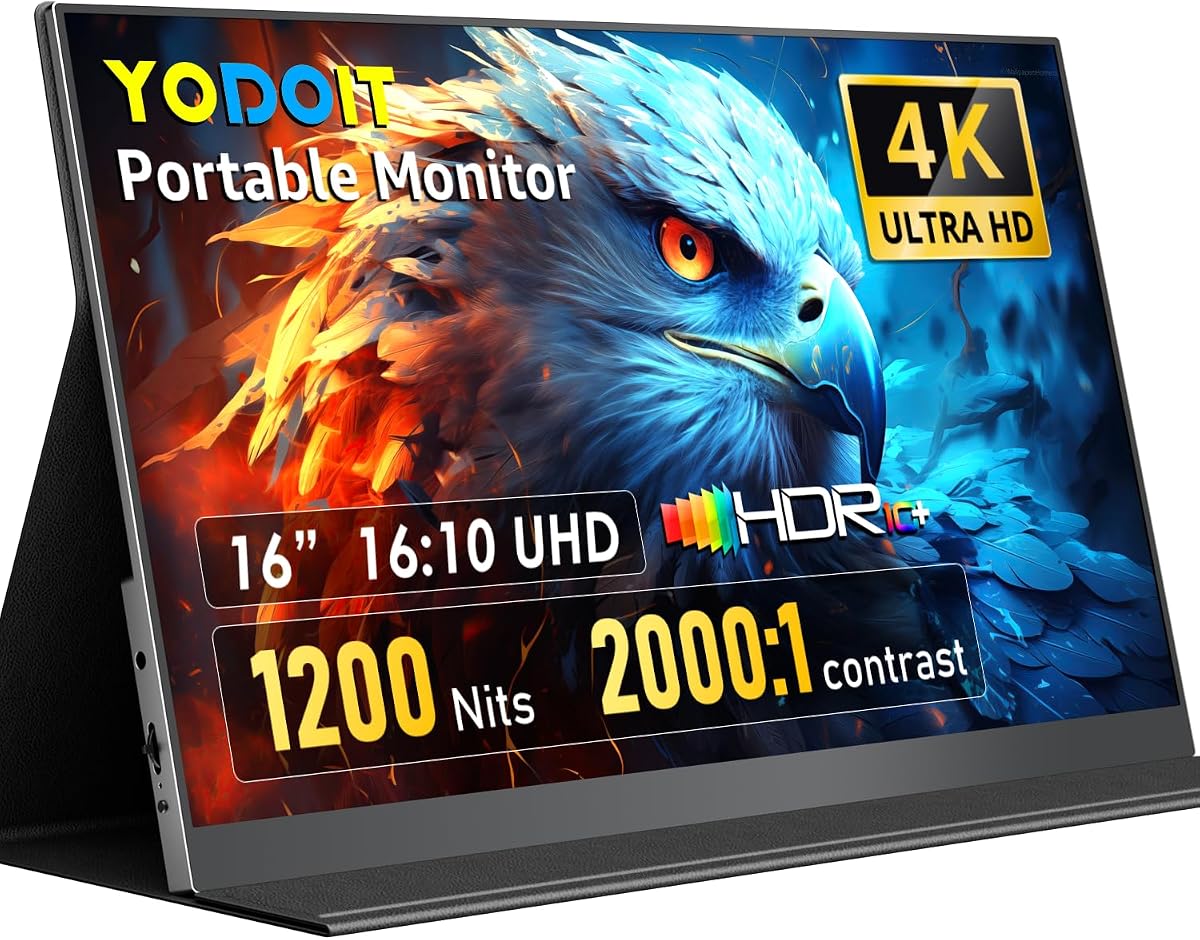
The Yodoit 4K Portable Monitor stands out as the top choice for professionals needing reliable outdoor performance. With a peak brightness of 1200 nits, it remains visible even in direct sunlight.
We may earn a commission when you buy through this link, at no additional cost to you.
Its 16-inch 4K display delivers exceptional clarity for photo editing and design work. The 145% sRGB color gamut ensures accurate colors, while the matte anti-glare coating minimizes reflections.
While it requires an external power adapter for peak performance, the trade-off is worth the enhanced visibility and color fidelity. Its compact size makes it ideal for travel.
Ideal for photographers and field workers, this monitor offers a blend of portability and performance that few competitors match. We highly recommend it for outdoor tasks.
The 1200nit brightness ensures clear viewing outdoors without eye strain or squinting.
145% sRGB coverage provides precise colors for photo editing and creative work.
We may earn a commission when you buy through this link, at no additional cost to you.
The Dell 24 Monitor SE2426H offers excellent value for users seeking a reliable display without breaking the bank. Its 144Hz refresh rate delivers smooth motion for gaming and general use.
We may earn a commission when you buy through this link, at no additional cost to you.
IPS technology ensures consistent colors across wide viewing angles. TÜV Rheinland certification reduces harmful blue light, making it suitable for extended viewing sessions.
Though its brightness is standard at 250 nits, it performs well indoors. The lack of height adjustment is a minor drawback given the competitive price.
For budget-conscious buyers needing fluid visuals, this monitor is a strong contender. It balances performance and cost effectively for everyday tasks.
144Hz refresh and 1ms response minimize blur for fluid gaming experiences.
TÜV certified low blue light helps reduce strain during long work hours.
We may earn a commission when you buy through this link, at no additional cost to you.
The Newsoul 4K Portable Monitor brings premium features to the travel display market. With 1200 nits of peak brightness, it rivals desktop monitors in bright environments.
We may earn a commission when you buy through this link, at no additional cost to you.
Its 4K resolution and 145% sRGB coverage make it ideal for detailed creative work. The aluminum alloy shell ensures durability while keeping the unit lightweight.
Although it demands an external power source for full brightness, the visual quality is exceptional. The protective case adds convenience for travelers.
Best for professionals needing top-tier portable performance, this monitor justifies its cost with robust build quality and stunning visuals.
Aluminum alloy shell offers superior heat dissipation and durability over plastic.
4K resolution and high contrast deliver sharp, detailed images anywhere.
We may earn a commission when you buy through this link, at no additional cost to you.
The Dell 27 Monitor S2725QS provides a spacious workspace with crisp 4K visuals. Its 120Hz refresh rate ensures smooth operation for both work and entertainment.
We may earn a commission when you buy through this link, at no additional cost to you.
ComfortView Plus reduces blue light without compromising color accuracy. The integrated speakers deliver surprisingly detailed audio for a monitor.
While brightness is standard, the HDR readiness adds depth to supported content. The design features ultra-thin bezels for a sleek look.
Ideal for users wanting a larger screen, this monitor balances features and design. It is perfect for home offices or media centers.
27-inch 4K resolution offers ample space for multitasking and creative work.
Re-engineered sound system provides deeper frequency response than competitors.
We may earn a commission when you buy through this link, at no additional cost to you.
The Dell 24 Plus Monitor S2425HSM excels with its full ergonomic adjustability. Height, tilt, pivot, and swivel features allow for a customized viewing experience.
We may earn a commission when you buy through this link, at no additional cost to you.
Integrated dual speakers provide sound without extra peripherals. TÜV certification ensures eye comfort during prolonged use.
While it lacks 4K resolution, the FHD display is clear and vibrant. The stand versatility is a major plus for ergonomics.
Perfect for office workers needing flexibility, this monitor supports healthy viewing habits. Its design complements any modern desk setup.
Height and pivot adjustments help reduce strain and improve posture.
Integrated speakers offer a convenient alternative to external sound systems.
We may earn a commission when you buy through this link, at no additional cost to you.
The LG 24U411A-B delivers smooth visuals with a 120Hz refresh rate. Its IPS panel provides wide viewing angles and consistent color accuracy.
We may earn a commission when you buy through this link, at no additional cost to you.
Reader Mode lowers blue light for comfortable reading. Dynamic Action Sync minimizes input lag for responsive gaming.
The slim bezels create an immersive viewing experience. While it lacks USB-C, its HDMI options suit most setups.
A solid choice for gaming and productivity, this monitor offers strong performance. It is an excellent entry point for high refresh rates.
Dynamic Action Sync and low motion blur ensure fast reactions.
Reader Mode and flicker safe features reduce eye strain effectively.
We may earn a commission when you buy through this link, at no additional cost to you.
The Acer 27in FHD SB273 G0bi offers a large screen for multitasking at a great price. Its zero-frame design maximizes visible area.
We may earn a commission when you buy through this link, at no additional cost to you.
With a 120Hz refresh rate, it handles motion smoothly. Adaptive-Sync support reduces tearing for gaming.
While FHD at 27 inches results in lower pixel density, it remains sharp for office use. The stand is basic but functional.
Best for budget offices needing space, this monitor prioritizes utility. It is a practical choice for general productivity tasks.
Zero-frame bezels provide edge-to-edge viewing and immersion.
1ms response time and 120Hz ensure fluid transitions and no blur.
We may earn a commission when you buy through this link, at no additional cost to you.
The LG 32 inch QHD monitor provides a spacious workspace with accurate colors for creators. USB-C connectivity simplifies desk setups.
We may earn a commission when you buy through this link, at no additional cost to you.
HDR10 enhances contrast, making media consumption more vivid. 99% sRGB coverage ensures true-to-life color reproduction.
Its larger size is great for detailed work, though tilt-only adjustability may limit flexibility. The reading mode aids comfort.
Top choice for designers needing color precision, this monitor excels in quality. It is perfect for content creation and entertainment.
99% sRGB ensures accurate representation of colors for design projects.
USB-C port handles video and power, reducing cable clutter.
We may earn a commission when you buy through this link, at no additional cost to you.
The Dell 27 Plus QHD S2725DSM is a gaming-focused display with crisp visuals. Its 144Hz refresh rate ensures smooth gameplay.
We may earn a commission when you buy through this link, at no additional cost to you.
Integrated speakers and TÜV certification add convenience and comfort. Full adjustability supports ergonomic setups for long sessions.
QHD offers a balance between performance and image quality. While bright enough for indoor use, it competes well with others.
Best for gamers needing quality, this monitor blends features seamlessly. It is a solid investment for competitive and casual gaming.
144Hz and 1ms response deliver tear-free, fluid visuals.
Integrated speakers provide immersive sound without external peripherals.
We may earn a commission when you buy through this link, at no additional cost to you.
The Acer 23.8in FHD KB242Y G0bi is a compact monitor ideal for small spaces. Its 120Hz refresh rate ensures smooth motion for productivity.
We may earn a commission when you buy through this link, at no additional cost to you.
Zero-frame design maximizes screen real estate. The 1ms response time helps with fast tasks.
While brightness is standard, its IPS panel provides wide angles. The design is modern and minimalist.
Perfect for tight desks, this monitor offers strong performance. It is a practical option for general home office use.
Fits easily on small desks while maintaining full functionality.
IPS technology ensures consistent colors from any viewing angle.
We may earn a commission when you buy through this link, at no additional cost to you.
Selecting the right monitor for bright environments requires attention to brightness, color accuracy, and panel technology. This guide covers essential factors.
Brightness measured in nits determines visibility in light. For sunlight readability, look for 1000 nits or more.
Higher nits mean better outdoor performance.
IPS panels offer wide viewing angles and consistent colors. They are ideal for collaborative work.
IPS provides reliable color and angle stability.
Color gamut coverage like sRGB ensures vibrant hues. Look for 145% sRGB for professional tasks.
High sRGB guarantees accurate visual output.
USB-C simplifies power and video transmission. HDMI supports consoles and older devices.
Versatile ports suit diverse setups.
Weight and thickness affect travel convenience. Aluminum bodies offer durability.
Lightweight designs ease transport.
Higher refresh rates ensure smooth motion. 120Hz or 144Hz is ideal.
Fast refresh minimizes motion blur.
Ergonomic adjustments improve posture. Height, tilt, and pivot help.
Adjustable stands enhance comfort.
Anti-glare coatings reduce reflections. TÜV certifications protect eyes.
Coatings and certifications aid vision.
Always use an external power adapter for peak brightness. This ensures consistent performance outdoors.
Clean the screen with a microfiber cloth. Avoid harsh chemicals that damage coatings.
Store portable monitors in protective cases. This prevents scratches during travel.
For direct sunlight, aim for 1000 nits or higher. Many standard monitors struggle outdoors at 250 nits. High brightness ensures visibility.
Many models feature aluminum shells and reinforced hinges. Check product specs for ruggedness ratings to ensure durability in field conditions.
Use a USB-C cable if your phone supports video output. Some models require a power adapter alongside the video connection.
Yes, they work indoors too. High brightness helps in bright office spaces but can be dimmed or adjusted via settings.
Most modern laptops handle 4K or FHD well. Ensure your device supports the required resolution and refresh rate.
Typical lifespan exceeds 50,000 hours. Proper care and avoiding extreme temperatures help longevity.
Most manufacturers offer 2 to 3-year warranties. Check specific terms for accidental damage coverage.
Yes, many models feature TÜV certifications and low blue light modes. These reduce eye strain effectively.
Our top picks include the Yodoit 4K for professionals and the Dell 24 for budget buyers. Each offers distinct advantages based on your needs.
Prioritize brightness and color accuracy if you work outdoors. Portability matters if you travel frequently with your equipment.
Prices change often on online stores. Always verify current details and availability before finalizing your purchase.