
QNAP TL-D1600S
4.5Editor score
SATA 6Gbps JBOD Support
Includes PCIe SATA Card
4 SFF-8088 Ports
16 Bay Mixed Drive Support
Selecting the right 16 bay NAS enclosure is critical for organizations needing massive storage scalability. These systems support high drive densities while maintaining thermal stability and robust networking options for demanding workloads.
We evaluated ten leading models based on processor power, memory expandability, and interface versatility. Our analysis focuses on how each unit handles intensive file access and virtualization tasks without compromising system integrity or uptime.
Each pick highlights key strengths and trade-offs to help you match hardware to your specific storage needs. Please note that product availability and pricing may change frequently, so verify current details before making a purchase decision.
4.5Editor score
4.3Editor score

4.0Editor score
As an Amazon Associate we earn from qualifying purchases.
The following table provides a side-by-side look at key specifications for each enclosure. This comparison helps you quickly identify which model aligns with your performance and connectivity requirements.


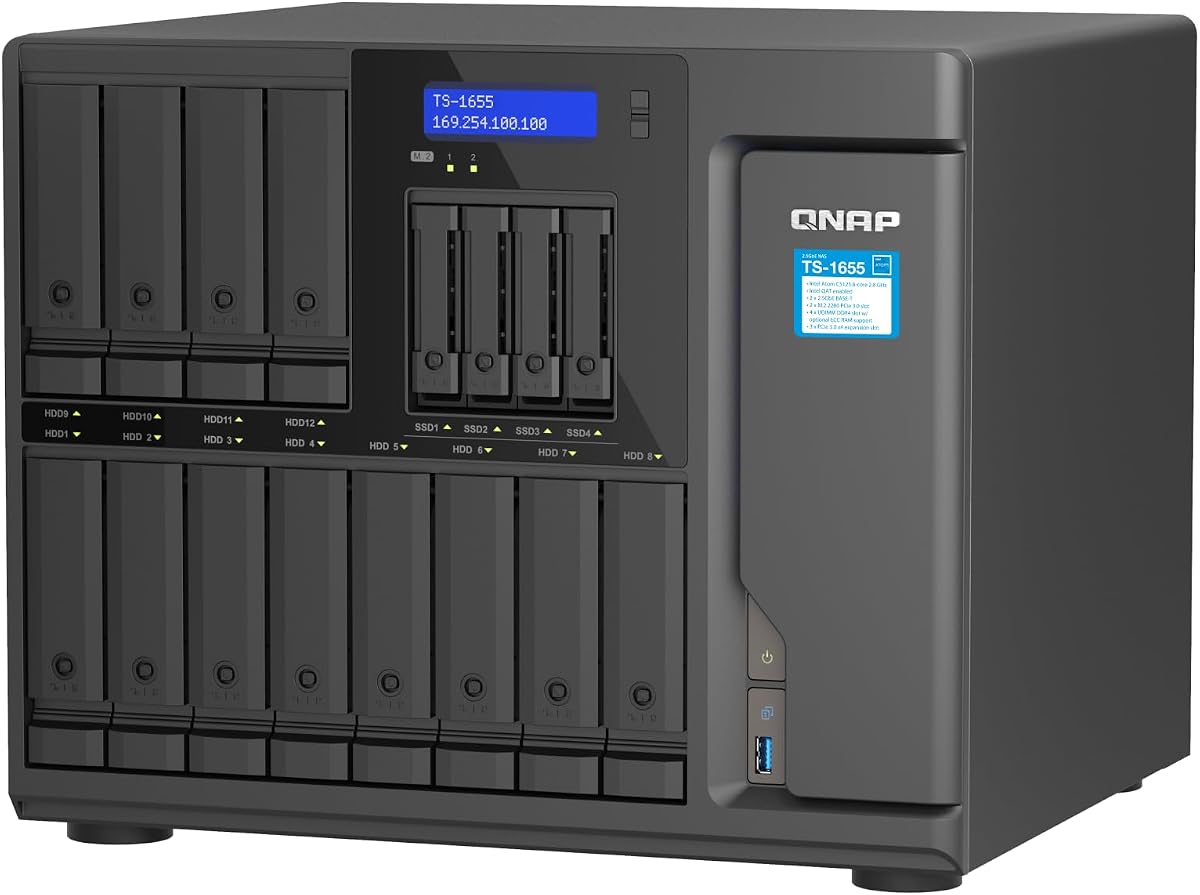
The QNAP TS-1655-8G-US stands out as a highly capable hybrid NAS unit. It holds a 4.3 rating from users who value its balance of performance and scalability. This model is designed for users needing a blend of traditional HDD storage and fast NVMe caching.
We may earn a commission when you buy through this link, at no additional cost to you.
Its Intel Atom C-5125 processor supports burst speeds up to 2.8GHz. The system ships with 8GB RAM but can be upgraded to 128GB with ECC support. Dual M.2 NVMe PCIe Gen 3 slots allow for significant SSD cache acceleration. This setup is excellent for virtualization and multimedia workflows.
The dual 2.5GbE RJ45 ports provide solid networking speed. This helps accelerate file access and large backup tasks. While the CPU is not the most powerful available, the upgrade potential makes up for it. Some users may need to purchase licenses for advanced features.
This unit is ideal for small businesses and prosumers needing reliable storage. It handles intensive file access without breaking a sweat. If you prioritize flexibility and future-proofing, this NAS is a strong recommendation. It offers a solid foundation for growth.
This hybrid design allows you to mix 3.5 inch and 2.5 inch drives effectively. You can allocate SSDs for caching while using larger HDDs for bulk storage.
Dual M.2 slots enable SSD cache or storage pools. You can also install a Coral M.2 accelerator for faster image recognition tasks.
We may earn a commission when you buy through this link, at no additional cost to you.
The Synology RS4021xs+ delivers enterprise-grade performance in a compact rack unit. With a 4.0 rating, it is trusted by IT admins for critical services. This unit is built to host compute-intensive services without dropping a beat.
We may earn a commission when you buy through this link, at no additional cost to you.
Its 8-core Intel processor drives impressive performance metrics. Random read IOPS reach nearly 235000 while sequential reads hit 6258 MB per second. Two PCIe expansion slots allow you to add M.2 NVMe cache or high bandwidth network cards. This flexibility is key for growing networks.
Business continuity is ensured with two redundant power supplies. You can support up to 40 drive bays by adding two RX1217 expansion units. The included 5-year warranty provides peace of mind for long-term deployments. While costly, it offers reliable infrastructure for demanding environments.
This rackstation is perfect for organizations needing high availability. It consolidates backup and virtual machines seamlessly. If budget allows, this is a top-tier solution for professional IT needs. It scales well and maintains performance under heavy loads.
The 8-core processor handles multiple services simultaneously. You can run backups and virtualization tasks concurrently without slowdown.
Two expansion ports let you reach 40 total bays. This modularity means you can start small and grow as data needs increase.
We may earn a commission when you buy through this link, at no additional cost to you.
The QNAP TL-D1600S is an excellent high-performance desktop storage enclosure. It has a 4.5 rating for its ease of use and performance. This unit is ideal for expanding existing NAS systems or servers easily.
We may earn a commission when you buy through this link, at no additional cost to you.
It supports high-performance desktop SATA 6Gbps speeds. The enclosure comes with a QXP-1600eS PCIe SATA card. This ensures you can connect via SFF-8088 ports reliably. The layout includes 12 bays for 3.5 inch drives and 4 for 2.5 inch ones.
This is not a standalone NAS but a JBOD expansion box. It needs a host computer or NAS to function. However, the included card saves you from buying extra hardware. It integrates smoothly with QNAP NAS units or Linux servers.
If you need cheap and fast storage expansion, this is it. It works well with Windows and Linux computers. The setup is straightforward and delivers consistent speeds. For budget-conscious users needing capacity, this unit is a solid choice.
Works with QNAP NAS, Windows, and Linux servers. This broad support makes it versatile for different IT setups.
The mix of 3.5 and 2.5 inch bays allows flexible drive planning. You can optimize your physical storage layout for any use case.
We may earn a commission when you buy through this link, at no additional cost to you.
The CENMATE Aluminum 12 Bay enclosure serves as a reliable external storage system. It has a 4.3 rating for its robust build and capacity. This unit supports 2.5 and 3.5 inch HDDs and SSDs effectively.
We may earn a commission when you buy through this link, at no additional cost to you.
Its aluminum-alloy housing and three cooling fans manage heat well. This maximizes data security during transfers. The unit supports up to 240TB total capacity. USB 3.0 ports offer transfer speeds ten times faster than USB 2.0.
A stable DC power adapter ensures steady transmission speeds. Daisy chain expansion allows you to add up to three devices. Total storage can reach 720TB with this setup. Just note that fan noise is around 40-50 decibels.
This device is perfect for personal or enterprise users needing quick access. It works with Windows, Mac OS, and Linux systems. No drivers are needed for plug and play use. If you want a simple DAS solution this is a top pick.
Three internal fans keep drives cool under load. The aluminum construction helps dissipate heat quickly.
An external USB HOST port lets you chain devices. This expands your storage without adding more computers.
We may earn a commission when you buy through this link, at no additional cost to you.
The QNAP TL-R1600PES-RP-US is a 3U short depth rackmount JBOD. It features a 4.0 rating for its practical design. This unit helps expand storage space of a QNAP NAS for petabyte levels.
We may earn a commission when you buy through this link, at no additional cost to you.
It supports 16 3.5 inch SATA 6Gb/s drives. The Mini-SAS HD ports provide fast and reliable connections. Redundant power supplies ensure service continuity even during power fluctuations. The short depth design makes it easy to install in small media cabinets.
This enclosure is ideal for places with a lot of cabling. You save space while gaining massive storage capacity. It flexibly expands existing systems economically. Rail kits are sold separately if you need rack mounting.
If you need to fit storage into tight server rooms, this is the choice. It maintains service continuity with stable power. The standard warranty provides added security for your investment. It is a smart move for space-constrained setups.
Short depth design fits better in tight spaces. This reduces cabling issues in crowded server environments.
Two power supplies ensure the unit stays online. Redundancy helps avoid interruptions during critical operations.
We may earn a commission when you buy through this link, at no additional cost to you.
The Synology DS3622xs+ is a capable diskstation for video management. It holds a 3.9 rating from professionals. This unit consolidates backup and virtual machines effectively.
We may earn a commission when you buy through this link, at no additional cost to you.
Its 6-core Intel Xeon processor delivers over 260000 4K random read IOPS. Sequential read/write performance reaches 4700/2400 MB per second. You can leverage up to 48GB memory for better multitasking. NVMe SSD Cache boosts read and write speeds further.
Network connectivity includes 10/25GbE and Fibre Channel support. You can scale up to 36 drive bays using two DX1222 expansion units. This modular design means you only pay for what you need initially. The 5 year warranty covers your investment.
This DiskStation suits businesses needing powerful management systems. It handles heavy virtualization workloads well. If you need room to grow, this model is very adaptable. It provides the backbone for professional storage networks.
The Xeon processor optimizes random read tasks. This makes it great for video editing workflows.
Using two expansion units allows 36 total bays. You can grow capacity without replacing the main unit.
We may earn a commission when you buy through this link, at no additional cost to you.
The Asustor Lockerstor 10 Gen3 is designed for enterprise workloads. It has a 4.1 rating for its enterprise features. This NAS supports virtualization and 24/7 operation.
We may earn a commission when you buy through this link, at no additional cost to you.
An AMD Ryzen Embedded V3C14 processor powers the system. It supports dual 10GbE and dual 5GbE ports. This bandwidth is huge for multi-user enterprise environments. Four M.2 NVMe SSD slots allow for caching or high-speed storage pools.
Memory is 16GB ECC DDR5 with expansion up to 64GB. This ensures data integrity and stability for mission-critical tasks. USB4 and USB 3.2 Gen2 ports add ultra-fast external connectivity. It is optimized for 4K and 8K media workflows.
This model is ideal for creative studios and IT environments. It handles AI RAG server and containerized apps well. If you need enterprise performance in a compact unit this is a strong option. It is built for heavy continuous use.
Built specifically for virtualization and backup systems. It maintains performance under continuous heavy loads.
Multiple 10GbE ports support link aggregation. This handles high data traffic from multiple users easily.
We may earn a commission when you buy through this link, at no additional cost to you.
The Generic ZhenLoong Full Tower NAS case offers massive capacity. It has a 4.6 rating for its robust chassis. This unit supports up to 15 hot swap hard drives.
We may earn a commission when you buy through this link, at no additional cost to you.
Its size is 585mm x 448mm x 198mm. The material is 1.0mm SGCC for durability. It supports EEB EATX ATX MATX and ITX motherboards. You can use standard ATX or redundant power supplies.
The backplane provides 15 SATA3 connections. Eight PCI Full-Height expansion slots allow for GPUs and cards. This makes it a great workstation chassis as well. Just note the shipping cycle is approximately 30 to 40 days.
If you want to build your own server this is perfect. The net weight is 16kg but feels very solid. It supports both 3.5 and 2.5 inch drives. For DIY enthusiasts needing 15 bays this is the top choice.
Supports a wide range of motherboards and PSUs. You have full control over the internal hardware configuration.
The 15 bay hot swap capability is rare for DIY cases. You can swap drives without powering down the system.
We may earn a commission when you buy through this link, at no additional cost to you.
The Synology DX1222 is a streamlined disk expansion unit. It has a 4.7 rating for user satisfaction. This unit is designed for selected Synology diskstation units.
We may earn a commission when you buy through this link, at no additional cost to you.
You can configure new storage in minutes using Synology DSM. The unified tools make expansion incredibly easy. There is no need for complex command lines or setups. The process is intuitive and fast.
This enclosure comes with a 5 year warranty. It ensures your expansion unit is protected for years. While it depends on a main NAS, it grows well with the ecosystem. It is a reliable partner for your Synology storage.
If you already use Synology this expansion is natural. It adds capacity quickly and cleanly. For those who value simplicity, this is the top pick. It integrates seamlessly with your existing setup.
Synology DSM allows you to configure in minutes. The unified tools handle the technical details automatically.
It works with selected Synology diskstation units. This integration ensures smooth operation and management.
We may earn a commission when you buy through this link, at no additional cost to you.
The QNAP TS-1655-8G-US delivers high performance and capacity. It has a 4.3 rating for reliability. This hybrid NAS is built for long-term availability.
We may earn a commission when you buy through this link, at no additional cost to you.
Its Intel Atom 8-core processor bursts up to 2.8GHz. The system supports up to 128GB RAM with ECC. Dual 2.5GbE RJ45 ports accelerate file access. It also has M.2 NVMe slots for SSD caching.
This setup is excellent for virtualization and backup. You can use SSD cache acceleration for speed. The unit supports up to 128GB RAM with ECC. It handles backup restoration tasks well.
For small businesses needing robust capacity this is great. It offers stable performance over long periods. If you value reliability and availability, this is a smart choice. It delivers consistent results for daily tasks.
Upgrading to 128GB ECC RAM ensures stability. This is vital for virtualization and heavy multitasking.
Two 2.5GbE ports boost transfer speeds. This helps accelerate backup and restoration tasks.
We may earn a commission when you buy through this link, at no additional cost to you.
Choosing the right 16 bay enclosure requires evaluating your processing needs and network environment. The following factors will help you identify a system that supports your specific workload efficiently.
A strong processor ensures smooth file access and virtualization. Look for Intel Core or Xeon chips for heavy tasks. AMD Ryzen or Atom options work well for general storage.
Prioritize multi-core CPUs if you run multiple services at once.
More RAM improves caching and application speed. Ensure the unit supports ECC memory for stability. Some systems allow upgrades to 128GB or more.
High memory is essential for virtualization and large databases.
Fast network ports reduce transfer bottlenecks. Look for 2.5GbE or 10GbE Ethernet ports. Link aggregation can double throughput for shared access.
Select networking that matches your local infrastructure.
M.2 slots enable SSD caching for faster read/write. This boosts application performance without new HDDs. Check for PCIe Gen 3 or Gen 4 support.
NVMe caching is critical for media editing workflows.
Dual power supplies keep systems running during outages. This prevents data corruption and downtime. It is vital for mission-critical enterprise deployments.
Always verify if the unit supports hot-swap power.
Check if bays support 3.5 and 2.5 inch drives. Some units are hybrid to maximize your physical layout. Mixed bays allow SSD caching without separate slots.
Ensure the backplane supports your desired drive types.
The OS determines usability and app support. Synology offers intuitive DSM. QNAP provides extensive features like containers. Evaluate your need for virtualization or surveillance tools.
Match the software to your technical skill level.
A longer warranty protects your investment from failures. Look for units with at least a 3 to 5 year coverage. Support responsiveness is also key for enterprise needs.
Check the provider's reputation for customer service.
Always install drives one by one to confirm health before adding another. This helps isolate bad drives and protects your data from corruption.
Maintain a cool and clean environment for your enclosure. Dust filters should be cleaned regularly to prevent overheating.
Schedule automatic backups to ensure data safety. Keep firmware updated to fix vulnerabilities and improve stability.
A NAS is a standalone device with its own operating system and network capabilities. A DAS is a direct-attached storage unit that connects via USB to a host computer. NAS units can be accessed by multiple users over a network.
Many 16 bay models support both drive sizes in mixed configurations. This flexibility allows you to use SSDs for caching and HDDs for bulk storage. Check the product specs to confirm bay compatibility.
SSD caching is highly recommended for virtualization and media workflows. It speeds up read and write operations significantly. Without it, performance relies entirely on slower mechanical drives.
ECC RAM corrects data errors that occur during processing. This ensures data integrity and system stability for critical workloads. It is especially important for virtualization and database storage.
Redundant power supplies provide backup power if the main one fails. This keeps your NAS running during power failures or hardware issues. It ensures service continuity and protects your data.
Modern NAS systems offer guided setup wizards to simplify configuration. You can usually set up storage in minutes using a web interface. Most models are plug and play for basic tasks.
Yes, many systems support expansion units like DX1222 to add more bays. Some models allow up to 40 drive bays total. This scalability ensures you can grow without replacing your main unit.
Synology is often praised for its intuitive DSM interface. QNAP offers powerful features for advanced users. The best choice depends on your technical comfort and needs.
The QNAP TS-1655-8G-US and Synology RS4021xs+ offer top performance for different needs. The QNAP TL-D1600S remains the best value for expanding existing storage systems.
Prioritize processor power and memory upgrade paths when choosing your unit. Networking options like 10GbE should match your local infrastructure to avoid bottlenecks.
Always check current availability and pricing before you finalize your purchase. These factors change quickly and impact your final decision significantly.