
TCL 55" T7 4K QLED Google TV with 144Hz Gaming
4.3Editor score
120Hz Panel Refresh Rate
QLED Quantum Dot Technology
HDMI 2.1 with eARC
Finding the right display for modern gaming requires a television that supports high refresh rates and low input lag. A 120Hz TV ensures smooth motion and responsive gameplay essential for competitive titles and immersive single-player experiences on next generation consoles.
We evaluated ten leading models based on their panel technology, gaming features, and overall picture performance. Our analysis focuses on how well each TV handles fast action, supports variable refresh rates, and delivers vibrant colors for both gaming and streaming content.
Each pick highlights specific strengths like mini LED brightness or OLED contrast to help you decide. While prices fluctuate frequently, these selections represent strong value across different budget ranges for gamers seeking peak visual fidelity and performance today.
4.3Editor score

4.3Editor score
4.5Editor score
As an Amazon Associate we earn from qualifying purchases.
The following table provides a side-by-side overview of all ten models reviewed in this guide. It highlights key specifications such as refresh rate capabilities, panel technology, and smart platform features to help you compare options quickly.


The Samsung M70H Series stands out as a strong contender for next-gen console gaming with its Mini LED technology. It balances brightness and contrast well, delivering sharp visuals in both dark and bright environments.
We may earn a commission when you buy through this link, at no additional cost to you.
Its 120Hz motion support ensures fluid gameplay without noticeable blur, while the Gaming Hub consolidates your favorite titles. The color booster and HDR features enhance scene detail significantly.
While local dimming is good, it may show some blooming around bright objects. However, this is typical for the price point and does not significantly detract from the overall gaming experience.
Gamers seeking high brightness and strong color performance at a reasonable cost should consider this model. It offers a compelling mix of features for both console and PC gaming.
The Gaming Hub serves as a central dashboard for your console games, cloud services, and apps. This reduces the need to switch inputs manually and streamlines your gaming setup.
MOTION XCELERATOR + DLG 120HZ technology optimizes refresh rates for sports and action. It analyzes content to ensure sharpness and fluidity during fast scenes.
We may earn a commission when you buy through this link, at no additional cost to you.
The TCL T7 offers exceptional value for gamers needing a 144Hz panel without breaking the bank. It covers nearly the entire DCI-P3 color space, ensuring vibrant visuals for supported titles.
We may earn a commission when you buy through this link, at no additional cost to you.
Its Google TV platform provides intuitive navigation and a wide range of apps. Motion Rate 480 with MEMC helps reduce blur, making it suitable for fast-paced action games.
While brightness is adequate for controlled rooms, it may struggle in very bright environments. The audio is decent but benefits from a soundbar for full immersion.
If you prioritize high refresh rates and smart functionality over peak brightness, this is an excellent choice. It delivers smooth performance for next-gen consoles at an accessible price.
With a native 144Hz panel, this TV supports high frame rate outputs from modern consoles. This reduces motion blur and input lag significantly compared to standard 60Hz panels.
Google TV aggregates content from various apps and services. Voice control and Chromecast support make it easy to find and stream your preferred media.
We may earn a commission when you buy through this link, at no additional cost to you.
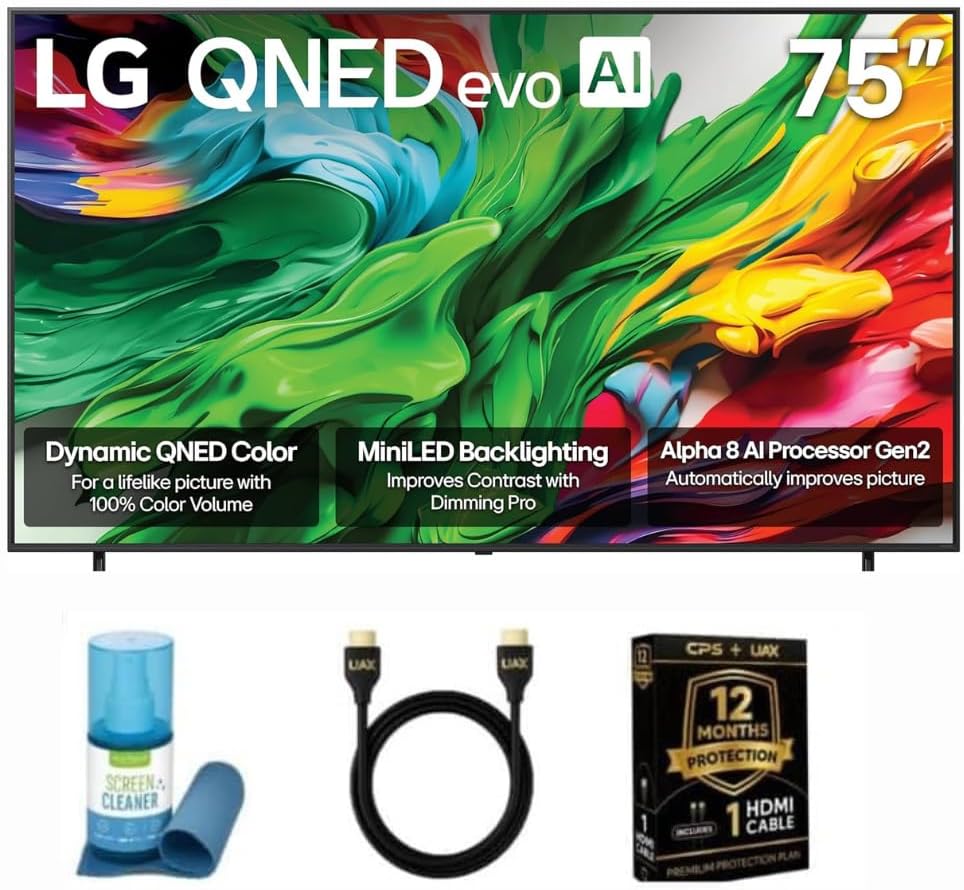
The LG QNED85A series delivers premium performance with MiniLED backlighting and Quantum Dot color. Its α8 AI processor optimizes image quality dynamically, ensuring sharpness and color precision.
We may earn a commission when you buy through this link, at no additional cost to you.
Gamers benefit from Game Optimizer and VRR compatibility for responsive play. The webOS platform offers quick access to major streaming services and voice controls via Alexa or Google Assistant.
While expensive, the picture quality justifies the investment for enthusiasts. The included protection plan adds value for long-term ownership peace of mind.
If you want top-tier picture quality and smart features for your next-gen console, this model is a strong contender. It balances advanced tech with user-friendly interface design.
MiniLED backlighting provides precise local dimming for deep blacks and bright highlights. This enhances contrast significantly compared to standard LED panels.
The α8 AI Processor analyzes scenes to adjust image settings in real time. This ensures optimal clarity and color reproduction across different content types.
We may earn a commission when you buy through this link, at no additional cost to you.
The QM6K Series combines Mini LED and QLED for incredible brightness and color. It excels in well-lit rooms, maintaining clarity and contrast even under direct sunlight.
We may earn a commission when you buy through this link, at no additional cost to you.
Its Halo Control System reduces blooming, keeping dark scenes clean. The 144Hz refresh rate ensures smooth motion for competitive gaming and sports viewing.
The large screen size dominates the room, requiring careful placement. While audio is decent, pairing it with a soundbar improves immersion.
This TV suits gamers who need high brightness and contrast. It delivers premium performance without the cost of flagship models.
Local dimming eliminates haloing and improves shadow detail significantly. Dark scenes look deeper while bright details remain crisp and defined.
Motion Rate 480 and 144Hz refresh rate minimize blur. Fast action remains clear and easy to track during intense gameplay.
We may earn a commission when you buy through this link, at no additional cost to you.
The BRAVIA 3 II LED is tailored for PS5 users with Auto HDR Tone Mapping and Picture Modes. Its XR Processor optimizes scenes for optimal contrast and clarity.
We may earn a commission when you buy through this link, at no additional cost to you.
Anti-glare technology ensures visibility in bright rooms. Motionflow XR keeps fast scenes smooth, ideal for sports and racing games.
While not Mini LED, the contrast is solid. The included movie credits add value to the entertainment experience.
PlayStation owners will find this TV maximizes their console capabilities. The integration of PS5 features makes setup seamless and effective.
Auto HDR Tone Mapping optimizes picture quality for PS5 games automatically. This enhances color and detail without manual tweaking.
Anti-glare screen minimizes reflections from windows and lights. This ensures clear viewing regardless of lighting conditions in the room.
We may earn a commission when you buy through this link, at no additional cost to you.
The Hisense U7 delivers premium gaming with 165Hz native refresh and 3000 nits peak brightness. Hi-QLED ensures vibrant colors and deep blacks via thousands of MiniLEDs.
We may earn a commission when you buy through this link, at no additional cost to you.
Anti-reflection coating keeps images clear in bright rooms. The Hi-View AI Engine Pro adjusts settings instantly for optimal performance.
The price reflects its premium features, making it competitive with higher-end brands. The VRR support prevents tearing and stuttering.
Serious gamers seeking high refresh and brightness will appreciate this model. It balances advanced specs with user-friendly smart features.
Native 165Hz refresh rate supports ultra-smooth gameplay. This eliminates blur and lag in fast-paced action sequences effectively.
Up to 3000 local dimming zones allow precise lighting. Bright areas shine while dark scenes stay deep and detailed.
We may earn a commission when you buy through this link, at no additional cost to you.
The F8D Series offers a 75-inch canvas for immersive viewing. Its 144Hz native rate ensures blur-free motion, supported by Game Accelerator 288 for responsive play.
We may earn a commission when you buy through this link, at no additional cost to you.
Fire TV provides seamless content discovery. Ambient light sensor adjusts brightness to room conditions automatically.
While large, it may dominate smaller rooms. The price makes this size accessible for home theater setups.
If screen size is a priority, this model delivers without sacrificing refresh rate. It is ideal for movie nights and expansive living spaces.
Game Accelerator 288 reduces input lag for responsive gaming. It cuts delays between controller input and on-screen action effectively.
A 75-inch display provides a cinematic experience. It enhances immersion for both gaming and film content.
We may earn a commission when you buy through this link, at no additional cost to you.
The Roku Pro Series brings OLED contrast to a competitive price. True blacks and vibrant colors enhance cinematic and gaming visuals significantly.
We may earn a commission when you buy through this link, at no additional cost to you.
120Hz refresh rate with Freesync Premium supports smooth gameplay. The simplified remote and interface reduce setup complexity.
Brightness is lower than LED panels, limiting use in bright rooms. OLED burn-in is a risk with static HUDs.
This is ideal for controlled lighting environments. It offers OLED benefits without the high cost of premium models.
OLED pixels turn off completely for true blacks. This creates infinite contrast and vibrant color saturation.
Freesync Premium and ALLM reduce tearing and lag. This ensures tear-free gaming and responsive input.
We may earn a commission when you buy through this link, at no additional cost to you.
This model combines QLED color with Mini-LED backlighting for vivid highlights and deep darks. The Roku OS provides intuitive navigation for all content.
We may earn a commission when you buy through this link, at no additional cost to you.
AI Picture Max automatically refines color and sharpness for every scene. 120Hz refresh supports tear-free gaming with Freesync Premium Pro.
The rechargeable remote adds convenience but requires charging. Audio is enhanced by Soundstage speakers but a soundbar helps immersion.
For balanced brightness and color, this TV delivers strong performance. It suits users wanting premium tech in an accessible package.
Mini-LEDs provide deeper darks and sharper detail. They eliminate blooming while maintaining high contrast effectively.
AI cleans up signals and optimizes settings for each show. This ensures consistent color and sharpness.
We may earn a commission when you buy through this link, at no additional cost to you.
The Q7 offers Full Array Local Dimming for deep blacks and HDR Ultra support. Its 120Hz native rate with up to 240Hz VRR ensures responsive gaming.
We may earn a commission when you buy through this link, at no additional cost to you.
Motion Rate 480 reduces blur effectively. Google TV integrates all streaming apps and voice control easily.
Bright rooms may see glare, but contrast is solid for the price. Local dimming zones are fewer but effective.
This is a solid mid-range choice for gamers. It balances performance and cost for everyday streaming and play.
Full Array PRO Local Dimming adapts zones to content. This ensures deep blacks without image blooming.
VRR up to 240Hz provides lag-free gameplay. This ensures responsive play and competitive leaderboard success.
We may earn a commission when you buy through this link, at no additional cost to you.
Choosing the right TV requires balancing refresh rate, resolution, and smart features. This guide outlines key factors to consider for optimal next-gen gaming performance.
A true 120Hz panel refreshes the screen 120 times per second. This ensures smooth motion and minimal blur in fast-paced games like shooters and racers. Look for native 120Hz support rather than interpolated rates that may cause artifacts.
Prioritize TVs with native 120Hz or higher refresh rates for fluid gameplay.
VRR syncs the TV refresh rate with the console output. This prevents screen tearing and stuttering during variable frame rate gaming. Ensure HDMI 2.1 ports support VRR protocols like FreeSync or G-Sync.
Always verify VRR compatibility for seamless gaming without visual glitches.
Input lag measures the delay between controller input and on-screen action. Below 20ms is ideal for competitive play. Game Mode disables extra processing to reduce this lag significantly.
Select models with dedicated Game Modes and verified low input lag specs.
OLED offers perfect blacks and instant pixel response, ideal for dark rooms. LED and Mini-LED provide higher brightness suitable for bright environments. Choose based on your room lighting conditions.
Match panel tech to your lighting: OLED for contrast, LED for brightness.
Google TV, Fire TV, and Roku provide different app ecosystems. Consider which streaming services you use and how intuitive the interface feels. Voice control and casting features add convenience.
Pick a smart platform that matches your app and voice assistant needs.
HDR10+ and Dolby Vision expand color and contrast. High peak brightness ensures HDR content looks impactful. Accurate color gamut coverage ensures realism across games and movies.
Look for Dolby Vision support and high brightness for immersive visuals.
HDMI 2.1 ports are essential for 4K 120Hz connections. Ensure enough ports for console, PC, and soundbar. Check for eARC support for high-quality audio passthrough.
Verify sufficient HDMI 2.1 ports for all your devices.
Larger screens enhance immersion but require adequate space. Consider 55 to 75 inches depending on room size. Distance from the seating affects perceived sharpness and comfort.
Choose size based on room layout and comfortable viewing distance.
Set your console to output 4K 120Hz in the video settings. Enable Game Mode on the TV to minimize input lag and maximize response. Verify that VRR and ALLM are active for optimal synchronization.
Calibrate your picture settings using the TV's built-in tools. Adjust brightness and contrast based on room lighting. Use a dark scene to check black levels and a bright scene for highlights.
Clean the screen with a soft microfiber cloth and avoid harsh chemicals. Ensure proper ventilation to prevent overheating during long gaming sessions. Regularly update firmware to access new features and fixes.
Yes, 120Hz provides smoother motion and responsiveness for supported games. It reduces blur and enhances competitive play. Consoles like PS5 and Xbox Series X support this feature.
Yes, HDMI 2.1 supports the bandwidth needed for 4K 120Hz. Without it, you may be limited to lower resolutions. Check port specs before buying a new console.
VRR synchronizes the TV with the console frame rate to prevent tearing. It ensures smooth visuals even if performance drops. Most modern TVs and consoles support VRR.
Enable Game Mode to disable unnecessary image processing. This reduces delay between controller and screen. Check settings for low input lag performance.
No, a 60Hz TV cannot display 120Hz content. It will downscale to 60Hz, losing smoothness. Ensure your TV supports 120Hz for full next-gen performance.
OLED offers faster response times and better contrast, ideal for dark rooms. LED provides higher brightness for bright spaces. Choose based on your environment and preference.
Google TV, Fire TV, and Roku all support gaming apps. Choose based on available apps and voice assistant integration. All offer intuitive navigation for media.
Higher refresh rates may consume slightly more power. Modern TVs optimize usage during inactivity. Power settings can adjust brightness to save energy.
This guide highlights top models offering 120Hz performance for next-gen gaming. From the Samsung M70H to the LG QNED85A, each model balances features and performance effectively.
Prioritize refresh rate and VRR support for competitive play. Brightness and smart features enhance the overall experience. Select based on room lighting and budget constraints.
Prices and availability change frequently so check current listings before buying. Investing in the right TV ensures you get the most out of your console gaming.