
10Gtek X540
4.1Editor score
Dual RJ45 Ports
Intel X540 Controller
Three Year Warranty
This guide compares the top 10GB Ethernet Card models for speed compatibility and value helping you choose the right 10G network adapter for your PC server NAS
Upgrading your network to 10 gigabits per second transforms how you work and play. A reliable 10GB Ethernet Card delivers the bandwidth needed for 4K streaming massive file transfers and lagfree gaming without bottlenecks.
We evaluated ten top-rated adapters based on chipset performance port configurations and system compatibility. Our analysis covers PCIe cards and USB options to ensure you find a solution that fits your specific hardware and operating system needs.
Each pick highlights unique strengths like auto-negotiation support heatsink design and warranty coverage. Prices fluctuate often so verify the current list before purchasing to ensure you get the best value for your network upgrade project.
4.1Editor score

4.2Editor score

4.6Editor score
The following table provides a side-by-side look at every model we reviewed. It highlights critical specifications like port count chipset type and system support to help you quickly identify the adapter that aligns with your infrastructure requirements.




The TP-Link TX401 stands out as the top choice for most users seeking a reliable 10GB Ethernet Card. With a solid 4.2-star rating it delivers extreme speeds of up to 10 Gbps which is ten times faster than standard Gigabit adapters ensuring smooth data transmissions for both internet access and local file sharing.
We may earn a commission when you buy through this link, at no additional cost to you.
Its versatile compatibility is a major strength as it uses 10GBase-T technology that automatically negotiates between 10 5 2.5 1 and 100 Mbps connections. This means you do not need to buy new network gear immediately just because your router is older. The included free CAT6A Ethernet Cable ensures you get the most out of the card right out of the box.
While the single port limitation might be a drawback for server environments the QoS technology helps prioritize gaming traffic to avoid congestion. You will need to install drivers on Linux but Windows support is comprehensive covering versions from 7 to 10 and various server editions.
This card is ideal for home users and gamers who want a straightforward upgrade without breaking the bank. The 2-year warranty and free 24/7 technical support provide peace of mind. We recommend this for anyone needing a quick plug-and-play style upgrade for their desktop PC.
Unlike many competitors that require you to buy your own cabling this package includes a 1.5 m CAT6A Ethernet Cable rated for up to 10 Gbps so you can start transferring files immediately.
The built-in Quality of Service technology ensures prioritized performance for gamers by avoiding network congestion for PC gaming and critical data streams.
We may earn a commission when you buy through this link, at no additional cost to you.
The VIMIN 10G is a powerhouse for server environments that require redundancy. With a high 4.5-star rating it utilizes the Intel X540-T2 chipset controller to deliver up to 10Gbps of network connection speed on two separate ports. This setup ensures reliable performance and stability ideal for high-speed data transmission requirements in servers.
We may earn a commission when you buy through this link, at no additional cost to you.
Its wide compatibility with operating systems makes it a flexible choice for diverse network setups. It supports Windows Windows server Linux and VMware meeting the network needs in various environments. The flexible PCIe x8 and x16 compatibility allows it to adapt to different specifications of PCIe slots which provides more deployment options for different chassis.
A notable limitation is that it does not support 2.5Gbps and 5Gbps speeds. If your network device is 2.5G or 5G this card will only operate at a speed of 1Gbps. This should be considered if you have a modern switch that supports Multi-Gig speeds. The heat sink design helps maintain optimal temperature levels during heavy usage.
This adapter is best suited for dedicated server builds where port redundancy is key. The choice of standard and slim brackets meets diverse installation requirements. While the speed negotiation limitation exists the raw 10Gbps performance on two ports makes it a strong contender for enterprise or prosumer NAS setups.
Utilizing the Intel X540-T2 chipset controller this Dual Lan 10Gb NIC network card delivers up to 10Gbps of network connection speed and offers reliable performance and stability.
Available with standard and slim brackets suitable for different heights of servers and devices meeting diverse installation requirements for any rack or tower setup.
We may earn a commission when you buy through this link, at no additional cost to you.
The Asus NADACA0140 brings Hyper-fast 10Gbps networking to your desktop. With a 4.1-star rating it delivers up to 10X-faster data-transfer speeds for bandwidth-demanding tasks like large file backups or video editing. It works with current network standards including 10/5/2.5/1Gbps and 100Mbps for seamless backward compatibility.
We may earn a commission when you buy through this link, at no additional cost to you.
Its Windows and Linux support offers flexible OS integration with Windows 10/8.1/8/7 and Linux Kernel 4.4/4.2/3.6/3.2. The RJ45 port easily upgrades your desktop to 10Gbps networking using standard copper network Cables. Prioritize your data with built-in Quality-of-Service (QoS) technology allowing you to prioritize bandwidth and supported data packets for a smooth online experience.
The QoS feature is particularly useful for streamers or gamers who need consistent bandwidth. However the higher price point might be a consideration compared to similar single-port cards. If you are already invested in the Asus ecosystem this card integrates well with their other networking hardware.
This card is perfect for users who value brand reliability and specific OS compatibility. It simplifies the upgrade path by using standard copper cables. We recommend it for those who need a trusted name in networking hardware and want to ensure their desktop keeps up with modern bandwidth demands.
Prioritize your data with built-in Quality-of-Service (QoS) technology allowing you to prioritize bandwidth and supported data packets for a smooth online experience.
RJ45 port easily upgrades your desktop to 10Gbps networking using standard copper network Cables without needing specialized fiber hardware.
We may earn a commission when you buy through this link, at no additional cost to you.
The 10Gtek 10Gb Dual RJ45 Port Network Card offers incredible value for those needing two ports. It is equipped with original Intel X540 controller chip which supports Intelligent Offloads and make the servers more stable. Compatible with Windows Server 2003/ 2008/ 2012 and Linux it meets enterprise server standards at a budget price.
We may earn a commission when you buy through this link, at no additional cost to you.
Dual copper RJ45 ports let you connect to Category-6A and up to 100m for meeting the demands of data center environments. The profile bracket and additional low profile bracket that makes it easy to install the card in a small form factor/low profile computer case/server. It is backed by 10Gtek 30 Days Free-returned 3 Year Free Warranty and Lifetime Technology Support.
While the hardware is robust users should note that this card can be used with Windows 11 but it needs to be manually set up. If you buy it for Windows 11 you should contact support for installation guide before using. It does not support hot swaping which is standard for desktop cards.
This is the best choice for budget-conscious server builders who want Intel quality without the premium price tag. The dual ports allow for failover setups which are critical for business continuity. If you need reliability on a budget this card provides the core features you need.
Equipped with original Intel X540 controller chip which supports Intelligent Offloads and make the servers more stable for professional workloads.
Backed by 10Gtek 30 Days Free-returned 3 Year Free Warranty and Lifetime Technology Support for peace of mind with your purchase.
We may earn a commission when you buy through this link, at no additional cost to you.
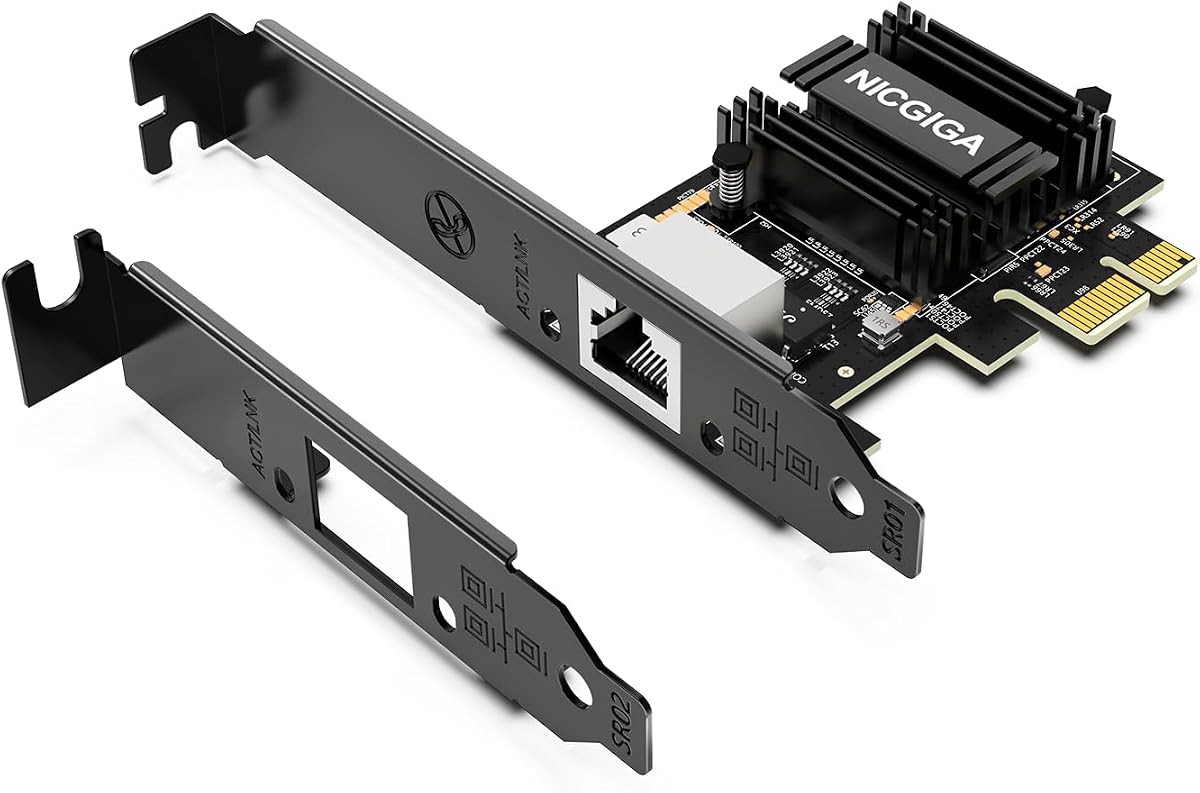
The NICGIGA 10Gb PCIe 4.0 x1 Network Card adopts the latest Realtek RTL8127 controller to deliver blazing-fast speeds up to 10Gbps. This 10Gb PCIe network card delivers extreme stability for local data transmission and internet access effectively preventing packet loss. Perfect for NAS storage home labs gaming and 4K video editing.
We may earn a commission when you buy through this link, at no additional cost to you.
Its PCIe 4.0 x1 for Compact Systems allows it to convert a standard x1 slot into a 10G RJ45 Ethernet port. It universally fits into PCIe x1 x4 x8 and x16 slots without occupying your GPU's lanes making it ideal for Mini PCs ITX builds and compact workstations. Native plug-and-play for modern Linux distributions with Kernel 6.x and above simplifies setup.
The ultra-efficient Realtek RTL8127 chipset means this 10G NIC consumes minimal power and generates significantly less heat than older 10G chips ensuring non-stop stability. It also includes both standard full-height and low-profile brackets to perfectly fit into slim or full-size desktop towers ensuring physical compatibility.
This card is the perfect choice for those with limited space in their case. The broad OS support ensures it will work with your current Windows or Linux version without major hassle. If you have a Mini PC or an ITX build this card gives you full 10G speed without needing a full-width slot.
Features a high-bandwidth PCIe 4.0 x1 interface that easily converts a standard x1 slot into a 10G RJ45 Ethernet port for compact systems.
Seamlessly backward compatible with 10Gbps 5Gbps 2.5Gbps 1Gbps and 100Mbps to negotiate optimal speed with your network gear.
We may earn a commission when you buy through this link, at no additional cost to you.
The VunLink 10GbE RJ45 Ethernet Card is powered by the latest Realtek RTL8127 chipset delivering up to 10Gbps Ethernet connectivity for NAS servers workstations gaming PCs home labs media editing cloud storage and high-speed file transfers. Built for stable low-latency and reliable network performance it handles demanding tasks with ease.
We may earn a commission when you buy through this link, at no additional cost to you.
Its 10G/5G/2.5G Multi-Gig Auto-Negotiation supports various speeds with automatic negotiation for seamless integration with routers switches desktop PCs servers and existing network infrastructure. Designed with a PCIe 4.0 x1 interface it provides full-featured 10GbE networking while maximizing slot efficiency for Mini PCs and ITX builds.
The advanced RTL8127 controller is engineered for lower power consumption and reduced heat output compared with traditional 10GbE solutions. Includes both standard and low-profile brackets for flexible installation in full-height and compact desktop systems. Note that driver installation may be required depending on the operating system version.
This card is ideal for energy-conscious users who still need high speeds. The compatibility with NAS platforms makes it a great choice for home media servers. If you want a low-profile card that doesn't run hot the VunLink is a solid option for compact builds.
The advanced RTL8127 controller is engineered for lower power consumption and reduced heat output compared with traditional 10GbE solutions for cooler runs.
Designed with a PCIe 4.0 x1 interface to provide full-featured 10GbE networking while maximizing slot efficiency on your motherboard.
We may earn a commission when you buy through this link, at no additional cost to you.
The Asus XG-C100F offers Blazing FAST 10 Gbps speeds capable of 10x the speeds of Gigabit Ethernet to complete all your networking and online tasks. Its Fiber optics compatibility allows it to work with the latest fiber optic technology which carries high speed transmissions over a much greater distance than traditional copper cables.
We may earn a commission when you buy through this link, at no additional cost to you.
The SFP+ cage allows for both fiber optic and Direct-Attach copper connections. A stylish and sophisticated aluminum heatsink keeps the XG-C100F cool during high performance tasks ensuring stability. Automatic prioritization is handled by Built-in QoS technology which automatically boosts bandwidth to important streams or games.
Operating Temperature ranges from 0 °C to 40 °C while Storage Temperature ranges from -40 °C to 60 °C making it versatile for different environments. While fiber optics can be pricier this card is essential if you need to run connections over long distances or in noisy electromagnetic environments.
This is the right pick for professionals who need fiber connectivity. The heatsink ensures the card runs cool even under full load. If you have fiber switches in your network this card is one of the few consumer-friendly options that supports SFP+ interfaces reliably.
Compatible with the latest fiber optic technology which carries high speed transmissions over a much greater distance than traditional copper cables.
A stylish and sophisticated aluminum heatsink keeps the XG-C100F cool during high performance tasks to ensure consistent speeds.
We may earn a commission when you buy through this link, at no additional cost to you.
The Synology 2-Port 10GbE RJ-45 PCIe Network Adapter is designed specifically for Synology systems. With the highest rating of 4.6 stars it supports high-performance storage applications with two 10GbE ports. It automatically negotiates between 10 Gbps and 1 Gbps to ensure seamless integration with existing network gear.
We may earn a commission when you buy through this link, at no additional cost to you.
This adapter is purpose-built for use with Synology systems ensuring a plug-and-play experience with DSM 7.1.1 or above. The 5-year warranty provides excellent protection for your investment. For hardware compatibility information you can refer to Synology's official compatibility list to ensure it works with your specific NAS model.
The price is higher than other options but for Synology users the reliability and support are worth the cost. The dual ports allow for link aggregation to increase throughput or redundancy for your storage array. If you use a Synology NAS this is the safest and most reliable upgrade path.
We recommend this premium card to Synology owners who want guaranteed compatibility and maximum uptime. The warranty alone sets it apart from third-party options. If you rely on your NAS for business or critical media storage the premium cost is a justified expense.
Purpose-built for use with Synology systems ensuring a plug-and-play experience with DSM 7.1.1 or above for maximum reliability.
Two 10GbE ports support high-performance storage applications allowing for faster transfers and link aggregation options.
We may earn a commission when you buy through this link, at no additional cost to you.
The TRENDnet TEG-10GECTX is an NDAA and TAA compliant Network Adapter designed for those who need certified hardware. It features 1 x 10Gbps RJ-45 Ethernet port with supported speeds of 10Gbps 5Gbps 2.5Gbps 1Gbps and 100Mbps. This makes it a versatile choice for both standard and multi-gig networks.
We may earn a commission when you buy through this link, at no additional cost to you.
With our NDAA and TAA compliant Network Adapters you can plan and install networking solutions that Government customers demand today. Our team of advisors support and tech experts are English speaking and available for all your needs during normal business hours. The TEG-10GECTX 10 Gigabit PCIe Network Adapter is backed and supported with 3 years of TRENDnet Manufacturer Protection.
The 2.5G BASE-T support allows for flexibility if your cabling is not full CAT6a rated. The network adapter supports most installations and standard and low-profile brackets are included. It converts a PCIe 3.0 x4 slot into a 10G Ethernet Port with high reliability.
This card is best for government or enterprise buyers who need compliant hardware. The strong tech support ensures you will get help if you run into issues. If compliance is a requirement for your organization this adapter meets the necessary standards while delivering solid performance.
With our NDAA and TAA compliant Network Adapters you can plan and install networking solutions that Government customers demand today.
Our team of advisors support and tech experts are English speaking and available for all your needs during normal business hours.
We may earn a commission when you buy through this link, at no additional cost to you.
The Cable Matters USB C to 10Gb Ethernet Adapter offers a non-invasive way to get 10G speeds on a laptop. It supports 10G/5G/2.5G/1G/100M auto-negotiation for broad compatibility. While 10GbE is the theoretical link rate real-world Windows throughput is typically ~7Gbps depending on setup and host controller.
We may earn a commission when you buy through this link, at no additional cost to you.
Compatible with Thunderbolt 3/4/5 and USB4 ports it works great with MacBook iMac and Dell XPS. On Macs macOS may report a 5Gb link rate but typical real-world throughput is ~5Gbps depending on the Mac model and network equipment. Built to last with a rugged aluminum housing plus integrated thermal silicone and a heat sink it helps dissipate heat and withstand daily wear.
Powered by the Realtek RTL8159 USB 10G controller for efficient power use and minimal heat in typical operation. Plug-and-play on the latest macOS and Windows ensures easy setup. The braided USB-C pigtail cable adds strength and flexibility to help prevent fraying and reduce port strain.
This is the best choice for laptop users who cannot open their machine to install a PCIe card. It is silent and low-heat making it great for portable setups. If you need high-speed networking on a MacBook or Windows laptop this adapter is a solid reliable solution.
Upgrade to fast wired networking with this USB C to 10Gb Ethernet adapter without needing to open your laptop to install a card.
Built to last with a rugged aluminum housing plus integrated thermal silicone and a heat sink to help dissipate heat and withstand daily wear.
We may earn a commission when you buy through this link, at no additional cost to you.
Selecting the right 10GB Ethernet Card depends on your hardware setup use case and budget. This guide outlines the key factors to consider before making a purchase.
Decide if you need a single port or dual ports. Dual port cards allow for link aggregation or failover which is critical for servers or NAS systems that need high uptime. Single port cards are sufficient for most desktop gaming or home office needs.
Choose a dual-port card if you run a server or NAS. Single port cards work for standard desktops.
Look for trusted chipsets like Realtek RTL8127 for cost efficiency or Intel X540-T2 for enterprise stability. Realtek chips are generally better for modern multi-gig support and power efficiency while Intel chips offer robust stability for heavy loads.
Prioritize Realtek for efficiency and Intel for raw stability.
Ensure the card supports your OS. Most cards support Windows 10 and 11 but Linux support varies. Some cards work out of the box with newer kernels while others require manual driver installation. Check compatibility lists carefully for Linux users.
Check Linux kernel support if you are not on Windows.
Verify your motherboard slot type. Most cards use PCIe x4 x8 or x16 slots but some compact cards like NICGIGA fit into x1 slots. If you have a Mini PC check if you have a full-height or low-profile bracket included.
Match the card size to your available motherboard slot.
To get 10G speeds you need Cat6a cabling for copper connections. Some cards include the cable while others do not. For fiber connections you will need an SFP+ card and specific optical modules. Ensure your network switch also supports 10G speeds.
Upgrade your cables to Cat6a before installing the card.
Look for warranties ranging from one to five years. Brands like Synology offer longer warranties which indicate confidence in the product. Check if the brand provides free technical support if you run into driver issues.
A longer warranty is a sign of product reliability.
10G cards generate more heat than Gigabit cards. Check for heatsinks or built-in fans. Cards with passive cooling are quieter but must be placed in a case with good airflow. Thermal throttling can reduce speeds if the card overheats.
Ensure your case has enough airflow for passive cooling.
Budget cards can deliver great performance but premium cards offer better warranties. Determine your priorities before spending. If you just need speed a basic card works if you need reliability a premium card is better.
Balance the cost against your need for reliability.
Install the card by turning off your PC and removing the side panel. Locate an available PCIe slot and insert the card firmly. If you have a low-profile bracket replace the standard one to fit your case.
Connect a Cat6a Ethernet cable to the port on the card and to your router or switch. Turn on your PC and check if the OS detects the network connection. Install any necessary drivers if the connection does not work immediately.
Maintain your card by keeping the case dust-free and ensuring proper airflow. Do not remove the card while the PC is on to avoid electrical damage. Check for BIOS updates if you experience connection issues.
Yes for copper connections you should use Cat6a cables to ensure stable 10Gbps speeds. Cat6 cables can work for shorter distances up to 55 meters but Cat6a is rated for full 100 meters. If you use old Cat5e cables you may not achieve 10G speeds.
Your router must support 10Gbps speeds to utilize the full power of the card. If your router is limited to 1Gbps the card will negotiate down to that speed automatically. You can still use the card but you will not see the 10G performance unless your network equipment is upgraded.
Most PCIe cards are not compatible with Macs as they do not have PCIe slots for expansion. However the USB-C to 10Gb Ethernet adapter options work well with MacBooks and iMacs. Always check the product description for macOS compatibility before buying.
Yes a 10GB Ethernet Card can improve gaming by reducing latency and preventing packet loss. QoS features on some cards help prioritize game traffic over other downloads. While gaming usually requires less bandwidth the stability of a 10G connection ensures a smoother experience.
PCIe cards are installed inside the PC and offer better performance stability for desktops. USB adapters plug into an external port and are ideal for laptops. USB adapters are more flexible but may not reach full 10G speeds depending on the USB controller.
Some modern Linux distributions support 10G cards out of the box with recent kernels. However older versions may require manual driver installation from the manufacturer. Check if your distribution has built-in support before purchasing to avoid setup issues.
Our top pick is the TP-Link TX401 for its balance of speed ease of use and included accessories. For those needing dual ports the VIMIN 10G offers great performance. Users with Synology NAS systems should choose the Synology E10G30-T2 for guaranteed compatibility.
Prioritize chipset stability and OS compatibility when making your final decision. Ensure your case has enough airflow and your cables are rated for 10G speeds. A proper setup will ensure you get the most out of your upgrade.
Remember that prices change frequently so check the current listings on Amazon before purchasing. Look for deals that include accessories or extended warranties to get the best value. With the right card your network will be ready for any future demands.