
Calibrite Display 123
4.0Editor score
Easy 1 2 3 workflow
USB C connection standard
Supports up to 2 displays
This guide compares the top 10 colorimeters for monitor calibration to help you choose the right tool for accurate colors in photo and video editing workflows.
Accurate color is essential for professional creators who need their screens to match prints or other devices. A colorimeter for monitor calibration ensures your display shows true tones, preventing costly mistakes in editing and design projects across various industries.
We evaluated ten leading models based on sensor technology, software features, and compatibility with modern displays like OLED and Mini LED. Our analysis covers everything from budget-friendly options to professional-grade tools designed for complex color grading and multi-monitor setups.
Each pick highlights specific strengths for different user needs, whether you are a photographer, video editor, or casual user. Prices and availability can change frequently, so check the latest details before purchasing to ensure you get the best value for your workflow.
4.0Editor score
4.5Editor score

4.0Editor score
This side-by-side comparison highlights the key specifications and capabilities of each colorimeter to help you quickly identify which model fits your specific display technology and workflow requirements.


The Calibrite Display 123 offers a straightforward approach to monitor calibration for users who need reliable accuracy without complexity. With a strong rating, it is designed to make color management accessible to photographers and casual editors alike.
We may earn a commission when you buy through this link, at no additional cost to you.
Its standout feature is the guided 1 2 3 workflow that simplifies the setup process significantly. The USB C connection ensures modern compatibility, while the before and after check allows you to verify improvements immediately after calibration.
While it lacks some advanced controls found in higher-end models, this trade-off keeps the device simple and cost-effective. The compact design makes it easy to store and transport, which is ideal for mobile creators.
This colorimeter is best suited for those who want a reliable tool for daily editing tasks without a steep learning curve. It delivers consistent results that help maintain trust in your visual work across different sessions.
The 1 2 3 software guides you through each step, reducing confusion and ensuring accurate results even for first-time users.
You can calibrate up to two monitors simultaneously, ensuring consistent color across your entire workspace setup.
We may earn a commission when you buy through this link, at no additional cost to you.
Designed for professionals working with high-luminance screens, the Calibrite Display Plus HL handles Mini LED and OLED panels with ease. Its advanced sensor measures up to 10000 nits, making it essential for HDR workflows and critical color grading.
We may earn a commission when you buy through this link, at no additional cost to you.
The included PROFILER software provides deep control over white point, gamma, and contrast ratios. Video standards like Rec.709 and BT.1886 are supported, ensuring your output matches broadcast requirements accurately and reliably.
While it is a significant investment, the precision it offers is unmatched for high-end production environments. The validation tools help you confirm that your calibration holds up over time, reducing the need for frequent recalibration.
This tool is ideal for video editors and colorists who need absolute confidence in their display performance. It bridges the gap between consumer monitors and professional grading suites effectively.
The sensor can measure ultra-bright displays up to 10000 nits, ensuring accurate calibration for the latest HDR monitors.
Features like Profile Validation and Uniformity Check help you trust the accuracy of your calibration results consistently.
We may earn a commission when you buy through this link, at no additional cost to you.
The datacolor Spyder Calibrator strikes an excellent balance between speed and depth, making it a favorite for many creators. Its ability to complete a calibration in about 90 seconds ensures you spend more time editing and less time configuring.
We may earn a commission when you buy through this link, at no additional cost to you.
A unique feature is the DevicePreview, which simulates how your images will appear on other devices right on your screen. This helps you visualize final outputs before exporting, saving valuable time during the editing process.
While the software offers extensive customization for pros, it remains accessible enough for beginners to get started quickly. The ambient light sensor tracks room lighting changes and can adjust your display brightness automatically to maintain consistency.
This model is recommended for those who want a modern tool that keeps up with current display technologies like OLED and mini-LED. It provides a robust foundation for maintaining color accuracy across your entire digital workflow.
See how your photos look on other devices directly from your calibrated screen to prevent unexpected color shifts.
The sensor measures room light to adjust your display brightness, ensuring your view stays accurate even as lighting changes.
We may earn a commission when you buy through this link, at no additional cost to you.
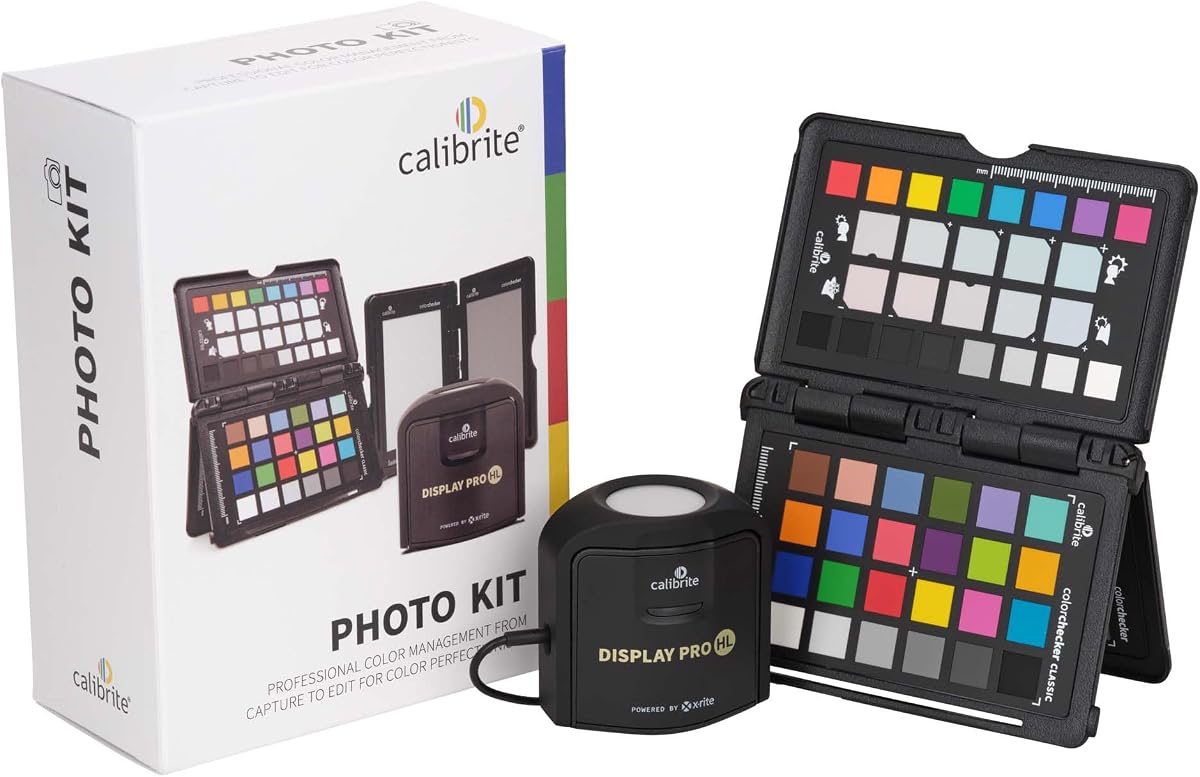
The Calibrite Photo Kit is a comprehensive solution that covers both camera profiling and monitor calibration in one package. It is designed to create a seamless workflow from the moment you capture an image to when you edit it on screen.
We may earn a commission when you buy through this link, at no additional cost to you.
The Display Pro HL component ensures your monitor handles modern panels like OLED and Mini LED with precision. Alongside the ColorChecker Passport Photo 2, you can create custom camera profiles that match your specific gear perfectly.
By combining these tools, you reduce the guesswork in your color management process significantly. The software provides flexible targets so you can start with a neutral baseline and refine creatively without losing consistency across sessions.
This kit is perfect for photographers who want a reliable, all-in-one system to ensure their prints and screens match. It simplifies the complex task of maintaining accurate color across multiple devices effectively.
This kit helps you maintain consistent color from capture to edit, reducing unexpected shifts during post-processing.
The Passport 2 enables custom profiles for RAW files, improving white balance accuracy and exposure reference.
We may earn a commission when you buy through this link, at no additional cost to you.
Designed for hybrid shooters who work with both photos and videos, this kit provides essential tools for consistent color across media types. It includes the Display 123 for screen calibration and the Passport Video 2 for capture control.
We may earn a commission when you buy through this link, at no additional cost to you.
The Passport Video 2 helps set accurate white points and verify exposure on set, which is crucial for filmmakers in changing lighting conditions. This reduces the need for heavy color correction during post-production significantly.
Its easy monitor profiling workflow builds trust in your screen color, ensuring your edits look right when delivered. This combination is particularly useful for content creators who need dependable color management without spending a fortune.
This is a great choice for those entering professional video production or photography who need a reliable starting point. It simplifies the workflow by offering a unified system for capture and display calibration.
The Passport Video 2 ensures consistent white balance and exposure references, making on-set adjustments more reliable.
Calibrate your monitor to ensure the final output matches what you see during the editing process accurately.
We may earn a commission when you buy through this link, at no additional cost to you.
The Calibrite ColorChecker Display Pro is a trusted tool in professional environments requiring consistent color profiling across different display types. It leverages proven technology to deliver high repeatability and accuracy for critical color work.
We may earn a commission when you buy through this link, at no additional cost to you.
One of its key features is the rotatable diffuser arm, which serves multiple purposes such as a stand for projectors or a cover for optics. This versatility makes it a practical choice for varied calibration tasks in the field.
The tripod mount allows for stable projector profiling in larger venues, extending its utility beyond desktop monitors. While it is a classic model, its reliability remains high among users who value precision over modern software interfaces.
This option is recommended for professionals who need a robust tool for consistent results across different setups. Its optical design ensures that you can trust the data it provides for your workflow needs.
The diffuser arm functions as a stand and cover, adding flexibility to your calibration toolkit for different devices.
Integrated tripod mount allows for stable profiling of projectors in larger venues effectively.
We may earn a commission when you buy through this link, at no additional cost to you.
The Datacolor Spyder5PRO is designed for serious photographers and designers who need a reliable tool for color accuracy. It focuses on ensuring your edited images match prints by monitoring room light to set optimal brightness levels.
We may earn a commission when you buy through this link, at no additional cost to you.
The Before and After evaluation feature lets you assess calibration results using your own photographs, making it easy to spot improvements. This practical approach helps you understand the impact of calibration on your actual work rather than abstract metrics.
While it is an older model, it still delivers accurate results for standard displays. The Display Analysis feature allows you to compare multiple monitors quickly, helping you identify inconsistencies between your devices.
This model remains a solid choice for those who prioritize print accuracy and simplicity over cutting-edge display technologies. It helps reduce the waste of ink and paper by getting colors right on the screen first.
The sensor determines optimal brightness to ensure you see fine details in shadows and highlights.
Designed to ensure your screen colors match your prints, reducing costly reprints in professional workflows.
We may earn a commission when you buy through this link, at no additional cost to you.
The ASUS ProArt CaliControl offers a unique 3-in-1 functionality that combines a colorimeter with display OSD control and an ASUS Dial shortcut. It is designed to integrate seamlessly with ASUS ProArt monitors for hardware and software calibration.
We may earn a commission when you buy through this link, at no additional cost to you.
With support for up to 10000 nits, it is capable of handling high HDR brightness levels for precise calibration. The reversible USB-C connection ensures quick setup, making it convenient for users who switch between devices frequently.
While the hardware features are advanced, the software experience may not yet match the maturity of other market leaders. Users should be aware that the calibration workflow depends heavily on the ASUS ecosystem for optimal performance.
This tool is best suited for owners of compatible ASUS monitors who want an integrated solution. It offers potential for tight hardware-software coordination but may require patience as the software evolves.
The colorimeter includes display OSD control, allowing you to adjust monitor settings directly through the calibration software.
Measuring up to 10000 nits ensures you can calibrate high-brightness displays accurately for HDR work.
We may earn a commission when you buy through this link, at no additional cost to you.
The Datacolor Spyder4Pro is a classic entry in the colorimeter market, known for its full-spectrum color sensor and automated calibration process. It features double-shielded filters to improve accuracy and long-term stability compared to earlier models.
We may earn a commission when you buy through this link, at no additional cost to you.
One of its most useful features is the ReCAL tool, which allows for quick recalibration to compensate for changes over time. This ensures that your display settings remain accurate without needing a full recalibration every time.
While it is an older generation device, it still provides solid performance for standard editing tasks. The automated process makes it easy to use, and the single sensor can handle multiple displays effectively.
This model is recommended for budget-conscious users who need a reliable tool for basic color correction. It offers a stable foundation for ensuring color accuracy without the need for complex settings.
The ReCAL tool makes it easy to recalibrate your display quickly to compensate for changes over time.
Double-shielded filters ensure better long-term stability and improved accuracy across multiple units.
We may earn a commission when you buy through this link, at no additional cost to you.
The Datacolor Spyder X Pro is designed to be user-friendly while providing advanced accuracy for photographic images. Its lens-based color engine delivers higher precision, making it suitable for both first-time users and experienced editors.
We may earn a commission when you buy through this link, at no additional cost to you.
Calibration is quick, often taking just a minute or two, and features a wizard workflow with predefined targets for different needs. The SpyderProof function allows you to see before and after differences using your own images for immediate feedback.
Room light monitoring ensures that your brightness adjustments are appropriate for your environment, which helps maintain consistent detail. It supports calibrating multiple laptops and desktop monitors, making it versatile for multi-device setups.
This tool is a strong recommendation for those who want a balance of speed and precision. It is particularly good for users who need reliable results without diving too deep into technical settings.
The groundbreaking lens-based color engine provides higher levels of color accuracy compared to previous models.
See the difference your calibration makes using your own images, ensuring results that matter to your work.
We may earn a commission when you buy through this link, at no additional cost to you.
Choosing the right colorimeter involves considering your display technology, workflow complexity, and budget constraints to find the best fit.
Modern displays like OLED and Mini LED require colorimeters that can measure high brightness levels and specific gamuts. Ensure the device supports these panels to avoid inaccurate results on high-end screens.
Check the product specifications to confirm it works with your specific monitor type before purchasing.
Software varies significantly between brands, with some offering automated wizards for beginners and others providing detailed controls for professionals. Look for features like profile validation and multiple target presets.
Choose software that matches your workflow needs and allows for sufficient customization.
The sensor is the heart of the colorimeter, so its accuracy and repeatability are critical for reliable calibration. High-quality sensors ensure that your results remain consistent over time without drift.
Prioritize devices with proven sensor technology for long-term reliability.
If you work with multiple screens, a colorimeter that supports multi-monitor calibration helps maintain consistency across your workspace. This is essential for editing workflows that span several devices.
Verify that the software supports profiling multiple displays in one session.
USB C connectivity is now standard for modern colorimeters, ensuring compatibility with recent laptops and desktops. A compact and durable build is also important for users who travel or use multiple workstations.
Ensure the physical design fits your usage environment comfortably.
Some colorimeters offer additional tools for camera profiling or video workflows, creating a unified color management system. This integration can save time and reduce errors in complex production pipelines.
Consider if you need extra features beyond basic monitor calibration.
For beginners, guided workflows and clear instructions are vital to achieving good results without frustration. Advanced users may prefer manual controls to fine-tune settings for specific creative needs.
Select a device that aligns with your technical comfort level.
Prices vary widely, from affordable options for casual use to premium tools for professionals. Determine what features are essential for your work to avoid overspending on unnecessary capabilities.
Balance the cost with the specific benefits you need for your projects.
Start by warming up your monitor for at least 30 minutes to ensure stable output before calibration. Connect the colorimeter to your computer and run the software to measure the current display state.
Follow the software prompts to set your target white point and gamma, then let the device run its measurement process. Keep the area quiet and avoid ambient light changes during calibration for best results.
Store the colorimeter in a protective case when not in use to prevent dust or scratches on the lens. Recalibrate your monitor every few months or if you notice color shifts in your daily work.
It is generally recommended to recalibrate your monitor every four to six weeks for professional work. However, if you use your display heavily or notice color inconsistencies, you may need to do it more frequently.
Yes, but you must choose a colorimeter that specifically supports OLED technology. Look for devices with high luminance sensors to handle the unique brightness characteristics of OLED panels accurately.
Yes, ambient light can impact how you perceive brightness on your screen. Many modern colorimeters include sensors that measure room light to help adjust your display settings accordingly.
Software calibration is a great start, but for critical print work, you may also need to account for paper and ink characteristics. Always do a soft proof test to verify how the print will look.
A colorimeter measures color using sensors similar to human eyes, while a spectrophotometer measures the full spectrum of light. Colorimeters are typically faster and cheaper, while spectrophotometers offer higher accuracy for complex tasks.
Most colorimeters are USB-powered and do not have internal batteries, so replacement is not needed. Always check the device manual to confirm how it is powered and maintained.
We have explored ten top options ranging from budget-friendly tools to premium solutions for high-end displays. Each model offers unique strengths tailored to different needs, whether you are editing photos or grading video.
Prioritize features like OLED support or multi-monitor capabilities if your workflow demands them. Ensuring your device matches your specific display technology will save time and improve accuracy significantly.
Always verify the latest pricing and availability before purchasing, as these details can change. Selecting the right colorimeter is an investment in the quality of your visual work.