
Quick Release Desk Mount
4.7Editor score
Quick Release Clamping
All Metal Materials
Ergonomic Design
Compare the top joystick hotas mounts for flight sim gaming including desk and chair options to find the perfect ergonomic setup for your cockpit.
Flight simulation enthusiasts know that immersion starts with how your controls sit. A solid joystick hotas mount transforms a cluttered desk into a professional cockpit. These devices secure your gear firmly, reducing wobble and fatigue during long sessions. Choosing the right one ensures your throttle and stick stay exactly where you need them.
This guide compares ten leading joystick hotas mounts available this month. We evaluated stability, adjustability, compatibility, and ease of installation for each model. Whether you use a Logitech X56 or a Thrustmaster Warthog, our list covers the variety you need. You will see how each mount handles different desk thicknesses and control weights.
Each pick highlights specific strengths and ideal use cases for different simmers. We include detailed reviews, comparison tables, and a buying guide to help you decide. Remember that availability and stock levels change frequently. Always verify the latest details before completing your purchase to ensure the best experience.
4.7Editor score

4.6Editor score

4.4Editor score
The following table provides a side-by-side overview of the top ten joystick hotas mounts. Use this to quickly compare key specifications like compatibility, material, and adjustability ranges before diving into the detailed reviews.


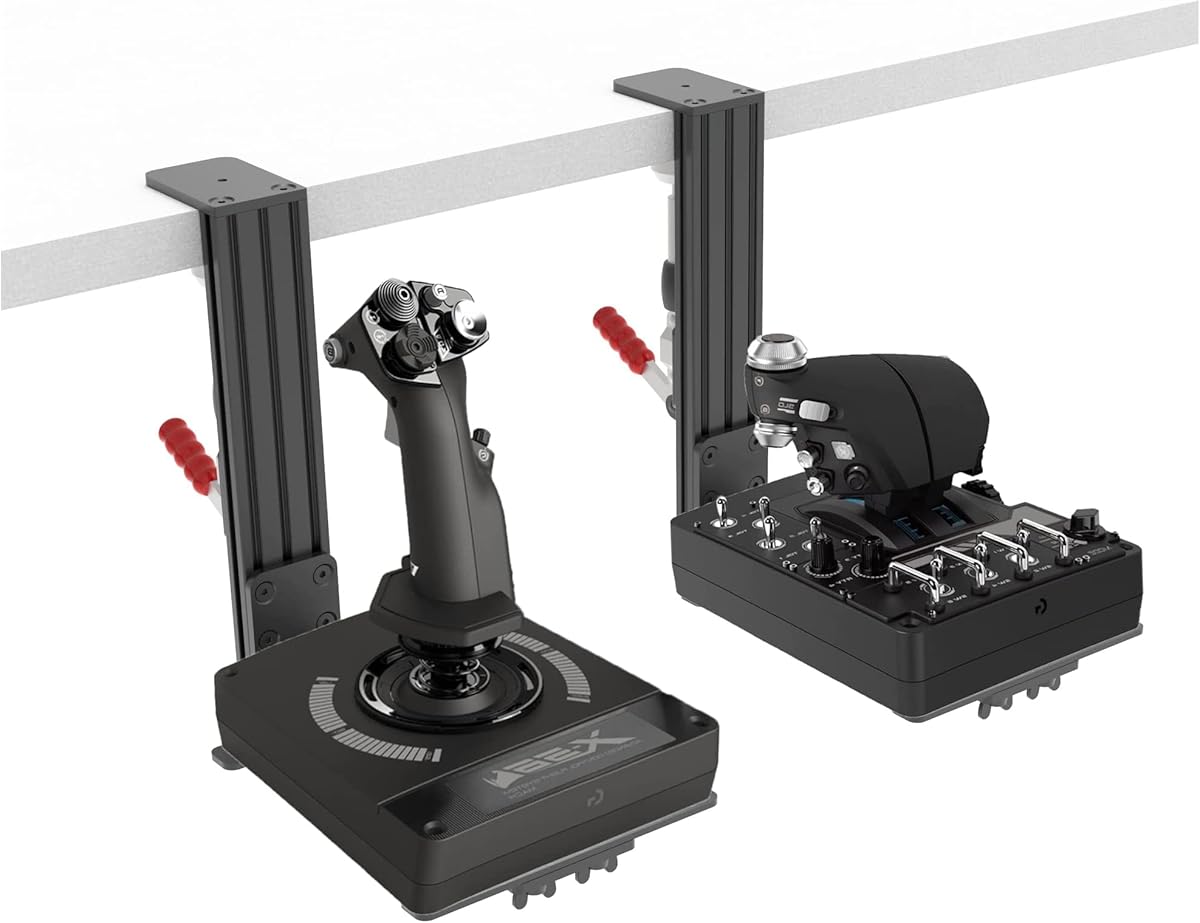
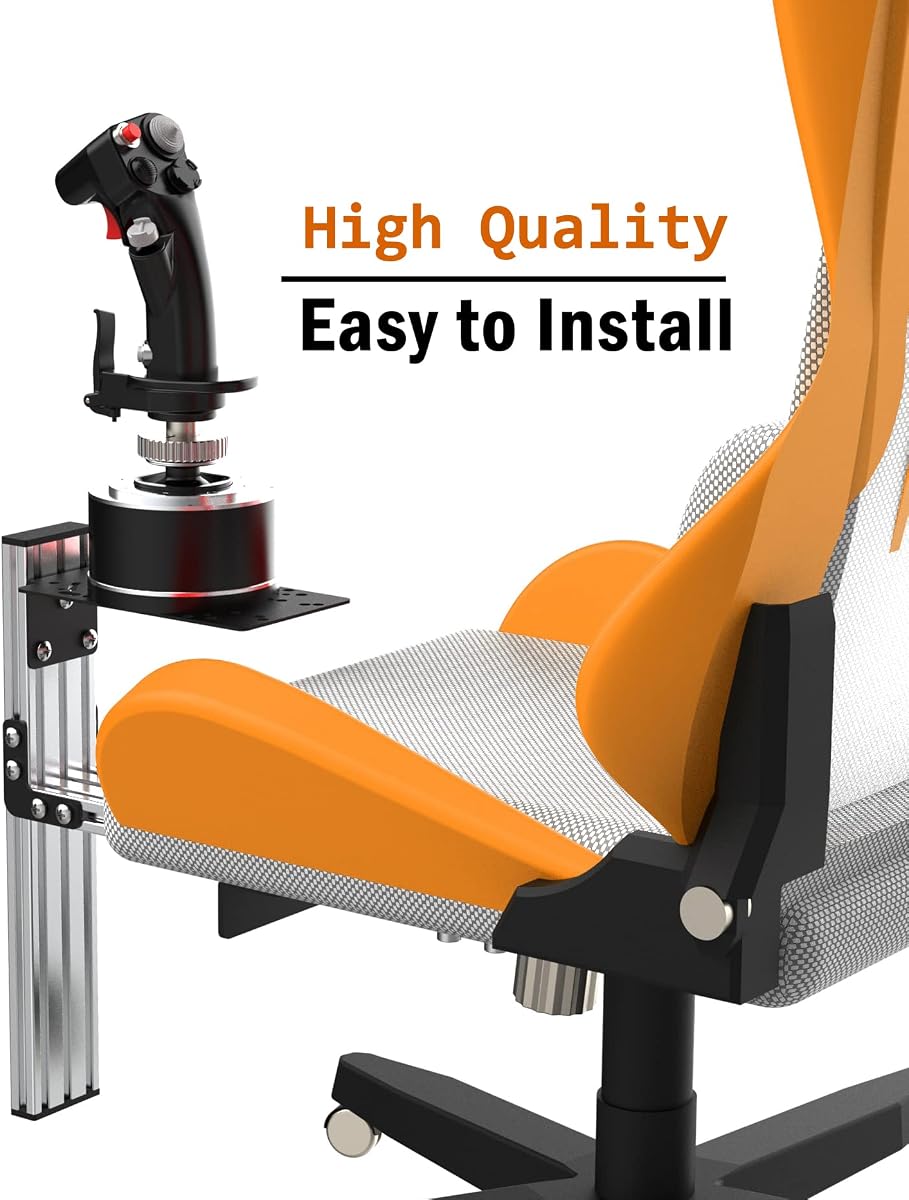
The Meza Mount-HOTAS Desk Mount Set of 2 stands out as the top choice for serious flight simmers. It holds a strong rating of 4.6 stars from users who value stability and build quality. This set is specifically designed for heavy-duty systems like the Thrustmaster Warthog and WinWing Orion 2, ensuring your controls do not wobble during intense maneuvers. The heavy-duty metal construction gives it a premium feel that justifies its position as our Editor's Choice pick.
We may earn a commission when you buy through this link, at no additional cost to you.
Its key strength lies in the rigid structure built to support heavy HOTAS systems. The reinforced metal plates and aluminum profile support columns provide strong load-bearing performance. This is crucial for users with weighty throttles and sticks that tend to tip over on lighter mounts. The ability to adjust both height and position allows you to find the perfect ergonomic reach. This customization helps reduce desktop clutter and improves access during long flight sessions, making it a reliable foundation for any home cockpit.
While the build quality is exceptional, there are trade-offs to consider. The price point is higher than many other options on this list, which might deter budget-conscious buyers. Additionally, its design is optimized for specific heavy systems, so it might be overkill for lighter controllers like the Logitech Extreme 3D Pro. However, if you own a Warthog or similar heavy gear, the stability it provides is well worth the investment and avoids the need for future upgrades.
This mount is best suited for enthusiasts who prioritize stability and have heavy control sticks. If you are building a dedicated cockpit and need a setup that will not shake during combat or turbulence, this is the one to get. The included set of two mounts covers both joystick and throttle needs efficiently. We recommend it for anyone serious about realism and durability in their flight simulation station.
The metal construction ensures your controls stay fixed even during high-g maneuvers in the simulator.
Specifically tailored for Warthog and Orion bases to prevent tipping and provide maximum support.
We may earn a commission when you buy through this link, at no additional cost to you.
The Quick Release Desk Mount is our top pick for budget-conscious simmers who still want quality. It holds an impressive rating of 4.7 stars from users who appreciate its simplicity and effectiveness. Crafted from all-metal materials including an aluminum alloy main body, it offers durability that rivals more expensive options. This single mount is designed to work seamlessly with a variety of popular joysticks, making it a versatile choice for different setups.
We may earn a commission when you buy through this link, at no additional cost to you.
Its standout feature is the quick-release clamp that ensures stable installation without needing tools. The clamp accommodates desks ranging from 0 to 2.36 inches thick, which covers most standard tables. The all-inclusive kit comes with screws and a screwdriver, simplifying the setup process significantly. By lifting the joystick off the desk surface, it prevents shaking during use and significantly enhances gaming immersion. The ergonomic design also saves valuable desktop space for other peripherals.
One limitation is the maximum desk thickness limit of 2.36 inches, which might not work for very thick wooden or industrial desks. Additionally, since it is a single mount, you would need to buy two if you want to mount both stick and throttle separately. However, these trade-offs are minor considering the price point and the high stability it offers for the cost. It is a great entry point into cockpit-style control layouts without breaking the bank.
This mount is perfect for gamers with lighter to medium-weight sticks like the Logitech Extreme 3D Pro or Turtle Beach VelocityOne. If you need a reliable, affordable solution that does not compromise on build quality, this is an excellent choice. The tool-free installation means you can be flying in minutes. We highly recommend it for those looking to upgrade their desk setup on a budget.
Includes all necessary hardware and a screwdriver to get you started without extra trips to the store.
Works with a wide range of brands including Winwing, Thrustmaster, Logitech, and Turtle Beach.
We may earn a commission when you buy through this link, at no additional cost to you.
The DIWANGUS Foldable HOTAS Desk Mount earns the Premium spot due to its exceptional flexibility and space-saving design. With a rating of 4.4 stars, it appeals to users who need to reclaim their desk space after gaming sessions. This 2-pack includes two identical mounts, allowing you to separate your joystick and throttle for a more realistic layout. The foldable design lets you remove the mounts and store them away when you are done flying.
We may earn a commission when you buy through this link, at no additional cost to you.
Its ability to fit desk edges from 0.4 to 7 inches thick is unmatched on this list, accommodating even the heaviest tables. Each mount arrives 90 percent preassembled, requiring you to attach crossbars and bolt on your control. This level of pre-assembly saves time while still offering robust support. You can adjust each mount independently by height and front-to-back distance to find the perfect ergonomic reach. The build uses iron and aluminum, ensuring it is sturdy enough for daily use.
While the premium features are compelling, the iron construction makes it slightly heavier than aluminum-only options. You also need to attach the crossbars during setup, which adds a small step to the process. However, these are minor inconveniences compared to the benefit of having a mount that can handle thick desks and fold away easily. The dual-pack ensures you have everything needed for a full HOTAS setup right out of the box.
This mount is ideal for users with shared spaces or home offices where desk real estate is at a premium. If you have a thick desk edge or need a setup that can disappear when not in use, this is the perfect solution. The wide compatibility and independent adjustments make it versatile for almost any controller. We recommend it for those who value convenience and adaptability in their flight station.
Fold away the mounts to reclaim your desk space for work or other uses after gaming.
Accommodates desk edges up to 7 inches thick, covering a wider range than standard clamps.
We may earn a commission when you buy through this link, at no additional cost to you.
The Hikig 2 Set Desk Mount offers broad compatibility that covers almost all flight game hand-control devices. It holds a rating of 4.1 stars and is known for supporting a wide array of brands from Logitech to Thrustmaster. This set includes two mounts, one for the joystick and one for the throttle, providing a complete solution for your setup. The wide adaptability ensures you are covered regardless of which control hardware you currently own.
We may earn a commission when you buy through this link, at no additional cost to you.
Its main strength is the strong 91 Newton meter clamp force that keeps equipment stable during gaming. The height is adjustable from -175mm to +175mm, allowing you to position your controls for comfortable reach. This adjustability ensures that you can create a more ergonomic cockpit experience. The preparation for gaming is seamless, as you can set up your station quickly and take flight. The solid construction helps prevent movement during intense flight simulation sessions.
While the compatibility is excellent, some users report that the installation process might take more time than expected. The rating is also slightly lower than other premium options, which might reflect mixed experiences with fit. However, for those who need a mount that works with many devices, this is a practical choice. It strikes a balance between features and price, making it a strong contender for general use.
This mount is best for simmers who own multiple different controllers or want a versatile option. If you prioritize compatibility and need a solution that fits a variety of setups, this is a solid choice. The two-pack ensures you have the right configuration for both stick and throttle. We recommend it for users looking for reliable support without restricting their hardware choices.
Supports almost all flight game hand-control devices including X56, T.16000M, and Warthog.
91 Newton meter force ensures your controls stay locked in place during intense maneuvers.
We may earn a commission when you buy through this link, at no additional cost to you.
The RACGTING 2-Pack Foldable HOTAS Desk Mount stands out for its speed and ease of installation. With a rating of 4.4 stars, it promises a setup process that takes under five minutes, ideal for those who want to start flying fast. The durable aluminum clamp system locks firmly onto your desk for near-zero-wobble stability. This ensures precise control in every session without worrying about your gear shifting.
We may earn a commission when you buy through this link, at no additional cost to you.
Its adjustable height and reach support desk thickness from 0.2 to 5.7 inches, covering most standard setups. The foldable and removable design allows you to transition from cockpit to a clean desk in seconds. This feature is perfect for shared spaces where desk space is needed for other tasks. The secure setup ensures that your joystick is positioned in a natural hands-down layout for smoother, more realistic flight sim control.
While the installation is quick, the desk thickness range might exclude very thin or very thick tables outside the 0.2 to 5.7 inch band. Additionally, the aluminum construction, while durable, might not feel as heavy-duty as steel options. However, these are minor drawbacks given the convenience it offers. The foldable design adds value for users who frequently need to clear their desk.
This mount is perfect for gamers who value time and flexibility. If you want a quick solution that does not compromise on stability, this is a great choice. The two-pack ensures you have mounts for both stick and throttle. We recommend it for anyone looking to streamline their setup process without sacrificing performance.
Designed to get you flying in under five minutes with minimal tools or effort.
Quickly detach and fold the mount to clear your desk when not gaming.
We may earn a commission when you buy through this link, at no additional cost to you.
The Reashy Hotas Mount is designed for those who want a lightweight yet durable solution. It holds a rating of 4.4 stars and features a perfect combination of lightweight aluminum and exquisite craftsmanship. This mount is compatible with popular joysticks like Logitech X56 and Thrustmaster T.1600M, offering broad support for many simmers. The lightweight design makes it easy to handle and install without unnecessary bulk.
We may earn a commission when you buy through this link, at no additional cost to you.
Its DIY-friendly design allows for desktop thickness adjustment within 0.2 to 5.7 inches, which covers most standard desks. The mount comes pre-assembly, meaning no tedious work is required to start using it. The high pitch clamp design allows easy installation, disassembly, and folding storage. This convenience is perfect for users who need to set up and clear their desk frequently. The anti-slip pads and enlarged rotary knob clamp ensure rock-solid stability.
One drawback is that it is a single mount, so you may need to buy another for your throttle. Also, the thickness range might not suit desks outside the specified limits. However, for those seeking a lightweight option that is easy to install, it is a great choice. The pre-assembly feature saves time and effort significantly.
This mount is best for users who prefer a light yet reliable setup. If you need a mount that is easy to manage and works well with popular sticks, this is a good fit. The design focuses on user convenience and comfort. We recommend it for those looking for a simple, effective solution.
Made from lightweight aluminum to reduce weight while maintaining durability.
The high pitch clamp design allows for quick folding and easy storage.
We may earn a commission when you buy through this link, at no additional cost to you.
The SILVIP 2 Set HOTAS Desk Mount is known for its broad platform compatibility including PC, Xbox, and PlayStation. With a rating of 4.5 stars, it is a popular choice among gamers who want a versatile mount for flight simulation games. The package includes two desk mounts, allowing you to configure both joystick and throttle separately. This two-set design helps create a comfortable operating environment for flight simulation enthusiasts.
We may earn a commission when you buy through this link, at no additional cost to you.
It is compatible with major brands like Thrustmaster and VKB, covering many common setups. However, note that the Logitech X56 support may be updated in future versions, so check before purchasing. The product requires some assembly due to packaging constraints, but the instructions are available to help you through the process. The improved gaming experience comes from eliminating desktop clutter and providing a dedicated spot for controls.
While the platform compatibility is impressive, the assembly requirement might be a hurdle for some users. The note about X56 support is also a consideration if you own that model. However, for those with other hardware, this is a solid option. The two-pack ensures you have the full set needed for a dual-control setup.
This mount is ideal for console gamers or those using multiple platforms. If you value broad compatibility and want a set that covers both stick and throttle, this is a strong contender. We recommend it for users who check the controller details before buying.
Compatible with PC, Windows, Xbox One, Xbox Series X/S, Xbox 360, and PlayStation 4/5.
Includes two desk mounts for both joystick and throttle for a complete setup.
We may earn a commission when you buy through this link, at no additional cost to you.
The 2PCS Hotas Mount has achieved a perfect 5.0 rating, reflecting exceptional user satisfaction with its stability. The upgraded dual-clamp design ensures the stand is secured firmly from the top, providing outstanding stability during gameplay. This 2-piece set allows for separate mounting of joystick and throttle, ideal for those who want a clean layout. The vertical height adjustment helps you find the ideal ergonomic position for your hands.
We may earn a commission when you buy through this link, at no additional cost to you.
Its clamp works well on desk thicknesses up to 2.36 inches, which fits many standard tables. The dual clamp design minimizes wobble, ensuring your controls stay steady during flight. It is compatible with many models including Logitech, Thrustmaster, and VKB systems. The optional anti-slip pads can be attached for even better grip on your desk surface.
One limitation is the strict thickness limit of 2.36 inches, which might be too thin for some desks. Also, compatibility is limited to specific models listed in the description, so verify before buying. However, for compatible setups, the stability and 5-star rating are impressive. The two-piece design is a great value for those needing both mounts.
This mount is best for users with standard desks and compatible hardware. If you value stability and a perfect user rating, this is a strong choice. The dual clamp design ensures secure performance. We recommend it for those who verify their desk thickness before purchasing.
Secures the stand from the top for outstanding stability during gameplay.
Achieved a 5.0 rating, indicating high satisfaction with its performance.
We may earn a commission when you buy through this link, at no additional cost to you.
The Hikig 2 Pack Desk Mount stands out for its exceptional holding capacity of up to 386kg. It holds a rating of 4.2 stars and uses a push-pull quick clamp that is fast in loading and unloading. This model is compatible with a wide range of devices including Warthog and VKB systems. The two-pack ensures you can mount both your joystick and throttle comfortably on your desk.
We may earn a commission when you buy through this link, at no additional cost to you.
Its clamp strength ensures your equipment is fixed stably in the best position, which is crucial for heavy setups. The ergonomic design allows you to adjust the bracket vertically to suit your desktop thickness from 0.2 to 5.3 inches. The non-slip feet protect the surface of your desk and ensure better grip. The dual-handed system allows positioning for both left and right-handed users effectively.
While the capacity is impressive, the build may feel heavier than other options. Correct alignment during installation is key to feeling the excellent stability. However, for those with heavy gear, the holding capacity is a major advantage. The quick clamp system saves time during setup and adjustments.
This mount is best for users with heavy controllers who need maximum stability. If you have a Warthog or similar heavy system, the strength of this mount is ideal. We recommend it for those who prioritize holding power and quick adjustment.
Holds up to 386kg ensuring stability even for the heaviest control setups.
Can be positioned for both left and right-handed users for flexible placement.
We may earn a commission when you buy through this link, at no additional cost to you.
The Fosiya SIM Fighting Joystick Center Chair Mount is a unique option that attaches directly to your chair. It holds a rating of 4.3 stars and uses M8 heavy duty screws for quick loading and unloading. This mount supports devices like T-Flight Hotas 4 and Warthog Flight Stick. The chair mount design offers a central position for the stick, which can be more ergonomic for some users.
We may earn a commission when you buy through this link, at no additional cost to you.
Its adjustable vertical height and left-right banners allow you to tailor the fit to your habits. Each bracket can be adjusted left and right by 8cm and up and down by 9cm. The non-slip flange nut fixing system ensures better grip and does not change the shape of the chair appearance. The quick assembly design makes it easy to upgrade with the original chair structure.
One downside is that it requires a chair that can accommodate the mount. It is also a single mount, so you would need additional solutions for the throttle. However, for those seeking a chair-mounted setup, this provides great stability. The heavy-duty screws ensure the mount stays secure during use.
This mount is best for simmers who prefer a chair-mounted setup over a desk mount. If you want a central position for your stick, this is an excellent choice. The adjustable height ensures a comfortable fit. We recommend it for those looking for an ergonomic chair alternative.
Mounts directly to the chair for a central ergonomic stick position.
Uses M8 screws to ensure stability and strength during intense use.
We may earn a commission when you buy through this link, at no additional cost to you.
Choosing the right joystick hotas mount requires considering your desk setup, control weight, and budget. This guide outlines the key factors to help you make an informed decision.
One of the most critical factors is ensuring the mount can accommodate your desk thickness. Most clamps work within a specific range like 0.2 to 5.7 inches. Check your desk edge measurement before buying to avoid issues. Some mounts like DIWANGUS support very thick desks up to 7 inches.
Always measure your desk edge to ensure the mount clamp range matches your table.
Verify that the mount is compatible with your specific joystick and throttle models. While many are universal, some heavy systems like the Warthog need stronger mounts. Check the product description for supported brands and models to ensure a proper fit. The Meza Mount is a good example of a set tailored for specific heavy systems.
Confirm your hardware list against the mount's compatibility guide to avoid fit issues.
The material used affects stability and weight. Aluminum mounts are lightweight but sturdy, while steel options might be heavier but more rigid. Look for anti-slip pads and robust clamps to ensure stability during flight. The Reashy mount uses aluminum for a balance of strength and ease of handling.
Choose aluminum for lightness or metal for rigidity based on your control weight.
Decide if you need a single mount or a two-pack for both stick and throttle. Two-packs like the Hikig set offer a complete solution for dual controls. Single mounts are cheaper but you may need to buy two for a full setup. Plan your cockpit layout accordingly before selecting the count.
Two-packs are more convenient for full HOTAS setups.
Look for height and position adjustments to find an ergonomic reach. Adjustable brackets allow you to optimize your desk space. Some mounts offer independent adjustments for each control. The RACGTING mount offers flexible adjustments for a comfortable experience.
Ensure the mount allows height and position changes for a customized setup.
Some mounts are pre-assembled while others require tools. Quick-release designs speed up the process. Pre-assembled units like Reashy save time. Check if tools are included or needed for setup. The Quick Release Desk Mount offers tool-free installation for convenience.
Prioritize mounts with pre-assembly or tool-free installation for faster setup.
Prices vary based on features and materials. Budget options like the Quick Release Desk Mount offer great value. Premium mounts might cost more but offer unique features like foldability. Consider how much you want to invest for your cockpit setup. The 2PCS Hotas Mount offers a high rating at a competitive price point.
Balance your budget with necessary features like durability and compatibility.
If you share your desk, a foldable or removable mount is ideal. This allows you to reclaim space when not gaming. The DIWANGUS mount is a great example of a foldable option. Consider your desk usage patterns when choosing the design style.
Foldable designs are best for shared or multi-purpose desks.
Start by measuring your desk thickness and checking the clamp range of your mount. Ensure your surface is clean and smooth to allow the clamp to grip properly. Position the mount at the edge where you want your control to sit comfortably.
Attach your joystick or throttle to the mount using the provided hardware. Adjust the height and position to match your ergonomic needs. Tighten the clamp securely to prevent movement during flight sessions.
Periodically check the screws and clamps to ensure they remain tight. Wipe down the mount with a dry cloth to remove dust. Store foldable mounts in a safe place when not in use to protect the joints.
Many mounts in this list including Hikig and Meza support the Logitech X56. Check the specific product compatibility list before purchasing to ensure a perfect fit. Most standard HOTAS mounts cover popular models like the X56.
Measure the edge of your desk with a ruler or tape measure. Ensure the measurement matches the mount's range. For example, a 0.2 to 5.7 inch range fits most standard desks.
No, these products are mounts only. Controllers like joysticks or throttles are not included. Check the product description to confirm what is in the package.
Yes, the DIWANGUS and RACGTING models feature foldable designs. This allows you to remove them when not in use. This is great for saving desk space.
It depends on the clamp design. Some clamps work best on wood or hard surfaces. Check if your desk has edges that fit the clamp profile. Non-slip pads help on smooth surfaces.
Most mounts require minimal tools like a screwdriver. Some include tools for convenience. Quick-release models may need no tools at all.
If your desk exceeds the clamp limit you may need a different mount. The DIWANGUS supports up to 7 inches which is quite thick. Consider measuring before buying.
Yes, these mounts provide the stability needed for VR experiences. They prevent shaking during active play. Ensure your mount is secure for the best VR experience.
We have reviewed the top ten joystick hotas mounts to help you find the perfect fit for your flight simulation needs. From the sturdy Meza Mount for heavy systems to the budget-friendly Quick Release Desk Mount, there is an option for every setup.
When choosing, prioritize stability and compatibility with your existing gear. Consider the desk thickness and how much space you have. A good mount enhances your immersion and comfort during long flights.
Remember to check current stock and details before buying as availability may change. We hope this guide helps you build a better cockpit. Happy flying with your new setup.