
HDMI Adapter for N64/ Game Cube/SNES
4.2Editor score
720P/1080P support
Plug and play
HDMI cable included
This guide compares the best GameCube HDMI adapters for modern TVs, detailing features like GCVideo support, resolution upscaling, and ease of setup for retro
Modern displays lack the inputs needed for classic consoles like the GameCube. A reliable HDMI adapter bridges this gap, ensuring your favorite games look sharp and play smoothly on today’s screens without signal loss or complex wiring.
We evaluated ten top-rated adapters based on video quality, compatibility with DOL-001 consoles, and additional features like firmware updates. Each product was analyzed for build quality, signal processing capabilities, and user feedback to ensure accurate recommendations for your setup.
Every pick highlights unique strengths such as line doubling, scanline options, or budget-friendly designs. Note that prices and availability change frequently, so verify current offers before purchasing to ensure you get the best value for your retro gaming needs.
4.2Editor score

4.6Editor score

4.4Editor score
The following table provides a side-by-side comparison of all ten adapters, highlighting key specifications like supported resolutions, power requirements, and unique features to help you decide quickly.



The Kaico Gamecube HDMI Adapter stands out as a top choice for retro enthusiasts seeking high-quality output. With a rating of 4.6 stars, it offers exceptional image clarity and advanced features like Line Doubling and Scanlines to enhance your gaming experience.
We may earn a commission when you buy through this link, at no additional cost to you.
This adapter runs the GCVideo Operating System, supporting up to 480p/576p resolution without needing extra power. The included remote allows easy menu navigation, while the USB port ensures firmware updates are straightforward. The 3D printed shelf protects the digital connector, adding durability.
While it requires a DOL-001 console with a Digital Port, the trade-off is significant improvements in visual fidelity. The lack of extra power needs simplifies setup, though the 3D printed shelf may need careful handling to avoid strain on the console's back.
Buyers looking for a reliable, feature-rich solution should prioritize this adapter. It balances performance and ease of use effectively, making it the ideal pick for anyone wanting to elevate their GameCube setup on modern HDMI TVs.
The Line Doubling and Scanlines features provide sharper images than standard AV cables, ensuring your games look crisp on HDTVs.
The USB port allows simple firmware updates, keeping your adapter compatible with new TV features and improving overall performance over time.
We may earn a commission when you buy through this link, at no additional cost to you.
This HDMI Adapter for N64/ Game Cube/SNES is a budget-friendly option that delivers clear and smooth picture quality for legacy systems. Supporting 720P/1080P conversion, it ensures your classic games run well on newer TVs without lag or screen issues.
We may earn a commission when you buy through this link, at no additional cost to you.
The adapter is designed for ease of use, featuring plug-and-play functionality and including an HDMI cable in the box. Strict factory testing ensures normal use, and customer service is available for any questions. It supports multiple consoles, making it versatile for retro setups.
While it requires an external power supply, which adds a small complication, the overall experience remains straightforward. Users should verify connections if they encounter blue screens or no sound, but these issues are typically resolved quickly with proper setup.
For gamers seeking an affordable yet effective solution, this adapter is a solid choice. Its multi-console support and included HDMI cable make it convenient for those with diverse retro collections looking to connect to modern displays.
Supporting N64, GameCube, and SNES, this adapter lets you connect multiple classic systems to one HDMI port without needing separate adapters.
The inclusion of an HDMI cable simplifies the setup process, saving you from buying an extra cable and ensuring immediate usability upon arrival.
We may earn a commission when you buy through this link, at no additional cost to you.
The BITFUNX NGC to HDMI Adapter offers premium features for serious retro enthusiasts. With GC2SD Gen2 support, it enables storage expansion up to 512GB via microSD cards, allowing easy backup and restoration of game files while protecting your data.
We may earn a commission when you buy through this link, at no additional cost to you.
Video and audio output in full digital HDMI format ensure zero transmission loss, providing advanced signal processing with precise colors and resolution. The adapter includes a remote for selecting features like Line Doubling and Scanlines without extra power. A USB port simplifies firmware updates.
While it requires a DOL-001 console and cannot function as a standalone memory card, the homebrew software support and faster loading speeds in SLOT B enhance the experience. The included bracket protects the adapter and adds durability to your setup.
Gamers who value storage expansion and high-fidelity output should consider this adapter. Its robust feature set and digital precision make it ideal for those looking to maximize their GameCube capabilities on modern displays.
Supports microSD cards up to 512GB and homebrew software like Swiss, enabling broader customization and game management options.
Output in full digital HDMI format ensures zero transmission loss, delivering crisp colors and precise resolution for a superior visual experience.
We may earn a commission when you buy through this link, at no additional cost to you.
The Tengchi RCA to HDMI Converter is designed to convert analog composite input to HDMI 1080p output, making it suitable for various legacy devices including GameCubes. It supports PAL, NTSC, and SECAM formats, ensuring compatibility with different regional standards.
We may earn a commission when you buy through this link, at no additional cost to you.
Plug and play functionality makes installation easy, powered by an external USB cable included in the package. The adapter comes with an HDMI cable and user manual, offering a complete solution for connecting older consoles to modern monitors or TVs.
While it does not support 3D or 4K, it delivers reliable 1080p output for standard HD TVs. The external power requirement adds a step to setup, but the one-year warranty provides peace of mind for any potential issues during use.
This adapter is a practical choice for those needing basic AV conversion. Its multi-format support and included accessories make it convenient for connecting various retro devices to HDMI displays without needing additional adapters.
Supports PAL, NTSC, and SECAM standards, ensuring your adapter works with GameCubes and other consoles from different regions.
Includes HDMI and USB cables plus a user manual, simplifying setup and ensuring you have everything needed to start gaming immediately.
We may earn a commission when you buy through this link, at no additional cost to you.
This N64 to HDMI Converter Adapter transforms analog RGB signals into digital HDMI signals, offering better picture quality through S-Video signal output. The all-in-one cable design eliminates the need for extra cables, providing a clean and simple setup for retro consoles.
We may earn a commission when you buy through this link, at no additional cost to you.
The adapter delivers brighter and sharper images with precision color and resolution handling. It supports 1080p60hz output and requires no extra power, making it convenient for quick setup. However, users should ensure connections are secure to avoid blue screens or sound issues.
While it does not support 720p60hz, the focus on S-Video output ensures a more defined image compared to standard AV. The plug-and-play nature means you can start gaming immediately without installing software or additional hardware.
Ideal for gamers wanting a clean setup with better visual quality, this adapter is a strong option. Its S-Video signal output and all-in-one design make it easy to integrate into any modern TV or monitor setup.
The S-Video signal output provides a cleaner image than standard composite, resulting in sharper details and better color separation for classic games.
Built-in console ports and HDMI plug eliminate extra cables, offering the simplest and cleanest setup available for retro gaming.
We may earn a commission when you buy through this link, at no additional cost to you.
This HDMI Cable for Nintendo Gamecube features a 3-In-1 HD LINK design that converts and upscale analog S-Video signals from NGC, N64, and SNES to digital HDMI. It includes a toggle switch for 4:3 and 16:9 aspect ratios, ensuring the correct display mode for your games.
We may earn a commission when you buy through this link, at no additional cost to you.
The detachable design allows use with high-end or extended HDMI cables, providing flexibility for larger setups. With low latency and unnoticeable lag, it ensures responsive performance during gameplay. The adapter supports precise color and resolution handling for awesome image quality.
While it requires an external HDMI cable due to the detachable design, this allows customization based on your needs. Customer service is available 24/7, and a 365-day replacement policy adds significant value and confidence for buyers.
Gamers who want aspect ratio control and flexible cable options should choose this adapter. Its 3-in-1 compatibility and low-latency performance make it a strong choice for serious retro gaming setups.
The 4:3 and 16:9 switch lets you match your display preferences, ensuring games look correct on both traditional and widescreen TVs.
Unnoticeable lag ensures responsive gameplay, keeping the feel of classic games intact while using modern HDMI displays.
We may earn a commission when you buy through this link, at no additional cost to you.
The OLCLSS HDMI Adapter converts analog signals into crisp digital HDMI signals with up to 1080P resolution. It supports consoles like N64, GameCube, and SNES, connecting seamlessly to modern HDTVs and projectors for a vibrant retro gaming experience.
We may earn a commission when you buy through this link, at no additional cost to you.
This adapter ensures stable and lag-free gaming with ultra-low input lag and stable signal transmission. The upgraded power design operates without extra power for normal use, though connecting an external source helps if using additional accessories. A toggle switch allows switching between 4:3 and 16:9 aspect ratios.
While the adapter is designed for plug-and-play ease, some users may need to check signal stability or use external power for accessories. The color accuracy and responsive performance make it a reliable choice for connecting classic consoles to modern displays.
For those seeking a simple way to upscale retro games to 1080P, this adapter is effective. Its wide compatibility and plug-and-play setup make it an accessible option for casual and serious gamers alike.
Converts analog signals to 1080P, bringing retro gaming to life on modern displays with sharp, clear picture quality.
Features ultra-low input lag and stable signal transmission, ensuring responsive gameplay without noticeable delays.
We may earn a commission when you buy through this link, at no additional cost to you.
The Kaico N64 to HDMI Adapter works with Nintendo 64, SNES, and Gamecube consoles via their proprietary analogue ports. It supports SVideo and Composite outputs, making it versatile for different signal types without needing additional power.
We may earn a commission when you buy through this link, at no additional cost to you.
Plug and play functionality means no software or hardware installation is required. The all-in-one design simplifies connections, and the 12-month warranty provides protection for your purchase. Packaging may vary, but the functionality remains consistent across units.
While some users may need to verify connections, the adapter is designed for easy setup. Its multi-console compatibility and support for SVideo and Composite make it a practical choice for collectors with multiple classic systems.
Gamers wanting a versatile solution for N64, SNES, and Gamecube should consider this adapter. Its simplicity and warranty support make it a reliable option for connecting classic consoles to HDMI TVs.
Works with N64, SNES, and Gamecube via the proprietary analogue port, reducing the need for multiple adapters in your collection.
Supports both SVideo and Composite outputs, allowing you to choose the best signal type available on your console.
We may earn a commission when you buy through this link, at no additional cost to you.
This N64 HDMI Adapter is designed for clear and smooth picture quality, supporting legacy systems on newer TVs. It supports 16:9 convert on HDTV, ensuring games look modern without lag or additional power supply requirements.
We may earn a commission when you buy through this link, at no additional cost to you.
Plug and play functionality makes setup easy, with an HDMI cable included for convenience. Customer service offers 30 days return and refund plus 1 year replacement, ensuring support if you encounter any problems after placing an order.
While basic in features, the adapter focuses on reliable connectivity and ease of use. Users should check connections if no sound or blue screen appears, but these issues are typically resolved with proper setup.
For gamers seeking a straightforward solution without extra power needs, this adapter is suitable. Its included HDMI cable and flexible return policy make it a low-risk choice for testing retro gaming on modern displays.
Supports 16:9 convert on HDTV, ensuring your classic games display correctly on widescreen modern TVs.
The included HDMI cable simplifies setup, saving you from buying an extra cable and ensuring immediate use.
We may earn a commission when you buy through this link, at no additional cost to you.
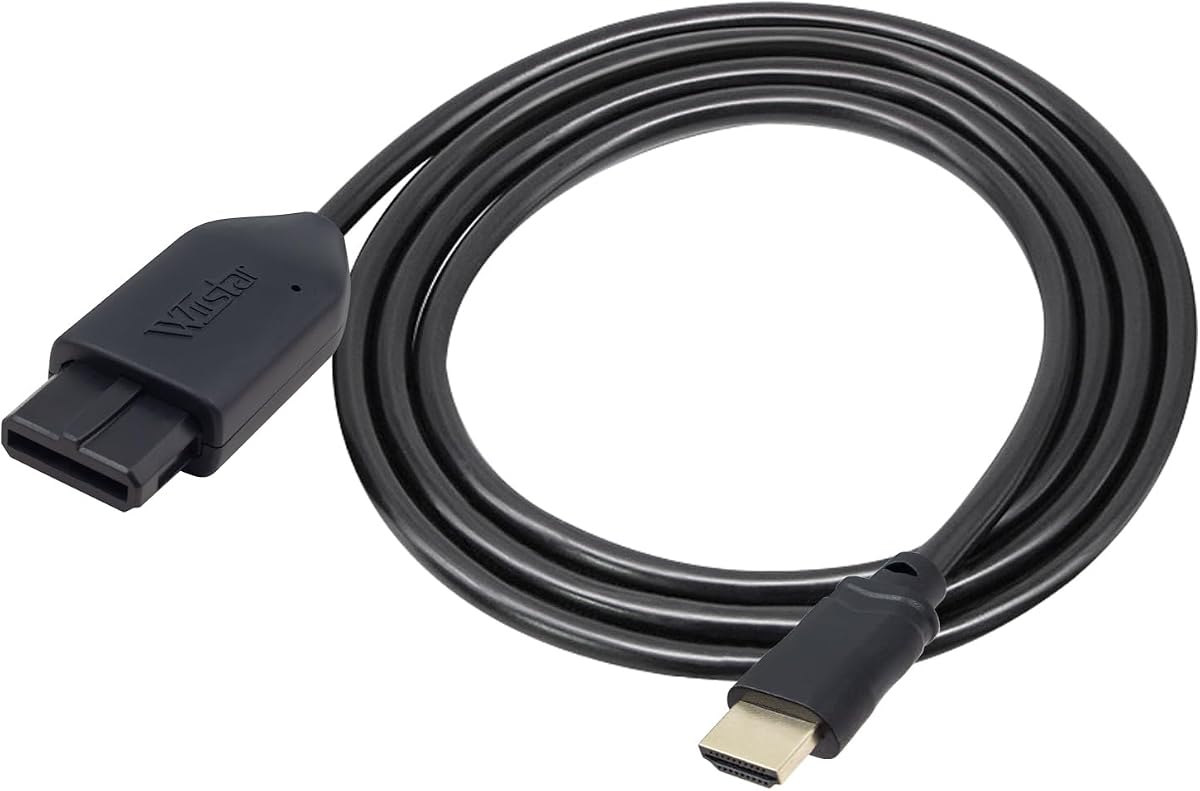
This HDMI Converter connects directly to the AV Multi-Out port of N64, SNES, and GameCube, extracting the S-Video signal for cleaner output than RCA composite. It includes a 1.5m HDMI cable with nickel-plated connectors to resist oxidation and ensure stable transmission.
We may earn a commission when you buy through this link, at no additional cost to you.
No external power is required for normal use since the console provides sufficient power through the AV Multi-Out port. The Micro USB port is included only for backup power in rare situations like unstable displays, making the setup completely plug and play.
While the adapter does not upscale to HD resolutions, it outputs the original console resolution ensuring a true retro experience. The nickel-plated connectors and included HDMI cable provide durability and convenience for long-term use.
For purists who want clean S-Video output without extra power needs, this converter is ideal. Its focus on signal quality and durable connectors make it a solid choice for connecting classic consoles to modern HDMI displays.
Extracts the S-Video signal path from the AV Multi-Out port, providing a more defined image than standard composite cables.
Nickel-plated connectors help resist oxidation, maintaining stable signal transmission and ensuring long-term reliability.
We may earn a commission when you buy through this link, at no additional cost to you.
Selecting the right adapter involves considering console compatibility, video quality, and additional features like firmware updates or storage options.
Ensure the adapter supports your specific GameCube model. Many adapters require the DOL-001 version with a Digital Port. Universal adapters work with multiple consoles like N64 and SNES, offering more versatility for retro collections.
Verify your console model before purchasing to avoid compatibility issues. Check product descriptions for mentions of DOL-001 support if you have an older GameCube.
Look for adapters that offer line doubling or scanline features to enhance image clarity on modern screens. Full digital HDMI output with zero transmission loss ensures precise colors and resolutions up to 1080p.
Higher resolutions like 480p or 1080p provide sharper images than standard AV. Choose adapters with advanced signal processing for the best visual experience.
Some adapters require external power supplies while others draw power from the console's AV port. USB-powered or console-powered adapters simplify setup by eliminating extra cables.
If you plan to use accessories, ensure the adapter supports external power options. Check product details for USB or external power requirements.
Features like firmware updates via USB, remote controls for menu navigation, and aspect ratio switches add value. Storage expansion like microSD support is beneficial for homebrew users.
Consider what features matter most for your gaming style. Firmware updates ensure long-term compatibility, while remote controls simplify adjustments.
Durability depends on build materials and connector quality. Adapters with brackets or protective designs reduce strain on the console's digital port.
Look for adapters with warranties and durable connectors to ensure long-term use. Check for included accessories like cables or shelves.
Prices vary based on features. Budget options may lack advanced signal processing but still provide functional HDMI output. Premium options offer better quality and more features.
Balance your budget with the features you need. Often, mid-range adapters provide the best mix of performance and cost.
Warranties like 12 months or replacement policies provide peace of mind. Customer service availability ensures you can resolve any setup issues quickly.
Choose brands offering clear warranty terms. Reliable support can save you time if you encounter connection problems.
Some adapters include HDMI cables, USB power cables, or brackets. Having these included simplifies setup and reduces extra costs.
Check what comes in the box before buying. Included cables can save money and ensure compatibility from the start.
Begin by connecting the adapter to your GameCube's AV Multi-Out or Digital Port. Ensure the connection is secure to avoid signal issues. Use a high-quality HDMI cable to connect the adapter to your TV or monitor for the best signal transmission.
If your adapter requires external power, connect the USB cable to a power source before turning on your console. Use any included remote or switches to adjust settings like aspect ratio or scanlines. Navigate menus carefully to select your preferred output resolution.
To maintain longevity, avoid bending the cables sharply and ensure the adapter is well-ventilated to prevent overheating. Store the adapter and cables in a dry place when not in use. Keep firmware updated if your adapter supports it to ensure ongoing compatibility.
Many adapters require the DOL-001 model with a Digital Port on the back. Universal adapters may work with standard models via AV ports. Check product descriptions to confirm compatibility with your specific console version before purchasing.
A blue screen usually indicates no video input or a failed connection. Check that your HDMI cable is securely connected to both the adapter and TV. Verify the console is powered on and the correct HDMI input is selected on your display.
Some adapters support up to 1080p output while others focus on 480p. Universal adapters may upscale to 720p or 1080p. Check product specs to confirm supported resolutions and ensure compatibility with your TV's capabilities.
Not all adapters require external power. Some draw power from the console's AV port while others need USB or external supplies. Verify power requirements in the product details to determine if you need to purchase a power adapter.
Many adapters support N64, SNES, and GameCube simultaneously. Universal options allow you to connect multiple classic systems. Check compatibility lists to confirm if the adapter supports your specific console models.
Some adapters include a USB port for firmware updates. Connect the USB cable to a computer and follow manufacturer instructions to update. Check the product's manual or support site for specific update procedures.
Yes, these adapters are designed to work with modern TVs featuring HDMI inputs. They convert analog signals to digital HDMI ensuring compatibility. Ensure your TV supports the adapter's resolution output for the best experience.
If you experience no sound, check your cable connections and ensure the adapter is properly powered. Some adapters require specific audio settings. Consult the product manual for troubleshooting tips on audio setup.
We have reviewed ten top adapters, from budget-friendly options to premium models with advanced features. Each offers unique strengths like GCVideo support or S-Video extraction to enhance your retro gaming setup.
Prioritize adapters that match your console model and desired resolution. Consider factors like external power needs and included accessories to simplify your setup process effectively.
Prices and availability can change frequently, so verify current offers before purchasing. Choose the adapter that best fits your gaming needs for an optimal retro experience.