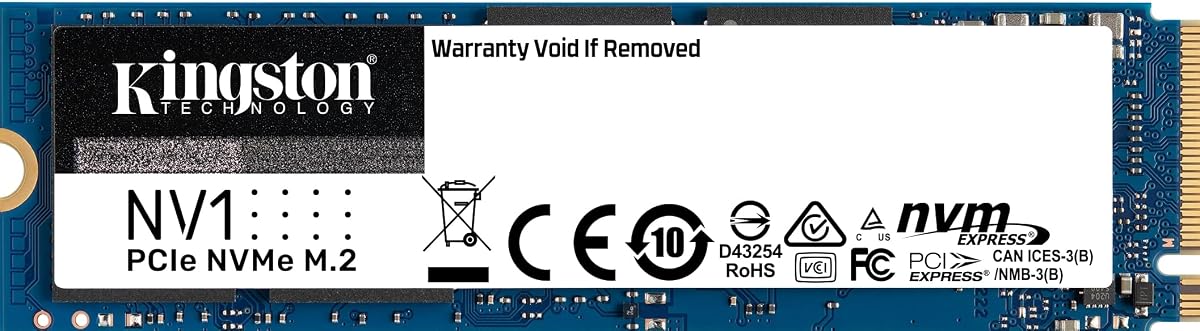
Kingston NV1 500G
4.8Editor score
Ideal for laptops and small PCs
Up to 2100MB/s read speed
Available in capacities up to 2TB
This guide compares the top Kingston Internal NVME SSD models for speed, capacity, and value to help you choose the right storage upgrade for your PC or laptop.
Choosing the right internal storage can dramatically improve your computer performance and overall user experience. Kingston offers a wide range of NVMe SSDs designed for everything from basic laptop upgrades to high-end gaming rigs.
We have analyzed the latest models based on performance metrics, reliability ratings, and real-world usage scenarios. This list covers the most relevant options available in the market today for various needs.
Each pick highlights key features, strengths, and potential trade-offs to guide your decision. Please note that prices and availability can change frequently, so check the current listings before purchasing.
4.8Editor score

4.7Editor score
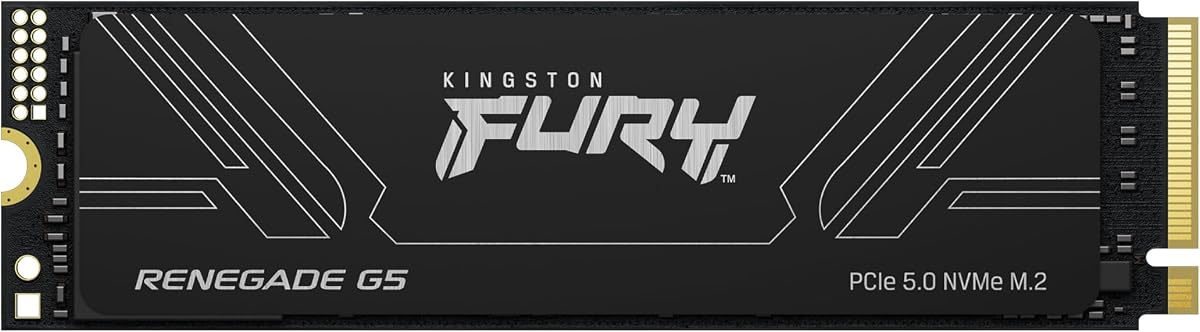
4.7Editor score
The following table provides a side-by-side comparison of all ten models featured in this guide. Review the specifications to find the drive that matches your system requirements and budget constraints effectively.


The Kingston NV3 1TB stands out as a top contender in the internal storage market with its robust performance metrics. It holds a strong user rating reflecting consistent reliability across various computing tasks.
We may earn a commission when you buy through this link, at no additional cost to you.
Its Gen 4×4 NVMe PCIe performance delivers read speeds up to 6000MB/s which is excellent for modern applications. The included Acronis cloning software simplifies migration from older drives to this new NVMe solution.
While it lacks a built-in heatsink, the low power design helps manage thermal output in many scenarios. The 5-year limited warranty provides peace of mind for long-term usage and system stability.
This drive is ideal for users seeking a balance of speed and cost for desktops and laptops. We recommend it for general productivity and gaming builds that need fast boot times.
Gen 4×4 NVMe PCIe performance ensures that your system can handle large file transfers without bottlenecks.
The inclusion of Acronis cloning software adds significant value by making the upgrade process seamless for users.
We may earn a commission when you buy through this link, at no additional cost to you.
The Kingston FURY Renegade G5 represents the cutting edge of consumer storage technology with its PCIe 5.0 interface. It boasts an impressive user rating from enthusiasts who value extreme performance capabilities.
We may earn a commission when you buy through this link, at no additional cost to you.
With read speeds reaching up to 14800MB/s this drive minimizes wait times for demanding applications and games. The advanced thermal design uses an SM2508 controller and efficient cooling layers to maintain stability.
Users should ensure their motherboard supports Gen 5×4 to fully utilize these speeds as older slots will limit performance. The high price reflects the top-tier components and future-proofing it offers for builds.
This model is best suited for power users and hardcore gamers who demand the fastest possible storage available. It is a worthy investment for those building next-generation high-performance workstations.
Blazing PCIe 5.0 speeds allow for rapid data access that surpasses traditional Gen 4 limits significantly.
Advanced thermal design ensures stable power and reliable performance even under heavy workloads.
We may earn a commission when you buy through this link, at no additional cost to you.
The Kingston NV1 500G is an excellent entry-level option for those upgrading from older SATA or legacy drives. Its high user rating suggests strong reliability and ease of use for everyday tasks.
We may earn a commission when you buy through this link, at no additional cost to you.
With read speeds up to 2100MB/s it provides a noticeable boost in system responsiveness for laptops and small form factor PCs. It is designed to meet the storage requirements of general users efficiently.
While it does not match the top speeds of Gen 4 drives it offers sufficient performance for most non-gaming workloads. The compact M.2 form factor makes it easy to fit into tight internal spaces.
This drive is perfect for students or home users looking for a cost-effective storage solution. We recommend it for system boot drives or secondary storage in non-critical workflows.
Its affordable pricing makes it accessible for anyone looking to upgrade storage without breaking the bank.
Ideal for laptops and small form factor PCs ensures it fits where space is limited.
We may earn a commission when you buy through this link, at no additional cost to you.
The Kingston Fury Renegade 1TB is engineered specifically for gaming performance and high-throughput tasks. It enjoys a high rating from users who need consistent speeds during intense sessions.
We may earn a commission when you buy through this link, at no additional cost to you.
Its incredible PCIe Gen 4×4 NVMe performance delivers speeds up to 7300MB/s which helps reduce load times significantly. The available heatsink option ensures thermal stability during prolonged usage periods.
The PS5 Ready certification allows it to function seamlessly as an expansion drive for the console. This makes it a versatile choice for both PC builders and console gamers alike.
We recommend this drive for gamers who want to future-proof their systems with high-end components. It is also suitable for content creators who handle large media files regularly.
Incredible PCIe Gen 4×4 NVMe performance ensures that games load faster and run smoother.
PS5 Ready status confirms it meets the strict requirements for console storage expansion.
We may earn a commission when you buy through this link, at no additional cost to you.
Although not a Kingston product this Samsung drive is often compared due to its strong market presence and speed. It maintains a solid rating from users seeking reliable high-performance storage solutions.
We may earn a commission when you buy through this link, at no additional cost to you.
It offers huge speed boosts with sequential read/write speeds up to 7450MB/s which rivals top competitors. The nickel-coated controller delivers effective thermal control to maintain performance under load.
Samsung Magician software allows for advanced optimization tools to monitor health and update firmware easily. This gives users more control over their drive settings compared to basic hardware setups.
This drive is a viable alternative if you prioritize brand reputation and software support over specific brand loyalty. It fits perfectly in desktops and laptops meeting modern power standards.
HUGE SPEED BOOST capabilities provide faster loads for an ultimate gaming experience.
Samsung Magician software offers advanced optimization tools to monitor drive health effectively.
We may earn a commission when you buy through this link, at no additional cost to you.
This compact drive is designed for devices with limited internal space such as handhelds or small laptops. It holds a decent rating for its specialized use case in portable computing.
We may earn a commission when you buy through this link, at no additional cost to you.
The M.2 2230 size allows it to fit into slots where larger drives cannot go. It is compatible with Stream Deck and various laptops making it versatile for specific setups.
While 128GB may seem small it is suitable for system drives or specialized applications in handhelds. Users should be aware of the capacity limits when planning their storage strategy.
We recommend this drive for those needing a small secondary drive or system boot drive in tiny PCs. It is ideal for stream deck accessories or compact handheld gaming devices.
The M.2 2230 size allows it to fit into slots where larger drives cannot go.
Compatible with Stream Deck devices adds utility for content creators using compact hardware.
We may earn a commission when you buy through this link, at no additional cost to you.
The KC2500 is known for its focus on security and enterprise-grade features alongside solid performance. It holds a good rating from professionals who prioritize data protection in their storage.
We may earn a commission when you buy through this link, at no additional cost to you.
This self-encrypting drive supports end-to-end data protection using XTS-AES 256 bit hardware-based encryption. It allows usage with various security management solutions such as Symantec and McAfee for added safety.
With read/write speeds up to 3500/2900MB/s it delivers outstanding endurance and workflow improvements. It also supports Microsoft eDrive and BitLocker for seamless encryption integration.
This drive is ideal for users who need reliable hardware encryption without software overhead. It is a strong choice for workstations and sensitive data handling scenarios.
Self-encrypting drive capabilities support end-to-end data protection using robust encryption standards.
Superior NVMe speeds ensure that workflow improvements are noticeable in daily tasks.
We may earn a commission when you buy through this link, at no additional cost to you.
This model offers a large 2TB capacity at a competitive price point for users needing ample space. It maintains a strong user rating due to its consistent performance across various usage patterns.
We may earn a commission when you buy through this link, at no additional cost to you.
With read speeds up to 2100MB/s it provides fast access to files and applications. It is designed as a storage solution for laptops and small form factor PCs where space is tight.
While it does not offer the highest speeds it balances capacity with affordability well. The M.2 form factor ensures it fits into most modern internal slots without modification.
We recommend this drive for users who need to store large amounts of data without high speed requirements. It is great for media libraries and secondary storage backups.
Capacities up to 2TB meet your data storage requirements for larger libraries.
Ideal for laptops and small form factor PCs ensures compatibility with many devices.
We may earn a commission when you buy through this link, at no additional cost to you.
The NV3 2230 variant is built for devices with smaller storage slots such as handhelds. It holds a solid rating for its ability to deliver high speeds in a compact package.
We may earn a commission when you buy through this link, at no additional cost to you.
It offers Gen 4×4 NVMe PCIe performance up to 6000MB/s which is impressive for such a small form. This makes it ideal for upgrade storage solutions for compatible handheld gaming devices.
The low power design ensures that battery life is not compromised during gaming sessions. It is a critical component for users who want to maximize their handheld console performance.
We recommend this drive for owners of modern handheld PCs looking to increase storage and speed. It fits seamlessly into SFF PCs and specialized handheld gaming hardware.
Ideal for upgrade storage solutions for compatible handheld gaming devices ensures smooth gameplay.
Gen 4×4 NVMe PCIe performance ensures that small slots still get massive speed.
We may earn a commission when you buy through this link, at no additional cost to you.
The KC3000 is a high-performance option designed for demanding tasks and professional workflows. It has a perfect rating reflecting exceptional reliability and speed consistency across users.
We may earn a commission when you buy through this link, at no additional cost to you.
It delivers read speeds of 7000MB/s and write speeds of 6000MB/s which are among the fastest in its class. This makes it suitable for video editing and heavy data transfers easily.
The quality assured products promise ensures that you are getting a drive built to high standards. It is explicitly listed as compatible with notebook devices for portable high-performance needs.
We recommend this drive for professionals who need fast storage without the absolute top tier price. It is a balanced choice for notebook users needing serious performance.
Read 7000MB/s and Write 6000MB/s speeds make it suitable for demanding professional workflows.
Quality Assured Products label gives confidence in build quality and reliability for notebooks.
We may earn a commission when you buy through this link, at no additional cost to you.
Selecting the right SSD involves understanding several key factors that affect performance and compatibility. This guide breaks down what to look for to make an informed decision.
The interface type such as Gen 3 or Gen 4 determines the maximum speed potential. Ensure your motherboard supports the generation you plan to buy for optimal performance.
Choose a Gen 4 drive if your system supports it to get higher speeds than older generations.
Storage capacity ranges from 128GB to 4TB depending on your budget and storage requirements. Decide if you need space for an OS or large media libraries.
Higher capacities like 2TB or 4TB are best for gaming and content creation.
Most modern SSDs use the M.2 2280 form factor but some handhelds use 2230. Check your device manual to confirm the physical size limits.
Ensure the physical dimensions fit your chassis before making a purchase.
NVMe drives can generate heat which affects performance over time. Some models come with heatsinks or heat spreaders to manage temperature.
Consider a model with a heatsink if you run heavy loads frequently.
A good warranty ensures peace of mind for long-term use. Most models offer 5-year warranties which is standard for quality drives.
Look for warranties that cover data recovery or replacement to protect your investment.
Some drives come with cloning or monitoring software to simplify migration. Tools like Acronis or Samsung Magician are helpful for beginners.
Check if the drive includes software tools to help manage your storage easily.
Endurance ratings indicate how much data can be written before the drive wears out. Higher endurance is important for writing intensive tasks.
Choose higher endurance drives if you write large files regularly.
Prices vary based on speed and capacity so set a realistic budget early. Balance performance needs with what you can afford.
Budget models are great for boot drives while premium models suit professional work.
Install the drive into an available M.2 slot on your motherboard and secure it with the screw. Connect the power cable if your motherboard requires external power for M.2 slots.
Use the included software or a cloning tool to transfer your operating system or data to the new drive. Format the drive in your OS settings if it is used as secondary storage.
Avoid excessive heat by ensuring your case has proper airflow. Check for firmware updates using the manufacturer tools to keep performance and stability optimal.
NVMe SSDs connect via the PCIe lane which is much faster than the SATA interface. This results in higher speeds for boot times and large file transfers.
It is recommended if your system runs hot or performs heavy workloads. Many SSDs come with a heatsink but others may require one for purchase.
Yes but the speed will be limited to the Gen 4 maximum. You will not see the full speed benefits of the newer interface.
Use the cloning software included with the drive such as Acronis to copy your old data. Follow the instructions to set up the new drive as your main boot device.
No but Windows 10 or 11 is required for full compatibility. Mac and Linux also support NVMe drives but you may need to adjust settings.
Most drives last 5 to 10 years with normal usage. Higher endurance models are designed to last longer under heavy write loads.
We have reviewed ten top models including the NV3 and Fury Renegade to cover various needs. These options provide a solid range of performance from budget friendly to premium.
Prioritize speed and capacity based on your specific use case such as gaming or data storage. Ensure compatibility with your motherboard to avoid any installation issues.
Remember that prices can change frequently so check current listings for the best deal. Choosing the right model will significantly upgrade your computing experience.