
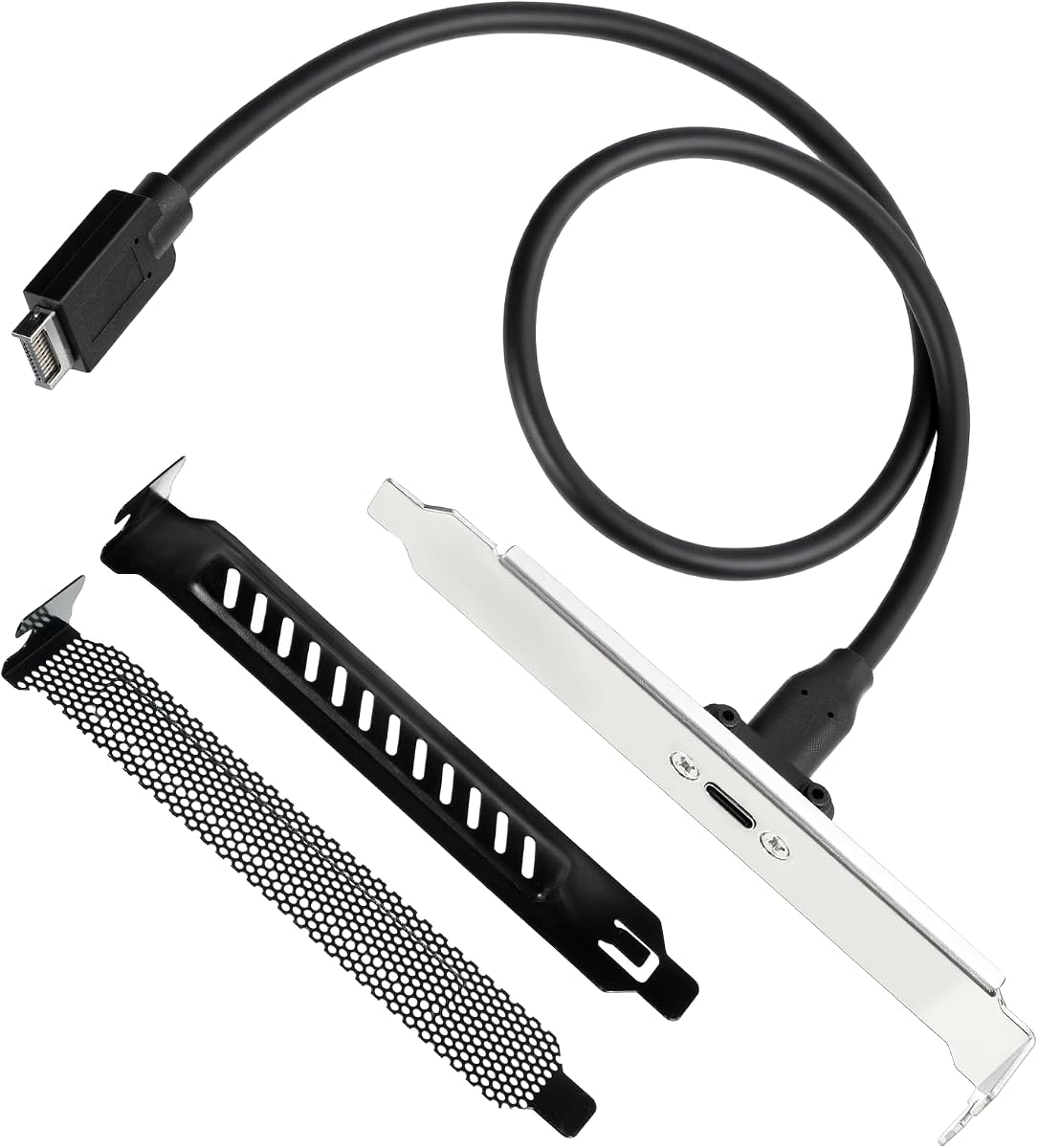
Motherboard USB 2.0 to Type C Front Panel Cable
4.8Editor score
USB 2.0 Specification Speed
Six Point Seven Inch Length
No Driver Required Setup
Modern desktop computers often lack the latest front panel connectivity options, leaving users stranded with outdated ports. Front Panel USB C Headers solve this problem by adding fast, reversible USB Type-C access directly to your case front.
We analyzed ten leading header cables and hub adapters based on speed ratings, motherboard compatibility, and build durability. Each product was selected for its ability to extend internal headers to external, panels without compromising signal integrity or power delivery.
Every pick highlights specific use cases from budget extensions to full hub solutions. While prices may fluctuate over time, the technical specifications and compatibility notes remain reliable references for planning your next PC upgrade project today.
4.8Editor score

4.6Editor score

4.2Editor score
As an Amazon Associate we earn from qualifying purchases.
This side-by-side comparison evaluates all ten selected products across critical technical metrics including maximum data transfer rates, connector types supported, physical cable lengths, and specific motherboard header requirements needed for successful installation.




This GRAUGEAR cable offers the fastest front panel connectivity available for modern motherboards with Type-E headers. It supports up to 20Gbps data transfer which matches the latest USB standards for rapid file movement and peripheral support.
We may earn a commission when you buy through this link, at no additional cost to you.
The build quality stands out with double shielded wires that prevent interference during high speed transfers. The included metal bracket ensures the port sits flush with the case back providing a professional look and secure connection.
Installation requires a motherboard with a 20-pin USB3.2 Key-A Type-E header which may not be present on older systems. If your board lacks this specific header you will need an adapter or expansion card to use this cable effectively.
Buy this cable if you need maximum speed for external drives or docking stations connected to the front panel. It is the top recommendation for users with compatible modern hardware who prioritize performance and durability.
The cable supports USB 3.2 Gen2x2 which delivers up to 20Gbps transfer rates ensuring fast data movement.
Sturdy metal construction and double shielded wires ensure long life and stable signal transmission.
We may earn a commission when you buy through this link, at no additional cost to you.
This adapter cable mirrors the performance of the top pick with identical speed ratings and connector types. It is designed to extend the internal USB Type-E header to a front facing USB-C port for convenient device access.
We may earn a commission when you buy through this link, at no additional cost to you.
Users benefit from the same double shielded wiring that protects against interference. The long cable allows for flexible routing inside the case which is useful for larger chassis or complex cable management setups.
The main limitation is the dependency on a specific motherboard header type. Older boards without the 20-pin Type-E header will require an additional adapter to convert existing headers or use a PCIe card to add support.
Choose this cable for reliable high speed front panel USB-C access. It is ideal for modern builds where speed and connectivity are priority goals without needing extra hubs.
Works with phones tablets flash drives and any USB Type-C ready peripheral for versatile connectivity.
Simple plug and play installation requires no drivers for immediate use after connection.
We may earn a commission when you buy through this link, at no additional cost to you.
This premium adapter combines both USB Type-E and standard USB 3.0 headers into a single solution with both USB-C and USB-A front ports. It provides maximum versatility for users who need multiple connection types simultaneously.
We may earn a commission when you buy through this link, at no additional cost to you.
The cable supports up to 20Gbps for the Type-C side and 5Gbps for the USB-A side. This dual capability ensures that legacy devices and modern high-speed drives can both connect to the front panel without adapters.
Compatibility is the key trade-off here since you need both 20-pin Type-E and 19-pin USB 3.0 headers on your motherboard. If your board lacks either header you will need to install expansion cards to utilize all features.
Invest in this adapter if you want a comprehensive front panel solution for diverse peripherals. It is perfect for users with compatible hardware who need both Type-C and Type-A access points.
Uses both Type-E and USB 3.0 headers to provide USB-C and USB-A outputs on the front.
Supports all USB ready devices including phones tablets and flash drives for broad utility.
We may earn a commission when you buy through this link, at no additional cost to you.
This hub turns an old 3.5 inch floppy bay into a powerful connectivity center with four ports. It provides two USB-C and two USB-A ports all supporting up to 10Gbps speeds for efficient data transfers.
We may earn a commission when you buy through this link, at no additional cost to you.
The metal construction ensures durability and the included safety features like over-voltage protection keep devices safe. It is robust enough to handle multiple high-power devices simultaneously without stability issues.
You will need to connect a 15-pin SATA power cable in addition to the Type-E header. This extra requirement adds complexity to installation but ensures stable power delivery for connected devices.
Select this hub for desktops needing multiple high-speed front ports. It is ideal for users with spare 3.5 inch bays who want a permanent multi-port expansion solution.
Offers four total ports combining USB-C and USB-A to connect many devices at once.
Includes over-current and over-voltage protection to protect connected hardware during use.
We may earn a commission when you buy through this link, at no additional cost to you.
This expansion card is a great solution for older motherboards that lack internal USB-C headers. It installs in a PCIe x1 slot and provides both Type-C and Type-A front panel connectors directly to your case.
We may earn a commission when you buy through this link, at no additional cost to you.
The card offers superspeed 5Gbps which is sufficient for most peripherals like phones and external storage. It does not need external power as it draws directly from the PCIe slot and internal headers.
Note that some older operating systems or specific manufacturers might require driver installation for full functionality. However modern systems like Windows 10 and 11 typically work without extra software steps.
Choose this card if you need to add front USB-C ports to an older system. It is the best option when internal headers are missing and you have a free PCIe slot available.
Draws power from PCIe slot so no external power cable is required for operation.
Works with Windows Linux and other systems though some may need drivers.
We may earn a commission when you buy through this link, at no additional cost to you.
This hub provides one high-speed USB-C port and two standard USB 3.0 ports in a compact form factor. It is ideal for users who need 20Gbps capability alongside legacy USB support for various devices.
We may earn a commission when you buy through this link, at no additional cost to you.
The hub supports fast file transfers for the USB-C side and connects to both 20-pin Type-E and 19-pin USB headers. This dual header requirement allows for greater bandwidth availability on the USB-C side.
Installation includes screws to secure the hub in the case bay ensuring stability. Safety features like over-current protection are included to protect connected devices during power fluctuations.
Pick this hub for balanced front panel expansion with speed. It works best when your motherboard has both required headers for maximum performance.
The USB-C port supports up to 20Gbps for rapid data transfer.
Sturdy construction ensures long service life in desktop environments.
We may earn a commission when you buy through this link, at no additional cost to you.
This budget cable allows you to add a USB-C port to older systems that only have 2.0 headers. It is a simple way to bring modern connectivity to legacy hardware without needing expensive upgrades.
We may earn a commission when you buy through this link, at no additional cost to you.
The cable is short at 17cm which is perfect for cases with tight spaces. It supports USB 2.0 speeds which are sufficient for charging phones or connecting low-speed peripherals like mice.
It is not compatible with 19-pin USB 3.0 headers so check your board before buying. If your system has only 2.0 headers this is a cost-effective solution to get a USB-C port.
Buy this cable for low-cost USB-C access on older motherboards. It is best for users prioritizing price over raw data transfer speed.
Extends USB 2.0 headers to USB-C for older systems without new hardware.
Six point seven inch length fits easily in small cases.
We may earn a commission when you buy through this link, at no additional cost to you.
This adapter delivers 20Gbps speed with a long cable and extra slot covers for a professional install. The clear labeling on the connector helps avoid wiring mistakes during installation.
We may earn a commission when you buy through this link, at no additional cost to you.
The cable is flexible and resistant to bending which is useful for tight case routing. The included PCI covers protect the internal connector from debris which keeps the build clean.
While it supports high speeds the rating is lower than other models so check reviews before buying. Ensure your motherboard has the specific Type-E header to use this cable.
Choose this adapter for a complete install kit including covers. It is good for users who want all mounting accessories in one package.
Includes PCI slot covers to protect internal connectors and improve aesthetics.
Fifty centimeter length provides enough slack for most cases.
We may earn a commission when you buy through this link, at no additional cost to you.
This cable uses a flat TPE material that allows flexible routing without damaging the wires. It supports 10Gbps speeds which is ideal for most modern USB-C devices and fast storage drives.
We may earn a commission when you buy through this link, at no additional cost to you.
The double shielding layer ensures stable signal transmission during high-speed data transfers. The reversible design simplifies plugging in devices without worrying about orientation.
Panel mount screws are included for secure installation on the case. Ensure your board has the USB 3.1 Type-E port for compatibility before purchase.
Buy this cable for flexibility and ease of routing. It works well for builds where flat cables help with tidy cable management.
Ultra-thin flat TPE cable bends easily for better case routing.
USB-C design allows insertion in any direction for convenience.
We may earn a commission when you buy through this link, at no additional cost to you.
This adapter stands out with a perfect user rating and comprehensive connectivity options. It supports 20Gbps USB-C speeds and adds USB-A ports for a balanced front panel setup.
We may earn a commission when you buy through this link, at no additional cost to you.
The build includes double shielded wires for stable signal transmission. It is easy to install and requires no drivers for immediate use after connection.
You need both Type-E and USB 3.0 headers to use all ports which may limit compatibility. If your motherboard supports this combination you get a complete front panel solution.
Select this adapter for reliability and full connectivity. It is perfect for users with compatible hardware who want top ratings and dual port support.
Holds a perfect user rating indicating high satisfaction with performance.
Double shielded wires ensure stable signal transmission and safety.
We may earn a commission when you buy through this link, at no additional cost to you.
Selecting the right front panel header depends on your motherboard capabilities and desired speed. This guide explains the key factors to check before making a purchase.
Check your motherboard manual to confirm if it has a 20-pin USB 3.2 Type-E header. Some boards only have older 19-pin USB 3.0 headers which require different cables or adapters.
Always verify header type before buying to avoid compatibility issues.
Choose a cable that matches your port needs such as 20Gbps for USB 3.2 Gen2x2 or 5Gbps for standard USB 3.0. Higher speed cables are essential for fast external storage drives.
Prioritize speed if you frequently transfer large files to external media.
Measure the distance from your motherboard header to the front panel cutout. Long cables offer flexibility but may create clutter while short cables fit small cases better.
Select a length that ensures clean cable management without tension.
Decide if you need just one USB-C port or multiple ports including USB-A. Multi-port hubs add versatility but require more internal headers and power connections.
Pick multi-port options if you need to connect many devices simultaneously.
Look for double shielded wires and metal construction to prevent interference and ensure longevity. Shielded cables maintain signal integrity during high-speed data transfers.
Invest in quality build to protect your devices and ensure stability.
Some hubs require extra SATA power connections while most cables draw power from the header. Check if your case has available power connectors before buying hub options.
Ensure power availability for hubs that need extra SATA cables.
Most adapters work without drivers on modern Windows systems. Check if older operating systems require extra software before buying to avoid installation hurdles.
Choose plug and play solutions for immediate use after connection.
Prices vary based on speed features and build materials. Budget options work for older systems while premium models offer higher speeds and durability.
Balance your budget with the features you truly need for your setup.
Turn off your computer and unplug the power cable before opening the case. Identify the motherboard header labeled as USB3.2 Type-E or USB 3.0 on the motherboard.
Connect the header end of the cable firmly to the motherboard port. Ensure the connector is oriented correctly by matching the keying or markings on both ends.
Run the cable through available case holes to the front panel cutout and secure the metal bracket with screws. Close the case and power on to test connected devices.
A USB Type-E header is a 20-pin internal connector on motherboards that provides USB 3.2 Gen2x2 speeds. It allows you to connect internal cables to front panel USB-C ports. This header type is common on modern boards for high-speed support.
Older motherboards may lack Type-E headers so you need specific adapters or PCIe cards. Some budget cables work with USB 2.0 headers but offer slower speeds. Check your motherboard manual to confirm compatibility before purchasing.
Most front panel cables and adapters work without extra drivers on modern operating systems. Windows 10 and 11 typically recognize them immediately. However some older systems may require installation software for full functionality.
Full speed depends on the motherboard header speed. If the board only has 5Gbps headers the port will match that limit. You must ensure the motherboard supports 10Gbps or 20Gbps to achieve higher rates.
Simple extension cables draw power from the motherboard header without extra needs. Multi-port hubs may need a 15-pin SATA power cable for stable operation. Check product details to confirm specific power requirements.
Connect the adapter cable to the motherboard header and secure the front port bracket with screws. Run the cable through case openings carefully. Ensure all connections are firm before powering on the system.
The top picks cover all major use cases from budget cables to high-speed hubs. Choosing the right one depends on your motherboard headers and required data transfer rates.
Prioritize compatibility and build quality to ensure stable performance. Always verify your motherboard specifications before purchasing to avoid installation issues.
Check current pricing and availability as deals may vary over time. Selecting the right header now ensures your PC stays ready for modern connectivity needs.