
4K@60Hz HDMI Switch Splitter 4 in 2 Out w/Remote, Optical Audio and 3.5mm
4.2Editor score
Affordable 4K@60Hz matrix
Built-in optical and analog audio
Includes IR remote control
This guide compares the top 10 HDMI Matrix Switch models for audio extraction, video scaling, and multi-display routing in home and professional setups.
Selecting the right HDMI Matrix Switch is essential for managing multiple video sources across several displays. A quality unit ensures signal integrity, supports high resolutions, and offers flexible routing options for any setup.
We evaluated ten leading models based on performance, compatibility, audio handling, and build quality. Our analysis covers features like 4K and 8K support, extraction capabilities, and control interfaces to help you choose wisely.
Each pick highlights specific strengths and ideal use cases to guide your decision. Remember that availability and pricing fluctuate frequently, so verify current details before purchasing to ensure you get the best value today.
4.2Editor score

4.3Editor score

4.7Editor score
The following comparison outlines the key specifications of each top-rated HDMI Matrix Switch to help you evaluate performance, connectivity, and features side by side for your specific needs.



This OREI 4×2 HDMI Matrix Switch stands out as a top choice for advanced home theater setups requiring next-generation performance. It earns an Editor's Choice badge due to its support for 8K resolution and HDMI 2.1 features like Variable Refresh Rate and Auto Low Latency Mode, which are critical for high-end gaming and cinematic experiences.
We may earn a commission when you buy through this link, at no additional cost to you.
The unit delivers exceptional video quality with support for resolutions up to 8K@60Hz and bandwidths reaching 40Gbps. This ensures that your signal remains pristine even when transmitting high-bitrate content. Additionally, the inclusion of eARC and comprehensive audio extraction via Optical and Analog outputs allows for seamless integration with modern soundbars and amplifiers.
While the price is higher than standard matrices, the investment is justified for users who demand top-tier performance. The only trade-off is that eARC functionality requires compatible TVs and soundbars to function correctly. However, for professional AV enthusiasts, this limitation is minor compared to the flexibility and fidelity offered.
We recommend this model for anyone building a premium home theater or commercial display system where future-proofing is essential. If you need to route multiple high-definition sources to different displays without compromising quality, this switch provides the reliability and advanced features necessary to meet those demanding standards.
With support for 4K@120Hz and 8K@60Hz, this matrix is ideal for next-gen consoles and high-frame-rate video playback without lag.
The matrix supports advanced audio formats including Dolby Atmos and DTS-HD Master Audio, ensuring immersive sound for every output.
We may earn a commission when you buy through this link, at no additional cost to you.
The OREI 8×8 HDMI Matrix Switch represents the pinnacle of AV distribution technology, earning a Best Premium label for its extensive capabilities. With a high user rating of 4.7, this device is designed for large-scale installations where routing multiple sources to numerous displays simultaneously is required without signal degradation.
We may earn a commission when you buy through this link, at no additional cost to you.
Its support for HDMI 2.1 and 8K resolution ensures that the system remains viable for years to come. The inclusion of audio extraction and advanced IR control allows for centralized management of complex environments. This makes it an ideal candidate for boardrooms, large entertainment complexes, or multi-room home automation systems.
While the cost is significant, the scalability and robustness it offers justify the expense for professional users. The only minor drawback is that its complexity may be overkill for a simple living room setup. However, for those who need eight independent inputs and outputs, there is no better option on the market.
We recommend this switch for enterprise or high-end residential projects requiring maximum flexibility. It combines cutting-edge video standards with reliable audio handling, making it a definitive choice for installers who need a comprehensive solution for high-demand AV distribution networks.
The 8×8 configuration allows any source to be routed to any display independently, providing unparalleled flexibility for large spaces.
Advanced IR and EDID management allow for seamless integration into existing smart home or commercial control systems.
We may earn a commission when you buy through this link, at no additional cost to you.
This 4K@60Hz HDMI Switch Splitter offers incredible value for users needing a reliable matrix on a budget. Awarded Best Budget, it delivers strong performance at a fraction of the cost of higher-end models, making it accessible for homeowners, offices, and schools looking to manage multiple displays efficiently.
We may earn a commission when you buy through this link, at no additional cost to you.
It supports 4K@60Hz video transmission and includes both optical and 3.5mm audio outputs, allowing for flexible sound system integration. The metal shell ensures heat dissipation and durability, while the included remote simplifies daily operation. This combination of affordability and functionality makes it a standout choice for casual users.
The main trade-offs are that it lacks HDMI 2.1 features and requires AAA batteries for the remote, which are not included. However, for standard HD content and modern consoles, these limitations do not impact usability. It provides excellent reliability for everyday switching tasks without unnecessary extras.
We recommend this model for those prioritizing cost-effectiveness without sacrificing core performance. If you need to connect two displays to a couple of sources like a console and a streaming device, this unit provides a robust and straightforward solution that meets most consumer needs.
For users who need 4K switching but do not require 8K or advanced features, this offers the best price to performance ratio.
The ability to extract audio to separate outputs ensures you can use external speakers without extra hardware.
We may earn a commission when you buy through this link, at no additional cost to you.
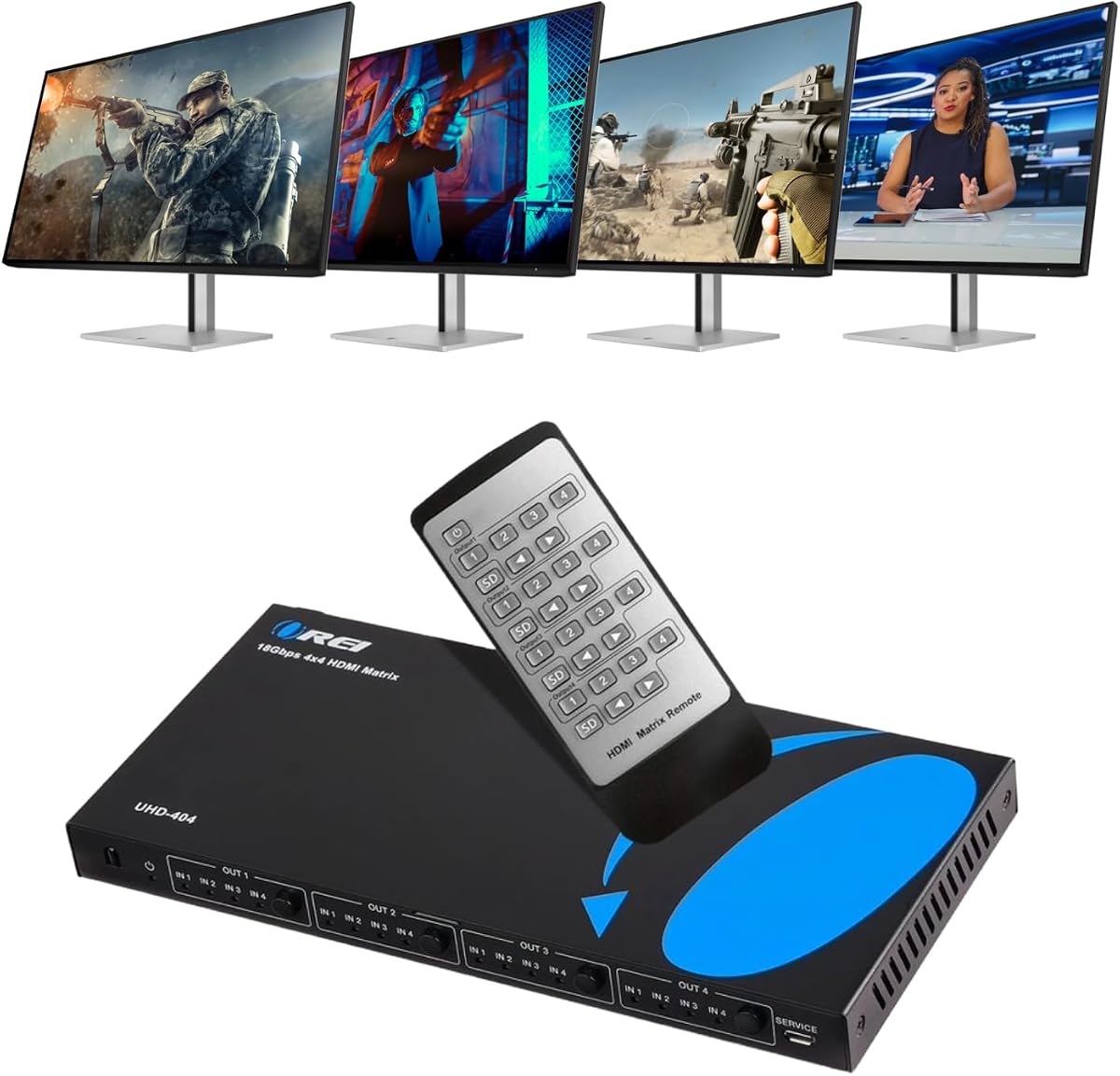
The OREI 4×4 HDMI Matrix Switch is a versatile tool for commercial and home entertainment environments that need four independent outputs. With a 4.5 rating, it is known for stability and high-quality visuals. This model is particularly well-suited for digital signage, classrooms, and conference rooms where multiple screens need synchronized or independent content.
We may earn a commission when you buy through this link, at no additional cost to you.
It supports up to 4K@60Hz with HDR and allows for Audio Return Channel (ARC) functionality on Output A. This is beneficial for setups where audio from a TV needs to return to a central system. The flexible switching allows you to route different sources to different screens, maximizing display utility.
While it does not support 8K or HDMI 2.1 advanced features like VRR, its performance is ample for most professional video needs. The only limitation is that HDR is supported but at a lower bandwidth than premium units. For general video distribution, however, the reliability and ease of use make it a strong contender.
We recommend this switch for small businesses or home offices needing a 4×4 routing solution. It provides the necessary bandwidth and audio flexibility to run presentations or media smoothly across multiple displays without breaking the bank or requiring complex installation.
ARC support allows audio to return from a display to the matrix, simplifying sound system connections in meeting rooms.
Each output can display different content, making it perfect for multitasking setups in retail or educational environments.
We may earn a commission when you buy through this link, at no additional cost to you.
This OREI 4×4 HDMI Matrix Switch is designed for reliability and ease of setup in global markets. It earns a spot for its balanced feature set, offering downscaling for mixed-resolution displays and a dual voltage power supply with an adapter. This makes it an excellent choice for travelers or international installations.
We may earn a commission when you buy through this link, at no additional cost to you.
It handles 4K@60Hz video with HDR and supports HDCP 2.2 for content protection. The downscale function allows you to connect 4K and 1080p displays simultaneously without issues. This level of flexibility is valuable for users with older and newer screens in the same room or building.
The only limitations are the lack of specific audio extraction ports and basic EDID controls compared to premium units. However, for standard 4K distribution, it performs flawlessly. The included international adapter adds significant convenience, saving users the hassle of finding local power solutions.
We recommend this model for users who need a simple 4×4 solution with international capabilities. It provides reliable video switching and handles mixed resolutions well, making it a practical option for offices, hotels, or homes with varied display setups.
The dual voltage supply and included adapter ensure this matrix works anywhere in the world with minimal setup.
Downscale functionality ensures both 4K and 1080p screens receive compatible video signals simultaneously.
We may earn a commission when you buy through this link, at no additional cost to you.
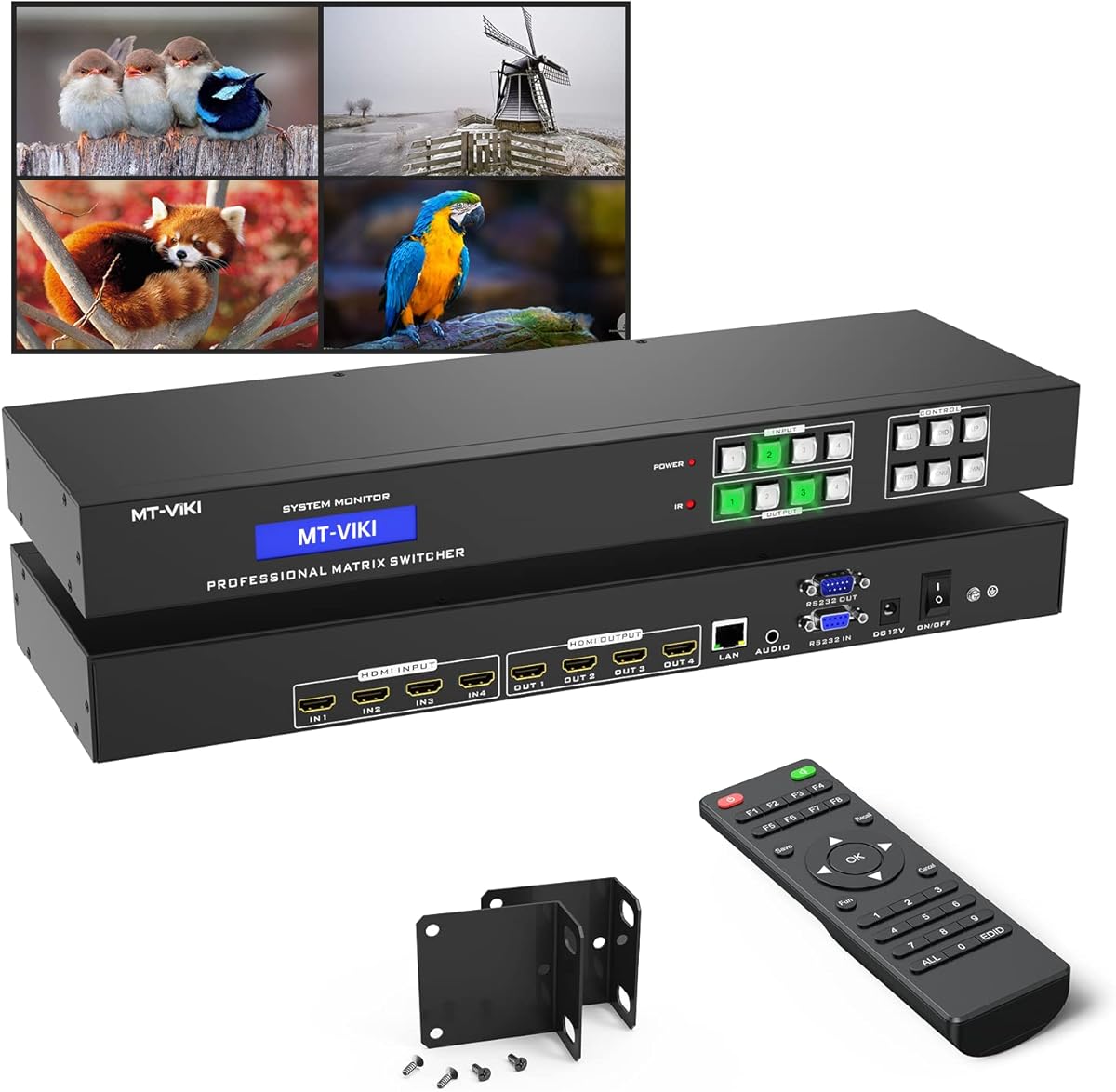
The MT-VIKI 4K HDMI Matrix Switch is built for environments that require advanced control and integration. With features like Web GUI, RS232, and LAN port, it allows for centralized management, making it ideal for conference rooms and churches. Its rack-mount design fits seamlessly into AV equipment closets.
We may earn a commission when you buy through this link, at no additional cost to you.
Although it supports up to 4K@30Hz, its strength lies in its connectivity options. You can control it via a web browser or RS232, which is crucial for custom installers. Additionally, audio extraction is available on OUT4, providing a convenient way to route audio to external systems.
The main trade-off is the 4K@30Hz limit, which may be slow for high-speed video editing or gaming. However, for presentations and static content, it is more than sufficient. The complexity of setup is acceptable given the professional control capabilities it offers.
We recommend this model for AV technicians and businesses needing remote control options. It is a robust solution for institutional setups where devices need to be managed from different locations or integrated into existing automation systems.
LAN port support allows administrators to switch sources remotely via a browser, eliminating physical access needs.
The audio extraction feature on OUT4 simplifies sound routing for presentation rooms without needing extra splitters.
We may earn a commission when you buy through this link, at no additional cost to you.
This OREI 4×2 HDMI Matrix Switch is a solid mid-range choice for home users who need reliable 4K routing. It offers downscaling and ARC support, which makes it compatible with a wide range of TVs and soundbars. Its simple design keeps it affordable without compromising on essential video transmission quality.
We may earn a commission when you buy through this link, at no additional cost to you.
The unit supports up to 4K@60Hz and includes IR control for easy switching. It handles various HDMI versions and ensures stable connections for modern consoles and PCs. While it lacks advanced audio extraction ports, the ARC support helps manage audio return effectively for soundbars.
The only downside is its relatively lower user rating compared to other models. However, this often depends on setup complexity. For standard home theater needs, it delivers consistent performance. The USB power supply adds convenience, reducing the need for a wall outlet.
We recommend this model for casual gamers and movie watchers. It provides the necessary 4K throughput and ARC compatibility to connect multiple sources to two displays, making it a practical solution for budget-conscious consumers seeking quality video distribution.
Output A supports ARC, allowing audio to be sent back to the matrix for soundbar processing.
The USB power supply allows for flexible placement near USB-enabled TVs, simplifying cable management.
We may earn a commission when you buy through this link, at no additional cost to you.
This matrix is an efficient solution for small offices needing to manage inputs across two displays. It supports 4K@60Hz and downgrades resolution automatically for compatibility. The inclusion of both optical and 3.5mm audio outputs makes it versatile for connecting various speaker systems in meeting rooms.
We may earn a commission when you buy through this link, at no additional cost to you.
It offers built-in equalization and amplification to ensure signal strength over long runs. The device is compatible with PCs, consoles, and streaming devices, making it a flexible option for hybrid work setups. It is robust and handles daily switching without issues.
The only limitations are the mirror-only output and exclusion of batteries. For most office tasks, mirroring is sufficient. The remote makes switching between inputs easy during meetings. This combination of features ensures it remains a reliable tool for day-to-day productivity tasks.
We recommend this model for small business offices. It provides a straightforward way to manage multiple devices on two screens with minimal cabling complexity. Its affordability and compatibility ensure it meets the needs of budget-conscious commercial environments.
Optical and 3.5mm audio outputs allow for easy connection to conference speakers without extra equipment.
Built-in equalization helps maintain signal integrity over longer HDMI cable runs typical in office environments.
We may earn a commission when you buy through this link, at no additional cost to you.
This OREI 4×2 HDMI Matrix Switch is an excellent choice for users dealing with a mix of old and new devices. It supports HDCP 2.2 and HDMI 2.0 but also offers extensive EDID modes to ensure stable handshaking with legacy systems. The downscale feature allows simultaneous use of 4K and 1080p screens.
We may earn a commission when you buy through this link, at no additional cost to you.
It includes ARC support for returning TV audio to the matrix, which simplifies audio routing. The device is compact and comes with mounting ears, making it easy to hide in a media cabinet. Its compatibility ensures that older Blu-ray players or set-top boxes work seamlessly.
The lack of HDMI 2.1 features like VRR makes it less suitable for next-gen gaming, but for general AV, it is strong. The only minor limitation is that downscaling is specific to 4K to 1080p transitions. However, this covers most common compatibility issues users face.
We recommend this switch for households with mixed AV equipment. It ensures older devices work without handshake issues, making it a reliable choice for those who do not need the latest video specifications but need stable performance.
Multiple EDID modes allow stable connections with older HDMI 1.4 devices while supporting modern 4K sources.
Included mounting ears allow the unit to be secured easily in standard AV rack setups or shelves.
We may earn a commission when you buy through this link, at no additional cost to you.
This extender matrix allows for distribution of video sources over long distances using CAT6 cables. It is ideal for large buildings where HDMI cabling is impractical. With support for 4K@60Hz and Power over Coax (PoC), it simplifies installation by eliminating extra power adapters at remote zones.
We may earn a commission when you buy through this link, at no additional cost to you.
It offers advanced control options including RS-232, LAN, and Web GUI for remote management. The 1-Way IR matrix allows you to control source devices from remote locations, which is essential for multi-zone setups. This level of integration is vital for high-end commercial installations.
The main requirement is that you need additional extender receivers for each output, which adds to the cost. However, the performance is unmatched for long-distance signal integrity. The complexity of configuration is worth it for those needing extensive coverage.
We recommend this model for commercial projects like hotels or museums. It ensures signal reaches distant displays without degradation. Its comprehensive control options make it the best choice for managing large-scale AV systems where physical access is limited.
Extends HDMI signals up to 230 feet using CAT6, overcoming physical cable limitations in large spaces.
1-Way IR matrix allows control of source devices from any room, essential for large residential complexes.
We may earn a commission when you buy through this link, at no additional cost to you.
Choosing the right HDMI Matrix Switch involves evaluating several technical factors to ensure it meets your specific audio and video needs.
The resolution support determines the clarity of your video output. Ensure the matrix supports at least 4K@60Hz for modern content. Look for bandwidth ratings like 18Gbps or 40Gbps to guarantee smooth playback of high bitrate files without artifacts.
Prioritize units with HDMI 2.1 support if you use next-gen consoles or want future-proofing for 8K content.
Determine how many sources and displays you have. A 4×2 matrix allows four inputs and two outputs, while an 8×8 offers massive flexibility. Choose a configuration that covers your current needs with some room for growth.
Ensure the outputs support independent routing if you want different content on different screens.
Audio extraction allows you to separate sound from video to send to a soundbar or amplifier. Check for Optical (S/PDIF) or Analog 3.5mm outputs. Some models also support eARC for high-quality audio return from TVs.
If you have a complex audio setup, a matrix with robust audio output options is essential.
If you use a mix of 4K and 1080p displays, downscaling ensures all screens work simultaneously. This feature converts high-resolution signals to match lower-resolution outputs without losing stability.
Look for matrices that handle mixed resolutions efficiently to avoid handshake errors.
Advanced users may need remote control options like RS-232, LAN, or Web GUI. These allow for centralized management in commercial settings. Basic users can suffice with an IR remote or front panel buttons.
Select a control method that matches your technical comfort and installation environment.
Look for metal enclosures that offer better heat dissipation. Ensure the ports are reinforced to withstand frequent plugging and unplugging. High-quality ports reduce signal loss over time.
Solid build quality ensures reliability for daily use without frequent hardware failures.
Connect your HDMI source devices like consoles or PCs to the input ports on the matrix. Then connect your displays to the output ports using high-speed HDMI cables. Power on the matrix first, then turn on the sources and displays to ensure proper handshake.
Use the included remote or front panel buttons to select which source appears on which display. If your unit supports EDID management, configure it to match your display capabilities for optimal resolution output. This avoids issues with missing video signals.
Keep the unit in a well-ventilated area to prevent overheating. Dust accumulation can affect performance, so clean the vents periodically with compressed air. Ensure cables are secured to prevent strain on the ports.
Yes, many models support independent scaling allowing one display to show 4K while another shows 1080p. This ensures compatibility with mixed screen setups without signal errors. Check for downscaling features before purchasing.
Yes, most modern HDMI 2.0 compatible matrices support 3D video formats. Ensure your source device and display also support 3D for the feature to work correctly. Verify compatibility in the product specs.
ARC supports compressed audio return for basic soundbars, while eARC supports uncompressed audio like Dolby Atmos. If you have a high-end sound system, eARC support is preferable for immersive audio quality.
Yes, most require an external power adapter to maintain signal stability especially over long cable runs. Some budget models may use USB power, but dedicated adapters provide better reliability for high-resolution content.
Absolutely, especially models with HDMI 2.1 support offer low latency and VRR features essential for gaming. Standard 4K matrices work for casual gaming, but ensure the model supports high refresh rates for the best experience.
Check all cable connections and ensure the source is on before switching. Try resetting the EDID settings if available. Using high-quality cables under 30 feet helps maintain signal integrity for consistent performance.
We have reviewed ten top HDMI Matrix Switch models ranging from budget-friendly units to premium enterprise solutions. The OREI 4×2 HDMI Matrix Switch 8K stands out as an Editor's Choice for next-gen performance, while the 4K@60Hz Splitter offers great value for general use.
When choosing, prioritize resolution support and audio features that match your setup. For simple home use, a basic 4×2 model may suffice, but professional environments benefit from advanced control options like Web GUI and RS232 found in higher-end models.
Remember that prices and availability change frequently, so check current listings before purchasing. Selecting a unit with the right bandwidth and compatibility ensures a smooth AV experience for years to come.