
GIGABYTE Radeon RX 9070 XT Gaming OC 16G
4.7Editor score
Powerful Radeon RX 9070 XT
Advanced WINDFORCE Cooling System
RGB Lighting Effects
This guide compares the top flagship graphics cards of October 2026, analyzing performance, cooling, and features to help you choose the right GPU.
Flagship graphics cards define the pinnacle of gaming and creative performance. These powerful GPUs deliver exceptional frame rates, advanced ray tracing, and robust AI features for demanding workloads.
We evaluated ten top models based on architecture, cooling efficiency, memory specs, and real-world capabilities. Our analysis highlights strengths, trade-offs, and ideal use cases for each card.
Each pick showcases unique advantages for specific budgets and needs. Note that prices and availability fluctuate frequently, so verify current listings before making your final purchasing decision.
4.7Editor score

4.8Editor score

4.4Editor score
This side-by-side comparison highlights key specifications and strengths across all ten models to help you quickly identify the best fit for your system.





This ASUS TUF model earns our Editor's Choice for its remarkable balance of performance, durability, and thermal management. With an impressive 4.8 rating, it leverages the latest NVIDIA Blackwell architecture and DLSS 4 to deliver exceptional gaming and creative capabilities.
We may earn a commission when you buy through this link, at no additional cost to you.
The phase-change GPU thermal pad significantly outlasts traditional paste, ensuring optimal thermal performance even under heavy loads. Military-grade components provide rock-solid power delivery and extended lifespan, while the three Axial-tech fans and massive fin array optimize airflow for consistent stability.
While the 850W minimum PSU requirement and 16-pin connector add some complexity to system builds, these are acceptable trade-offs for the reliability and performance gains. The protective PCB coating further safeguards against moisture and debris, making it ideal for long-term use.
Enthusiasts seeking a reliable flagship GPU that combines cutting-edge architecture with robust engineering should prioritize this card. Its blend of advanced thermal solutions, durable construction, and strong software support through GPU Tweak III makes it a top recommendation.
The phase-change thermal pad ensures optimal heat transfer and longevity under heavy loads, surpassing traditional paste in performance and reliability over time.
Military-grade components and protective PCB coating deliver rock-solid power and resistance to moisture, dust, and debris for extended operational lifespan.
We may earn a commission when you buy through this link, at no additional cost to you.
The ASUS TUF RTX 5090 stands as the ultimate premium flagship, offering a staggering 32GB of GDDR7 memory and 772 AI TOPS for unparalleled productivity and gaming. Despite its high price, it delivers top-tier performance for 8K gaming and AI-driven workflows.
We may earn a commission when you buy through this link, at no additional cost to you.
Powered by NVIDIA Blackwell architecture and DLSS 4, it features SFF-Ready design with a 2.5-slot layout for better compatibility. The Axial-tech fans with smaller hubs and barrier rings increase air pressure for efficient cooling, while dual-ball bearings ensure longevity.
The primary trade-offs are the significant cost and the need for sufficient case clearance due to its size. However, for users requiring maximum VRAM and AI capabilities, these are acceptable compromises given its class-leading specifications and Auto-Extreme reliability.
Professionals and hardcore gamers seeking the absolute highest performance and memory capacity should consider this flagship. Its advanced features, dual BIOS for quiet or performance profiles, and strong thermal design make it a top choice for elite builds.
With 32GB GDDR7 and 772 AI TOPS, it delivers exceptional capacity and speed for demanding rendering, AI, and high-resolution gaming workloads.
The 2.5-slot SFF-Ready design balances compatibility with performance, while dual-ball bearings and Axial-tech fans ensure efficient, long-lasting cooling.
We may earn a commission when you buy through this link, at no additional cost to you.
This GIGABYTE RX 9070 XT offers an outstanding entry point into flagship-level performance at a budget-friendly price. Its 4.7 rating reflects strong real-world gaming capabilities, powered by the latest Radeon architecture and ample 16GB GDDR6 memory.
We may earn a commission when you buy through this link, at no additional cost to you.
The WINDFORCE Cooling System with Hawk Fans and server-grade thermal conductive gel ensures efficient heat dissipation for sustained performance. RGB lighting adds customizable aesthetics, while PCIe 5.0 support future-proofs the card for upcoming systems and bandwidth demands.
While it lacks some of NVIDIA's advanced AI and ray tracing features, the trade-off is negligible for gamers prioritizing raw rasterization performance and value. The cooling and build quality remain solid, making it a reliable choice for mid-range enthusiasts.
Budget-conscious gamers and creators looking for high performance without breaking the bank will find this card compelling. Its combination of speed, cooling, and modern connectivity at a competitive price makes it a standout budget flagship recommendation.
Delivers strong gaming performance and modern PCIe 5.0 support at a highly competitive price, ideal for budget-minded enthusiasts seeking flagship features.
WINDFORCE Cooling with Hawk Fans and server-grade gel ensures thermal efficiency, complemented by customizable RGB lighting for personalized system aesthetics.
We may earn a commission when you buy through this link, at no additional cost to you.
The GIGABYTE GeForce RTX 5080 Gaming OC delivers premium performance with the latest NVIDIA Blackwell architecture and DLSS 4 support. Its 4.6 rating highlights reliable gaming and creative capabilities, backed by 16GB of fast GDDR7 memory and PCIe 5.0 bandwidth.
We may earn a commission when you buy through this link, at no additional cost to you.
The WINDFORCE Cooling System provides efficient thermal management, ensuring stable clock speeds during intense workloads. The 256-bit memory interface and advanced connectivity options future-proof the card for high-resolution displays and data-intensive applications.
While the price and power requirements are significant, they are justified by the card's high-end specifications and performance tier. For users needing cutting-edge features without stepping to flagship pricing, this model offers an excellent balance of speed and capability.
Enthusiasts and professionals seeking robust performance for 4K gaming or content creation will appreciate this card. Its combination of modern architecture, ample memory, and effective cooling makes it a compelling choice for high-end system builds.
Powered by NVIDIA Blackwell and DLSS 4, it delivers the latest advancements in performance and visual fidelity for next-gen gaming and AI workflows.
The WINDFORCE Cooling System ensures stable performance during intense sessions, maintaining optimal temperatures for sustained clock speeds and longevity.
We may earn a commission when you buy through this link, at no additional cost to you.
ASUS TUF Gaming GeForce RTX 5080 combines high performance with exceptional durability, earning a 4.6 rating for its robust design. The NVIDIA Blackwell architecture and 16GB GDDR7 memory ensure top-tier capabilities, while phase-change thermal pads maximize thermal efficiency and longevity.
We may earn a commission when you buy through this link, at no additional cost to you.
Military-grade components and Auto-Extreme manufacturing deliver rock-solid power and higher reliability. Protective PCB coating guards against environmental factors, and the 3.6-slot design with Axial-tech fans optimizes airflow for consistent cooling under heavy workloads.
The 850W minimum PSU requirement and 348mm length necessitate careful system planning, but these requirements are standard for high-end GPUs. The GPU Tweak III software allows intuitive performance tweaking and monitoring, adding value for advanced users.
Gamers and professionals prioritizing long-term reliability and consistent performance should choose this model. Its focus on durability, advanced cooling, and premium components makes it ideal for builds where stability and longevity are critical priorities.
Military-grade components and Auto-Extreme manufacturing ensure rock-solid power and higher reliability, with protective PCB coating guarding against moisture and debris.
Phase-change thermal pads optimize heat transfer for longevity, while GPU Tweak III software enables intuitive performance tweaking and system monitoring.
We may earn a commission when you buy through this link, at no additional cost to you.
The ASUS Dual RTX 5060 Ti offers an impressive balance of compact size and performance, earning a 4.7 rating for its efficiency. Powered by NVIDIA Blackwell architecture, it delivers 767 AI TOPS and supports DLSS 4 for modern gaming and AI tasks.
We may earn a commission when you buy through this link, at no additional cost to you.
The 2.5-slot design maximizes compatibility with smaller chassis while maintaining cooling efficiency. Axial-tech fans with smaller hubs increase downward air pressure, and 0dB technology ensures silent operation during light gaming, while dual BIOS profiles allow customization between Quiet and Performance modes.
While raw power is lower than flagship models, the card excels in small form factor builds and energy efficiency. The dual ball fan bearings lasting up to twice as long as sleeve designs add reliability for users needing a compact yet capable GPU.
Build enthusiasts and those with limited case space should consider this model for its excellent fit and modern features. Its blend of AI performance, silent operation, and durability makes it a standout choice for compact gaming systems.
The 2.5-slot design ensures broader compatibility with smaller cases while maintaining superior cooling efficiency through Axial-tech fan optimization.
0dB technology provides silence for light gaming, and dual BIOS profiles let users toggle between Quiet and Performance settings for flexible control.
We may earn a commission when you buy through this link, at no additional cost to you.
The ASUS Prime Radeon RX 9070 XT combines advanced thermal features with a compact design, rated 4.6 for its value. The phase-change thermal pad ensures optimal heat transfer, while the 2.5-slot design allows for greater build compatibility in smaller cases.
We may earn a commission when you buy through this link, at no additional cost to you.
Axial-tech fans with smaller hubs increase air pressure for better cooling efficiency. Dual-ball fan bearings provide longevity, and the dual BIOS switch enables toggling between Quiet and Performance profiles. GPU Tweak III software offers intuitive performance tweaking and monitoring.
While lacking NVIDIA's AI ecosystem, it offers solid raw gaming performance and modern connectivity at a competitive price. The Auto-Extreme manufacturing process adds precision and reliability, making it a robust choice for budget and mid-tier systems.
Users seeking a compact GPU with advanced cooling and customization should consider this model. Its balance of thermal efficiency, build quality, and performance makes it a strong contender for value-focused builds needing modern features.
Phase-change thermal pads lower GPU temperatures for enhanced performance and reliability, while Axial-tech fans optimize airflow for consistent thermal management.
Dual BIOS profiles allow tuning for quiet or performance modes, and Auto-Extreme manufacturing ensures precision and long-term operational reliability.
We may earn a commission when you buy through this link, at no additional cost to you.
The ASUS TUF RTX 5070 delivers reliable mid-range performance with NVIDIA Blackwell architecture and DLSS 4 support, earning a 4.7 rating. Military-grade components ensure rock-solid power and longer lifespan, while phase-change thermal pads maintain optimal thermal performance over time.
We may earn a commission when you buy through this link, at no additional cost to you.
The 3.125-slot design with massive fin arrays and Axial-tech fans optimizes airflow. ASUS GPU Guard and bracket secure the GPU, reducing crack risks and ensuring stable mounting during operation. GPU Tweak III software provides intuitive performance controls and monitoring.
The 12GB GDDR7 memory offers a balance between performance and efficiency, though it is lower than 16GB rivals. For users needing solid mid-tier performance with exceptional build quality and thermal design, these trade-offs are acceptable and justified.
Gamers and creators seeking a reliable, durable GPU for 1440p or moderate 4K workloads will appreciate this model. Its focus on stability, thermal longevity, and robust construction makes it an ideal choice for long-term system builds.
Military-grade components and phase-change thermal pads deliver rock-solid power and optimal thermal performance, ensuring longevity under heavy use.
ASUS GPU Guard and bracket ensure stable mounting to reduce cracks, while GPU Tweak III enables intuitive performance tweaking and thermal monitoring.
We may earn a commission when you buy through this link, at no additional cost to you.
The VIPERA NVIDIA GeForce RTX 4090 Founders Edition remains a legacy flagship with 16,384 CUDA cores, earning a 4.6 rating for raw performance. It supports 4K 120Hz HDR and 8K 60Hz HDR, with fourth-gen tensor cores delivering up to 2x AI performance.
We may earn a commission when you buy through this link, at no additional cost to you.
Third-gen RT cores provide up to 2x ray tracing performance, while NVIDIA DLSS 3 enhances AI-accelerated gaming. The NVIDIA Reflex low latency platform ensures gaming-winning sensitivity, and the NVIDIA Encoder supports optimized livestreaming and content creation workflows.
Though it is an older generation compared to Blackwell models, its raw power and feature set remain competitive for specific use cases. The higher power consumption is a trade-off for its unmatched rasterization and ray tracing capabilities at launch.
Users seeking maximum raw performance without upgrading to the latest architecture will find this card compelling. Its extensive feature set for gaming, AI, and content creation makes it a strong legacy choice for power users.
With 16,384 CUDA cores and advanced tensor and RT cores, it delivers exceptional AI and ray tracing performance for demanding gaming and creative workloads.
Support for 8K HDR, DLSS 3, and NVIDIA Reflex ensures high-fidelity visuals and low-latency gaming, while NVIDIA Encoder optimizes livestreaming capabilities.
We may earn a commission when you buy through this link, at no additional cost to you.
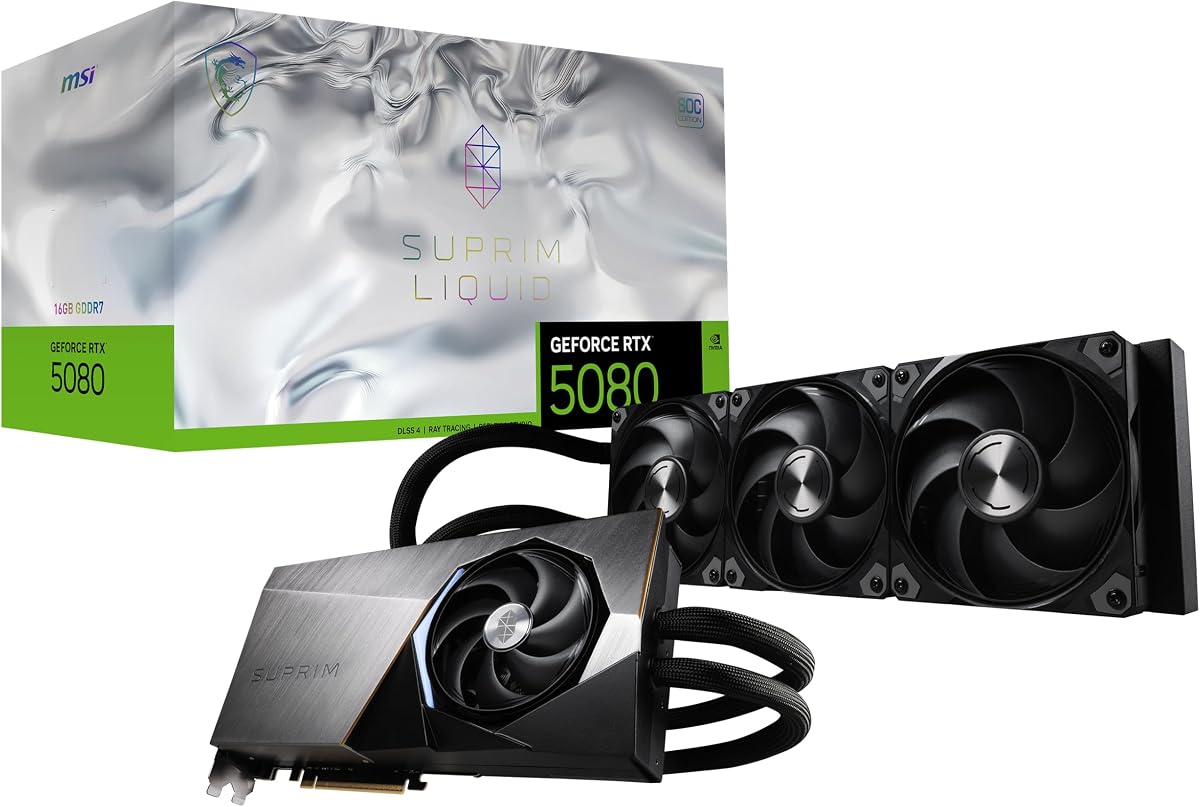
The MSI RTX 5080 SUPRIM Liquid SOC targets extreme performance enthusiasts with a liquid SOC cooling solution, rated 4.7 for its thermal and clock performance. Powered by NVIDIA Blackwell architecture, it features 16GB GDDR7 memory and an extreme boost clock up to 2760 MHz.
We may earn a commission when you buy through this link, at no additional cost to you.
The 256-bit memory interface supports digital resolutions up to 7680×4320. DisplayPort 3 (v2.1a) and HDMI 2.1b connectivity enable multi-monitor setups and future-proof displays. Liquid cooling ensures exceptional thermal management for overclocking and sustained heavy loads.
The complexity and cost of liquid cooling are significant trade-offs, but they are justified for users seeking maximum clock speeds and thermal stability. The card delivers top-tier performance with robust connectivity for high-end workstation and gaming systems.
Extreme enthusiasts and professionals requiring maximum performance and advanced cooling should consider this flagship. Its combination of liquid cooling, high clock speeds, and premium connectivity makes it an elite choice for cutting-edge builds.
The liquid SOC solution ensures exceptional thermal management for extreme overclocking and sustained loads, enabling the highest clock speeds available.
DisplayPort 2.1a and HDMI 2.1b support resolutions up to 7680×4320, enabling multi-monitor setups and future-proof high-resolution displays.
We may earn a commission when you buy through this link, at no additional cost to you.
Selecting the right flagship GPU requires understanding key factors that impact performance, compatibility, and longevity.
Modern flagship GPUs use advanced architectures like NVIDIA Blackwell or latest Radeon designs. These determine core performance, AI capabilities, and support for features like DLSS 4 or FSR. Look for architectures that align with your software and game optimization needs.
VRAM capacity, such as 12GB, 16GB, or 32GB GDDR7, directly affects performance in high-resolution gaming, AI, and content creation. Higher speeds and wider interfaces ensure smoother performance with large textures and data sets. Match capacity to your target resolutions and workloads.
Effective cooling like phase-change pads, liquid SOC, or Axial-tech fans maintains stable clock speeds and longevity. Consider airflow, fan count, and thermal design for your case size. Advanced cooling ensures performance under heavy loads without throttling or noise issues.
Flagship GPUs often need 850W+ PSUs and specific 12V-2×6 connectors. Check your PSU wattage, efficiency rating, and available cables. Upgrading your power supply may be necessary to safely support high-end models without instability.
Measure case clearance for length, slot width, and height. Some models occupy 2.5 to 3.6 slots, requiring compatible cases. Verify slot spacing and bracket options to ensure proper fit and ventilation without obstructions.
Check DisplayPort and HDMI versions for monitor compatibility, including refresh rates and resolutions. Multi-monitor setups need sufficient outputs. Future-proof connections like DisplayPort 2.1a ensure support for upcoming display technologies and bandwidth needs.
Vendor software like GPU Tweak III or MSI Center offers performance tweaking, thermal controls, and monitoring. Stable driver support is crucial for long-term reliability. Evaluate software tools for ease of use and integration with your workflow.
Look for military-grade components, PCB coatings, and extended warranties for reliability. Auto-Extreme manufacturing and phase-change thermal pads improve lifespan. Consider customer support and warranty terms to protect your investment against defects.
Install your GPU in a clean, powered-down system, ensuring the 12V-2×6 connector is securely seated. Connect all power cables and verify the PSU supports the card's wattage before powering on.
Update drivers from the manufacturer's website to ensure optimal performance and stability. Monitor temperatures and clock speeds using vendor software, adjusting fan curves or performance modes as needed.
Clean dust regularly from fans and heatsinks to maintain cooling efficiency. Ensure proper airflow in your case and avoid placing the GPU near heat sources to extend its lifespan and reliability.
Flagship cards offer superior performance, advanced architectures, higher VRAM capacity, and specialized features like AI acceleration or liquid cooling. They support higher resolutions, refresh rates, and demanding workloads that mid-range GPUs cannot handle efficiently.
Most flagship GPUs require 850W or higher PSUs with specific 12V-2×6 connectors. Verify your PSU wattage, efficiency, and available cables. If insufficient, upgrading ensures stable power delivery and prevents system crashes or instability.
Higher VRAM like 16GB or 32GB enables smoother performance at 4K resolutions, complex textures, and AI workflows. Insufficient VRAM can cause stuttering or limit software capabilities, so choose capacity based on your target resolutions and application needs.
Phase-change thermal pads provide optimal heat transfer between the GPU and cooler, outlasting traditional paste under heavy loads. They maintain thermal performance over time, reducing maintenance needs and ensuring consistent cooling for longer GPU lifespan.
Some models feature compact designs like 2.5-slot layouts for better case compatibility. However, many flagships are large and require sufficient length and airflow clearance. Always check physical dimensions and case requirements before purchasing.
Regularly clean dust from fans and heatsinks to maintain cooling efficiency. Monitor temperatures and use vendor software to adjust performance or fan settings. Ensure adequate case airflow and avoid overheating conditions to prolong GPU health.
Look for DisplayPort 2.1a and HDMI 2.1b support to match your monitors' refresh rates and resolutions. Multiple outputs enable multi-monitor setups. Future-proof connectors ensure compatibility with upcoming display technologies and higher bandwidth needs.
Most vendors offer extended warranties, often 3 years, with customer support for defects or issues. Check warranty terms, service centers, and support availability. Reliable support ensures protection and peace of mind for high-value hardware purchases.
Our top picks include the ASUS TUF RTX 5070 Ti for balanced performance, the ASUS TUF RTX 5090 for premium power, and the GIGABYTE RX 9070 XT for budget-friendly flagship capability.
Prioritize factors like VRAM capacity, cooling solutions, and compatibility with your PSU and case to ensure a seamless build. Align your choice with specific workloads, whether gaming, content creation, or AI processing.
Prices and availability change frequently, so verify current listings before purchasing. These flagship GPUs offer exceptional performance and longevity for those ready to invest in high-end computing capabilities.