
StarTech 2-Port GbE SFP Network Card, 1000BASE Copper/Fiber Optic
5.0Editor score
Intel I350 Series chipset
Unlocked 1GB SFP slots
Low-Profile bracket included
Compare the top Fiber Optic Network Interface Card options for speed and reliability to upgrade your server or desktop network performance effectively.
Finding the right Fiber Optic Network Interface Card can transform your network capabilities significantly. These devices enable high-speed data transfer over long distances with minimal signal loss. Selecting the correct card ensures compatibility with your existing infrastructure while maximizing throughput.
We compared ten leading Fiber Optic Network Interface Card models based on performance specs and connectivity features. Our analysis covers chipset reliability, port types, and operating system support to help you choose wisely. Each entry offers distinct advantages for different user needs and environments.
Each pick shows key strengths along with detailed specifications and verified user ratings from trusted sources. Prices and availability change frequently so always check current listings before making your final decision. This guide helps you navigate the options confidently without overspending on unnecessary features.
5.0Editor score

4.9Editor score

4.5Editor score
This side-by-side comparison highlights the critical specs and features of each Fiber Optic Network Interface Card to help you evaluate performance and compatibility quickly.


This CX4121A Dual 25Gb/s SFP28 Fiber Ports card leads our list with a near perfect rating. It delivers serious performance for storage servers and virtualization environments where bandwidth matters most. The Mellanox controller ensures stable data paths under heavy loads.
We may earn a commission when you buy through this link, at no additional cost to you.
Its dual 25GbE ports support RDMA over RoCE which reduces CPU overhead significantly. The PCIe 3.0 x8 interface provides enough bandwidth to sustain simultaneous high-speed transfers without bottlenecks. Support for NVGRE and VXLAN makes it ideal for complex overlay networks.
The passive heatsink can run warm so adequate case airflow is necessary. Users should verify their switch supports 25GbE SFP28 transceivers to avoid compatibility issues. These trade-offs are acceptable given the performance gains over standard 10GbE cards.
Buy this if you need enterprise-grade speed for data centers or large NAS clusters. It stands out as the best Fiber Optic Network Interface Card for users prioritizing throughput and advanced offloading features.
RDMA over RoCE allows direct memory access reducing latency for storage workloads.
Two independent SFP28 ports enable link aggregation or separate VLAN connections easily.
We may earn a commission when you buy through this link, at no additional cost to you.
The StarTech 2-Port GbE SFP Network Card holds a perfect five star rating from users. It uses the reliable Intel I350 Series chipset which ensures long-term stability for servers and desktops. The unlocked SFP slots work with any MSA compliant modules offering great flexibility.
We may earn a commission when you buy through this link, at no additional cost to you.
Its design includes LED indicators and a built-in heatsink to maintain optimal temperatures during extended use. Support for IPv6 TCP offloading and SR-IOV makes it versatile for modern network management tasks. The included low-profile bracket fits smaller cases easily.
While it caps at Gigabit speeds this limits raw throughput compared to 10GbE alternatives. The price point is also higher than some generic 10G cards which might deter budget buyers. However the reliability and support make it worth the premium for critical setups.
Choose this if you prioritize stability and ease of use over maximum speed. It is the best Premium Fiber Optic Network Interface Card for those needing trusted hardware with extensive compatibility.
The I350 AM2 chipset is known for consistent performance and low error rates in servers.
Unlocked SFP slots allow mixing fiber and direct attach copper cables as needed.
We may earn a commission when you buy through this link, at no additional cost to you.
This 10Gb PCIe NIC Network Card with Intel 82599EN SFP+ offers the best value on our list. It uses genuine Intel silicon without vendor locks meaning third-party DAC or fiber modules work without issues. This flexibility saves significant money on transceivers.
We may earn a commission when you buy through this link, at no additional cost to you.
It detects natively on Proxmox Truenas and ESXi which simplifies setup for virtualized homelabs. The card includes both full-height and low-profile brackets to fit various chassis sizes. Jumbo frames and checksum offload run in hardware to maximize CPU efficiency.
The passive heatsink gets warm during operation so good case airflow is essential. Windows users must install the Intel Ethernet Adapter Complete Driver Pack manually which adds a step. These minor issues do not outweigh the low cost and broad compatibility.
Select this for a cost-effective upgrade to 10G speeds without breaking the bank. It is the best Budget Fiber Optic Network Interface Card for users who want flexibility and reliability without premium pricing.
Unlike branded Intel cards this one accepts any SFP+ module without rejection.
Native support for Proxmox and TrueNAS reduces driver headaches significantly.
We may earn a commission when you buy through this link, at no additional cost to you.
This 10Gb/s SFP+ Fiber Port Ethernet Adapter uses the popular Intel 82599ES controller for stable 10GbE connectivity. It delivers unified LAN and SAN connectivity ideal for NAS servers and desktop gaming PCs. The PCIe 2.0 x4 interface provides sufficient bandwidth for single port throughput.
We may earn a commission when you buy through this link, at no additional cost to you.
Virtualization features like VMDq and SR-IOV enable efficient traffic management across multiple virtual machines. It supports 10GbE and 1GbE rates depending on the transceiver used. Users can choose between fiber DAC or AOC cables for flexible installation options.
Windows 10 and 11 require manual driver installation which might inconvenience casual users. The card comes with full-height and low-profile brackets but lacks active cooling features. Heat buildup can occur in enclosed cases without airflow.
Use this for general home server or gaming needs requiring reliable 10G speeds. It offers a balanced mix of performance and compatibility for typical users.
Supports iSCSI FCoE and NFS protocols for versatile storage connectivity options.
Advanced traffic management ensures VMs get consistent network performance.
We may earn a commission when you buy through this link, at no additional cost to you.
The Asus 10Gbps Gigabit Ethernet PCI Express Adapter offers blazing fast speeds for desktop users. It achieves 10x the throughput of standard gigabit links for faster file transfers and downloads. The aluminum heatsink keeps the chip cool during intense network sessions.
We may earn a commission when you buy through this link, at no additional cost to you.
A built-in SFP+ cage allows both fiber and direct-attach copper connections easily. QoS technology prioritizes critical streams like gaming to prevent lag during congestion. Operating and storage temperature ranges ensure durability across different climates.
Compared to server-grade cards it lacks some advanced features like SR-IOV support. The price is higher than generic alternatives using similar chipsets. However Asus provides better build quality and warranty support which justifies the cost for some.
Buy this for desktop PCs needing fast local network access with simple setup. It suits users who value brand reputation and effective cooling design.
Automatic prioritization boosts bandwidth to important streams like online gaming.
The aluminum heatsink maintains optimal temps without fans or noise.
We may earn a commission when you buy through this link, at no additional cost to you.
This 10Gtek card uses the high-quality Intel 82599EN controller for robust server performance. It supports I/O virtualization to ensure stable operations across virtual environments. The single SFP+ port connects to any 10 Gigabit module or DAC for flexible networking.
We may earn a commission when you buy through this link, at no additional cost to you.
Users receive both full and low-profile brackets for easy installation in compact cases. The PCIe X8 lane works in both X8 and X16 slots providing versatile motherboard compatibility. Free returns and lifetime support add value beyond the hardware itself.
Hot swapping is not supported so the system must be powered down for installation. Setting up drivers on Windows 11 requires careful configuration as noted by users. These limitations are minor given the stable performance and support.
Choose this for budget-friendly server upgrades needing proven controller reliability. It delivers consistent performance for virtualization and storage applications.
Original Intel controller ensures reliable I/O virtualization without glitches.
Included brackets fit low profile and standard towers easily.
We may earn a commission when you buy through this link, at no additional cost to you.
The 10G SFP+ PCIe Network Card with Realtek RTL8127 controller offers modern PCIe Gen4 speeds. It provides dramatic 10x speed increases over standard gigabit adapters. The RealWoW technology enhances data transmission stability and wake-up functions.
We may earn a commission when you buy through this link, at no additional cost to you.
Its PCIe x1 design works in any X1 to X16 slot maximizing motherboard flexibility. Users can scan a QR code for quick driver downloads and installation. It supports IEEE 802.1Q VLAN tagging and flow control for complex network environments.
It does not support FreeBSD or ESXi which limits virtualization options for some users. Linux kernel support is capped at 6.15 requiring caution for newer distros. Still it offers excellent performance for compatible systems.
Use this for modern PCs needing 10G speeds with broad OS support. It is ideal for Windows and Linux users avoiding virtual machine environments.
PCIe Gen4 x1 provides plenty of bandwidth for single 10G port.
QR code on the card simplifies driver downloads significantly.
We may earn a commission when you buy through this link, at no additional cost to you.
This 10Gb Fiber Optic Network Card comes with a multimode optical module included for convenience. The Intel 82599EN chip ensures low consumption and stable performance. Gold-plate fingers reduce hardware contact faults for reliable service life.
We may earn a commission when you buy through this link, at no additional cost to you.
The PCIe X1 port fits most slots from X1 to X16 for broad compatibility. It auto adapts transmission rates and supports both half and full duplex modes. TCP/UDP checksum offloading frees CPU resources for other tasks effectively.
Warranty details are not explicitly clear which may concern cautious buyers. User reviews are not fully rated leaving some uncertainty about long-term reliability. The included module is a nice touch for immediate deployment.
Choose this if you need a ready-to-use 10G fiber setup. It suits workstations or industrial PCs needing low latency connectivity.
A multimode optical module ships with the card for instant fiber connectivity.
Gold-plate fingers provide better contact and prevent oxidation over time.
We may earn a commission when you buy through this link, at no additional cost to you.
The TP-Link TX401 uses 10GBase-T copper technology instead of fiber but delivers similar speeds. It offers extreme speeds up to 10Gbps which is ten times faster than typical gigabit links. The included CAT6A cable ensures maximum performance without extra purchase.
We may earn a commission when you buy through this link, at no additional cost to you.
It auto negotiates between multiple data rates including 5 Gbps and 2.5 Gbps for flexibility. QoS prioritizes gaming traffic to avoid congestion. Both low-profile and full-height brackets are provided for any case size.
Since it uses copper it does not match fiber immunity to interference or distance limits. Heat generation is higher than passive SFP+ cards so fans may be needed. Users needing optical connectivity should look at SFP models.
Buy this for copper-based systems needing 10G without switching cabling. It offers convenience with included cables and strong support.
10GBase-T works with standard CAT6A cables unlike SFP fiber.
TP-Link provides a strong two-year warranty with 24/7 support.
We may earn a commission when you buy through this link, at no additional cost to you.
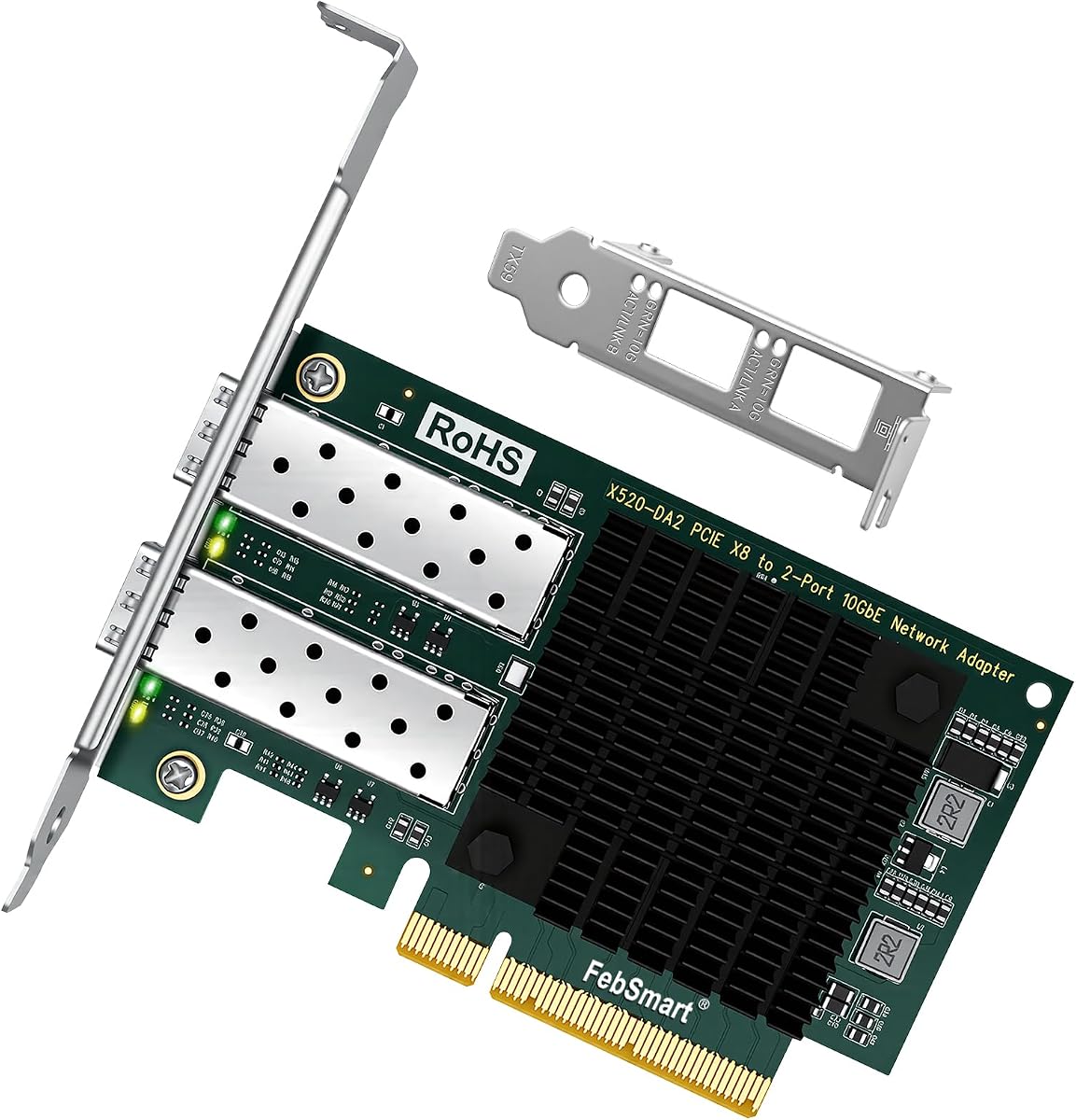
The FebSmart X520-DA2 features dual SFP+ optical ports using a powerful Intel 82599ES controller. It delivers stable 10GbE connectivity for servers and data centers. The PCIe 2.0 x8 interface provides forty Gbps total bandwidth for full duplex speeds.
We may earn a commission when you buy through this link, at no additional cost to you.
Advanced support includes SR-IOV FCoE and PXE boot for versatile enterprise environments. It works natively on Windows Server Linux Ubuntu Debian and VMware. The card comes with full height brackets plus a low profile option included.
Requires an x8 PCIe slot which limits motherboard compatibility for smaller boards. Windows 10 and 11 need driver installation adding setup time. These factors are manageable for users with compatible hardware.
Select this for systems needing dual port redundancy at 10GbE speeds. It offers excellent support for virtualization and storage workloads.
Two SFP+ ports enable link aggregation or failover for reliability.
Works with nearly all major OS including ESXi without issues.
We may earn a commission when you buy through this link, at no additional cost to you.
Selecting the right Fiber Optic Network Interface Card involves understanding speed requirements compatibility and feature needs.
Determine the data rates you need like 1Gbps 10Gbps or 25Gbps. Higher speeds demand more PCIe lanes and proper switch support to avoid bottlenecks.
Always match your NIC speed with your switch and cabling to maximize throughput efficiency.
Fiber Optic Network Interface Cards often use SFP SFP+ or SFP28 connectors. Ensure your chosen modules match the cage type and fiber type singlemode or multimode.
Select SFP+ for 10G or SFP28 for 25G depending on your future upgrade plans.
Check that the card supports your OS like Windows Server Linux or FreeBSD. Some cards have native drivers while others require manual installation.
Verify driver availability for your specific OS version to avoid installation headaches.
If using VMware ESXi or Proxmox look for SR-IOV and VMDq support. These features allow multiple VMs to share the NIC efficiently.
Prioritize cards with virtualization offload to reduce CPU overhead in virtual environments.
Some branded cards reject third-party transceivers forcing expensive official modules. Look for unlocked SFP cages for better cost efficiency.
Avoid vendor locked NICs to save on optical module purchases over time.
Measure your case space to see if a low-profile or full-height bracket fits. Passive heatsinks need airflow so consider case fans if the card runs warm.
Ensure your system has enough clearance and airflow for the NIC to avoid throttling.
Review the warranty terms and return policy to protect your investment. Reputable brands offer better support channels and longer coverage periods.
Choose sellers or brands with responsive support to resolve hardware issues quickly.
Consider PCIe generation and lane availability for future upgrades. A PCIe 3.0 card might struggle with 25G rates without enough lanes.
Plan for bandwidth headroom to support new apps without replacing the NIC soon.
Install the Fiber Optic Network Interface Card into a compatible PCIe slot on your motherboard. Secure the brackets and connect the fiber cables using clean LC connectors.
Insert the transceiver module into the SFP cage before plugging in fiber cables to avoid damage. Ensure both ports light up indicating link status on the card.
Keep the system well ventilated and clean dust from heatsinks regularly. Update drivers and firmware to maintain performance and security patches over time.
Most cards require drivers for non-server systems. Windows users often need manual installation while many Linux distributions detect them automatically. Always check manufacturer support pages for the latest stable driver releases.
SFP supports Gigabit speeds while SFP+ supports 10G. SFP+ cages work with SFP modules at lower rates but not vice versa. Choose the correct type based on your intended speed goals.
No they are not compatible due to core size differences. Using mismatched fiber types causes signal loss or failure. Always match fiber and optic specifications precisely for reliable performance.
Most desktop cards are not hot swappable and need system shutdown for install. Server NICs may support hot swap if the system supports it. Check specs before attempting live insertion.
Singlemode can reach tens of kilometers while multimode usually maxes at 300m. Always verify transceiver specs for exact distance limits. Longer runs require proper fiber grades.
Use system tools like lspci in Linux or device manager in Windows. PCIe speed affects available bandwidth for high-speed NICs. Ensure the slot meets the card's requirements.
It could be due to wrong cable or transceiver settings. Check link negotiation on switch ports. Some cards default to lower speeds if modules mismatch.
Yes most 10G cards generate heat needing passive or active cooling. Avoid enclosing them in tight spaces without airflow. Overheating reduces reliability and performance.
The CX4121A Dual 25Gb/s and StarTech 2-Port GbE stand out for performance and stability. Their ratings and features make them top picks for different user needs.
Prioritize chipset reliability and port flexibility when selecting your Fiber Optic Network Interface Card. Ensure compatibility with your OS and switch to avoid setup issues.
Always check current prices and availability before buying as these change often. This guide provides a solid foundation for choosing the right network upgrade.