
Tripp Lite BC450
4.2Editor score
Compact mini UPS design
316 joules surge suppression
Wall mount mounting tabs
Discover the top battery backup for small office solutions compared for reliability and power protection.
Finding reliable power protection is essential for any small office environment where downtime costs money. A quality battery backup ensures your computers stay running during sudden outages and guards sensitive electronics from damaging surges that occur daily.
We compared ten top-rated UPS systems focusing on output capacity, outlet count, waveform type, and management features. Each unit was evaluated for its ability to protect workstations, network gear, and communication equipment while offering clear status displays and useful software tools.
Every pick shows specific strengths for different office setups from compact workspaces to server closets. These units provide critical runtime to save files and shut down safely. Prices and availability may change so verify current details before purchasing your system.
4.2Editor score

4.5Editor score
4.9Editor score
This side by side comparison highlights key specs for every unit including wattage ratings outlet counts and special protection features.


The CyberPower CP1500PFCLCD tops our list with its 1500VA capacity and true sine wave output. It holds a strong rating from users who need reliable protection for active PFC power supplies found in modern servers and workstations.
We may earn a commission when you buy through this link, at no additional cost to you.
Its color LCD panel gives immediate details on load and battery conditions without needing software. The twelve outlets split between battery backup and surge only let you prioritize critical gear while protecting less vital peripherals from surges.
While the unit is physically larger than compact models the expanded outlet count and true sine wave justify the size. Modern equipment requires clean power to avoid shutdowns during transfers so this waveform matters for stability.
Small offices running network racks or high performance desktops should choose this model. It balances runtime with clean power delivery and software support for monitoring across multiple systems in the workspace.
Active PFC power supplies demand pure sine wave to avoid overheating and shutdowns during battery operation.
The color display shows battery charge load percentage and runtime estimates instantly without installing extra software.
We may earn a commission when you buy through this link, at no additional cost to you.
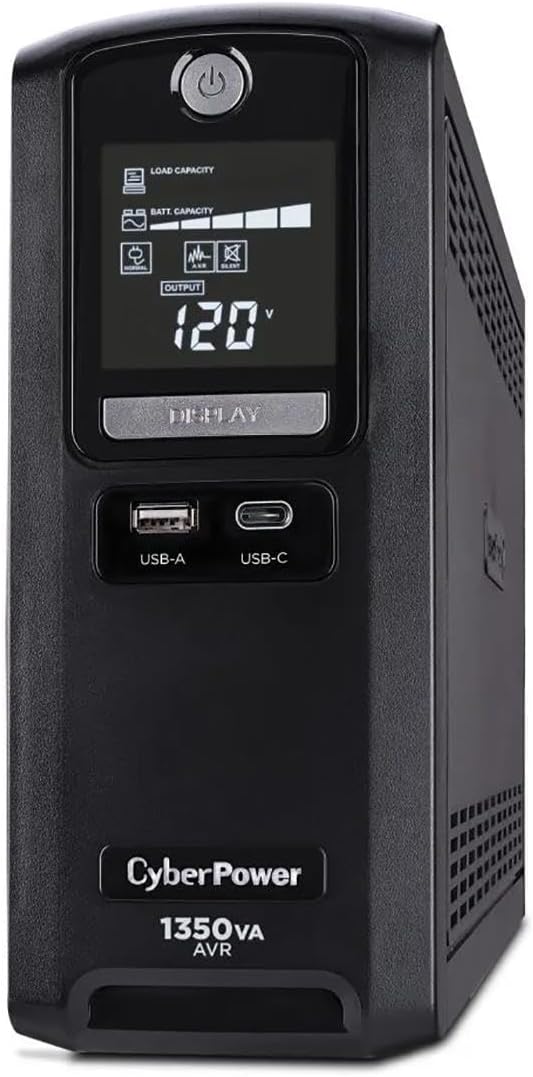
The CyberPower CST135UC earns the highest user rating in this lineup thanks to its robust protection suite. It combines solid runtime with data line protection that many units skip making it ideal for offices relying on internet connectivity during outages.
We may earn a commission when you buy through this link, at no additional cost to you.
With ten outlets and both USB Type A and C ports you can keep phones and tablets charged alongside desktop gear. The included network and coax protection prevents surges from entering through cables which often damage equipment during storms.
Its simulated sine wave works fine for standard office PCs though not for active PFC supplies. The energy efficient design reduces heat and power draw when running on line power which lowers long term operating costs.
Businesses needing data line security and long runtimes should prioritize this unit. It offers excellent value through its comprehensive protection features and strong track record for reliability across diverse environments.
Surge protection extends to network and coaxial lines to shield modems and routers from incoming voltage spikes.
Ten minutes at half load provide ample time for safe shutdowns and file saves during typical power interruptions.
We may earn a commission when you buy through this link, at no additional cost to you.
The Tripp Lite BC450 provides essential protection at a low cost suitable for single workstations. It offers sufficient wattage to keep a desktop and monitor running briefly while you save files during unexpected power losses.
We may earn a commission when you buy through this link, at no additional cost to you.
Its eight outlets include wide spacing for bulky power adapters and wall mount tabs for flexible placement under desks. The replaceable battery cartridge ensures long life without buying a whole new unit when the internal cell ages out.
Runtime is limited but acceptable for short surges or brief interruptions common in commercial buildings. Without network software this model relies on LED indicators to show status which keeps costs down while maintaining core reliability.
Small offices with tight budgets or minimal needs will find this unit practical. It delivers solid surge protection and basic backup for essential gear without the premium price or feature bloat of larger systems.
The slim form factor saves valuable desk space while still offering multiple outlets for desktop peripherals and devices.
Users can swap the internal battery cartridge easily to restore full runtime capacity after several years of use.
We may earn a commission when you buy through this link, at no additional cost to you.
The CyberPower CP1500AVRLCD3 delivers 900 watts of protected power which handles high load office gear well. Its intelligent LCD panel shows detailed battery health and runtime estimates helping you plan shutdowns during outages.
We may earn a commission when you buy through this link, at no additional cost to you.
Twelve outlets provide ample room for multiple monitors and routers while automatic voltage regulation stabilizes minor fluctuations without using battery power. USB ports keep mobile devices charged to maintain communication when main power fails.
Simulated sine wave output limits use with active PFC equipment but suits most desktops and peripherals. The unit balances price with performance making it a strong choice for general office workloads needing consistent backup power.
Offices needing higher wattage without true sine wave will appreciate this model. It offers clear monitoring and good capacity for standard workstations requiring reliable short term power during interruptions.
Automatic voltage regulation corrects low or high voltage conditions without switching to battery saving charge for actual outages.
The color panel displays precise load percentage battery charge and estimated runtime for clear status monitoring at a glance.
We may earn a commission when you buy through this link, at no additional cost to you.
The CyberPower EC850LCD features ECO controlled outlets that cut power to peripherals when the connected computer sleeps reducing energy waste. This green feature lowers costs without compromising protection for critical gear during actual power failures.
We may earn a commission when you buy through this link, at no additional cost to you.
Its twelve outlets accommodate multiple devices with a clear LCD panel showing battery status and load levels. The 850VA rating supports typical desktops and monitors providing enough runtime to close programs safely.
The ECO mode is useful for offices with many peripheral devices like printers that draw power even when idle. This design balances environmental goals with practical backup needs for general office workflows requiring steady power.
Organizations focused on energy savings will find value in this unit. It delivers essential backup with smart power management to reduce ongoing electrical costs while protecting essential workstations from outages.
ECO outlets automatically disable power to nonessential peripherals when the master device sleeps to reduce wasted energy consumption.
The multifunction LCD provides immediate visual feedback on battery health and power conditions without needing extra software tools.
We may earn a commission when you buy through this link, at no additional cost to you.
The CyberPower ST900U offers a slim vertical profile that fits easily beside desks or in tight corners. Its 500 watt output supports typical workstations while twelve widely spaced outlets handle bulky adapters without blocking each other.
We may earn a commission when you buy through this link, at no additional cost to you.
GreenPower high efficiency design reduces energy consumption during normal line operation which lowers heat and running costs. This unit provides straightforward standby protection ideal for home offices needing basic backup without complex features.
Lack of data line protection limits use where network gear is exposed to surge risks. However the outlet flexibility and compact size make it suitable for personal workspaces where simplicity and space saving are priorities.
Offices needing a compact solution with many outlets will like this model. It delivers dependable standby protection for core devices while saving valuable floor or desk space.
The vertical footprint minimizes floor usage allowing placement under desks or in server closets with limited room.
Four outlets feature wide spacing to accommodate large power bricks for monitors and printers without blocking adjacent sockets.
We may earn a commission when you buy through this link, at no additional cost to you.
The CyberPower AVRG900LCD includes data line protection to guard modems and routers from surges traveling through telephone lines. With a 480 watt output and twelve outlets it handles standard office desktops and network equipment comfortably.
We may earn a commission when you buy through this link, at no additional cost to you.
Users praise its reliability and clear LCD display showing battery status and load instantly. Automatic voltage regulation stabilizes minor fluctuations without using battery charge which extends runtime during actual power losses.
This model balances protection features without charging premium prices. The inclusion of data line shielding makes it a strong candidate for offices where internet connectivity must stay active during outages.
Workplaces needing network protection with solid general backup will find this unit effective. It offers dependable performance for mixed workloads requiring both device and line surge protection.
Surge suppression extends to telephone lines to protect connected modems and fax machines from incoming voltage spikes.
The display shows battery status and load levels allowing quick checks on power health without software interaction.
We may earn a commission when you buy through this link, at no additional cost to you.
The Tripp Lite BC350R offers basic surge protection for entry level needs at a very low price point. Its 210 watt output suits small peripherals like routers and single desktops for brief outages.
We may earn a commission when you buy through this link, at no additional cost to you.
Setup is simple with audible alarms indicating low battery or faults clearly. The keyhole slots allow wall mounting under desks to save space while keeping devices protected from surges and brownouts.
Runtime is short but sufficient for saving files and shutting down critical devices. Its compact size makes it ideal for kiosks or limited workspace setups where footprint matters more than extended backup.
Small businesses with minimal power needs will find this unit adequate. It provides essential surge defense and brief backup for lightweight devices where budget and space are primary concerns.
Keyhole slots enable secure wall mounting to clear desktop space and protect devices from accidental drops or clutter.
Pressing the power button activates protection immediately with LEDs showing status clearly without complex configuration steps.
We may earn a commission when you buy through this link, at no additional cost to you.
The APC BE600M1 provides 23 minutes of runtime at a 100 watt load which offers generous time to shut down systems safely. Its USB port keeps phones charged so staff can communicate when power is lost.
We may earn a commission when you buy through this link, at no additional cost to you.
Seven outlets cover essential desktop gear including routers and NAS units. The battery replacement process is simple requiring no tools to swap the internal cell and restore full capacity at minimal cost.
Total wattage is limited so it suits lighter workloads focused on connectivity and basic desktops. The long runtime ensures critical network gear stays online longer than many competitors during typical interruptions.
Offices prioritizing network uptime and mobile communication will find this unit valuable. It balances runtime with phone charging to keep teams connected when main power fails unexpectedly.
Twenty three minutes at low load gives ample time to save work and close applications without rushing during brownouts.
The built in 1 5 amp USB port charges phones directly to maintain contact and coordination during outages.
We may earn a commission when you buy through this link, at no additional cost to you.
The CyberPower ST425 fits into tight spaces with eight outlets spaced to avoid bulky plug conflicts. Its 260 watt output supports light office desktops and peripherals during short outages.
We may earn a commission when you buy through this link, at no additional cost to you.
GreenPower high efficiency design lowers energy use during normal operation which reduces heat generation. The LED indicators show power status and wiring faults quickly for easy setup and monitoring.
Transformer spacing ensures larger adapters do not block adjacent outlets making it practical for multi device setups. The simple design provides essential backup without needing advanced features or software integration.
Home offices and small workstations will find this model practical for budget conscious setups. It delivers reliable standby protection for essential devices while saving floor or desk space.
Outlets spaced for transformers prevent blocking adjacent sockets for devices with large power adapters and cables.
GreenPower efficiency reduces energy use during normal operation which lowers heat output and operating costs over time.
We may earn a commission when you buy through this link, at no additional cost to you.
Selecting the right backup requires balancing wattage runtime and protection type for your specific office gear.
Output capacity measured in VA or watts determines how much load the unit can support. Small offices should match total device wattage to at least 60 percent of the rated wattage for optimal battery performance.
Choose units with headroom to avoid overloading during outages.
Sine wave output provides clean power matching utility mains. Pure sine wave suits active PFC power supplies found in servers while simulated sine wave works for standard desktops and monitors.
Verify your equipment needs pure wave to avoid shutdown risks.
Multiple outlets allow you to connect desktops monitors and network gear together. Aim for at least six total sockets with separate battery backed and surge only zones to prioritize essential devices.
Check spacing for bulky adapters to prevent blocking issues.
Runtime depends on load and battery capacity. Most units give 5 to 15 minutes at partial loads which is enough to save files and shut down safely.
Match runtime to your critical gear and outages duration.
Surge suppression protects against spikes from lightning or grid surges. Look for high joule ratings especially for expensive electronics and ensure protection covers both power and data lines when possible.
High joule ratings reduce long term equipment wear.
Management software and USB ports let you monitor status and trigger safe shutdowns. LCD panels offer quick visual checks without software which helps non technical users verify battery health.
Prioritize models with alerts and easy monitoring tools.
Energy Star certified units draw less power during normal operation which lowers heat and operating costs. Efficient chargers reduce waste and extend battery life over time.
Efficiency features help lower overall office electricity usage.
Footprint matters in tight office spaces. Vertical or slim designs save floor space while maintaining adequate outlet count. Ensure clearance around vents for proper heat dissipation.
Measure your workspace before choosing a unit.
Plug the unit directly into a grounded wall outlet and turn it on. Connect critical devices to battery backed outlets and surge only items to other sockets for prioritized protection.
Download management software if available to enable auto shutdown alerts and monitor battery health. Check status displays regularly to ensure all devices show green indicators.
Replace the internal battery every two to three years to maintain runtime. Ensure the unit stays cool and away from direct sunlight for best longevity and performance.
UPS stands for uninterruptible power supply and includes surge protection and automatic switchover. Battery backup refers to the stored power component. Most office units combine both features to keep devices running during interruptions safely.
Active PFC power supplies require pure sine wave to avoid shutdowns or overheating. Standard desktop PCs and monitors work fine with simulated sine wave. Check your equipment manual if unsure before buying.
Most small office units provide 5 to 15 minutes at partial load. This time allows you to save files and shut down systems safely. Runtime depends on connected wattage and battery capacity.
Many models include outlets for routers and switches. Some units add network surge protection for incoming cables. Keep critical networking equipment on battery backed sockets to maintain connectivity during outages.
Open the battery door using the supplied screwdriver or latch. Disconnect the old battery and swap it with the new cartridge. Close the cover and reset the battery indicator if required for proper monitoring.
The unit will still offer surge protection without battery backup. You may get alerts through LED or software. Replace the battery promptly to restore runtime and shutdown features before actual outages occur.
Yes modern UPS units are designed for continuous operation. They monitor temperature and charging cycles to prevent overheating. Ensure proper ventilation and place them away from flammable items for safety.
Idle power draw is small but varies by model. Energy efficient units consume less when on line power. Check product specs for wattage draw to estimate long term electricity costs accurately.
The top choices cover needs from budget friendly entry to premium data protection with pure sine wave or high ratings. Each unit balances runtime and features for reliable office protection.
Prioritize output capacity and waveform type for your gear while considering outlet spacing and management tools. These details ensure your office stays operational during unexpected power interruptions.
Verify current availability and prices before ordering to get the best deal. Regular maintenance and battery checks will keep your system ready whenever power fails.