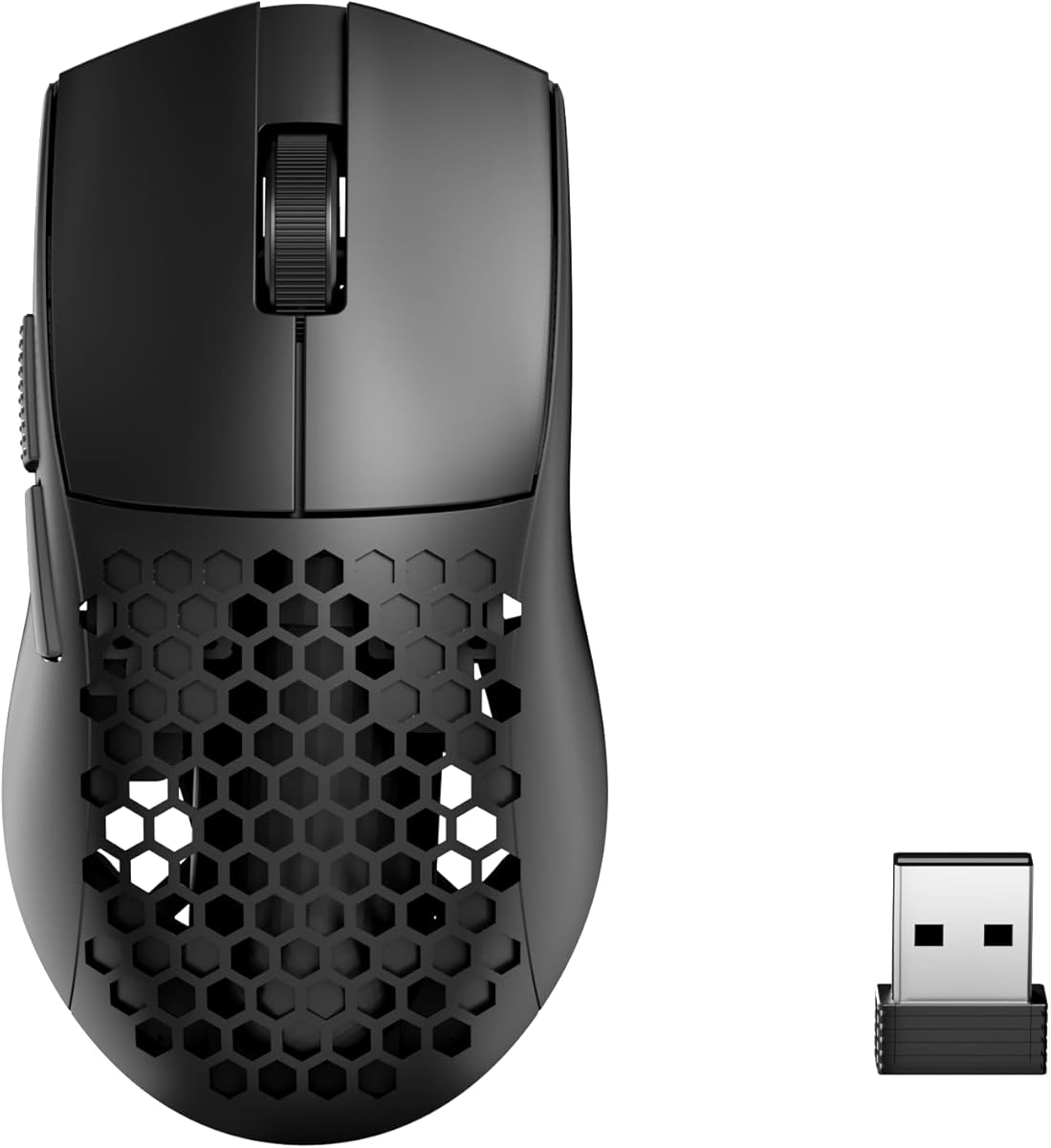
Redragon M725 Honeycomb Shell Gaming Mouse Wireless
4.4Editor score
49g ultra lightweight design
Tri-mode connectivity support
8000 DPI adjustable sensor
Discover the lightest mice for gaming in our comprehensive guide comparing top wireless and wired models for speed, precision, and comfort.
Finding the right gaming mouse can transform your experience by enhancing speed and precision during intense matches. Lightweight designs reduce strain and allow for quicker reactions, making them essential for competitive players.
We analyzed the top ten options based on sensor performance, build quality, and ergonomic design to help you choose wisely. Each model offers unique features tailored to different grip styles and budgets for optimal control.
Each pick highlights key strengths and potential trade-offs so you can make an informed decision before buying. Note that prices and availability may change frequently, so check current listings for the most up to-date information.
4.4Editor score

4.5Editor score

4.3Editor score
This side-by-side comparison highlights the key specifications and standout features of each top-rated lightweight gaming mouse to help you find the perfect fit for your needs.


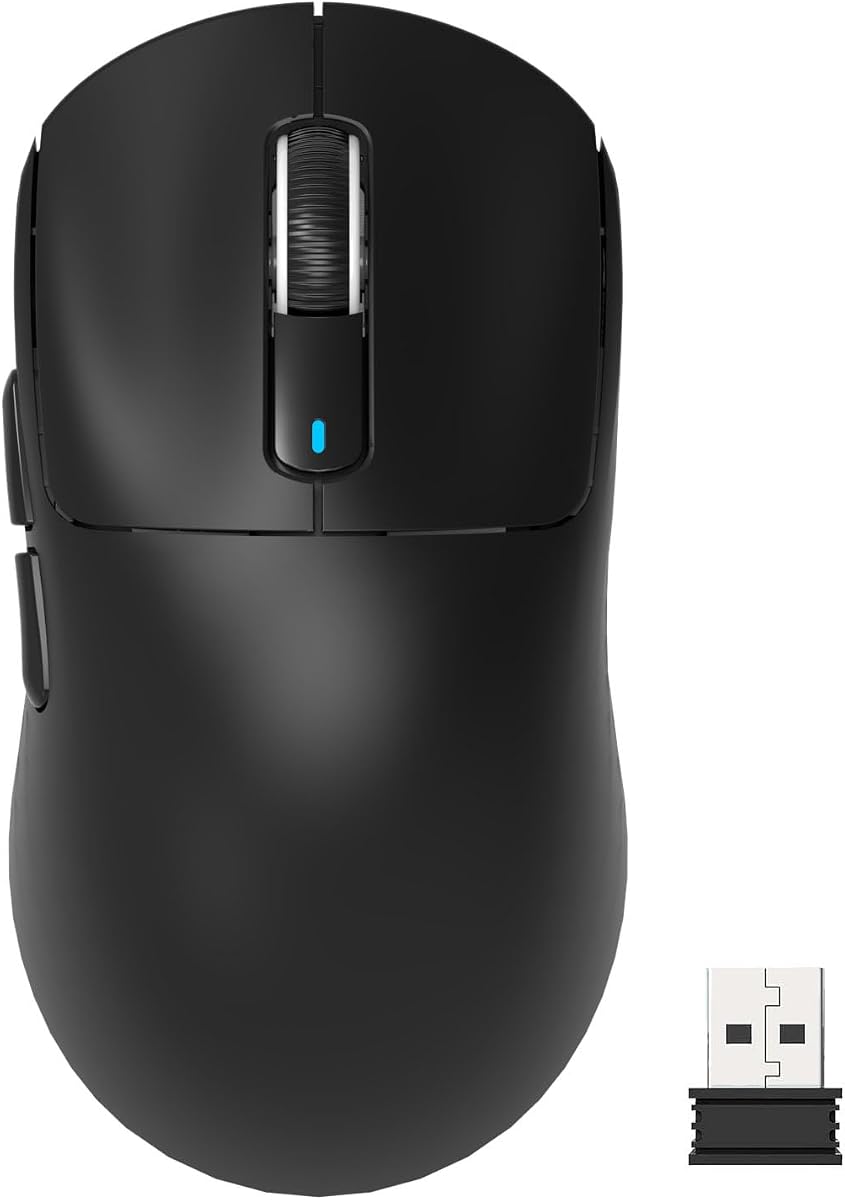


The Logitech G PRO X Superlight 2 stands out as a top contender with a rating of 4.5 stars. It combines championship-grade performance with a refined wireless experience for serious gamers.
We may earn a commission when you buy through this link, at no additional cost to you.
Its HERO 2 sensor delivers unmatched accuracy over 888 IPS with up to 44,000 DPI settings. The 8 kHz polling rate ensures instant responsiveness while the 95-hour battery supports extended sessions.
While it lacks customizable RGB lighting, the focus remains on raw performance and reliability. The zero-additive PTFE feet and hybrid switches provide a smooth glide and crisp tactile feedback.
Ideal for competitive FPS players seeking precision without weight penalties, this mouse justifies its cost through superior engineering and long-term durability in high-intensity gaming environments.
Developed with top esports pros, this mouse features a mass central design for balanced control during rapid movements and precise aim adjustments.
The HERO 2 sensor eliminates smoothing and filtering to track every micro movement accurately across various surfaces including glass.
We may earn a commission when you buy through this link, at no additional cost to you.
The Pulsar X2H Crazylight earns a 4.3 rating by redefining lightweight standards at just 37 grams. Its minimalist aesthetic hides advanced tech designed for peak performance.
We may earn a commission when you buy through this link, at no additional cost to you.
Featuring the exclusive XS-1 sensor with 32,000 DPI and 750 IPS tracking, this mouse ensures pinpoint accuracy. Speed of Light optical switches prevent double clicks for consistent inputs.
The symmetrical shape supports both claw and relaxed claw grips effectively. Enhanced DOT skates reduce friction further making movement smoother on any mousepad surface.
Gamer seeking the lightest possible option with pro-grade features will find this model unmatched. Its durability and low-profile design make it ideal for competitive play.
Despite weighing less than an egg, this mouse delivers heavyweight results through a balanced structure and premium components.
Included UHMW-PE skates provide exceptional low friction ensuring smooth gliding even during aggressive rapid movements.
We may earn a commission when you buy through this link, at no additional cost to you.
The Redragon M725 offers impressive value with a 4.4 rating and a 49 gram weight. It brings wireless freedom to budget-conscious gamers without sacrificing essential features.
We may earn a commission when you buy through this link, at no additional cost to you.
Its 8000 DPI sensor supports five programmable levels while tri-mode connection allows seamless switching between Bluetooth 2.4GHz and wired modes. Macro programming adds versatility for work or play.
The honeycomb design reduces weight and improves airflow to keep hands dry during long sessions. Symmetrical shape ensures comfort for various hand sizes and grip preferences.
Perfect for casual players or those new to lightweight mice, this option balances performance and affordability. It proves you do not need to spend heavily for reliable gaming gear.
Switch effortlessly between devices using Bluetooth USB-C or 2.4GHz wireless within a ten meter range for efficient multitasking.
All buttons and DPI settings can be tailored through dedicated software to match your specific workflow preferences.
We may earn a commission when you buy through this link, at no additional cost to you.
The Razer Viper V3 HyperSpeed achieves a 4.4 rating with a balanced 82 gram design. It offers robust performance suitable for diverse gaming styles and budgets.
We may earn a commission when you buy through this link, at no additional cost to you.
Featuring a Focus Pro 30K optical sensor it ensures flawless tracking across surfaces. Up to 280 hours of battery life on one AA battery means less downtime.
Hyperspeed wireless maintains low latency even in noisy environments. Gen-2 mechanical switches provide a 60-million click lifespan for long-term reliability.
Gamers wanting a durable wireless option with trusted brand support will appreciate this model. Its on-mouse DPI control simplifies adjustments during intense competitive matches.
Forward sensor placement and intelligent functions maintain accuracy on a wider variety of surfaces including glass.
Power through intense scrimming and tournament schedules with high-performance gaming on just a single AA battery.
We may earn a commission when you buy through this link, at no additional cost to you.
The Logitech G305 Lightspeed earns a stellar 4.6 rating for its efficiency and reliability. It proves lightweight gaming is accessible at lower price points.
We may earn a commission when you buy through this link, at no additional cost to you.
Its next-generation HERO sensor delivers up to 12,000 DPI with 10x power efficiency. The 250-hour continuous gameplay extends to nine months in Endurance mode.
At 3.4 oz it remains light enough for competitive play while offering a durable compact shape. Built-in nano receiver storage makes it ideal for laptop travel.
Ideal for students or casual gamers needing a dependable wireless mouse without breaking the bank. Its proven track record ensures consistent performance in daily use.
Delivers incredible performance with up to 10x the power efficiency over previous generations for lasting play.
Compact shape with built-in receiver storage makes it a great travel companion for gaming laptops.
We may earn a commission when you buy through this link, at no additional cost to you.
The MCHOSE L7 Pro gets a 4.4 rating with an ergonomic design weighing just 39 grams. It balances comfort with high-speed specs for competitive play.
We may earn a commission when you buy through this link, at no additional cost to you.
Its new sensor offers 26,000 DPI sensitivity and 8k Hz polling rates to detect motion at submicron scale. Optical switches provide up to 150 million clicks lifespan.
Tri-mode connection supports USB-C 2.4G and Bluetooth for flexible use. The high hump design conforms to hand shapes reducing fatigue over long sessions.
Those seeking an ergonomic feel at ultra-light weight will find this mouse appealing. Its fast wireless tech and customizable driver add versatility for various setups.
High hump design and small waist angle conform perfectly to various hand shapes and grip styles.
Capable of detecting motion at the submicron scale to provide exceptional accuracy for optimal tracking.
We may earn a commission when you buy through this link, at no additional cost to you.
The ATTACK SHARK X3 claims a 4.4 rating by combining a PAW3395 sensor with a 49g build. It aims to deliver flagship features at a competitive price.
We may earn a commission when you buy through this link, at no additional cost to you.
Six level adjustable DPI and 650 IPS speed capture the slightest movement for precise positioning. Kailh Black Mamba switches ensure crisp feedback with 80 million click lifespan.
Three modes allow seamless switching between gaming and work. Up to four devices can connect simultaneously making it versatile for multi-device setups.
Gamers prioritizing sensor quality and durability will appreciate this balance of specs and cost. Its ergonomic design minimizes wrist fatigue during extended sessions.
Adopts a Pixart 3395 flagship optical sensor for accurate positioning tailored for gaming enthusiasts.
Switch between 2.4G wireless Bluetooth and wired mode to meet various using scenes effectively.
We may earn a commission when you buy through this link, at no additional cost to you.
The Pulsar X2 Crazylight achieves a 4.3 rating with a 39g lightweight structure. Its symmetrical design supports both claw and fingertip grips comfortably.
We may earn a commission when you buy through this link, at no additional cost to you.
The XS-1 sensor boasts 32,000 DPI and 750 IPS tracking for unparalleled precision. Optical switches minimize double clicks while ensuring swift pinpoint responses.
Included DOT skates enhance low friction for smooth gliding on glass or hard pads. The dust-proof structure ensures consistent performance even with extended use.
Ideal for gamers seeking a balanced shape with minimal weight penalty. Its sleek aesthetics and reliable engineering deliver heavyweight results in daily use.
Features a low-profile wide symmetrical shape that supports both claw and fingertip grips effectively.
Deliver exceptional low friction for smooth gliding enhancing both speed and precision on any surface.
We may earn a commission when you buy through this link, at no additional cost to you.
The ASUS ROG Harpe Ace Mini earns a 4.4 rating with a compact 49g design. Co-developed with pros it optimizes for fingertip and claw grips.
We may earn a commission when you buy through this link, at no additional cost to you.
ROG AimPoint Pro sensor tracks 42,000 DPI and offers track-on-glass technology. Tri-mode connectivity includes USB-C 2.4 GHz and Bluetooth for three devices.
ROG SpeedNova wireless ensures ultra-low latency and optimized power efficiency. The refined shape reduces fatigue making it ideal for desktop or laptop setups.
Perfect for smaller hands needing maximum control without fatigue. Its pro-approved engineering delivers pixel-perfect accuracy for competitive gaming.
Co-developed with pro FPS players the shape optimizes for fingertip and claw grips effectively.
ROG AimPoint Pro sensor delivers 42000 DPI providing pixel-perfect accuracy for competitive play.
We may earn a commission when you buy through this link, at no additional cost to you.
The Redragon M808 Storm gets a 4.5 rating with a honeycomb shell and RGB features. It offers essential performance for budget gamers.
We may earn a commission when you buy through this link, at no additional cost to you.
85g weight reduces fatigue compared to standard mice. 12,400 DPI optical sensor ensures precise registration. 7 programmable buttons support macros.
Sets Your DPI RGB settings customizable with software. The no-drag weave cable minimizes weight and friction for smooth control.
Ideal for those needing RGB aesthetics without high cost. Its tested ultralight shell ensures long-session comfort and essential buffs for PRO play.
Assures your long-session gaming without fatigue with every click in your control.
Kill the weight and friction as much as possible for better performance.
We may earn a commission when you buy through this link, at no additional cost to you.
Selecting the right lightweight gaming mouse requires weighing factors like weight, sensor, connectivity and ergonomics to match your playstyle.
Lightweight mice generally range from 30 to 70 grams. Lower weight reduces wrist fatigue and allows faster movements. Aim for a model that fits your grip style while staying under 60 grams for competitive advantage.
Focus on a weight that feels balanced during rapid flicks and holds steady during precise shots.
A high-quality optical sensor ensures accurate tracking without acceleration or spin-outs. Look for flagship sensors like HERO or PAW3395 with at least 16,000 DPI and high IPS speeds for reliable performance.
Prioritize sensors tested for consistent tracking on your preferred mousepad surface.
Wireless mice offer freedom from cables but ensure low latency technology like 2.4GHz or proprietary wireless. Wired models deliver stable connection if latency is a concern. Tri-mode options add flexibility for multi-device use.
Choose connectivity that aligns with your primary use case and setup.
Mechanical switches offer tactile feedback while optical switches prevent double clicks. Optical switches often provide faster actuation. Consider switch lifespan and click feel for long-term durability and comfort.
Select a switch type that matches your preferred tactile response and reliability needs.
The shape should complement your hand size and grip style. Symmetrical shapes suit various grips while ergonomic molds support palm or claw grips. A well-fitted design minimizes strain over long sessions.
Test the shape if possible or review dimensions to ensure a comfortable fit.
For wireless models, longer battery life reduces charging interruptions. Look for models offering 50 hours or more of continuous use. Some support fast charging or battery replacement for extended play.
Prioritize battery longevity if you game frequently without daily charging access.
Customizable buttons allow macros and keybinds for specific games. Software support enables DPI adjustments and profile management. More buttons add versatility but may add weight.
Balance button count with weight goals to maintain a lightweight build.
Honeycomb shells reduce weight but may affect structural integrity. Look for durable materials and reinforced frames. Quality construction ensures longevity despite lightweight features.
Inspect user reviews for durability feedback before committing to a build style.
Start by adjusting DPI settings in software to match your comfort level. Ensure wireless receivers are close to your system for stable connection.
Clean sensor lenses regularly with a soft cloth to prevent tracking issues. Dust and debris can hinder performance especially on honeycomb designs.
Store in a protective case when transporting to avoid shell damage. Use quality mousepads to maintain glide consistency and prevent excessive wear.
Yes, lightweight mice reduce fatigue and enable quicker movements essential for competitive gaming. Players often report improved reaction times and better accuracy with reduced mouse weight.
Flagship optical sensors track accurately on various surfaces including glass. Look for models with track-on-glass technology if you use non-traditional mousepads.
Competitive gamers typically prefer mice between 40 and 60 grams. This range balances speed and control without causing excessive wrist strain during long sessions.
Modern wireless technology like 2.4GHz and proprietary systems offers near-zero latency. Trust reputable brands for competitive-grade performance.
Wipe the sensor lens gently with a microfiber cloth weekly. Avoid harsh chemicals and keep the area free of dust buildup.
High-quality honeycomb shells are reinforced for durability despite reduced weight. Handle with care to prevent cracks at structural weak points.
Most wireless mice last 50 to 280 hours on a single charge or battery. Choose models with extended life if charging access is limited.
Many lightweight models support software customization for DPI and macros. Verify software features match your desired configuration options.
These ten top picks deliver exceptional speed and precision with minimal weight. Each model offers unique strengths tailored to different gaming preferences and budgets.
Consider your grip style and sensor needs when narrowing down choices. Balancing weight with comfort ensures better performance and less fatigue.
Remember to check current listings and prices before purchasing for the most accurate deals.