
GEEKOM IT13 MAX
4.6Editor score
Intel Ultra 9 185H
Local AI NPU Acceleration
3-Year Warranty Included
Discover the top Intel Core i9 Mini PC options for 2026. We compare performance, ports, and value to help you pick the perfect compact desktop.
Finding the right compact computer requires balancing raw power with space efficiency. The best Intel Core i9 Mini PC delivers flagship performance in a tiny footprint, ideal for offices or home setups.
We evaluated ten leading models based on processor speed, connectivity options, and thermal design. Our analysis focuses on real-world usability for work, creative tasks, and general computing needs.
Each pick highlights unique strengths like expandability or AI features. Note that product details and availability may shift over time, so always verify current specs before purchasing.
4.6Editor score

4.5Editor score

4.5Editor score
This table provides a quick side-by-side view of the key specifications for all ten top-rated Intel Core i9 Mini PC models reviewed in this guide.


The MINISFORUM M1-1390 stands out as the top choice for users needing maximum processing power in a tiny box. Its i9-13900HX processor offers 24 cores and 32 threads, making it incredibly fast for multitasking and heavy workloads.
We may earn a commission when you buy through this link, at no additional cost to you.
Performance-wise, this unit excels with a 5.4GHz max clock speed and 36MB cache. It supports up to three 4K displays, which is perfect for creative professionals who need expansive screen real estate for design or video editing workflows.
While it uses DDR4 RAM which is slightly older than DDR5, it still provides ample speed for most tasks. The dual SSD slot design allows for significant storage expansion up to 8TB ensuring you never run out of space.
If you need a desktop that balances power with size, this is the one to buy. It fits easily in home or office environments without sacrificing performance for standard office or creative computing needs.
The hybrid architecture splits tasks between performance and efficiency cores for smooth operation under load.
Connect up to three monitors via HDMI, DisplayPort, or USB-C to maximize your workspace efficiency.
We may earn a commission when you buy through this link, at no additional cost to you.
The Beelink GTi13 is a fantastic option for users who need modern connectivity features. It uses DDR5 memory which offers faster speeds than DDR4 models and includes a Thunderbolt 4 port for high-speed data transfer.
We may earn a commission when you buy through this link, at no additional cost to you.
Its hybrid cooling system ensures the unit stays quiet even under load. The built-in fingerprint sensor adds a layer of security for quick logins which is great for office environments where shared access might occur.
One trade-off is that the PCIe slot is limited to specific expansion cards. However, the inclusion of dual 2.5G LAN ports makes it ideal for users who need stable wired internet connections for servers or NAS setups.
For those prioritizing future-proof connections and security features, this unit is a strong contender. It balances performance with the modern conveniences that power users often look for.
Thunderbolt 4 and DDR5 ensure you are ready for next-gen peripherals and faster data access.
The integrated fingerprint sensor allows for quick and secure entry without typing passwords.
We may earn a commission when you buy through this link, at no additional cost to you.
The KAMRUI Hyper H2 brings the latest 14th Gen Intel Core i9 processor to the mini PC market. Its 14900HX chip delivers up to 5.8GHz clock speed making it one of the fastest in this category.
We may earn a commission when you buy through this link, at no additional cost to you.
Thermal management is handled by a dual-copper heatsink and centrifugal fans. This design ensures the CPU stays cool during heavy loads like 3D rendering or video editing without throttling performance.
While it uses DDR4 RAM the sheer power of the processor makes up for it in most tasks. The unit is extremely small fitting easily behind a monitor via the included VESA mount.
Buyers looking for the absolute latest processor technology should consider this model. It offers a great balance of speed and size for those who want flagship performance in a minimal footprint.
The 14th Gen i9 ensures you get the most efficient and powerful performance currently available.
Copper pipes move heat away from the CPU to maintain stability under intense workloads.
We may earn a commission when you buy through this link, at no additional cost to you.
The MINISFORUM NAB9S is designed for users who need to connect multiple screens. It supports up to four independent displays via dual HDMI and dual USB-C ports which is rare in this form factor.
We may earn a commission when you buy through this link, at no additional cost to you.
It comes with two 2.5G Ethernet ports making it suitable for network enthusiasts who want to set up firewalls or NAS devices directly at the mini PC level.
Accessing internals is easy with a tool-free removable top cover. This allows for quick upgrades to memory or storage without needing special screwdrivers which adds to the user-friendliness of the device.
If your primary need is multi-monitor productivity or network connectivity this unit is an excellent choice. It prioritizes utility and expansion over flashy design elements.
Connect four 4K screens to maximize workspace for trading or detailed design work.
Two Ethernet ports allow for network separation or failover setups without extra hardware.
We may earn a commission when you buy through this link, at no additional cost to you.
The MINISFORUM MS-01 is a true workstation capable of hosting external GPUs and high-speed network cards. It includes a full PCIe 4.0 slot which allows for massive upgrades in graphics or storage capabilities.
We may earn a commission when you buy through this link, at no additional cost to you.
Networking is handled by dual 10Gbps SFP+ ports alongside standard RJ45 ports. This makes it perfect for homelab enthusiasts or businesses that require gigabit network throughput for file servers.
It supports U.2 SSDs and RAID configurations which are essential for data integrity and speed in enterprise settings. The vPro support ensures reliable remote management and security for business fleets.
This is the pick for users who need desktop workstation power in a small chassis. It is more expensive but offers the flexibility of a full tower in a smaller size.
SFP+ ports enable 10Gbps connections for professional data center or NAS applications.
Add a dedicated graphics card or controller card via the standard PCIe slot for custom builds.
We may earn a commission when you buy through this link, at no additional cost to you.
The GEEKOM IT13 MAX is built for users who want to run AI models locally without cloud dependency. It features a dedicated NPU for AI acceleration which helps with tasks like image generation or transcription.
We may earn a commission when you buy through this link, at no additional cost to you.
Cooling is optimized for silence making it suitable for shared spaces like schools or clinics. The system maintains high performance while keeping noise levels low enough for quiet environments.
It comes with a generous 3-year warranty which provides long-term peace of mind for business users. This is often better than the standard one-year coverage offered by other brands.
If you need a reliable unit for daily creative tasks with an eye on AI integration this is a smart buy. It offers strong value for the performance and support it provides.
Run local AI tasks securely without sending data to external servers for privacy.
The IceBlast cooling system ensures operation remains silent even during intensive work.
We may earn a commission when you buy through this link, at no additional cost to you.
The MS-01 Barebone version gives you the chassis and motherboard without pre-installed memory or storage. This is perfect for users who already have components or want specific hardware configurations.
We may earn a commission when you buy through this link, at no additional cost to you.
It supports discrete graphics cards allowing you to upgrade for high-end gaming or rendering. The three SSD slots provide ample room for storage expansion which is great for media libraries.
You will need to install the OS and memory yourself which adds a step to the setup process. However this flexibility allows for a truly personalized machine tailored to your specific needs.
For tech enthusiasts who enjoy building their own systems this offers great value. You can mix and match components to create a unique solution that fits your workflow exactly.
Build a system that matches your exact needs by choosing your own RAM and storage.
Add an external GPU to unlock high-end gaming or 3D rendering capabilities.
We may earn a commission when you buy through this link, at no additional cost to you.
The GEEKOM XT13 Pro stands out with its massive 2TB SSD included in the package. This is ideal for users who store large media files or libraries without needing immediate upgrades.
We may earn a commission when you buy through this link, at no additional cost to you.
It features strong multitasking capabilities thanks to 32GB of RAM. The system is optimized for AI workloads ensuring that creative apps run smoothly alongside standard office tools.
While some user ratings are slightly lower than others the hardware specs remain competitive. It is a solid choice for those who want a ready-to-use system with plenty of storage space.
If you need space for video projects or game files right out of the box this model is a top contender. It saves you the cost of buying additional drives later.
A 2TB drive provides plenty of room for large files and media collections.
The three-year warranty covers hardware issues to ensure reliable service over time.
We may earn a commission when you buy through this link, at no additional cost to you.
The GT13 MAX focuses heavily on privacy with on-device AI processing. It supports features like document Q&A and OCR without uploading data to the cloud which protects sensitive information.
We may earn a commission when you buy through this link, at no additional cost to you.
Connectivity is future-proof with Wi-Fi 7 support and dual 2.5G LAN ports. This ensures fast wireless and wired connections for users with high-speed internet providers.
The system supports up to four displays via USB4 and HDMI ports. This multi-monitor capability is great for multitasking workflows that require multiple open applications at once.
For professionals concerned about data security and needing advanced connectivity this unit is a strong choice. It balances privacy features with modern networking standards.
Keep sensitive documents and queries local to avoid cloud exposure.
Wi-Fi 7 support ensures compatibility with the latest high-speed wireless standards.
We may earn a commission when you buy through this link, at no additional cost to you.
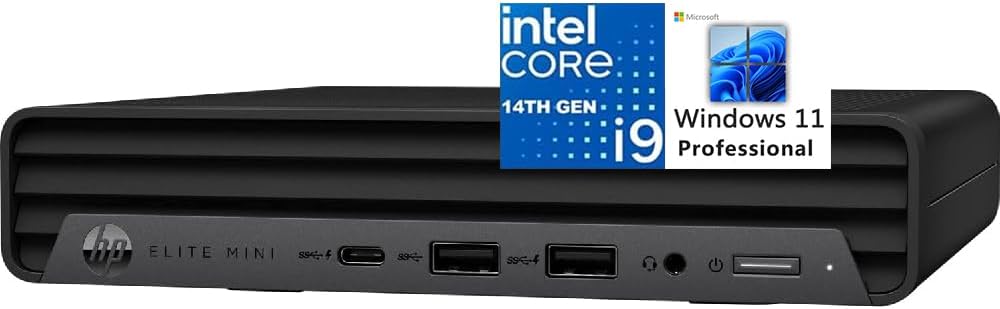
The HP Elite Mini 800 G9 is a complete business solution that includes a keyboard and mouse in the box. It runs Windows 11 Pro which is essential for many enterprise management and security policies.
We may earn a commission when you buy through this link, at no additional cost to you.
This unit is designed for ultra-quiet operation making it suitable for open office spaces where noise is a concern. The included peripherals save you the time of buying them separately.
It supports up to three 4K displays providing a flexible workspace for professionals. However it comes with 16GB of RAM which is sufficient but not as expandable as other options.
If you want a ready-to-deploy office setup without extra purchases this is the best option. It offers the stability and support of a major business brand for your workstation.
Includes essential peripherals so you can start working immediately after setup.
Windows 11 Pro provides advanced security and management tools for business users.
We may earn a commission when you buy through this link, at no additional cost to you.
Selecting the right mini PC involves weighing several factors beyond just the processor. Use this guide to understand what matters most for your specific needs.
Look for Intel Core i9 processors from the 13th or 14th Gen series. These chips offer the best balance of power and efficiency for demanding tasks like video editing or 3D rendering.
Higher clock speeds and more cores generally mean better multitasking performance for your workload.
DDR5 RAM is the standard for newer models and offers faster speeds than DDR4. Aim for at least 32GB if you plan on running virtual machines or heavy creative software.
Ensure the model supports memory upgrades so you can expand in the future if needed.
Check how many M.2 slots are available. Some models support up to three drives which is great for storing large media libraries or separate system and data drives.
A PCIe 4.0 SSD ensures your system boots and loads files quickly without bottlenecks.
Consider how many monitors you need to connect. Models with HDMI, DisplayPort, and USB-C offer the most flexibility for multi-screen setups.
Look for Thunderbolt support if you need ultra-fast data transfer or external graphics cards.
Standard Wi-Fi 6E is good for most users but enterprise models often include multiple Ethernet ports. If you are setting up a server or NAS, dual 2.5G LAN is highly recommended.
Faster network speeds ensure your internet or local file transfers do not lag.
Mini PCs pack powerful hardware into small spaces so cooling is critical. Models with copper heat pipes or active cooling fans will stay quieter and more reliable under load.
Check for reviews that mention noise levels to ensure the unit fits your environment.
Many premium models come with three-year warranties compared to the standard one year. This can save you money and downtime if a component fails later.
Choose brands known for responsive customer support to resolve issues quickly.
Some models come with Windows 11 Pro included which has features for domain joining and advanced security. Others may be sold without an OS which saves money but requires you to install it yourself.
Verify what is included in the package before purchasing to avoid extra costs.
Start by placing the unit in a well-ventilated area. Ensure there is enough space around the vents for air to flow freely to prevent overheating.
Regularly clean the dust filters or intake vents with compressed air. Dust buildup can restrict airflow and reduce the lifespan of the cooling system.
Keep your BIOS and firmware updated for the best performance and security. Manufacturers often release patches that fix bugs and improve stability.
Yes they can run modern games with integrated graphics like Intel Iris Xe. For AAA titles you will need models with an external GPU option via PCIe or Thunderbolt.
Absolutely. The high core counts and fast SSD speeds make them ideal for 4K video editing. Look for units with at least 32GB of RAM for smooth rendering.
Most of these models support triple or even quad display setups. You can connect via HDMI DisplayPort and USB-C to expand your workspace.
DDR5 is faster but DDR4 still handles most tasks well. If you are not doing heavy multitasking DDR4 is a cost-effective choice that saves money.
Yes. Most mini PCs have at least one spare M.2 slot for expansion. Some enterprise models support up to three drives for massive capacity.
High-end models use advanced cooling systems to stay quiet. However under heavy load all fans will spin up. Look for models known for silent operation in reviews.
The HP Elite Mini 800 G9 is great for business due to Windows 11 Pro. The MINISFORUM MS-01 is also strong for enterprises needing network management.
Yes they use standard SO-DIMM RAM and M.2 SSDs. This means you can upgrade them with off-the-shelf components easily.
We reviewed ten exceptional models ranging from the MINISFORUM M1-1390 for raw power to the HP Elite Mini for office use. Each unit offers a unique set of features tailored to different user needs.
Prioritize what matters most for your setup whether that is connectivity storage expansion or AI capabilities. For most users the balance of performance and size makes these devices a great investment.
Remember to check current availability and specs before finalizing your purchase. Technology moves fast so ensuring you get the latest configuration is always recommended.