
Thermalright Trofeo Vision LCD
4.3Editor score
Affordable pricing
USB-C connection
Compact design
Adding an LCD Screen for PC Case transforms a standard build into a dynamic display hub. These panels show real time hardware stats or custom visuals. They add personality and utility to your workstation or gaming rig.
We evaluated ten top models based on resolution, software features, and mounting versatility. Each option offers unique benefits for different case sizes and user needs. Our analysis helps you find the perfect fit for your setup.
Each pick highlights key strengths and ideal use cases for builders. Note that availability and pricing change frequently. Check current listings before purchasing to ensure compatibility with your hardware.
4.3Editor score

4.5Editor score

4.2Editor score
As an Amazon Associate we earn from qualifying purchases.
The following table provides a side by side overview of all ten selected models. It highlights key specifications and unique features to help you compare options quickly.




This 8 inch LCD screen delivers excellent value for PC builders seeking real time system monitoring. It holds a strong rating for ease of setup and visual clarity. The integrated software allows extensive customization for your display preferences.
We may earn a commission when you buy through this link, at no additional cost to you.
The standout feature is the added desktop mode which lets you use the screen as an extended monitor. This is rare in this category. The IPS panel ensures wide viewing angles so stats remain readable from any position.
Some limitations exist regarding operating system support since it does not work with macOS or Linux. The white shell may not match black cases without modification. These are minor trade-offs for the functionality offered.
Ideal for users who want a plug and play experience with rich software features. It balances price and performance better than most competitors. We recommend this for general PC enthusiasts seeking versatility.
Switching to desktop mode allows the screen to function as a second monitor for broader workflows beyond stats.
Dynamic video themes and custom layouts let you personalize the look to match your build aesthetic.
We may earn a commission when you buy through this link, at no additional cost to you.
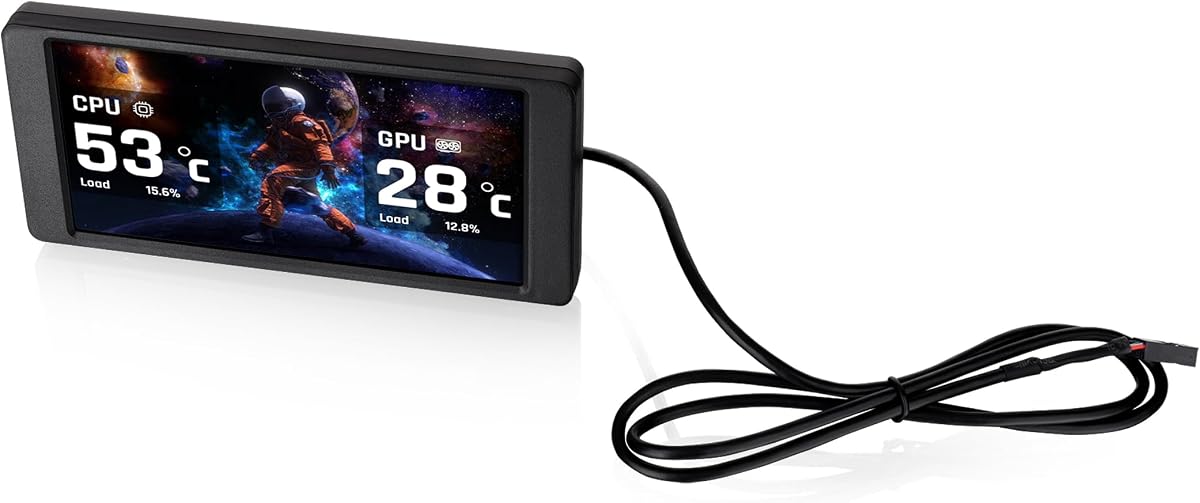
This model offers a high resolution display at a very accessible price. It fits well in standard PC cases without adding bulk. The software provides good control over what information is shown on screen.
We may earn a commission when you buy through this link, at no additional cost to you.
The USB-C connection simplifies cabling inside tight case environments. Text and graphs render clearly thanks to the wide aspect ratio. This makes it ideal for monitoring CPU and GPU temperatures effectively.
Users may need time to learn the TRCC software interface fully. There are no built-in speakers so audio output is not possible. These factors are typical for budget focused displays in this segment.
Best suited for builders prioritizing cost without sacrificing screen quality. It performs well for daily monitoring tasks. We suggest this for those entering the case display market.
The single USB-C connection reduces clutter and simplifies installation inside crowded PC cases.
High resolution ensures that system metrics and custom themes appear sharp and easy to read.
We may earn a commission when you buy through this link, at no additional cost to you.
This screen provides a massive viewing area for rich visual content and data. It is tailored for specific cases but works generally via HDMI. The added speakers provide audio output which is rare in this space.
We may earn a commission when you buy through this link, at no additional cost to you.
The high resolution panel delivers stunning detail for videos or graphs. It connects easily to PCs or consoles for use as a secondary monitor. Installation is straightforward with included mounting hardware.
Powering the unit requires an external source which adds cable complexity. The fit is perfect for Hyte Y60 but may need brackets for other cases. These constraints are expected for specialized premium designs.
Choose this if you want a cinema experience inside your PC case. It excels at media playback and system monitoring. We recommend it for enthusiasts seeking top tier features.
Built-in speakers and HDMI support allow this screen to serve as a multimedia display beyond stats.
The large wide format creates an immersive display that stands out prominently in any gaming setup.
We may earn a commission when you buy through this link, at no additional cost to you.
Lian Li continues to deliver premium aesthetics with this universal screen model. The ARGB frame syncs with your lighting ecosystem for a cohesive look. Software integration simplifies control of both display and lights.
We may earn a commission when you buy through this link, at no additional cost to you.
It functions as a true secondary display via USB which frees up GPU ports. Mounting options allow placement on fan frames or flat surfaces easily. The screen quality is bright and vibrant for all lighting conditions.
Reliance on proprietary software may limit flexibility for some users. The design is larger than some compact alternatives and might not fit small cases. These are standard considerations for feature rich units.
Perfect for Lian Li users or those prioritizing lighting sync. It blends function and design seamlessly. We suggest this for builds focused on total system aesthetics.
ARGB frame integration ensures consistent color profiles across your entire PC lighting setup.
Versatile brackets make it simple to find the best angle for viewing from anywhere.
We may earn a commission when you buy through this link, at no additional cost to you.
The V92 offers an ultra-wide IPS panel that ensures clear visibility from any angle. It supports extensive data monitoring without needing expensive third party tools. The aluminum body adds a premium feel to the build.
We may earn a commission when you buy through this link, at no additional cost to you.
Connection options include USB or motherboard headers providing flexibility during installation. The software suite supports various widgets like weather and news feeds. This makes it a versatile info hub beyond basic stats.
Operating system compatibility is limited to Windows 10 or 11 only. There are no speakers integrated into the unit for audio output. These are standard trade-offs for screen focused devices in this market.
Recommended for users seeking wide viewing angles and flexible connectivity. It offers great value for the display size. We advise this for general monitoring needs.
IPS technology ensures accurate colors and sharp text even when viewed from extreme angles.
Support for both USB ports and headers allows fitting into tight case spaces easily.
We may earn a commission when you buy through this link, at no additional cost to you.
Touch input capability distinguishes this model in the PC case display market. It connects easily to various devices including consoles and single board computers. The brightness ensures good visibility even in bright rooms.
We may earn a commission when you buy through this link, at no additional cost to you.
It supports HDMI directly allowing it to serve as a general monitor without extra adapters. Power efficiency is high making it suitable for long term running. The touch interface adds interactivity to monitoring tasks.
AIDA64 software is not included in the package and must be downloaded separately. Build quality feels slightly less robust than premium alternatives. These are minor issues given the unique functionality provided.
Best for users who want touch control or Raspberry Pi projects. It bridges the gap between PC stats and general utility. We suggest this for interactive display needs.
Capacitive touch allows direct control of menus and widgets without needing external peripherals.
Support for multiple operating systems makes it a universal display for various hardware setups.
We may earn a commission when you buy through this link, at no additional cost to you.
Thermaltake integrates this display directly into their ecosystem for seamless control. It supports standalone usage but shines when matched with compatible cases. The software allows extensive customization of displayed content.
We may earn a commission when you buy through this link, at no additional cost to you.
It supports various video formats for animated backgrounds and widgets. The connection type simplifies installation through standard headers. Brightness levels are sufficient for normal room lighting conditions.
Physical compatibility is limited to specific Thermaltake chassis models primarily. Resolution is lower than some modern alternatives available today. These constraints are acceptable for dedicated ecosystem users.
Ideal for Thermaltake owners wanting unified control over lighting and stats. It offers convenience within the brand. We recommend this for existing ecosystem users.
Unified software allows managing all RGB and display elements from one central dashboard.
Custom graphics support lets you upload images and videos to personalize your build.
We may earn a commission when you buy through this link, at no additional cost to you.
GeeekPi offers a high resolution display tailored for a specific popular case design. It includes multi-touch support and built-in speakers for a premium feel. Setup is quick with plug and play compatibility.
We may earn a commission when you buy through this link, at no additional cost to you.
The touch panel allows intuitive interaction with system graphs and menus. Audio output is provided without extra hardware which adds convenience. Contrast and clarity are strong for detailed monitoring tasks.
Fit is specific to Hyte Y60 cases requiring brackets for others. Some drivers may need manual updates for touch functionality. These are standard limitations for specialized hardware products.
Perfect for Hyte Y60 owners needing advanced control features. It delivers a tablet-like experience inside the case. We suggest this for premium Y60 builds.
10-point multi-touch supports gestures and simultaneous inputs for intuitive interface control.
Dual speakers allow for media playback and alerts without extra cables or devices.
We may earn a commission when you buy through this link, at no additional cost to you.
This unit features a unique magnetic design for tool-free installation. It allows users to move the display without unscrewing components. The software provides robust control over all visual elements.
We may earn a commission when you buy through this link, at no additional cost to you.
IPS technology ensures accurate colors and wide viewing angles. The frame is slim enough to fit tight spaces while maintaining durability. Connection is handled via standard motherboard interfaces.
Magnetic adhesion depends on surface material which may not be metal everywhere. Software is needed for full functionality and adds initial setup steps. These are minor trade-offs for the installation convenience.
Ideal for those who value quick installation and removal. It suits users who frequently swap components. We recommend this for modders seeking flexibility.
Magnets eliminate the need for screws enabling fast and secure mounting without tools.
Magnetic suction allows moving the screen anywhere on compatible metal surfaces easily.
We may earn a commission when you buy through this link, at no additional cost to you.
The 6.86 inch display is designed for small spaces like AIO coolers. It uses magnetic mounting for flexible placement anywhere on the case. The software supports dynamic images for visual customization.
We may earn a commission when you buy through this link, at no additional cost to you.
Resolution is adequate for key metrics like temps and usage rates. It connects via standard USB interfaces for simple setup. This model fits builds where space is at a premium.
Size limits how much data you can display at once. Advanced features are limited compared to larger screens available today. These are expected trade-offs for this size class.
Best for compact builds needing a small visual display. It adds style without bulk. We suggest this for space constrained setups.
Tiny footprint ensures it fits where larger screens cannot without adding bulk.
Strong magnets allow secure placement on various metal surfaces without tools.
We may earn a commission when you buy through this link, at no additional cost to you.
Selecting the right display requires evaluating several technical and practical factors. Understanding these details ensures compatibility with your specific hardware and use case.
Screen size determines how much information you can display at once. Larger screens like 12.6 inches offer more detail but require more case space. Smaller screens fit compact cases but limit text legibility. Resolution impacts sharpness and clarity of graphs and text. Aim for at least 1280 width for readable metrics.
Choose a size that fits your case layout without blocking airflow or other components.
Software integration is critical for monitoring hardware stats in real time. Some brands offer proprietary apps while others rely on third party tools like AIDA64. Ensure the software supports your operating system such as Windows or Linux. Cross platform support adds flexibility for diverse setups. Check if the software requires constant background running.
Prioritize software that matches your preferred monitoring tools and OS environment.
Connection method affects cable management and power needs. USB ports are easy to access but use external connectivity. Motherboard headers keep cables hidden inside the case for a cleaner look. HDMI inputs add versatility for non PC devices. Verify the required cables are included in the package.
Select a connection type that aligns with your available ports and routing preferences.
Mounting versatility ensures the screen is visible from your desired angle. Some models include adjustable brackets while others rely on adhesive or magnets. Case specific mounts simplify installation but limit portability. Universal brackets offer more flexibility across different PC chassis. Check clearance requirements before finalizing your purchase.
Ensure the mounting method suits your case design and viewing needs.
IPS panels provide better color accuracy and viewing angles than older tech. This ensures readability even from steep angles. Resolution and brightness levels impact visibility in different lighting conditions. Check the refresh rate for smooth animation support. Higher specs generally mean a better visual experience.
Choose IPS panels for consistent color and sharp text clarity.
Additional features like speakers or touchscreens add convenience and interactivity. Built-in speakers allow media playback without extra devices. Touch support lets you interact with system stats directly. These features can increase cost and complexity. Decide if they are necessary for your specific workflow.
Consider if interactive elements or audio output justify the added value.
Design elements like ARGB frames or color options impact visual style. Some units offer customizable lighting that syncs with your system. Choose colors and finishes that match your build theme. Sleek profiles help blend the screen into the case design. Consistent styling enhances overall aesthetic appeal.
Match the design and color to your existing build components for cohesion.
Cost varies widely based on features and screen quality. Entry level models cover basic stats while premium ones offer high res and touch. Determine what features are essential for your needs. Higher cost does not always mean better value for basic monitoring. Balance performance with your spending limit.
Set a budget that covers essential features without unnecessary extras.
Install the software first before powering on the display. Ensure all cables are connected securely to avoid signal issues. Follow the manual for mounting to prevent damage to sensitive components.
Keep the screen area dust free using a soft dry cloth. Avoid using chemical cleaners that could damage the coating. Proper care extends the lifespan of the panel and maintains image quality.
Adjust brightness settings to reduce eye strain during long sessions. Configure the software to launch automatically with your system. Regularly update the software to benefit from new features and patches.
No it does not impact system performance significantly. The display draws minimal power and uses negligible system resources. It functions independently as an external output device without taxing the CPU.
Most models are designed for Windows but some offer Linux support. Check the official product data before buying to confirm compatibility. Community tools may exist but official support is preferred.
Many units include required USB or header cables. Always check the package contents for what is included. Some models need HDMI cables or external power adapters separately.
Some models offer magnetic or adhesive mounts suitable for glass. Universal brackets may need extra adhesive pads for flat surfaces. Verify the mounting method before purchasing for your case type.
Software is needed to monitor system stats and customize themes. Without it you may see static images or blank screens. Ensure you install and configure the software correctly.
Not all screens fit every case universally due to size limits. Specific models are optimized for certain chassis sizes and layouts. Measure available space before choosing a model to avoid fit issues.
Yes many screens support dynamic images and video playback. This allows for custom wallpapers or animated backgrounds. Check software features to ensure video file compatibility.
Most models use USB or motherboard headers freeing GPU ports. HDMI models may require a video output connection. Always verify connection types to avoid unnecessary GPU usage.
Our top picks cover a range of needs from budget focused to premium feature rich models. Each offers distinct advantages regarding display quality and integration. Consider your specific requirements when finalizing your choice.
Prioritize compatibility with your case size and available ports to ensure smooth installation. Balance software support with aesthetic goals for the best results. A good display enhances both utility and style.
Always check current listings for availability and compatibility before purchasing. Requirements change frequently so verify details before buying. This ensures a perfect match for your PC build.