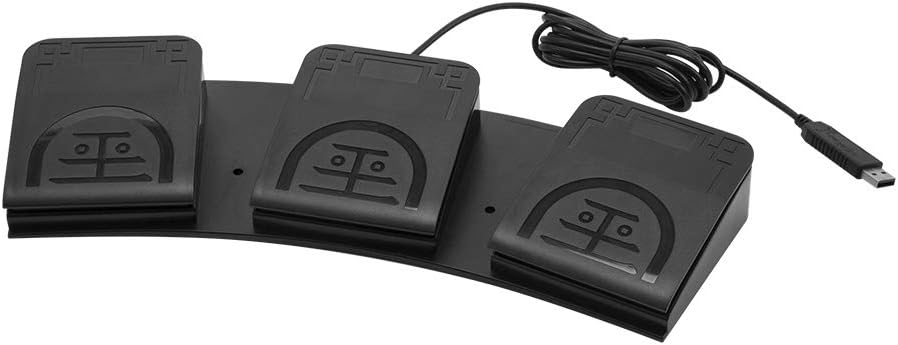
iKKEGOL Upgraded USB Triple Foot Pedal
4.4Editor score
Programmable HID device
Quiet optical switches
Wide ergonomic pedal
Discover the top foot pedals for transcriptionists compared by durability and compatibility to enhance your workflow efficiency today.
Finding the right foot pedal can transform your transcription workflow by keeping your hands on the keyboard. A good pedal offers precise control over playback speed and allows seamless navigation through audio files without interrupting your typing flow.
We evaluated ten popular models based on build quality, software compatibility, and ergonomic design. Our analysis considers user feedback and technical specifications to help you choose a device that meets professional demands for long transcription sessions.
Each pick highlights specific strengths like durability or budget friendliness for different needs. Please note that prices and availability may change frequently so verify current listings before making your final purchase decision for your setup.
4.4Editor score

4.5Editor score

4.1Editor score
This side-by-side comparison highlights key specifications and features across all ten models to help you identify the best fit for your transcription environment and software requirements.


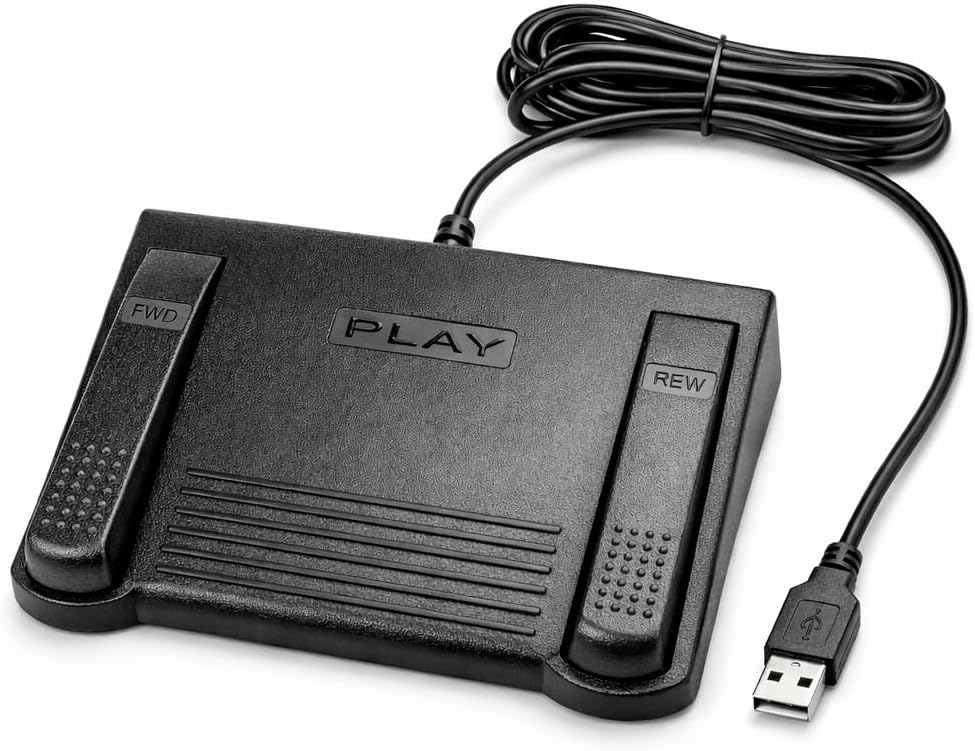


The Infinity 3 USB Foot Pedal Control stands out as a reliable choice for transcriptionists needing consistent performance. With a 4.5 rating it offers a sturdy design that supports countless hours of daily use.
We may earn a commission when you buy through this link, at no additional cost to you.
Its ultra-heavy-duty micro switches ensure long life while the wide sloping Play pedal allows intuitive navigation between functions. The ergonomic layout helps minimize strain during extended transcription sessions.
Trade-offs include a fixed layout that lacks advanced customization options found in higher end models. However for standard transcription needs this simplicity ensures reliable operation without complex setup.
This model is ideal for professionals seeking a durable plug and play solution. We recommend it for users prioritizing build quality and ease of use in busy transcription environments.
The heavy-duty switches are built to withstand millions of activations ensuring longevity even with intensive daily use.
The sloping pedal design allows natural foot movement reducing fatigue during long hours of dictation and typing.
We may earn a commission when you buy through this link, at no additional cost to you.
The VEC in-USB-2 offers a rechargeable battery solution for cordless convenience in various settings. It earns a 4.4 rating for its durable construction and thoughtful safety features.
We may earn a commission when you buy through this link, at no additional cost to you.
Its mechanical stop prevents accidental triggering of the center pedal ensuring precise control during active transcription. The rechargeable battery provides up to 1000 hours of digital recording time for extended periods.
Relying on battery power means occasional charging is needed which may disrupt workflow if forgotten. Despite this the convenience and precision it offers make it a strong contender for modern transcription work.
Ideal for those who value mobility and safety features this pedal supports most leading dictation software. Consider it for environments where cable management is a priority.
The mechanical stop design ensures that stepping on side pedals does not accidentally trigger the center button.
Up to 1000 hours of recording time allows for long work sessions without needing frequent recharges.
We may earn a commission when you buy through this link, at no additional cost to you.
The Philips ACC2330 features a unique toe touch control system designed for professional digital systems. It offers a distinct ergonomic approach that many users find reduces physical strain.
We may earn a commission when you buy through this link, at no additional cost to you.
Swing your foot using the heel to change control areas and feel the difference with your toe. The increased width of the center pedal avoids unintended presses of other pedals during use.
This premium option comes at a higher price point and may require an adjustment period to master the toe control. However the ergonomic benefits justify the cost for heavy daily users.
Best suited for professionals dedicated to minimizing movement and strain this pedal enhances comfort. Choose it if you prioritize ergonomic innovation over standard functionality.
Using your toe to change control areas allows you to keep your heel planted for better stability.
The wider center pedal design ensures that adjacent pedals are not triggered accidentally during intense typing.
We may earn a commission when you buy through this link, at no additional cost to you.
The DAC 3 Function Foot Pedal stands out with unique features like Next Job and Record buttons. It holds a perfect 5.0 rating for users who need these specific workflows.
We may earn a commission when you buy through this link, at no additional cost to you.
Large labeled buttons ensure you always know which function you are triggering without guessing. This pedal is compatible with certain computer software designed for these specialized transcription tasks.
The high price point reflects its specialized nature which may not suit general transcription needs. However for those workflows requiring job management it is unmatched.
Ideal for professional environments with specific software requirements this pedal streamlines complex processes. Consider it if your workflow demands more than simple play and rewind.
The Next Job button helps manage multiple audio files without touching the keyboard.
Large labeled buttons reduce errors and speed up operation during critical transcription sessions.
We may earn a commission when you buy through this link, at no additional cost to you.
The Infinity USB Digital Foot Control IN-USB3 offers a low profile design that fits discreetly under desks. It maintains the 4.5 rating of the brand for reliability.
We may earn a commission when you buy through this link, at no additional cost to you.
Greater non slip surface area ensures the pedal stays in place even during vigorous use. This model is ideal for users who prefer a simpler compact footprint.
While compact it may offer less tactile feedback for some users compared to larger models. The low profile is a trade-off that benefits desk space management.
This pedal is perfect for users with limited desk space who still need reliable control. Choose it if minimalism and stability are your top priorities.
The low profile design ensures the pedal does not clutter your workspace during typing.
The non slip surface area keeps the pedal stable even on smooth flooring.
We may earn a commission when you buy through this link, at no additional cost to you.
The Express Scribe Transcription Foot Pedal is designed exclusively for use with Express Scribe software. It features an exclusive modified internal control board for seamless operation.
We may earn a commission when you buy through this link, at no additional cost to you.
Large ergonomic pedals allow easy movement between functions supporting comfortable low fatigue operation. True plug and play USB setup means no configuration wizard is required.
Its exclusivity to one software limits its utility for users who switch platforms. The lower rating reflects this niche focus compared to more versatile options.
Ideal for dedicated Express Scribe users who want guaranteed compatibility. If you rely on this software it simplifies your setup.
The custom hardware board ensures reliable and precise playback control with Express Scribe.
No foot pedal wizard is required simply connect via USB and start transcribing immediately.
We may earn a commission when you buy through this link, at no additional cost to you.
The ECS-IN-USB-1 offers an ergonomic design engineered for comfort during extended use. It aims to minimize strain through a thoughtfully contoured layout.
We may earn a commission when you buy through this link, at no additional cost to you.
Hands-free transcription control allows you to work faster without interrupting typing flow. It works with most major dictation and transcription software platforms.
Despite its ergonomic goals the product holds an average rating suggesting mixed user experiences. It is a solid option for those seeking affordability and basic comfort.
Best for professionals seeking a balance between comfort and broad compatibility. Choose it for general use in medical or legal applications.
The contoured layout supports natural foot positioning to help minimize strain.
Ideal for daily transcription workloads in public safety and insurance applications.
We may earn a commission when you buy through this link, at no additional cost to you.
This iKKEGOL pedal is a versatile HID device programmable for various uses including transcription. It features quiet optical switches and a wide pedal for comfort.
We may earn a commission when you buy through this link, at no additional cost to you.
The programmable nature allows you to map keys for custom macros or media control. It is designed for a free hands environment during complex workflows.
As a multi-use device it may lack specific transcription software integration out of the box. This requires some initial setup but offers flexibility.
Ideal for budget-conscious users who need custom key mapping. Choose it if you value quiet operation and affordability over dedicated branding.
Optical switches operate silently ensuring your microphone does not pick up clicks.
Program keys to execute complex macros that speed up your specific transcription tasks.
We may earn a commission when you buy through this link, at no additional cost to you.
The Philips LFH-2330 features a slim ergonomic design to minimize foot movement. It allows full configuration via a user-friendly wizard to suit your needs.
We may earn a commission when you buy through this link, at no additional cost to you.
The 4 pedal design offers flexibility for multiple commands without changing software. Anti-slip bottom surface keeps it in the right place during intense sessions.
Initial setup via wizard adds a step compared to plug and play models. This allows greater customization which is beneficial for long term use.
Best for users who need customizable foot control. Choose it if you want to tailor functions to your exact workflow.
The wizard allows you to configure all four pedals to suit your exact workflow needs.
Slim design minimizes physical strain by lessening movement of foot during transcription.
We may earn a commission when you buy through this link, at no additional cost to you.
This mechanical switch pedal uses spring loaded levers for precise actuation. It comes with ElfKey configuration software to customize commands effectively.
We may earn a commission when you buy through this link, at no additional cost to you.
System support includes Windows Mac and Linux making it versatile for any environment. The heavy weight capacity ensures durability under intense daily use.
Mechanical switches may feel clicky which some prefer for feedback. However software configuration is required before use on your machine.
Ideal for power users needing precise mechanical feedback. Choose it if you want customizable macros across multiple operating systems.
Spring loaded levers physically close an electrical circuit for distinct feedback feel.
System support spans Windows Mac and Linux for maximum flexibility in your workspace.
We may earn a commission when you buy through this link, at no additional cost to you.
Selecting the right foot pedal involves balancing durability compatibility and comfort for your specific transcription workflow and needs.
Ensure the pedal works with your specific transcription software. Some models are dedicated to programs like Express Scribe while others offer broad universal support.
Always check the manufacturers specifications before purchase to avoid connectivity issues.
Look for pedals with sloping designs and wide surfaces to minimize foot strain. Comfort is critical for long hours of daily use.
Pedals with non slip surfaces help keep your foot stable during intensive sessions.
High-quality micro switches and sturdy construction ensure the pedal lasts under daily pressure. Heavy-duty components prevent premature wear.
Choose models with proven track records for longevity to protect your investment.
Some pedals allow you to map keys or add macros to suit complex workflows. Others offer fixed simple controls for quick setup.
Decide if you need advanced features or just basic playback control.
Most modern pedals use USB which offers plug and play ease. Ensure your computer has a free port for connection.
USB connections provide stable performance without needing extra drivers.
Prices vary significantly based on features and brand. Budget models often suffice for basic needs while premium options offer customization.
Balance cost against the specific features your workflow requires.
Check for warranty coverage such as one year parts and labor. Reputable brands offer better support if issues arise.
A warranty provides peace of mind for daily professional tools.
Connect the pedal via USB and install any required software or drivers. Ensure the pedal is recognized by your transcription program before starting work.
Test each function to confirm play fast forward and rewind keys work correctly. Adjust your foot position to ensure comfortable and efficient use.
Keep the pedal clean and free from dust to maintain smooth operation. Avoid excessive force to extend the lifespan of the internal switches.
Many modern USB foot pedals are compatible with Mac systems. However you should verify specific model compatibility as some may require configuration software that runs only on Windows.
Some pedals allow you to customize functions using software tools. Others have fixed layouts. Check the product details to see if it supports mapping macros.
Yes many professional models are designed for legal and medical transcription. Look for durability and precision features to ensure reliable performance in these environments.
Most USB pedals are plug and play and do not require drivers. Some advanced models might include configuration software for custom key mapping.
High-quality pedals can last for millions of presses with proper care. Durability depends on build quality and frequency of use over time.
Universal pedals work with most transcription software. Dedicated models may only work with specific programs so check compatibility before buying.
The Infinity 3 USB Foot Pedal Control offers a reliable and durable option for most users seeking stability and ease of use in daily transcription.
When selecting a model prioritize ergonomics and software compatibility to ensure the device enhances your workflow rather than complicating it.
Prices and availability may fluctuate so verify current listings before purchase to secure the best value for your transcription setup.