
Wireless Keyboard and Mouse Combo
4.4Editor score
2.4GHz wireless connection
Retro round keycaps
Auto power-saving mode
Discover the top colorful keyboards for 2026. Our expert guide compares features, designs, and performance to help you find the perfect vibrant typing solution.
Colorful keyboards bring personality and style to any workspace. These vibrant input devices combine retro aesthetics with modern functionality. They cater to users who want their desk setup to stand out visually while maintaining productivity.
We evaluated ten leading models based on design, connectivity, and typing comfort. Our analysis covers wireless and wired options across various price points. Each selection offers unique features like round keycaps, multimedia keys, and durable finishes.
Every pick highlights specific strengths and potential limitations for different needs. We include detailed specs and usage tips to streamline your decision. Keep in mind that product availability and pricing may change over time.
4.4Editor score

4.7Editor score
4.6Editor score
This table provides a side-by-side overview of all ten reviewed models. Compare key specifications quickly to find the right fit for your desk setup and typing preferences.


The Womier SK80 stands out with its unique color multimedia display screen in the corner. It holds a 4.7 star rating from users who appreciate its visual appeal and tactile experience.
We may earn a commission when you buy through this link, at no additional cost to you.
This keyboard features a Frog Green aesthetic with a gasket mount design that reduces noise and enhances stability. You can customize RGB lighting, macros, and even GIF images via driver software on Windows.
The main trade-off is software compatibility, as customization tools are limited to Windows systems. However, the hardware itself works well across Mac and Windows for basic input needs.
Enthusiasts and streamers looking for a visually stunning mechanical keyboard will find this model ideal. It offers deep customization for those willing to explore its software capabilities.
The 11-degree angled display allows you to show custom images and system status like caps lock or volume.
Hot-swap sockets let you change switches easily without soldering to alter sound and feel.
We may earn a commission when you buy through this link, at no additional cost to you.
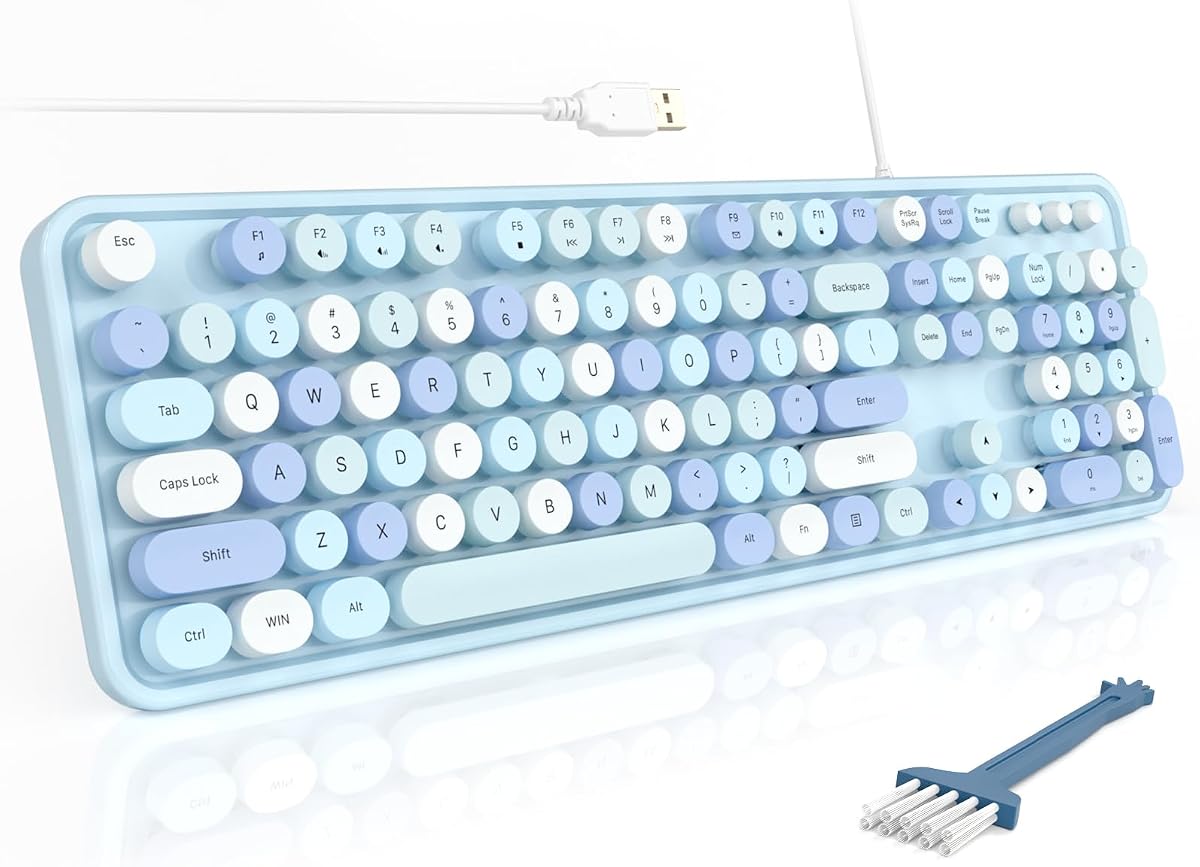
The MOFII Wired Keyboard captures nostalgia with round keycaps and a vintage look. It earns a 4.6 rating for its reliable performance and comfortable ergonomic design for long sessions.
We may earn a commission when you buy through this link, at no additional cost to you.
Key strengths include a foldable stand that keeps wrists at an optimal angle and a spacious number pad for efficiency. It works across Windows, Linux, Chrome OS without needing extra drivers.
While it lacks wireless flexibility and backlighting, the plug-and-play setup ensures zero lag and no battery worries. The included brush helps keep keys clean over time.
Users seeking a clean, wired retro keyboard without subscription or battery hassles will love this choice. It balances style and practicality well for office environments.
The built-in stand and anti-slip pads prevent wrist strain during extended typing work.
Detachable caps and a provided dust brush make cleaning quick and simple.
We may earn a commission when you buy through this link, at no additional cost to you.
This budget combo offers a classic typewriter feel with round keycaps at a very accessible price point. It maintains a 4.4 star rating for delivering reliable connectivity and comfort.
We may earn a commission when you buy through this link, at no additional cost to you.
The 2.4GHz connection reaches up to 30 meters with minimal latency, and both devices share one receiver to save USB ports. Auto power-saving extends battery life significantly during idle times.
Users should note that batteries are not included and may need replacing every few months based on usage. Still, the cost savings make it a great entry into wireless retro setups.
Students and casual users looking to save money while adding color to their desk will find this ideal. It proves you do not need to spend much for a stylish setup.
Insert the single USB receiver to start typing and moving your cursor instantly without drivers.
The shared receiver and wireless design reduce cable clutter for a cleaner workspace.
We may earn a commission when you buy through this link, at no additional cost to you.
The KNOWSQT Wireless set features a distinct MilkTea aesthetic designed to brighten your desk. It holds a 4.4 star rating for delivering a pleasant typing experience with a vintage twist.
We may earn a commission when you buy through this link, at no additional cost to you.
Floating button design mimics old typewriters for a soft feel, and all keycaps are detachable for deep cleaning. It includes a brush to remove debris effectively from between keys.
Auto power-saving helps conserve battery life, but you must replace batteries when the indicator warns. Compatibility is broad, covering Windows and Mac systems seamlessly.
Those who want a unique pastel color and clean maintenance process should consider this model. It balances fun visuals with functional wireless convenience.
Detachable keycaps allow you to remove and wash them for a fresh keyboard.
The MilkTea color scheme was a top trend, adding a trendy vibe to offices.
We may earn a commission when you buy through this link, at no additional cost to you.
This Atelus wired keyboard offers a charming purple finish with round keycaps that mimic a retro typewriter. It maintains a 4.6 rating for its reliable plug-and-play functionality and ergonomic design.
We may earn a commission when you buy through this link, at no additional cost to you.
Key features include a large number pad and foldable stands that improve typing posture. The detachable keycaps simplify cleaning, and there is no need to recharge batteries.
The wired connection ensures no signal dropouts, but it limits mobility compared to wireless options. Caps indicators provide visual feedback during typing sessions.
Users wanting a sturdy, budget-friendly retro keyboard without wireless fuss will appreciate this pick. It brings fun to workdays with a consistent typing experience.
ABS plastic construction ensures durability and a satisfying feel during use.
Packaging is suitable for gifting to friends or family who love vintage aesthetics.
We may earn a commission when you buy through this link, at no additional cost to you.
The FOPETT Wireless set features a blue finish and silent micro-motion technology for quiet operation. It has a 4.3 rating from users who value its durability and long warranty coverage.
We may earn a commission when you buy through this link, at no additional cost to you.
The keyboard uses a waterproof conductive film to protect against spills. It includes a shared USB receiver and offers a three-year worry-free warranty plus a money-back guarantee.
Users may notice that some hotkeys do not work perfectly on Mac systems. The mouse clicks are nearly silent which is great for shared offices.
Anyone needing a quiet, splash-resistant full-size combo with solid warranty support will find this reliable. It is a good match for busy work environments.
Internal film design allows liquid to flow out preventing internal damage from accidents.
Silent mouse technology ensures no loud clicks disturb others nearby.
We may earn a commission when you buy through this link, at no additional cost to you.
This UBOTIE combo showcases a purple rainbow theme that resists fading over time. It holds a 4.2 rating for its durable keycaps and satisfying tactile typing experience.
We may earn a commission when you buy through this link, at no additional cost to you.
Upgraded materials ensure color retention while the clicky feel mimics classic typewriters. Independent power switches let you use the keyboard and mouse separately if needed.
Connectivity reaches 33 feet with minimal lag, though USB adapters are required for tablets. Support is available via a 24-hour customer service team.
Users wanting a durable, colorful setup that stands out without fading will like this option. It suits office or dorm use where style matters.
Fade-resistant coatings keep the keyboard bright even with daily handling.
Round keycaps offer a clicky feel that adds fun to writing tasks.
We may earn a commission when you buy through this link, at no additional cost to you.
This model features a sleek mirror-finish panel that reflects light for a premium look. It carries a 4.3 rating for its updated coating that resists fading during daily use.
We may earn a commission when you buy through this link, at no additional cost to you.
Retro round keycaps provide smooth typing while the shared nano receiver saves USB ports. It works with Windows and macOS though some shortcuts may have minor issues.
Auto power-saving helps battery life, but users must keep spare batteries on hand. Cleaning is simple due to the smooth surface finish.
If you want a modern take on colorful keyboards with an elegant mirror finish, this is a strong choice. It brings personality and polish to any desk.
The mirror surface adds a modern touch to the classic retro style.
One tiny receiver handles both mouse and keyboard for less clutter.
We may earn a commission when you buy through this link, at no additional cost to you.
This wired keyboard combines gaming utility with colorful rainbow LED backlighting. It has a 4.4 rating for its durable construction and flexible lighting modes for night use.
We may earn a commission when you buy through this link, at no additional cost to you.
Key features include water-resistant protection and removable keycaps for easy cleaning. Adjustable brightness lets you set the level perfect for your environment.
While designed for gaming, it serves well for office tasks with ergonomic arc keycaps. The water-resistant design prevents damage from accidental spills.
Gamers and users who want visible backlighting in dark rooms will enjoy this model. It offers robust build quality at an accessible price point.
Rainbow modes let you see keys easily even without ambient lighting.
Triple protection design guards against coffee or drink spills on the surface.
We may earn a commission when you buy through this link, at no additional cost to you.
This MOFII wireless set offers a green colorful look with ergonomic features. It maintains a 4.2 rating for its reliable connection and comfortable typing slope.
We may earn a commission when you buy through this link, at no additional cost to you.
The foldable stand prevents wrist strain while auto-sleep mode extends battery life to around 18 months. It includes anti-slip pads for stability during use.
Battery replacement may be needed eventually, but the included receiver makes setup easy. Mac and Windows compatibility covers most common systems.
Anyone needing a comfortable wireless set with a fun color will find this practical. It supports long typing sessions with minimal physical fatigue.
The ergonomic design prioritizes wrist health during extended work hours.
Auto-sleep saves power for months between battery replacements.
We may earn a commission when you buy through this link, at no additional cost to you.
Selecting the right colorful keyboard involves balancing aesthetics, function, and budget.
Wireless models reduce cable clutter and offer mobility but require batteries. Wired options provide consistent connection without power concerns.
Choose wireless for clean desks and wired for uninterrupted work sessions.
Round keycaps mimic typewriters for a retro feel while standard keys suit gaming. Textured caps can offer better grip and reduced slippage.
Prioritize round caps for nostalgia or standard for gaming precision.
Some keyboards use fade-resistant coatings to maintain vibrant hues over time. Check reviews to see if colors wear down after months of use.
Look for fade-resistant claims to ensure long-term visual appeal.
Full-size layouts include a number pad for data entry while compact ones save space. 75% or 60% models suit minimalist setups.
Select based on whether you need a number pad for work.
USB-A or USB-C ports determine compatibility with modern or older devices. Wireless uses nano receivers which may need an adapter for new laptops.
Ensure your ports match the keyboard interface to avoid adapter costs.
Detachable keycaps allow you to remove dust easily and keep the keyboard fresh. Splash-resistant designs prevent liquid damage from accidental spills.
Choose models with removable parts for simpler maintenance routines.
Most keyboards work on Windows but Mac users should check for shortcut compatibility. Some software tools might not run on macOS systems.
Verify Mac support if you use a Macbook or iMac.
Some models offer a three-year warranty for protection against defects while others offer shorter terms. Customer service responsiveness matters if issues arise.
Look for longer warranty periods and accessible support channels.
Connect the USB receiver or plug the cable into your device and wait for automatic driver installation. For wireless models, switch on the power button and ensure batteries are inserted correctly.
Clean your keyboard regularly using the included brush or a soft cloth. For detachable keycaps, remove them to wipe dust from underneath and let them dry before reattaching.
Enable power-saving features if available to extend battery life. Adjust brightness or lighting settings to suit your workspace needs and reduce eye strain.
Most colorful keyboards work with Mac systems via USB or wireless receivers. However some shortcut keys may require mapping or software adjustments. Always check product details for macOS specific notes before purchasing.
Yes wireless colorful keyboards typically require AA or AAA batteries for power. Some use built-in rechargeable batteries which need USB charging. Wired versions do not need batteries and run directly via USB.
Use a dust brush or compressed air to remove loose debris from between keys. If caps are detachable, remove them gently and wipe with a damp cloth. Ensure everything is dry before reassembling.
To prevent fading choose models with fade-resistant coatings. Clean with gentle cloths instead of abrasive chemicals. If fading occurs over time it may indicate the end of the product lifespan.
Many colorful keyboards work for basic gaming but mechanical or backlit versions offer better performance. Check for anti-ghosting features if you press multiple keys simultaneously during play.
Yes they are great for offices where style adds creativity. Quiet models prevent noise distraction in shared spaces. Ensure they meet workplace ergonomics guidelines to avoid wrist fatigue.
Most 2.4GHz wireless keyboards offer a range of 30 to 33 feet. Signal strength may vary if there are walls or obstacles. Keeping the receiver close improves connection stability.
Many models include a one to three-year warranty covering defects. Keep your receipt to file claims if issues arise. Check seller pages for specific support terms before buying.
We reviewed ten standout models with unique styles ranging from retro typewriter looks to modern multimedia displays. The top picks balance style and utility for different needs.
Prioritize ergonomics and durability alongside color if you type daily. Consider wireless for clean desks or wired for reliability without batteries.
Prices and availability fluctuate regularly so verify current offers before buying. Use our guide to find a keyboard that matches your visual taste and work style.