
Nektar SE49
4.5Editor score
Full size velocity sensitive keys
Comprehensive MIDI functionality
Includes DAW software package
This guide compares the top 49 key MIDI keyboards for producers and musicians based on features integration and build quality to help you choose the right
Finding the right keyboard can transform your music production workflow significantly. A 49 key model offers a perfect balance between portability and playability for most studios.
We analyzed ten top rated controllers focusing on key feel software integration and overall value. Each product was evaluated based on user feedback and technical specifications.
Every pick highlights unique strengths and potential drawbacks for different needs. Prices and availability change frequently so verify details before making your final decision.
4.5Editor score

4.7Editor score

4.4Editor score
This side by side comparison highlights the core specifications of each controller to help you identify the best fit for your specific music production needs.




The Novation Launchkey 49 MK4 stands out as a top tier choice for producers. It receives high ratings for its seamless integration with major DAWs like Ableton and Logic.
We may earn a commission when you buy through this link, at no additional cost to you.
Its standout feature is the seamless integration with major DAWs. The pads are responsive and support polyphonic aftertouch making them versatile for more than just drumming.
While the software offers powerful creative tools there is a slight learning curve for new users. The price is also slightly higher than some budget competitors.
This keyboard is perfect for producers who want deep DAW control without constant manual mapping. It is highly recommended for those using Ableton Live or FL Studio.
The controller maps perfectly to session views and mixer tracks reducing mouse clicks significantly.
Scale and chord modes help generate harmonies quickly even if you are not a music theory expert.
We may earn a commission when you buy through this link, at no additional cost to you.
The M-AUDIO Oxygen Pro 49 is designed for serious producers needing a robust control surface. It features semi-weighted keys and aftertouch which adds expression to your performances.
We may earn a commission when you buy through this link, at no additional cost to you.
Its integration with Native Instruments is a major highlight for users of Komplete. The 16 pads are RGB backlit and velocity sensitive making them great for clip launching.
The unit is somewhat heavy and bulky compared to more portable options. Initial setup for mapping can be complex for those unfamiliar with MIDI protocols.
Choose this if you need a comprehensive control hub for your desktop studio. It is ideal for producers heavily invested in the Native Instruments ecosystem.
Aftertouch allows for dynamic sound manipulation such as filtering or vibrato while holding notes.
Included software like MPC Beats and Ableton Live Lite provides immediate production capabilities.
We may earn a commission when you buy through this link, at no additional cost to you.
The Arturia KeyLab mk3 represents a premium option with exceptional build quality and a high resolution LCD screen. It is rated highly for its tactile feel and durability.
We may earn a commission when you buy through this link, at no additional cost to you.
It features 12 pressure-sensitive pads and 9 encoders for detailed control. The included Analog Lab V software offers thousands of presets which adds immense value.
The price point is significantly higher than entry-level controllers. Some features rely heavily on Arturia's proprietary software which might limit flexibility for some users.
This is the best choice for producers seeking a professional aesthetic and feel. It suits those who want a central hub for their high-end studio setup.
The layout is designed for long sessions with comfortable spacing between controls and keys.
Custom scripts allow for deep control over major DAWs like Logic and FL Studio.
We may earn a commission when you buy through this link, at no additional cost to you.
The M-AUDIO Oxygen 49 MKV offers a strong balance of features and price for intermediate producers. It includes a full software suite and native support for Native Instruments.
We may earn a commission when you buy through this link, at no additional cost to you.
It features auto-mapping which simplifies setup significantly. The Smart Chord and Scale modes are helpful for songwriters looking to create melodies quickly.
The build quality is plastic and feels lighter than premium options. The keybed is functional but lacks the weight of high-end semi-weighted models.
Choose this if you want maximum features without breaking the bank. It is ideal for home studios needing a versatile tool for production.
Auto-mapping allows you to start controlling your DAW immediately after connecting via USB.
Smart Chord modes allow you to play complex harmonies with single finger presses.
We may earn a commission when you buy through this link, at no additional cost to you.
The Nektar SE49 is an excellent entry point for beginners looking for a full-size keyboard. It is praised for its reliability and straightforward setup process.
We may earn a commission when you buy through this link, at no additional cost to you.
It includes DAW integration that works well with popular software. The controls are simple and easy to map making it friendly for new users.
It lacks advanced features like aftertouch or extensive modulation controls. The control surface is basic compared to higher-end models.
This is the best choice for those on a tight budget. It suits beginners who need a reliable keyboard for learning and basic production.
The straightforward layout means you can start creating music without reading a massive manual.
It works with most major DAWs including Cubase and Pro Tools without additional drivers.
We may earn a commission when you buy through this link, at no additional cost to you.
The Arturia KeyLab Essential mk3 is tailored for newcomers with a focus on ease of use. It includes a massive sound library that inspires creativity immediately.
We may earn a commission when you buy through this link, at no additional cost to you.
It features new creative modes like Chord Mode and Arpeggiator to help write songs quickly. The RGB pads provide visual feedback during performance.
The keys are synth-action which may feel too light for piano players. The overall build feels light and portable rather than heavy.
Ideal for beginners needing sounds and tools out of the box. It is best for those wanting to focus on composition without complex setup.
The built-in modes suggest musical ideas helping to overcome writer's block effectively.
The included preset library covers styles from electronic to orchestral providing endless exploration.
We may earn a commission when you buy through this link, at no additional cost to you.
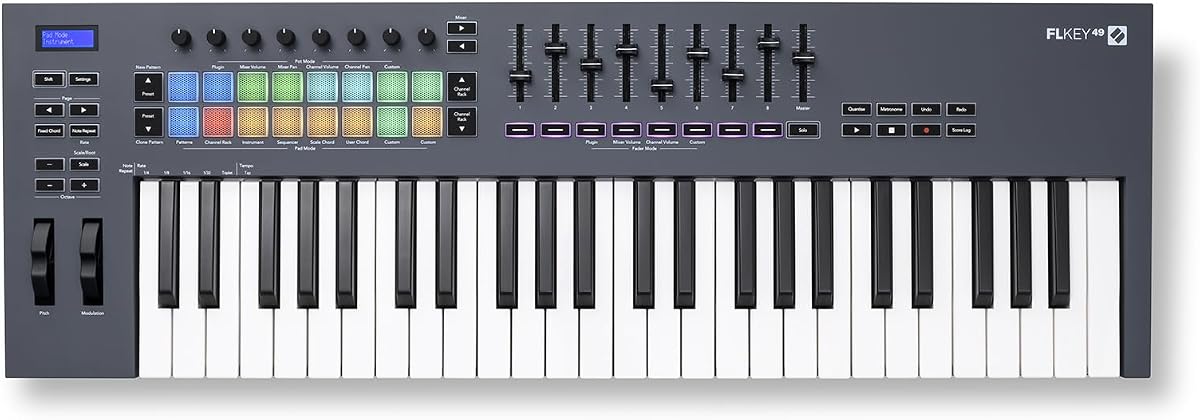
The Novation FLkey 49 is specifically optimized for FL Studio users needing deep integration. It receives high marks for removing the need for manual mapping entirely.
We may earn a commission when you buy through this link, at no additional cost to you.
It offers direct control over the channel rack and mixer allowing for quick workflow adjustments. The pads map directly to the step sequencer for beat making.
Its utility drops significantly outside of FL Studio making it less versatile for others. Other DAW support is basic compared to other controllers.
This is the definitive choice for dedicated FL Studio producers. It is highly recommended for those wanting to minimize mouse usage in that environment.
Immediate access to mixer and transport controls keeps you in the creative flow state.
The step sequencer mapping allows for fast beat programming without screen interaction.
We may earn a commission when you buy through this link, at no additional cost to you.
The M-AUDIO Keystation 49 MK3 is a streamlined option focusing purely on playing notes. It is popular for its reliability and uncomplicated design.
We may earn a commission when you buy through this link, at no additional cost to you.
It features full-size keys that feel responsive without extra complex controls. This simplicity makes it easy to set up and use immediately.
It lacks faders and knobs which limits real-time control over parameters. Users needing more knobs must rely on mouse automation or other hardware.
This is best for performers needing a portable keyboard for recording. It suits those who want to focus on playing rather than mixing.
The compact design fits easily into backpacks making it ideal for mobile production.
By minimizing buttons you are encouraged to focus on your playing performance.
We may earn a commission when you buy through this link, at no additional cost to you.
The midiplus AK490 is a budget-friendly option offering essential MIDI functionality. It is rated decently for its price point and basic utility.
We may earn a commission when you buy through this link, at no additional cost to you.
It features essential wheels and buttons for simple performance control. The velocity sensitivity works well for basic playing tasks.
Build quality feels lower than branded competitors and wheels are basic. It lacks the durability required for heavy professional use.
Best for occasional users or those testing MIDI workflows. It is suitable for those needing a basic tool without investment.
Provides essential inputs for those just starting to explore music software.
An affordable entry point for those uncertain about long-term commitment.
We may earn a commission when you buy through this link, at no additional cost to you.
The generic 49-Key MIDI Keyboard offers a simple and compact solution for desktops. It is rated for its basic utility and small footprint.
We may earn a commission when you buy through this link, at no additional cost to you.
It is constructed with ABS plastic for durability and ease of storage. The design is simple and focuses on essential functionality.
It lacks many standard controls found on branded models. The key feel is basic and may not satisfy serious performers.
Best for those needing a spare keyboard for simple tasks. It is suitable for users with very limited budget or space.
Its small size allows it to fit into tight workspace arrangements easily.
Fulfills essential requirements for casual practice and input.
We may earn a commission when you buy through this link, at no additional cost to you.
Choosing the right controller depends on your workflow and specific needs. This section breaks down the key factors to consider before buying.
Key feel varies between synth action semi-weighted and weighted styles. Synth action keys are light and fast ideal for electronic production and organ parts. Semi-weighted keys offer a bit more resistance suitable for a more expressive playing experience. Weighted keys mimic a real piano but are often heavier. Consider how often you play piano parts versus programming drums.
Prioritize key type based on your primary instrument. Pianists may prefer weighted keys while electronic producers often prefer light synth action.
Deep integration with your DAW saves significant setup time. Controllers with built-in scripts for Ableton Logic or FL Studio allow you to control tracks mixer and transport without mapping. Check if the manufacturer provides dedicated software for your specific DAW. This feature often separates generic controllers from professional production tools.
Choose a controller with specific integration for your main software to streamline your workflow.
Faders knobs and pads are essential for manipulating sounds without a mouse. Look for a mix of rotary encoders and linear faders to control volume panning and effects. Drum pads should ideally be responsive and velocity sensitive. Some advanced models offer aftertouch for dynamic control while holding a key.
Ensure the control surface matches your mixing needs to maintain a hands-on production style.
A 49 key keyboard offers a balance between playability and size but dimensions vary. Consider the width and depth to ensure it fits your desk comfortably. Weight is also a factor if you plan to move it to gigs. Some models are designed to be ultralight while others are robust and heavy.
Select dimensions that fit your physical workspace and mobility requirements.
USB MIDI is the standard but some models include traditional 5-pin MIDI outputs. This is crucial for connecting to hardware synthesizers or sound modules. Ensure the unit provides power via USB so you don't need extra adapters. Some newer models offer USB-C for modern connection standards.
Check connectivity to ensure compatibility with your entire hardware setup.
Many manufacturers bundle DAWs and instrument plugins with the hardware. Look for useful software like Ableton Live Lite or Komplete Select. This adds significant value especially for beginners. Verify the license terms to ensure you can use the software long-term.
Value the software bundle to understand the total cost effectiveness of the controller.
Materials range from plastic to metal affecting longevity and feel. Metal chassis models feel more premium and withstand travel better. Check the construction of knobs and faders as these are prone to wear. Durability is critical for professional use.
Invest in robust build quality if you plan to move the unit frequently.
Prices vary from under one hundred to several hundred dollars. Higher price usually correlates with better build and features. Determine your budget range but consider cost of ownership including cables or accessories. Sometimes a slightly more expensive unit saves money by replacing the need for extra tools.
Set a realistic budget but consider long-term utility when spending.
Connect your keyboard to your computer via USB and open your DAW. Check the settings to ensure the input device is recognized correctly. Configure MIDI channels if you are using external hardware synthesizers.
Download and install any required drivers or software provided by the manufacturer. This ensures all knobs pads and controls map correctly to your specific software. Keep firmware updated for best performance.
Keep your keyboard away from direct sunlight and dust. Clean keys gently with a soft cloth. Ensure cables are not frayed to prevent connection drops.
Synth action keys are light and springy making them fast to play. Weighted keys have resistance like an acoustic piano. Synth action is better for electronic music while weighted is better for piano playing.
Most modern keyboards are class compliant and work without drivers on Mac and PC. However some advanced models may require specific drivers for full feature support.
They offer a middle ground between portability and playability. They fit on most desks but still provide enough octaves for playing bass and melody lines simultaneously.
Generally you need a computer or tablet to run sound software. However some keyboards have USB ports to connect directly to hardware synthesizers for control.
Aftertouch detects pressure after the key is pressed. It allows you to add vibrato or filter changes while holding a note. It adds expression but is not essential for basic use.
USB-C is reversible and often supports faster data transfer and power. It is becoming standard on newer models for convenience and modern cable compatibility.
The Novation Launchkey 49 MK4 and Arturia KeyLab mk3 stand out for their feature sets. The Nektar SE49 offers the best value for those starting out.
Prioritize integration with your DAW and key feel when making your decision. These factors impact your workflow more than minor specification differences.
Always check current prices and availability before buying as deals change frequently. Ensure you verify warranty terms with the retailer.