
XPPen Magic Note Pad
4.4Editor score
16K pressure sensitivity
Anti-glare screen
Standalone Android system
Electronic sketch pads have revolutionized how artists and students capture their creative ideas on the go. These versatile devices combine the tactile feel of traditional paper with the convenience of digital storage and sharing capabilities. Whether you are a professional illustrator or a casual doodler, finding the right tool can significantly enhance your workflow and artistic expression.
To compile this expert guide, we analyzed a wide range of electronic sketch pads available on the market. Our evaluation process focused on key aspects such as screen quality, pressure sensitivity, portability, and software compatibility. We also considered user feedback and expert reviews to ensure each recommendation meets high standards of performance and reliability for diverse creative needs.
Each product in this list highlights specific strengths tailored to different user requirements and budget ranges. From budget-friendly options for beginners to premium devices for professional artists, our selections cover a broad spectrum of capabilities. Please note that product availability and pricing can change over time, so we recommend verifying current details before making a purchase decision.
4.4Editor score

4.2Editor score
4.4Editor score
As an Amazon Associate we earn from qualifying purchases.
This side-by-side comparison highlights the core specifications and unique features of each electronic sketch pad in our selection. By reviewing these details together, you can quickly identify which device aligns best with your specific creative requirements and operational preferences.


The HUION Note Digital Notebook stands out as a unique hybrid solution that bridges the gap between traditional paper and digital tools. With a rating of 4.2 stars, it has garnered positive feedback for its ability to capture handwritten work digitally while maintaining the natural feel of writing on paper. This device is particularly appealing to those who want the convenience of digital notes without sacrificing the tactile experience of pen on paper.
We may earn a commission when you buy through this link, at no additional cost to you.
One of its key strengths is the seamless integration with the free Huion Note app available on both iOS and Android devices. Everything you write is captured with vector lines and transferred via Bluetooth 5.0, ensuring high fidelity and accuracy in your digital copies. The ability to record audio synced with your notes adds an extra layer of utility, making it perfect for meetings or lectures where context matters as much as the content itself.
While the HUION Note offers significant benefits, it does require a smartphone or tablet to function fully, which might be a limitation for users preferring standalone devices. Additionally, you will need to purchase replacement paper refills, which adds a recurring cost over time. However, these trade-offs are often acceptable given the unique value proposition of having physical paper with digital capabilities.
For students, professionals, and creatives who frequently take handwritten notes and want to digitize them easily, the HUION Note is an excellent choice. Its organizational features within the app, such as merging and splitting pages, help keep your workflow efficient. We recommend this product for anyone seeking a practical and innovative way to manage their notes and ideas across different environments.
The combination of a physical notebook and digital pen allows users to enjoy the best of both worlds without compromising on feel or functionality.
Built-in tools for editing and organizing notes ensure your digital content remains accessible and structured for future reference or sharing.
We may earn a commission when you buy through this link, at no additional cost to you.
The XPPen Magic Note Pad represents a premium tier of electronic sketch pads, offering a standalone experience that rivals traditional sketchbooks. With a rating of 4.4 stars, it is highly regarded for its realistic sketching experience provided by the X-Paper display with AG nano-etching technology. This device is ideal for artists who demand high precision and a natural drawing feel without being tethered to a computer.
We may earn a commission when you buy through this link, at no additional cost to you.
Key strengths include its 16K pressure sensitivity and tilt support, which allow for nuanced control over line weight and shading. The tablet supports three distinct color modes, enabling users to switch between natural mode for annotation, light color mode for sketching, and black and white mode for reading. Its standalone nature powered by Android 14 means you can access a wide range of creative apps directly without needing additional hardware.
Despite its advanced features, the XPPen Magic Note Pad comes with a higher price point compared to other options, which may be a consideration for budget-conscious buyers. Additionally, adapting to an Android-based operating system might require a learning curve for users accustomed to desktop workflows. However, the investment is often justified by the device's versatility and high-quality display performance.
This product is best suited for professional artists, students, and anyone seeking a high-end tool for creative work. Its eye protection features and all-in-one design make it a reliable companion for long drawing sessions. We recommend this electronic sketch pad for those who prioritize premium build quality and advanced creative capabilities in a portable format.
The AG nano-etching technology creates a paper-like friction that enhances the natural feel of drawing, making digital art feel authentic.
Multiple color modes and app compatibility provide flexibility for various tasks ranging from note-taking to detailed digital illustration.
We may earn a commission when you buy through this link, at no additional cost to you.
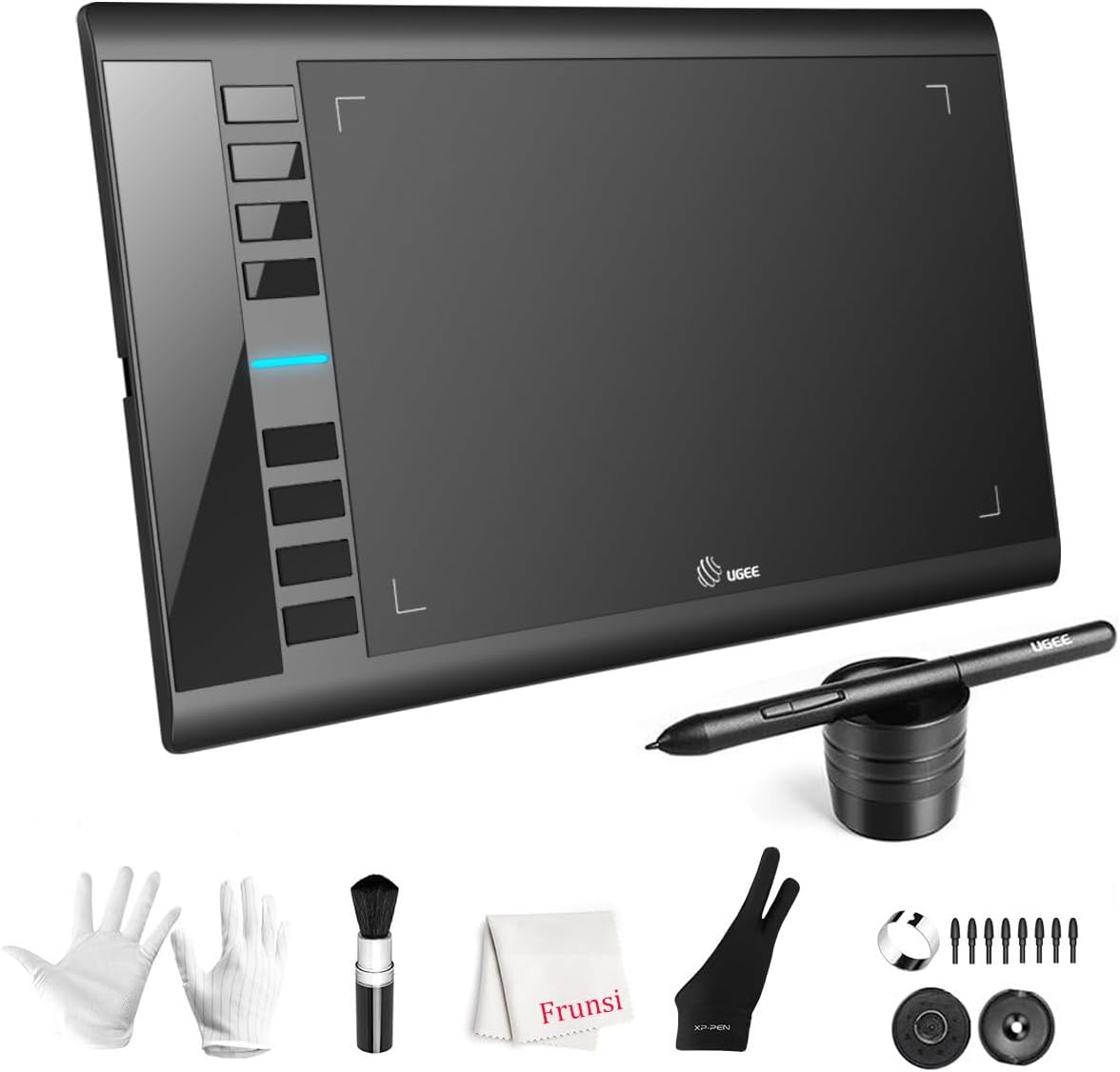
The UGEE M708 Drawing Tablet is an excellent entry-level option for those looking to explore digital art without a significant financial commitment. With a rating of 4.4 stars, it is praised for its large active drawing space and smooth performance. This tablet provides a solid foundation for beginners and hobbyists who want to create digital artwork using existing computer software.
We may earn a commission when you buy through this link, at no additional cost to you.
Its standout features include 16384 levels of pressure sensitivity, allowing for accurate and expressive lines based on how hard you press. The eight customizable express keys on the side streamline workflow by providing quick access to common functions like erasing and zooming. Compatibility with multiple operating systems and creative software ensures you can integrate it into your existing setup easily.
While the UGEE M708 offers great value, it does require a connection to a computer or tablet to function, which limits its portability compared to standalone devices. Additionally, the absence of a built-in screen means you must look at your monitor while drawing, which can take some getting used to. These limitations are typical for this category and do not significantly detract from its performance.
For students, designers, and anyone starting their digital art journey, the UGEE M708 is a highly recommended choice. It balances cost and functionality effectively, providing a professional feel at a budget-friendly price. We suggest this product for users who already have a computer setup and want to add a reliable drawing tool to their workflow.
High pressure sensitivity and large active area deliver performance features usually found in more expensive professional-grade drawing tablets.
Customizable shortcut keys reduce the need for constant keyboard use, speeding up the creative process significantly.
We may earn a commission when you buy through this link, at no additional cost to you.
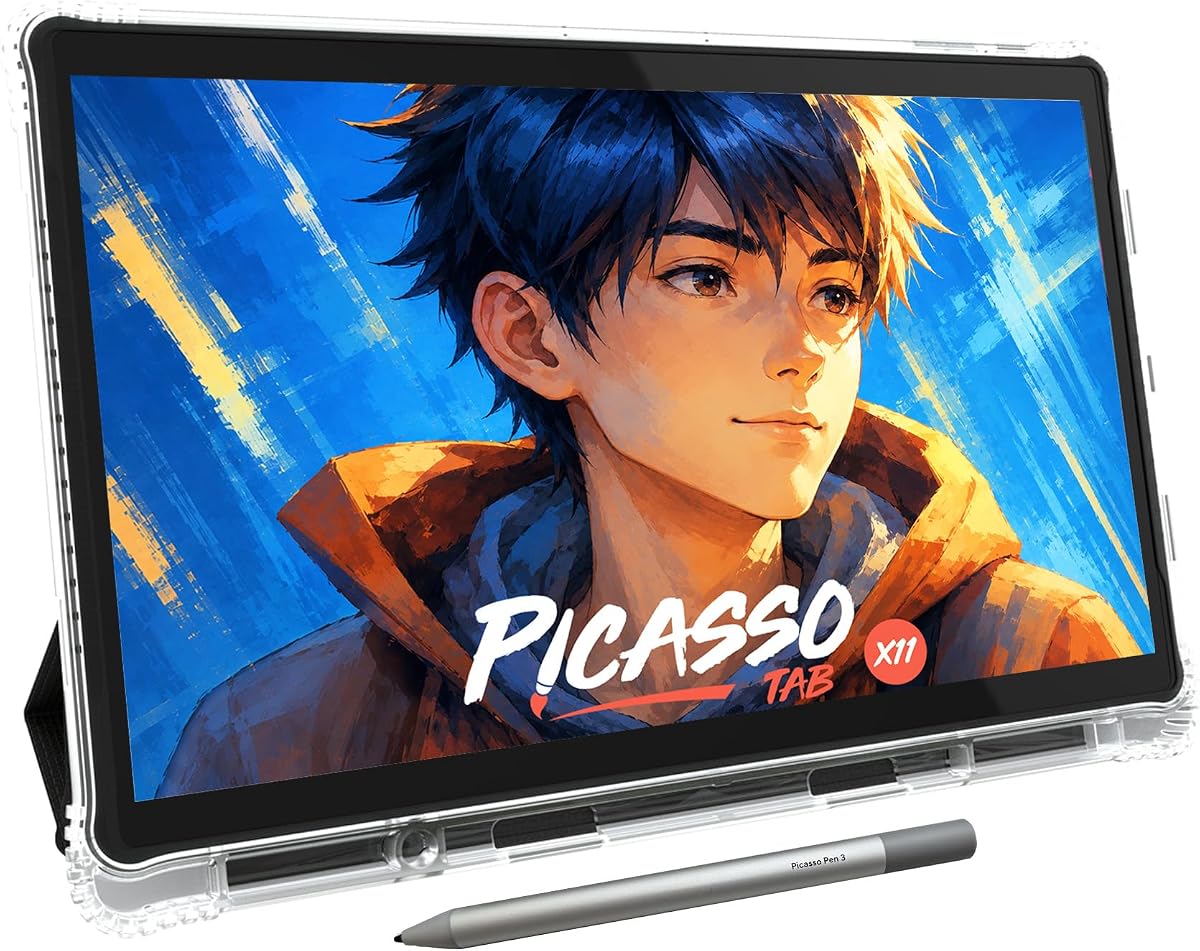
The PicassoTab X11 offers a fully standalone solution for digital art enthusiasts who want the freedom of a tablet without needing a computer. With a rating of 4.2 stars, it has gained popularity for its ease of use and comprehensive bundle of accessories and upgrades. This device is designed to be a complete creative station, making it ideal for beginners and students.
We may earn a commission when you buy through this link, at no additional cost to you.
Its fully laminated 11-inch 2K screen reduces parallax, providing a realistic and immersive drawing experience. The preloaded creative apps and lifetime VIP tutorials make it easy to get started, while the fast octa-core performance handles multitasking smoothly. The inclusion of bonus accessories like a case and screen protector adds significant value to the purchase.
However, users should note that the battery life may vary depending on usage intensity, which could be a limitation during long sessions without a charger. Additionally, reliance on specific apps for tutorials and drawing means you must be comfortable with its ecosystem. Despite these points, the overall package offers a robust tool for creative development.
This electronic sketch pad is best for beginners, students, and anyone wanting a self-contained device for learning art. Its focus on guided lessons and ease of setup makes it a strong contender in the standalone category. We recommend it for those who want a ready-to-use creative tool with supportive resources included.
Built-in tutorial resources guide new users through fundamental techniques, ensuring a smooth start into digital art creation.
The inclusion of essential accessories like cases and protectors ensures your device is protected right out of the box.
We may earn a commission when you buy through this link, at no additional cost to you.
The Kayoubi LCD Writing Tablet is specifically designed for children, offering a large 14.5-inch screen for free expression. With a high rating of 4.6 stars, it is loved for its mess-free design and ease of use. This electronic sketch pad is perfect for encouraging creativity in young children without the hassle of paper cleanup.
We may earn a commission when you buy through this link, at no additional cost to you.
Its standout feature is the massive drawing space, allowing kids to explore their imagination freely. The one-click erase function ensures they can easily clear their work, while the lock screen feature prevents accidental deletion of masterpieces. The eye-friendly display with zero blue light makes it a safer alternative to traditional tablets for long play sessions.
While it is excellent for kids, its basic functionality means it lacks color capabilities and advanced features found in more expensive devices. However, this simplicity is often a benefit for children who just want to doodle without complex settings. The durable build and lightweight design make it easy to carry around.
This product is an ideal gift for boys and girls aged 3 to 8 who enjoy drawing and writing. It serves as an excellent educational tool for homes, cars, and classrooms. We recommend it for parents looking for a safe, engaging, and mess-free toy to keep children creatively occupied.
The screen technology avoids harmful blue light, ensuring comfortable use during long play sessions without eye strain.
Reusable technology eliminates paper waste and ink stains, making it easy for parents to manage cleanup.
We may earn a commission when you buy through this link, at no additional cost to you.
The Bravokids LCD Writing Tablet is designed with education and portability in mind for young children. With a rating of 4.6 stars, it is highly appreciated for its colorful screen and lightweight design. This device provides a quiet and engaging way for children to entertain themselves while learning basic writing and drawing skills.
We may earn a commission when you buy through this link, at no additional cost to you.
Its colorful screen captures children's attention effectively, while the lightweight 150g build makes it easy to carry anywhere. The device is made of durable plastic with rounded corners, ensuring it can withstand drops and rough handling. The lock key feature allows kids to save their drawings temporarily without accidental erasure.
While the tablet is excellent for basic drawing and writing, it does not support advanced features found in more complex digital tools. However, for children aged 3 to 8, this simplicity is often sufficient and reduces distraction. The eco-friendly aspect of reusing the screen instead of paper adds to its appeal.
This product is an excellent choice for parents seeking a travel-friendly and educational toy for toddlers. It keeps children engaged and quiet during long trips without the noise of electronic games. We recommend it for young children who are starting to explore drawing and writing creatively.
Its small size and light weight make it perfect for keeping kids occupied in cars, planes, and restaurants during family trips.
Reducing paper waste by allowing thousands of drawings on a single device promotes environmental consciousness early on.
We may earn a commission when you buy through this link, at no additional cost to you.
The UGEE M708 Drawing Tablet continues to be a popular choice for those entering the world of digital art. Its 4.4-star rating reflects user satisfaction with its large active area and smooth performance. This tablet allows users to create digital artwork with precision and ease when connected to a computer.
We may earn a commission when you buy through this link, at no additional cost to you.
Its papery texture surface provides a comfortable drawing experience, while the passive stylus eliminates the need for charging. The eight customizable express keys help streamline workflow by assigning frequent actions to physical buttons. Additionally, its ambidextrous design makes it suitable for both left and right-handed users.
While the tablet is robust, users need to install drivers to unlock all features, which might be a hurdle for some. The lack of a screen means you must look at your monitor, which requires coordination. However, these are standard for this class of device and do not impact its value significantly.
This product is best for artists who want to start digital drawing affordably. It offers professional features at a budget price, making it a strong option for beginners and students. We recommend it for those willing to use a computer setup to create detailed digital art.
Customizable express keys allow artists to create a personalized workflow that boosts productivity significantly.
Support for Windows, Mac, and Linux ensures this tablet fits seamlessly into almost any existing computer system.
We may earn a commission when you buy through this link, at no additional cost to you.
The Mafiti LCD Writing Tablet offers a compact solution for quick notes and doodles. With a rating of 4.2 stars, it is valued for its portability and simplicity. This device is excellent for capturing ideas on the go or for children who want a lightweight drawing tool.
We may earn a commission when you buy through this link, at no additional cost to you.
Its update version provides thicker writing that is easier to see, and the kick-stand function allows you to display messages hands-free. The replaceable battery ensures long-term usability without needing to replace the device entirely. Its slim profile makes it easy to slip into a bag or pocket.
While practical, the smaller 8.5-inch screen limits the drawing space compared to larger models. It is best suited for quick notes rather than detailed art. However, this limitation is offset by its convenience and ease of use for everyday tasks.
This product is ideal for office workers, students, and children who need a simple writing tool. It serves as an effective whiteboard alternative for quick tasks. We recommend it for anyone seeking a straightforward and portable electronic sketch pad for basic use.
The compact size and instant erase feature make it perfect for quick thoughts and temporary reminders without clutter.
A built-in kickstand allows you to prop up the tablet for easy viewing during presentations or casual use.
We may earn a commission when you buy through this link, at no additional cost to you.
The TEKFUN LCD Writing Tablet is built for durability and ease of use for children. With a rating of 4.5 stars, it is praised for its robust build and simple interface. This electronic sketch pad is a great choice for travel or daily use at home without worrying about breakage.
We may earn a commission when you buy through this link, at no additional cost to you.
Its waterproof and anti-fall design ensures it can handle accidental drops or liquid spills, making it practical for active kids. The battery lasts up to six months, reducing the need for frequent replacements. The lightweight design allows children to carry it easily in backpacks or bags.
While it lacks advanced features, its reliability and ease of use make it a strong contender for young users. The simplicity helps children focus on creativity without complex settings. The only limitation is its basic functionality, which is often a positive for parents seeking screen-free digital alternatives.
This product is perfect for parents who want a reliable toy for children aged 3 to 8. It ensures hours of creative engagement without mess or frustration. We recommend it for families looking for a durable and practical gift for young artists.
Lightweight and durable construction makes it an ideal companion for long road trips or flights to keep children entertained.
Long battery life and simple operation mean less downtime and more creative time for children without parental intervention.
We may earn a commission when you buy through this link, at no additional cost to you.
The Wacom Intuos Small is a trusted name in the digital art industry, offering reliable performance for professionals and enthusiasts. With a 4.6-star rating, it is known for its pen technology that feels like drawing on paper. This tablet provides precise control for editing photos and designing graphics efficiently.
We may earn a commission when you buy through this link, at no additional cost to you.
Key features include a battery-free EMR pen and access to professional software upon registration. Its compact size makes it easy to integrate into any desk setup, while the wired connection ensures stability without lag. Wacom's reputation for quality ensures this device will last for years of creative use.
However, the wired connection limits mobility compared to wireless alternatives, and the smaller active area may feel restrictive for some users. Additionally, the lack of a screen requires monitoring eye coordination. Despite this, its reliability and performance remain unmatched in this category.
This product is best for professionals who need a reliable tool for precise creative work. Its software bundle adds significant value for new users. We recommend it for those seeking a proven standard in the digital drawing market with industry-leading support.
Wacom's longstanding presence in the market ensures robust support and compatibility with almost all creative software available.
Included registration bonuses provide immediate access to professional tools, helping new users start creating right away.
We may earn a commission when you buy through this link, at no additional cost to you.
Selecting the right electronic sketch pad depends on your specific creative needs, technical requirements, and budget. This guide outlines key factors to consider to help you make an informed decision.
Screen quality varies significantly between devices. Some offer high-resolution displays with color accuracy, while others use basic LCDs or paper-like surfaces. Consider whether you need a screen to view your work directly or if a pen tablet connected to a computer suffices. Higher resolution and better color reproduction are crucial for professional artwork.
Choose a display that matches your visual needs and workflow complexity for the best results.
Pressure sensitivity determines how well the pen detects the force you apply. Levels range from 2048 to over 16000, affecting line variation and detail. Higher sensitivity allows for more natural shading and brush effects, making it ideal for artists seeking realism. Beginners may find lower sensitivity sufficient for simple tasks.
Prioritize higher pressure levels for professional work and expressive digital painting.
Electronic sketch pads come in various sizes, from compact travel models to large stationary tablets. Consider where you plan to use your device, whether at home or on the go. Larger active areas provide more workspace but reduce portability, while smaller devices are easier to carry but may feel cramped for detailed work.
Select a size that balances workspace needs with your lifestyle and carrying capacity.
Ensure the device works seamlessly with your preferred software and operating system. Many tablets support major creative tools like Photoshop or Illustrator, but some may require specific drivers. Standalone devices run on their own operating systems, which may limit app selection. Compatibility affects how well you can integrate the device into your workflow.
Verify driver and OS requirements to avoid connectivity or performance issues later.
Some devices require constant power, while others offer long-lasting battery life. Battery-free pens are convenient as they never need charging, whereas active pens add to battery drain. Consider how long you typically work and whether you have easy access to charging sources. Efficient power management ensures uninterrupted creative sessions.
Opt for battery-free pens and efficient power usage for a hassle-free experience.
Devices may connect via USB, Bluetooth, or Wi-Fi. Wireless options offer freedom of movement but can introduce latency if not stable. Wired connections provide consistent performance but limit mobility. Choose based on your preference for flexibility versus reliability and technical stability during drawing.
Match connectivity to your setup needs, balancing mobility with performance stability.
Many bundles include cases, stylus holders, or software subscriptions. These add value and convenience, especially for beginners. Check if the device comes with essential tools or if you need to purchase them separately. Comprehensive packages reduce additional costs and setup time significantly.
Look for bundles that include necessary accessories to maximize value and ease of setup.
Durability is important for long-term use, especially if the device will be handled frequently. Look for sturdy materials and protective features like rounded corners. High build quality ensures the device withstands regular wear and tear. This is critical for both home and professional environments.
Invest in a device with robust build quality to ensure longevity and reliability.
Begin by installing necessary drivers and software on your computer or connecting the device to a mobile unit. Ensure all connections are secure to prevent input delays or signal loss during creative sessions. Proper setup ensures you get the most out of the device's features.
Use the pen with a gentle touch to avoid unnecessary wear on the screen or surface. If your device supports different pen tips or settings, customize them to match your personal drawing style. Regular calibration improves accuracy and responsiveness over time.
Store your electronic sketch pad in a cool, dry place when not in use to protect against dust and damage. If it uses a battery, keep it charged to avoid degradation. Clean the screen or surface with a soft cloth to maintain visibility and performance longevity.
A standalone sketch pad functions independently with its own screen and operating system, similar to a tablet. A non-display pad connects to a computer to draw, requiring you to look at a separate monitor. Standalone models offer more portability while non-display ones typically provide higher performance.
Not all electronic sketch pads need paper. Devices like LCD writing tablets use reusable screens instead of paper. Some hybrid models do require standard paper with digital pens to capture input, but they do not use ink. It depends entirely on the specific technology and design of the device.
Yes, many electronic sketch pads are designed for professional use with high pressure sensitivity and accurate color reproduction. However, entry-level models may lack advanced features required for complex projects. Professionals should check specs to ensure the device meets their technical demands.
Use a soft, dry cloth to gently wipe the screen surface. Avoid using harsh chemicals or excessive moisture that could damage internal components. For stubborn marks, slightly dampen the cloth with water but ensure no liquid seeps into the device during cleaning.
Many models support connection to smartphones and tablets via Bluetooth or USB-C adapters. Compatibility depends on the device's software and operating system support. Always check manufacturer specifications to ensure your mobile device is supported for proper connectivity.
Some include free software or subscriptions, especially professional models. Others rely on third-party apps available through app stores. Budget models may not include any software but work with basic drawing applications. Always verify what software is included before purchasing.
Battery life varies by model and usage. Some offer up to 18 hours on a single charge while others may last only a few hours. Battery-free pens are common on some devices and do not require charging. Check specific battery specs to understand expected usage times.
Most are not fully waterproof but some kid-friendly models have splash-resistant designs. Avoid exposing any device to water directly to prevent damage. If water resistance is needed, look for specific IP ratings or models designed for durability in varied environments.
Choosing the right electronic sketch pad can transform your creative process whether you are a professional or a student. Our guide highlights versatile options like the HUION Note for hybrid work, the XPPen Magic Note Pad for standalone premium use, and the UGEE M708 for budget-friendly entry.
Prioritize features that align with your workflow such as screen size, pressure sensitivity, and portability. Whether you need a device for quick notes or detailed digital art, there is an electronic sketch pad suited for your specific goals. Understanding these factors helps you narrow down choices efficiently.
Remember to check current availability and details before purchasing since product features may change over time. Investing in the right tool can significantly improve your creative output and satisfaction. We hope this guide helps you find the perfect electronic sketch pad for your journey.