
Dell SE2426HG
4.7Editor score
240Hz Refresh
TÜV Certified
IPS Technology
Finding the right 240Hz monitor for competitive Valorant is crucial for players who demand precision and speed. High refresh rates ensure smooth motion while low response times reduce blur during intense firefights.
We compared ten leading gaming monitors based on panel type, refresh rate capabilities, and adaptive sync support. Each entry offers unique strengths for achieving peak performance in tactical shooters.
Every pick highlights key specs and real-world performance notes to guide your decision. Prices vary frequently so check current listings before purchasing to secure the best deal available today.
4.7Editor score
4.5Editor score

4.6Editor score
As an Amazon Associate we earn from qualifying purchases.
This side-by-side comparison highlights key specs across ten models to help you decide which monitor fits your setup and budget for competitive Valorant gameplay.



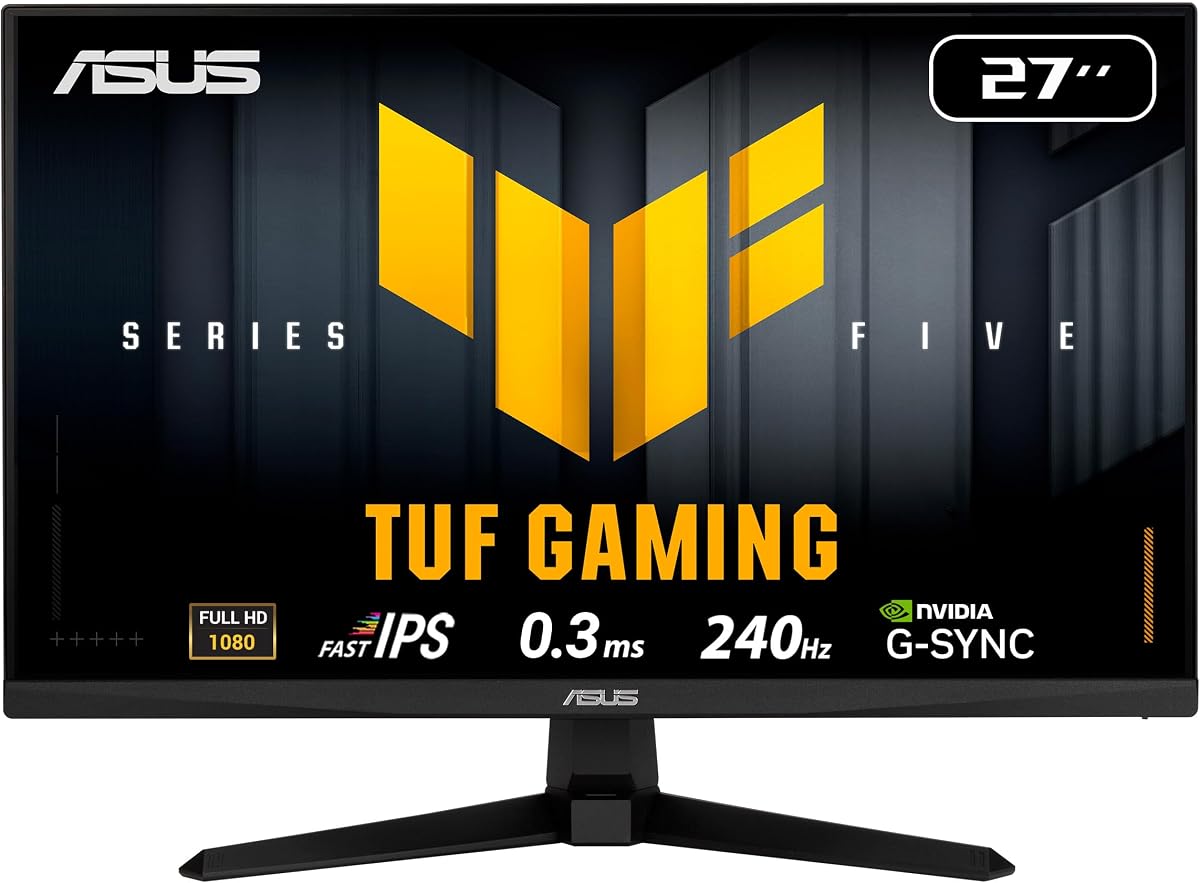
This ASUS TUF model stands out as a top performer for competitive gamers seeking high refresh rates and clarity. With a 240Hz refresh rate and Fast IPS panel it delivers smooth motion during fast-paced Valorant matches.
We may earn a commission when you buy through this link, at no additional cost to you.
Its 0.3ms response time minimizes blur while G-SYNC compatibility ensures tear-free gameplay. The inclusion of ELMB SYNC further sharpens moving images helping players track enemies effectively.
While the stand lacks USB ports the height adjustment feature improves ergonomics for long sessions. The 99% sRGB coverage ensures colors remain vibrant without sacrificing performance.
Buyers prioritizing fluidity and precision should consider this model. It balances speed and color accuracy well making it ideal for serious Valorant competitors.
ELMB SYNC combines motion blur reduction with variable refresh rates for clearer visuals.
Height adjustment allows players to set eye level reducing neck strain during practice.
We may earn a commission when you buy through this link, at no additional cost to you.
Dell's SE2426HG offers an accessible entry point into high refresh gaming. It features a 240Hz refresh rate and IPS technology delivering crisp visuals and smooth motion for Valorant.
We may earn a commission when you buy through this link, at no additional cost to you.
Fast IPS ensures better color accuracy than TN panels while the 0.5ms response time reduces blur. FreeSync Premium support helps synchronize frames with your GPU efficiently.
The display includes TÜV certification for eye comfort making it suitable for long practice sessions. However adjustments are limited to tilt only which may bother some users.
Budget-conscious gamers looking for speed and eye comfort will appreciate this monitor. It delivers reliable performance without breaking the bank.
TÜV 3-Star certification reduces blue light while preserving color quality for comfort.
IPS technology provides wide viewing angles and vivid colors even at this price.
We may earn a commission when you buy through this link, at no additional cost to you.
The ASUS TUF VG259QM5A delivers premium performance tailored for competitive play. Its 240Hz rate and Fast IPS panel provide fluid motion with accurate colors essential for tactical shooters.
We may earn a commission when you buy through this link, at no additional cost to you.
Ultra-fast 0.3ms GtG response times keep visuals sharp during rapid movements. G-SYNC compatibility and ELMB SYNC work together to eliminate tearing and ghosting effectively.
The ergonomic stand adjusts height and tilt improving comfort during extended use. While it lacks speakers the 99% sRGB coverage ensures vibrant content creation capabilities too.
Competitive players seeking top-tier specs and ergonomics should choose this model. It justifies its price with reliability and advanced gaming features.
ELMB SYNC and G-SYNC allow tear-free gameplay while maintaining low latency.
99% sRGB coverage ensures accurate colors enhancing visibility of enemies.
We may earn a commission when you buy through this link, at no additional cost to you.
AOC's Q27G41ZE offers a stunning QHD experience with overclocking up to 260Hz. The IPS panel provides vibrant colors and wide angles ideal for immersive Valorant gameplay.
We may earn a commission when you buy through this link, at no additional cost to you.
Fast response times and G-SYNC support reduce artifacts and tear. The bezel-free design looks modern while gaming presets help tune visuals quickly.
Though tilt-only ergonomics may limit positioning the high resolution adds clarity. It suits users wanting more detail without sacrificing speed significantly.
Players seeking extra visual clarity alongside high refresh rates will value this unit. It bridges the gap between resolution and performance well.
QHD resolution reveals finer textures making enemy spotting easier in maps.
DisplayPort overclocking reaches 260Hz offering extra smoothness for enthusiasts.
We may earn a commission when you buy through this link, at no additional cost to you.
SANSUI delivers versatility with a panel reaching up to 300Hz on DP. Its 24.5-inch FHD screen offers responsive visuals suitable for fast-paced Valorant matches.
We may earn a commission when you buy through this link, at no additional cost to you.
Fast IPS ensures good color accuracy while FreeSync Premium helps sync frames. Includes crosshair tools that can aid aiming practice for new players.
The tilt stand and standard ports make setup simple. However warranty terms differ from larger brands so check support details carefully.
Gamers wanting flexible refresh rates and tools at lower cost may like this. It balances performance and utility well for entry to mid-level users.
300Hz overclocking via DP lets you adapt to GPU capabilities easily.
Onboard crosshair overlays help visualize centering during target practice.
We may earn a commission when you buy through this link, at no additional cost to you.
Amzfast provides a curved option for immersive viewing with 240Hz speed. The ultra-slim base saves desk space allowing room for keyboard placement and accessories.
We may earn a commission when you buy through this link, at no additional cost to you.
Wide color gamut restores vivid colors while game modes optimize visuals for FPS titles. A joystick OSD allows quick adjustments without disrupting gameplay sessions.
Adjustment is limited to tilt so ergonomics are minimal. Still the price point and features offer a compelling package for limited setups.
Those needing space efficiency and immersion may find this model useful. It brings competitive specs to compact desks effectively.
Slim base allows under-keyboard storage ideal for small desks and tight spaces.
Curvature focuses attention inward enhancing immersion during tactical matches.
We may earn a commission when you buy through this link, at no additional cost to you.
msi's MAG series uses a VA panel for rich contrast and deep blacks. Its 240Hz refresh rate delivers fluid motion suited for fast-paced tactical shooters.
We may earn a commission when you buy through this link, at no additional cost to you.
Low GtG response times and AI Vision enhance dark details improving visibility. HDR readiness adds depth to scenes though it's limited compared to premium tiers.
Tilt-only ergonomics and minimal stand features keep costs down. The high rating suggests reliability for consistent gaming sessions.
Players prioritizing contrast and dark detail might prefer this model. It blends affordability with solid performance for many users.
AI Vision brightens dark areas helping reveal enemies in shadowed maps.
VA offers deeper blacks than IPS improving contrast for atmospheric games.
We may earn a commission when you buy through this link, at no additional cost to you.
AOC's 27G51Z offers native 240Hz with overclocking up to 260Hz for extra smoothness. Its 27-inch IPS panel delivers clear visuals and wide viewing angles.
We may earn a commission when you buy through this link, at no additional cost to you.
Adaptive Sync eliminates tearing and flicker-free tech reduces strain during long sessions. The tilt adjustment and VESA support allow basic positioning flexibility.
Eco mode lowers power usage making it efficient for 24/7 operation. While lacking speakers the frameless design enhances visual immersion.
Gamers needing reliable refresh options and efficiency will appreciate this unit. It offers solid value for competitive setups.
Overclocking allows adjusting performance to match GPU capabilities precisely.
Flicker-free and low power features comfort during extended practice runs.
We may earn a commission when you buy through this link, at no additional cost to you.
SANSUI delivers a curved FHD option for immersive competitive play. With 240Hz refresh rates and FreeSync support motion remains smooth during fast encounters.
We may earn a commission when you buy through this link, at no additional cost to you.
Wide color gamut and HDR enhance visuals while anti-glare coatings reduce reflections. Shadow boost helps adjust brightness for better enemy visibility.
Basic tilt stand and warranty terms keep costs low. Still the panel performance is solid for casual and semi-competitive use.
Those wanting curved immersion without spending much may like this model. It balances cost with decent speed features effectively.
Curved design wraps visuals around your view enhancing focus during matches.
Shadow boost and anti-glare improve visibility in varied lighting setups.
We may earn a commission when you buy through this link, at no additional cost to you.
ASUS offers ergonomic value with this 24-inch model featuring height adjustment. Fast IPS ensures clarity and smooth motion vital for precision aiming in Valorant.
We may earn a commission when you buy through this link, at no additional cost to you.
0.3ms response and ELMB SYNC maintain crisp visuals during rapid movements. Wide color gamut coverage ensures vibrant content beyond gaming scenarios.
While cost is higher the ergonomic benefits improve posture significantly. A three-year warranty adds long-term peace of mind too.
Gamers valuing ergonomics alongside speed should consider this option. It supports comfort without compromising performance.
Height adjustable stands align screen with eye level reducing strain.
ELMB SYNC maintains blur reduction with high refresh rates.
We may earn a commission when you buy through this link, at no additional cost to you.
Selecting a 240Hz monitor requires balancing speed, clarity, and ergonomics. These factors ensure you get a display that enhances performance during ranked matches.
A 240Hz refresh rate allows smoother motion by rendering more frames per second. Pair this with a response time of 1ms or lower to minimize ghosting and blur.
Prioritize models combining high Hz with low ms for the clearest movement during intense firefights.
IPS panels offer better color accuracy and viewing angles compared to TN. VA panels provide deeper blacks which may help in darker map areas.
Choose IPS if you want vibrant visuals; consider VA if contrast matters more to you.
G-SYNC Compatible or FreeSync Premium prevents tearing and stuttering by syncing refresh rates with your GPU. This reduces latency and improves overall smoothness.
Ensure the monitor supports your graphics card brand for optimal synchronization benefits.
Adjustable stands with height and tilt options reduce neck strain during long sessions. Fixed tilt-only mounts may limit comfort for varied positions.
Look for ergonomic stands if you play several hours daily to maintain posture.
1080p on 24-25 inches keeps pixel density high and performance demand low. Larger or higher resolutions need stronger GPUs to sustain high frame rates.
Stick to 24 to 25 inches for native 1080p to maximize refresh performance.
Certifications like TÜV for blue light reduction and flicker-free tech help reduce eye strain. Anti-glare coatings are vital for bright room setups.
Prioritize displays with eye care features if you play frequently or in bright rooms.
DisplayPort usually supports higher refresh rates than HDMI. Ensure the monitor includes enough ports for your devices and peripherals.
Check connectivity specs to guarantee your desired refresh rate is achievable.
Budget models offer speed but limited ergonomics. Premium models add features like height adjustment and better warranties.
Balance your budget with long-term needs like warranty and build quality.
Connect your monitor using DisplayPort to enable full refresh rate support. Ensure your graphics driver is updated to recognize the 240Hz capability.
Calibrate brightness and contrast using in-game overlays or NVIDIA Control Panel. Avoid extreme settings that increase eye strain over time.
Clean the screen with a microfiber cloth and avoid harsh chemicals. Protect the stand and vents from dust to maintain performance and longevity.
While not mandatory, 240Hz provides smoother motion and faster reaction cues than lower refresh rates. Competitive players benefit from reduced blur and consistent frame delivery for precise aiming.
High-end GPUs like RTX 40-series or RX 7000 series often sustain 240fps in Valorant. Entry models may struggle but you can adjust settings to boost frame rates.
Modern Fast IPS panels match TN speeds with better color. Response times of 1ms or lower are typical, minimizing motion blur significantly.
Use DisplayPort to connect, then select 240Hz in Windows Display settings or GPU control panel. Check monitor OSD for overclocking or refresh options.
G-SYNC Compatible monitors work with AMD FreeSync too. They support adaptive sync for tearing-free gameplay across different GPU brands.
Bigger screens offer more detail but require more GPU power. For pure speed, 24-25 inches at 1080p delivers higher refresh potential.
Height adjustable stands improve posture and comfort during long sessions. Look for tilt and pivot features if space allows for customization.
Use a soft microfiber cloth and distilled water if needed. Avoid paper towels or sprays that could damage coatings or leave residue.
Our top picks cover various needs from budget-friendly options to premium ergonomic models. The ASUS TUF VG279QM5A leads for speed and clarity while Dell SE2426HG stands out for value.
Prioritize response time, adaptive sync support, and ergonomics when selecting your display. These features directly influence performance and comfort during intense ranked matches.
Prices and availability shift often so verify current listings before buying. Check for deals and warranty terms to ensure you get the best long-term value.